Surfire/livis-hermes-platform
GitHub: Surfire/livis-hermes-platform
该项目是一个非官方适配器,解决已部署 Hermes Agent 的用户通过 Livis 客户端发起按需请求的连通问题。
Stars: 5 | Forks: 1
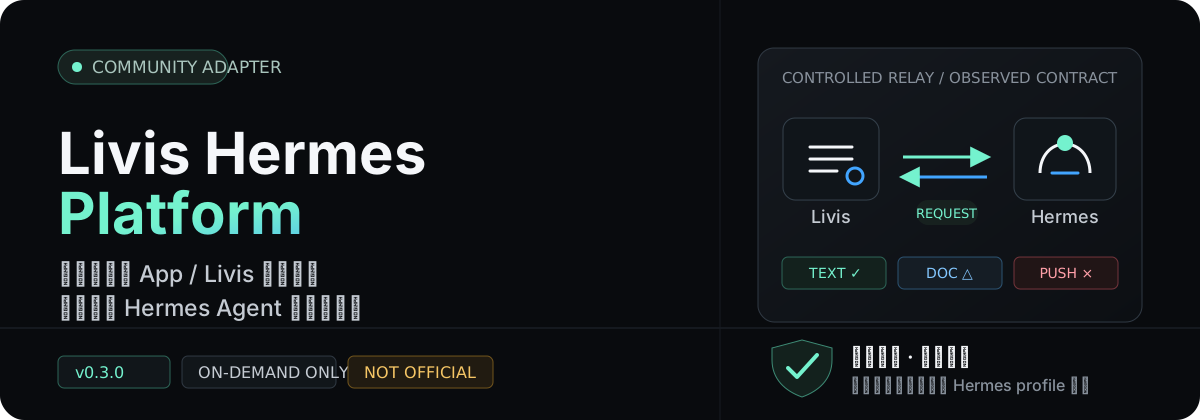
不改 Hermes Core,不接管你的 Agent,只把一次明确的 Livis 请求安全地送进现有 profile。
快速开始 ·
能力合同 ·
兼容性证据 ·
安全策略
## 它解决什么
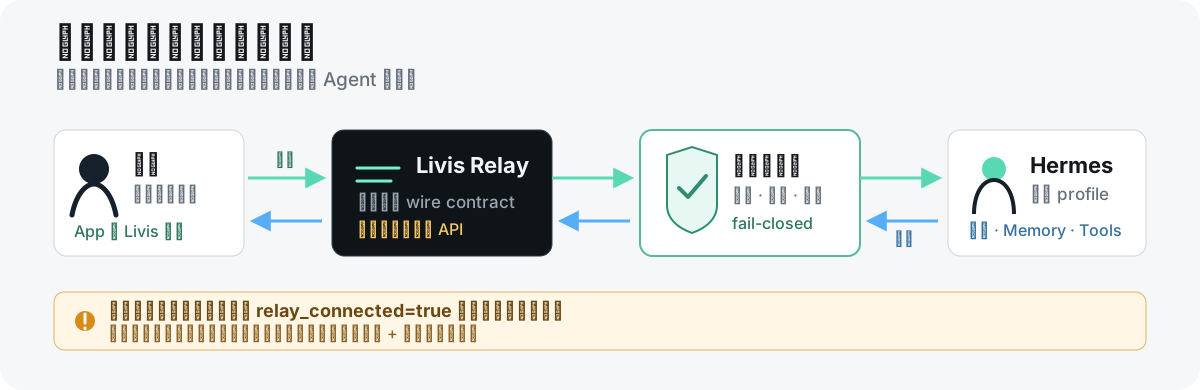
你已经在 Hermes Agent 中配置好了模型、Memory 和业务工具,希望在移动场景中通过理想同学 App 或 Livis 眼镜向它发起一次请求。Livis Hermes Platform 提供独立的 Hermes platform plugin,把这条请求送入你的现有 Hermes profile,再将本次结果沿原链路返回。
| 你保留的控制权 | 适配器负责的部分 | 它不会做的事 |
| --- | --- | --- |
| Hermes profile、模型、Soul、Memory、skills 与工具权限 | Livis 认证、请求传输、ACK、去重、恢复与文档交付 | 不修改 Hermes Core,不捆绑业务 Agent,不主动推送 |
仓库可独立安装和运行,不包含账号、token、个人运行数据、业务提示词或专有工具。
## 当前能力边界
能力状态来自机器可读的 [`capabilities.json`](./capabilities.json),不是营销承诺。完整证据与尚未证明的部分见 [`docs/compatibility.md`](./docs/compatibility.md)。
| 能力 | 当前状态 | 证据边界 |
| --- | --- | --- |
| Livis → Hermes 文本请求 | `offline_verified` | 模拟 wire contract 与 Hermes 事件转发通过;未证明当前生产 relay 端到端 |
| Hermes → Livis 文本结果 | `offline_verified` | 结果缓冲、ACK 生命周期通过离线测试 |
| 取消、去重、重连与交付恢复 | `offline_verified` | 模拟取消与 SQLite 恢复通过;未证明长期断网与多进程运行 |
| PDF / HTML / MD / DOC / DOCX | `official_livis_format_claim_code_verified` | 官方格式声明 + 本地上传边界测试;未逐一验证真实 App 展示 |
| 脱敏诊断上传 | `explicit_command_only` | 只有操作者显式执行 `uploadlog` 才会发生 |
| PNG / JPEG / GIF / WebP | `unsupported` | 当前代码 fail-closed 拒绝 |
| 音视频、主动推送、cron sender | `unsupported` | v0.3.0 为 **on-demand only** |
| 同账号多个 Livis Agent | `unsupported` | 当前官方文档声明每账号一个个人 Agent |
### 支持基线
| 组件 | 支持范围 | 已核验证据 |
| --- | --- | --- |
| Python | `>=3.11,<3.14` | 本地构建与测试 |
| Hermes Agent | `>=0.19.0,<0.20.0` | 0.19.0 官方包 API 合同离线验证;未启动真实 gateway |
| Livis PC Kit | 参考 v2.0.0 | 2026-07-22 刷新官方安装器与文档;协议未公开版本化 |
## 先做一次离线自检
下面的步骤只安装本地工具并输出能力合同,**不会登录 Livis、启动 Hermes gateway 或发送消息**。
git clone https://github.com/Surfire/livis-hermes-platform.git
cd livis-hermes-platform
UV_DEFAULT_INDEX=https://pypi.tuna.tsinghua.edu.cn/simple \
uv tool install .
livis-hermes-platform capabilities
如果 GitHub 网络不稳定,可从 [GitHub Releases](https://github.com/Surfire/livis-hermes-platform/releases) 下载 wheel,再使用同一国内 Python 镜像安装:
UV_DEFAULT_INDEX=https://pypi.tuna.tsinghua.edu.cn/simple \
uv tool install ./livis_hermes_platform-0.3.0-py3-none-any.whl
输出中的 `official_endorsement=false`、兼容版本范围和 `fail_closed_defaults` 是后续操作的事实边界。
## 接入 Hermes profile
### 1. 确认 Hermes 版本
先按 [Hermes Agent 官方安装文档](https://hermes-agent.nousresearch.com/docs/getting-started/installation) 安装 Hermes 0.19.x:
hermes --version
### 2. 安装并检查 plugin
livis-hermes-platform --hermes-home "${HERMES_HOME:-$HOME/.hermes}" install
livis-hermes-platform --hermes-home "${HERMES_HOME:-$HOME/.hermes}" status
安装器把 plugin 放到 `$HERMES_HOME/plugins/platforms/livis/`,只向 `config.yaml` 的 `plugins.enabled` 加入 `platforms/livis`。旧 plugin 与配置会先保存在本地备份中,安装器不会替你启动或重启 gateway。
### 3. 保持 fail-closed
真实连接前,确认该 Hermes profile 的私有环境配置包含:
LIVIS_ENABLED=true
LIVIS_ALLOW_ALL_USERS=false
LIVIS_ALLOWED_NODE_IDS=<已确认的-livis-node-id>
首次尚不知道 node id 时,不要临时开启全用户。保持 `LIVIS_ALLOW_ALL_USERS=false`,通过 Hermes 授权或配对事件确认真实节点后再写入白名单。profile 配置结构可参考 [`examples/profile-config.example.yaml`](./examples/profile-config.example.yaml),示例默认不授予任何工具。
### 4. 显式初始化与账号授权
以下步骤会创建本地标识符;`login` 会连接理想账号授权端点。只在你准备进行真实授权时执行:
hermes livis setup
hermes livis login --no-browser
hermes livis agent-id
随后在理想同学 App 的“连接与服务 → 连接我的 Agent”中按提示完成绑定。
### 5. 由操作者变更服务并验证
确认没有正在处理的会话后,由操作者选择合适的 Hermes 服务命令,再检查:
hermes livis status --json
hermes livis tools --json
## 安全设计
- 默认 `LIVIS_ENABLED=false`、`LIVIS_ALLOW_ALL_USERS=false`;未知节点应被 Hermes 授权层拒绝或进入配对流程。
- refresh token、绑定标识符和交付状态只写入 `$HERMES_HOME/livis/`;文件权限为 `0600`,目录权限为 `0700`。
- `messages.sqlite3` 为恢复交付会保存有限的请求与回复内容,属于隐私数据,不应同步、提交或上传。
- `uploadlog` 是唯一诊断上传入口,永不自动执行;日志会先脱敏。
- HTTP 客户端使用 `trust_env=false`,不会继承代理环境变量。
- 工具权限由 Hermes profile 所有者负责;不要把高风险写工具、外部消息工具或不受控 shell 默认暴露给眼镜入口。
涉及 token、账号、node/device/agent id、Hermes profile、session、Memory、消息正文或日志的安全问题,请遵循 [`SECURITY.md`](./SECURITY.md),不要在公开 issue 或 PR 中粘贴敏感内容。
## 为 Livis 分配工具
这个包不自带业务工具。Livis 只会继承当前 Hermes profile 显式分配给 `livis` 的 toolset:
platform_toolsets:
livis:
- memory
- your_business_tools
known_plugin_toolsets:
livis:
- your_business_plugin
## 给 AI Agent 的操作边界
Agent 应优先读取 [`capabilities.json`](./capabilities.json) 或运行:
livis-hermes-platform capabilities
1. Hermes 版本不在支持范围时立即停止。
2. 不得把本项目描述为官方 Hermes / Livis plugin。
3. 不得擅自把 `LIVIS_ALLOW_ALL_USERS` 改为 `true`。
4. `install`、`setup`、`login/logout`、gateway 生命周期、`uploadlog` 和 `--purge-state` 必须获得人类明确授权。
5. 不得读取或回显 `$HERMES_HOME/livis/` 中的 token、id、消息数据库或日志。
6. 不得把连接状态推断为全量兼容。
完整规则见 [`docs/agent-guide.md`](./docs/agent-guide.md)。
升级、回滚与卸载
升级安装器后,对明确的 Hermes profile 再执行一次 `install`:
UV_DEFAULT_INDEX=https://pypi.tuna.tsinghua.edu.cn/simple \
uv tool install --force ./livis_hermes_platform-0.3.0-py3-none-any.whl
livis-hermes-platform --hermes-home "${HERMES_HOME:-$HOME/.hermes}" install
安装器原子替换 plugin,并把旧版本保留在 `$HERMES_HOME/backups/livis-platform/`。普通卸载默认保留认证和交付状态:
livis-hermes-platform --hermes-home "${HERMES_HOME:-$HOME/.hermes}" uninstall
只有在明确希望不可恢复地删除账号凭证、绑定标识符和本地交付状态时才使用 `--purge-state`。详见 [`docs/upgrade.md`](./docs/upgrade.md)。
开发与发布验证
UV_DEFAULT_INDEX=https://pypi.tuna.tsinghua.edu.cn/simple uv sync --group dev
uv run ruff check src tests scripts
uv run pytest
uv build
uv run python scripts/scan_public_tree.py .
这些检查不会登录 Livis、启动 Hermes gateway 或发送消息。贡献规则见 [`CONTRIBUTING.md`](./CONTRIBUTING.md),首发审计与构建哈希见 [`docs/release-audit.md`](./docs/release-audit.md)。
## 文档索引
- [`docs/architecture.md`](./docs/architecture.md):四层实现与 Hermes / Livis / 业务系统边界
- [`docs/compatibility.md`](./docs/compatibility.md):当前版本、证据分级与协议漂移策略
- [`docs/security.md`](./docs/security.md):本地状态、网络与诊断数据边界
- [`docs/troubleshooting.md`](./docs/troubleshooting.md):安装、认证、relay 与文档交付排查
- [`docs/agent-guide.md`](./docs/agent-guide.md):AI Agent 可自动执行与必须授权的动作
## 许可证与归属
本项目采用 [MIT License](./LICENSE)。Hermes Agent 由 Nous Research 开源并采用 MIT 许可证。Livis、理想汽车及相关名称和标识属于其权利人。
本仓库不包含或再分发 Livis 官方 JavaScript plugin;兼容代码只实现互操作所需的接口行为。详见 [`NOTICE`](./NOTICE) 与 [`docs/compatibility.md`](./docs/compatibility.md)。
标签:AI智能体, 中间件, 兼容适配器, 消息转发, 物联网, 逆向工具