HisnameisSky/ai-protection-pro-v7
GitHub: HisnameisSky/ai-protection-pro-v7
一款多格式数字内容保护桌面应用,通过嵌入抗AI学习噪声、音频密钥和AES-256加密来防止图像、视频、音频和文档被未授权用于AI训练或窃取。
Stars: 1 | Forks: 0
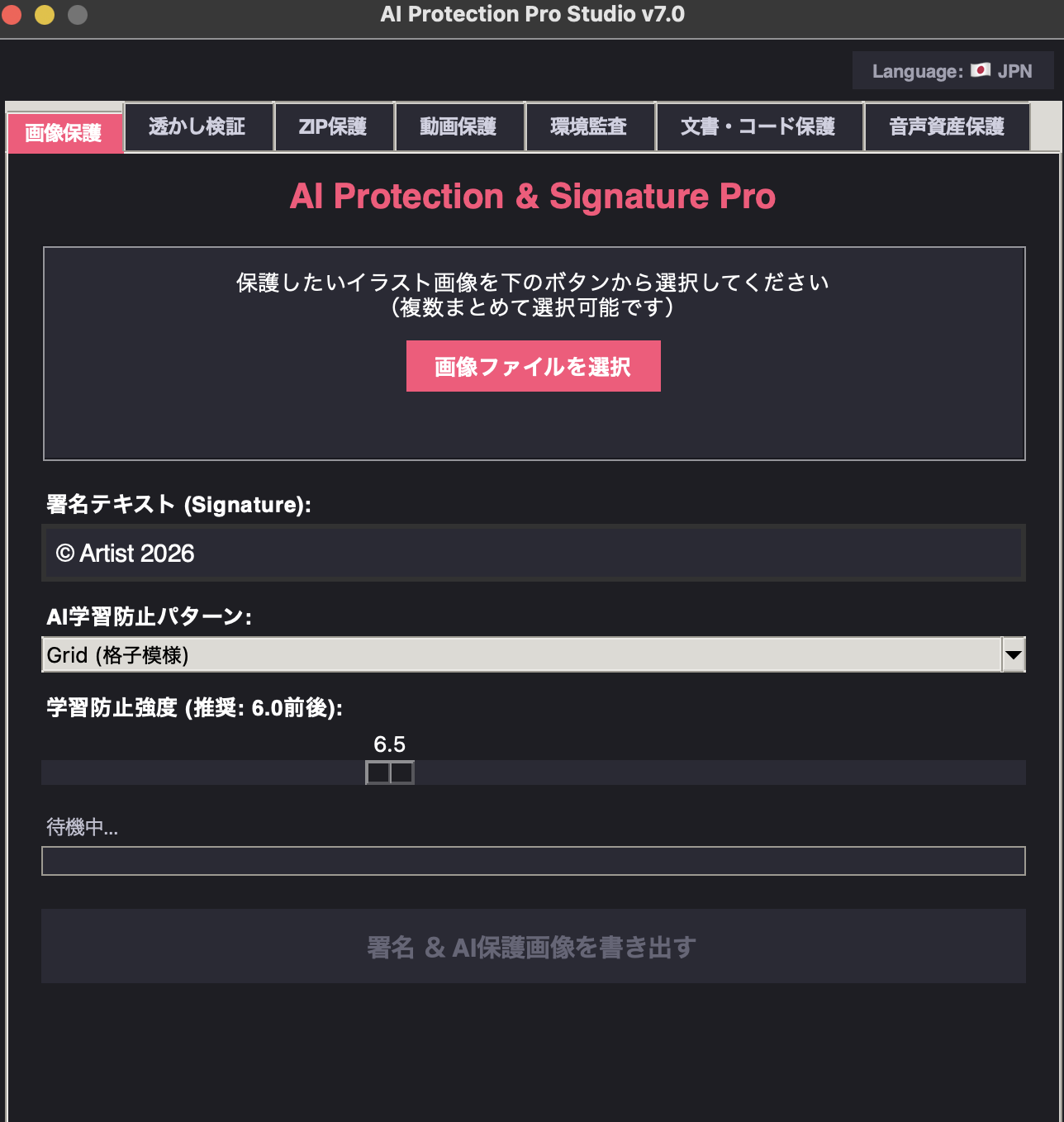 ーーー
# AI Protection Pro Studio v7.0 🛡️
这是一款多工具桌面应用程序,旨在保护并对数字内容(图像、音频、视频和文档)进行加密,防止未经授权的 AI 训练和窃取。
This is a multi-tool desktop app designed to protect and encrypt digital content (images, audio, video, and documents) from unauthorized AI training and theft.


## 🌟 主要功能 (Features)
* **🖼️ 图像保护与签名**:同时嵌入人眼难以察觉的防护噪声模式和签名文本,从而干扰 AI 学习。
* **🔍 水印验证**:提取原始图像/视频与受保护图像/视频之间的差异(噪声),并将其可视化。
* **📦 Secure ZIP**:将重要文件压缩为带有加密(AES-256)的 ZIP 归档。
* **🎬 视频保护**:对所有帧应用保护模式,防止视频被用于 AI 学习。
* **🎵 音频资产保护**:在人类听觉无法察觉的 19kHz 频段嵌入所有者密钥(加密),以防御语音克隆。(备注:目前仅支持 Wav 文件)
* **📄 文档与代码保护**:使用 AES-256 对 PDF、Office 文档、Python 代码等进行完全加密/还原。
* **🛡️ 安全审计**:内置 SHA-256 哈希验证和系统日志记录功能。
* **🌐 多语言支持**:支持日语 (JPN) / 英语 (ENG) 的一键切换。
## 🌟 主要功能(英文)
* **🖼️ Image Protection & Watermarking**: Simultaneously embeds anti-spoofing noise patterns—which are barely noticeable to the human eye—and signature text to disrupt AI training.
* **🔍 Watermark Verification**: Extracts and visualizes the differences (noise) between the original image/video and the protected image/video.
* **📦 Secure ZIP**: Compresses important files into a ZIP archive with AES-256 encryption.
* **🎬 Video Protection**: Applies a protection pattern to every frame to prevent AI training using the video.
* **🎵 Audio Asset Protection**: Embeds an owner key (cryptographic key) in the 19 kHz band—invisible to the human ear—to prevent voice cloning. (Note: Currently only supported for WAV files.)
* **📄 Document & Code Protection**: Fully encrypts and decrypts PDFs, Office documents, Python code, and more using AES-256.
* **🛡️ Security Audit**: Includes SHA-256 hash verification and system log recording features.
* **🌐 Multilingual Support**: Supports one-tap switching between Japanese (JPN) and English (ENG).
## 🚀 使用方法 (Setup & Run)
### 1. 克隆仓库(或下载)
```
git clone [https://github.com/HisnameisSky/ai-protection-pro-v7.git](https://github.com/HisnameisSky/ai-protection-pro-v7.git)
cd ai-protection-pro-v7
### 2. 必要なライブラリのインストール
Bash
pip install -r requirements.txt
### 3. アプリの起動
Bash
python main.py
---English:
## 🚀 如何使用(设置与运行)
### 1. Clone(或下载)repository
```bash
git clone [https://github.com/HisnameisSky/ai-protection-pro-v7.git](https://github.com/HisnameisSky/ai-protection-pro-v7.git)
cd ai-protection-pro-v7
### 2. 安装必需的 Libraries
Bash
pip install -r requirements.txt
### 3. 运行 Application
Bash
python main.py
```
ーーー
# AI Protection Pro Studio v7.0 🛡️
这是一款多工具桌面应用程序,旨在保护并对数字内容(图像、音频、视频和文档)进行加密,防止未经授权的 AI 训练和窃取。
This is a multi-tool desktop app designed to protect and encrypt digital content (images, audio, video, and documents) from unauthorized AI training and theft.


## 🌟 主要功能 (Features)
* **🖼️ 图像保护与签名**:同时嵌入人眼难以察觉的防护噪声模式和签名文本,从而干扰 AI 学习。
* **🔍 水印验证**:提取原始图像/视频与受保护图像/视频之间的差异(噪声),并将其可视化。
* **📦 Secure ZIP**:将重要文件压缩为带有加密(AES-256)的 ZIP 归档。
* **🎬 视频保护**:对所有帧应用保护模式,防止视频被用于 AI 学习。
* **🎵 音频资产保护**:在人类听觉无法察觉的 19kHz 频段嵌入所有者密钥(加密),以防御语音克隆。(备注:目前仅支持 Wav 文件)
* **📄 文档与代码保护**:使用 AES-256 对 PDF、Office 文档、Python 代码等进行完全加密/还原。
* **🛡️ 安全审计**:内置 SHA-256 哈希验证和系统日志记录功能。
* **🌐 多语言支持**:支持日语 (JPN) / 英语 (ENG) 的一键切换。
## 🌟 主要功能(英文)
* **🖼️ Image Protection & Watermarking**: Simultaneously embeds anti-spoofing noise patterns—which are barely noticeable to the human eye—and signature text to disrupt AI training.
* **🔍 Watermark Verification**: Extracts and visualizes the differences (noise) between the original image/video and the protected image/video.
* **📦 Secure ZIP**: Compresses important files into a ZIP archive with AES-256 encryption.
* **🎬 Video Protection**: Applies a protection pattern to every frame to prevent AI training using the video.
* **🎵 Audio Asset Protection**: Embeds an owner key (cryptographic key) in the 19 kHz band—invisible to the human ear—to prevent voice cloning. (Note: Currently only supported for WAV files.)
* **📄 Document & Code Protection**: Fully encrypts and decrypts PDFs, Office documents, Python code, and more using AES-256.
* **🛡️ Security Audit**: Includes SHA-256 hash verification and system log recording features.
* **🌐 Multilingual Support**: Supports one-tap switching between Japanese (JPN) and English (ENG).
## 🚀 使用方法 (Setup & Run)
### 1. 克隆仓库(或下载)
```
git clone [https://github.com/HisnameisSky/ai-protection-pro-v7.git](https://github.com/HisnameisSky/ai-protection-pro-v7.git)
cd ai-protection-pro-v7
### 2. 必要なライブラリのインストール
Bash
pip install -r requirements.txt
### 3. アプリの起動
Bash
python main.py
---English:
## 🚀 如何使用(设置与运行)
### 1. Clone(或下载)repository
```bash
git clone [https://github.com/HisnameisSky/ai-protection-pro-v7.git](https://github.com/HisnameisSky/ai-protection-pro-v7.git)
cd ai-protection-pro-v7
### 2. 安装必需的 Libraries
Bash
pip install -r requirements.txt
### 3. 运行 Application
Bash
python main.py
```
标签:AES加密, IPv6支持, 反AI学习, 哈希校验, 数字水印, 文件安全, 桌面应用, 逆向工具