uditk2/review-assist
GitHub: uditk2/review-assist
Review Assist 将 AI 编码 Agent 的会话上下文转化为结构化的可验证 PR 审查文档,帮助开发者以与 Agent 编码同等的效率审查 AI 生成的代码。
Stars: 0 | Forks: 0
Review Assist
以与 Agent 编写代码同等的速度审查 AI 编写的代码。
将编码 Agent 的会话转化为引导式、可验证的 pull-request 审查。
安装 ·
工作原理 ·
架构 ·
开发 ·
贡献

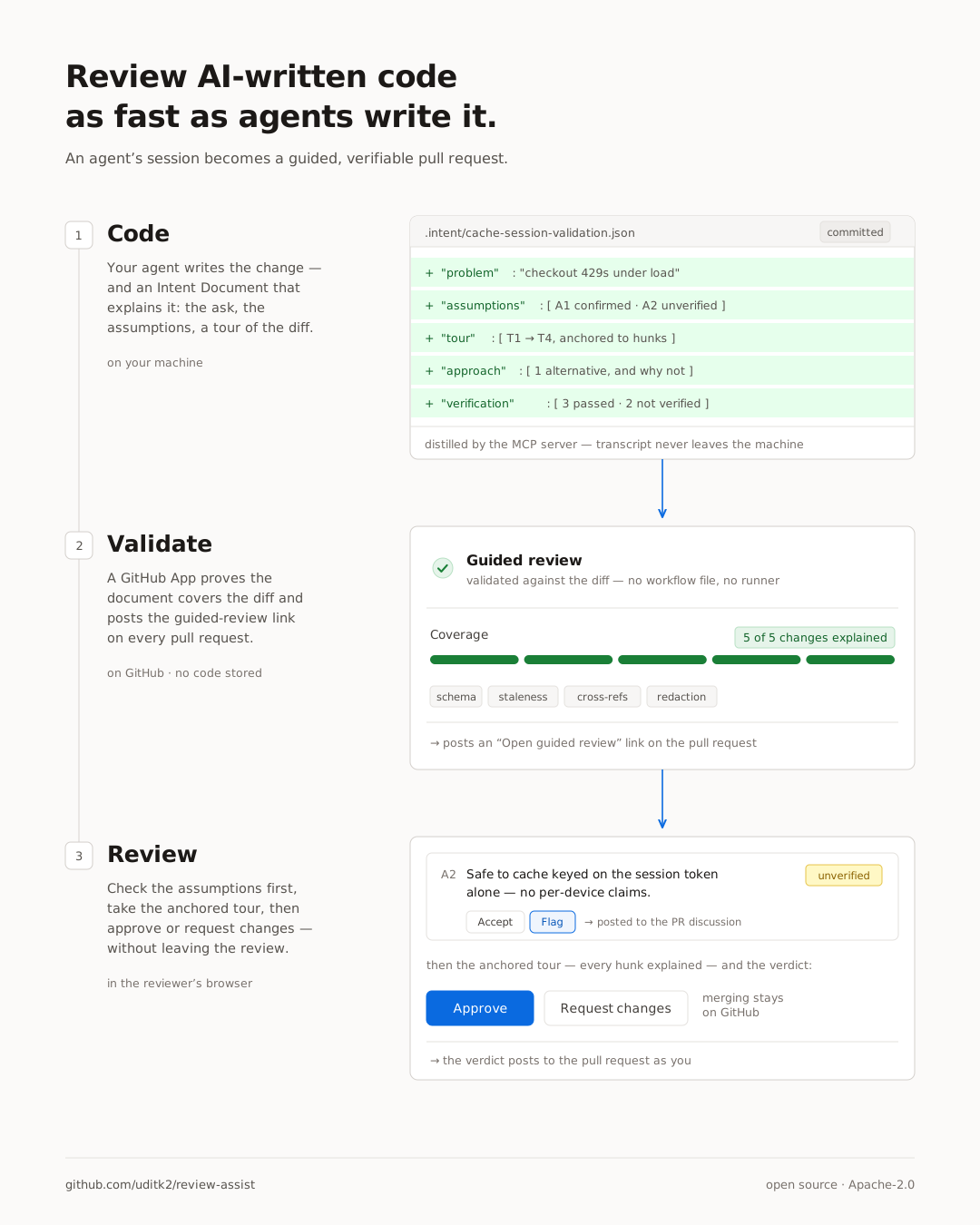
AI Agent 编写代码的速度超过了任何人阅读 diff 的速度 —— 而且让审查变得高效的那份上下文(被要求做什么、假设了什么、尝试并放弃了什么、测试了什么)在 PR 开启的那一刻就被丢弃了。Review Assist 在源头捕获它:Agent 的会话变成一份 **Intent Document**,验证器证明它确实覆盖了 diff,而 GitHub App 将其作为 pull request 之上的引导式审查呈现出来。
完全开源,可自托管,并且**不存储您的任何代码**。您的会话记录永远不会离开您的机器。该应用没有数据库:它在每次请求时使用审查者自己的 token 从 GitHub 读取文档和 diff,在请求期间将其保留在内存中,并以 `private, no-store` 的方式提供给在审查者浏览器中渲染的查看器。没有任何内容会被写入磁盘,但您的代码在传输过程中确实会经过该服务 —— 如果您对此在意,请自行托管。
## 安装
需要进行两次一次性安装 —— 开发者端的 MCP server,以及代码仓库端的 GitHub App。
**1. 向您的 Agent 注册 MCP server**(以便它可以编写 Intent Documents)。
Claude Code:
```
claude mcp add -s user review-assist -- npx -y review-assist-mcp
```
Codex:
```
codex mcp add review-assist -- npx -y review-assist-mcp
```
两者都会向 Agent 自身的配置中写入相同的条目 —— 对于 Codex,那是 `~/.codex/config.toml`,与 IDE 扩展共享。使用 `codex mcp list`(或 `claude mcp list`)检查它是否生效。
Claude 桌面应用 —— 一键安装,无需终端:
[下载 `.mcpb`](https://github.com/uditk2/review-assist/releases/latest/download/review-assist-mcp.mcpb)
并打开它。
**2. [安装 GitHub App →](https://github.com/apps/review-assist-guided-review)**
一键安装。只需只读代码 + PR 评论权限,无需 workflow 文件 —— 它会在每个 PR 上添加自动检查、摘要评论以及引导式审查查看器。
## 工作原理
## 架构
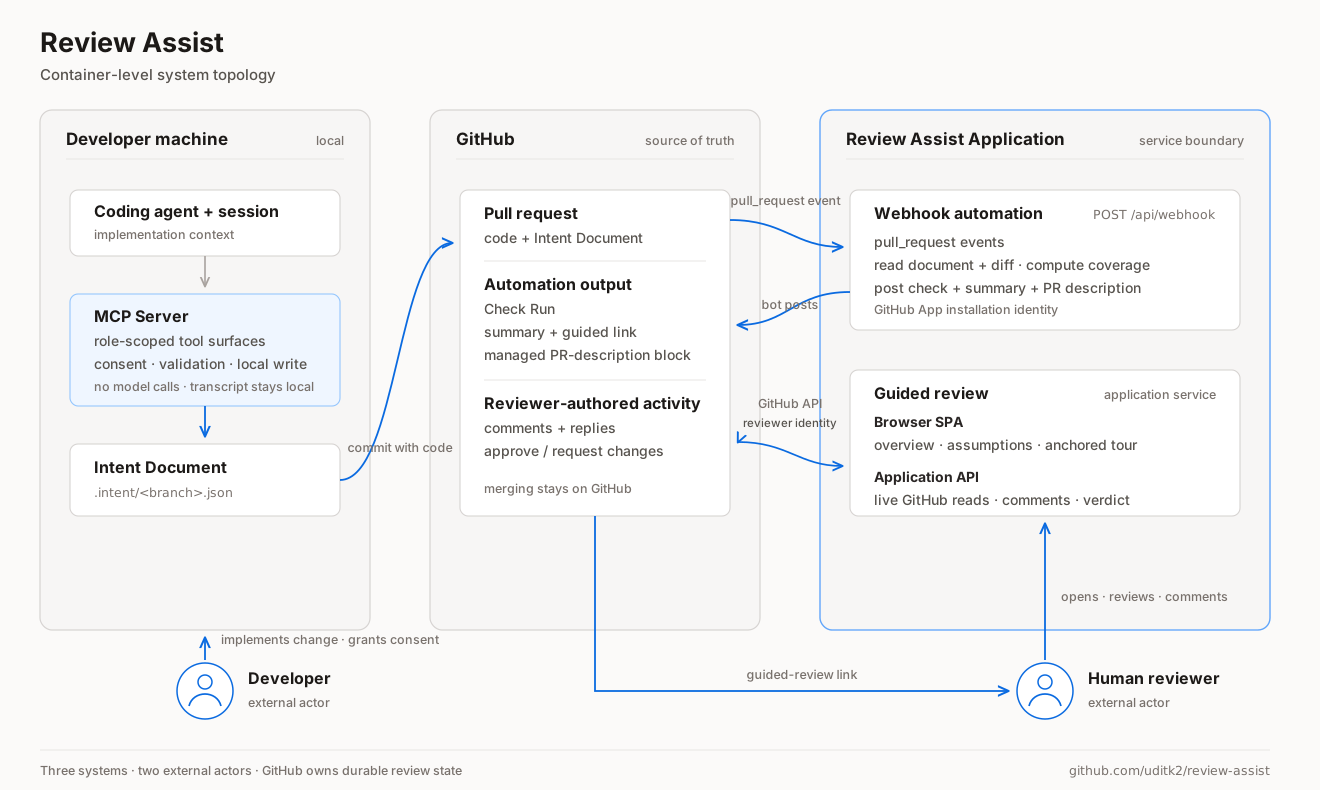
三个系统和两个外部参与者。您的机器产生更改及其 Intent Document;会话记录永远不会离开它。GitHub 持有 pull request 和每一份持久化的审查状态。应用程序响应 `pull_request` 事件并以 bot 身份发布检查,然后提供引导式审查,以登录审查者的身份对 GitHub 进行读写。
双 Agent 提炼 —— 作者和审查者作为独立的角色锁定上下文,以及各自可以调用的工具 —— 是组件级的视图,连同完整的路由列表一起保存在
[`docs/ARCHITECTURE.md`](docs/ARCHITECTURE.md) 中。
## 开发
| 路径 | 组件 |
|---|---|
| [`packages/schema`](packages/schema) | 格式 —— JSON Schema (draft 2020-12) + TypeScript 类型 |
| [`packages/validator`](packages/validator) | `review-assist` CLI + 库:五项检查和 Markdown 渲染器 |
| [`packages/mcp-server`](packages/mcp-server) | 驱动提炼并把关提交的 MCP server |
| [`apps/github-app/worker`](apps/github-app/worker) | 无状态 Cloudflare Worker:OAuth 代理 + 轻量级 GitHub 代理 |
| [`apps/github-app/viewer`](apps/github-app/viewer) | 客户端引导式审查查看器 |
| [`SPEC.md`](SPEC.md) | 冻结的设计:文档的六个部分和五项检查 |
```
npm install
npm run build
# 验证并渲染示例 Intent Document
node packages/validator/dist/cli.js validate packages/schema/src/example.json
node packages/validator/dist/cli.js render packages/schema/src/example.json
# 使用 mock 数据预览引导式查看器 → http://localhost:8787/#acme/checkout-service/pull/42
node scripts/mockserver.mjs
# 测试
npx vitest run
```
架构与内部机制:[`docs/ARCHITECTURE.md`](docs/ARCHITECTURE.md)。
## 贡献
欢迎提交 Issues 和 pull requests。如果引导式审查在您的某个 pull requests 上显示异常,请[提交一个 issue](https://github.com/uditk2/review-assist/issues) 并附上 Intent Document 以及生成它的 diff —— 这对组合通常足以复现问题。
关于更改格式本身的提案值得先作为 issue 提出,因为
[`SPEC.md`](SPEC.md) 是被刻意冻结的,任何更改都会波及验证器、查看器以及已经提交的每一份文档。
在提交 pull request 之前,请运行[开发](#developing)下的检查;CI 会运行相同的构建、类型检查、测试和示例验证。
## 许可证
[Apache-2.0](LICENSE)。
标签:AI编程助手, MCP, MITM代理, SOC Prime, 代码审查, 开发工具, 开源, 暗色界面, 程序员工具, 自动化攻击
