Mrg77/opsforge
GitHub: Mrg77/opsforge
opsforge 是一款集成了CLI工具批量安装、策略驱动的DevOps终端增强和工作站快照同步功能的个人开发环境管理工具。
Stars: 0 | Forks: 0
# opsforge 🔥
**Your DevOps workstation, forged in minutes.**
Pick your CLIs from an interactive terminal UI, install them in one go, and turn
your zsh into a context-aware DevOps environment — live completion, a prod-aware
prompt, and **policy-as-code guards** that stop you from nuking the wrong cluster.
opsforge is the **supply-chain + policy layer for your own workstation**: it
installs your toolbox, guards how *you* use it, and hands you a CVE-correlated
SBOM plus an **OpenVEX** document of the whole thing — prioritized by CISA's
Known-Exploited catalog. It's a personal power tool, not a team platform — no
server, no account, no lock-in.
**English** · [Français](README.fr.md)
[](https://github.com/Mrg77/opsforge/actions/workflows/ci.yml)
[](https://github.com/Mrg77/opsforge/releases/latest)
[](https://goreportcard.com/report/github.com/Mrg77/opsforge)
[](LICENSE)
[](#the-catalog) [](#sbom--supply-chain) [](https://go.dev)  **[Try it](#try-it-in-a-sandbox) · [Install](#install) · [Tour](#a-quick-tour) · [Workflows](#common-workflows) · [Shell](#the-devops-shell-environment) · [Guards](#policy-as-code-guards) · [Project mode](#project-mode) · [SBOM & VEX](#sbom--supply-chain) · [AI agents (MCP)](#ai-agents-mcp) · [CI](#ci--integrations) · [Catalog](#the-catalog) · [Under the hood](#engineering-highlights)**
## What it is
opsforge is **three tools in one binary**:
| | | |
|:--:|---|---|
| 📦 | **Tool installer** | An interactive picker over **287 curated CLIs across every IT discipline** — including a new **AI & LLM** category. Detects what you have and what's outdated, then installs the rest via Homebrew *or* direct GitHub-release binaries — works on a bare Linux box with no package manager. |
| 🐚 | **DevOps shell** | One command turns your own zsh into a Warp/Fish-like experience: live completion, inline `?` help, a prod-aware prompt, and [**policy-as-code guards**](#policy-as-code-guards) on destructive commands. No shell replacement, no lock-in. |
| 📸 | **Workstation- & project-as-code** | `opsforge snapshot` exports your whole setup — tools, profiles, shell, theme *and* guard policy — to one YAML; a committed [`opsforge.yaml`](#project-mode) declares a repo's toolchain and `opsforge sync` reproduces it (with a CVE gate). `apply --check` / `sync --check` verify a machine in CI, and [`opsforge sbom`](#sbom--supply-chain) emits a CVE-correlated SBOM of it. |
### Why this exists
Three recurring frictions on a DevOps machine, each usually solved by a
different tool — or by hand:
- **Rebuilding a workstation** means installing 20+ CLIs, then wiring
completions, aliases and a useful prompt for each, on every machine.
- **A distracted `kubectl delete` on the wrong context** has no seatbelt: the
tools happily run it whether you're on staging or prod.
- **Nobody knows what's actually on the box** — which versions, which CVEs,
which of them are being exploited.
opsforge folds those into one binary because they share the same data (the
detected toolbox) and the same home (your shell). It's deliberately a
**personal power tool, not a team platform** — no server, no account, no
lock-in — so it stays something you run, not something you operate.
## Try it in a sandbox
Want to see the guards fire without installing anything or touching real infra?
Run the throwaway demo image — a forged zsh shell already sitting in a **fake
prod context**, with no-op `kubectl`/`terraform`/`helm` stubs:
docker run --rm -it ghcr.io/mrg77/opsforge-demo
It opens a short guided tour (status → guards → SBOM), then drops you into the
shell so you can type `kubectl delete namespace payments` yourself and watch the
prod guard intercept it. Nothing there can reach a real cluster — the "prod"
context is a one-line fake kubeconfig, read passively, and the tools are stubs.
Prefer the browser? Open it in a Codespace — same image, zero local install:
[](https://codespaces.new/Mrg77/opsforge?quickstart=1)
## Install
curl -fsSL https://raw.githubusercontent.com/Mrg77/opsforge/main/install.sh | sh
Downloads the right binary for your OS/arch into `~/.local/bin` (override with
`OPSFORGE_INSTALL_DIR`, pin with `OPSFORGE_VERSION=v1.2.3`). From source:
`go install github.com/Mrg77/opsforge@latest`.
Keep it current with `opsforge self update` — it downloads the latest release,
**verifies its published SHA-256 before swapping the binary in place**, and
no-ops when you're already up to date (`--check` for cron/CI).
## A quick tour
opsforge # interactive picker (tabs: 1 Tools · 2 Updates · 3 Security)
opsforge status # one-glance cockpit of your workstation
opsforge doctor # full health check — incl. CVEs & leaked secrets
opsforge audit # scan installed tools for CVEs (--secrets: leaked creds too)
opsforge guard test "terraform destroy" --context prod # simulate a guard rule
opsforge apply --check my-setup.yaml # verify this machine matches your snapshot (CI)
opsforge self update # self-update, checksum-verified before the swap
[](#the-catalog) [](#sbom--supply-chain) [](https://go.dev)  **[Try it](#try-it-in-a-sandbox) · [Install](#install) · [Tour](#a-quick-tour) · [Workflows](#common-workflows) · [Shell](#the-devops-shell-environment) · [Guards](#policy-as-code-guards) · [Project mode](#project-mode) · [SBOM & VEX](#sbom--supply-chain) · [AI agents (MCP)](#ai-agents-mcp) · [CI](#ci--integrations) · [Catalog](#the-catalog) · [Under the hood](#engineering-highlights)**
| Command | What it does |
|---|---|
opsforge | Interactive picker — browse, check, install |
opsforge status | Cockpit: tools, updates, shell, theme at a glance |
opsforge notify [--json] | One digest of what needs attention — CVEs, updates, leaked secrets, a newer opsforge (see notify) |
opsforge install kubectl helm | Non-interactive install by name (scriptable) |
opsforge install --profile aws-k8s | Install a whole stack preset in one command |
opsforge upgrade [-u] [tool…] | Upgrade all, only outdated (-u), or named tools |
opsforge audit [--secrets] [--json] | CVE scan of installed tools · optional leaked-secrets scan · --json + non-zero exit gates CI |
opsforge guard [init|list|test|lint] | Policy-as-code guards on destructive commands · lint/test --json make them CI-checkable (see Guards) |
opsforge use terraform@1.5 | Pin a tool version here (delegates to mise/asdf) |
opsforge sync [--check] [--init] | Install the tools a committed opsforge.yaml declares · --check reports drift for CI · optional CVE gate (see Project mode) |
opsforge sbom [--audit] [--sign] | Emit a CycloneDX 1.6 SBOM of installed tools · --audit embeds their CVEs · --sign adds a Sigstore bundle (see SBOM) |
opsforge vex [--kev] [--sign] | Emit an OpenVEX document of the CVEs on your tools · --kev flags the actively-exploited (CISA KEV) ones · --sign signs it (see VEX) |
opsforge scan <image> [--diff] | Scan a container image for CVEs (via syft/trivy + opsforge's OSV engine) · --diff correlates it with your workstation (see scan) |
opsforge mcp | Run a read-only MCP server so an AI agent can query your workstation (see MCP) |
opsforge snapshot / apply | Export / rebuild a whole workstation |
opsforge apply --check <file-or-url> | Verify a machine against your snapshot without changing it · non-zero exit on drift (--json) |
opsforge self [version|update] | Report the version or self-update — checksum-verified before the swap (--check for CI/cron) |
opsforge history [family|tool] | Recent shell commands, grouped by tool family (kube, git, tf… — see History) |
opsforge explain [--last] <cmd> | Ask your AI CLI to explain a command or your last failure (the shell ?? shortcut) |
opsforge list [all] [-u] | Installed tools · full catalog · only updates (--json to script) |
opsforge list <term> | Search the whole catalog by name, description or category (e.g. list dns) |
opsforge profiles | Stack profiles with install status |
opsforge theme [set <name>] | List/preview/persist color themes |
opsforge doctor | Full health check — system, shell, toolbox, CVEs & leaked secrets (--json) |
| Key | What it does |
|---|---|
↑ / ↓ | Walk history by the line prefix you've typed (kubectl get pods -n s + ↑ cycles only lines starting that way) |
→ | Accept the whole grey suggestion |
Tab | Accept the grey suggestion one word at a time (ansible-play + Tab → ansible-playbook ) |
Ctrl-Space | File / command completion |
Ctrl-R | Search your whole history |
| Shell command | What it does |
|---|---|
opsforge shell install | Install the zsh environment into ~/.zshrc (idempotent) |
opsforge shell uninstall | Remove it cleanly (restores ~/.zshrc) |
opsforge shell doctor | Show what's provided and its state |
opsforge shell sync | Refresh the shell modules and cached completions (run after upgrading opsforge) |
| Family | Tools |
|---|---|
kube | kubectl, helm, k9s, kubectx, kustomize, stern, kubeseal, flux, argocd… |
git | git, gh, glab, lazygit, tig |
tf | terraform, tofu, terragrunt, tflint, terraform-docs |
docker | docker, docker-compose, podman, nerdctl, colima |
cloud | aws, gcloud, az, doctl, eksctl, flyctl, vercel |
ansible | ansible, ansible-playbook, ansible-galaxy, ansible-vault |
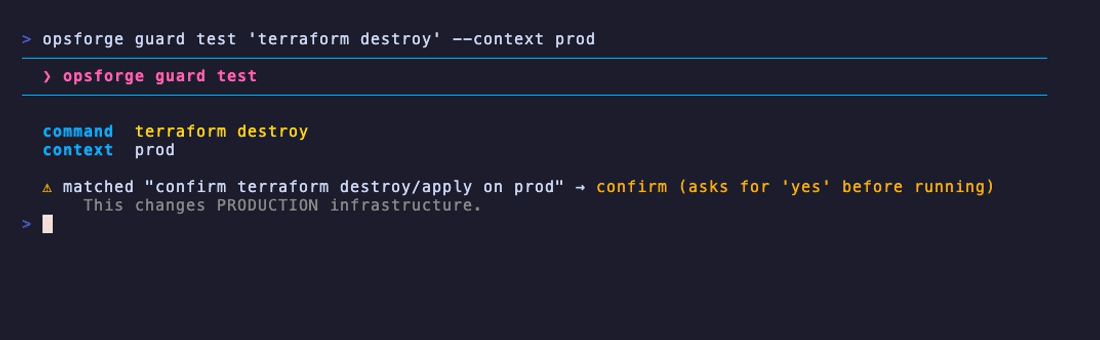
Tools like Homebrew Bundle, mise, chezmoi and aqua install your CLIs; opsforge
adds a layer on top of that — it **guards how you use them**. It turns the
prod-safety layer of the shell into a small policy engine: a declarative set of
rules that decides whether a destructive command should run, warn, confirm, or be
refused — based on the context you're actually in.
### The one rule to understand
A guard fires only when **two things line up at once**: a **destructive command**
*and* a **production marker**. Miss either one and the command runs untouched —
so read-only commands never nag you, and destructive commands on staging or dev
stay out of your way. It's a safety net for the distracted gesture, not a wall in
front of every command.
| Command | Context | Decision | Why |
|:--|:--|:--:|:--|
| `kubectl delete pod api` | `prod-eks` | ⚠️ confirm | destructive + prod |
| `kubectl get pods` | `prod-eks` | ✓ allow | prod, but read-only |
| `kubectl delete pod api` | `staging` | ✓ allow | destructive, but not prod |
| `terraform destroy -var-file=prod.tfvars` | *(none)* | ⚠️ confirm | prod is in the command itself |
| `terraform destroy -var-file=dev.tfvars` | *(none)* | ✓ allow | dev, not prod |
| `terraform plan -var-file=prod.tfvars` | *(none)* | ✓ allow | plan is read-only |
| `helm uninstall app` | `prod` | ⚠️ confirm | destructive + prod |
| `ls` · `git status` · `cat` | `prod` | ✓ allow | nothing destructive |
Simulate any of these yourself with `opsforge guard test "
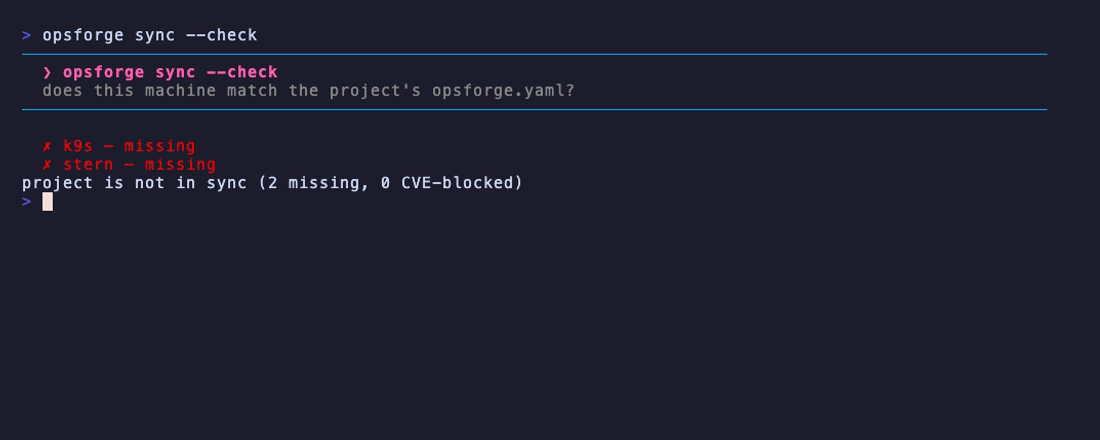
A workstation snapshot pins a whole *machine*. A **project** often needs less —
just the toolchain *this repo* depends on. Commit an `opsforge.yaml` at its root
and anyone reproduces it with one command — the same reproducibility mise and
devbox give you, with a CVE gate added on top.
# opsforge.yaml — commit at the repo root
version: 1
tools:
- kubectl
- helm
- terraform
profiles:
- core # pull in whole stack profiles too
fail_on: high # optional: sync fails if a required tool has a HIGH/CRITICAL CVE
opsforge sync # install whatever the manifest declares that's missing
opsforge sync --check # report drift, exit non-zero if a required tool is missing (CI/pre-commit)
opsforge sync --init # write a starter opsforge.yaml here
`sync` walks up from the working directory to the nearest `opsforge.yaml`, so it
works from any subdirectory. It resolves `tools` + `profiles` into one
de-duplicated list, installs only what's missing (via Homebrew or a GitHub
release, per tool), and skips anything not in the catalog with a warning.
**A CVE gate in the same file.** Set `fail_on: high` (or
`critical`) and `sync` audits *just the tools this project requires* against
[OSV.dev](https://osv.dev) and **fails** when one carries a CVE at that level —
so a single committed file gives you both a **reproducible environment** *and* a
**supply-chain gate** in one place. With `--json`, `sync
--check` emits `{compliant, missing, present, unknown, cve_blocked, fail_on}` for
a pipeline to assert on:
opsforge sync --check --json | jq '.compliant' # fails the job on drift or a blocked CVE
**A lockfile for verifiable reproducibility.** `opsforge sync` also writes an
**`opsforge.lock`** next to the manifest, pinning each installed tool to its
exact resolved version — the same idea as `package-lock.json` or `mise.lock`.
Commit it, and `sync --check` no longer just verifies a tool is *present* — it
verifies it's the *pinned version*, flagging **version drift** in both the human
and JSON output:
# opsforge.lock — written by sync, checked by sync --check (commit it)
version: 1
tools:
- name: helm
version: 3.14.0
- name: kubectl
version: 1.29.3
opsforge sync --check --json | jq '.version_drift'
# [{"name":"helm","expected":"3.14.0","got":"3.15.1"}] → non-zero exit
It's non-breaking: with no lockfile, `--check` behaves exactly as before; a tool
pinned with an unknown version is never flagged. That's what turns
"workstation-as-code" from a wish into reproducibility a reviewer can trust —
`opsforge.yaml` declares *what*, `opsforge.lock` proves *which exact version*.
## SBOM & supply-chain
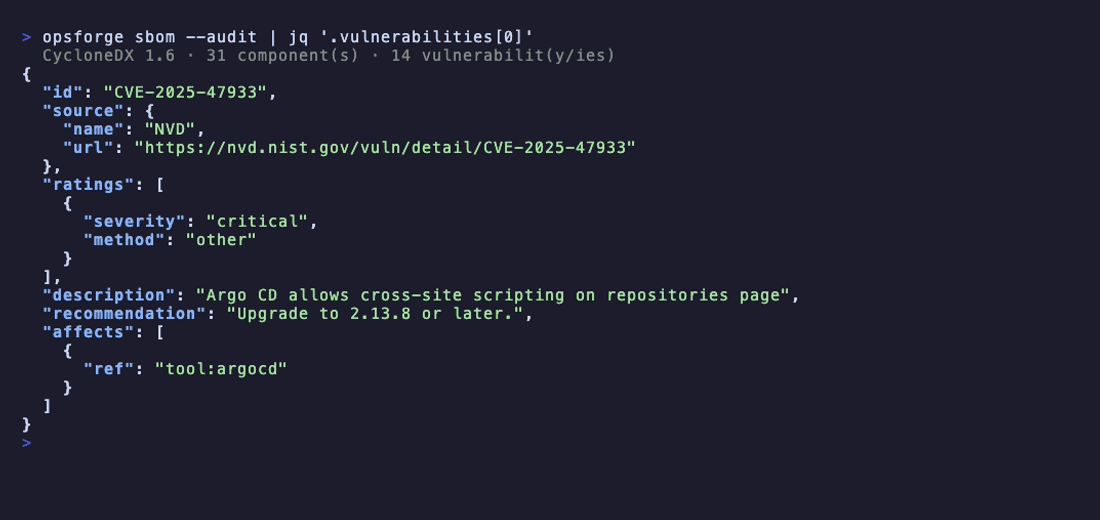
opsforge emits a **CVE-correlated SBOM of your workstation** — a supply-chain
artifact consumable by grype, `trivy sbom`, or a compliance pipeline.
opsforge sbom # CycloneDX 1.6 JSON of your installed tools → stdout
opsforge sbom --audit > bom.json # + embedded CVE findings, captured to a file
- **`opsforge sbom`** builds a **CycloneDX 1.6** document where each installed
tool is a component with its detected **version** and — when the catalog maps
it to a package ecosystem — a **PURL**.
- **`opsforge sbom --audit`** cross-references OSV.dev and embeds the known CVEs
as CycloneDX **vulnerabilities**, each linked to its component with a severity
and the recommended fix version. The SBOM ships CVE-corrected out of the box.
The document goes to stdout (a short summary to stderr), so
`opsforge sbom > bom.json` gives you a clean file plus feedback — a signed
inventory of your toolbox *with* its vulnerabilities, ready to feed a scanner or
a compliance gate.
That's the full supply-chain chain in one binary: a **checksum** proves each
download is intact, a **cosign signature** proves the release is authentic (see
[the catalog](#the-catalog)), and the **SBOM** proves what you ended up with —
CVEs included.
### VEX & CISA KEV
A raw CVE list tells you a vulnerability *exists*. It doesn't tell you which of
the dozens to fix **first** — and since the NVD stopped enriching most CVEs in
2026, the CVSS score you'd sort by is often missing or stale. `opsforge vex`
answers both questions.
opsforge vex # OpenVEX document → stdout (pairs with `opsforge sbom`)
opsforge vex --kev # + highlight the actively-exploited (CISA KEV) CVEs
opsforge vex > vex.json # capture the machine artifact
- **`opsforge vex`** turns the audit into an **[OpenVEX](https://openvex.dev)
v0.2.0** document: one machine-readable statement per (component, CVE) with a
status (`affected`) and an **action** — upgrade to the fixed version, or
monitor the advisory when none exists yet. Each component is identified by the
**same PURL the SBOM uses**, so a downstream scanner or auditor correlates the
two out of the box. Output is deterministically sorted, so it diffs and signs
cleanly.
- **`opsforge vex --kev`** cross-references **CISA's Known Exploited
Vulnerabilities** catalog and calls out the CVEs being **exploited in the
wild** — the handful to fix *now*, ahead of the long tail. The catalog is
fetched once and cached (`~/.cache/opsforge/kev.json`, 24h TTL); it's
best-effort, so a network hiccup degrades to "no KEV data", never a failed
command.
Prioritizing by **exploitability** instead of by a score that may not exist is a
sensible way to triage in 2026 — and VEX is the artifact that carries that
verdict to whatever consumes it next.
### Signing the artifacts
Both the SBOM and the VEX document can be signed into a self-contained
**[Sigstore](https://www.sigstore.dev) bundle** you can hand to anyone:
opsforge sbom --sign > bom.json # + a bom.sigstore.json bundle
opsforge vex --sign > vex.json # + a vex.sigstore.json bundle
cosign verify-blob --key ~/.config/opsforge/signing.pub \
--bundle bom.sigstore.json bom.json
`--sign` signs the document **key-based** with a persistent local opsforge key
(an ECDSA P-256 key generated on first use under `~/.config/opsforge/`) and
writes a Sigstore bundle that `cosign verify-blob` — or any Sigstore verifier —
accepts. It's fully **offline**: no OIDC login, no certificate, no entry in a
public transparency log.
That last part is deliberate, and worth being precise about:
- **Local signing is key-based, on purpose.** Keyless Sigstore signing would
publish the signer's OIDC identity (your email) in Rekor — a public, immutable
log — on *every* signature, and it would prove nothing about supply-chain
*provenance* for a document generated by hand on a laptop. So opsforge signs
with a local key instead.
- **Be clear about what it proves.** A key-based signature proves the
document's **integrity** and **attribution to your key** — not that it was
built by a trusted pipeline. Provenance is a CI property: opsforge's own
*releases* are the ones signed **keyless with SLSA provenance** (see
[the catalog](#the-catalog)), because there the identity *is* the pipeline.
Same primitives, right tool for each job — local integrity for the artifacts you
generate, keyless provenance for the binaries you ship.
### Scanning a container image
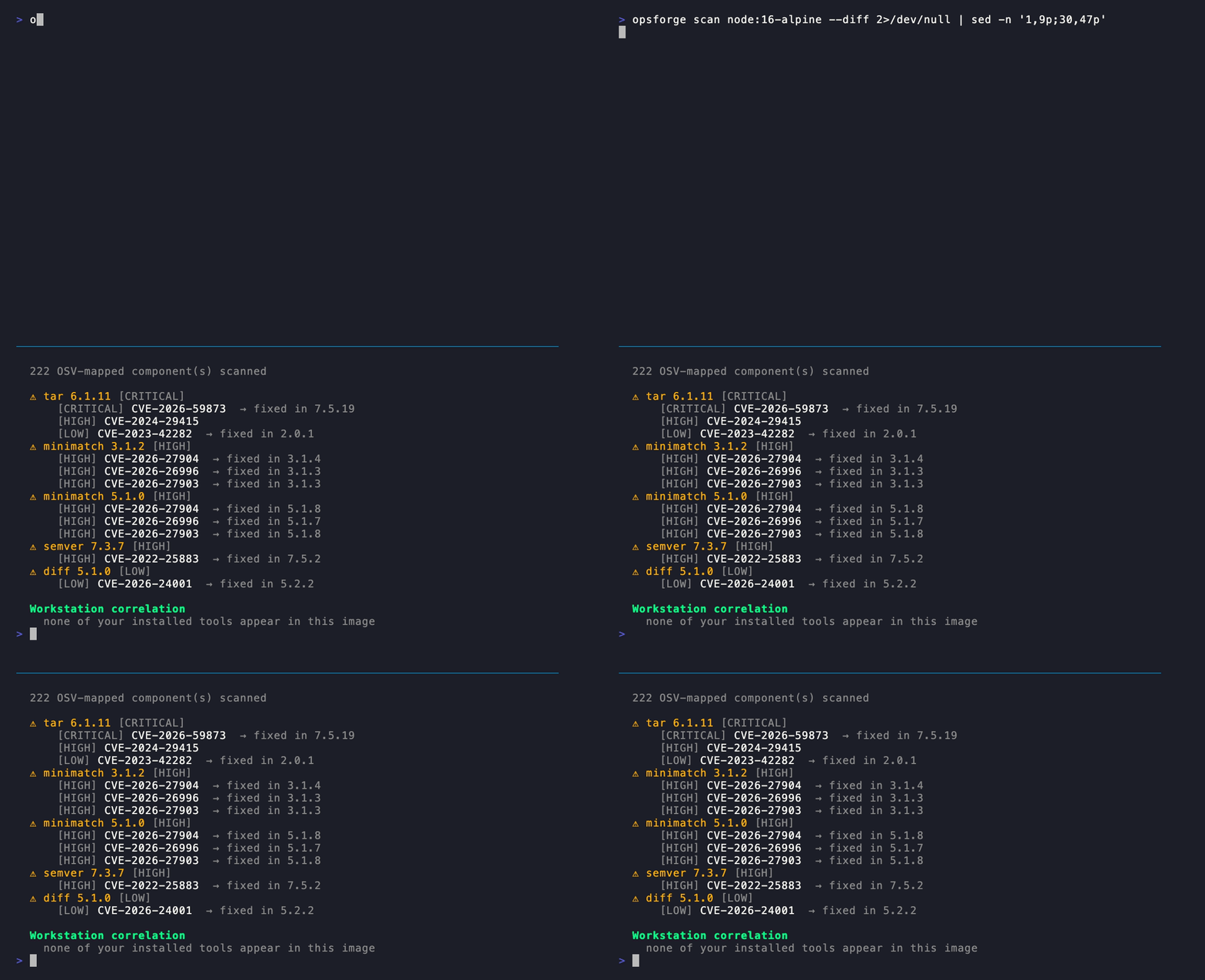
`opsforge scan` extends the same OSV engine to a container image — and adds the
part a standalone scanner can't: **correlation with your own workstation**.
opsforge scan node:16-alpine # CVEs in the image
opsforge scan my-ci-image --diff # + how it drifts from your machine
opsforge scan my-image --json # machine-readable, non-zero on HIGH/CRITICAL
opsforge **doesn't re-implement image SBOM extraction** — that's syft/trivy's
job, and importing them as libraries would bloat the binary for no gain. So it
drives whichever is installed (the same way it delegates version pinning to
mise/asdf), reads back the CycloneDX SBOM, and runs those components through
opsforge's **own** OSV engine — the exact matcher `opsforge audit` uses on your
machine, CVSS scoring and per-branch fix versions included.
With **`--diff`** it answers a question trivy doesn't: *does a tool I run locally
ship at a different version in this image?* It correlates the image's components
against your installed toolbox and reports the version drift — the workstation↔CI
skew that "works on my machine" hides. Like `audit`, it exits non-zero on a
HIGH/CRITICAL CVE, so it drops into a pipeline as a gate.
### The notify digest
opsforge doesn't wait for you to run `audit` — `opsforge notify` is **one
digest of everything on *your* machine that needs attention**, in a single
place:
- installed tools carrying a **known CVE** (HIGH/CRITICAL called out in red),
- tools that **can be updated**,
- **credentials leaking** in your shell history / rc / `.env` (when scanned),
- a **newer opsforge** than the one you're running.
Each line comes with the exact command that fixes it:
✗ 1 tool with a HIGH/CRITICAL CVE → opsforge audit
✗ 6 critical secrets leaking in your shell → opsforge audit --secrets
⚠ 3 tools can be updated → opsforge upgrade -u
opsforge notify # the full digest, grouped by severity
opsforge notify --json # the structured Digest, for scripts
opsforge notify --refresh # recompute the cache now
opsforge notify --quiet # just the compact one-liner (used by the shell)
**A heads-up in your shell, once per session.** When something needs your
attention, the [DevOps shell](#the-devops-shell-environment) prints a compact
one-liner on startup — e.g. *"opsforge: 1 tool with a HIGH/CRITICAL CVE · 3
tools can be updated — run `opsforge notify`"* — then you run `opsforge notify`
for the breakdown. Silence it with `OPSFORGE_NOTIFY=0`.
**Cached, instant, never blocking.** `notify` reads a local cache under
`~/.cache/opsforge/` (6h TTL) and only ever *reads* it — a stale cache is
refreshed in the background (or on demand with `--refresh`), so neither the
digest nor the shell heads-up ever waits on the network. The same finding also
surfaces at a glance in [`opsforge status`](#a-quick-tour).
It folds CVEs, updates, leaked secrets *and* its own self-update into one digest
and surfaces it, proactively, in your shell — so the moment an advisory lands on
your toolbox, you know, without running a thing.
## AI agents (MCP)
opsforge speaks the **[Model Context Protocol](https://modelcontextprotocol.io)**
— so an AI agent (Claude Code, Cursor, any MCP client) can *ask about your
workstation* through the same data the CLI computes, with no scraping and no
guessing.
claude mcp add opsforge -- opsforge mcp # register the stdio server once
`opsforge mcp` runs a stdio MCP server exposing **five read-only tools**:
| Tool | What the agent gets |
|:--|:--|
| `list_installed_tools` | every installed tool, its version, category, and whether it's outdated |
| `audit_vulnerabilities` | the CVEs on those tools (top severity + fixed-in), straight from OSV.dev |
| `generate_sbom` | a CycloneDX 1.6 SBOM (optionally with embedded CVEs) |
| `workstation_status` | one-glance summary: installed/outdated counts, shell state, kube/cloud/tf context |
| `check_guard_policy` | evaluate a command against your guard policy — `allow`/`warn`/`confirm`/`deny` — *before* the agent suggests running it |
This turns opsforge into a **grounded source of truth** an agent can lean on:
instead of hallucinating your tool versions or guessing whether `terraform
destroy` is safe here, it asks.
## CI & integrations
opsforge isn't just a pretty TUI — a global `--json` flag makes `list`, `status`,
`doctor` and `audit` emit structured JSON, so the same binary you use interactively
also drives scripts and pipelines.
opsforge audit --json | jq '.tools[] | select(.vulnerable)' # only the affected tools
opsforge doctor --json | jq '.status' # "healthy" | "warnings" | "failing"
opsforge list all --json | jq '.[] | select(.outdated).name' # tools with an update
The security commands also set **meaningful exit codes**, which is what turns
opsforge into a one-line gate:
- `opsforge audit` (and `--json`) exits **non-zero on any HIGH/CRITICAL CVE**.
- `opsforge audit --secrets` adds leaked credentials to the report; a **critical
leak** exits non-zero too.
- `opsforge doctor --json` returns `{status, passed, warnings, failed, checks[]}`
and fails when a check fails.
Ready-to-use GitHub Actions workflow: [`examples/ci-security-gate.yml`](examples/ci-security-gate.yml)
— it installs opsforge and fails the pipeline on any HIGH/CRITICAL CVE or leaked
credential, uploading the JSON reports as artifacts.
# excerpt — audit exits non-zero on HIGH/CRITICAL, failing the job on its own
- name: CVE audit
run: opsforge audit --json | tee cve-report.json
### Official GitHub Action
Skip the install boilerplate — the composite action does it, then runs whichever
gates you switch on (`audit`, `secrets`, `guard-lint`, `sbom`, `baseline`):
- uses: Mrg77/opsforge@v1
with:
audit: 'true' # fail on any HIGH/CRITICAL CVE
secrets: 'true' # also fail on a leaked credential
guard-lint: 'true' # validate guards.yaml (policy-as-code)
sbom: 'true' # emit a CycloneDX SBOM, uploaded as an artifact
vex: 'true' # emit an OpenVEX doc (KEV-prioritized), uploaded too
baseline: my-setup.yaml # assert this machine matches your snapshot
Full example: [`examples/github-action-usage.yml`](examples/github-action-usage.yml).
### Docker image
A distroless image (~20–30 MB, no package manager) ships the static binary — run
any command against a build image that has your CLIs:
docker run --rm ghcr.io/mrg77/opsforge audit --json
This is the production image — minimal, non-interactive. For a *playground* with
a shell and the guards wired up, see [Try it in a sandbox](#try-it-in-a-sandbox)
(`ghcr.io/mrg77/opsforge-demo`).
### pre-commit hooks
Gate commits with the same policy engine, straight from
[`.pre-commit-hooks.yaml`](.pre-commit-hooks.yaml):
# .pre-commit-config.yaml
repos:
- repo: https://github.com/Mrg77/opsforge
rev: v1.0.0
hooks:
- id: opsforge-guard-lint # validate guards.yaml — fails on a bad rule
- id: opsforge-secrets # block a commit leaking a credential
## The catalog
**287 tools across 16 categories** — Kubernetes, Infrastructure as Code, Cloud
CLIs, Containers, Git & CI/CD, Observability & Monitoring, Logs, Networking &
HTTP, **System & SysAdmin**, Databases, Security & Compliance, Secrets & Identity,
Serverless & PaaS, Runtime & Versions, Utilities, and a new **AI & LLM** category.
The catalog now spans **every IT job** — not just Kubernetes and cloud, but
development, DevOps, systems, networking, security, databases and AI — so a dev, a
DevOps engineer, a sysadmin, a network engineer, a DevSecOps or an AI engineer all
find their toolbox here:
- **Networking** — `tcpdump`, `iperf3`, `nmap`, `wireguard`…
- **System & SysAdmin** — `htop`, `tmux`, `zellij`, `rclone`…
- **Security & pentest** — `nuclei`, `ffuf`, `semgrep`, `trivy`, `opa`…
- **Databases** — `mongosh`, `litecli`, `atlas`…
- **Observability, GitOps & pipelines** — `prometheus`, `otel-cli`, `grafana`,
`argo`, `tekton`/`tkn`, `dagger`…
- **AI & LLM** — `ollama`, `llm`, `aichat`, `mods`, `aider`, `fabric`,
`gemini-cli`, `promptfoo`, `codex`…
It's a single embedded [YAML file](internal/catalog/catalog.yaml) — adding a tool
is a five-line PR.
**Two install backends, picked per tool at runtime:**
- **Homebrew** (when on PATH) — always the latest release; `opsforge upgrade`
refreshes the whole toolbox.
- **GitHub releases** — for hosts without Homebrew (bare Linux, CI images), tools
with a `github:` block are installed by downloading their release binary into
`~/.local/bin`. No package manager required.
Force one with `OPSFORGE_BACKEND=brew|github`; set the target dir with
`OPSFORGE_BIN_DIR`.
**Supply-chain: checksum verification.** Before a GitHub-release binary is made
executable, opsforge verifies its **SHA-256 against a published checksum** —
`checksums.txt`, `标签:AI应用开发, EVTX分析, SBOM, 日志审计, 硬件无关, 策略即代码, 终端UI, 聊天机器人安全, 请求拦截