Yug1275/ThreatLens-AI

GitHub: Yug1275/ThreatLens-AI

一款结合 OSINT 确定性分析与 LLM 智能引擎的企业级网络威胁情报平台,支持 URL、邮件、电话、二维码和图片的多模态威胁调查与自动化报告生成。

Stars: 1 | Forks: 0

# 🚀 ThreatLens AI

ThreatLens AI Logo ### 企业级、AI 驱动的网络威胁情报平台 通过将确定性的 OSINT 分析与智能 LLM 引擎相结合,统一威胁检测,以编排深度调查并生成可操作的缓解报告。 ![React](https://img.shields.io/badge/Frontend-React%20%2B%20Vite-61DAFB?style=for-the-badge&logo=react) ![FastAPI](https://img.shields.io/badge/Backend-FastAPI-009688?style=for-the-badge&logo=fastapi) ![PostgreSQL](https://img.shields.io/badge/Database-PostgreSQL-4169E1?style=for-the-badge&logo=postgresql) ![Python](https://img.shields.io/badge/Python-3-3776AB?style=for-the-badge&logo=python) [![在线演示](https://img.shields.io/badge/🚀%20Live%20Demo-ThreatLens%20AI-success?style=for-the-badge)](https://threat-lens-ai-yug.vercel.app/)

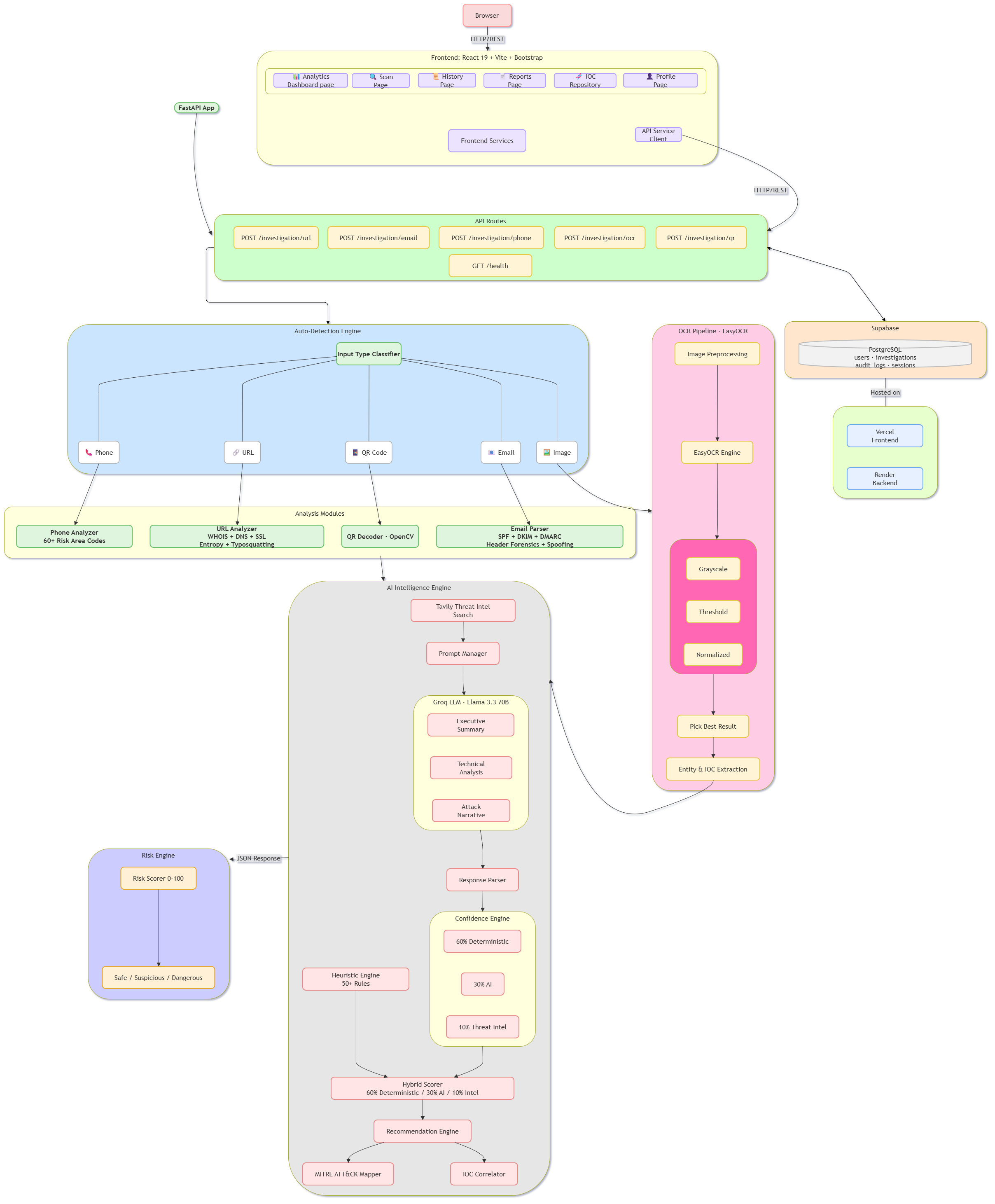
# 📖 目录 - 关于 - 功能 - 技术栈 - 系统架构 - 时序图 - 项目结构 - 快速开始 - 环境变量 - API 概览 - 安全功能 - 文档 - 贡献 - 许可证 # ✨ 关于 ThreatLens AI ThreatLens AI 是一个企业级、AI 驱动的网络威胁情报平台,使安全分析师和组织能够通过单一统一界面调查多种威胁向量。 该平台支持对以下内容进行深度调查: - 🌐 URL - 📧 电子邮件 - 📱 电话号码 - 🔳 QR 码 - 🖼 图像 (OCR) ThreatLens AI 将确定性威胁分析(WHOIS、DNS、SSL、OCR、QR 解码、元数据提取和验证)与 AI 驱动的情报相结合,生成执行摘要、技术报告、IOC 关联、威胁解释和缓解建议。 该平台还包括调查历史、报告、分析师工作区、通知、仪表板和安全监控,以简化网络威胁调查。 # ✨ 功能 ## 🔍 多模态调查 - 🌐 URL 调查 - WHOIS 查询 - DNS 分析 - SSL 检查 - 重定向链分析 - 威胁评分 - 📧 电子邮件调查 - 标头分析 - SPF / DKIM / DMARC 验证 - 网络钓鱼检测 - 域名抢注检测 - IOC 提取 - 📱 电话调查 - 号码验证 - 运营商检测 - 地理情报 - 诈骗检测 - 🖼 OCR 调查 - EasyOCR 文本提取 - 威胁检测 - 实体提取 - 深度调查路由 - 🔳 QR 码调查 - QR 解码 - Payload 分类 - 安全预览 - IOC 提取 - 深度调查路由 ## 🧠 AI 智能引擎 - **上下文分析**:使用 Groq/Llama-3 对 IOC 进行上下文分析。 - **自动化报告**:生成执行摘要和缓解策略。 - **回退机制**:如果外部 LLM 失败,则无缝回退到确定性威胁评分。 ## 👨‍💻 分析师工作区 - **调查文件夹**:将调查组织到逻辑文件夹中。 - **仪表板**:通过直观的仪表板跟踪历史数据和威胁趋势。 - **保存的查询**:保存并重新运行常见调查。 ## 🔒 安全且可扩展 - **基于角色的访问控制 (RBAC)**:细粒度权限。 - **JWT 身份验证**:安全的 API 访问。 - **审计日志**:全面跟踪用户操作。 - **数据验证**:Pydantic v2 确保严格的数据 schema 执行。 # 🛠 技术栈 | 类别 | 技术 | |-----------|--------------| | 前端 | React 19, Vite, Bootstrap 5, Framer Motion, Recharts | | 后端 | Python 3, FastAPI, SQLAlchemy, Pydantic | | 数据库 | PostgreSQL (Supabase) | | AI 集成 | Groq (LLMs), Tavily (Search) | | OCR | EasyOCR | | 身份验证 | Passlib, Python-JOSE (JWT) | | 部署 | Docker, Vercel, Render | # 🏗 系统架构

ThreatLens AI System Architecture

# 🔄 系统时序图 ``` sequenceDiagram autonumber actor Analyst participant Frontend as React Frontend participant Backend as FastAPI Backend participant DB as PostgreSQL participant OSINT as OSINT & Forensics (WHOIS/DNS/Headers/OCR/QR) participant AI as AI Engine (Groq/Llama-3) %% 1. Analyst initiates investigation Analyst->>Frontend: Submit IOC (URL, Email, Phone, QR, Image) activate Frontend Frontend->>Backend: Request investigation with JWT activate Backend %% 2. Validate and Save Request Backend->>Backend: Validate payload (Pydantic) Backend->>DB: Log investigation request activate DB DB-->>Backend: Log saved deactivate DB %% 3. Deterministic OSINT Gathering Backend->>OSINT: Query WHOIS, DNS, Email headers, Phone carrier, QR decoder, or OCR extraction activate OSINT OSINT-->>Backend: Return deterministic data & threat score deactivate OSINT %% 4. AI Contextual Analysis Backend->>AI: Send OSINT data for contextual analysis activate AI AI-->>Backend: Return executive summary, MITRE mapping & mitigation deactivate AI %% 5. Save Results Backend->>DB: Save complete investigation report activate DB DB-->>Backend: Saved successfully deactivate DB %% 6. Return Data Backend-->>Frontend: Return investigation report deactivate Backend Frontend-->>Analyst: Display dashboard & report deactivate Frontend ``` # 📂 项目结构 ``` ThreatLens-AI/ ├── frontend/ # React Frontend (Vite + Bootstrap) │ ├── public/ # Static assets (Logos, Icons) │ ├── src/ │ │ ├── components/ # Reusable UI components │ │ ├── context/ # React Context (AuthContext, NotificationContext) │ │ ├── hooks/ # Custom React Hooks │ │ ├── layouts/ # Layout wrappers (DashboardLayout, MainLayout) │ │ ├── pages/ # Application Pages │ │ │ ├── Dashboard │ │ │ ├── URL Investigation │ │ │ ├── Email Investigation │ │ │ ├── Phone Investigation │ │ │ ├── QR Investigation │ │ │ ├── OCR Investigation │ │ │ ├── Reports │ │ │ ├── History │ │ │ ├── Workspace / IOC Repository │ │ │ ├── Notifications │ │ │ └── Settings │ │ ├── services/ # API Client Services (investigationService, aiService, etc.) │ │ └── utils/ # Frontend utilities (Axios instance) │ ├── package.json │ └── vite.config.js │ ├── backend/ # FastAPI Backend │ ├── app/ │ │ ├── api/ # API Route definitions (/v1/auth, /v1/investigation, /v1/ai) │ │ ├── core/ # Security, config, middleware, database connection │ │ ├── models/ # SQLAlchemy schemas (User, Investigation, AuditLog) │ │ ├── repositories/ # Data access repositories (user_repository, investigation_repository) │ │ ├── schemas/ # Pydantic validation models │ │ ├── services/ # Core Business Logic & Intelligence Services │ │ │ ├── ai/ # AI Engine (Groq Provider, Tavily, Prompts, Confidence Engine) │ │ │ ├── url_investigator.py │ │ │ ├── email_investigator.py │ │ │ ├── phone_investigator.py │ │ │ ├── qr_investigator.py │ │ │ └── ocr_investigator.py │ │ └── utils/ # Helper utilities │ ├── requirements.txt │ └── Dockerfile │ ├── docs/ # Project documentation & Architecture assets ├── nginx/ # Nginx configuration for production ├── docker-compose.yml # Local dev environment └── README.md # Project documentation ``` # 🚀 快速开始 ## 克隆仓库 ``` git clone https://github.com/Yug1275/ThreatLens-AI.git cd ThreatLens-AI ``` ## 安装依赖与设置(本地) ### 1. 配置环境变量 在 `backend` 目录中,根据 `.env.example` 创建一个 `.env` 文件。 ### 2. 启动后端 ``` cd backend python -m venv .venv source .venv/bin/activate # On Windows: .venv\Scripts\activate pip install -r requirements.txt uvicorn app.main:app --reload ``` ### 3. 启动前端 ``` cd frontend npm install npm run dev ``` 应用 URL: ``` Frontend: http://localhost:5173 Backend API: http://localhost:8000 API Docs: http://localhost:8000/docs ``` # ⚙️ 环境变量 在 `backend` 目录中创建一个 `.env` 文件。 ``` # 数据库 DATABASE_URL=postgresql://user:password@localhost:5432/threatlens # 安全 SECRET_KEY=your_super_secret_jwt_key ALGORITHM=HS256 ACCESS_TOKEN_EXPIRE_MINUTES=30 # External APIs GROQ_API_KEY=your_groq_api_key TAVILY_API_KEY=your_tavily_api_key ``` # 📡 API 概览 | 方法 | Endpoint | 描述 | |--------|----------|-------------| | POST | `/api/v1/auth/login` | 用户身份验证 | | POST | `/api/v1/auth/register` | 注册新用户 | | POST | `/api/v1/investigation/url` | URL 调查 | | POST | `/api/v1/investigation/email` | 电子邮件调查 | | POST | `/api/v1/investigation/phone` | 电话调查 | | POST | `/api/v1/investigation/ocr` | OCR 调查 | | POST | `/api/v1/investigation/qr` | QR 码调查 | | GET | `/api/v1/investigation/{id}` | 调查详情 | | GET | `/api/v1/investigation/` | 调查历史(分页与过滤) | | GET | `/api/v1/dashboard` | 仪表板统计 | | GET | `/api/v1/iocs` | 全局 IOC 存储库 | # 🔒 安全功能 - **JWT 身份验证**:短生命周期的 access token。 - **密码加密**:通过 Passlib 进行 bcrypt 哈希处理。 - **RBAC**:对分析师/管理员角色实行严格的基于角色的访问控制。 - **输入验证**:通过 Pydantic 针对SQLi和 XSS 进行稳健验证。 - **审计日志**:每个调查操作都会安全地记录在数据库中。 # 📚 文档 如需更详细的信息,请参阅我们专门的文档文件: - [部署指南](docs/deployment.md) - 部署到 Vercel、Render 和 Supabase 的手动说明。 - [用户与管理员指南](docs/user_admin_guide.md) - 使用平台和配置设置的详细指南。 - [V1.0 发布报告](docs/release_report_v1.0.md) - 版本摘要和功能分解。 - [API 设置指南](docs/Phase9_API_Setup_Guide.md) - AI 提供商 API 配置。 # 📄 许可证 该项目基于 MIT 许可证授权。
标签:AV绕过, DLL 劫持, ESC4, FastAPI, GitHub, OSINT, PostgreSQL, React, Syscalls, 大语言模型, 威胁情报, 实时处理, 开发者工具, 测试用例, 网络安全, 自定义脚本, 请求拦截, 隐私保护