KrishiCyberLabs/Malware-Hash-Analyzer
GitHub: KrishiCyberLabs/Malware-Hash-Analyzer
一个基于 Python 的防御性恶意软件分析工具,通过加密哈希生成、本地威胁数据库比对、熵计算及自动化报告帮助用户快速评估可疑文件的安全风险。
Stars: 0 | Forks: 0
# 🦠 Malware Hash Analyzer v3.0
一个基于 Python 的防御性网络安全工具,旨在通过加密哈希、元数据提取、熵计算、恶意软件哈希比对以及自动化安全报告来分析文件。
该项目专注于防御性安全环境中实用的恶意软件分析基础,帮助安全学习者了解如何调查、提取指纹及评估文件的潜在威胁。
# 📌 项目概述
Malware Hash Analyzer 通过生成唯一的加密指纹并执行基本威胁分析,帮助安全分析师检查可疑文件。
每个文件都有一个称为**哈希值**的唯一数字身份。安全专业人员使用这些哈希来识别已知的恶意文件、验证文件完整性,并支持威胁调查工作流。
该工具可自动化完成:
- 文件指纹生成
- 文件元数据收集
- 基于哈希的威胁检查
- 熵分析
- 安全报告生成
# 🚀 功能
## 🔐 加密哈希生成
为分析的文件生成多个加密哈希:
- MD5
- SHA-256
- SHA-512
这些哈希可作为唯一的数字指纹,用于:
- 恶意软件识别
- 文件验证
- 威胁情报分析
## 📂 文件元数据提取
收集重要的文件信息:
- 文件名
- 绝对文件路径
- 文件大小
- 创建时间
- 最后修改时间
这有助于安全调查人员在分析过程中了解文件的特征。
## 🦠 恶意软件哈希数据库检测
该工具将生成的 SHA-256 哈希与本地的恶意软件哈希数据库进行比对。
功能:
- 离线基于哈希的检测
- 已知威胁识别
- 可疑文件调查
数据库位置:
database/malware_database.json
## 📊 熵分析
计算文件熵以识别异常的随机性模式。
高熵可能表明:
- 打包文件
- 加密内容
- 混淆的恶意软件
熵分析通常在恶意软件调查期间使用。
## ⚠️ 可疑扩展名检测
检查潜在有风险的文件扩展名:
.exe
.dll
.bat
.cmd
.ps1
.vbs
.scr
该工具会标记通常需要额外安全调查的文件。
## 📄 自动化安全报告
自动生成包含以下内容的详细报告:
- 文件详情
- 加密哈希
- 威胁状态
- 熵值
- 扩展名分析
报告保存于:
reports/analysis_report.txt
# 🖥️ 截图
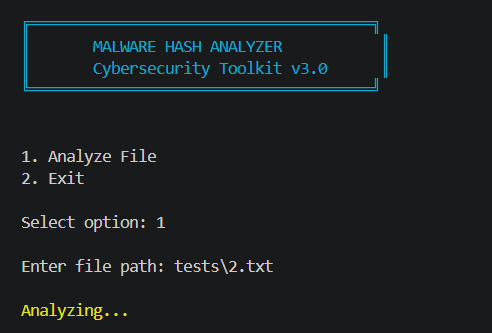
## 主菜单
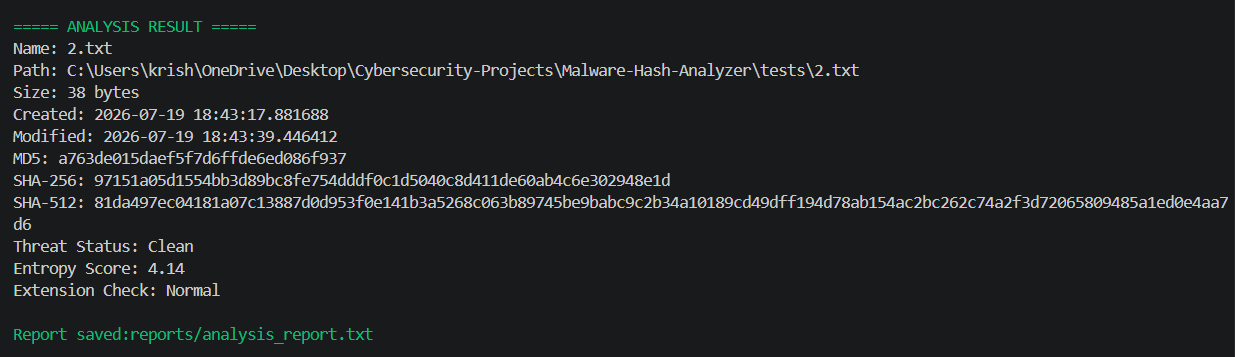
## 文件分析结果
# 🛠️ 使用的技术
| 技术 | 用途 |
|------------|---------|
| Python 3 | 核心开发语言 |
| hashlib | 加密哈希生成 |
| JSON | 恶意软件数据库管理 |
| OS Module | 文件系统分析 |
| Math Module | 熵计算 |
| Colorama | 终端界面增强 |
# 📁 项目结构
Malware-Hash-Analyzer
│
├── malware_hash_analyzer.py
├── README.md
├── requirements.txt
│
├── database
│ └── malware_database.json
│
├── reports
│ └── analysis_report.txt
│
├── images
│ ├── main-menu.png
│ └── file-analysis.png
│
└── tests
├── 1.txt
├── 2.txt
└── 3.txt
# ⚙️ 安装与设置
## 1. 克隆仓库
```
git clone https://github.com/yourusername/malware-hash-analyzer.git
2. Navigate to Project Directory
cd malware-hash-analyzer
3. Install Dependencies
pip install -r requirements.txt
4. Run Application
python malware_hash_analyzer.py
🔍 Usage Example
Start the tool:
MALWARE HASH ANALYZER
Cybersecurity Toolkit v3.0
1. Analyze File
2. Exit
Select:
1
Provide file path:
tests\2.txt
Example result:
===== ANALYSIS RESULT =====
Name: 2.txt
MD5:
xxxxxxxxxxxxxxxx
SHA-256:
xxxxxxxxxxxxxxxx
SHA-512:
xxxxxxxxxxxxxxxx
Threat Status:
Clean
Entropy Score:
4.14
Extension Check:
Normal
Report saved:
reports/analysis_report.txt
🔐 Cybersecurity Concepts Demonstrated
This project demonstrates practical implementation of:
Malware analysis fundamentals
Cryptographic hashing
File fingerprinting
Threat intelligence concepts
Security automation
Defensive analysis workflows
Digital investigation techniques
🎯 Real-World Applications
Similar techniques are used in:
Security Operations Centers (SOC)
Malware analysis labs
Incident response investigations
Antivirus solutions
Threat intelligence platforms
🔮 Future Enhancements
Planned improvements:
Risk scoring system
VirusTotal API integration
Expanded malware hash database
YARA rule integration
Machine learning malware classification
Real-time file monitoring
Advanced threat reporting
⚠️ Disclaimer
This project is developed for educational and defensive cybersecurity purposes only.
Always analyze files responsibly and only on systems where you have proper authorization.
👨💻 Author
Krishi Dhaduk
Cybersecurity Enthusiast
Python Security Projects | Defensive Security Learning
⭐ If you find this project useful, consider giving it a star on GitHub.
```
标签:DAST, Homebrew安装, Python, 哈希计算, 威胁情报, 开发者工具, 恶意软件分析, 无后门