mockingbird777/archlens
GitHub: mockingbird777/archlens
一款零运行时依赖的本地优先 CLI 工具,通过生成交互式依赖图谱帮助开发者分析代码仓库中的循环依赖和架构热点。
Stars: 0 | Forks: 1
## 快速开始
需要 [Node.js 20 或更高版本](https://nodejs.org/)。
```
# 直接从 GitHub 运行最新代码(该 package 尚未发布到 npm)
npx --yes github:mockingbird777/archlens .
# 打开生成的报告
open archlens-report.html # macOS
xdg-open archlens-report.html # Linux
```
或者全局安装 GitHub 仓库:
```
npm install --global github:mockingbird777/archlens
archlens ./your-repository
```
安装过程会运行仓库的 `prepare` 脚本,在 CLI 启动之前编译 TypeScript。在正式发布包之前,我们有意不对 `npx archlens` 等 npm registry 命令提供文档说明。
## 为什么选择 ArchLens?
依赖图通常要么太浅显而无法指导重构,要么被锁定在托管平台之后。ArchLens 旨在实现实用的折中方案:一个快速、可审计的本地 CLI,具备足够的仓库智能,适用于代码审查、项目入门和架构清理。
- **在循环固化之前发现它们。** Tarjan 的强连通分量算法能够识别完整的循环依赖组,包括自环。
- **优先处理高风险文件。** 透明的热点评分结合了唯一 fan-in、唯一 fan-out、文件大小和循环成员资格。
- **理解多语言仓库。** 在一次扫描中分析 JS/TS ESM、CommonJS、Python import 和本地 Go module import。
- **分享报告,而不是你的源代码。** HTML 报告仅包含图元数据,且不会发起任何网络请求。
- **自动化架构检查。** 稳定的 JSON 和 Mermaid 输出易于在 CI、pull request 或文档中使用。
- **信任工具链。** ArchLens 本身不包含任何运行时依赖,仅使用 Node.js 内置功能。
## 它能生成什么
### 交互式 HTML
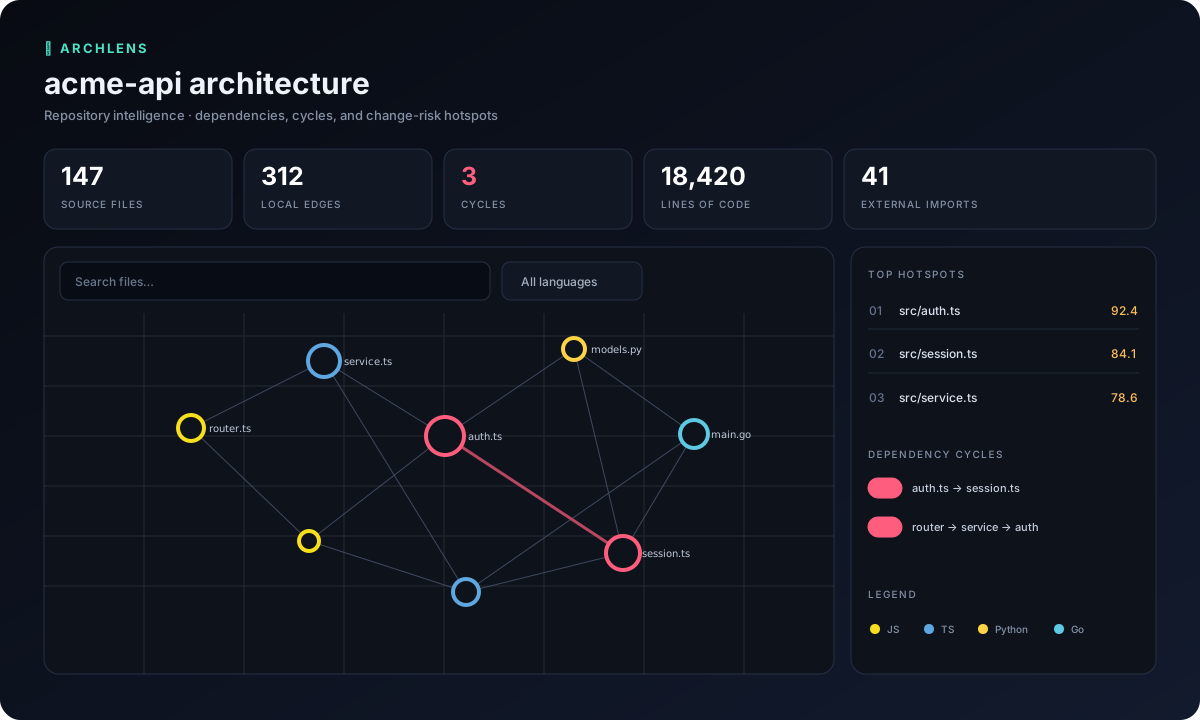
默认报告是一个单一的便携式文件,具有:
- 实时文件搜索和语言过滤器;
- 仅循环和仅热点聚焦模式;
- 可缩放和平移的依赖图;
- 可点击的节点详情,包含 LOC、fan-in、fan-out 和循环成员资格;
- 热点排名、循环摘要和嵌入式机器可读数据集;
- 响应式布局,不使用 CDN、分析工具、字体或远程资产。
```
npx --yes github:mockingbird777/archlens . --title "Payments service architecture"
```
### JSON
为脚本和 CI 使用带有版本的 schema:
```
npx --yes github:mockingbird777/archlens . --format json --stdout > architecture.json
```
文档包含 `meta`、`summary`、`nodes`、`edges`、`unresolvedImports`、`cycles`、`hotspots` 和非致命的 `warnings`。路径是相对于仓库的;绝对不会输出源内容和绝对路径。
### Mermaid
在你的技术文档旁边保留一个图:
```
npx --yes github:mockingbird777/archlens ./packages/core --format mermaid --output docs/core-graph.mmd
```
## CLI 参考
```
archlens [path] [options]
-f, --format
html (default), json, or mermaid
-o, --output Output path; use - for stdout
--stdout Write the report to stdout
--include Only scan matching files (repeatable)
--exclude Ignore matching paths (repeatable)
--no-gitignore Do not read .gitignore files
--max-files Safety limit (default: 20000)
--title Custom HTML report title
-q, --quiet Suppress progress and summary
-h, --help Show help
-v, --version Show the version
```
示例:
```
npx --yes github:mockingbird777/archlens . --exclude '**/*.test.ts' --exclude 'generated/**'
npx --yes github:mockingbird777/archlens . --include 'packages/**' --max-files 50000
npx --yes github:mockingbird777/archlens services/api -f json -o artifacts/api-architecture.json
```
ArchLens 始终会跳过常见的生成目录或重量级目录,例如 `.git`、`node_modules`、`dist`、`build`、`coverage`、`vendor`、虚拟环境以及语言缓存。它还会评估常见的 `.gitignore` 规则,包括通配符、锚定路径、目录规则和取反规则。
## 语言支持
| 语言 | 识别的语法 | 本地解析 |
| --- | --- | --- |
| JavaScript / TypeScript | `import`、副作用 import、re-export、动态 `import()`、`require()` | 相对文件、无扩展名文件、目录索引、`.js` 指定符背后的 TS 源码 |
| Python | `import`、别名/多重 import、`from … import`、相对 import | 来自源目录或仓库根目录的 module 文件和 package `__init__.py` |
| Go | 单个、分组、别名、空白和点 import | `go.mod` 声明的 module 路径下的 package,以及相对 import |
外部 package 会被统计,但会被特意排除在本地文件图之外。看起来是本地但无法解析的 import 会被单独报告,以便配置缺口保持可见。
## 工作原理
```
flowchart LR
A[Repository walker] --> B[Language import parsers]
B --> C[Local module resolver]
C --> D[Dependency graph]
D --> E[Tarjan SCC cycles]
D --> F[Hotspot metrics]
E --> G[HTML / JSON / Mermaid]
F --> G
```
实现是有意分层的:
```
src/
├── analyzers/ # Dependency extraction per language
├── core/ # Walking, ignores, resolution, SCC, metrics
├── reporters/ # Self-contained HTML, JSON, Mermaid
├── test/ # node:test unit and integration tests
├── cli.ts # Argument parsing and terminal UX
└── index.ts # Public programmatic API
```
从 GitHub 安装,然后将其作为库使用:
```
npm install github:mockingbird777/archlens
```
```
import { analyzeRepository } from 'archlens';
const result = await analyzeRepository({
root: './my-repo',
exclude: ['generated/**'],
});
console.log(result.cycles);
```
## 热点评分
分数是相对于扫描的仓库而言的,范围为 0 到 100:
```
40% normalized fan-in
25% normalized fan-out
25% normalized LOC
10% circular-dependency membership
```
对数归一化可以防止一个生成的超大文件抹平所有其他信号。该分数是一种优先级排序辅助工具——而不是对代码质量的评判。
## 隐私与安全
ArchLens 完全在你的机器上运行。它不进行网络调用,不执行扫描到的代码,不评估配置文件,也不在报告中包含源文本。报告包含相对文件路径和 import 指定符,这些信息可能仍然很敏感;在组织外部共享之前,请先对其进行审查。
有关负责任的披露和威胁模型,请参阅 [SECURITY.md](SECURITY.md)。
## 当前限制
ArchLens 倾向于可预测的零配置分析,而不是编译器级别的完整性。它目前尚不支持评估 TypeScript 路径别名、bundler 别名、Python 环境/package 元数据、Go workspace、条件 import 或计算得出的 import 字符串。在语法不寻常的代码中,可能会出现解析器误报和未解析的边。当你发现此类情况时,请提交一个简单的复现用例。
## 路线图
- [ ] `tsconfig.json` 和 package `exports` 解析
- [ ] 可配置的架构边界和 CI 退出策略
- [ ] commit 之间的图差异对比
- [ ] 来自本地 Git 历史记录的所有权和变动叠加层
- [ ] Rust 和 Java/Kotlin 分析器
- [ ] 用于组织特定解析器的插件 API
## 贡献
欢迎提交 issue 和 pull request。请从 [CONTRIBUTING.md](CONTRIBUTING.md) 开始,遵循[行为准则](CODE_OF_CONDUCT.md),并在提交更改之前运行 `npm test`。良好的首次贡献包括专注于解析器测试用例、解析器边界情况、报告可访问性以及来自大型公共仓库的性能分析。
## 许可证
[MIT](LICENSE) © 2026 ArchLens 贡献者。标签:MITM代理, SOC Prime, WebSocket, 云安全监控, 代码分析, 依赖分析, 凭证管理, 开发工具, 架构可视化, 自动化攻击, 静态分析