# 🛍️ tuistore
**TUI 应用商店:查找、搜索并一键安装数百款终端应用,全程无需离开终端。**
浏览精选的 TUI 目录,阅读详情,并使用单键
安装 —— tuistore 会为你算出在**你的**机器上应该*如何*安装每一个应用
(cargo, brew, pacman, uv, go, npm……),因此你永远不会粘贴你的设备
无法运行的命令。直接在你喜欢的项目上 Star 到 GitHub。
**想让你的 TUI 获得推荐?前往这里 -> [gheat.net/#p/tuistore](https://gheat.net/#p/tuistore)**
基于 [🍚 ricekit](https://github.com/Gheat1/ricekit) 构建 · 数据种子源自
[awesome-tuis](https://github.com/rothgar/awesome-tuis) · 由 [@Gheat1](https://github.com/Gheat1) 制作
[](https://github.com/Gheat1/tuistore/actions/workflows/tests.yml)
[](https://github.com/Gheat1/tuistore/releases)


[](https://github.com/Gheat1/homebrew-tuistore)


## 这是什么
寻找优秀的终端应用意味着要在 GitHub 和 awesome-lists 中艰难跋涉;而安装
它们则意味着要猜测到底是该用 `cargo install`、`brew install`、`pacman -S`、
`uv tool install`、`curl | sh` 脚本,还是从源码编译 —— 而且 README 中一半的
命令都是针对*错误*操作系统的。
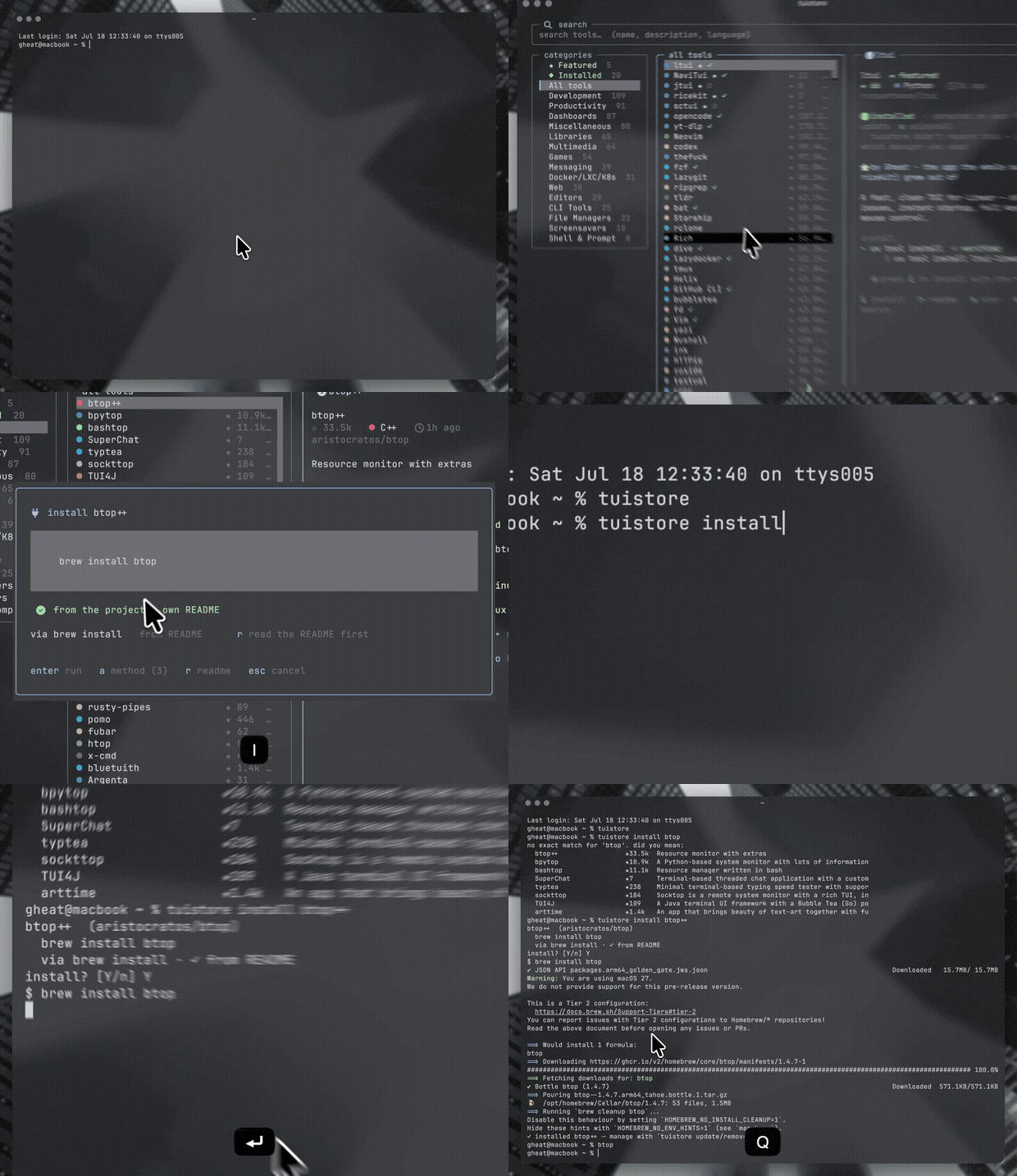
tuistore 解决了这两个问题。它是一个快速、支持鼠标和键盘的 TUI,它可以:
- 将 **800+ 精选终端应用**置于一次模糊搜索之内 —— 包括全屏 TUI
*以及*现代 CLI 工具包(fastfetch、neovim、ripgrep、bat、eza、starship、
zoxide、fzf……),
- 向你展示**在你的机器上真正有效的安装命令**,并进行了排序,
- 通过**一键**进行安装并实时输出日志流,
- 还可以让你直接在商店里对你喜欢的任何项目在 GitHub 上 **★ star**。
## 安装
**单行命令**(自动在 uv / pipx / pip 中选择最佳方式,如果都没有找到则先
安装 uv):
```
curl -fsSL https://raw.githubusercontent.com/Gheat1/tuistore/main/install.sh | sh
```
**Homebrew:**
```
brew install gheat1/tuistore/tuistore
```
**或者直接从 PyPI 安装:**
```
uv tool install tuistore # recommended
pipx install tuistore
pip install tuistore
```
**安装最新的 `main` 分支而非最新发布版本:**
```
uv tool install git+https://github.com/Gheat1/tuistore
pipx install git+https://github.com/Gheat1/tuistore
```
**Arch Linux (AUR):**
```
yay -S tuistore # or paru, or any other AUR helper
```
Windows 在 PowerShell(或 Windows 终端)中同样受支持。安装任何你
已经在使用的包管理器和工具链 —— `winget`、Scoop、
Chocolatey、`uv`、Cargo、Go 和 npm 都会被自动检测 —— 然后运行与
上述相同的命令。Windows 专属的安装方式仅会在 Windows 上提供。
然后只需运行:
```
tuistore
```
## 使用它
极其简单:**输入进行搜索,方向键浏览,`i` 安装。**
```
/ focus search — type a name, description, or language
↑ ↓ · j k move through the list g / G jump to top / bottom
enter open / focus a tool
i install (press a to pick a different method)
r read the README in-app (inspect before you install)
u update · x uninstall (tools you installed via tuistore)
s star / unstar on GitHub o open the repo in your browser
, manage (update tuistore · refetch catalog · update all)
f features / about t cycle theme
? all keybindings q quit
```
一切都可以点击操作 —— 行、提示栏,以及可拖动的面板分割条。
## 安装引擎的工作原理
这是最困难的部分,也是 tuistore 的核心所在。
1. **它会读取你的设备信息。** 包括 OS、Linux 发行版*家族*(Arch、Debian、Fedora、
SUSE、Void、Alpine、Gentoo……)、CPU 架构,以及你的 `PATH` 中实际存在的每个包管理器 /
工具链。
2. **每个工具都带有平台限制的安装方法。** 某种方法知道它需要什么
二进制文件以及允许运行的环境,因此 `pacman -S` 只会出现在
Arch 上,`brew` 只会在存在 brew 的地方出现,`cargo` 只会在存在 cargo 的地方出现。
3. **这些方法有三个来源,UI 会标明具体是哪一个:**
- ✓ **官方 (official)** —— 项目自身文档记录的命令(针对精选套件进行了人工验证),
- ✓ **来自 README (from README)** —— 直接从各 repo 的 README 中抓取(仅当命令
实际指名了该工具时才保留,这样依赖项的说明就不会混入),
- ⚠ **未验证 (unverified)** —— 根据 repo 的语言进行的最佳猜测,并打上标记以便你
知晓需要去核实。
4. **对可运行的方法进行排名**,并提供最优项作为默认选项 —— 优先使用干净的
托管安装(brew / cargo / uv)而不是 `curl | sh`,优先验证过的而不是
猜测的 —— 所有其他备选方案只需按下一个键 (`a`) 即可查看。
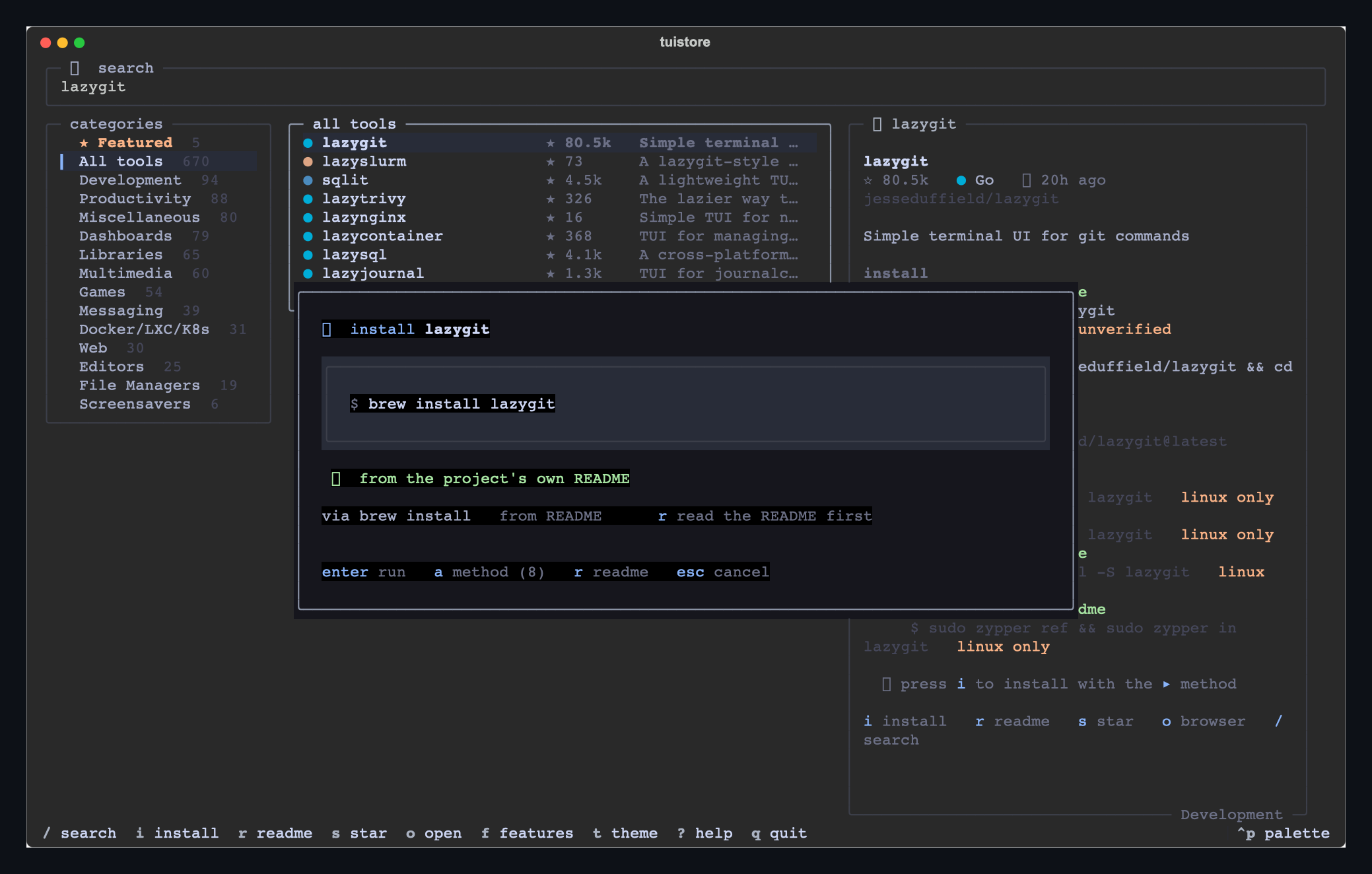
5. **在确认前,你可以先查看。** 安装界面会显示确切的
命令,并带有清晰的 **✓ 已验证 / ⚠ 未验证** 徽章(对于远程 `curl | sh` 脚本会有
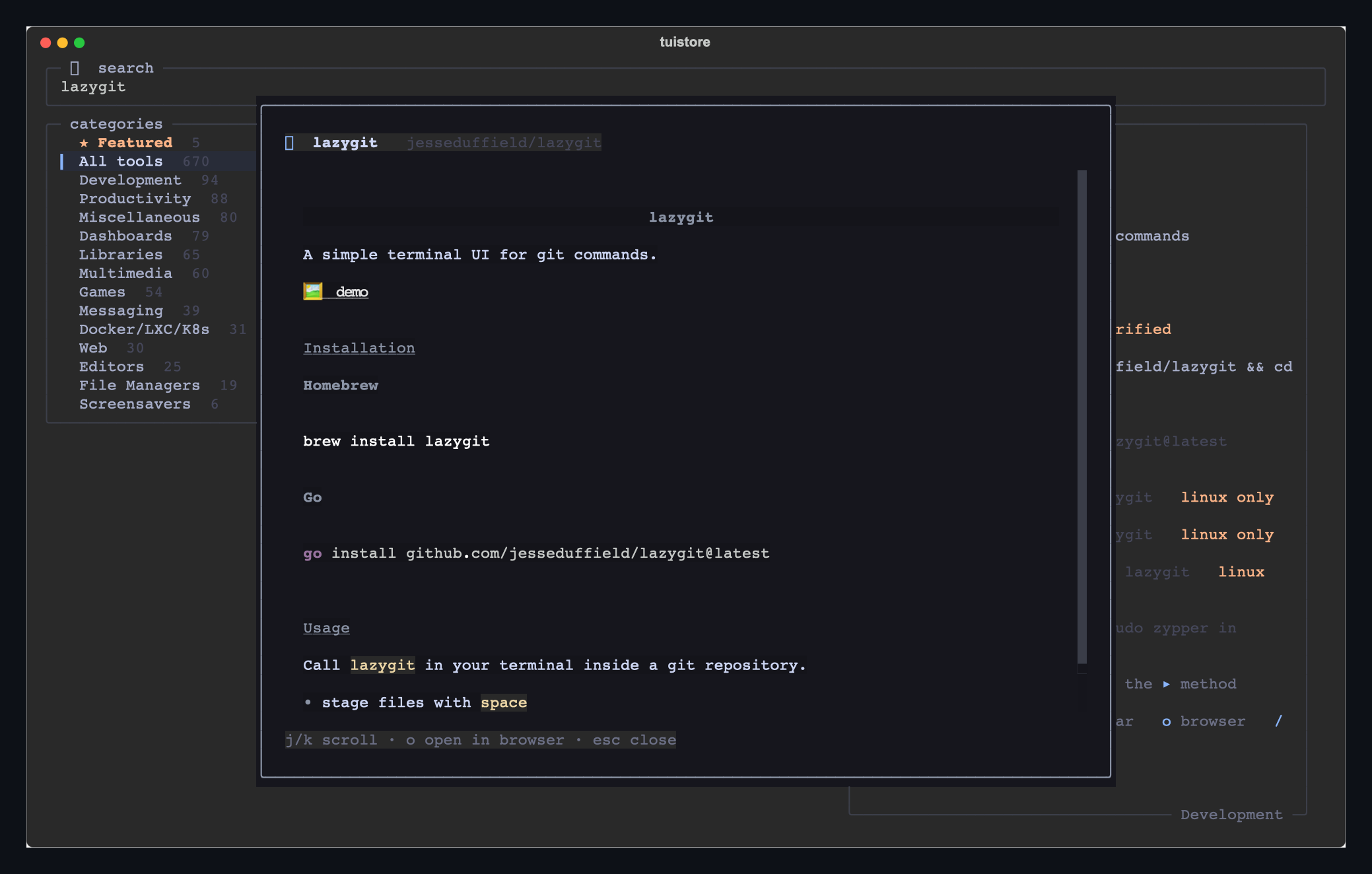
醒目的警告),并且 **`r` 可以直接在商店内打开项目的 README**,让你可以在
安装前对一个工具进行详细审查。
6. **它会在你的登录 shell 中运行**并实时输出日志流 —— 绝不会在
后台静默运行;你始终能看到确切的命令并需要进行确认。
## 安装、更新与卸载
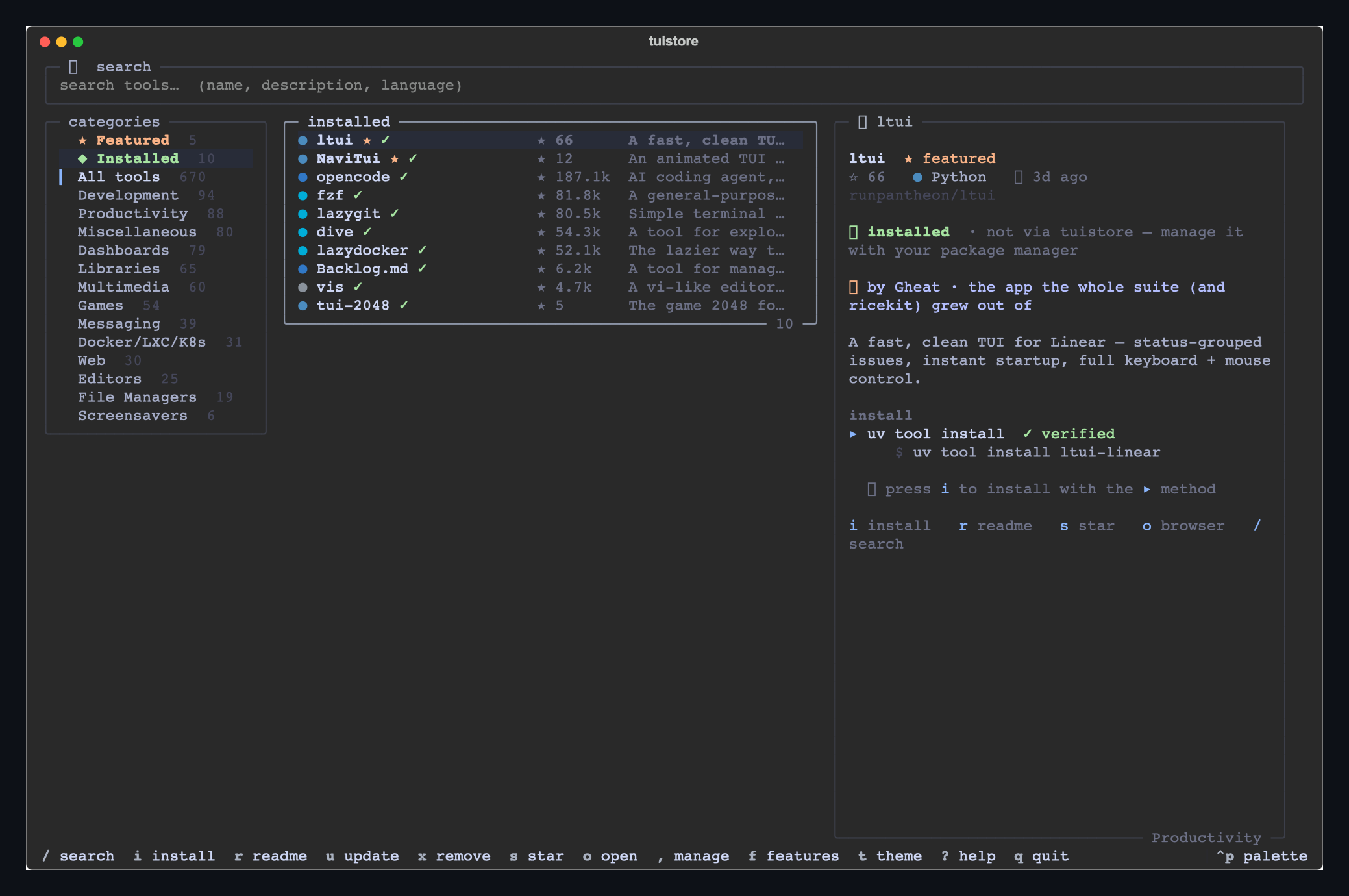
tuistore 不仅仅是一个浏览器 —— 对于它所安装的工具来说,它还是一个包管理器。
- 它**会记住自己安装了什么**(哪个管理器,哪条命令),并且还会
**检测**你已有的工具 —— 不仅是通过你 `PATH` 中的二进制文件,还会通过
询问 **brew, uv, npm, cargo, pipx** 它们安装了什么(因此 `ripgrep`→`rg`、
`bottom`→`btm`、`git-delta`→`delta` 都能显示出来)。**◆ Installed (已安装)** 过滤器
会列出你所拥有的全部内容。
- 对于任何已安装的工具,**`u` 进行更新**,**`x` 进行原地卸载**,
使用适合该管理器的正确命令(`brew upgrade …`、`uv tool upgrade …`、
`cargo uninstall …`),并实时输出日志流。对于非 tuistore 安装的工具,它会
询问你使用的是哪个管理器。
- **`,` 打开管理菜单**,包含 **全部更新** —— 这是一个一次性的
`brew upgrade` + `uv tool upgrade --all` + `npm update -g` …… 操作,可升级你的
**所有**包,包括在 tuistore 之外安装的包 —— 此外还可以更新
tuistore 本身、重新获取目录以及清除缓存。
### 它也是一个 CLI 包管理器
所有操作都可以在 shell 中完成,因此 tuistore 可以直接无缝集成到 dotfiles、
安装脚本和 README 中:
```
tuistore install lazygit # resolve + install (platform-aware, confirmed)
tuistore install btop++ -y # -y to skip the prompt (great for scripts/CI)
tuistore remove lazygit # uninstall a tool you installed via tuistore
tuistore update lazygit # update one tool
tuistore search git # search the catalog
tuistore info btop++ # details + every install method
tuistore installed # list what tuistore installed
tuistore upgrade # update EVERYTHING (brew, uv, npm… all packages)
tuistore update # update tuistore itself
tuistore update installed # update only what tuistore installed
tuistore refetch catalog # pull the latest catalog
tuistore --doctor # what your machine looks like to the install engine
```
Shell 安装使用相同的引擎(先验证后猜测,平台限制)
并记录在同一个账本中 —— 因此 `tuistore installed`、`update`、
`remove` 以及 TUI 的 **◆ Installed** 视图都会保持同步。
## 目录
- **★ 精选。** Gheat 的套件 —— [ltui](https://github.com/runpantheon/ltui)、
[NaviTui](https://github.com/Gheat1/NaviTui)、[ricekit](https://github.com/Gheat1/ricekit)
—— 外加少量精心挑选的社区工具,全部固定在顶部。
- **800+ 工具** —— [rothgar/awesome-tuis](https://github.com/rothgar/awesome-tuis)
外加一套精选的终端必备工具(人们经常会去 `brew install` 的获取系统信息的工具、编辑器和
现代 CLI 实用程序)以及对
[cli.masoko.net](https://cli.masoko.net) 的一次全面扫描,分布在可浏览的类别中,每一项
都包含了实时的 GitHub star 数、编程语言和新鲜度信息。
你可以随时刷新或扩充目录 —— 它只需运行一个单一的脚本:
```
uv run python tools/build_catalog.py # refresh stars + installs
uv run python tools/build_catalog.py --scrape 300 # scrape more READMEs
```
它会解析 awesome-tuis,批量执行一次 GraphQL 扫描以获取 star 数/语言/新鲜度,
为 star 数最多的工具抓取安装命令,并推断出其余的内容。
## 基于 ricekit 构建
tuistore 是这个家族的一员。它基于
[**🍚 ricekit**](https://github.com/Gheat1/ricekit) 构建 —— 整个套件背后的主题、组件、
模态框、图标和设计理念 —— 因此它共享了
五种主题(`mocha` · `void` · `onyx` · `clear` · `system`)、vim 与鼠标并重的
导航方式、拖拽调整面板大小以及缓存优先的极速体验。
如果你喜欢 tuistore,你可能也会喜欢该套件中的其他成员:
| | |
| --- | --- |
| [**ltui**](https://github.com/runpantheon/ltui) | 一款用于 Linear 的快速、简洁的 TUI |
| [**jtui**](https://github.com/Gheat1/jtui) | 同上,针对 Jira |
| [**sctui**](https://github.com/Gheat1/sctui) | 同上,针对 Shortcut |
| [**NaviTui**](https://github.com/Gheat1/NaviTui) | 一款用于 Navidrome 的带动画终端播放器 |
| [**ricekit**](https://github.com/Gheat1/ricekit) | 它们所有人共享的设计系统 |
## 配置与数据
在 macOS 和 Linux 上使用 XDG 风格的目录;在 Windows 上使用 Local AppData:
| 内容 | 位置 |
| --- | --- |
| 状态(主题、布局) | `~/.local/state/tuistore/state.json` · `%LOCALAPPDATA%\tuistore\state.json` |
| 缓存(抓取的安装信息) | `~/.cache/tuistore/` · `%LOCALAPPDATA%\tuistore\cache\` |
| 刷新后的目录和安装账本 | `~/.local/state/tuistore/` · `%LOCALAPPDATA%\tuistore\` |
`tuistore --doctor` 会打印出你的机器在安装引擎眼中的样子。
## 许可证
[**GPL-3.0-or-later**](LICENSE),**包含第 7 节下的附加条款**(详见
[`LICENSE`](LICENSE) / [`NOTICE`](NOTICE)):
- **tuistore** 名称、🛍️ 标志以及 Gheat 的品牌均保留所有权利 —— 任何
fork 或再分发**必须重命名**并去除品牌标识,使其不能被
冒充为 tuistore;
- 必须保留对原作者的**署名**+ 指向原项目的链接;
- 你**不得歪曲来源**或声称你是原作者。
随意 fork 并尽情修改它 —— 只是不要把我的作品当作你自己的
项目来发布。由 [@Gheat1](https://github.com/Gheat1) 制作,基于
[ricekit](https://github.com/Gheat1/ricekit) 构建。