the-artist111/NeuralReaper
GitHub: the-artist111/NeuralReaper
通过 MCP 协议将 Claude 连接到 46 个真实安全工具的 AI 原生侦测平台,用自然语言驱动完整的安全扫描与评估流程。
Stars: 1 | Forks: 0
```
███╗ ██╗███████╗██╗ ██╗██████╗ █████╗ ██╗
████╗ ██║██╔════╝██║ ██║██╔══██╗██╔══██╗██║
██╔██╗ ██║█████╗ ██║ ██║██████╔╝███████║██║
██║╚██╗██║██╔══╝ ██║ ██║██╔══██╗██╔══██║██║
██║ ╚████║███████╗╚██████╔╝██║ ██║██║ ██║███████╗
╚═╝ ╚═══╝╚══════╝ ╚═════╝ ╚═╝ ╚═╝╚═╝ ╚═╝╚══════╝
██████╗ ███████╗ █████╗ ██████╗ ███████╗██████╗
██╔══██╗██╔════╝██╔══██╗██╔══██╗██╔════╝██╔══██╗
██████╔╝█████╗ ███████║██████╔╝█████╗ ██████╔╝
██╔══██╗██╔══╝ ██╔══██║██╔══██╗██╔══╝ ██╔══██╗
██║ ██║███████╗██║ ██║██║ ██║███████╗██║ ██║
╚═╝ ╚═╝╚══════╝╚═╝ ╚═╝╚═╝ ╚═╝╚══════╝╚═╝ ╚═╝
```
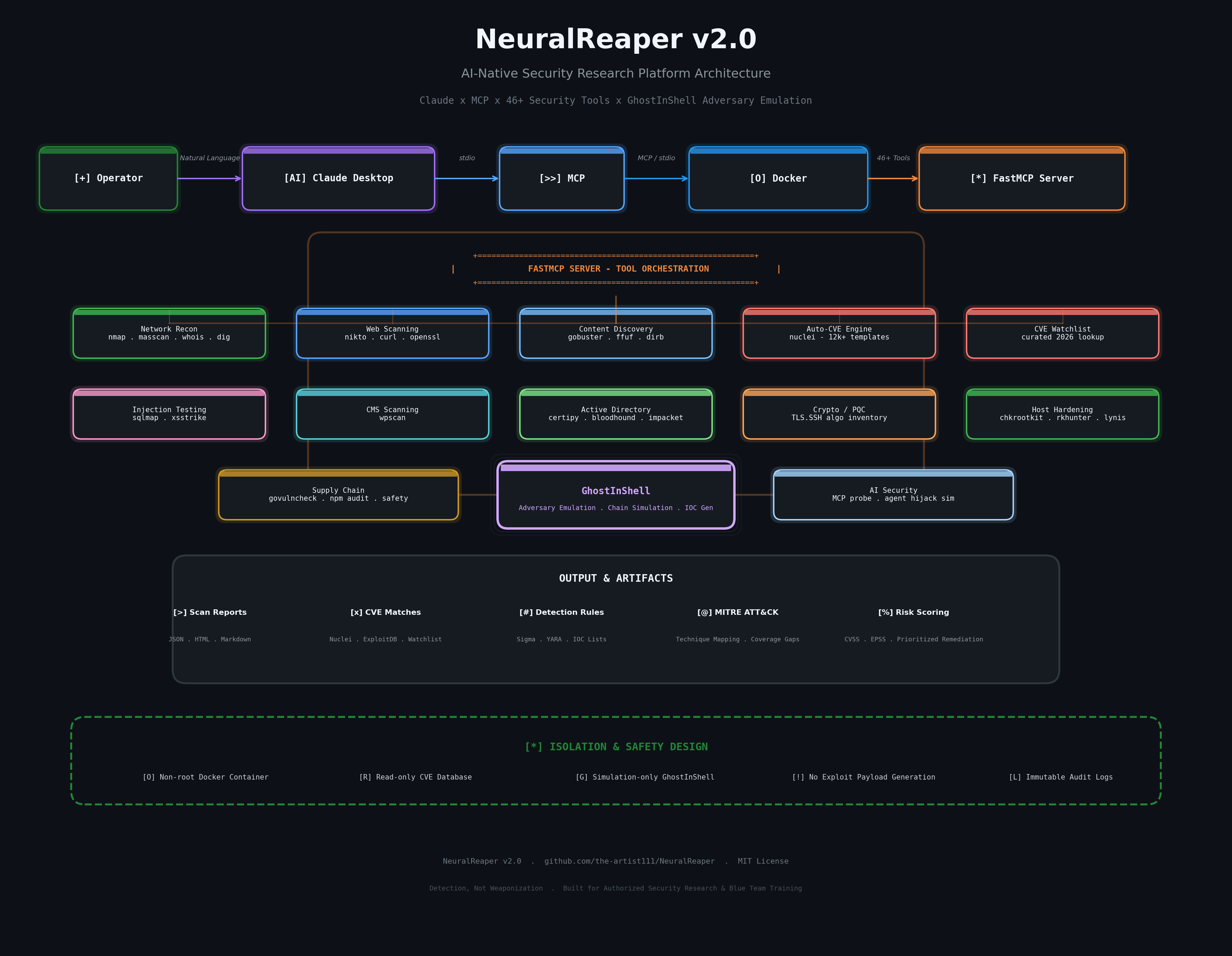 ```
Claude Desktop 每次会话都会通过 stdio 启动容器——没有持久的网络监听器,没有暴露的端口,并且在运行之间不会保留任何状态(Docker 本身缓存的内容除外,例如 Nuclei 的模板目录)以及 `generate_report()` 使用的内存会话日志。
## 工具库
| 类别 | 工具 | 功能 |
|---|---|---|
| **网络侦测** | `nmap`, `masscan`, `whois`, `dig`, `traceroute`, `ping` | 服务/版本检测、全范围端口扫描、DNS/WHOIS 枚举 |
| **Web 扫描** | `nikto`, `curl`, `openssl` | 错误配置检查、Header 检查、TLS/证书验证 |
| **内容发现** | `gobuster`, `ffuf`, `dirb` | 目录/DNS 暴力破解、高速 Fuzzing |
| **自动 CVE 引擎** | `nuclei` | 12,000+ 模板 — CVE、错误配置、暴露、默认凭据 |
| **精选 CVE 监视列表** | `cve_watchlist_scan` | 针对精选的最新高危 CVE ID 列表,进行 Nuclei + ExploitDB 的仅供查找的编排 |
| **注入测试** | `sqlmap`, `xsstrike` | SQL 注入和 XSS 检测以及 WAF 指纹识别 |
| **CMS 扫描** | `wpscan` | WordPress 核心/插件/主题漏洞枚举 |
| **Active Directory 与身份** | `certipy`, `bloodhound-python`, `bloodyAD`, Impacket (`GetUserSPNs.py`, `GetNPUsers.py`) | ADCS 错误配置 (ESC1–16)、AD 数据收集、ACL/对象枚举、Kerberoast/AS-REProast 检测 |
| **加密清单 / 后量子** | nmap `ssl-enum-ciphers` / `ssh2-enum-algos` | TLS 和 SSH 算法清单;现在获取以后解密 (Harvest-Now-Decrypt-Later) 风险分类 |
| **宿主机加固与 Rootkit 检测** | `chkrootkit`, `rkhunter`, `lynis` | 基于签名的 rootkit 检查和通用 Linux 加固审计 |
| **勒索软件相关暴露** | nmap + nuclei (精选标签) | 外部 RDP/SMB/VPN 暴露检查 — 仅针对攻击面,而非感染检测 |
| **供应链** | `osv-scanner` | 针对 OSV.dev 数据库进行依赖项 CVE 审计 |
| **Fuzzing** | `AFL++` | 针对本地插桩二进制文件的崩溃发现 Fuzzing 工具自动化 |
| **OWASP 参考** | — | 映射到工具覆盖范围的静态 Top-10 (Web) 和 Top-10 (Agentic/AI) 检查清单 |
| **侦测编排器** | — | `full_recon` 将 DNS/WHOIS/端口/技术指纹侦测串联成一份攻击面摘要,并根据检测到的技术栈建议测试优先级 |
| **会话报告** | — | `generate_report` 将本次会话的每个工具调用编译成一份 Markdown 报告,并带有严重性摘要 |
| **漏洞利用研究** | `searchsploit` | 按产品或 CVE 进行离线 ExploitDB 查找 |
总共 46 个 MCP 工具 — 在 Claude 中运行 `tool_help` 可查看包含参数的完整可调用列表。
## 快速开始
```
git clone https://github.com/the-artist111/NeuralReaper.git
cd NeuralReaper
docker build -t neuralreaper:latest .
```
将 `claude_desktop_config.json` 合并到你自己的配置中,让 Claude Desktop 指向它,然后重启 Claude Desktop。完整说明如下。
## 详细设置
```
Claude Desktop 每次会话都会通过 stdio 启动容器——没有持久的网络监听器,没有暴露的端口,并且在运行之间不会保留任何状态(Docker 本身缓存的内容除外,例如 Nuclei 的模板目录)以及 `generate_report()` 使用的内存会话日志。
## 工具库
| 类别 | 工具 | 功能 |
|---|---|---|
| **网络侦测** | `nmap`, `masscan`, `whois`, `dig`, `traceroute`, `ping` | 服务/版本检测、全范围端口扫描、DNS/WHOIS 枚举 |
| **Web 扫描** | `nikto`, `curl`, `openssl` | 错误配置检查、Header 检查、TLS/证书验证 |
| **内容发现** | `gobuster`, `ffuf`, `dirb` | 目录/DNS 暴力破解、高速 Fuzzing |
| **自动 CVE 引擎** | `nuclei` | 12,000+ 模板 — CVE、错误配置、暴露、默认凭据 |
| **精选 CVE 监视列表** | `cve_watchlist_scan` | 针对精选的最新高危 CVE ID 列表,进行 Nuclei + ExploitDB 的仅供查找的编排 |
| **注入测试** | `sqlmap`, `xsstrike` | SQL 注入和 XSS 检测以及 WAF 指纹识别 |
| **CMS 扫描** | `wpscan` | WordPress 核心/插件/主题漏洞枚举 |
| **Active Directory 与身份** | `certipy`, `bloodhound-python`, `bloodyAD`, Impacket (`GetUserSPNs.py`, `GetNPUsers.py`) | ADCS 错误配置 (ESC1–16)、AD 数据收集、ACL/对象枚举、Kerberoast/AS-REProast 检测 |
| **加密清单 / 后量子** | nmap `ssl-enum-ciphers` / `ssh2-enum-algos` | TLS 和 SSH 算法清单;现在获取以后解密 (Harvest-Now-Decrypt-Later) 风险分类 |
| **宿主机加固与 Rootkit 检测** | `chkrootkit`, `rkhunter`, `lynis` | 基于签名的 rootkit 检查和通用 Linux 加固审计 |
| **勒索软件相关暴露** | nmap + nuclei (精选标签) | 外部 RDP/SMB/VPN 暴露检查 — 仅针对攻击面,而非感染检测 |
| **供应链** | `osv-scanner` | 针对 OSV.dev 数据库进行依赖项 CVE 审计 |
| **Fuzzing** | `AFL++` | 针对本地插桩二进制文件的崩溃发现 Fuzzing 工具自动化 |
| **OWASP 参考** | — | 映射到工具覆盖范围的静态 Top-10 (Web) 和 Top-10 (Agentic/AI) 检查清单 |
| **侦测编排器** | — | `full_recon` 将 DNS/WHOIS/端口/技术指纹侦测串联成一份攻击面摘要,并根据检测到的技术栈建议测试优先级 |
| **会话报告** | — | `generate_report` 将本次会话的每个工具调用编译成一份 Markdown 报告,并带有严重性摘要 |
| **漏洞利用研究** | `searchsploit` | 按产品或 CVE 进行离线 ExploitDB 查找 |
总共 46 个 MCP 工具 — 在 Claude 中运行 `tool_help` 可查看包含参数的完整可调用列表。
## 快速开始
```
git clone https://github.com/the-artist111/NeuralReaper.git
cd NeuralReaper
docker build -t neuralreaper:latest .
```
将 `claude_desktop_config.json` 合并到你自己的配置中,让 Claude Desktop 指向它,然后重启 Claude Desktop。完整说明如下。
## 详细设置
\NeuralReaper\claude_desktop_config.json" "$env:APPDATA\Claude\claude_desktop_config.json"
5. **Docker Desktop 必须在** Claude Desktop 启动容器**之前运行** — Claude 会直接调用 `docker.exe`,如果守护进程尚未启动,你会看到 `failed to connect to the docker API at npipe:////./pipe/dockerDesktopLinuxEngine`。
6. 完全退出并重新打开 Claude Desktop(系统托盘 → 退出,而不仅仅是关闭窗口)。
## 使用示例
```
"Update Nuclei templates, then run a full CVE scan on 192.168.1.10"
"Check my lab DC against the curated CVE watchlist, then check its TLS for post-quantum readiness"
"Run certipy_find against my lab domain, then check for kerberoastable accounts"
"Run a full_recon on target.local and tell me what to prioritize testing"
"Audit this container's hardening with lynis, then run chkrootkit"
"Check 192.168.1.50 for ransomware-relevant exposure, then generate a report of everything we've found this session"
```
真实 `nuclei_scan` 运行的输出尾部示例:
```
=== NUCLEI SCAN: http://192.168.56.10 [severity=critical,high,medium] ===
[CVE-2026-41940] [http] [critical] Apache HTTP Server path traversal — 192.168.56.10
[exposed-panel:phpmyadmin] [http] [medium] phpMyAdmin panel exposed — 192.168.56.10/pma/
[tech-detect:nginx] [http] [info] nginx 1.24.0 detected
```
`pqc_readiness_check` 输出示例:
```
=== PQC / HNDL READINESS: target.local:443 ===
HNDL Risk Level: HIGH (classical-only key exchange — prioritize for PQ migration if data sensitivity/longevity is high)
- [HNDL RISK] No post-quantum hybrid key exchange group detected. Traffic captured today could be
decrypted retroactively once a sufficiently large quantum computer exists.
- [CLASSICAL] RSA key exchange/signature present — broken by Shor's algorithm on a sufficiently
large quantum computer. Long-lived sensitive data is the highest-priority migration candidate.
```
## 安全与防护设计
这是一个安全工具,因此它符合自身的标准:
- **非 root 执行。** 容器以无特权的 `pentester` 用户身份运行;只有 `nmap` 和 `masscan` 通过 `setcap` 获得它们所需的特定 `CAP_NET_RAW` / `CAP_NET_ADMIN` 能力 — 没有任何东西以 `--privileged` 方式运行。
- **输入清理。** 每个目标字符串在接触子进程调用之前,都会根据严格的允许列表模式进行验证;没有任何内容是通过 Shell 传递的,因此不存在字符串拼接注入风险。
- **严格超时。** 每次工具调用都有界限(`MAX_TOOL_RUNTIME`,默认为 180 秒),因此挂起的扫描不会无限期地挂起 MCP 会话。
- **无持久监听器。** 容器在每次会话中通过 stdio 启动,并使用 `--rm` 销毁 — 没有暴露的端口或常驻服务让你意外留下敞开的大门。
- **运行之间无状态。** 容器内不会将任何扫描历史记录、凭据或目标列表写入磁盘。
已知限制:`--network host` 是原生 Linux Docker 功能。在 Docker Desktop(Windows/macOS)上,它在托管 VM 中运行,因此依赖宿主机网络的扫描(例如原始 ARP 发现)在 Linux 宿主机上行为正确,但在 Windows/macOS 上可能需要 bridge-network + 端口映射调整 — 已在[路线图](#roadmap)中跟踪。
## 工程笔记 — 解决的真实问题
真实的构建日志,特意保存在这里而不是修饰掉 — 这是面试中真正有趣的部分。
| 问题 | 根本原因 | 修复 |
|---|---|---|
| `apt-get install` 安装 `gcc-16`/`libexpat1` 失败并报 404 | Kali **rolling** 仓库在构建时出现了短暂的依赖链损坏(`libgcc-15-dev` 需要一个不可用的 `libtsan2` 版本) | 将基础镜像从 `kalilinux/kali-rolling` 迁移到 `ubuntu:24.04`;用 `gem install`、指定的 GitHub 二进制发布版和直接的 GitLab 克隆替换了 Kali 独有的软件包(`wpscan`、`ffuf`、`exploitdb`) |
| 通过 `apt-get` 无法找到 `wpscan` / `ffuf` | 未打包为 Ubuntu 软件包 | `gem install wpscan`(它是一个 Ruby gem);`ffuf` 作为预编译的发布二进制文件拉取 |
| 尽管 Docker Desktop 正在运行,但在 WSL2 内部出现 `docker: command not found` | 针对该特定发行版,Docker Desktop 的 **WSL Integration** 开关处于关闭状态 | Settings → Resources → WSL Integration → 启用该发行版 → Apply & Restart |
| 从 WSL2 写入 `/mnt/c/Users/.../AppData/Roaming/Claude` 时出现 `mkdir: Permission denied` | 从 WSL2 向 Windows `AppData` 进行跨文件系统写入时,即使在 WSL2 中以 root 身份,也会遇到 Windows ACL 限制 | 改为从原生 **PowerShell** 进行复制,通过 `\\wsl.localhost\` UNC 路径读取 WSL2 文件 |
| 具完全没有出现在 Claude 的工具列表中 | Claude 作为 **Microsoft Store** 软件包(`...\WindowsApps\Claude_...`)运行,该软件包处于沙箱中,从不读取 `%APPDATA%\Claude\claude_desktop_config.json` | 卸载 Store 软件包,转而从 claude.ai/download 安装直接的 `.exe` 程序 |
| MCP 服务器显示 `failed` — `Server disconnected` | 日志显示 `failed to connect to the docker API at npipe:////./pipe/dockerDesktopLinuxEngine` | 在 Claude Desktop 尝试启动容器时,Docker Desktop 尚未运行 — 配置和镜像本身已经是正确的 |
最重要的收获是:**在进行任何更改之前,请先阅读实际的日志文件。** 上述每个修复都来自 `%APPDATA%\Claude\logs\mcp-server-NeuralReaper.log`,而不是猜测。
## 项目结构
```
NeuralReaper/
├── server.py # FastMCP server — 46 tool wrappers across 13 modules
├── Dockerfile # Ubuntu 24.04 base + full tool install
├── docker-compose.yml # Alternative to manual `docker run`
├── requirements.txt # Python deps (mcp, fastmcp)
├── claude_desktop_config.json # Drop-in Claude Desktop MCP config
├── docs/
│ ├── ARCHITECTURE.md # System design deep-dive
│ └── portfolio-kit.md # GitHub/LinkedIn/resume presentation content
├── examples/
│ └── full_recon_workflow.md # Real end-to-end usage walkthrough
├── tests/
│ └── smoke_test.sh # Verifies the server initializes over MCP
├── .gitignore
├── CHANGELOG.md
├── CONTRIBUTING.md
├── SECURITY.md
├── LICENSE
└── README.md
```
## 路线图
- [ ] 为 Windows/macOS Docker Desktop 提供具有显式端口映射的原生 bridge-network 模式
- [ ] 每个工具的结构化 JSON 输出模式(用于下游解析,而不是原始文本)
- [x] ~~将完整测试整合到单个 Markdown 文档中的会话报告生成器~~ — 已作为 `generate_report` 发布
- [ ] `generate_report` 的 PDF 导出选项(目前仅支持 Markdown)
- [ ] 在每次推送时构建镜像并运行 `tests/smoke_test.sh` 的 CI pipeline
- [ ] PingCastle 集成 — 目前已跳过;它是一个 .NET/Windows 专用工具,旨在加入域的宿主机上运行,而不是在 Linux 容器中针对远程目标运行。最好作为独立的补充工具使用,而不是通过 Wine/Mono 强行塞入此容器。
- [ ] 自主 PoV 生成(类似于 FuzzingBrain/Revelio)— 真正具备研究水准的能力。`fuzz_binary` 提供了实用的构建块(通过 AFL++ 发现崩溃);在任意代码库上进行全自动的假设生成与验证是一个更大的系统,在此并未实现。诚实地将其列为延伸目标,而不是夸大为已经在运行。
## 免责声明
NeuralReaper 专为**授权**的渗透测试和安全研究而构建 — 适用于你拥有或获得明确书面许可进行测试的系统。在大多数司法管辖区,对你未获授权的基础设施运行这些工具是违法的。作者对滥用行为不承担任何责任。
## 许可证
[MIT](LICENSE) — 详情请参阅文件。
### AI 原生安全研究平台 — Claude × MCP × 真实攻击工具
*输入自然语言。输出真实的侦测、真实的 CVE 匹配、真实的 AD 攻击路径、真实的加密态势。*
[](LICENSE)
[](https://www.python.org/)
[](https://www.docker.com/)
[](https://modelcontextprotocol.io)
[](README.md#tool-arsenal)
[]()
## 目录
- [为什么选择 NeuralReaper](#why-neuralreaper)
- [设计理念 — 检测而非武器化](#design-philosophy--detection-not-weaponization)
- [架构](#architecture)
- [工具库](#tool-arsenal)
- [快速开始](#quick-start)
- [详细设置](#detailed-setup)
- [使用示例](#usage-examples)
- [安全与防护设计](#security--safety-design)
- [工程笔记 — 解决的真实问题](#engineering-notes--real-problems-solved)
- [项目结构](#project-structure)
- [路线图](#roadmap)
- [贡献](#contributing)
- [免责声明](#disclaimer)
- [许可证](#license)
## 为什么选择 NeuralReaper
大多数“AI + 安全”的演示只是将聊天机器人连接到单个 API 就草草了事。NeuralReaper 则不同,它通过 [Model Context Protocol](https://modelcontextprotocol.io),赋予 Claude 对真实攻击安全工具链的**直接、沙箱化的执行访问权限**——这与人类渗透测试人员在终端中运行的二进制文件完全相同。
结果是:你只需用通俗英语描述一个目标,Claude 就会规划并执行真实的侦测——选择工具、链式扫描,并对真实输出进行推理——而不是从训练数据中进行猜测。
让它值得写在简历上,而不仅仅是一个脚本的原因:
- **动态自动更新的 CVE 引擎。** [Nuclei](https://github.com/projectdiscovery/nuclei) 提供了 12,000 多个社区模板,并且持续更新,因此扫描器不会停留在镜像构建时存在的内容。
- **天生隔离。** 每个工具都在一个锁定的、非 root 的 Ubuntu 容器内运行——绝不在宿主机上运行。
- **真实的工程轨迹。** 基于 Windows + WSL2 + Docker Desktop + Claude Desktop 构建,遇到(并解决)了以下记录的确切集成失败,而不是掩盖它们。
- **全面覆盖现代评估面**——网络/Web 侦测、Active Directory 攻击路径枚举、加密/后量子态势、供应链依赖审计以及本地 Fuzzing——而不仅仅是围绕某个扫描器的包装器。
## 设计理念 — 检测而非武器化
现有的同类 AI Agent 渗透测试框架中,有些——最著名的是 [HexStrike AI](https://hexstrike.com/)——在侦测/扫描之上构建了自动化的漏洞利用生成层。在 HexStrike 公开发布后的几个小时内,研究人员就观察到攻击者在讨论如何将其武器化,以对抗 Citrix NetScaler 零日漏洞(CVE-2025-7775),从而将过去需要数天手动开发漏洞利用的时间压缩到了约 10 分钟。
NeuralReaper 刻意提前一步停止。这里的每个工具都是进行识别、枚举和报告——它不会生成漏洞利用 payload,而且永远也不会。CVE 监视列表仅供查找:它调用现有的 Nuclei 模板和 ExploitDB 条目进行匹配,自身不编写任何新的检测或漏洞利用逻辑。
这是一种约束,而不是缺失的功能——值得明确指出:构建安全工具时关注其可能被滥用的方式,本身就是一种技能。
## 架构
```
Claude Desktop 每次会话都会通过 stdio 启动容器——没有持久的网络监听器,没有暴露的端口,并且在运行之间不会保留任何状态(Docker 本身缓存的内容除外,例如 Nuclei 的模板目录)以及 `generate_report()` 使用的内存会话日志。
## 工具库
| 类别 | 工具 | 功能 |
|---|---|---|
| **网络侦测** | `nmap`, `masscan`, `whois`, `dig`, `traceroute`, `ping` | 服务/版本检测、全范围端口扫描、DNS/WHOIS 枚举 |
| **Web 扫描** | `nikto`, `curl`, `openssl` | 错误配置检查、Header 检查、TLS/证书验证 |
| **内容发现** | `gobuster`, `ffuf`, `dirb` | 目录/DNS 暴力破解、高速 Fuzzing |
| **自动 CVE 引擎** | `nuclei` | 12,000+ 模板 — CVE、错误配置、暴露、默认凭据 |
| **精选 CVE 监视列表** | `cve_watchlist_scan` | 针对精选的最新高危 CVE ID 列表,进行 Nuclei + ExploitDB 的仅供查找的编排 |
| **注入测试** | `sqlmap`, `xsstrike` | SQL 注入和 XSS 检测以及 WAF 指纹识别 |
| **CMS 扫描** | `wpscan` | WordPress 核心/插件/主题漏洞枚举 |
| **Active Directory 与身份** | `certipy`, `bloodhound-python`, `bloodyAD`, Impacket (`GetUserSPNs.py`, `GetNPUsers.py`) | ADCS 错误配置 (ESC1–16)、AD 数据收集、ACL/对象枚举、Kerberoast/AS-REProast 检测 |
| **加密清单 / 后量子** | nmap `ssl-enum-ciphers` / `ssh2-enum-algos` | TLS 和 SSH 算法清单;现在获取以后解密 (Harvest-Now-Decrypt-Later) 风险分类 |
| **宿主机加固与 Rootkit 检测** | `chkrootkit`, `rkhunter`, `lynis` | 基于签名的 rootkit 检查和通用 Linux 加固审计 |
| **勒索软件相关暴露** | nmap + nuclei (精选标签) | 外部 RDP/SMB/VPN 暴露检查 — 仅针对攻击面,而非感染检测 |
| **供应链** | `osv-scanner` | 针对 OSV.dev 数据库进行依赖项 CVE 审计 |
| **Fuzzing** | `AFL++` | 针对本地插桩二进制文件的崩溃发现 Fuzzing 工具自动化 |
| **OWASP 参考** | — | 映射到工具覆盖范围的静态 Top-10 (Web) 和 Top-10 (Agentic/AI) 检查清单 |
| **侦测编排器** | — | `full_recon` 将 DNS/WHOIS/端口/技术指纹侦测串联成一份攻击面摘要,并根据检测到的技术栈建议测试优先级 |
| **会话报告** | — | `generate_report` 将本次会话的每个工具调用编译成一份 Markdown 报告,并带有严重性摘要 |
| **漏洞利用研究** | `searchsploit` | 按产品或 CVE 进行离线 ExploitDB 查找 |
总共 46 个 MCP 工具 — 在 Claude 中运行 `tool_help` 可查看包含参数的完整可调用列表。
## 快速开始
```
git clone https://github.com/the-artist111/NeuralReaper.git
cd NeuralReaper
docker build -t neuralreaper:latest .
```
将 `claude_desktop_config.json` 合并到你自己的配置中,让 Claude Desktop 指向它,然后重启 Claude Desktop。完整说明如下。
## 详细设置
Linux
``` git clone https://github.com/the-artist111/NeuralReaper.git cd NeuralReaper docker build -t neuralreaper:latest . mkdir -p ~/.config/Claude cp claude_desktop_config.json ~/.config/Claude/claude_desktop_config.json # 重启 Claude Desktop ```通过 WSL2 使用 Windows(Windows 上推荐)
1. 安装适用于 Windows 的 **Docker Desktop**。 2. 在 Docker Desktop → **Settings → Resources → WSL Integration** 中,启用你的发行版(例如 Ubuntu)并点击 **Apply & Restart**。 3. 在你的 WSL2 发行版中: git clone https://github.com/the-artist111/NeuralReaper.git cd NeuralReaper docker build -t neuralreaper:latest . 4. 将配置复制到 Windows 中(从 PowerShell 运行,**不要**从 WSL 运行 — 从 WSL 写入 `AppData` 的跨文件系统操作经常会被拒绝权限): New-Item -ItemType Directory -Force -Path "$env:APPDATA\Claude" Copy-Item "\\wsl.localhost\Ubuntu\home\验证安装
``` bash tests/smoke_test.sh ``` 或者直接在 Claude Desktop 中检查:**Settings → Developer → Local MCP servers**。NeuralReaper 应该显示 `running` 徽章。如果显示 `failed`,请点击 **View Logs** — 错误几乎总是“Docker Desktop 未运行”或配置中的 `docker` 路径过期。
基于 [Anthropic MCP](https://modelcontextprotocol.io) · [ProjectDiscovery Nuclei](https://github.com/projectdiscovery/nuclei) · [XSStrike](https://github.com/s0md3v/XSStrike) 构建
标签:AI自动化, DLL 劫持, MCP, Web报告查看器, 域名收集, 大语言模型, 实时处理, 请求拦截, 逆向工具