sylhetyhackvenger/ONYXINT

GitHub: sylhetyhackvenger/ONYXINT

ONYXINT 是一款利用 Tor 网络通过 Tor66 搜索引擎匿名发现并编录 .onion 服务的暗网情报与取证工具。

Stars: 1 | Forks: 0

# ONYXINT - 暗网情报与取证工具

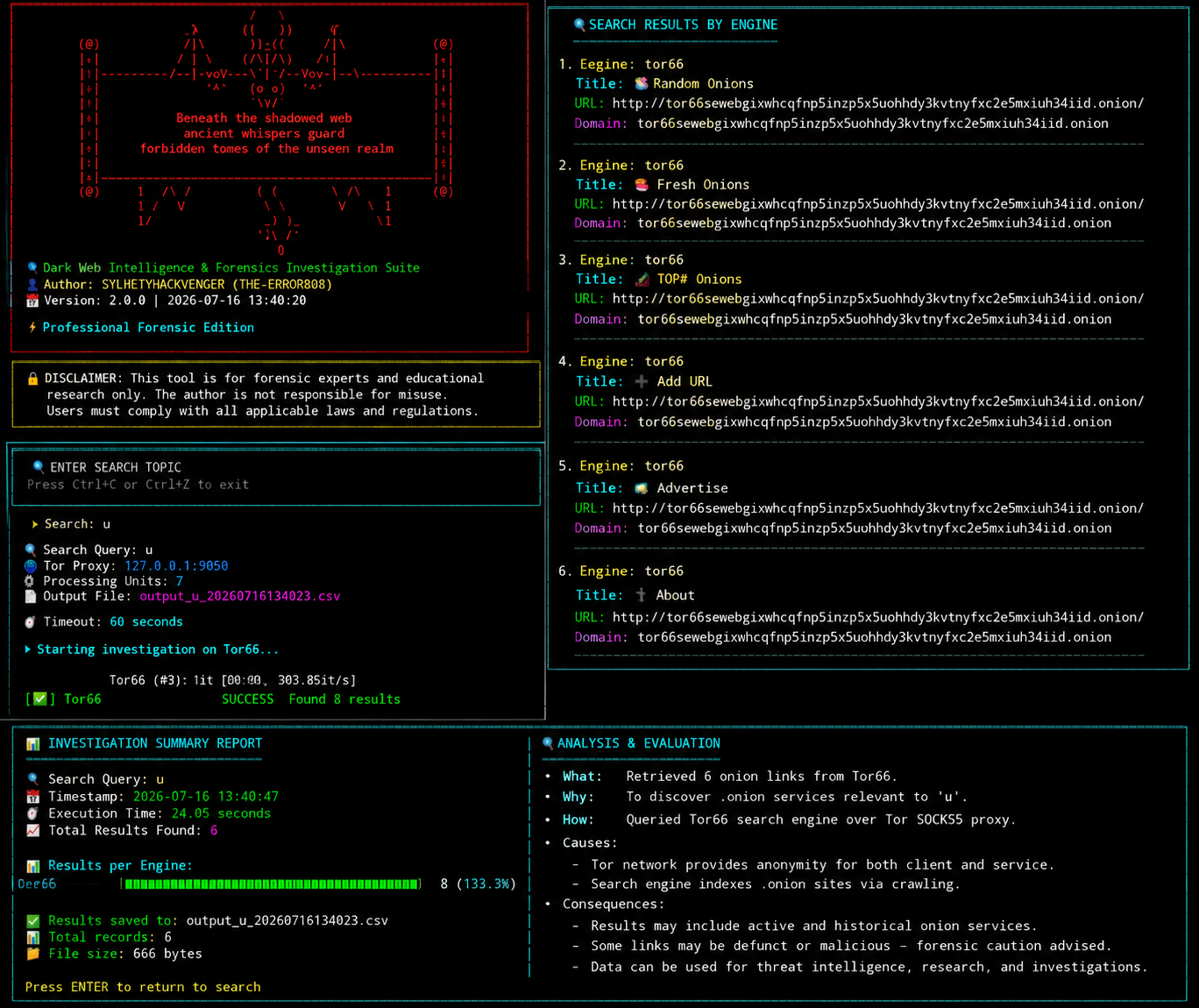
Banner 1

# 📋 概述 ONYXINT 是一款专为安全研究人员、取证调查员和威胁情报分析师设计的先进暗网情报与取证工具。它利用 Tor 网络匿名发现并编录 .onion 服务,通过 Tor66 搜索引擎提供全面的搜索功能。 # 🎯 核心功能 · 🔍 深度暗网搜索 - 查询 Tor66 搜索引擎以获取 .onion 服务 · 🖥️ 交互式 TUI - 具有实时进度且用户友好的终端界面 · 📊 综合分析 - 带有可视化条形图的详细统计数据 · 💾 CSV 导出 - 结构化输出,便于进一步分析 · ⚡ 多进程 - 优化的并行页面抓取 · 🌐 Tor 集成 - 支持 SOCKS5 代理进行匿名浏览 · 🔒 取证就绪 - 专业级调查能力 # 🛠️ 安装说明 要求 版本 检查命令 Python 3.7+ python3 --version Tor 最新版 tor --version Pip 最新版 pip3 --version # Clone repository git clone https://github.com/sylhetyhackvenger/ONYXINT cd ONYXINT # 安装 Python 依赖 requests>=2.28.0 beautifulsoup4>=4.11.0 tqdm>=4.64.0 PySocks>=1.7.1 urllib3>=1.26.0 lxml>=4.9.0 # 安装并启动 Tor (Linux/macOS) sudo apt-get install tor # Ubuntu/Debian brew install tor # macOS sudo systemctl start tor # Start Tor service # 🚀 用法 基本命令 ``` python3 onyxint.py . ``` # 命令行选项 ``` Option Description Default --proxy Tor SOCKS5 proxy 127.0.0.1:9050 --output Output CSV filename output_$SEARCH_$DATE.csv --limit Max pages to load 0 (unlimited) --timeout Request timeout (seconds) 60 --mp_units Parallel processes CPU cores - 1 --preview_limit Results to preview 20 --field_delimiter CSV delimiter , --continuous_write Write progressively False ```

Banner 2

# 示例 # 使用自定义 proxy 搜索 python3 onyxint.py --proxy 127.0.0.1:9050 # 限制为 5 页 python3 onyxint.py --limit 5 # 自定义输出文件 python3 onyxint.py --output investigation_results.csv # 为慢速连接延长 timeout python3 onyxint.py --timeout 120 # 使用 4 个并行进程 python3 onyxint.py --mp_units 4 ``` Column Description Example engine Search engine tor66 name Site title Dark Market link .onion URL http://abc123.onion domain Domain name abc123.onion ``` "engine","name","link","domain" "tor66","Dark Market","http://darkmarket.onion","darkmarket.onion" "tor66","Drug Market","http://drugsmarket.onion","drugsmarket.onion" # 工作流程 ┌─────────────────────────────────────────────────────────────────┐ │ 1. Start Script │ │ └── Display ASCII Banner with Dragon │ │ 2. TUI Interface │ │ └── Prompt user for search topic │ │ 3. Initialize Tor Proxy │ │ └── Setup SOCKS5 connection to Tor network │ │ 4. Query Tor66 │ │ ├── Fetch first page │ │ ├── Calculate total pages │ │ └── Multi-process parallel fetching │ │ 5. Extract Results │ │ ├── Parse HTML with BeautifulSoup │ │ ├── Extract .onion links │ │ └── Deduplicate entries │ │ 6. Generate Report │ │ ├── Display raw results preview │ │ ├── Show analytics dashboard │ │ └── Save to CSV │ │ 7. Loop Back │ │ └── Wait for Enter key to search again │ └─────────────────────────────────────────────────────────────────┘ # 功能状态 描述 🔍 Tor66 搜索 ✅ 查询 Tor66 搜索引擎 🖥️ TUI 界面 ✅ 交互式终端界面 📊 分析仪表板 ✅ 可视化统计与图表 💾 CSV 导出 ✅ 结构化输出格式 ⚡ 多进程 ✅ 并行页面抓取 🌐 Tor 代理 ✅ SOCKS5 匿名浏览 🔄 连续搜索 ✅ 循环进行多次查询 🎨 彩色输出 ✅ 状态指示符与样式 📈 进度条 ✅ 实时进度追踪 🛡️ 错误处理 ✅ 全面的错误恢复 # 技术规格 # ONYXINT/ ├── onyxint.py # Main application ├── requirements.txt # Python dependencies ├── README.md # Documentation └── output/ # Search results (generated) # 使用的 API 端点 服务 URL 用途 Tor66 http://tor66seweb...onion/search?q={query} 搜索 .onion 站点 # 免责声明 🔒 DISCLAIMER: This tool is for forensic experts and educational research only. The author is not responsible for misuse. Users must comply with all applicable laws and regulations. # 🐛 故障排除 常见问题与解决方案 问题 解决方案 Tor 未运行 sudo systemctl start tor 连接超时 增加 --timeout 的值 未找到结果 检查 Tor 连接和查询 未找到模块 pip install -r requirements.txt 权限被拒绝 chmod +x onyxint.py # 📄 许可证 本项目基于 MIT 许可证授权 - 详情请参阅 LICENSE 文件。 # 👤 作者 SYLHETYHACKVENGER (THE-ERROR808) · GitHub: @SYLHETYHACKVENGER · 项目: ONYXINT

Built with 🖤 for the security research community

```
标签:Splunk, 域名侦查, 逆向工具