dev-dipeshkumar/APEX-SOC
GitHub: dev-dipeshkumar/APEX-SOC
APEX SOC 是一个企业级安全运营中心平台,提供实时威胁情报监控、三维地球可视化、告警分诊与资产清单管理能力。
Stars: 0 | Forks: 0
 # APEX SOC
### Enterprise Threat Intelligence Platform
**Real-time threat intelligence • Interactive 3D globe visualization • Security Operations Center**
[](#)
[](#license)
[](#)
[](#technology-stack)
[](#technology-stack)
[](#technology-stack)
[](#technology-stack)
[](#technology-stack)
[](#)
[](#)
[](#)
[](#accessibility)
# APEX SOC
### Enterprise Threat Intelligence Platform
**Real-time threat intelligence • Interactive 3D globe visualization • Security Operations Center**
[](#)
[](#license)
[](#)
[](#technology-stack)
[](#technology-stack)
[](#technology-stack)
[](#technology-stack)
[](#technology-stack)
[](#)
[](#)
[](#)
[](#accessibility)
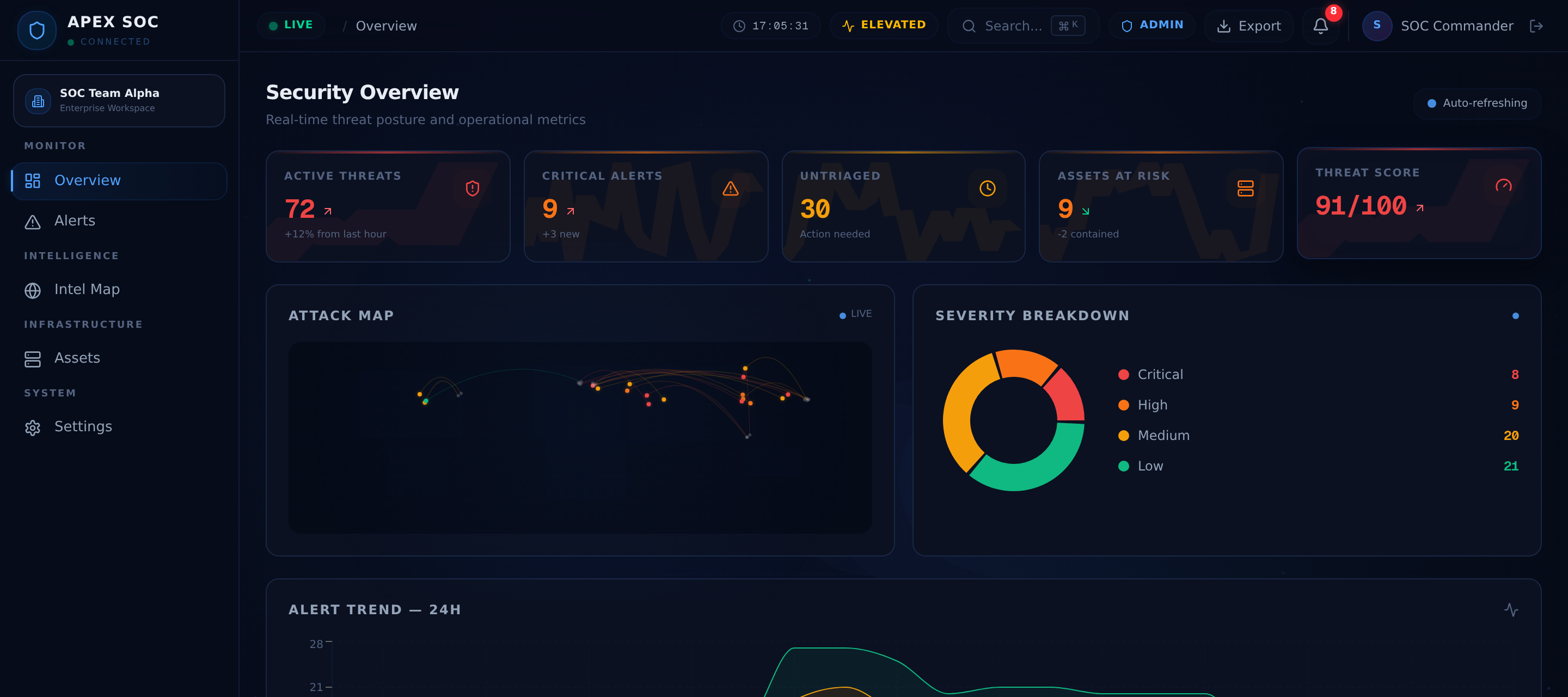
| ### 🌐 Threat Intelligence | Feature | Description | |---------|-------------| | Real-Time Threat Feed | Live-streaming threat events with auto-refresh | | Attack Correlation | Link related events across sources and regions | | Adversary Profiling | Track known threat actor patterns and TTPs | | Geolocation Mapping | Plot threats on interactive 3D globe | | IOC Indicators | Extract and display indicators of compromise | | ### 🗺️ Intel Map | Feature | Description | |---------|-------------| | 3D Globe Rendering | Cinematic Three.js globe with atmosphere shaders | | Attack Arc Visualization | Animated threat arcs between source and target | | Click-to-Investigate | Interactive threat detail panels on selection | | Cinematic Camera | Smooth orbital and zoom camera transitions | | Cloud & Star Effects | Atmospheric rendering with cloud layers and star fields | |
| ### 📊 Dashboard | Feature | Description | |---------|-------------| | KPI Cards | Animated counters for threats, alerts, assets, risk score | | Severity Distribution | Donut chart for threat severity breakdown | | Trend Analytics | Area chart for 24-hour threat trend tracking | | Live Alert Feed | Condensed real-time alert mini-table | | Mini Attack Map | Compact threat visualization overview | | ### 🚨 Alert Console | Feature | Description | |---------|-------------| | Multi-Axis Filtering | Filter by severity, status, attack type, keyword | | Bulk Operations | Select and triage multiple alerts simultaneously | | Alert Detail Drawer | Slide-out panel for per-alert deep investigation | | Severity Escalation | Promote or demote alert severity levels | | Status Transitions | Track alert lifecycle from new to resolved | |
| ### 🖥️ Asset Management | Feature | Description | |---------|-------------| | Card View | Visual asset cards with risk scoring | | Table View | Sortable, filterable TanStack data grid | | Network Topology | Interactive force-directed graph visualization | | Asset Categorization | Servers, workstations, IoT, cloud, mobile, network | | Risk Scoring | Per-asset risk assessment indicators | | ### ⚙️ Platform | Feature | Description | |---------|-------------| | Command Palette | `Ctrl+K` / `Cmd+K` keyboard-first navigation | | Notification Center | Real-time notification drawer with severity badges | | Dark Enterprise Theme | Full dark mode with glassmorphism effects | | Responsive Layout | Adaptive sidebar, panels, and grid layouts | | Accessibility | WCAG AA compliant, keyboard navigable, ARIA labeled | |
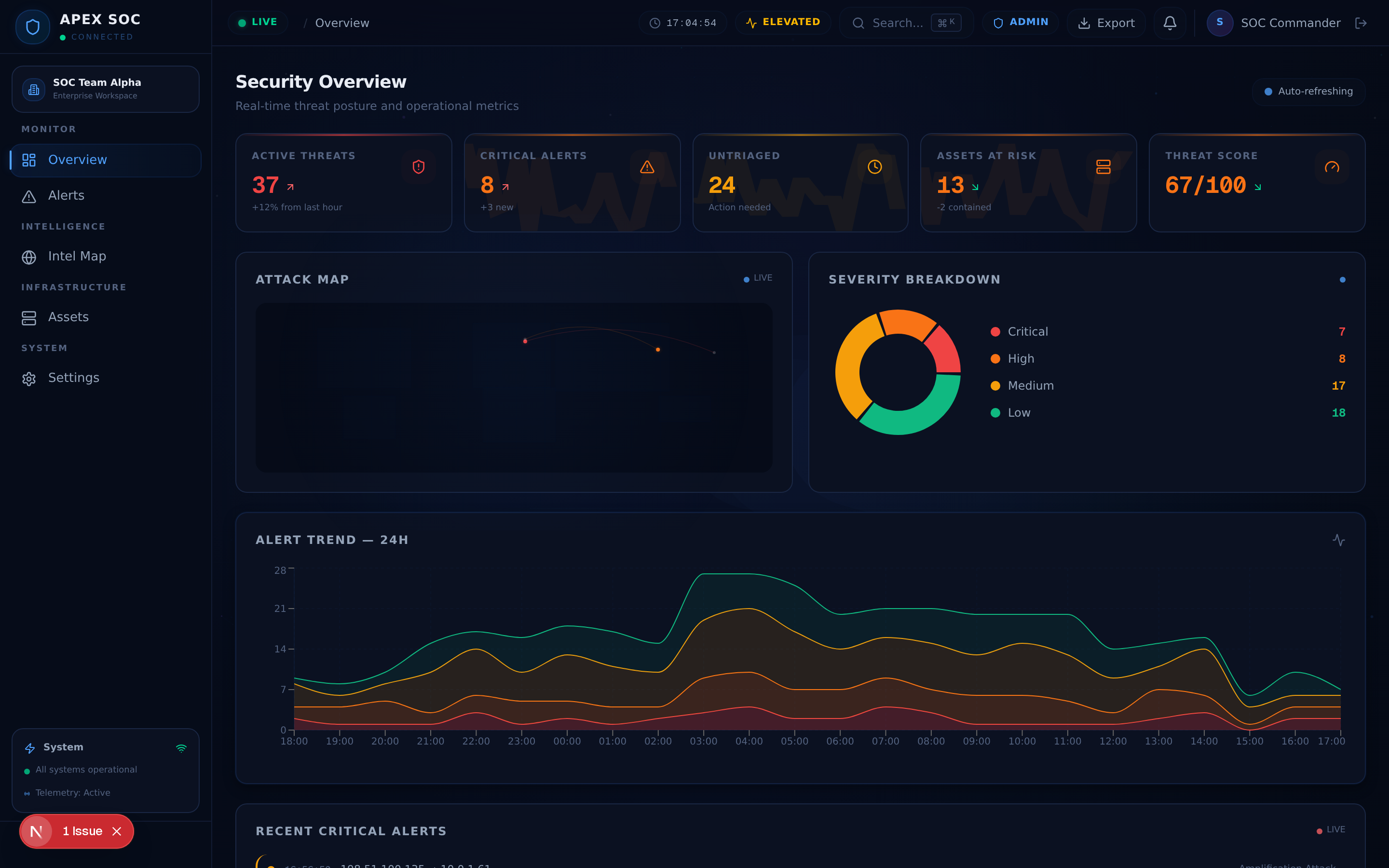 *The SOC dashboard presenting real-time KPI cards, severity distribution, threat trends, and a condensed alert feed — all synchronized with the live data stream.*
### Alerts
*The SOC dashboard presenting real-time KPI cards, severity distribution, threat trends, and a condensed alert feed — all synchronized with the live data stream.*
### Alerts
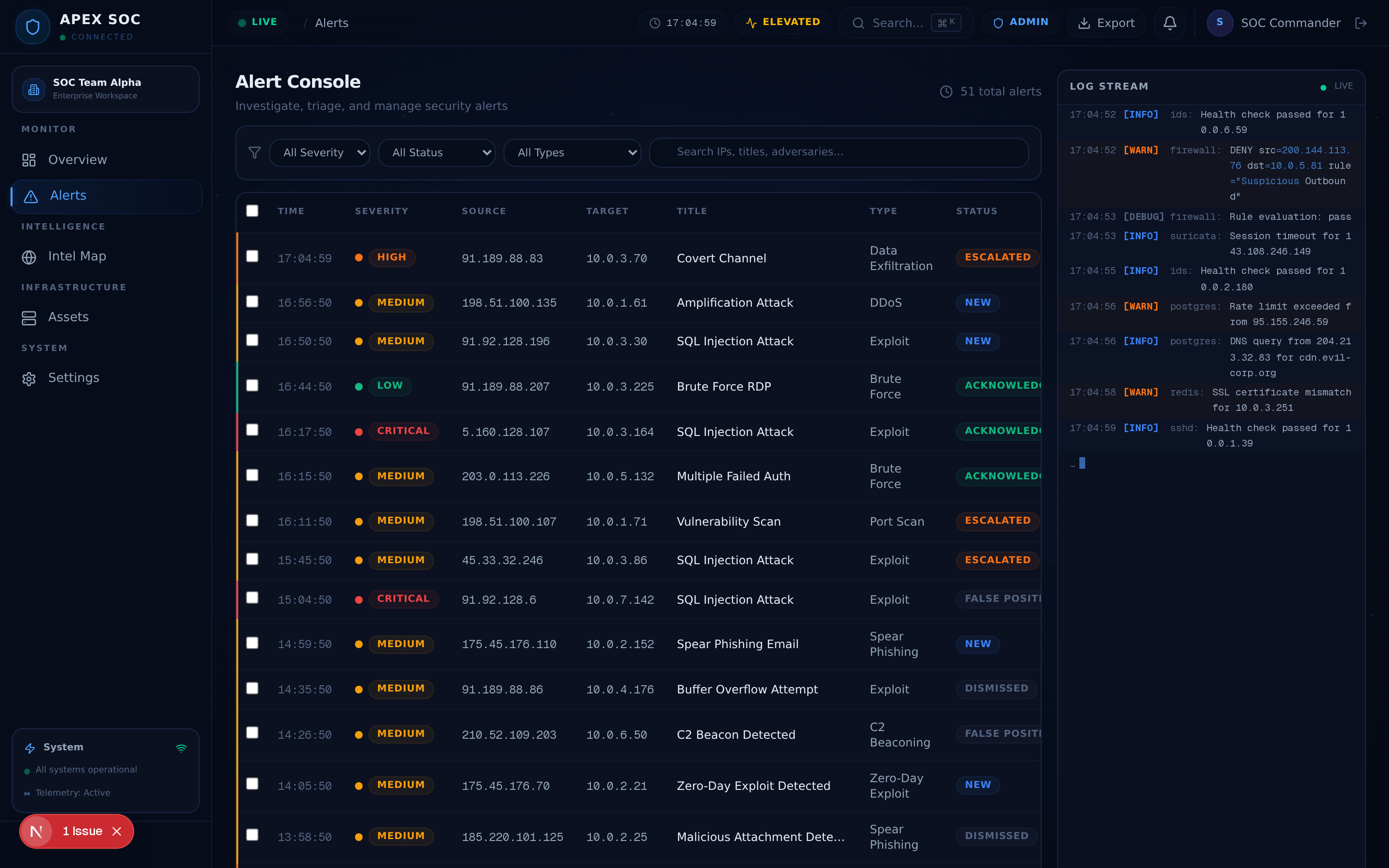 *The alert investigation console with multi-axis filtering, bulk triage operations, and a detail drawer for per-alert deep analysis.*
### Intel Map
*The alert investigation console with multi-axis filtering, bulk triage operations, and a detail drawer for per-alert deep analysis.*
### Intel Map
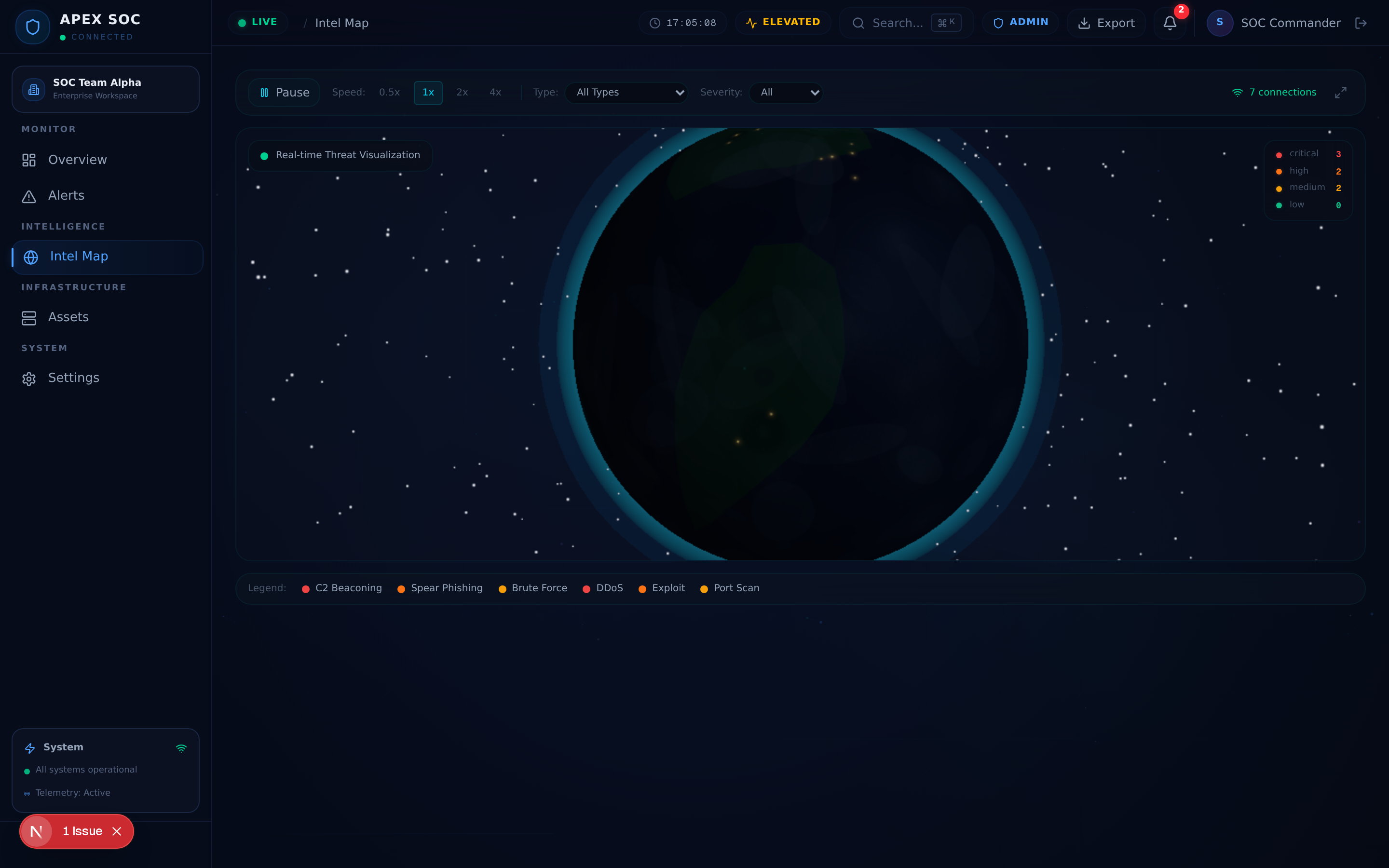 *The interactive 3D globe with cinematic rendering, atmospheric shaders, and real-time attack arc visualization tracing threat origins and targets.*
### Assets
*The interactive 3D globe with cinematic rendering, atmospheric shaders, and real-time attack arc visualization tracing threat origins and targets.*
### Assets
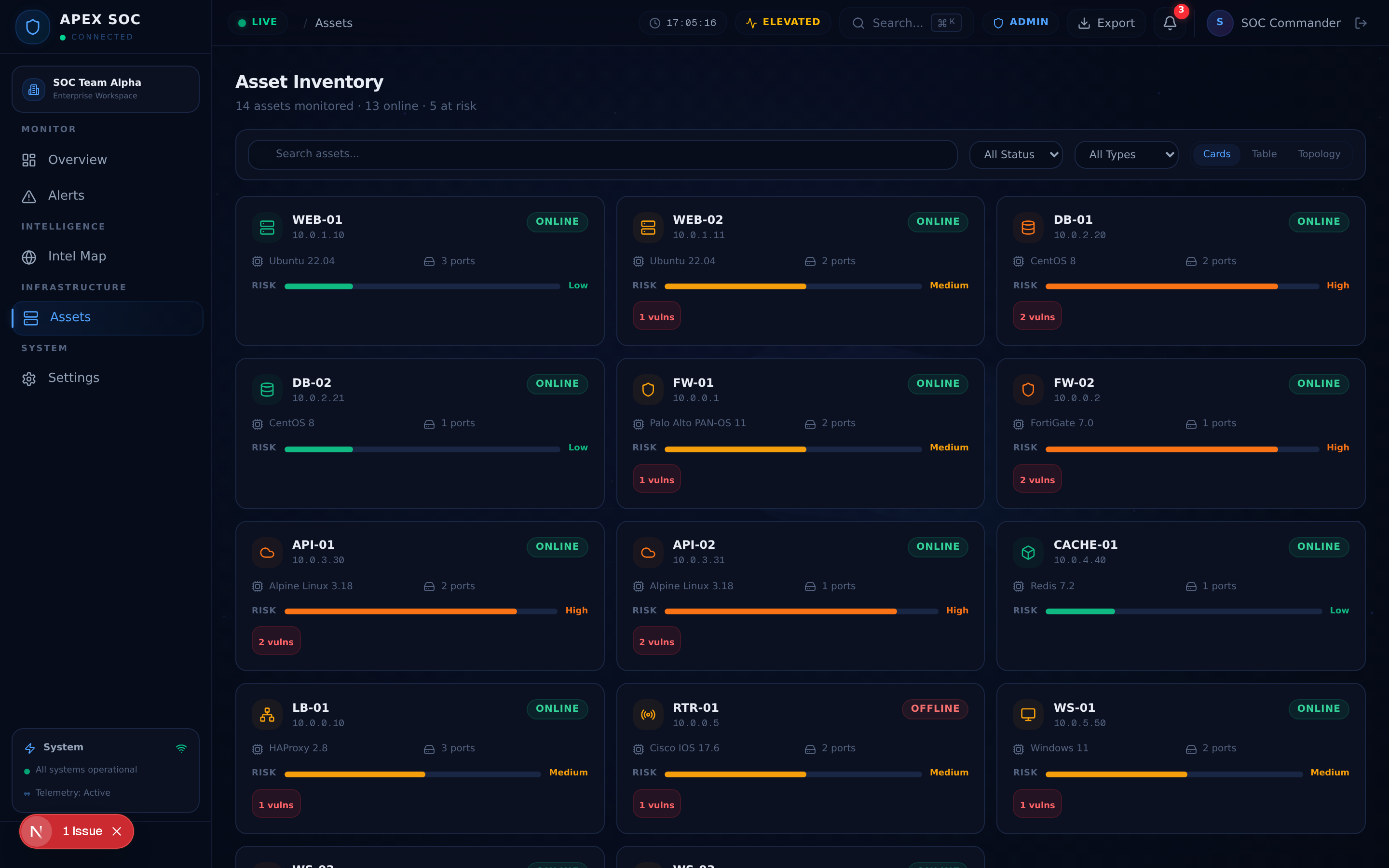 *The asset inventory in card view with risk scoring, status indicators, and type categorization.*
### Network Topology
*The asset inventory in card view with risk scoring, status indicators, and type categorization.*
### Network Topology
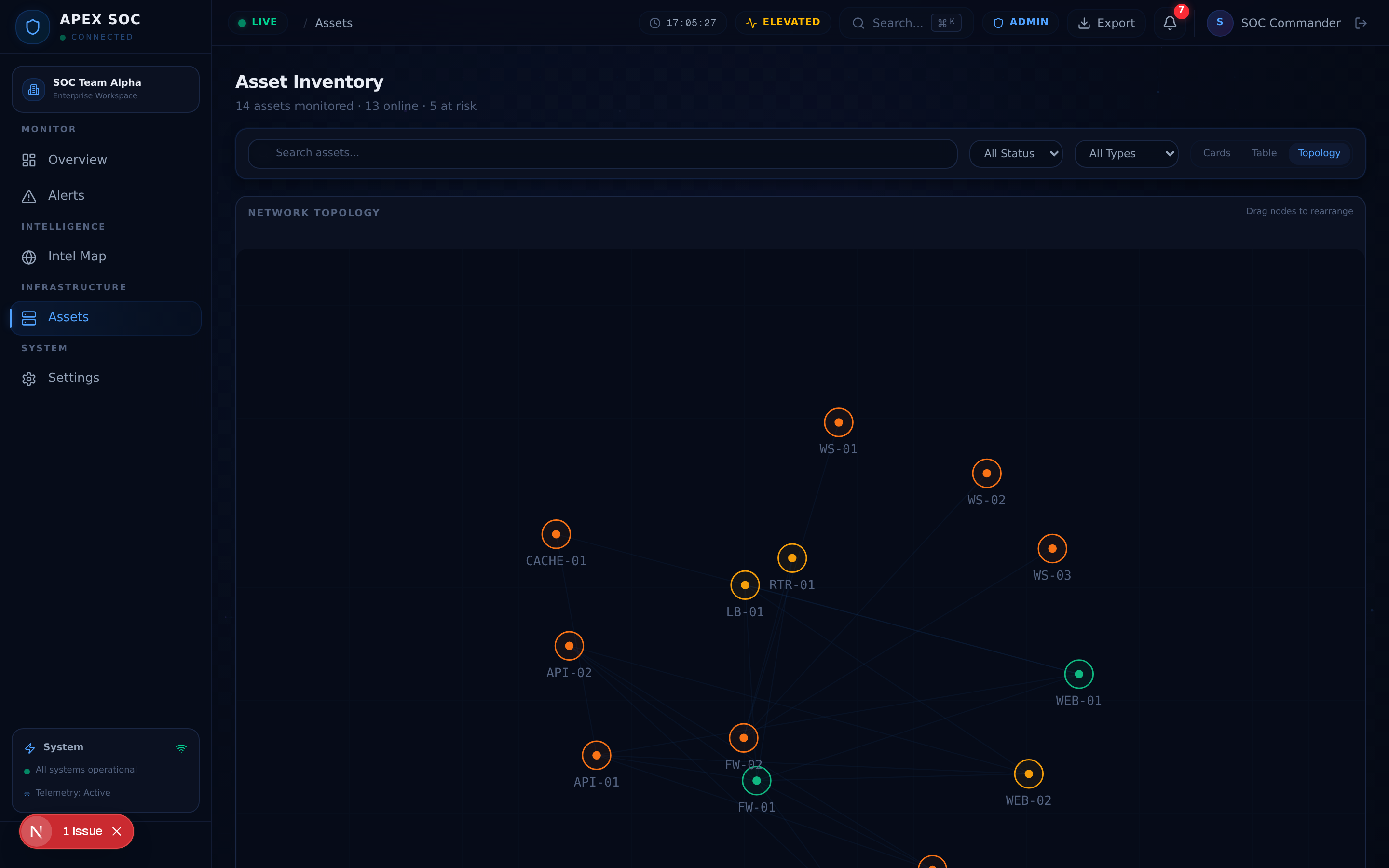 *The force-directed network topology graph showing asset relationships, traffic flow, and edge pulse animations.*
### Settings
*The force-directed network topology graph showing asset relationships, traffic flow, and edge pulse animations.*
### Settings
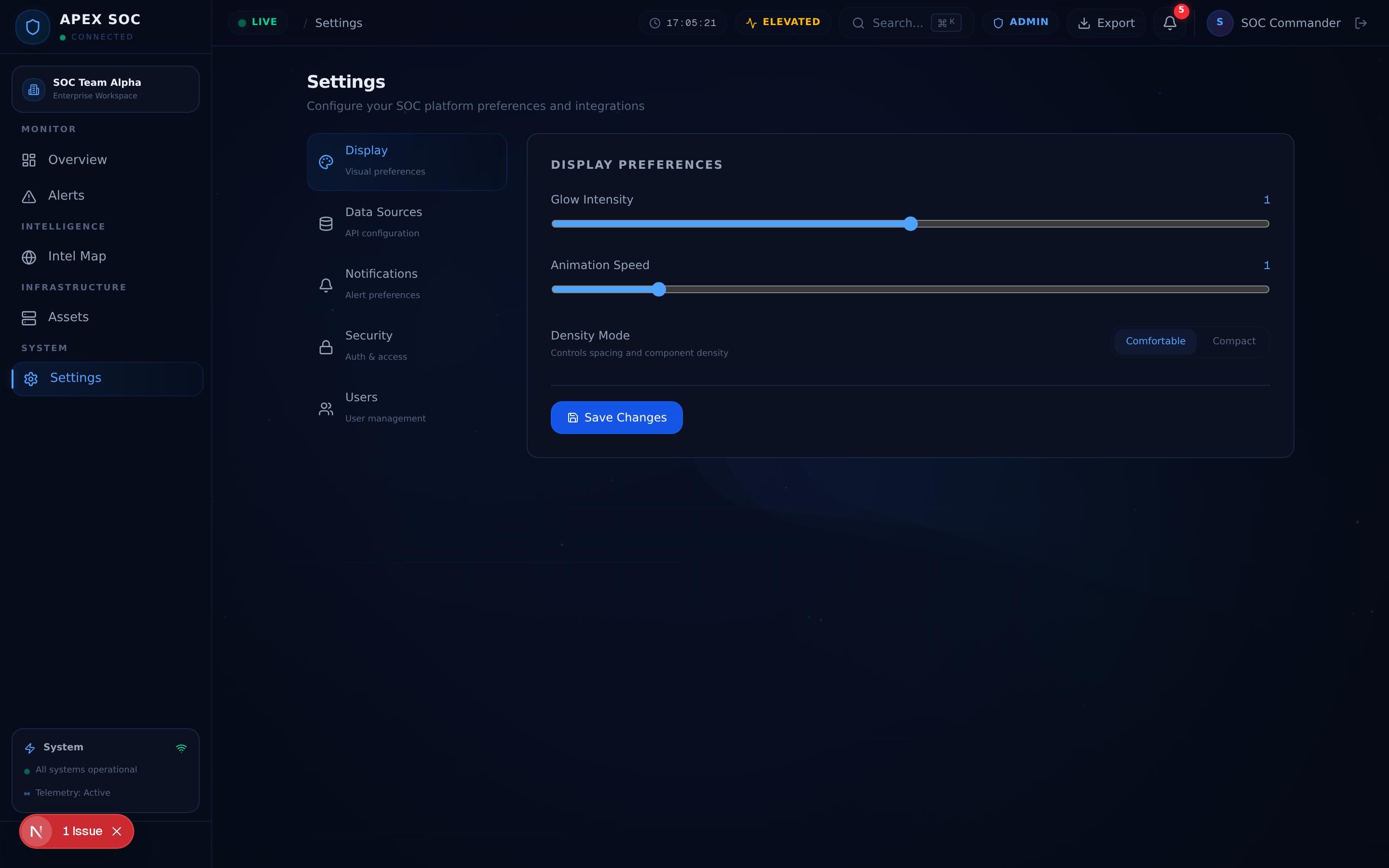 *The settings center with display preferences, data source configuration, notification rules, and security policies.*
### Login
*The settings center with display preferences, data source configuration, notification rules, and security policies.*
### Login
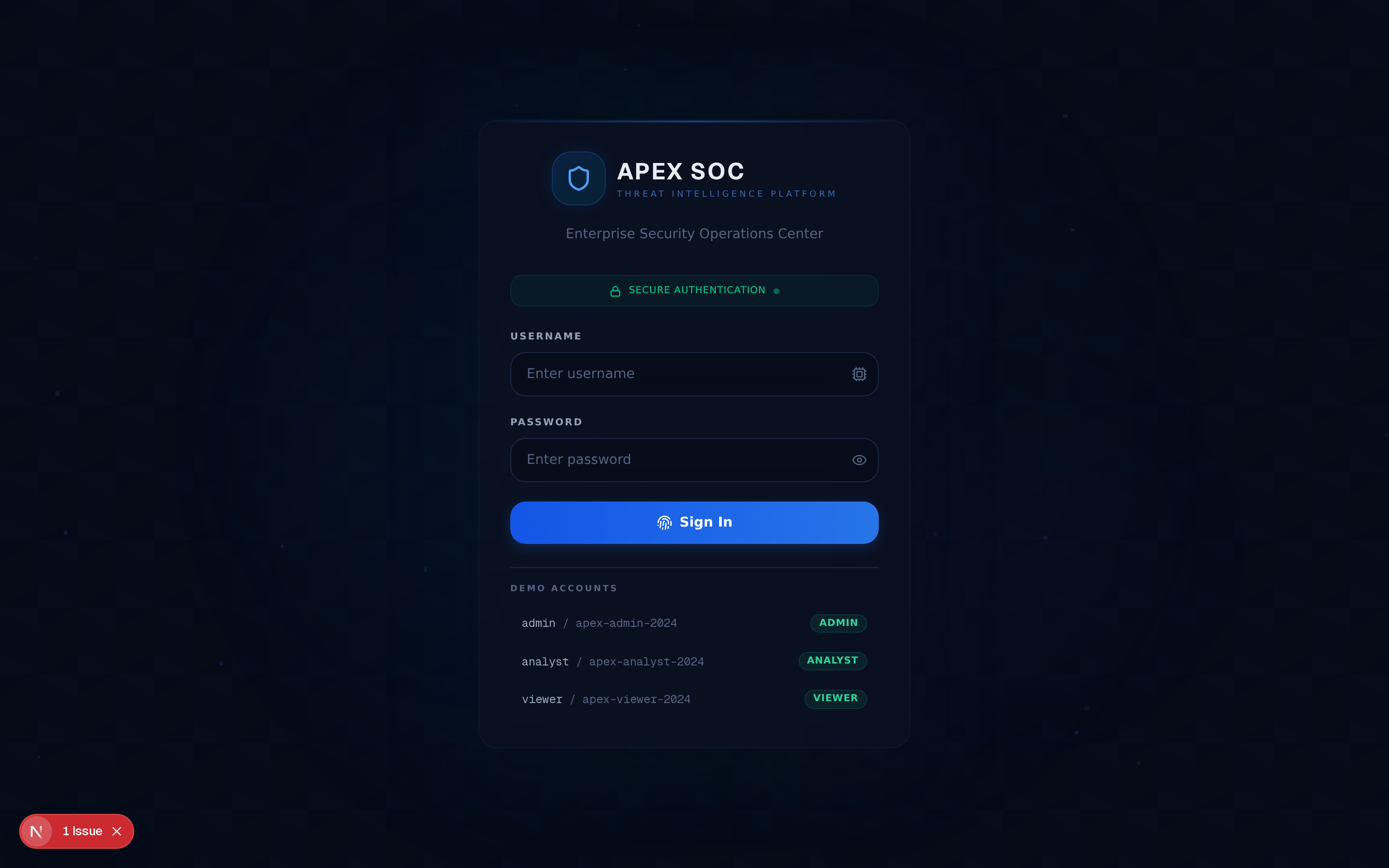 *The login screen with the animated cyber background, form validation, and role-based authentication.*
## Architecture
graph TB
User["👤 User"]
subgraph Frontend["⚛️ Frontend — Next.js 16 App Router"]
UI["React 19
*The login screen with the animated cyber background, form validation, and role-based authentication.*
## Architecture
graph TB
User["👤 User"]
subgraph Frontend["⚛️ Frontend — Next.js 16 App Router"]
UI["React 19Component Tree"] State["Zustand
State Layer"] API_Layer["API Layer
& Services"] end subgraph Visualization["🎨 Visualization Engine"] Globe["3D Globe
React Three Fiber"] Charts["Charts
Recharts"] Topology["Topology
Force Graph"] end subgraph DataEngine["📡 Data Engine"] ThreatEngine["Threat Engine
& Simulation"] RealTime["Real-Time
Event Stream"] Analytics["Analytics
& Correlation"] end subgraph Backend["🗄️ Backend"] Database["SQLite
Prisma ORM"] WebSocket["WebSocket
Socket.IO"] Auth["Authentication
NextAuth.js"] end User --> UI UI --> State UI --> API_Layer State --> ThreatEngine State --> Globe State --> Charts State --> Topology API_Layer --> RealTime API_Layer --> Auth ThreatEngine --> Analytics Analytics --> Database RealTime --> WebSocket WebSocket --> Database ## Application Flow flowchart TD A["🔐 User Login"] --> B{"Authentication
Validation"} B -->|Valid| C["📊 SOC Dashboard"] B -->|Invalid| A C --> D["📡 Live Threat Stream"] D --> E["🌍 Intel Map"] C --> F["🚨 Alert Console"] F --> G["🔍 Alert Investigation"] G --> H["📋 Incident Analysis"] C --> I["🖥️ Asset Inventory"] H --> I I --> J["🔗 Network Topology"] J --> K["🎯 Asset Correlation"] K --> L["⚡ SOC Response"] L --> C style A fill:#1e293b,stroke:#3b82f6,stroke-width:2px,color:#e2e8f0 style C fill:#0f172a,stroke:#06b6d4,stroke-width:2px,color:#e2e8f0 style E fill:#0f172a,stroke:#8b5cf6,stroke-width:2px,color:#e2e8f0 style F fill:#0f172a,stroke:#f59e0b,stroke-width:2px,color:#e2e8f0 style L fill:#0f172a,stroke:#10b981,stroke-width:2px,color:#e2e8f0 ## Project Structure apex-soc/ ├── public/ # Static assets served directly │ ├── logo.svg # APEX SOC logo │ └── robots.txt # Search engine directives │ ├── src/ │ ├── app/ # Next.js App Router │ │ ├── layout.tsx # Root layout — dark theme, Geist fonts, Toaster │ │ ├── page.tsx # SPA shell — view router, auth gate, real-time feeds │ │ ├── globals.css # Enterprise design system — 640 lines of tokens & effects │ │ └── api/ │ │ └── route.ts # API route placeholder │ │ │ ├── components/ │ │ ├── soc/ # Domain-specific SOC components │ │ │ ├── login-page.tsx # Authentication screen with role-based login │ │ │ ├── sidebar.tsx # Collapsible navigation with workspace switcher │ │ │ ├── topbar.tsx # Top navigation bar with search & status │ │ │ ├── dashboard-view.tsx # KPI cards, charts, mini map, alert feed │ │ │ ├── alerts-view.tsx # Investigation console with filters & triage │ │ │ ├── intel-map-view.tsx # 3D globe threat map (dynamically imported) │ │ │ ├── assets-view.tsx # Asset inventory — card, table, topology views │ │ │ ├── settings-view.tsx # Settings center — display, data, security │ │ │ ├── log-stream.tsx # Real-time scrolling log output │ │ │ ├── notification-drawer.tsx # Slide-out notification panel │ │ │ ├── command-palette.tsx # Ctrl+K / Cmd+K command search │ │ │ ├── cyber-background.tsx # Animated gradient & particle background │ │ │ └── three-globe.tsx # Three.js globe wrapper (SSR-safe) │ │ │ │ │ ├── globe/ # 3D globe sub-system (11 modules) │ │ │ ├── globe-scene.tsx # Scene orchestrator — lights, camera, post-processing │ │ │ ├── earth-mesh.tsx # Earth sphere geometry & texture mapping │ │ │ ├── earth-textures.ts # Texture loading & caching │ │ │ ├── clouds.tsx # Animated cloud layer overlay │ │ │ ├── atmosphere.tsx # Atmospheric glow — custom GLSL shader │ │ │ ├── background-effects.tsx # Star field & deep space rendering │ │ │ ├── cinematic-camera.tsx # Smooth orbital & zoom camera transitions │ │ │ ├── globe-interaction.tsx # Click & hover event handling │ │ │ ├── globe-utils.ts # Geospatial math, lat/lng conversions │ │ │ ├── threat-visualization.tsx # Attack arc rendering with animation │ │ │ ├── attack-info-panel.tsx # Threat detail overlay panel │ │ │ └── shaders/ │ │ │ └── index.ts # Custom GLSL vertex & fragment shaders │ │ │ │ │ └── ui/ # shadcn/ui component library (40+ primitives) │ │ ├── accordion.tsx ├── hover-card.tsx ├── select.tsx │ │ ├── alert.tsx ├── input-otp.tsx ├── separator.tsx │ │ ├── alert-dialog.tsx ├── input.tsx ├── sheet.tsx │ │ ├── avatar.tsx ├── label.tsx ├── sidebar.tsx │ │ ├── badge.tsx ├── menubar.tsx ├── skeleton.tsx │ │ ├── button.tsx ├── navigation-menu.tsx ├── slider.tsx │ │ ├── calendar.tsx ├── pagination.tsx ├── sonner.tsx │ │ ├── card.tsx ├── popover.tsx ├── switch.tsx │ │ ├── carousel.tsx ├── progress.tsx ├── table.tsx │ │ ├── chart.tsx ├── radio-group.tsx ├── tabs.tsx │ │ ├── checkbox.tsx ├── resizable.tsx ├── textarea.tsx │ │ ├── collapsible.tsx ├── scroll-area.tsx ├── toast.tsx │ │ ├── command.tsx ├── context-menu.tsx ├── toggle.tsx │ │ ├── dialog.tsx ├── dropdown-menu.tsx ├── toggle-group.tsx │ │ ├── drawer.tsx └── form.tsx └── tooltip.tsx │ │ │ ├── stores/ # Zustand state management │ │ ├── ui-store.ts # Auth, navigation, dashboard stats, settings, notifications │ │ ├── alert-store.ts # Alerts, triage, filters, bulk operations │ │ ├── asset-store.ts # Assets, topology, search, filters │ │ └── globe-store.ts # Threats, camera, interactions, FPS tracking │ │ │ ├── hooks/ # Custom React hooks │ │ ├── use-toast.ts # Toast notification dispatch │ │ └── use-mobile.ts # Responsive breakpoint detection │ │ │ └── lib/ # Shared utilities & data layer │ ├── constants.ts # Types, enums, color maps, adversary profiles, geo coords │ ├── mock-data.ts # Comprehensive mock data generators │ ├── formatters.ts # Date, time, number formatting utilities │ ├── exporters.ts # CSV & PDF export utilities │ ├── db.ts # Prisma client singleton │ └── utils.ts # cn() — clsx + tailwind-merge │ ├── prisma/ │ └── schema.prisma # Database schema — SQLite, User & Post models │ ├── db/ │ └── custom.db # SQLite database file │ ├── examples/ │ └── websocket/ │ ├── server.ts # Socket.IO WebSocket server (port 3003) │ └── frontend.tsx # WebSocket client integration example │ ├── docs/ # Documentation & assets │ └── images/ # Screenshots, banners, diagrams │ ├── .env # Environment variables ├── package.json # Project manifest & scripts ├── next.config.ts # Next.js configuration ├── tailwind.config.ts # Tailwind CSS design tokens ├── tsconfig.json # TypeScript configuration ├── components.json # shadcn/ui component registry ├── postcss.config.mjs # PostCSS plugins ├── eslint.config.mjs # ESLint rules └── Caddyfile # Caddy reverse proxy configuration ## Technology Stack | Category | Technology | Version | Purpose | |----------|-----------|---------|---------| | **Framework** | [Next.js](https://nextjs.org/) | 16 | App Router, SSR, standalone output | | **Language** | [TypeScript](https://www.typescriptlang.org/) | 5 | Static type checking, DX | | **UI Library** | [React](https://react.dev/) | 19 | Component architecture, concurrent features | | **Styling** | [Tailwind CSS](https://tailwindcss.com/) | 4 | Utility-first CSS with design tokens | | **Components** | [shadcn/ui](https://ui.shadcn.com/) | Latest | 40+ Radix UI-based primitives | | **Primitives** | [Radix UI](https://www.radix-ui.com/) | Latest | Accessible headless components | | **3D Graphics** | [Three.js](https://threejs.org/) | r170 | WebGL globe & threat visualization | | **3D React** | [React Three Fiber](https://docs.pmnd.rs/react-three-fiber) | Latest | Declarative Three.js for React | | **3D Helpers** | [@react-three/drei](https://github.com/pmndrs/drei) | Latest | Camera controls, helpers, effects | | **Post-Processing** | [@react-three/postprocessing](https://github.com/pmndrs/postprocessing) | Latest | Bloom, SSAO, vignette effects | | **Animation** | [Framer Motion](https://www.framer.com/motion/) | Latest | Page transitions, micro-interactions | | **Animation** | [GSAP](https://gsap.com/) | Latest | Advanced timeline animations | | **State** | [Zustand](https://zustand-demo.pmnd.rs/) | 5 | Lightweight global state management | | **Data Fetching** | [TanStack Query](https://tanstack.com/query) | 5 | Server state, caching, synchronization | | **Data Table** | [TanStack Table](https://tanstack.com/table) | 8 | Headless data grid with sorting & filtering | | **Charts** | [Recharts](https://recharts.org/) | Latest | Area, donut, and trend charts | | **Forms** | [React Hook Form](https://react-hook-form.com/) | Latest | Performant form validation | | **Validation** | [Zod](https://zod.dev/) | Latest | Schema validation & type inference | | **Database** | [Prisma](https://www.prisma.io/) | Latest | Type-safe ORM for SQLite | | **Auth** | [NextAuth.js](https://next-auth.js.org/) | 4 | Authentication framework | | **WebSocket** | [Socket.IO](https://socket.io/) | Latest | Real-time bidirectional communication | | **Toast** | [Sonner](https://sonner.emilkowal.dev/) | Latest | Toast notification system | | **Theming** | [next-themes](https://github.com/pacocoursey/next-themes) | Latest | Dark mode class-based theming | | **Icons** | [Lucide React](https://lucide.dev/) | Latest | Consistent icon library | | **i18n** | [next-intl](https://next-intl.dev/) | 4 | Internationalization framework | | **Markdown** | [react-markdown](https://github.com/remarkjs/react-markdown) | Latest | Markdown rendering | | **MDX** | [MDX Editor](https://mdxeditor.dev/) | Latest | Rich text editing | | **DnD** | [dnd-kit](https://dndkit.com/) | Latest | Drag and drop interactions | | **Build** | [Vite](https://vitejs.dev/) (via Next.js) | — | Fast bundling & HMR | | **Lint** | [ESLint](https://eslint.org/) | 9 | Code quality enforcement | | **Format** | [Prettier](https://prettier.io/) | Latest | Code formatting | | **Runtime** | [Bun](https://bun.sh/) | Latest | JavaScript runtime & package manager | ## Installation ### Prerequisites - **Node.js** ≥ 18.x - **Bun** ≥ 1.x (recommended) or npm ≥ 9.x - **Git** ≥ 2.x ### Quick Start # 1. Clone the repository git clone https://github.com/your-org/apex-soc.git cd apex-soc # 2. Install dependencies bun install # 3. Set up environment variables cp .env.example .env # 4. Initialize the database bun run db:push bun run db:generate # 5. Start the development server bun run dev The application will be available at **http://localhost:3000**. ### Default Login Credentials | Username | Password | Role | Display Name | |----------|----------|------|-------------| | `admin` | `apex-admin-2024` | Admin | SOC Commander | | `analyst` | `apex-analyst-2024` | Analyst | Jane Reyes | | `viewer` | `apex-viewer-2024` | Viewer | Guest Observer | ### Production Build # Build for production bun run build # Start production server bun run start The production build uses Next.js standalone output mode with Bun runtime for optimal performance. ### Preview Production Build bun run build bun run preview ## Environment Variables ### `.env.example` # ─── Database ─────────────────────────────────────────── DATABASE_URL="file:./db/custom.db" # ─── Authentication ───────────────────────────────────── NEXTAUTH_SECRET="your-nextauth-secret-change-me" NEXTAUTH_URL="http://localhost:3000" # ─── Application ──────────────────────────────────────── NEXT_PUBLIC_APP_NAME="APEX SOC" NEXT_PUBLIC_APP_VERSION="0.2.0" NEXT_PUBLIC_APP_URL="http://localhost:3000" # ─── WebSocket (Optional) ────────────────────────────── WEBSOCKET_PORT=3003 WEBSOCKET_ENABLED=false # ─── Data Simulation ─────────────────────────────────── NEXT_PUBLIC_SIMULATION_INTERVAL=1500 NEXT_PUBLIC_MAX_LOG_LINES=200 # ─── Globe Configuration ─────────────────────────────── NEXT_PUBLIC_GLOBE_FPS_CAP=60 NEXT_PUBLIC_GLOBE_AUTO_ROTATE=true NEXT_PUBLIC_GLOBE_ROTATION_SPEED=0.001 ## Scripts | Script | Command | Description | |--------|---------|-------------| | `dev` | `bun run dev` | Start development server on port 3000 with live logging | | `build` | `bun run build` | Production build with standalone output | | `start` | `bun run start` | Start production server via Bun runtime | | `preview` | `bun run preview` | Preview the production build locally | | `lint` | `bun run lint` | Run ESLint on all source files | | `format` | `bun run format` | Format code with Prettier | | `db:push` | `bun run db:push` | Push Prisma schema to database | | `db:generate` | `bun run db:generate` | Generate Prisma client | | `db:migrate` | `bun run db:migrate` | Run database migrations | | `db:reset` | `bun run db:reset` | Reset database to initial state | ## Security Features APEX SOC provides a comprehensive visualization and monitoring interface for security operations. The following capabilities are designed for threat awareness and analysis:
🔍 Threat Visualization
- **3D Attack Arc Mapping** — Visualize threat origins and targets on an interactive globe with animated arc trajectories - **Adversary Profiling** — Track known threat actor patterns including APT groups, hacktivist collectives, and script kiddie operations - **Geolocation Intelligence** — Map threats to geographic coordinates with region-specific severity analysis - **Attack Type Classification** — Categorize threats by vector: DDoS, Ransomware, Phishing, Data Exfiltration, Zero-Day, Brute Force, and more - **Severity Scoring** — Real-time severity classification (Critical, High, Medium, Low, Info) with color-coded indicators📊 Security Dashboards
- **KPI Monitoring** — Track active threats, open alerts, total assets, and organizational risk score in real time - **Severity Distribution** — Visual breakdown of threats by severity level with donut chart visualization - **Trend Analytics** — 24-hour threat trend analysis with area chart tracking - **Live Alert Stream** — Continuously updating alert feed with severity badges and time-since-event indicators - **Attack Mini Map** — Condensed geographic threat overview for rapid situational awareness🖥️ Asset Monitoring
- **Asset Inventory** — Categorized inventory of servers, workstations, network devices, IoT, cloud instances, and mobile assets - **Risk Scoring** — Per-asset risk assessment with visual severity indicators - **Status Tracking** — Monitor asset status: Online, Offline, Compromised, Maintenance, Unknown - **Network Topology** — Force-directed graph visualization of asset relationships and traffic flow - **Edge Pulse Animation** — Animated connections showing active data flow between assets⚡ Real-Time Event Handling
- **Simulated Threat Feed** — Auto-refreshing threat event stream with configurable interval - **WebSocket Infrastructure** — Socket.IO server ready for real-time bidirectional data push - **Live Log Stream** — Scrolling console output of security events and system activity - **Notification Dispatch** — Real-time notification drawer with severity-based sorting - **Command Palette** — Keyboard-first navigation (`Ctrl+K`) for rapid SOC operations🚀 Optimization Techniques
| Technique | Implementation | Impact | |-----------|---------------|--------| | **Code Splitting** | Next.js automatic route-based splitting + dynamic imports for 3D globe | Reduces initial bundle size; globe loads only when Intel Map is accessed | | **Lazy Loading** | `React.lazy()` + `Suspense` for heavy components (Three.js, topology) | Defers non-critical rendering until needed | | **GPU Acceleration** | Three.js WebGL rendering pipeline with hardware acceleration | Offloads 3D computation to GPU, freeing main thread | | **Memoization** | `React.memo()`, `useMemo()`, `useCallback()` on expensive renders | Prevents unnecessary re-renders in KPI cards, charts, and lists | | **Virtualization** | Windowed rendering for large alert and asset lists | Renders only visible rows, maintaining scroll performance with thousands of items | | **Animation Batching** | Framer Motion layout animations + requestAnimationFrame scheduling | Groups DOM mutations into single paint frames | | **Standalone Output** | Next.js `output: "standalone"` with Bun runtime | Minimal production server with reduced cold-start time | | **FPS Capping** | Configurable globe frame rate cap (`NEXT_PUBLIC_GLOBE_FPS_CAP`) | Limits GPU usage when full frame rate is unnecessary | | **State Isolation** | Zustand store separation (UI, Alert, Asset, Globe) | Component re-renders only when relevant store slices update | | **SSR-Safe Imports** | Dynamic import with `ssr: false` for Three.js components | Prevents server-side rendering failures with WebGL-dependent code |📈 Performance Benchmarks
🎨 Design System
APEX SOC features a meticulously crafted enterprise design system built on a 50+ token CSS custom property architecture: ### Color Palette | Token | Hex | Usage | |-------|-----|-------| | Deep Navy | `#060b18` | Primary background | | Dark Slate | `#0f172a` | Surface backgrounds | | Graphite | `#1e293b` | Card and panel surfaces | | SOC Blue | `#3b82f6` | Primary interactive color | | Electric Cyan | `#06b6d4` | Accent highlights, links | | Emerald | `#10b981` | Success, online status | | Amber | `#f59e0b` | Warning, medium severity | | Orange | `#f97316` | High severity indicators | | Red | `#ef4444` | Critical alerts, errors | | Purple | `#8b5cf6` | Special accents, intel | ### Visual Effects - **Glassmorphism** — Backdrop blur on dialogs, panels, command palette, and overlays (`.glass`, `.glass-heavy`, `.glass-light`) - **Animated Gradient Borders** — CSS conic-gradient border rotation on interactive cards - **Pulse Indicators** — Severity-aware pulse rings on KPI cards and status badges - **Scan-Line Animation** — Subtle CRT-style scan effect on focused elements - **Shimmer Skeletons** — Loading state placeholders with gradient sweep animation - **Cyber Background** — Multi-layer animated gradient with particle effects ### Typography - **Font Family** — Geist Sans (headings, body) + Geist Mono (code, logs, data) - **Scale** — 12px base with consistent 4px spacing increments - **Weight Hierarchy** — 400 (body) → 500 (labels) → 600 (headings) → 700 (KPI values)✨ Animations & Micro-Interactions
| Animation | Trigger | Duration | Easing | |-----------|---------|----------|--------| | Page Transition | View change | 300ms | Spring (stiffness: 300, damping: 30) | | Card Hover Lift | Mouse enter | 200ms | Ease-out | | KPI Counter | Value change | 800ms | Ease-out with stagger | | Alert Row Flash | New alert | 500ms | Ease-in-out | | Globe Camera | Click target | 1200ms | Cubic bezier (0.4, 0, 0.2, 1) | | Attack Arc | Threat event | Continuous | Linear with opacity fade | | Sidebar Collapse | Toggle | 250ms | Spring (stiffness: 400, damping: 35) | | Notification Slide | Drawer open | 300ms | Spring (stiffness: 300, damping: 30) | | Command Palette | Ctrl+K | 200ms | Spring (stiffness: 500, damping: 35) | | Gradient Border | Card focus | 3s loop | Linear rotation |
**APEX SOC** — v0.2.0
Made with React & TypeScript
Enterprise Security Dashboard
[⬆ Back to Top](#apex-soc)
标签:HTTP/HTTPS抓包, React, Syscalls, Three.js, 威胁情报, 安全运营, 开发者工具, 态势感知, 扫描框架, 自动化攻击