ThakurDivyanshsingh-77/CodeMind-AI-code-reviews-and-bug-finder-
GitHub: ThakurDivyanshsingh-77/CodeMind-AI-code-reviews-and-bug-finder-
一个 AI 驱动的全栈代码审查平台,通过上传 ZIP 或导入 GitHub 仓库自动检测 Bug、安全漏洞和性能问题,并支持交互式 AI 对话。
Stars: 1 | Forks: 0
     




[🚀 在线演示](https://code-mind-ai-code-reviews-and-bug-f.vercel.app/) · [📖 文档](./) · [🐛 报告 Bug](#) · [✨ 请求功能](#)
## 📌 目录 - [关于项目](#-about-the-project) - [截图与预览](#-screenshots--preview) - [核心功能](#-key-features) - [技术栈](#️-tech-stack) - [架构](#-architecture) - [仓库结构](#-repository-structure) - [快速开始](#-getting-started) - [API 参考](#-api-reference) - [路线图](#️-roadmap) - [贡献](#-contributing) - [许可证](#-license) - [联系方式](#-contact) ## 🎯 关于项目 **AI Code Reviewer** 是一个自动化的 code review 平台,允许开发者上传项目归档(ZIP)或直接导入 GitHub repo,以获得全面且 AI 驱动的审查 —— 识别 bug、安全漏洞和性能瓶颈 —— 并配备交互式 AI 对话,解答关于代码修复的问题。
## 🖼️ 截图与预览
### 🏠 Dashboard
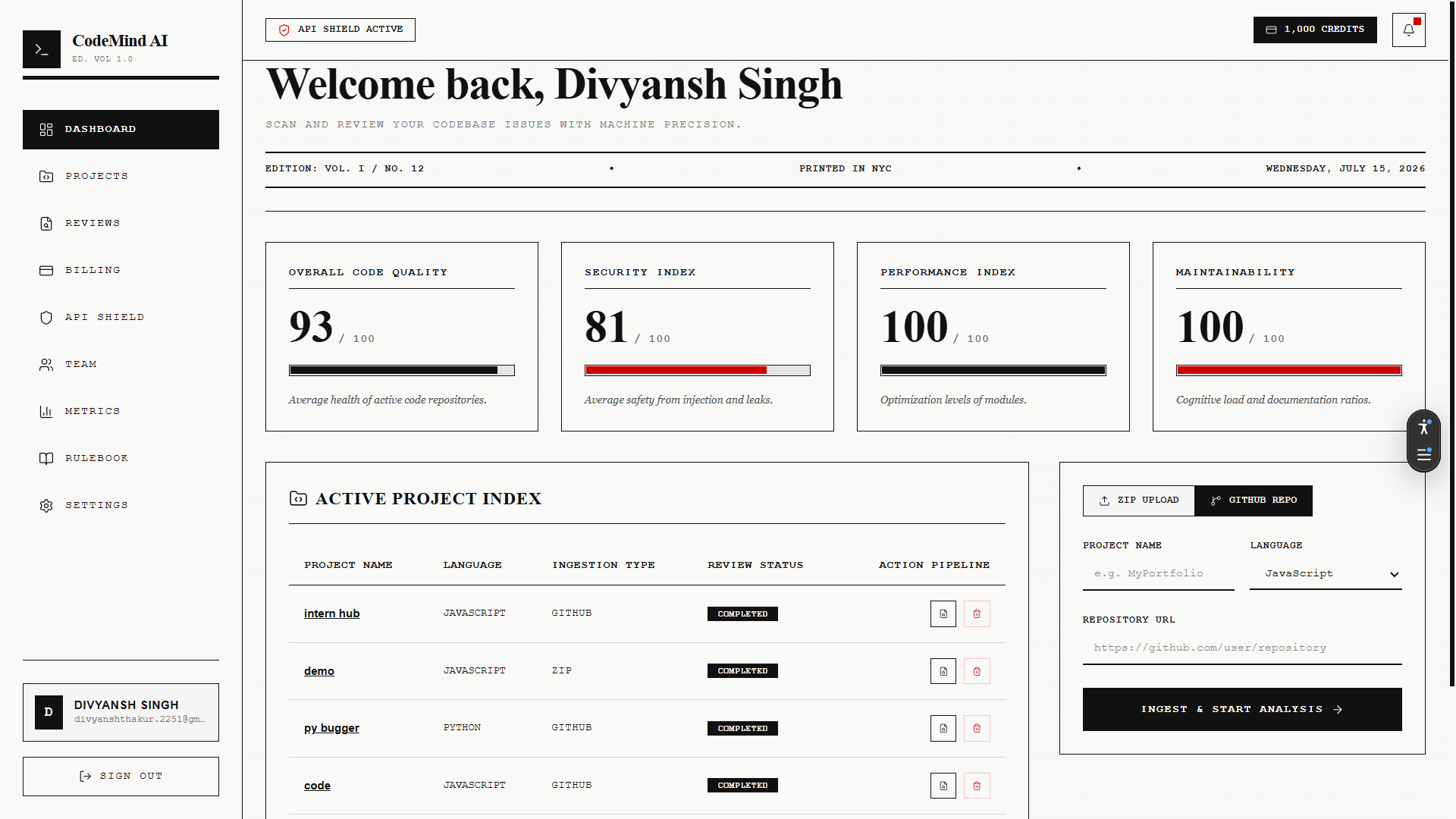
### 📊 审查报告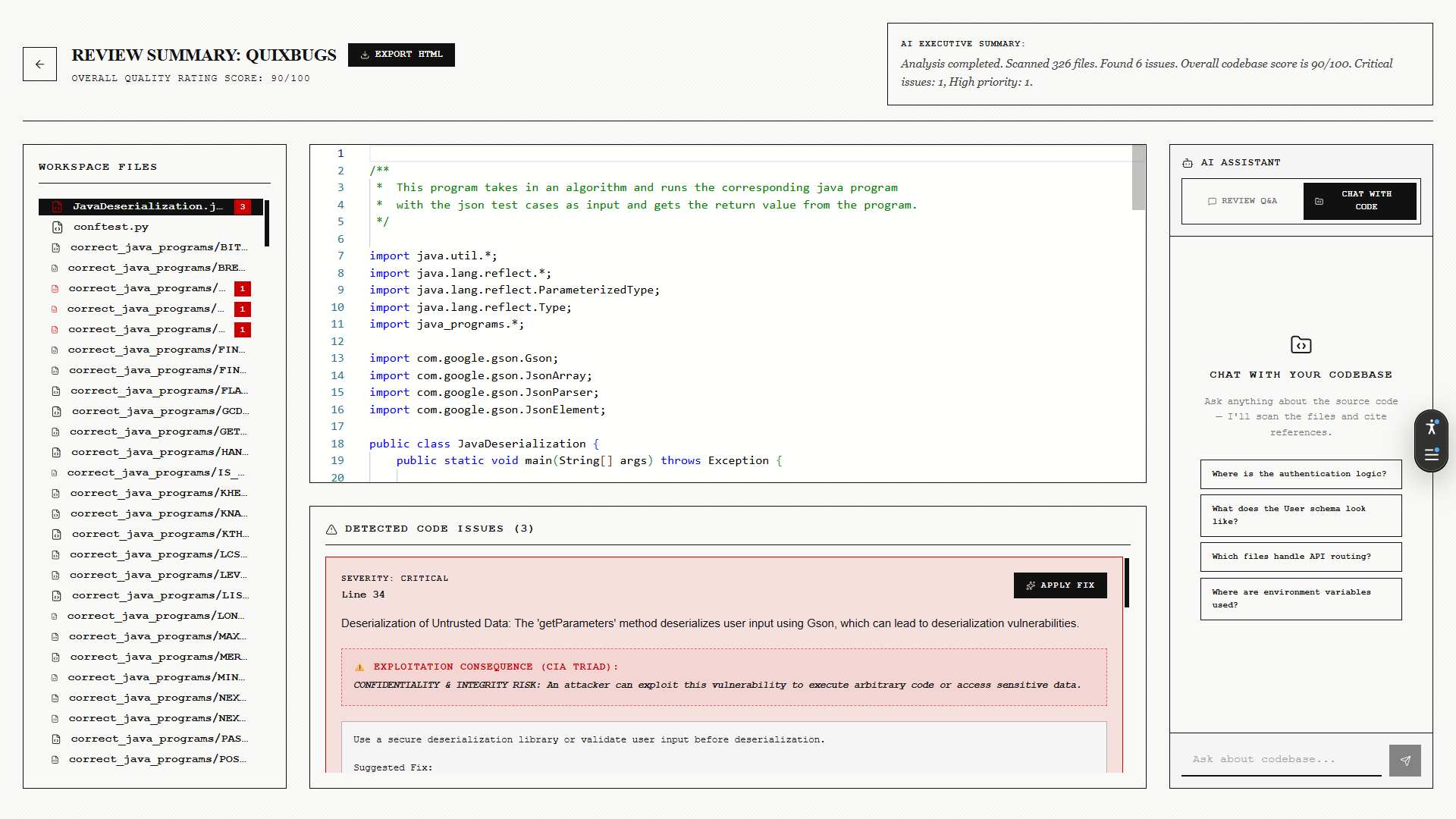
### 🎬 在线演示
### 📊 审查报告
|
💬 AI Chat
|
🔐 Authentication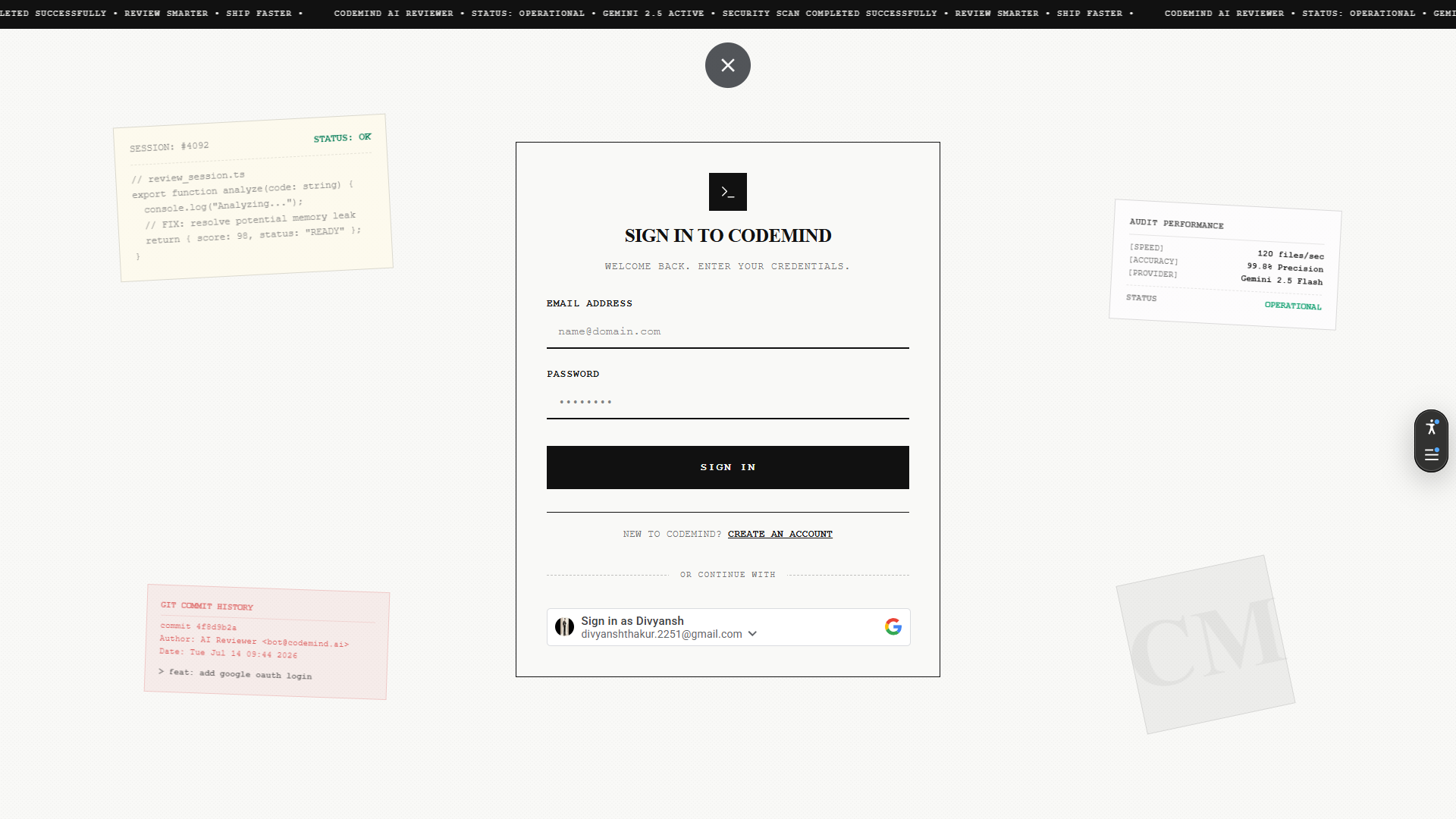
|
📁 GitHub Import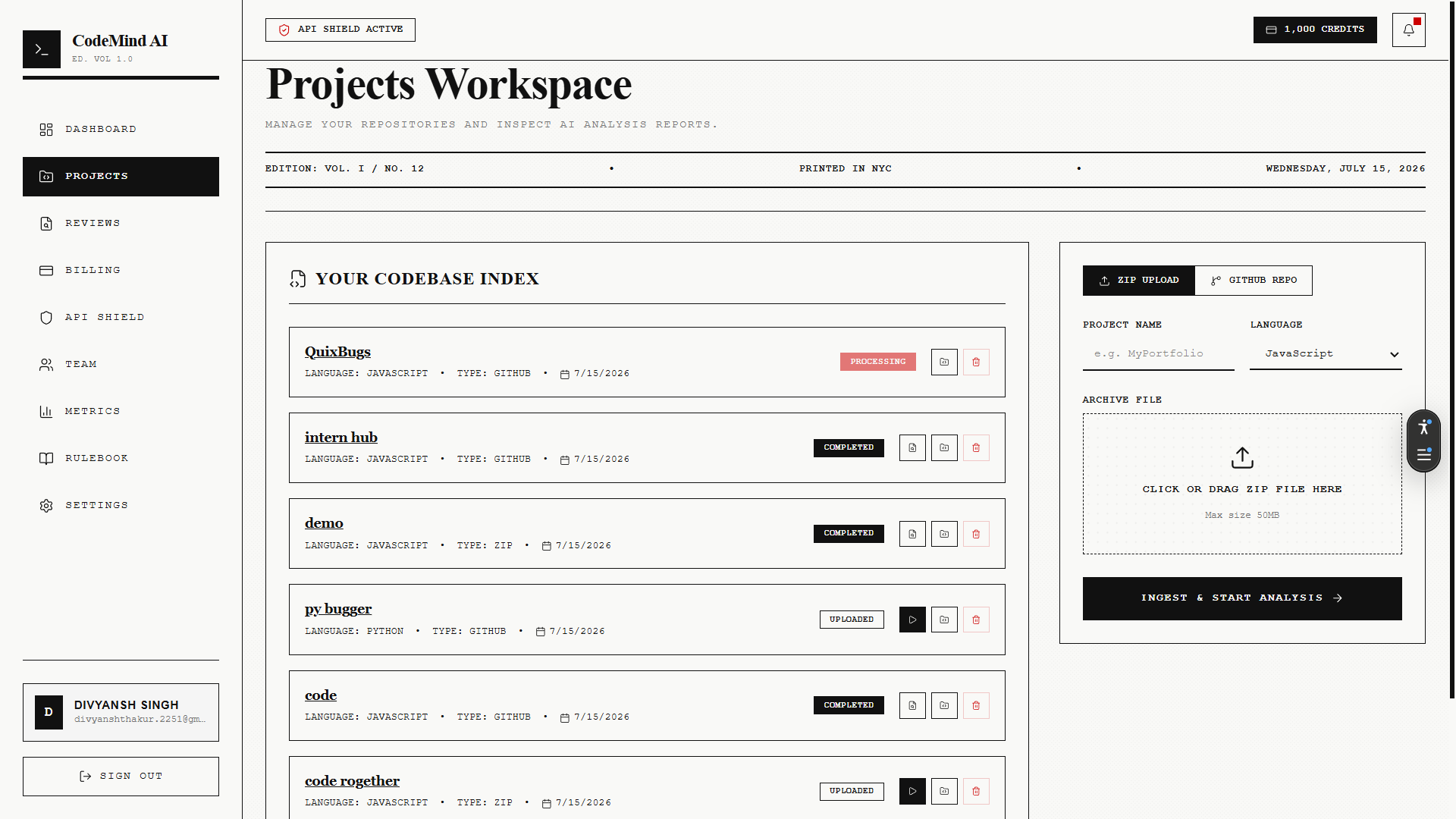
|
📄 PDF Export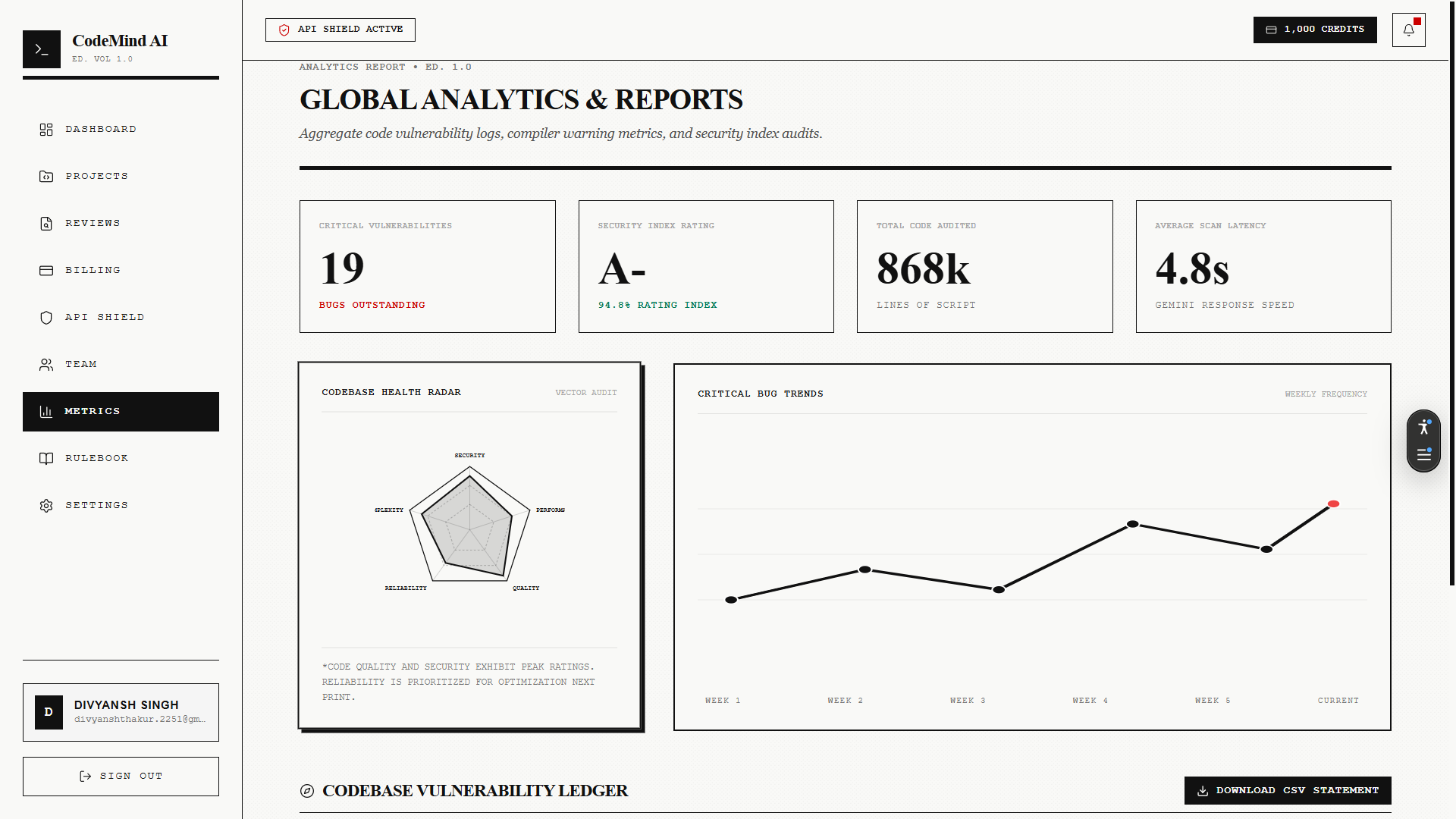
|
### 🎬 在线演示
## ✨ 核心功能 | | 功能 | 描述 | |---|---|---| | 🔐 | **安全认证** | 使用 JWT & GitHub OAuth 进行安全的用户会话管理 | | 📦 | **双重导入** | 上传 ZIP 归档或直接 clone/解析 GitHub repo | | 🧠 | **深度 AI 分析** | 解析源文件,向 Gemini / GPT-4 发送智能上下文 | | 💬 | **交互式 AI 对话** | 针对特定代码行或修复提出后续问题 | | 📊 | **精美的 Dashboard** | 采用 Next.js + TypeScript UI,包含记分卡和详细报告 | | 📤 | **报告导出** | 可下载的 PDF、HTML 和 JSON 摘要 |
## 🛠️ 技术栈
| 层级 | 技术 |
|---|---|
| **Frontend** |    |
| **Backend API** |   |
| **AI Service** |   |
| **Database** |  |
| **AI Models** | Gemini Pro · OpenAI GPT-4 |
| **DevOps** |  |
## 🏗️ 架构 ``` ┌─────────────┐ ┌──────────────┐ ┌────────────────┐ │ Next.js UI │ ───▶ │ Express API │ ───▶ │ FastAPI Worker │ │ (Frontend) │ ◀─── │ (Gateway) │ ◀─── │ (AI Analysis) │ └─────────────┘ └──────────────┘ └────────────────┘ │ │ ▼ ▼ ┌──────────────┐ ┌────────────────┐ │ MongoDB │ │ Gemini / GPT-4 │ │ Atlas │ │ API │ └──────────────┘ └────────────────┘ ``` 详细分解请参阅 [`docs/06-System-Architecture.md`](./docs/06-System-Architecture.md)。
## 📁 仓库结构
点击展开完整目录布局
``` ai-code-reviewer/ │ ├── client/ # Next.js Frontend │ ├── app/ # Pages & Routes │ ├── components/ # Reusable UI Components │ ├── hooks/ # Custom React hooks │ ├── services/ # Frontend API wrappers │ ├── lib/ # Client helper libraries │ ├── types/ # TypeScript declarations │ └── public/ # Static assets & images │ ├── server/ # Express.js Backend API │ ├── src/ │ │ ├── config/ # Configurations (DB, Cloudinary, Env) │ │ ├── models/ # Mongoose schema models │ │ ├── controllers/ # Request handlers (auth, project, review) │ │ ├── routes/ # API endpoint routing │ │ ├── middlewares/ # Auth guards, upload, error handlers │ │ ├── services/ # Integrations (AI, GitHub, Reports) │ │ └── utils/ # Logger, custom error classes, helpers │ ├── app.js │ └── server.js │ ├── ai-service/ # Python FastAPI AI Worker │ ├── main.py │ ├── analyzer.py │ ├── prompts.py │ ├── parser.py │ └── requirements.txt │ ├── docs/ # Project Specs & API Docs │ ├── assets/ # 🖼️ Screenshots & GIFs go here │ ├── system-design.md │ ├── openapi.yaml │ └── postman_collection.json │ ├── docker-compose.yml └── README.md ```## ⚡ 快速开始 ### 前置条件 ``` node >= 18.x python >= 3.10 MongoDB Atlas URI ``` ### 安装说明 ``` # 1. Clone 仓库 git clone https://github.com/your-username/ai-code-reviewer.git cd ai-code-reviewer # 2. 安装 frontend 依赖 cd client && npm install # 3. 安装 backend 依赖 cd ../server && npm install # 4. 安装 AI service 依赖 cd ../ai-service && pip install -r requirements.txt # 5. 设置 environment variables cp .env.example .env # 6. 使用 Docker 运行(推荐) docker-compose up --build ``` ### 环境变量 ``` MONGODB_URI= JWT_SECRET= GITHUB_CLIENT_ID= GITHUB_CLIENT_SECRET= GEMINI_API_KEY= OPENAI_API_KEY= ```
## 📚 API 参考 完整的 OpenAPI v3 规范可在 [`docs/openapi.yaml`](./docs/openapi.yaml) 查看 — 可导入的 Postman collection 位于 [`docs/postman_collection.json`](./docs/postman_collection.json)。 | 方法 | Endpoint | 描述 | |---|---|---| | `POST` | `/api/auth/register` | 创建新用户 | | `POST` | `/api/auth/login` | 认证用户 | | `POST` | `/api/projects/upload` | 上传 ZIP 项目 | | `POST` | `/api/projects/github` | 导入 GitHub repo | | `GET` | `/api/reviews/:id` | 获取审查报告 | | `POST` | `/api/chat/:reviewId` | 就某项审查向 AI 提问 |
## 🗺️ 路线图 - [x] JWT + GitHub OAuth - [x] ZIP & GitHub repo 导入 - [x] AI 驱动的分析引擎 - [x] PDF/HTML/JSON 报告导出 - [ ] VS Code 插件 - [ ] 实时协作审查 - [ ] 支持 GitLab & Bitbucket - [ ] 自托管 LLM 选项 完整的甘特图时间表请参阅 [`docs/09-Project-Roadmap.md`](./docs/09-Project-Roadmap.md)。
## 📄 许可证 基于 **MIT License** 分发。更多信息请参阅 `LICENSE`。
## 📬 联系方式
用 ❤️ 和大量 ☕ 制作
[](#)
[](#)
[](#)

标签:AI代码审查, AV绕过, FastAPI, MITM代理, 自动化代码评审, 自动化攻击, 请求拦截, 逆向工具, 错误基检测, 静态代码分析