sylhetyhackvenger/PacketVision
GitHub: sylhetyhackvenger/PacketVision
一款教育版 TCP-Dump 框架,通过 255 个分类过滤器和交互式仪表板帮助用户学习网络数据包分析。
Stars: 1 | Forks: 0
# PacketVision
## 面向 Gray Hat 黑客的教育版 TCP-Dump 框架
### 作者:SYLHETYHACKVENGER (THE-ERROR808)
## 📡 描述
**PacketVision** 是一个先进的教育框架,旨在通过 `tcpdump` 弥合网络安全理论与实际数据包分析之间的差距。该交互式工具由 SYLHETYHACKVENGER (THE-ERROR808) 开发,为安全专业人员、网络管理员和网络安全学生提供了网络流量分析的实践经验。
该框架包含一个庞大的数据库,内含 **255 个精心挑选的 tcpdump 过滤器**,每一个都经过分类和解释,以促进对网络协议、安全威胁和防御策略的深入理解。通过将交互式学习与实际的数据包抓取执行相结合,PacketVision 将理论知识转化为实用技能。
### 🎯 核心理念
PacketVision 的运作原则是:理解网络流量是攻防安全操作的基础。该工具赋予用户以下能力:
- 通过实际示例探索网络协议
- 理解不同流量模式的安全影响
- 在受控环境中实践符合道德规范的数据包分析
- 将理论概念与动手实践相结合
## 🖥️ 交互式仪表板
PacketVision 仪表板作为中央控制中心,用于探索 255 个不同的 tcpdump 功能,这些功能被组织成直观的类别:
### 📊 功能类别
| 类别 | 数量 | 描述 |
|----------|-------|-------------|
| **Interface** | 3 | 用于数据包抓取的网络接口选择 |
| **Output** | 17 | 输出格式化、详细程度与文件管理 |
| **Addressing** | 20 | IP、MAC 和网络寻址过滤器 |
| **Port Filter** | 38 | 特定于应用程序的端口过滤 |
| **Protocol** | 20 | 特定于协议的数据包检查 |
| **TCP Flags** | 30 | 用于连接状态的 TCP 标志分析 |
| **Size** | 30 | 数据包大小、TTL 和分片过滤器 |
| **Logic** | 30 | 复杂的过滤器组合 |
| **Payload** | 30 | 深度数据包检查与 Payload 分析 |
| **Offensive** | 20 | 面向渗透测试的过滤器 |
| **Defensive** | 15 | 安全监控与威胁检测 |
| **Capture** | 5 | 抓取控制与限制 |
| **Performance** | 4 | 性能优化参数 |
| **Info** | 3 | 信息类命令 |
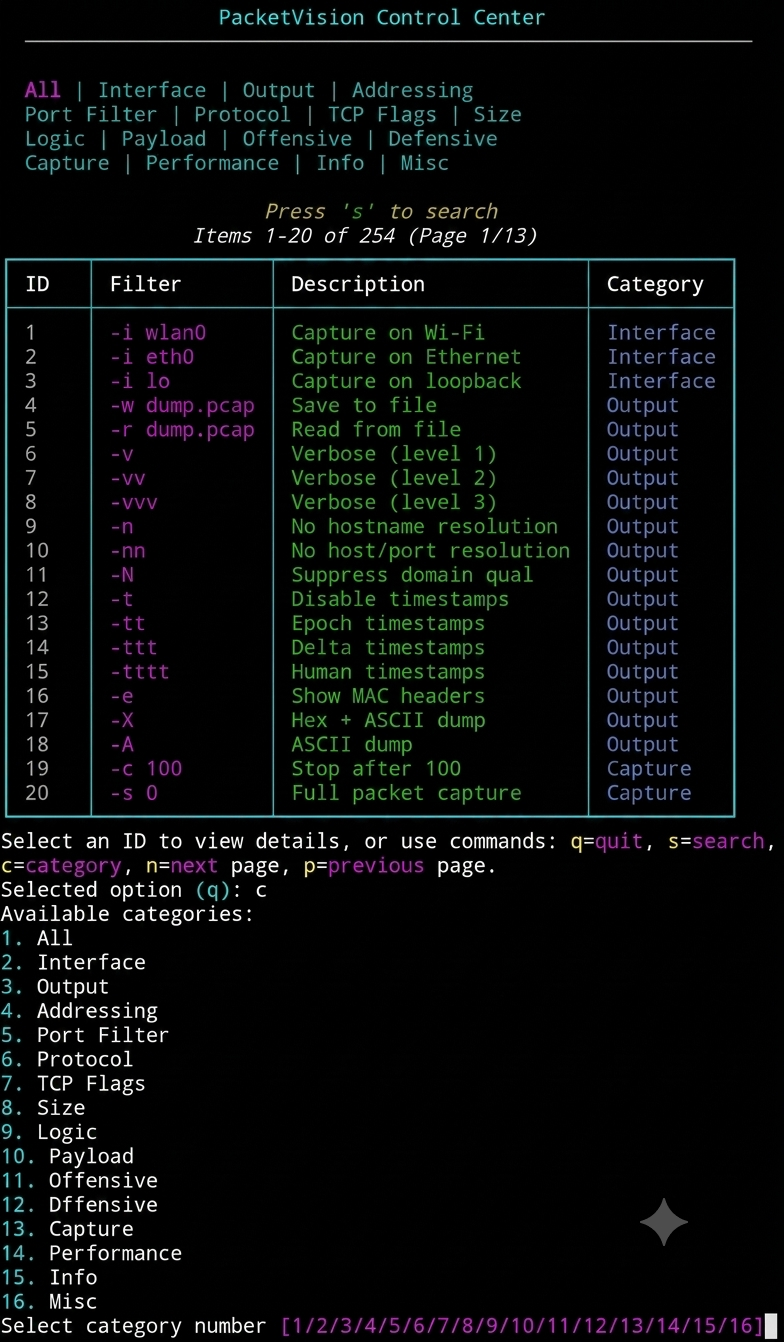
### 🎨 仪表板功能
交互式仪表板提供:
- **类别导航**:按功能类别浏览过滤器
- **搜索功能**:快速定位特定的过滤器或描述
- **分页功能**:高效浏览庞大的数据库
- **详细视图**:获取每个过滤器的全面说明
- **实时执行**:针对您的网络接口运行选定的过滤器
## 🔍 教育重点
### 您将学到什么
1. **网络协议基础**
- TCP/IP 协议栈分析
- 协议识别与行为
- 头部结构与字段解释
2. **安全分析技术**
- 攻击模式识别
- 通过流量分析进行漏洞评估
- 异常检测方法
3. **实用的 tcpdump 用法**
- 过滤器的构建与组合
- 性能优化策略
- 用于分析的输出格式化
4. **道德与法律考量**
- 数据包抓取的法律影响
- 负责任的安全测试实践
- 授权要求
## 🛠️ 安装与要求
### 前置条件
```
# 必需的 packages
pip install rich
sudo apt-get/pkg install tcpdump espeak # Debian/Ubuntu
# 或
brew install tcpdump espeak # macOS
git clone https://github.com/SYLHETYHACKVENGER/PacketVision.git
cd PacketVision
sudo python pkv.py
Command Function
s Search filter database
c Change category view
n Next page
p Previous page
q Quit application
Selection Process
1. Browse the database through categorized views
2. Select a filter ID to view detailed information
3. Understand the filter's purpose, mechanism, and implications
4. Execute the filter against your chosen network interface
5. Analyze real-time packet capture results
Voice Assistance
The framework includes text-to-speech functionality using espeak to read filter explanations and consequences, aiding auditory learners and providing hands-free operation.
---
⚠️ Disclaimer & Ethics
PacketVision is strictly for educational and research purposes. The tool is designed to:
· ✅ Enhance understanding of network protocols
· ✅ Develop practical packet analysis skills
· ✅ Recognize attack patterns and defensive strategies
· ❌ Never be used against networks without explicit authorization
· ❌ Never be used for illegal surveillance or data interception
Remember: Security testing without permission is illegal and unethical. Always obtain proper authorization before conducting packet captures on any network.
---
🎯 Use Cases
For Security Students
· Practice hands-on with real network traffic
· Understand theoretical concepts in practice
· Build confidence in network security operations
For Network Administrators
· Troubleshoot network issues effectively
· Monitor for security anomalies
· Optimize network performance through analysis
For Penetration Testers
· Validate security controls
· Identify potential vulnerabilities
· Demonstrate proof-of-concept attacks
For Security Engineers
· Develop intrusion detection signatures
· Analyze incident response data
· Create custom monitoring solutions
---
🔧 Technical Architecture
Core Components
1. Database Layer: 255 predefined filters with metadata
2. UI Layer: Rich interactive dashboard with categories
3. Execution Layer: Secure tcpdump command execution
4. Voice Layer: Text-to-speech for educational support
Filter Database Structure
Each filter entry includes:
· Filter Syntax: Actual tcpdump command components
· Description: Plain language explanation
· Category: Functional grouping
· Explanation: Detailed technical breakdown
· Purpose: Why this filter is useful
· Consequences: Security and performance implications
---
📚 Learning Pathways
Beginner Pathway
1. Start with basic interface selection
2. Explore simple addressing filters
3. Practice with protocol filtering
4. Understand output formats
Intermediate Pathway
1. Combine filters with logical operators
2. Analyze TCP flag patterns
3. Capture and analyze real traffic
4. Investigate payload patterns
Advanced Pathway
1. Build complex custom filters
2. Perform offensive security analysis (in authorized environments)
3. Develop defensive monitoring strategies
4. Create automated analysis workflows
---
🤝 Contributing
Contributions to PacketVision are welcome! Areas for contribution include:
· New Filters: Expanding the database with additional filters
· Documentation: Improving explanations and examples
· Bug Fixes: Identifying and resolving issues
· Feature Enhancements: Adding new capabilities
```

标签:逆向工具