xGreeny/incident-capsule
GitHub: xGreeny/incident-capsule
一款 Windows 本地只读应急响应证据收集工具,能够在事件初期快速采集主机易失状态并生成带有 SHA-256 完整性校验的离线报告。
Stars: 0 | Forks: 0
# Incident Capsule
[](https://github.com/xGreeny/incident-capsule/actions/workflows/ci.yml)
[](https://github.com/xGreeny/incident-capsule)
[](LICENSE)
```
┌──────────────────────────────────────────────────────────────┐
│ INCIDENT CAPSULE // WINDOWS FIRST-RESPONSE COLLECTION │
│ acquire locally · report offline · verify with SHA-256 │
└──────────────────────────────────────────────────────────────┘
```
**Incident Capsule 是一个本地、只读的 Windows 应急响应收集器,它将易失的主机状态、安全配置、选定的事件日志和完整性元数据打包成一个可审查的证据包。**
它专为调查的最初几分钟而设计:收集具有辩护效力的快照,了解收集了哪些内容,保留失败记录而不是隐藏它们,并将结果交给下一位分析人员,而无需 Web 服务或专有后端。
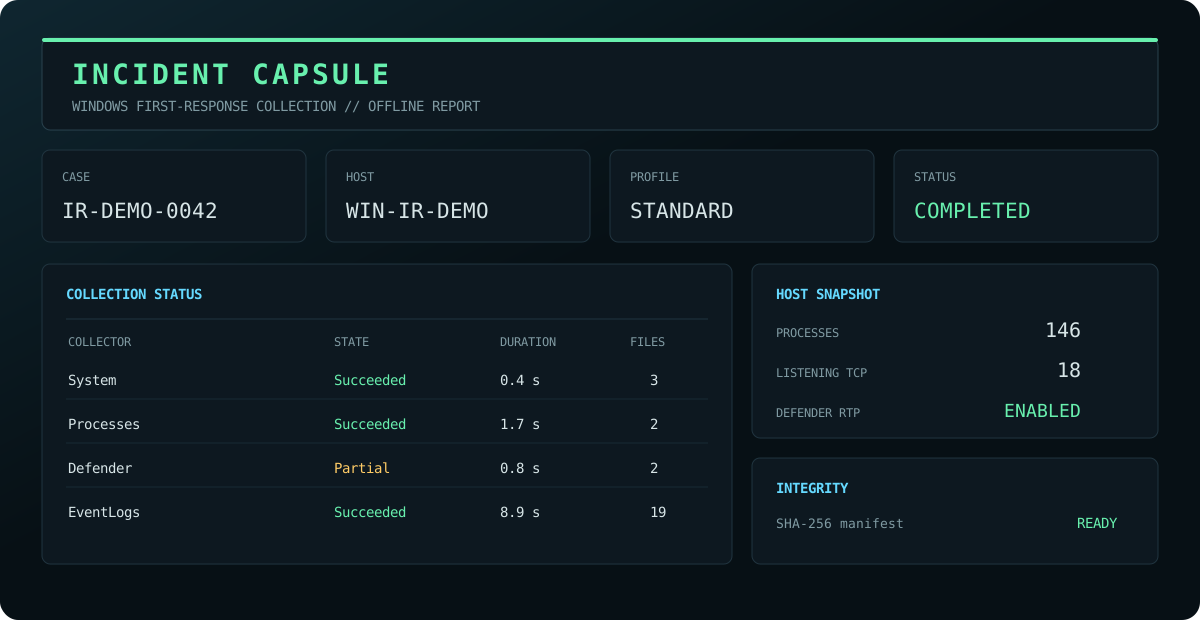
## 生成内容
标准收集会创建一个证据目录和一个 ZIP 归档:
```
IC_IR-2026-0042_WS-042_20260712T184233Z/
├── evidence/
│ ├── defender/
│ ├── drivers/
│ ├── events/
│ │ ├── evtx/
│ │ └── summaries/
│ ├── hotfixes/
│ ├── identities/
│ ├── network/
│ ├── persistence/
│ ├── powershell/
│ ├── processes/
│ ├── scheduled-tasks/
│ ├── security/
│ ├── services/
│ ├── sessions/
│ ├── storage/
│ └── system/
├── logs/
│ └── collector.log
├── metadata/
│ ├── capsule.json
│ ├── manifest.json
│ └── manifest.sha256
└── report/
└── index.html
IC_IR-2026-0042_WS-042_20260712T184233Z.zip
IC_IR-2026-0042_WS-042_20260712T184233Z.zip.sha256
```
报告是自包含的,可以离线打开。JSON 文件使用通用的证据封装格式;大型表格数据集也会导出为 CSV 格式。Capsule 中的每个文件都会记录在 SHA-256 清单中。ZIP 归档会生成一个独立的附属校验和。
## 快速开始
如果响应程序允许,请打开提权的 PowerShell 会话。支持非提权执行,但受保护的事件通道和部分安全配置可能无法获取。
```
git clone https://github.com/xGreeny/incident-capsule.git
Set-Location .\incident-capsule
Import-Module .\src\IncidentCapsule\IncidentCapsule.psd1 -Force
$result = Invoke-IncidentCapsule `
-OutputPath 'C:\IR\Cases' `
-CaseId 'IR-2026-0042' `
-Profile Standard
$result | Format-List
Start-Process $result.ReportPath
```
在分析或传输之前,请验证目录或归档:
```
Test-IncidentCapsuleIntegrity -Path $result.WorkingDirectory
Test-IncidentCapsuleIntegrity -Path $result.ArchivePath
```
单文件工作流可以在创建经过验证的归档后删除工作目录:
```
Invoke-IncidentCapsule `
-OutputPath 'E:\Evidence' `
-CaseId 'IR-2026-0042' `
-Profile Standard `
-RemoveWorkingDirectory
```
## 收集配置
| 配置 | 预期用途 | 事件回溯 | EVTX 导出 | 可执行文件哈希 |
|---|---|---:|---:|---:|
| `Minimal` | 时间紧迫下的快速分类 | 12 小时 | 否 | 否 |
| `Standard` | 默认的应急响应包 | 24 小时 | 是 | 否 |
| `Extended` | 时间和存储允许时更深入的主机审查 | 72 小时 | 是 | 是,有界限 |
在收集之前检查有效配置:
```
Get-IncidentCapsuleProfile
Get-IncidentCapsuleProfile -Name Extended | Format-List *
```
## 证据收集器
| 收集器 | 主要证据 | 提权影响 |
|---|---|---|
| `System` | OS、硬件、启动时间、时钟、时区、Secure Boot、TPM、执行身份 | 部分 firmware 数据可能无法获取 |
| `Storage` | 磁盘、卷、共享、BitLocker 状态 | BitLocker 详细信息可能需要提权 |
| `Processes` | PID/PPID、映像路径、所有者、命令行、启动时间、可选的映像哈希/签名 | 其他用户的详细信息会随提权而改善 |
| `Services` | 状态、启动模式、账户、二进制路径、进程 ID | 通常较低 |
| `Network` | 接口、地址、路由、TCP/UDP 端点、DNS、邻居缓存、内置命令输出 | 部分拥有者进程数据会随提权而改善 |
| `Sessions` | 交互式会话、登录会话元数据、已加载的配置文件 | 通常较低 |
| `LocalAccounts` | 本地用户、组及其成员身份 | 在强化系统或域控制器上,组枚举可能不完整 |
| `ScheduledTasks` | 任务元数据、操作、触发器、主体、上次/下次运行、可选的 XML | 受保护的任务 XML 可能需要提权 |
| `Persistence` | Run 键、Winlogon 值、启动文件夹、IFEO 调试器值、WMI 订阅 | 其他用户的配置单元必须已经加载 |
| `Defender` | 平台状态、首选项、排除项、ASR 状态、最近的检测 | 部分首选项和威胁数据可能需要提权 |
| `PowerShell` | 引擎版本、执行策略、日志记录策略、模块、配置文件元数据 | 故意不收集历史记录内容 |
| `SecurityConfiguration` | 审计策略、防火墙状态/规则、UAC、RDP、Device Guard、本地安全策略、AppLocker | 多个来源需要提权 |
| `Hotfixes` | QFE 记录和有界限的 Windows Update 历史 | 更新历史依赖于 Windows Update 接口 |
| `Drivers` | 系统驱动程序、可选的已签名 PnP 清单、`driverquery` 输出 | 通常较低 |
| `EventLogs` | 来自精选通道的有界限摘要和可选的原生 EVTX 导出 | Security 和受保护通道需要提权 |
完整的输出契约和注意事项详见[收集器参考](docs/collector-reference.md)。
## 范围控制
仅运行选定的收集器:
```
Invoke-IncidentCapsule `
-OutputPath 'C:\IR\Cases' `
-CaseId 'IR-2026-0042' `
-Collectors System,Processes,Network,Defender,EventLogs
```
或者从配置中移除特定的收集器:
```
Invoke-IncidentCapsule `
-OutputPath 'C:\IR\Cases' `
-CaseId 'IR-2026-0042' `
-Profile Standard `
-ExcludeCollector Drivers,Hotfixes
```
PowerShell 数据文件可以在不执行任意配置代码的情况下,覆盖有界限的设置和通道选择:
```
Invoke-IncidentCapsule `
-OutputPath 'C:\IR\Cases' `
-CaseId 'IR-2026-0042' `
-Profile Standard `
-ConfigurationPath .\examples\config.privacy-conscious.psd1
```
请参阅[配置](docs/configuration.md)以及 [`examples/`](examples/) 中即装即用的文件。
## 完整性模型
Incident Capsule 将获取与验证分离开来:
1. 收集器将证据写入唯一的 capsule 根目录下;
2. 完成 capsule 元数据和离线报告的定稿;
3. 关闭日志记录;
4. 除清单文件本身外,每个文件都使用 SHA-256 进行哈希处理;
5. 写入 `manifest.json` 和 `manifest.sha256`;
6. 对目录进行归档;
7. 归档文件生成一个附属的 SHA-256 校验和。
`Test-IncidentCapsuleIntegrity` 会检查缺失、被修改和意外的文件。对于归档文件,它还会在存在时验证附属校验和,将其解压到临时目录,并验证内嵌的清单。
```
$verification = Test-IncidentCapsuleIntegrity -Path 'E:\Evidence\IC_IR-2026-0042_WS-042_20260712T184233Z.zip'
$verification | Format-List
$verification.FileResults | Where-Object Status -ne 'Valid'
```
## 安全特性
Incident Capsule 受到有意限制:
- 仅限本地收集;不进行远程执行或横向探测;
- 不终止进程,不进行遏制、修复、隔离或配置更改;
- 不清除事件日志;
- 不获取内存或进行全盘映像;
- 不收集浏览器历史记录或 PowerShell 历史记录内容;
- 不进行主动端口扫描;
- 有界限的事件查询和有界限的可执行文件哈希;
- 收集器失败会被记录,不会抹去已成功收集的证据;
- 所有报告均可离线工作,不加载任何外部脚本、字体或遥测数据。
该收集器**不能**替代内存取证、磁盘映像、EDR 数据获取或正式的监管链流程。它是一个透明的应急响应快照。请保存原始证据,并遵守您所在组织的权限、保留和处理要求。
## 敏感数据警告
一个 capsule 可能包含用户名、组成员身份、进程命令行、IP 地址、域信息、事件消息、策略设置、Defender 排除项、共享名称和软件清单。请将其视为事件证据:
- 仅在您有权检查的系统上进行收集;
- 将其写入受访问控制且最好是加密的目标位置;
- 通过批准的安全通道进行传输;
- 在传输前后验证哈希值;
- 不要将真实的 capsule 附加到公开的 GitHub issue 中;
- 在实际操作前查阅[证据处理](docs/evidence-handling.md)。
## 架构
```
flowchart LR
A[Invoke-IncidentCapsule] --> B[Resolve profile and configuration]
B --> C[Create unique capsule root]
C --> D[Run isolated collectors]
D --> E[Structured evidence + native artifacts]
D --> F[Warnings and metrics]
E --> G[Finalize capsule metadata]
F --> G
G --> H[Generate offline HTML report]
H --> I[Freeze collector log]
I --> J[Build SHA-256 manifest]
J --> K[Create ZIP archive]
K --> L[Write archive sidecar hash]
J --> M[Test-IncidentCapsuleIntegrity]
L --> M
```
更多详细信息请参阅[架构](docs/architecture.md)和[威胁模型](docs/threat-model.md)。
## 要求
- Windows 上的 Windows PowerShell 5.1 或 PowerShell 7。
- Windows 客户端或 Windows Server,并为选定的收集器提供可用的 CIM/WMI 和内置管理接口。
- 建议为 Standard 和 Extended 配置使用管理员提权,但这并非强制要求。
- 有足够的可用空间用于 EVTX 导出,以及在启用压缩时存放重复的归档。
## 开发和发布验证
```
Install-Module Pester -MinimumVersion 5.5.0 -Scope CurrentUser
Install-Module PSScriptAnalyzer -Scope CurrentUser
./build.ps1 -Task Analyze
./build.ps1 -Task Test
./build.ps1 -Task Package
```
CI 工作流在 Windows PowerShell 5.1 和 PowerShell 7 中均运行静态分析和 Pester。匹配 `v*` 的标签会生成发布 ZIP 和 SHA-256 校验和。
## 文档
- [架构](docs/architecture.md)
- [收集器参考](docs/collector-reference.md)
- [配置](docs/configuration.md)
- [证据处理](docs/evidence-handling.md)
- [威胁模型](docs/threat-model.md)
- [故障排除](docs/troubleshooting.md)
- [合成报告样本](docs/sample-report.html)
## 许可证
Incident Capsule 基于 [MIT License](LICENSE) 发布。
标签:AI合规, Libemu