Shasaank-S/Wazuh-SOC-Home-Lab

GitHub: Shasaank-S/Wazuh-SOC-Home-Lab

该项目是一个基于 Wazuh SIEM/XDR 的 SOC 家庭实验室,演示端到端的威胁检测、日志关联与攻击模拟,帮助安全分析师实战练习检测工程与威胁狩猎。

Stars: 1 | Forks: 0

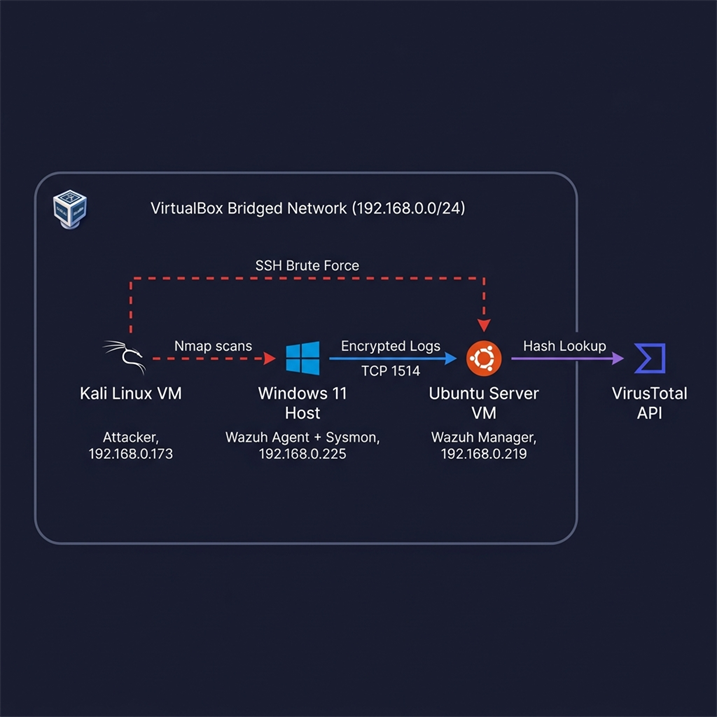
# SOC/SIEM 家庭实验室 — 使用 Kali Linux 进行 Wazuh XDR、FIM 与威胁模拟 ![Wazuh](https://img.shields.io/badge/Wazuh-4.14-3C99DC?style=for-the-badge&logo=wazuh&logoColor=white) ![Ubuntu](https://img.shields.io/badge/Ubuntu-VM-E95420?style=for-the-badge&logo=ubuntu&logoColor=white) ![Windows](https://img.shields.io/badge/Windows-Agent-0078D6?style=for-the-badge&logo=windows&logoColor=white) ![Kali Linux](https://img.shields.io/badge/Kali-Linux-557C93?style=for-the-badge&logo=kalilinux&logoColor=white) ![VirtualBox](https://img.shields.io/badge/VirtualBox-183A61?style=for-the-badge&logo=virtualbox&logoColor=white) ![VirusTotal](https://img.shields.io/badge/VirusTotal-API-394EFF?style=for-the-badge&logo=virustotal&logoColor=white) ![Nmap](https://img.shields.io/badge/Nmap-Recon-4682B4?style=for-the-badge) ![Hydra](https://img.shields.io/badge/Hydra-8B0000?style=for-the-badge) ## 📋 目录 - [环境要求](#requirements) - [使用的工具](#tools-used) - [系统架构](#system-architecture) - [搭建演练](#setup-walkthrough) - [1. Ubuntu VM + Wazuh Manager](#1-ubuntu-vm--wazuh-manager) - [2. Windows Agent 部署](#2-windows-agent-deployment) - [3. Sysmon 与日志增强](#3-sysmon--log-enrichment) - [4. 文件完整性监控 (FIM)](#4-file-integrity-monitoring-fim) - [5. VirusTotal 集成](#5-virustotal-integration) - [结果与检测分析](#results--detection-analysis) - [经验总结与故障排除](#lessons-learned--troubleshooting) - [未来进阶](#future-advancements) - [参考文献](#references) - [作者](#author) ## 环境要求 - Oracle **VirtualBox** - **Ubuntu Server 22.04+** VM(桥接网络,可访问互联网) — Wazuh Manager - 具有管理员权限的 **Windows 11 主机** — Wazuh Agent 端点 - **Kali Linux** VM — 攻击机 - 免费的 **VirusTotal API key** - 基本的 Linux 和 Windows 系统管理知识 ## 使用的工具 | 类别 | 工具 | 用途 | |----------|------|---------| | SIEM / XDR | **Wazuh 4.14** | 日志分析、关联引擎、告警 | | 端点 agent | **Wazuh Agent** (Windows) | 将遥测数据发送至 manager | | 端点遥测 | **Sysmon** | 进程、网络和注册表事件记录 | | 虚拟化 | **Oracle VirtualBox** | 承载 Ubuntu 和 Kali VM | | 威胁情报 | **VirusTotal API** | 自动进行文件哈希声誉查询 | | 侦察 | **Nmap** | 端口扫描与服务枚举 | | 凭证攻击 | **Hydra** | SSH 暴力破解模拟 | | 测试载荷 | **EICAR** | 业界标准的防病毒测试文件 | ## 系统架构 三台机器均运行在 VirtualBox 的 **桥接适配器(Bridged Adapter)** 上,在本地 `192.168.0.0/24` 网络中各自拥有独立的 IP。Windows 主机通过 TCP 1514 端口将加密的遥测数据发送给 Wazuh Manager;manager 通过 VirusTotal API 对文件事件进行充实。Kali VM 对环境发起 Nmap 侦察和 Hydra SSH 暴力破解。

SOC Home Lab network architecture: Kali attacker, Windows 11 Wazuh agent, and Ubuntu Wazuh manager on a bridged VirtualBox network with VirusTotal enrichment

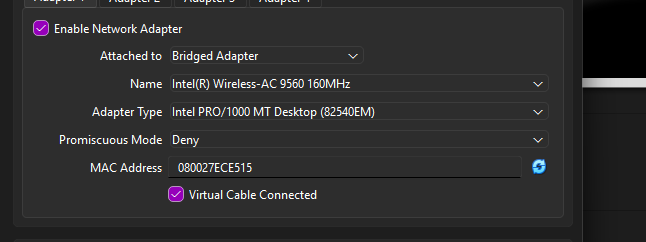
## 搭建演练 ### Ubuntu VM + Wazuh Manager 在 VirtualBox 中以 **桥接模式** 安装了 Ubuntu Server,并确认它在 `192.168.0.0/24` 网络上获取了 IP (`192.168.0.219`)。 **VirtualBox 桥接适配器配置:**

VirtualBox network adapter set to Bridged Mode

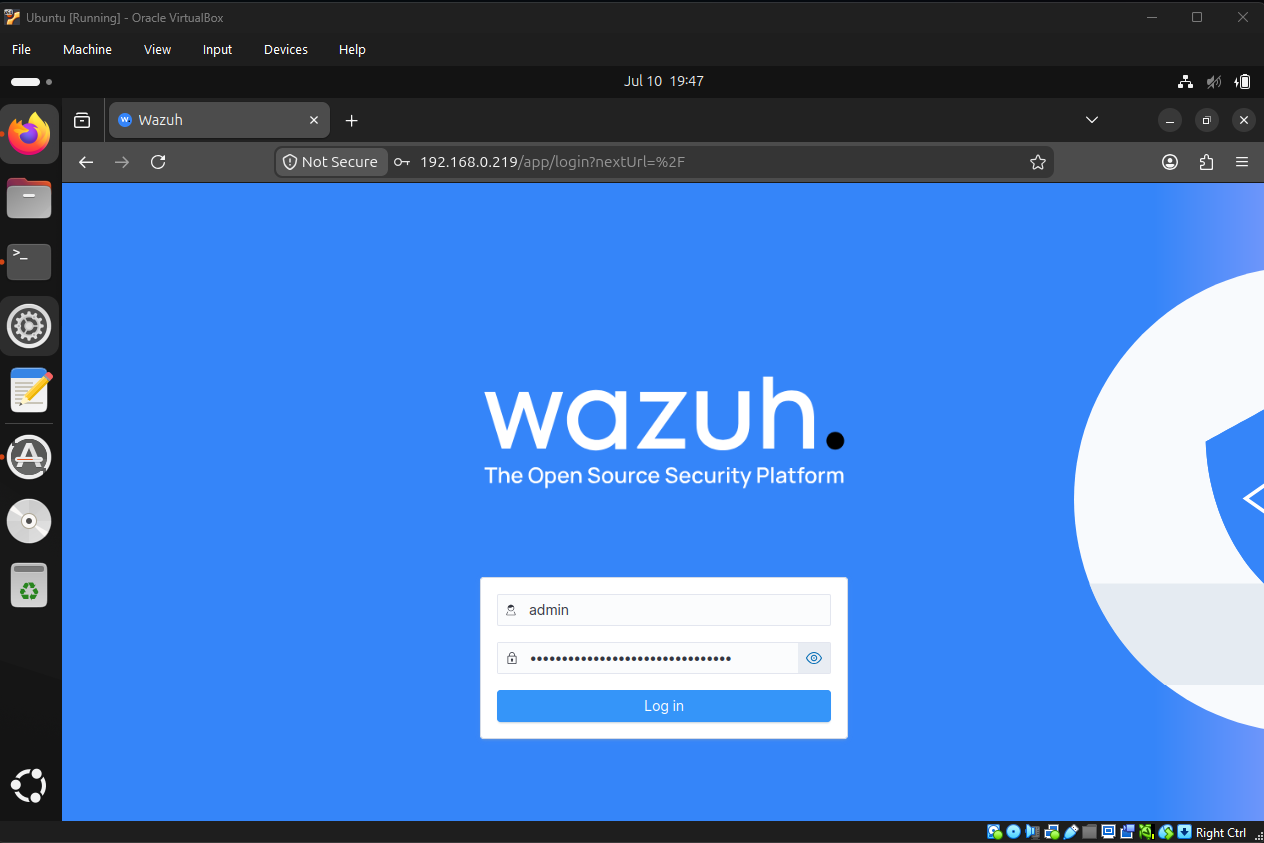
**第 1 步 — 添加 Wazuh GPG 密钥**(用于验证软件包的真实性): ``` curl -s https://packages.wazuh.com/key/GPG-KEY-WAZUH | sudo gpg --dearmor -o /usr/share/keyrings/wazuh-archive-keyring.gpg ``` **第 2 步 — 下载并运行 Wazuh 4.14 一体化安装程序:** ``` curl -sO https://packages.wazuh.com/4.14/wazuh-install.sh && sudo bash ./wazuh-install.sh -a -i ``` | 参数 | 用途 | |------|---------| | `-a` | 安装所有组件(Manager、Indexer、Dashboard) | | `-i` | 忽略硬件/操作系统检查,确保在实验 VM 中顺利完成安装 | 安装完成后,可以通过 `https://:443` 访问 Wazuh Dashboard(接受自签名证书警告,并使用安装结束时打印的自动生成的 `admin` 凭证登录)。 **Wazuh Dashboard 登录界面:**

Wazuh Dashboard login screen on Ubuntu VirtualBox

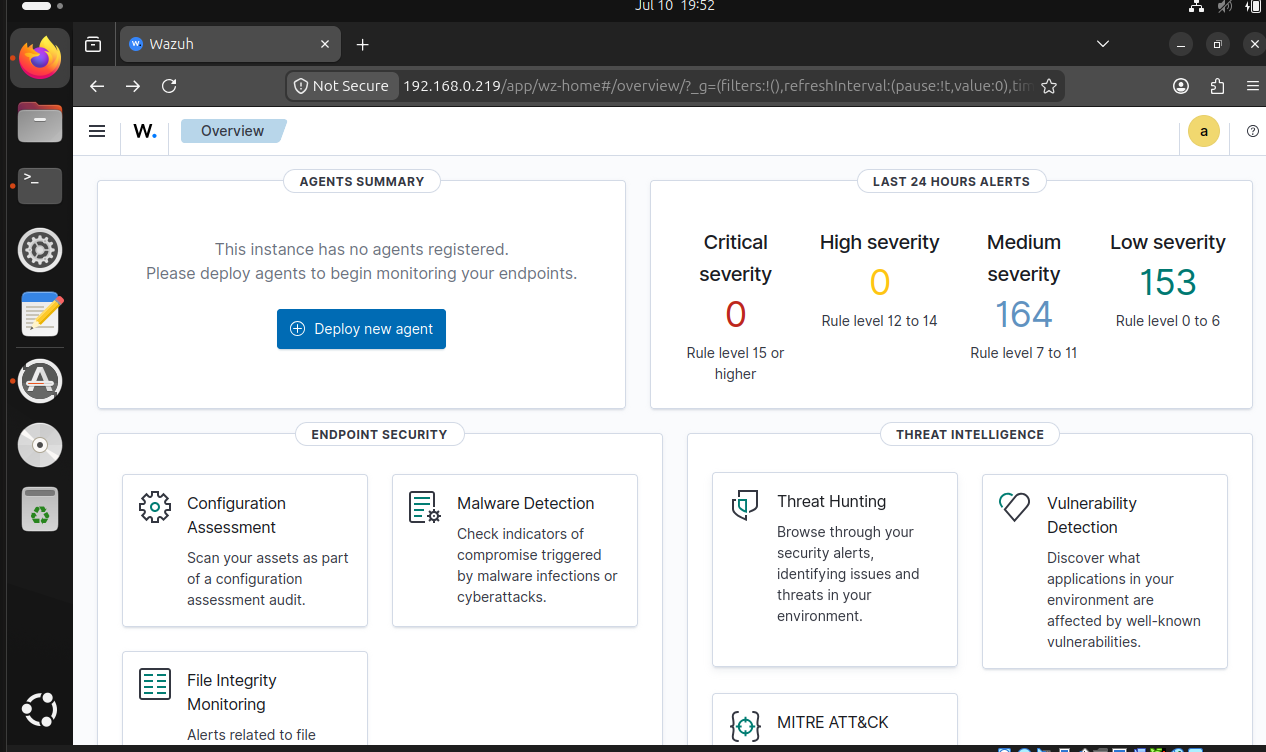
**尚未注册任何 agent 时的 Dashboard 界面:**

Wazuh Dashboard view without any agents connected

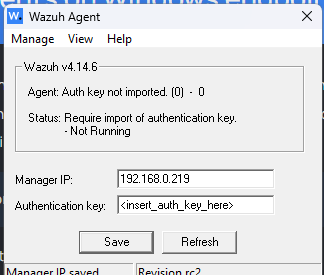
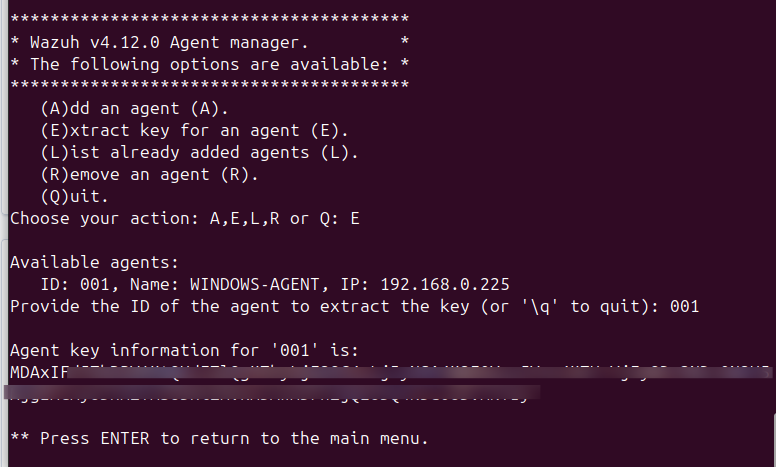
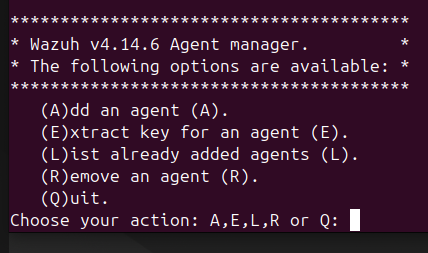
### 2. Windows Agent 部署 1. 从[官方文档](https://documentation.wazuh.com/current/installation-guide/wazuh-agent/wazuh-agent-package-windows.html)下载 Wazuh Agent MSI 并使用默认设置安装。 2. 在 Ubuntu manager 上**注册 agent**: sudo /var/ossec/bin/manage_agents 选择 `A` 添加 agent,为其命名(例如 `WindowsHost`),然后选择 `E` 提取其密钥。 3. 在 Windows Wazuh Agent Manager 图形界面中**应用密钥**,将 manager IP 设置为 `192.168.0.219`,并重启 agent 服务。 **Windows Agent — 添加认证密钥之前:**

Wazuh Agent Manager on Windows before adding authentication key

**Windows Agent — 接收密钥之后:**

Wazuh Agent Manager after receiving key from Ubuntu manager

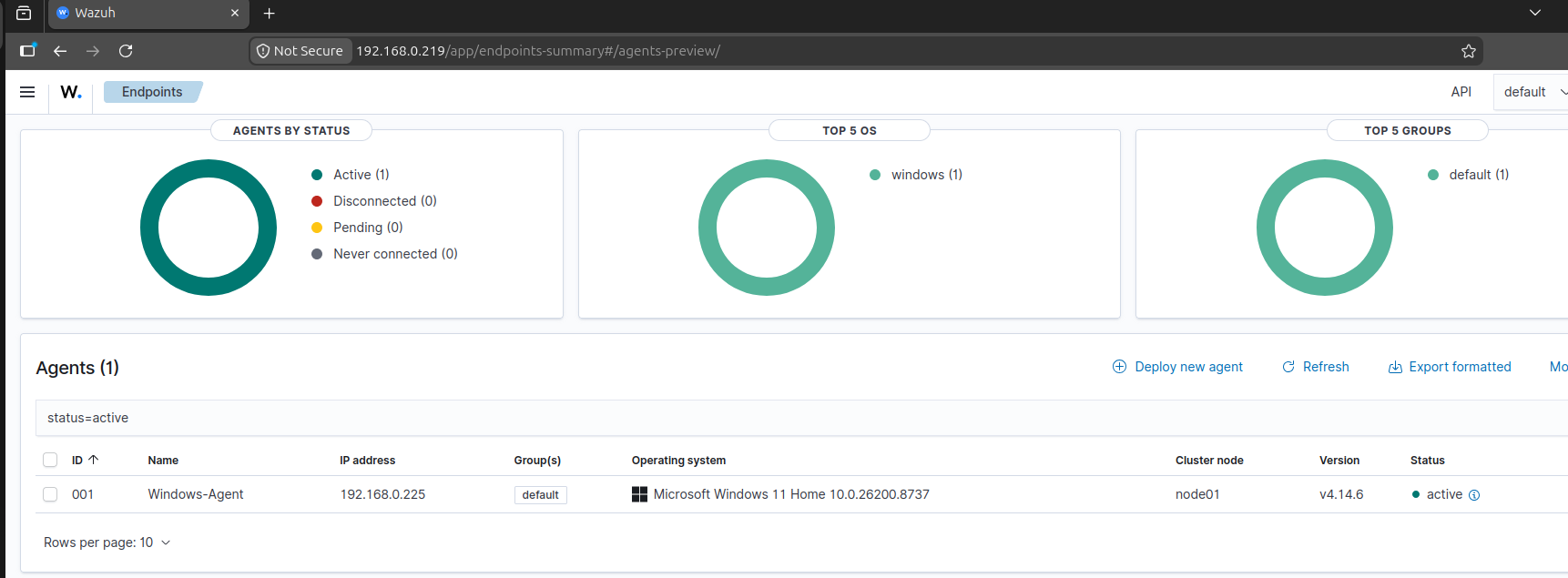
部署并重启后,该 agent 在仪表板上显示为 **Active(活跃)** 状态。 **Wazuh Dashboard — Windows agent 已连接 (Active):**

Wazuh Dashboard showing Windows 11 agent connected with status Active

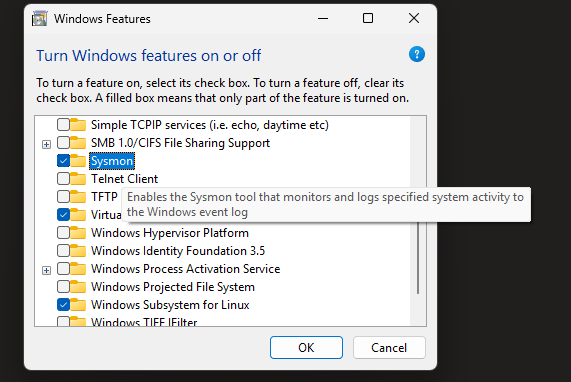
### 3. Sysmon 与日志增强 在 Windows 主机上安装了来自 [Microsoft Sysinternals](https://learn.microsoft.com/en-us/sysinternals/downloads/sysmon) 的 **Sysmon** (System Monitor),利用进程创建、网络连接和注册表事件来丰富遥测数据。下载了 [Sysmon 软件包](https://download.sysinternals.com/files/Sysmon.zip)并解压,然后在**管理员**命令提示符下安装该服务: ``` :: Install the Sysmon service and driver with default settings sysmon64 -accepteula -i ``` 若要使用配置文件来筛选和调整捕获的事件,可以将 XML 配置文件传递给同一个 `-i` 参数: ``` :: Install Sysmon with a configuration file sysmon64 -accepteula -i sysmonconfig.xml ``` Sysmon 会将日志记录在 `Applications and Services Logs/Microsoft/Windows/Sysmon/Operational` 中,并捕获包含完整命令行和映像哈希的进程创建(事件 ID 1)、网络连接(事件 ID 3)等内容——这些都是默认 Windows 安全日志遗漏的进程谱系信息。 **在 Windows 主机上安装并运行的 Sysmon:**

Sysmon running on Windows

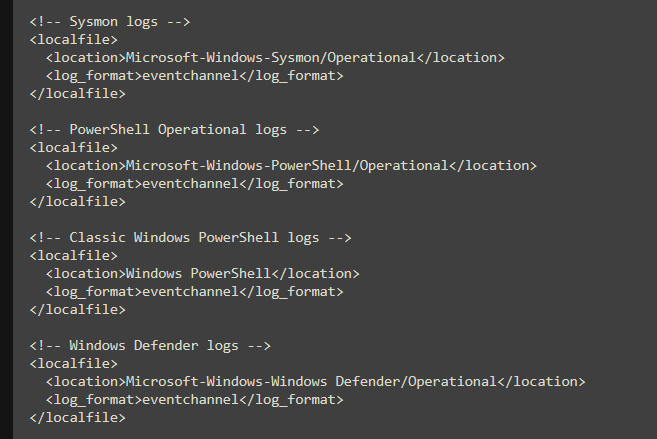
随后,我编辑了 agent 的 `ossec.conf`,让 Wazuh 指向其他 Windows 日志通道,以便 manager 同时转发 **Sysmon**、**PowerShell 脚本块记录** 和 **Windows Defender** 事件——这些遥测数据可以揭示“无文件(LotL)”攻击活动。 **Agent 配置 — 转发到 SIEM 的 Sysmon、PowerShell 和 Defender 日志通道:**

Wazuh agent ossec.conf configured to forward Sysmon, PowerShell, and Windows Defender event channels to the manager

### 4. 文件完整性监控 (FIM) Wazuh 的 **Syscheck** 模块可以实时监控文件和文件夹。在 agent 的 `ossec.conf` 文件中,于 `` 块内添加了一个受监控的测试目录: ``` C:\Users\\Desktop\wazuh-test ``` 保存后,重启 Wazuh agent 服务以应用更改。现在,FIM 会针对该文件夹中的任何内容报告 **创建 / 修改 / 删除** 事件。 **FIM — 添加到 agent 配置中的受监控测试目录:**
Test folder directory path added to ossec.conf for FIM monitoring

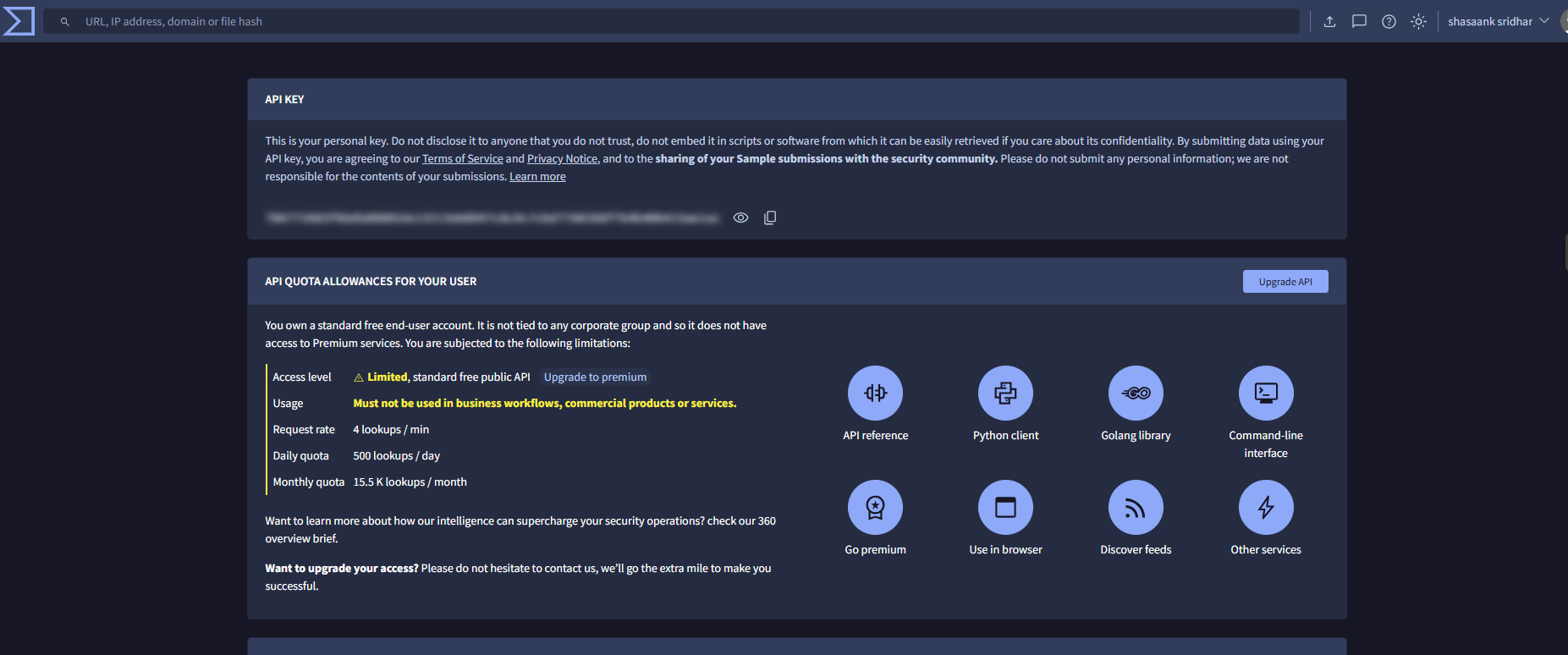
### 5. VirusTotal 集成 1. 从 [virustotal.com](https://www.virustotal.com) 获取了免费的 **VirusTotal API key**。 2. 将集成块添加到 Wazuh Manager 配置中,并在仪表板中启用它。 **在 Wazuh Dashboard 中配置的 VirusTotal API key:**

VirusTotal API key configuration in Wazuh dashboard settings

**Ubuntu manager 配置中的 VirusTotal 集成块:**

VirusTotal API key integration in Ubuntu ossec.conf

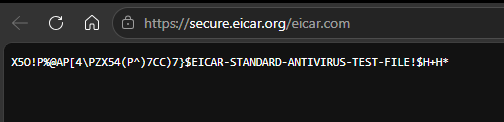
设置完成后,只要 FIM 检测到新文件或被修改的文件,Wazuh 就会自动提取其 MD5/SHA256 哈希值,并查询 VirusTotal 获取信誉判定结果。 ## 检测分析 端到端的流水线已通过实际检测验证:文件完整性事件、经 VirusTotal 充实的恶意软件投放,以及来自 Kali 的实时攻击(Nmap + Hydra)。本节将详细介绍每种情况的证据。 ### 1. 文件完整性监控生效 在受监控的 `wazuh-test` 目录中投放和删除文件产生了实时的 Syscheck 事件,证实 FIM 已正常运行: | 文件 | 事件 | 时间戳 | 规则 | 级别 | |------|-------|-----------|------|-------| | `test-eicar.com` | 文件已添加 | `2026-07-11T20:50:02Z` | 554 | 5 | | `test-eicar.com` | 文件已删除 | `2026-07-11T20:51:12Z` | 553 | 7 | | `test-malware sample.com` | 文件已添加 | `2026-07-11T20:51:12Z` | 554 | 5 | ### 2. 恶意软件检测 — EICAR 与样本 为了验证检测能力,我将 **EICAR** 测试载荷 (`test-eicar.com`) 投放到 FIM 监控的目录中。 **从 eicar.org 下载的 EICAR 测试文件:**

EICAR test file downloaded from secure.eicar.org

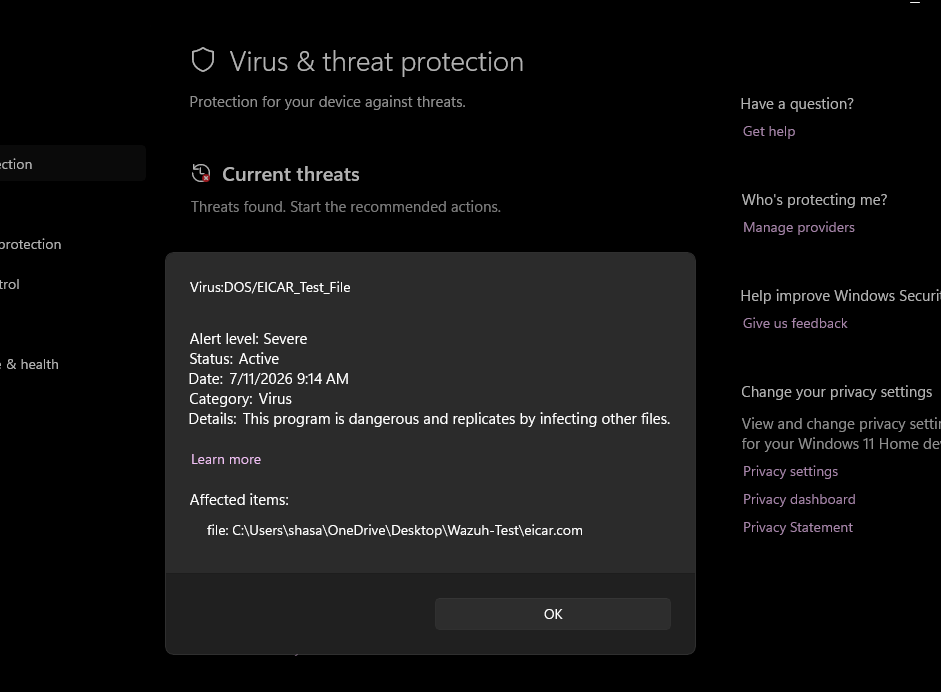
**Windows Defender 立即将 EICAR 标记为病毒:**

Windows Defender flagged EICAR sample file under Virus category

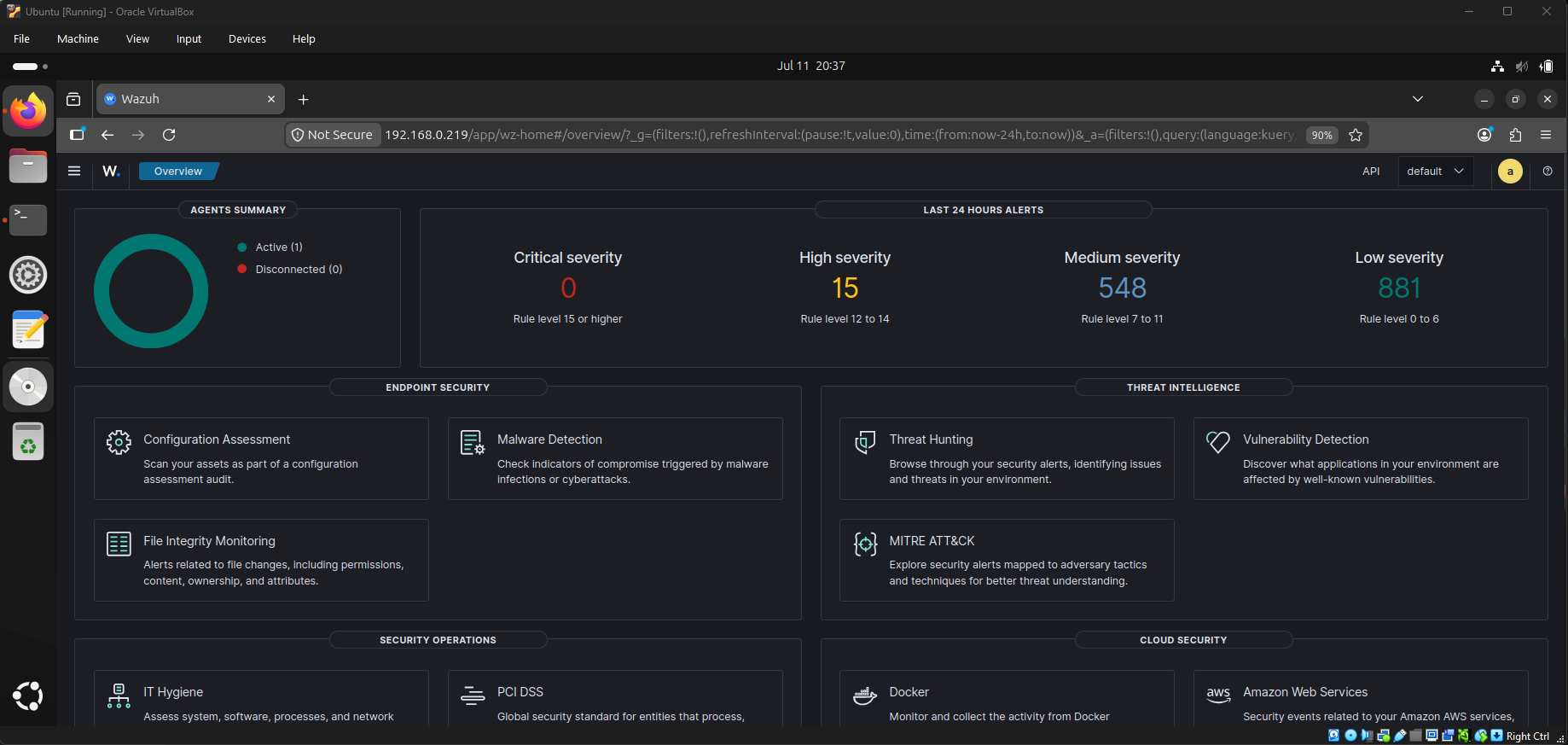
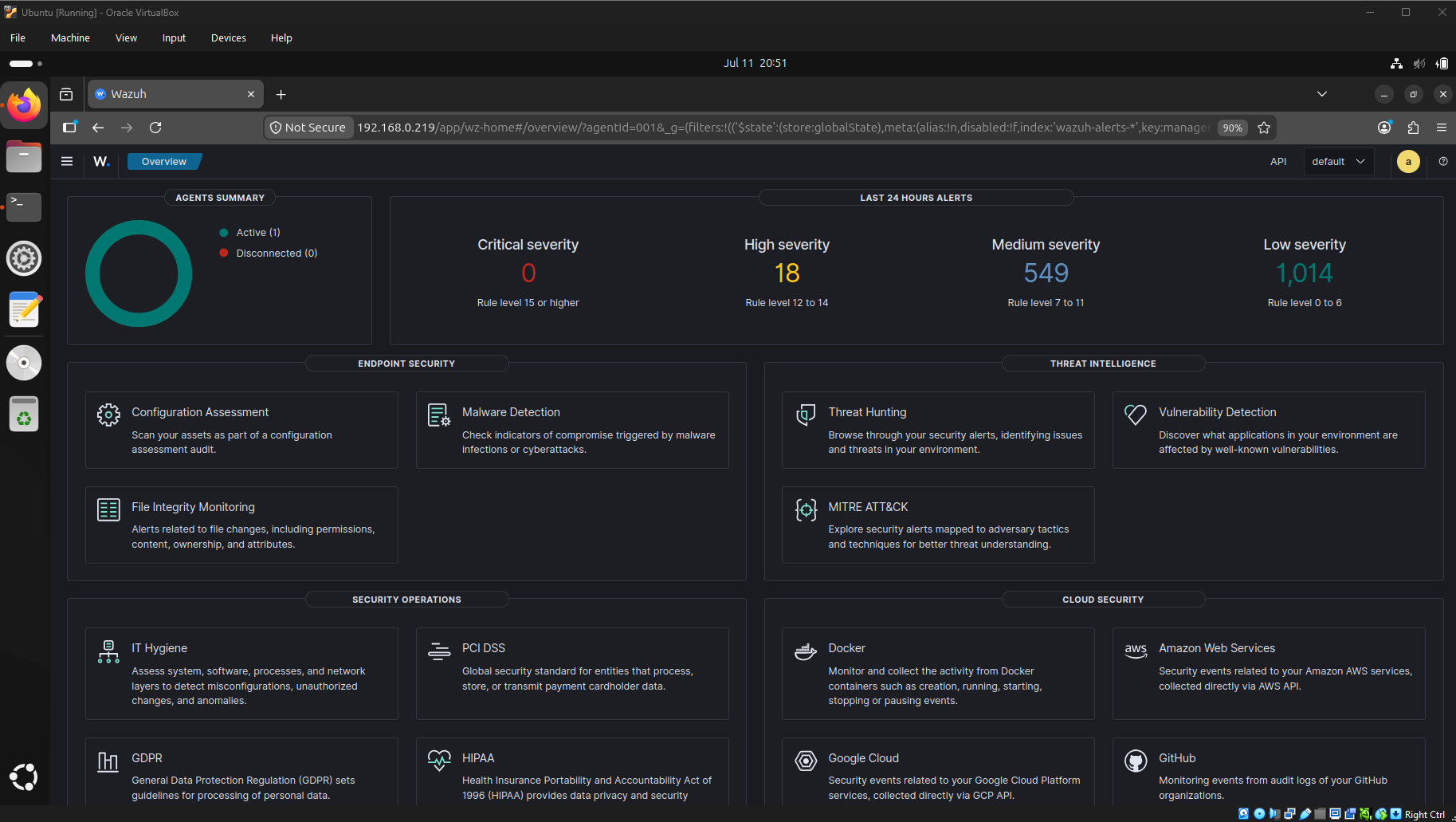
文件一落入,FIM 立刻检测到了它们,Wazuh 自动提取了哈希值,VirusTotal 集成返回了恶意判定——从而生成了新的高危告警。随着检测的触发,仪表板上的高危告警数量从 **15 上升到 18**。 **之前 — 15 个高危告警:**

Wazuh dashboard showing 15 high severity alerts before adding EICAR

**之后 — 18 个高危告警(新增 3 个检测):**

Wazuh dashboard showing 18 high severity alerts after adding EICAR

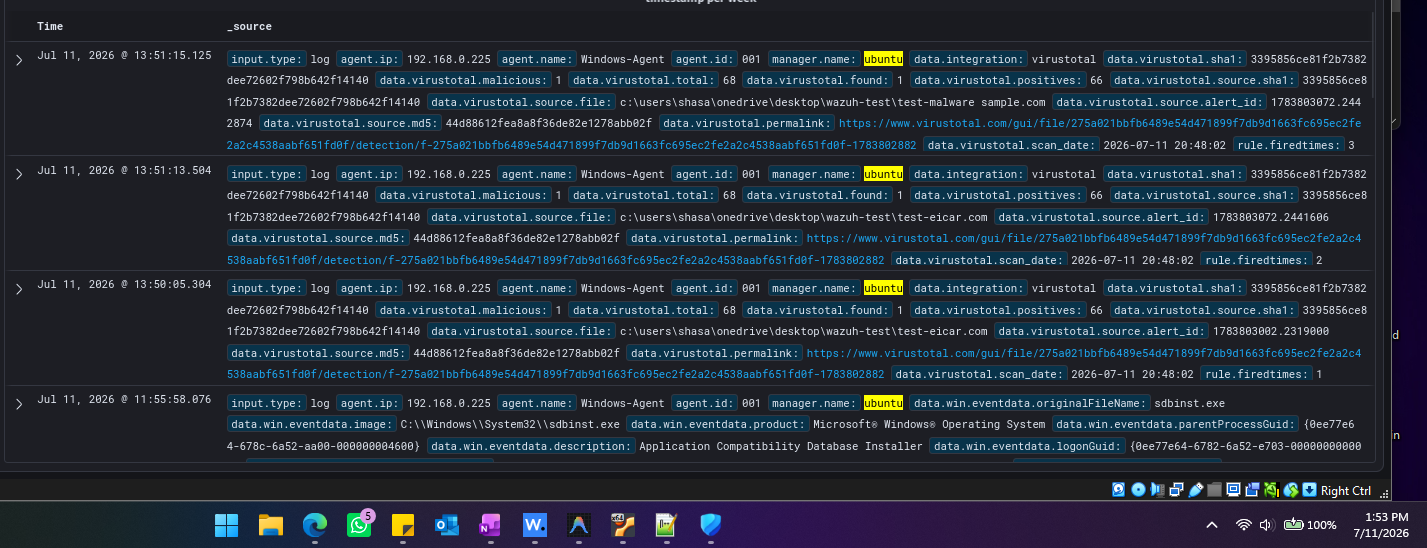
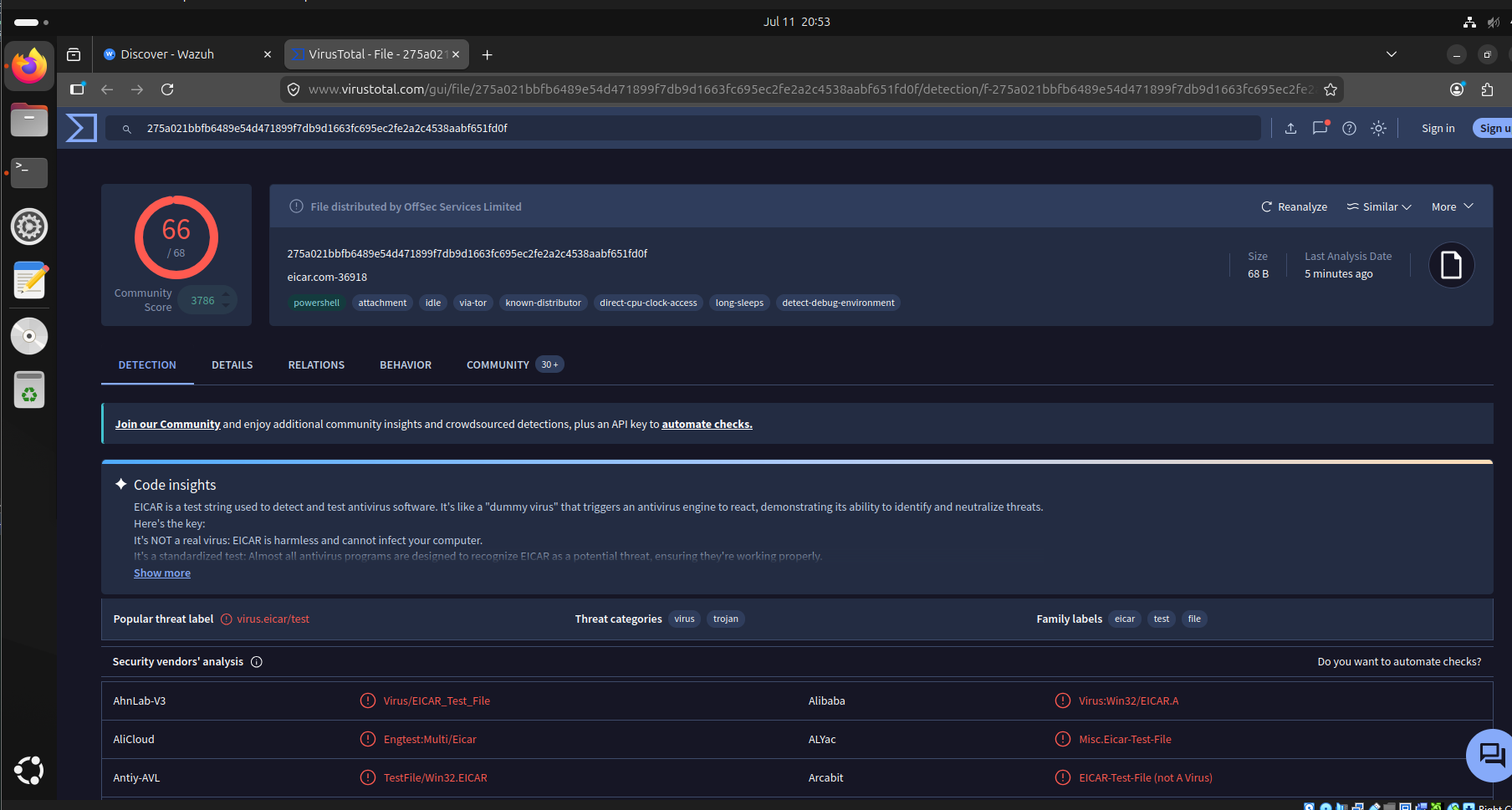
**Wazuh Discover — VirusTotal 充实告警。** 添加受监控目录并重启 agent 后,FIM 生成了文件哈希,触发了 VirusTotal 查询,针对 `test-eicar.com` 和 `test-malware sample.com` 产生了以下充实告警(`data.virustotal.positives: 66`, `data.virustotal.total: 68`):

Wazuh Discover showing VirusTotal enrichment alerts for the EICAR and sample malware files, 66 of 68 engines

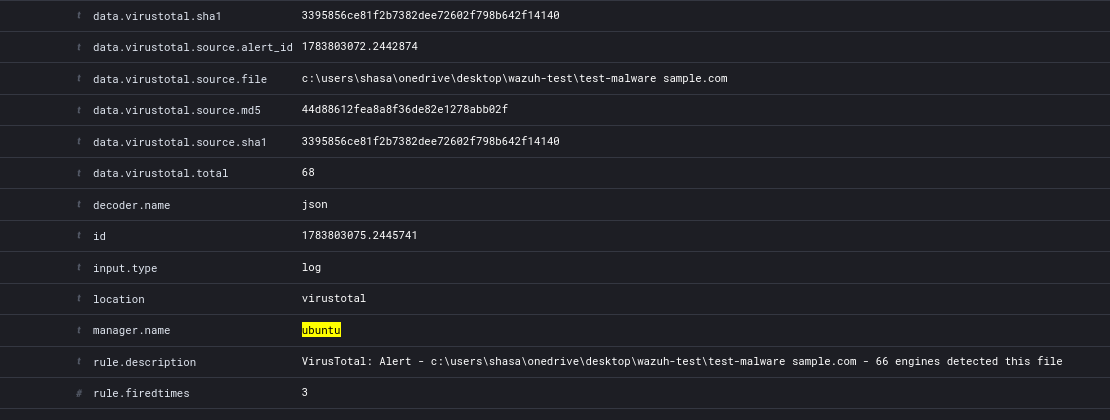
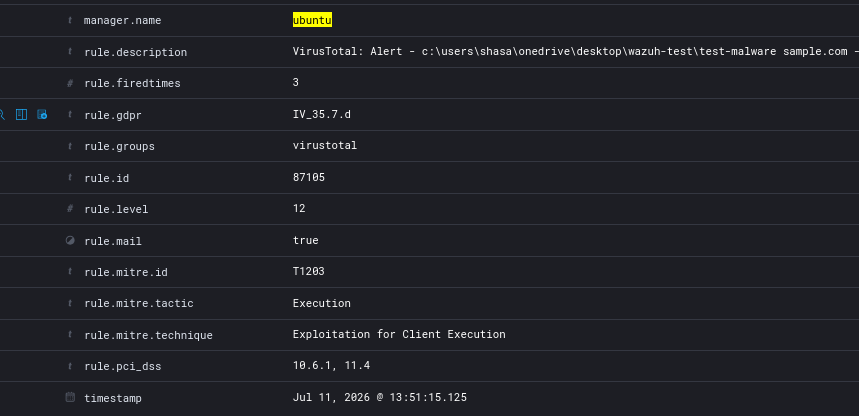
**展开的告警详情(第 1 和第 2 部分):**

Expanded EICAR detection log in Wazuh - Part 1

Expanded EICAR detection log in Wazuh - Part 2

**VirusTotal — 66/68 个引擎将其标记为病毒/木马:**

VirusTotal flagged EICAR hash as virus and trojan - 66 out of 68 detections

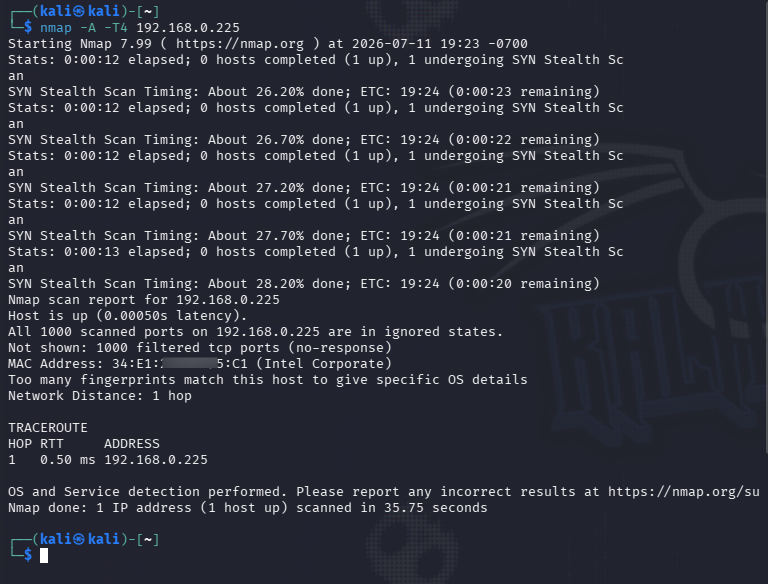
每次检测都触发了一个 **Level 12** 告警(规则 `87105` — *"VirusTotal:66 个引擎检测到此文件"*),映射至 **T1203: Exploitation for Client Execution**。 ### 3. 网络侦察检测 — Nmap 从 Kali (`192.168.0.173`) 发起,我对实验环境进行了侦察。 **针对 Windows 主机的激烈扫描** (`nmap -A -T4 192.168.0.225`):所有 1000 个 TCP 端口均返回 `filtered` — Windows 防火墙拦截了所有探测,导致 Nmap 无法对操作系统进行指纹识别。这验证了主机的防火墙态势。

Nmap aggressive scan against Windows host showing all 1000 ports filtered

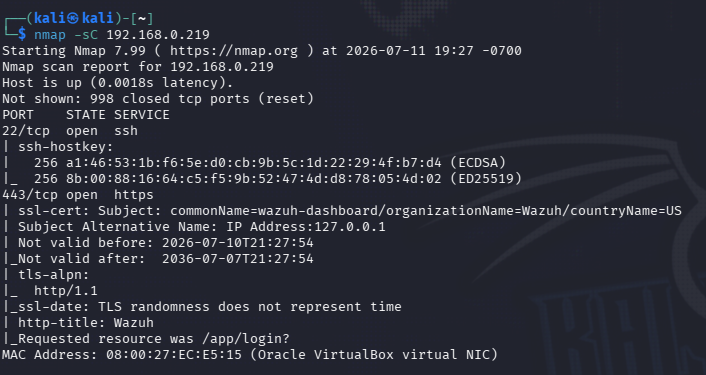
**针对 Ubuntu manager 的脚本扫描** (`nmap -sC 192.168.0.219`):暴露了端口 22 (SSH) 和端口 443 (HTTPS)。Nmap 的脚本引擎拉取了 SSL 证书,揭示了 `commonName=wazuh-dashboard` 以及 HTTP 标题 "Wazuh" — 从而向攻击者泄露了防御工具的身份(映射至 **T1592 — Gather Victim Host Information**)。

Nmap script scan against Ubuntu Wazuh Manager showing SSL certificate with Wazuh dashboard identity

### 4. 暴力破解检测 — Hydra 我使用 `rockyou.txt` 字典(1430 万个密码),对 Ubuntu manager 的 SSH 服务发起了 **Hydra v9.7** 攻击: ``` hydra -l ubuntu -P /home/kali/rockyou.txt ssh://192.168.0.219 ```

Hydra v9.7 brute-force attack from Kali targeting Ubuntu SSH with rockyou.txt wordlist

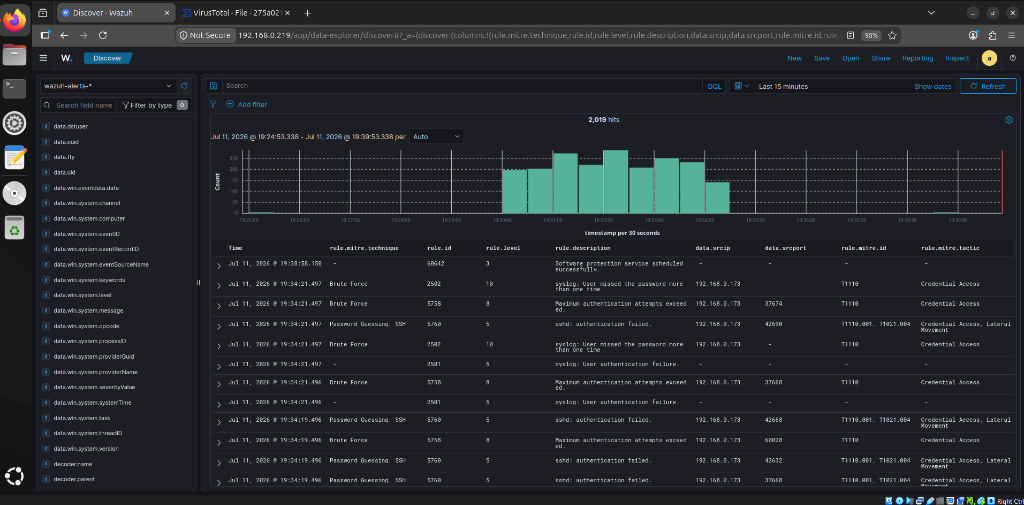
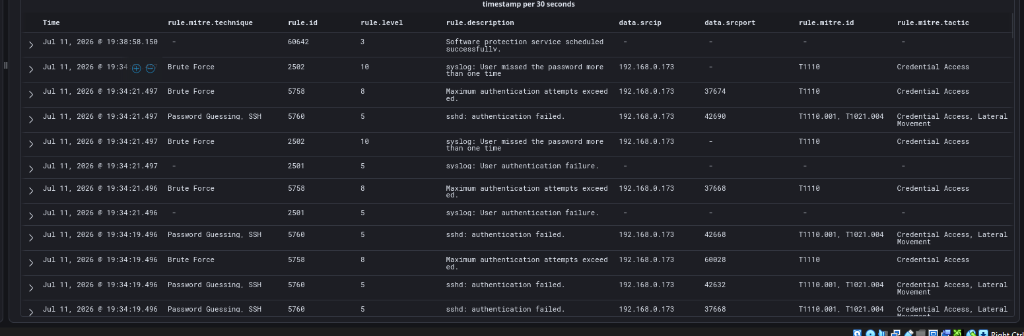
Wazuh Manager(Agent `000`,自我监控)实时检测到了攻击。对导出日志的事后分析显示,共有 **2,056 个威胁狩猎事件** 和 **1,902 MITRE 映射事件**。 **检测到的攻击阶段:** | 阶段 | Hydra 命令 | Wazuh 检测 | 事件数 | |-------|--------------|-----------------|--------| | **阶段 1** (`19:30`) | `hydra -l admin ...` | `sshd: Attempt to login using a non-existent user` (规则 5710) | **536** | | **阶段 2** (`19:32`) | `hydra -l ubuntu ...` | `sshd: authentication failed` (规则 5760) | **753** | **告警升级链** — 关联引擎将单独的 Level 5 失败升级到了 Level 10 暴力破解告警: | 规则 ID | 级别 | 描述 | MITRE | 计数 | |---------|-------|-------------|-------|-------| | `5760` | 5 | `sshd: authentication failed.` | T1110.001, T1021.004 | 753 | | `5710` | 5 | `Attempt to login using a non-existent user` | T1110.001, T1021.004 | 536 | | `5503` | 5 | `PAM: User login failed.` | T1110.001 | 171 | | `5758` | 8 | `Maximum authentication attempts exceeded.` | T1110 | 187 | | `2502` | **10** | `User missed the password more than one time` | **T1110** | **180** | | `40111` | **10** | `Multiple authentication failures.` | **T1110** | **31** | | `5551` | **10** | `PAM: Multiple failed logins in a small period of time.` | **T1110** | **26** | | `5712` | **10** | `sshd: brute force trying to get access to the system.` | **T1110** | **3** | **关键发现:** - 关联引擎通过多规则链将 Level 5 失败升级为 **Level 10** 暴力破解告警 — 自动化的多阶段聚合。 - **2,056 个事件中有 245 个** 达到了 Level 10 或以上(12% 的高严重性升级率)。 **Wazuh Discover — 来自 Kali IP 的暴力破解告警激增:**

Wazuh Discover dashboard showing brute-force alerts with histogram spike from Kali Linux attack

**告警表 — 带有 MITRE ATT&CK 映射的规则升级:**

Wazuh alert table showing brute-force rule escalation with MITRE technique T1110 mapping

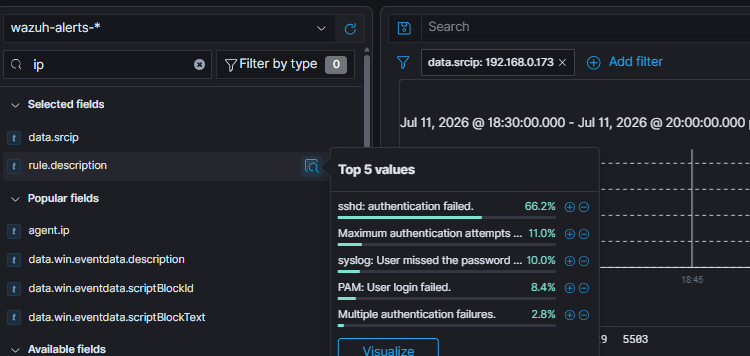
**深入分析攻击者的源 IP。** 在 Discover 中过滤 `data.srcip: 192.168.0.173`,可以将所有事件限定回 Kali 攻击者并在单一视图中查看 — Nmap 侦察探测与完整的 Hydra 暴力破解链并列展示。排名靠前的规则描述证实了此次攻击活动:`sshd: authentication failed` (66.2%)、`Maximum authentication attempts exceeded` (11%)、`syslog: User missed the password` (10%)、`PAM: User login failed` (8.4%),以及 `Multiple authentication failures` (2.8%)。

Wazuh Discover filtered by data.srcip 192.168.0.173 showing the top 5 rule descriptions from the Kali attacker: SSH authentication failures, max auth attempts, missed password, PAM login failed, and multiple auth failures

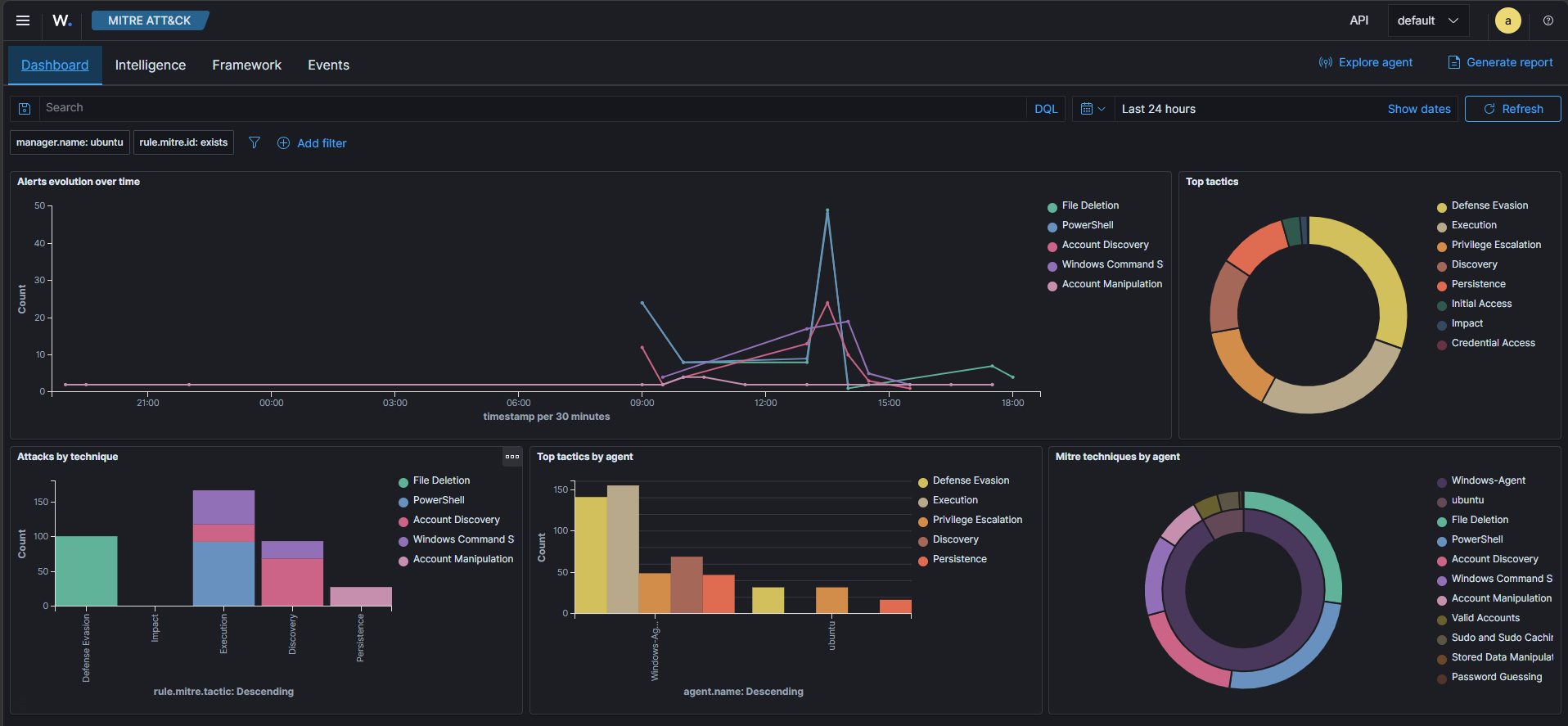
### 5. 威胁狩猎与 MITRE ATT&CK 通过关联 Sysmon、PowerShell 和安全事件日志,Wazuh 将检测到的行为直接映射到 **MITRE ATT&CK** 框架。导出的 MITRE 报告记录了分布在 **1,902 个映射事件** 中的 **9 个唯一技术 ID**。

Wazuh MITRE ATT&CK Dashboard showing tactic distribution

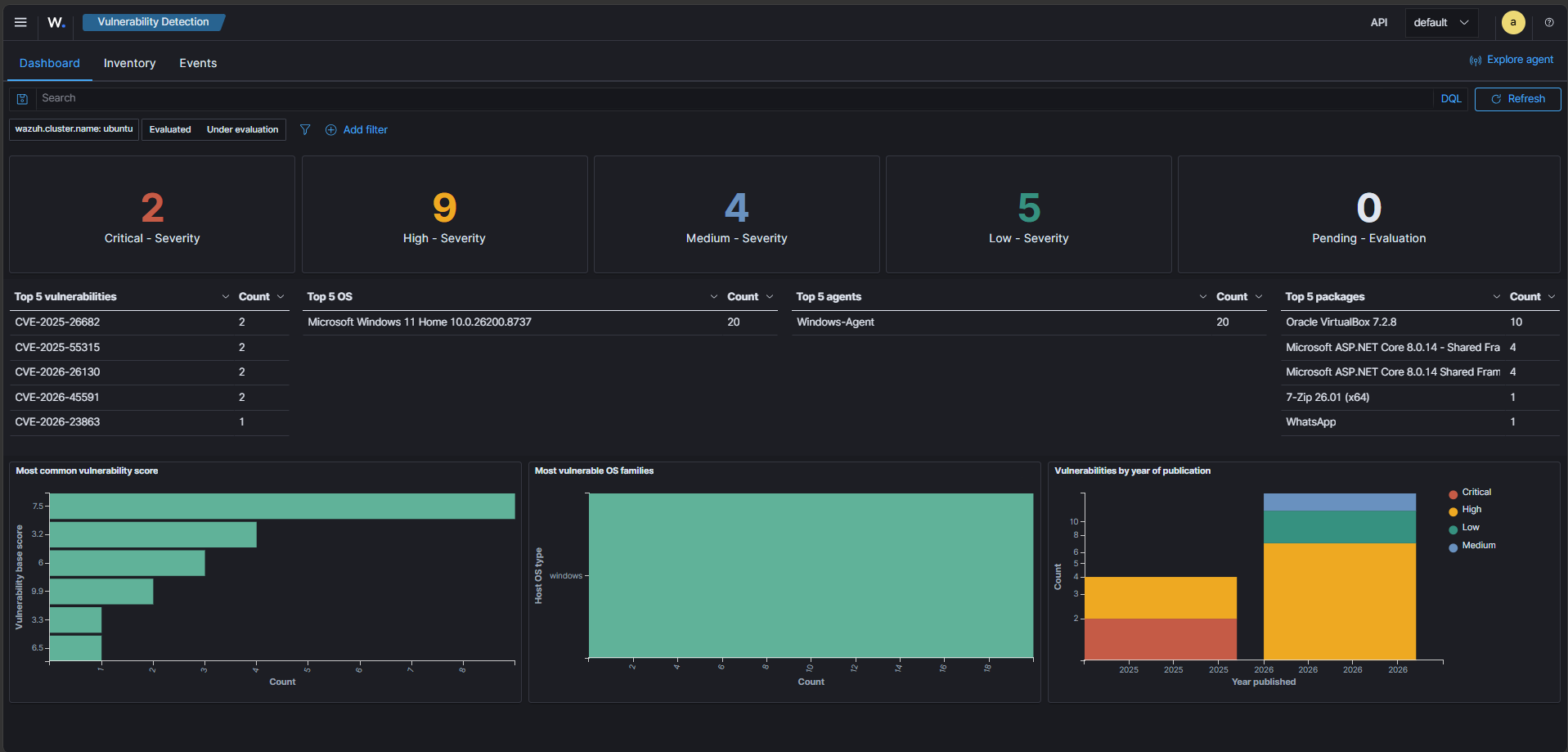
### 6. 漏洞检测 Wazuh 持续将 Windows 主机上安装的软件与国家漏洞数据库 (NVD) 进行比对,以呈现未修复的 CVE。

Wazuh Vulnerability Detection Dashboard showing critical and high vulnerabilities

## 经验总结与故障排除 让 Windows agent 能够与 manager 通信是本实验中最有价值的部分。我必须解决两个独立的问题 —— 而这两个问题都是通过阅读日志发现的,而不是靠猜测。 ### 问题 1 — IP 地址拼写错误(小错误,大影响) 在注册 agent 时,我将 Windows 主机输入为 `192.168.0.**255**` 而不是 `192.168.0.**225**` —— 数字颠倒了。`.255` 是 `/24` 子网的广播地址,因此无论我再怎么修复其他配置,agent 和 manager 都无法建立正常的连接。将 IP 更正为 `.225` 并使用新的密钥重新注册 agent 后,传输层的问题终于解决了。 ### 问题 2 — Agent / manager 版本不匹配 即使修正了 IP,agent 仍然拒绝连接。答案就在 agent 日志中: ``` C:\Program Files (x86)\ossec-agent\ossec.log ``` ``` Windows ... Wazuh v4.14.6 Trying to connect to server ([192.168.0.219]:1514/tcp) Couldn't connect to server '192.168.0.219': 'Agent version must be lower or equal to manager version' ``` | 组件 | 版本 | |-----------|---------| | Windows Agent | v4.14.6(较新) | | Ubuntu Manager | v4.12.x(较旧) | Wazuh **会拒绝任何版本高于 manager 的 agent**。原始指南使用的是 4.12 安装程序,因此将 manager 升级到 **4.14**(与 agent 匹配)解决了这个问题 —— 这就是上面的[安装步骤](#1-ubuntu-vm--wazuh-manager)使用 4.14 脚本的原因。

Wazuh Agent Manager after installing v4.14.6 matching the manager

### 关键要点 1. **日志分析是第一技能** — `ossec.log` 解决了这两个连接问题。 2. **版本管理至关重要** — Wazuh 强制执行 agent 版本 ≤ manager 版本 的策略。 3. **微小的配置细节极为关键** — 一个数字的错误 (`.255` 和 `.225`) 就会破坏整个流水线。 4. **纵深防御卓有成效** — Sysmon + FIM + VirusTotal 结合在一起,可以捕获任何单一工具遗漏的威胁。 5. **动手实践胜过纸上谈兵** — 调试发生故障的 agent 比任何认证指南教给我的东西都要多。 ## 未来进阶 - [ ] 添加 **Linux 端点 agent** 以实现跨平台监控 - [ ] 实施 **Active Response** 规则,在检测到恶意判定时自动隔离/检疫 - [ ] 添加 **OSINT 扩展**(AbuseIPDB、AlienVault OTX、GreyNoise)以减少告警疲劳 - [ ] 部署 **Shuffle SOAR**,实现带有 Discord/Slack 告警的自动化剧本 - [ ] 设置 **Suricata** 进行基于网络的入侵检测 (NIDS) - [ ] 为特定的 MITRE ATT&CK 技术编写自定义**检测规则** - [ ] 部署到 **云环境** (AWS/Azure) 中进行可扩展性测试 ## 参考文献 - [Wazuh 文档](https://documentation.wazuh.com/) - [Sysinternals 的 Sysmon](https://learn.microsoft.com/en-us/sysinternals/downloads/sysmon) - [EICAR 测试文件](https://www.eicar.org/download-anti-malware-testfile/) - [VirusTotal](https://www.virustotal.com) - [MITRE ATT&CK](https://attack.mitre.org/) ## 作者 **Shasaank Sridhar** - 🎓 亚利桑那州立大学 计算机工程硕士 - 🏅 CompTIA Security+ | Splunk Certified Core User | ISC² CC - 🔗 [LinkedIn](https://linkedin.com/in/shasaank-sridhar)
标签:AMSI绕过, CTI, Sysmon, Wazuh, 威胁检测, 安全运营, 扫描框架, 插件系统, 攻击模拟, 驱动签名利用