## 什么是 Ovecc
Ovecc 读取你的仓库一次,并构建一个确定性的、持久的模型:包含每个文件、import、symbol 和 call。基于这个单一索引,它可以回答你实际会询问代码库的问题:
- 如果我修改了这个,什么会崩溃?(`impact`)
- 依赖循环和紧耦合在哪里?(`query`, `summary`)
- 什么是重复的、死代码或过度复杂的?(`dupes`, `deadcode`, `health`)
- 什么是不安全的,哪些依赖项存在已知的 CVE?(`security`, `audit`)
- 代码频繁变更的地方在哪里,这段代码归谁所有?(`hotspots`)
它运行在你的机器上,每次运行都会给出逐字节一致的答案,并且从不将 LLM 视为事实来源:它是一个架构数据库,具有确定性的命令,可以通过 CLI、在 CI 中,或由编码 agent 通过 MCP 使用。
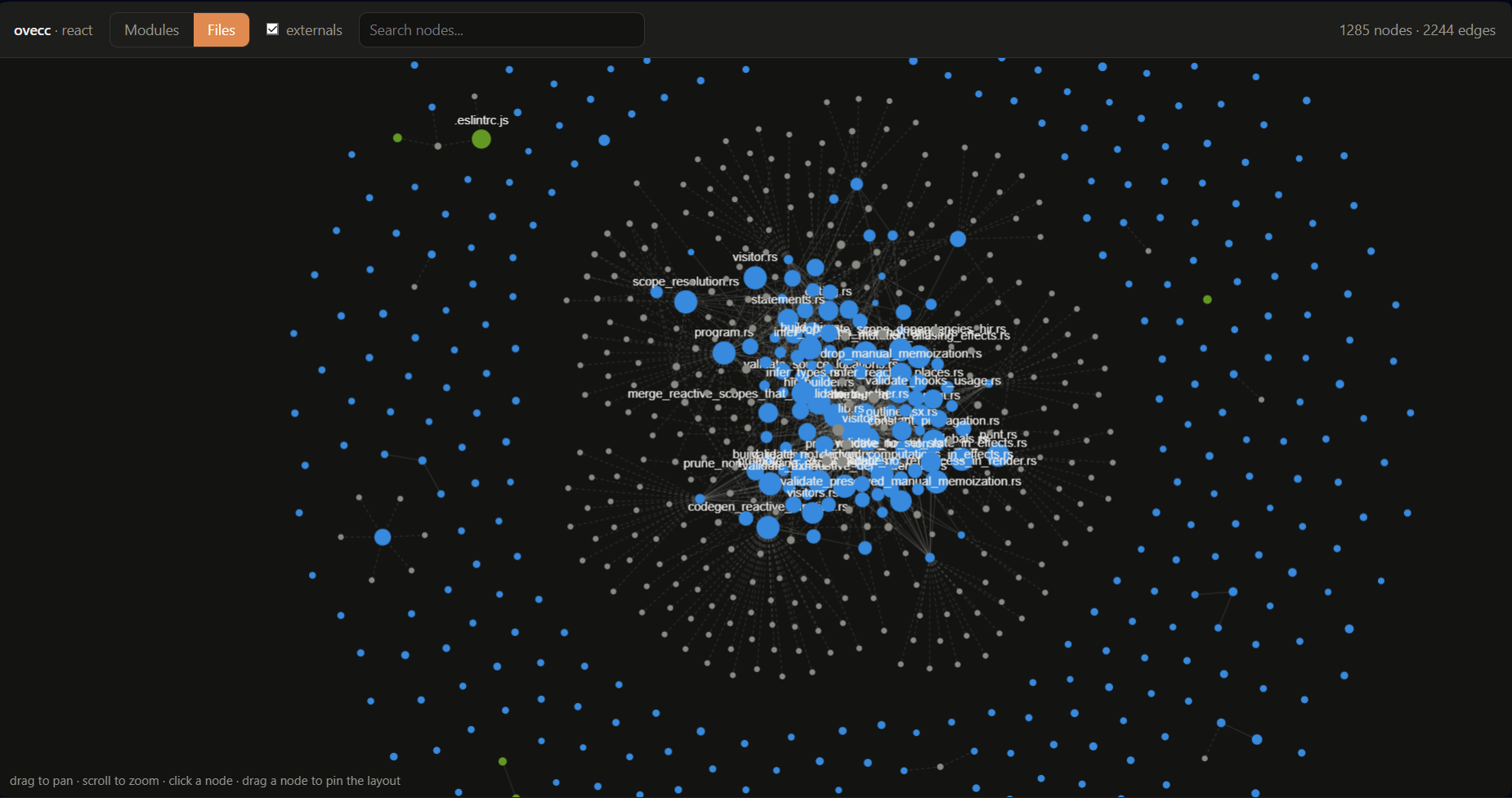
React's dependency graph, rendered by ovecc export graph --html into a single file you can open directly, no server or CDN needed.
针对真实仓库测量的性能和答案准确性位于
[docs/benchmark/BENCHMARKS.md](docs/benchmark/BENCHMARKS.md)。
## 写下你的架构,并让代码遵守它
大多数工具仅仅停留在阅读代码的阶段。Ovecc 更进一步:你在一个小文件中写下代码库的哪些部分允许依赖哪些部分,然后每次构建都会根据它来检查真实代码。
这是一个小型应用的示例:
```
# .ovecc/architecture.toml
[[component]]
name = "api"
paths = ["src/api/**"]
depends_on = ["core"] # the api may use core, nothing else
[[component]]
name = "features"
paths = ["src/features/**"]
depends_on = ["core"]
slices = true # and features may not import each other
[[component]]
name = "core"
paths = ["src/core/**"]
deny_capabilities = ["network"] # pure domain: no fetch, no I/O
max_cyclomatic = 8 # keep core functions simple
```
运行检查,每次违规都会返回具体的文件和行号:
```
$ ovecc architecture check
Divergences (1):
[High] api -> features is not in the contract
src/api/routes.ts:2 (../features/billing/service)
Slice isolation breaches (1):
[High] features/billing -> features/users breaks slice isolation
src/features/billing/service.ts:1 (../users/repo)
Denied capabilities used (1):
[Medium] core uses denied capability 'network'
src/core/pricing.ts:3 (fetch)
Complexity budgets exceeded (1):
[Medium] core: 1 function over the cyclomatic budget
src/core/pricing.ts:8 (cyclomatic 11 > 8)
```
一次运行即可捕获四种类型的衰败:某个层级越界了、某个 feature 与其邻居纠缠不清、你承诺是纯逻辑的代码中包含了网络调用,以及某个函数的复杂度超出了你设定的预算。将 `ovecc architecture check` 放入 CI 中,pull request 就会在发生偏离时失败,而不是等到三个月后由 reviewer 发现,或者根本无人发现。
**还没有契约?** `ovecc architecture suggest` 能够识别你已经在遵循的架构(Feature-Sliced、bulletproof-react、Clean/Hexagonal、Nx workspace),并生成与你真实文件夹绑定的文件。或者使用 `ovecc architecture init` 根据你实际的 import 图来起草它,这样第一天就能保持绿色(通过)状态,然后再逐步收紧。详细信息请参阅[下方的契约参考](#the-architecture-contract-in-depth)。
## 安装
从 [最新发布版](../../releases/latest) 获取预编译的二进制文件(支持 Linux 和 Windows x86_64),将其放入你的 `PATH` 中,并运行 `ovecc index .`。无需安装其他任何东西:DuckDB 已被打包其中,不需要额外运行时,并且完全支持离线工作。每次推送到 `main` 分支时都会发布滚动更新的 [开发构建版](../../releases/tag/latest)。
### 从源码构建
使用稳定的 Rust 进行构建(在 Windows 上请使用 `windows-gnu` 工具链;DuckDB 会在首次构建时从源码编译)。详细的 Windows 设置步骤请参阅 [docs/dev/SETUP.md](docs/dev/SETUP.md)。
```
cargo build --release
cargo test --workspace
```
生成的二进制文件是 `ovecc`(位于 `crates/ovecc-cli`)。
## 快速开始
```
ovecc index . # parse, resolve, and persist the model into .ovecc/
ovecc summary # coupling, density, cycles, risk score
ovecc violations # architecture + security findings, with file:line
ovecc diagnose # named architectural smells, evidence + curated remediation
ovecc security # secrets, insecure patterns, weak crypto, tainted flows
ovecc audit # offline OSV dependency vulnerabilities
ovecc impact Billing # blast radius of a change
ovecc hotspots # churn x coupling x ownership debt ranking
ovecc dupes # duplicated code (clone families), with file:line
ovecc health # functions over the complexity thresholds (oxc)
ovecc deadcode # unused exports + unreachable files (oxc + reachability)
ovecc fix # apply the mechanical fixes for those findings (dry-run by default)
ovecc query "cycles" # real elementary dependency cycles (A -> B -> A)
ovecc report # one-shot architecture report (markdown or json)
ovecc gate # CI gate: fail a PR on new cycles / violations
ovecc review # the named new defects a change introduced (file:line + cycle witnesses)
ovecc architecture init # draft .ovecc/architecture.toml from the graph, or a --template
ovecc architecture check # gate the code against the contract, with file:line
ovecc architecture suggest # recognize which architecture the repo already follows
ovecc export graph --html # interactive dependency-graph viewer, one self-contained offline file
ovecc capabilities # machine-readable contract: commands, metrics, rules, exit codes
ovecc mcp # MCP server over stdio: expose every command as an agent tool
```
每个命令都可以通过 `--format` 渲染为 `text`、`json`、`ndjson` 或 `markdown`(此外还支持用于 GitHub 代码扫描的 `sarif` 和用于 GitLab Code Quality 的 `codeclimate`),并为 CI 返回稳定的退出码。包含真实输出的完整命令参考位于 [docs/COMMANDS.md](docs/COMMANDS.md)。对于 pull request,该仓库提供了一个开箱即用的 [GitHub Action](action.yml),它会索引 base 和 head 分支,在 PR 上对 `review` 结果进行评论,并根据严重程度进行拦截。
## 深入了解架构契约
`.ovecc/architecture.toml` 是你作为代码的预期架构。每个组件通过路径 glob 声明文件;`depends_on` 是它允许 import 的白名单。`ovecc architecture init` 会根据你现有的依赖图生成第一版草稿,因此每个条目都映射了一个真实的 import,且第一天没有任何违规。偏好已知的架构形状?`init --template fsd`(或 `bulletproof-react`、`nx-workspace`、`clean-architecture`)会引入一个参考架构,而它与你的代码之间的 diff 就成了你的迁移计划。
从那时起,每次运行都会将代码与契约进行对比,并指出发现的问题:
- **divergence**(偏离)是指契约不允许的 import,
- **bypass**(绕过)是指跳过了组件声明的公共接口的 import,
- **absence**(缺失)是指你声明了但实际上从未使用过的依赖。
还有三个检查会读取 import 图之外的信息 (JS/TS):
- `slices = true` 将组件的子文件夹相互隔离,这是 Feature-Sliced Design 和 bulletproof-react 背后的规则,并支持 FSD 的 `@x` 公共 API 逃生舱。
- `deny_capabilities` 禁止组件使用会破坏纯度的环境能力:`network`、`filesystem`、`storage`、`dom`、`process`、`time`、`random`。纯 Domain 代码中的 `Date.now()` 会连同其文件和行号一起返回。
- `max_cyclomatic` / `max_cognitive` 在契约中为每个函数设定了复杂度预算,这样“保持核心简单”就成了一条构建可以检查的规则。
接口是虚拟的:你只需列出组件的公共入口文件,ovecc 就会在真实的 import 上强制执行它们,因此你无需 barrel 文件或额外的重新导出层即可获得封装性。
采用过程设计为渐进式的。`check --freeze` 会将当前的违规记录在按组件划分的基线中(每个条目一行,以便分支能干净地合并),从那时起只拦截新出现的违规,并在你修复问题时删除条目,从而确保数量永不增加。
Agent 可以在编辑之前通过 `ovecc architecture show
` 或 `ovecc_architecture` MCP 工具读取契约。
### 规则
更简单的、语言中立的策略位于 `.ovecc/config.toml` 中,在索引时强制执行,并显示在 `violations`(以及 `gate` CI 检查)中:
```
# 禁止 module-to-module 依赖。
[[rules.boundaries]]
name = "billing must not depend on user"
source = "billing"
target = "user"
allowed = false
severity = "high"
# 按 specifier 模式(exact、prefix*、*suffix 或 *infix*)禁止 imports。
[[rules.banned_imports]]
name = "no-deprecated-lodash"
pattern = "lodash"
message = "use es-toolkit instead"
severity = "medium"
```
在违规行使用 `// ovecc-ignore`(或 `// ovecc-ignore-next-line`,Python 中使用 `# ovecc-ignore`)可以屏蔽单条结果;它会在索引时被丢弃。
## 面向 CI 和编码 Agent
每个命令都是为了在 pipeline 中运行而构建的:通过 `--format` 选择格式,依赖稳定的退出码(`0` 表示正常,`1` 表示越过 `--fail-on` 阈值,`2` 及以上表示真正的错误),并为 GitHub 和 GitLab 输出 `sarif` 或 `codeclimate`。开箱即用的 [GitHub Action](action.yml) 将 `review` 接入到 pull request 中。
编码 Agent 也可以通过 Model Context Protocol 获取相同的分析功能。`ovecc mcp` 通过 stdio 运行一个 MCP 服务器,将每个命令作为一个工具(`ovecc_summary`、`ovecc_impact`、`ovecc_architecture` 等)暴露出来,这样 Agent 就可以询问“这个 export 被使用了吗?”、“`BillingService` 的爆炸半径有多大?”或“这个 PR 破坏了架构契约吗?”,并获得相同的确定性答案。
使用任意 MCP 客户端注册它:
```
{ "mcpServers": { "ovecc": { "command": "ovecc", "args": ["mcp"] } } }
```
从 `ovecc capabilities --format json` 开始:它返回每个命令、它们输出的指标和规则(每个都有定义)、严重程度词汇表以及退出码契约,这足以在无需阅读这些文档的情况下驱动一次审计。
每个命令的 JSON 都是一个稳定的、自我描述的信封,被规范化为相对于仓库的 POSIX 路径,并且在多次运行中保持逐字节一致。完整的指南位于 [docs/dev/MCP.md](docs/dev/MCP.md)。
## 语言支持
JavaScript 和 TypeScript 家族使用 tree-sitter 进行解析,并通过纯 Rust 的 **oxc** 技术栈进行丰富:提供真实的 `tsconfig` 路径和 `exports` 解析(`oxc_resolver`),以及每个函数的复杂度和 exports(`oxc_parser`/`oxc_semantic`)。单个 tree-sitter 适配器涵盖了 Python、Go、Rust 和 C++。它们都为同一个与语言无关的模型提供数据,因此解析、call graph、taint 和规则可以跨所有支持的语言工作。添加一种语言只是在 parser 边界后的新提取器,而不是核心更改。
## 工作区布局
十个库 crate 和一个二进制文件,每个都在其各自的 `README.md` 中进行了说明(此外还有 `xtask`,它是 `cargo xtask` 背后的仅使用 std 的任务运行器):
| Crate | 职责 |
| --- | --- |
| [`ovecc-core`](crates/ovecc-core) | 数据模型、类型化 ID、配置、错误类型、trait 契约 |
| [`ovecc-parser`](crates/ovecc-parser) | Tree-sitter 适配器和安全模式检测 |
| [`ovecc-indexer`](crates/ovecc-indexer) | 索引 pipeline:发现、解析、解析路径、分析、持久化 |
| [`ovecc-db`](crates/ovecc-db) | DuckDB 持久化、迁移、差异同步 |
| [`ovecc-git`](crates/ovecc-git) | 原生 Git 历史、代码变动追踪、归属(通过 gix) |
| [`ovecc-graph`](crates/ovecc-graph) | 影响范围、热点、循环、约定 |
| [`ovecc-rules`](crates/ovecc-rules) | 规则评估和安全分类 |
| [`ovecc-dataflow`](crates/ovecc-dataflow) | Source 到 sink 的污点可达性 |
| [`ovecc-audit`](crates/ovecc-audit) | 离线 OSV 依赖审计 |
| [`ovecc-ai`](crates/ovecc-ai) | 可选的确定性、离线解释 |
| [`ovecc-cli`](crates/ovecc-cli) | 命令行界面 |
## 设计保证
- **确定性优先于生成式。** 每个发现都可以追溯到明确的事实;相同的输入会产生相同的输出。
- **本地化与隐私保护。** 索引、分析和解释都在本机运行;没有任何数据离开你的机器。
- **增量处理。** 重新索引未更改的仓库时,不会重新解析任何内容,只会写入一个新的快照。
## 许可证
Apache-2.0;详见 [LICENSE](LICENSE)。部分代码改编自 [fallow](https://github.com/fallow-rs/fallow) (MIT);第三方归属说明请参见 [THIRD-PARTY-NOTICES.md](THIRD-PARTY-NOTICES.md)。