NVlabs/CuTe
GitHub: NVlabs/CuTe
CuTe 布局与张量代数的纯 Python 参考实现,支持在无 GPU 环境下学习、原型设计和生成测试向量。
Stars: 176 | Forks: 15
# PyCuTe
**CuTe 的纯 Python 参考实现 —— 这是处于
[CUTLASS 3.x](https://github.com/NVIDIA/cutlass) 和
[CuTe DSL](https://docs.nvidia.com/cutlass/latest/media/docs/pythonDSL/overview.html) 核心的分层
布局与张量代数。
无需 GPU。**
[](https://www.python.org/)
[](LICENSE.txt)
[](https://arxiv.org/abs/2603.02298)
虽然 C++ 版的 CuTe 是一个与 CUDA 紧密耦合的仅包含头文件的模板库,但
PyCuTe 是纯 Python 实现,你可以直接在任何脚本中 `import` 它 —— 这使其成为
**学习**代数、为新变换**构建原型**,以及为 C++ 和 DSL 实现生成
**测试向量**的理想之所。
它实现了 CuTe 白皮书中的布局代数 —— `coalesce`、
`composition`、`complement`、`logical_divide`、`logical_product`、
`right_inverse`、`left_inverse`、`nullspace`、`recast`、`layout_add` 和
`greatest_common_domain` —— 支持整数和坐标(`ArithTuple`/基)步长,以及对
`F2`(XOR-swizzle)步长的有限支持。一层轻量级的
`Tensor`/`Accessor` 层提供了参考数据模型。
## 安装说明
PyCuTe 直接通过源码检出版本进行本地安装。由于许多系统将系统
Python 标记为外部管理 (PEP 668),推荐的安装方式是使用
虚拟环境:
```
python3 -m venv .venv
source .venv/bin/activate
pip install -e . # core layout algebra only (no third-party deps)
pip install -e ".[viz]" # + visualization helpers (svgwrite, tabulate)
pip install -e ".[test]" # + everything needed to run the test suite
```
**Python 3.10+** 是唯一的硬性要求,且核心代数没有任何
第三方依赖。可选的额外组件增加了 `svgwrite`/`tabulate`
(`viz`)、`sympy` (`symbolic`) 和 `pytest` (`test`);`draw_latex` 辅助工具
只需安装 LaTeX 环境(例如 TeX Live 的 `pdflatex`)即可完成其 PDF 生成步骤。你也可以
在不安装的情况下直接通过仓库检出使用该包 —— 只要仓库位于
`PYTHONPATH` 中,`import pycute` 即可生效。
## 快速开始
```
>>> from pycute import *
>>> A = Layout((3, 4), (4, 1)) # 3x4 row-major matrix
>>> A(2, 3) # call the layout on a coordinate
11
>>> A(11) # a 1-D coordinate works too
11
>>> size(A), rank(A)
(12, 2)
>>> coalesce(Layout((2, (1, 6)), (1, (6, 2))))
Layout(12, 1)
>>> composition(Layout(12), Layout((4, 3)))
Layout((4, 3), (1, 4))
>>> logical_divide(Layout(24), Layout(4, 2))
Layout((4, (2, 3)), (2, (1, 8)))
```
构建一个 `Tensor` 并读写数据:
```
>>> T = make_tensor(Layout((4, 4), (4, 1))) # 4x4 row-major
>>> T[1, 2] = 42.0
>>> T[1, 2]
42.0
```
打印或绘制布局(参见[可视化](#visualization)):
```
>>> from pycute.util import print_tensor, draw_svg
>>> print_tensor(Layout((4, 8), (1, 4)))
(4, 8):(1, 4)
0 4 8 12 16 20 24 28
1 5 9 13 17 21 25 29
2 6 10 14 18 22 26 30
3 7 11 15 19 23 27 31
>>> draw_svg(Layout((4, 8), (1, 4)))
Saved as layout.svg
```
## 核心概念
整个 CuTe 可以用一句话来概括:
步长是将形状转化为行优先、列优先或任意
嵌套映射的关键:
| Layout | Description |
|---|---|
| `Layout((4, 8), (8, 1))` | 4×8 **row-major** |
| `Layout((4, 8), (1, 4))` | 4×8 **column-major** |
| `Layout(((2, 4), 8), ((1, 16), 2))` | **hierarchical** (nested modes) |
通过一个小型代数可以组合布局,从而表达分块、分区、
向量化以及布局分析。每个操作都是一个纯函数,它
接收布局并返回另一个 `Layout`:
- **`coalesce(A)`** —— 在保持相同映射的同时,将其简化为模式最少的形态。
- **`composition(A, B)`** —— 函数复合;通过 `B` 对 `A` 进行索引。
- **`complement(A)`** —— 填充 `A` 的到达域所需的“缺失”模式。
- **`logical_divide(A, T)`** —— 将 `A` 分解为形状为 `T` 的块(分块)。
- **`logical_product(A, B)`** —— 将 `A` 的模式在 `B` 上复制(重复)。
- **`right_inverse` / `left_inverse` / `nullspace`** —— 对映射进行反转和分析。
**`Tensor`** 是与 **`Accessor`**(例如指针)配对的 `Layout`:
在某个坐标处对其进行求值,会将布局计算为一个偏移量,并在该偏移量处对
accessor 进行解引用。这个简短的故事就是 CuTe 的全部 —— 其他所有内容都是
它的细化或应用。如需对每个部分进行严谨的探讨,请阅读
[文档](#documentation)。
## 文档
从 [`docs/index.md`](docs/index.md) 开始。文档从
层级元组逐步延伸至布局乃至完整的代数,其中包含了从
单元测试中提取的可运行示例:
| File | Topic |
|---|---|
| [`docs/00_quickstart.md`](docs/00_quickstart.md) | Install and a first tour |
| [`docs/01_htuple.md`](docs/01_htuple.md) | Hierarchical tuples and the toolbox over them |
| [`docs/02_shape_stride.md`](docs/02_shape_stride.md) | `Shape`, `Stride`, and the integer-modules strides live in |
| [`docs/03_layout.md`](docs/03_layout.md) | `Layout`: construction, evaluation, coordinates, slicing |
| [`docs/04_layout_algebra.md`](docs/04_layout_algebra.md) | The layout algebra |
| [`docs/05_tensor.md`](docs/05_tensor.md) | `Tensor` and `Accessor` |
| [`docs/06_swizzle.md`](docs/06_swizzle.md) | `Swizzle` and `F2`-stride layouts |
| [`docs/07_visualization.md`](docs/07_visualization.md) | `print_tensor`, `draw_svg`, `draw_latex`, and color functors |
| [`docs/08_api_reference.md`](docs/08_api_reference.md) | Index of every function, class, and unit test |
## 可视化
PyCuTe 可以将布局渲染为 ASCII 表格(`print_tensor`、`print_table`)、彩色
SVG(`draw_svg`、`draw_svg_tv`)或 TikZ/PDF(`draw_latex`、`draw_latex_tv` —
相当于 `cute::print_latex`)。下面的每一张图都是使用 `pycute.util` 绘制的普通 PyCuTe
`Layout`;可以使用
[`examples/readme_figures.py`](examples/readme_figures.py) 重新生成它们:
```
python -m examples.readme_figures # writes docs/images/*.svg (needs the viz extra)
```
**布局是形状加步长。** 相同的 8×8 形状配合两种不同的
步长可以产生行优先或列优先映射;每个单元格都标有其
偏移量,并根据 `offset % 8` 进行着色:
**线程-值布局。** `draw_svg_tv` 展示了 warp 的 `(thread, value)`
如何对矩阵进行平铺 —— 这里的 SM80 `16×8` MMA 的 C 累加器,根据
thread 进行着色。这正是布局代数产生的划分:
有关每个绘图工具、
`(r, g, b)` 颜色仿函数目录(`index_grey_8x`、`bank_color_32x`、
`thread_color_8x` 等)以及 LaTeX/PDF 输出的更多信息,请参见
[`docs/07_visualization.md`](docs/07_visualization.md)。
## 仓库布局
```
pycute/
├── docs/ # documentation (start at docs/index.md); figures in docs/images/
├── examples/ # standalone scripts (einsum, TV-layout, README figures)
├── test/ # pytest unit tests (one test_*.py per operation)
└── pycute/ # the importable package
└── util/ # optional printing and visualization helpers
```
## 运行测试
测试套件使用 [pytest](https://docs.pytest.org)。安装 `test` 额外组件
(参见[安装说明](#installation))并在仓库根目录下运行它:
```
pytest # the whole suite, quiet
pytest --log-cli-level DEBUG # with live logging
pytest test/test_coalesce.py # a single module
pytest -k coalesce # tests matching a keyword
```
## 参考文献
- Cris Cecka. *CuTe Layout Representation and Algebra.*
[arXiv:2603.02298](https://arxiv.org/abs/2603.02298)
- Jack Carlisle, Jay Shah, Reuben Stern, Paul VanKoughnett.
*Categorical Foundations for CuTe Layouts.*
[arXiv:2601.05972](https://arxiv.org/abs/2601.05972)
- Yang Shi, U. N. Niranjan, Animashree Anandkumar, Cris Cecka.
*Tensor Contractions with Extended BLAS Kernels on CPU and GPU.*
[HiPC 2016, pp. 193–202](https://ieeexplore.ieee.org/document/7839684)
- Bastian Hagedorn, Bin Fan, Hanfeng Chen, Cris Cecka, Michael Garland, Vinod Grover.
*Graphene: An IR for Optimized Tensor Computations on GPUs.*
[ASPLOS 2023, pp. 302–313](https://dl.acm.org/doi/10.1145/3582016.3582018)
- [NVIDIA CUTLASS / CuTe (C++)](https://github.com/NVIDIA/cutlass) — the original C++ implementation.
- [CuTe C++ documentation](https://docs.nvidia.com/cutlass/latest/media/docs/cpp/cute/00_quickstart.html)
- [NVIDIA CuTe DSL](https://docs.nvidia.com/cutlass/latest/media/docs/pythonDSL/overview.html) — the Python DSL that JIT-compiles CuTe kernels.
- [CuTe DSL documentation](https://docs.nvidia.com/cutlass/latest/media/docs/pythonDSL/cute_dsl_general/dsl_introduction.html)
## 许可证
版权所有 (c) 2026 NVIDIA CORPORATION & AFFILIATES。保留所有权利。
SPDX-License-Identifier: Apache-2.0
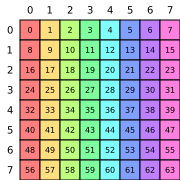 Layout((8,8),(8,1))Row-major |
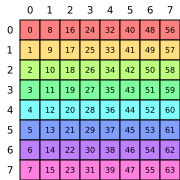 Layout((8,8),(1,8))Column-major |
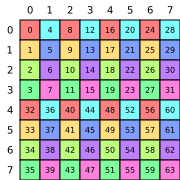 Layout(((4,2), (2,4)), ((1,32), (4,8)))Blocked |
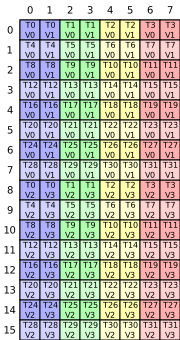
Layout(((4,8),(2,2)), ((32,1),(16,8)))
(tid, vid) → (m, n) in a 16×8 tile
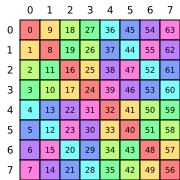 Layout((8,8),(F2(1),F2(9)))Swizzled Column-major |
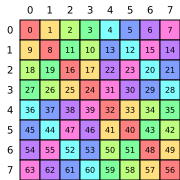 Layout((8,8),(F2(9),F2(1)))Swizzled Row-major |
标签:CUTLASS, GPU, Python, 代数算法, 张量计算, 无后门, 逆向工具, 高性能计算