Gowthaman90/mcp-bastion
GitHub: Gowthaman90/mcp-bastion
一个面向 MCP 协议的可靠性与安全代理,为任意 MCP 服务器提供自动重连、运行时工具防护及合规审计能力。
Stars: 6 | Forks: 3
# 🛡️ mcp-bastion
**Model Context Protocol (MCP) 的可靠性与安全代理。**
_为您的 MCP 服务器提供自我修复连接、运行时工具安全以及映射合规性的审计跟踪。_
[](https://www.npmjs.com/package/mcp-bastion)
[](https://www.npmjs.com/package/mcp-bastion)
[](https://registry.modelcontextprotocol.io/v0.1/servers?search=io.github.Gowthaman90/mcp-bastion)
[](https://github.com/Gowthaman90/mcp-defense-bench)
[](https://github.com/Gowthaman90/mcp-bastion/actions/workflows/ci.yml)
[](./LICENSE)
[](https://nodejs.org)
[](https://www.typescriptlang.org/)
[](#contributing)
`mcp-bastion` 位于您的 MCP 客户端(Claude Code、Cursor、Cline、Windsurf、Zed、Claude Desktop 或任何兼容 MCP 的 agent)与您的 MCP 服务器之间。它是**客户端无关的**——无需任何特定于客户端的代码,仅通过配置即可与任何兼容的客户端协同工作——同时也是**非侵入式的**:您的服务器无需任何修改即可运行,移除 Bastion 只需恢复一行配置。
📦 **包:** npm 上的 [`mcp-bastion`](https://www.npmjs.com/package/mcp-bastion) · 🗂️ **官方 MCP Registry:** `io.github.Gowthaman90/mcp-bastion`
🔒 **经测量的安全性:** 在开源、厂商中立的 [mcp-defense-bench](https://github.com/Gowthaman90/mcp-defense-bench) 上,Bastion 覆盖了 **63% 的 MCP 攻击面(15.0/24 个向量;11 个已强制执行)**,且零误报——这是所有测量过的代理中最广的。
📖 **发布故事:** [Medium](https://medium.com/p/e74f638e9e15) · [dev.to](https://dev.to/gowthaman90/the-mcp-reliability-security-gap-and-an-open-source-proxy-that-fills-it-3ppo)
👤 **由 [Gowthaman Arumugam](https://github.com/Gowthaman90) 创建并维护** — 独立研究员。配套基准测试:[mcp-defense-bench](https://github.com/Gowthaman90/mcp-defense-bench)。
## 目录
- [动机](#why)
- [工作原理](#how-it-works)
- [功能](#features)
- [快速开始](#quick-start)
- [演示](#demo)
- [控制工具](#control-tools)
- [配置](#configuration)
- [传输层](#transports)
- [运行时安全](#runtime-security)
- [审计与合规](#audit--compliance)
- [客户端配置](#client-setup)
- [架构](#architecture)
- [开发](#development)
- [路线图](#roadmap)
- [贡献](#contributing)
- [安全](#security)
- [许可证](#license)
## 动机
当 MCP 服务器在会话中途断开连接时,agent 只会看到一个通用的 _"No such tool available"_ 错误——**这与工具从未存在过无法区分**——并且它无法重新连接;只有人类才能做到。长时间的 agent 会话会悄悄失去功能,并以令人困惑的方式失败。
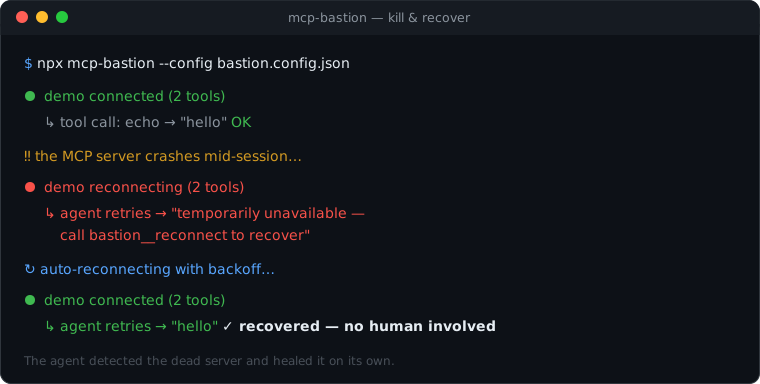
Bastion 弥补了这一差距。它对每个服务器进行健康检查,通过 backoff 自动重新连接,并且至关重要的是,它公开了控制工具,以便 **agent 自身**可以检查连接健康状况并在无需人工干预的情况下恢复掉线的服务器。
## 工作原理
如今,您的客户端**直接**连接到每个服务器。使用 Bastion 后,您的客户端连接到 **Bastion**,然后由 Bastion 代表您连接到那些相同的服务器——因此它位于工具调用路径中,并且可以透明地增加可靠性(以及未来的安全性)。
```
Before: Client ─▶ server A / server B / server C
After: Client ─▶ mcp-bastion ─▶ server A
─▶ server B
─▶ server C
```
Bastion 对您的客户端而言是标准的 MCP **服务器**,对每个上游而言是标准的 MCP **客户端**。因为它忠实地执行协议,所以它会自动与所有兼容的客户端配合工作——每个客户端之间唯一的区别在于您将几行配置放在何处。
## 功能
- 🔌 **客户端无关** — 一个二进制文件,仅通过配置集成;无需特定于客户端的插件。
- ♻️ **自我修复** — 健康检查 + 有限的指数退避机制,为 stdio 服务器提供自动重连。
- 🧭 **Agent 可恢复** — `bastion__status` 和 `bastion__reconnect` 让 agent 能够自行检测并修复掉线,而不是撞上不透明的 "no such tool" 墙壁。
- 🧩 **透明聚合** — 将许多服务器合并为一个,通过每个服务器的工具命名空间来防止冲突和工具覆盖。
- 💬 **清晰的错误反馈** — 服务器掉线会产生可操作的消息,而不是崩溃。
- 🛡️ **运行时安全** _(v0.2 中的新功能)_ — 锁定每个工具的定义并阻止 "rug pulls"(服务器在批准后更改工具);通过启发式方法检查描述中是否存在投毒;检测跨服务器覆盖。请参阅 [运行时安全](#runtime-security)。
- 📝 **审计与合规** _(v0.3 中的新功能)_ — 将结构化、防篡改的审计事件发送到可插拔的接收器(console / file / webhook),并映射到 NIST AI RMF 和 OWASP LLM Top 10。请参阅 [审计与合规](#audit--compliance)。
- 🪶 **非侵入式且可逆** — 您的服务器无需修改即可运行;卸载只需恢复配置。
- 🧱 **企业级代码库** — 严格的 TypeScript、分层架构、ESLint + Prettier,以及单元和端到端测试。
## 快速开始
Bastion 已作为 [`mcp-bastion`](https://www.npmjs.com/package/mcp-bastion) 发布到 npm — 下面的 `npx` 命令会自动获取它,因此无需先安装任何东西。
**1. 将 Bastion 添加到您的客户端**,并将其指向一个配置文件:
```
// your client's mcpServers config
{
"mcpServers": {
"bastion": {
"command": "npx",
"args": ["-y", "mcp-bastion", "--config", "bastion.config.json"],
},
},
}
```
**2. 在 `bastion.config.json` 中列出您的真实服务器**(原封不动地从客户端移过来):
```
{
"servers": {
"github": { "command": "npx", "args": ["-y", "@modelcontextprotocol/server-github"] },
"filesystem": {
"command": "npx",
"args": ["-y", "@modelcontextprotocol/server-filesystem", "/path/to/dir"],
},
},
"reconnect": { "auto": true },
"healthCheck": { "enabled": true },
}
```
**3. 重启您的客户端。** 您的工具现在会以命名空间的形式(例如 `github__create_issue`)显示在 Bastion 的控制工具旁边。有关完整的选项集,请参阅 [`bastion.config.example.json`](./bastion.config.example.json)。
## 演示
观看整个操作过程 — 一个在会话中途崩溃并自行恢复的服务器:
```
npm run demo
```
它在一个根据指令崩溃的服务器前启动 Bastion,展示了 agent 如何收到可操作的 "reconnect" 消息而不是隐晦的错误,然后连接在无需人工干预的情况下自动恢复。要将其录制为 GIF:`asciinema rec demo.cast -c "npm run demo" && agg demo.cast assets/demo.gif`。
## 控制工具
Bastion 注入了控制工具,以便 agent 可以仅使用标准 MCP 调用来自行管理连接和审查安全:
| 工具 | 用途 |
| --------------------- | ---------------------------------------------------------------------------------------------------------- |
| `bastion__status` | 每个 proxy 服务器的健康状况:已连接 / 已断开 / 重连中 / 失败、工具数量、上一个错误。 |
| `bastion__reconnect` | 无需人工干预重新连接指定的服务器(参数:`{ "server": "
" }`)。 |
| `bastion__security` | 每个工具的安全报告:锁定状态(已批准 vs 已更改)、投毒发现以及覆盖情况。 |
| `bastion__approve` | 重新批准已更改的工具(参数:`{ "server": "...", "tool": "..." }`)以解除 rug-pull 拦截。 |
| `bastion__compliance` | 映射到 NIST AI RMF / OWASP LLM Top 10 的近期活动审计摘要(需要启用 `audit.enabled`)。 |
## 配置
| 键 | 类型 | 默认值 | 描述 |
| ------------------------------ | -------------------------- | -------------------- | ---------------------------------------------------- |
| `servers` | map | — | 要 proxy 的上游服务器(必填,至少一个)。 |
| `servers..command` | string | — | 要启动的可执行文件(例如 `npx`、`node`)。 |
| `servers..args` | string[] | `[]` | 传递给 `command` 的参数。 |
| `servers..env` | map | — | 合并到进程环境变量之上的环境覆盖。 |
| `servers..cwd` | string | — | 生成进程的工作目录。 |
| `reconnect.auto` | boolean | `true` | 意外断开连接后自动重连。 |
| `reconnect.maxRetries` | number | `10` | 放弃前的最大尝试次数(`-1` = 无限制)。 |
| `reconnect.initialBackoffMs` | number | `500` | 初始退避时间,每次尝试翻倍。 |
| `reconnect.maxBackoffMs` | number | `30000` | 退避上限。 |
| `healthCheck.enabled` | boolean | `true` | 启用定期存活探测。 |
| `healthCheck.intervalMs` | number | `30000` | 探测之间的间隔时间。 |
| `healthCheck.timeoutMs` | number | `5000` | 每次探测的超时时间。 |
| `namespace.strategy` | `prefix` \| `passthrough` | `prefix` | 上游工具名称的暴露方式。 |
| `namespace.separator` | string | `__` | `prefix` 策略使用的分隔符。 |
| `security.pinTools` | boolean | `true` | 锁定工具定义并检测后续更改。 |
| `security.onRugPull` | `block` \| `warn` | `block` | 当锁定的工具定义发生更改时的动作。 |
| `security.inspectDescriptions` | boolean | `true` | 对工具描述运行投毒启发式检查。 |
| `security.onPoisoning` | `block` \| `warn` | `warn` | 发现高严重性投毒时的动作。 |
| `audit.enabled` | boolean | `false` | 为每次工具调用记录审计事件。 |
| `audit.includeArgs` | `none`\|`redacted`\|`full` | `none` | 工具参数的记录方式。 |
| `audit.tamperEvident` | boolean | `false` | 哈希链事件,以便检测篡改。 |
| `audit.sinks` | array | console | 目标地:`console`、`file`、`webhook`、`otlp`。 |
| `servers..transport` | `stdio` \| `http` | `stdio` | 本地子进程或远程 endpoint。 |
| `servers..url` | string | — | 远程 MCP URL(`http` 必填)。 |
| `servers..headers` | map | — | 用于 `http` 上游的 headers(例如 `Authorization`)。 |
| `listen.mode` | `stdio` \| `http` | `stdio` | 通过 stdio 或 Streamable HTTP 提供 Bastion 服务。 |
| `listen.host` / `listen.port` | string / number | `127.0.0.1` / `3000` | `http` 模式的绑定地址。 |
## 传输层
Bastion 在**两端**支持两种传输方式:
- **stdio**(默认) — 客户端生成 Bastion,Bastion 生成本地服务器。
- **Streamable HTTP** — 连接到**远程** MCP 服务器(`servers.` 使用 `transport: "http"`、一个 `url` 以及可选的认证 `headers`),和/或通过 HTTP 向多个/远程客户端**提供** Bastion 服务(`listen.mode: "http"` 或 `--http `)。
如果在配置 HTTP 上游时没有提供身份认证 header,它会在 `bastion__status` 中被标记(authenticated: false`),并在连接时发出警告。
## 运行时安全
_v0.2 中的新功能。_ Bastion 在工具调用路径中添加了一个安全层(拦截器 pipeline),默认启用:
- **Rug-pull 检测(工具锁定)。** 每个工具的定义在首次使用时即被锁定。如果服务器随后更改了该定义,该工具将被阻止(`onRugPull: "block"`),直到您对其进行审查并使用 `bastion__approve` 重新批准。这可以捕获那些在安装时看起来无害,但在之后变得恶意的服务器。
- **投毒检查。** 对工具名称和描述进行扫描,以检测操纵启发式特征(指令覆盖、机密访问、数据泄露、隐蔽指令、嵌入式指令、隐藏/零宽度字符)。由于启发式检查可能会产生误报,默认设置为 `warn`(仅记录和报告,不进行阻止);将 `onPoisoning` 设置为 `"block"` 以强制执行阻断。
- **覆盖。** 当两个服务器公开具有相同名称的工具时,这将显示在报告中。
使用 `bastion__security` 工具审查一切。目前这些检查适用于本地 stdio 服务器;远程服务器的身份验证检查将随 HTTP 传输支持一同推出。
## 审计与合规
_v0.3 中的新功能,可选择开启。_ 启用 `audit` 以记录每次工具调用的结构化、版本化事件——包括被安全层阻止的调用:
```
"audit": {
"enabled": true,
"includeArgs": "redacted", // none | redacted | full
"tamperEvident": true, // hash-chain events
"sinks": [
{ "type": "file", "path": "./bastion-audit.jsonl" },
{ "type": "webhook", "url": "https://collector.example/v1/audit" }
]
}
```
- **可插拔的 sink。** `console`(stderr JSONL)、`file`(JSONL 追加)、`webhook`(批量 POST)和 `otlp`(原生 OpenTelemetry 日志导出——将其指向 OTel Collector 即可分发到任何 SIEM/云后端)。sink 接口使得添加新的目的地变得非常简单。
- **合规性映射。** 每个事件都映射到 **NIST AI RMF** 功能和 **OWASP LLM Top 10** 类别;`bastion__compliance` 返回近期活动的汇总报告。
- **防篡改。** 启用 `tamperEvident` 后,事件将通过哈希链连接;导出的 `verifyChain` 辅助函数可以检测到任何追溯性编辑或删除。
- **脱敏。** 默认情况下省略参数;将 `includeArgs` 设置为 `redacted` 可以在掩盖敏感键的同时保留结构。
## 标准对齐
每个安全检查都映射到公认的框架——**NIST AI Risk Management Framework**(美国联邦标准)、**OWASP Top 10 for LLM (2025)** 和 **Agentic (2026)** Applications,以及 **STRIDE**。完整的逐项检查映射(包含指向检查所依据的 MCP 安全文献的参考链接)在 **[docs/CHECKS-MAPPING.md](docs/CHECKS-MAPPING.md)** 中。
覆盖率是独立测量的——bastion 由厂商中立的 [mcp-defense-bench](https://github.com/Gowthaman90/mcp-defense-bench) 基准测试针对 22 向量攻击面进行评分,并具有公开的 [排行榜和框架映射](https://gowthaman90.github.io/mcp-defense-bench/)。
## 客户端配置
每个客户端的步骤都是相同的——只有**配置文件的位置**不同:
| 客户端 | 添加 `bastion` 条目的位置 |
| -------------- | -------------------------------------------------- |
| Claude Code | 项目 `.mcp.json`(或 `claude mcp add`) |
| Cursor | `~/.cursor/mcp.json` 或项目 `.cursor/mcp.json` |
| Claude Desktop | `claude_desktop_config.json` |
| Cline | `cline_mcp_settings.json` |
| Windsurf | `~/.codeium/windsurf/mcp_config.json` |
## 架构
Bastion 采用具有单向依赖流的清晰层级进行组织,因此每个关注点都可以独立测试并易于演进:
```
src/
├── cli.ts # thin CLI entrypoint (parse → wire → serve)
├── index.ts # public library API
├── errors.ts # error hierarchy (BastionError, …)
├── config/ # schema (Zod) + loader
├── core/ # domain: upstream connection lifecycle, aggregation & routing
├── proxy/ # client-facing MCP server + control tools
├── observability/ # logging (audit sinks in v0.3)
└── internal/ # small cross-cutting utilities
```
设计细节——包括客户端无关的基本原理、拦截器 pipeline 以及审计 sink 策略——位于项目的设计文档中。
## 开发
```
npm install
npm run check # format:check + lint + typecheck + test (the full gate)
npm test # unit + end-to-end (in-memory transport) tests
npm run build # bundle to dist/ (CLI + library)
npm run dev -- --config bastion.config.json
```
| 脚本 | 作用 |
| ------------------------- | ----------------------------------- |
| `build` | 用 `tsup` 打包 CLI + 库。 |
| `dev` | 用 `tsx` 从源码运行 CLI。 |
| `typecheck` | `tsc --noEmit`(严格)。 |
| `lint` / `lint:fix` | ESLint(扁平配置)。 |
| `format` / `format:check` | Prettier。 |
| `test` / `test:watch` | Vitest。 |
| `check` | 上述所有操作,作为单一关卡。 |
## 路线图
| 版本 | 主题 | 亮点 |
| ----------- | ---------------------- | ----------------------------------------------------------------------------------------- |
| **v0.1** ✅ | **可靠性** | 聚合代理、自动重连、`bastion__status` / `__reconnect`。 |
| **v0.2** ✅ | **运行时安全** | 工具定义锁定(rug-pull 检测)、投毒检查、覆盖检测。 |
| **v0.3** ✅ | **审计与合规** | 可插拔的审计 sink(console / file / webhook),NIST AI RMF / OWASP LLM Top 10 映射。 |
同时支持 **stdio** 和 **Streamable HTTP** 传输方式(请参阅 [传输层](#transports))。
## 安全
`mcp-bastion` 是与安全相关的软件,因此我们对它有很高的标准。请私下报告漏洞——**不要公开 issue**。有关披露流程,请参阅 **[SECURITY.md](./SECURITY.md)**。
## 许可证
[Apache-2.0](./LICENSE) © Gowthaman Arumugam 和 mcp-bastion 贡献者标签:DLL 劫持, MCP协议, MITM代理, 人工智能, 代理工具, 反向代理, 大语言模型, 暗色界面, 用户模式Hook绕过, 网络安全, 自动化攻击, 隐私保护