Gitlovess/Active-Directory-Lab
GitHub: Gitlovess/Active-Directory-Lab
该项目在云上构建 Active Directory 实验环境,利用 Splunk SIEM 检测 RDP 暴力破解等攻击,并通过 Shuffle SOAR 与 Slack 实现自动告警和交互式账户处置。
Stars: 0 | Forks: 0
# 🏢 Active Directory 攻击与防御实验环境
这是一个云托管的 Active Directory 环境,用于模拟真实世界的 **RDP 暴力破解攻击**,通过 **Splunk SIEM** 进行检测,并利用 **Shuffle SOAR playbook** 实现自动化:通过 **Slack** 通知 SOC 分析师,并通过电子邮件请求做出**禁用用户的决定**。
## 🎯 证明了什么
90% 的企业网络中都存在 Active Directory。该实验环境证明我能够:
- 构建和管理真实的 AD 域环境
- 使用 Splunk 检测未经授权的 RDP 登录
- 通过 SOAR playbook 自动化分析师的响应决策
- 关联 Event ID 4624/4625 以识别基于凭证的攻击
## 🏗️ 架构
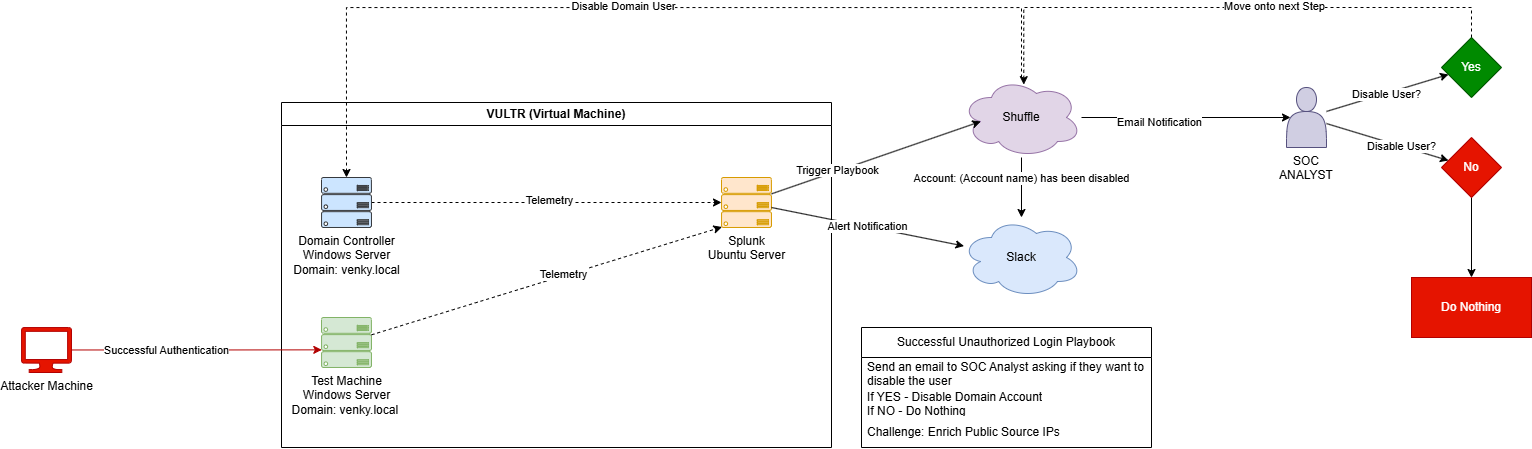
### pipeline 流程:
```
Attacker Machine
↓ [Successful unauthorized RDP authentication]
Test Machine (TEST-MACHINE.venky.local)
↓ [Windows Security logs — Event ID 4624]
Domain Controller (venky-ADDC01.venky.local)
↓ [Telemetry forwarded via Splunk Universal Forwarder]
Splunk SIEM (Ubuntu Server)
↓ [Alert: Unauthorized-Successful-Login-RDP triggered]
Shuffle SOAR
↓ [Send alert to Slack #alerts channel]
↓ [Email SOC analyst — "Would you like to disable the user?"]
SOC Analyst
↓ [YES → Disable domain account]
↓ [NO → Do nothing]
```
## 🔧 基础设施
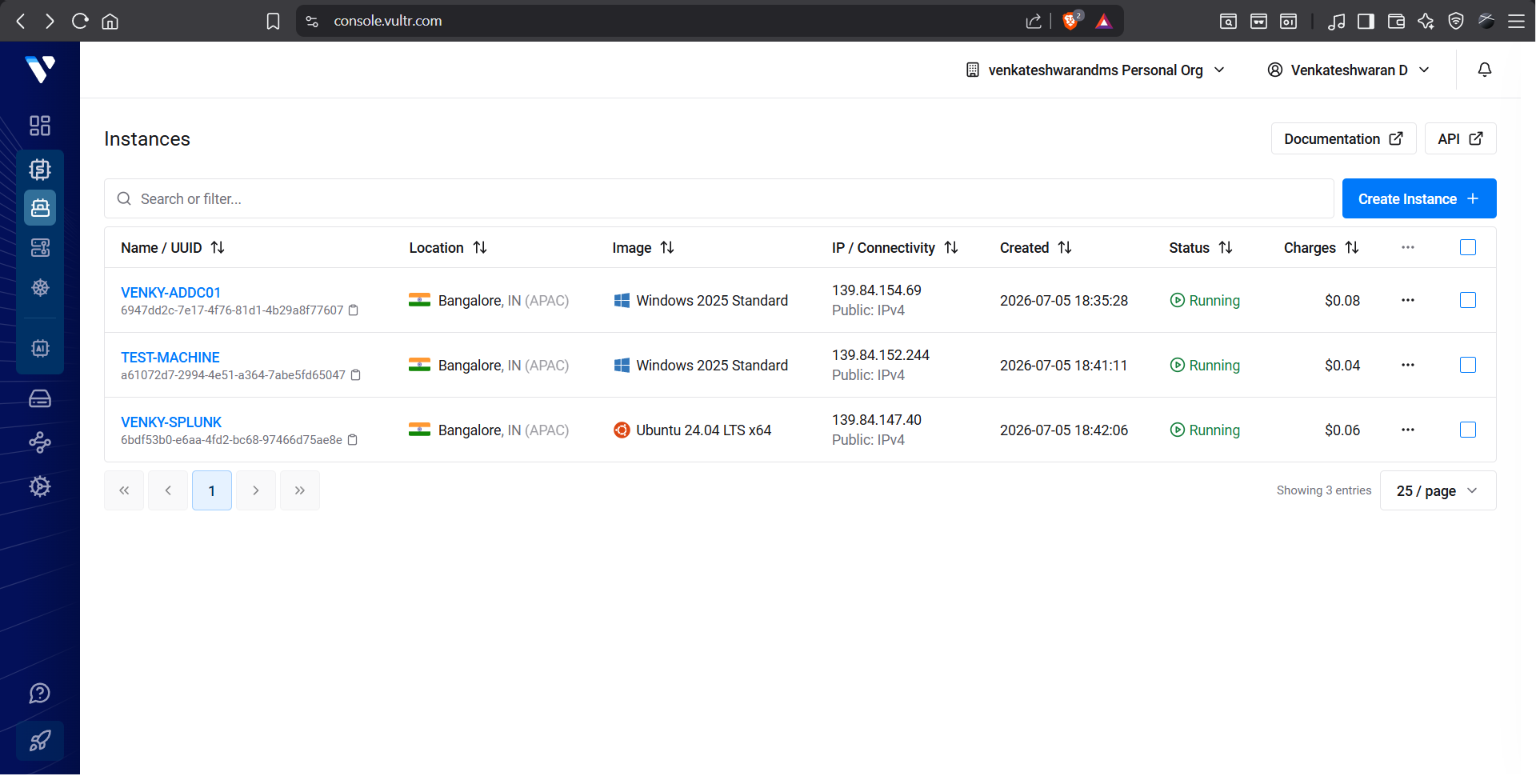
| VM | OS | IP | 角色 |
|----|----|----|------|
| **VENKY-ADDC01** | Windows Server 2025 | 139.84.154.69 | Domain Controller |
| **TEST-MACHINE** | Windows Server 2025 | 139.84.152.244 | 目标 Endpoint |
| **VENKY-SPLUNK** | Ubuntu 24.04 LTS | 139.84.147.40 | Splunk SIEM |
全部托管在 **Vultr Cloud — 印度班加罗尔 (APAC)**
## 📋 实验环境配置
### 1. Active Directory 域配置
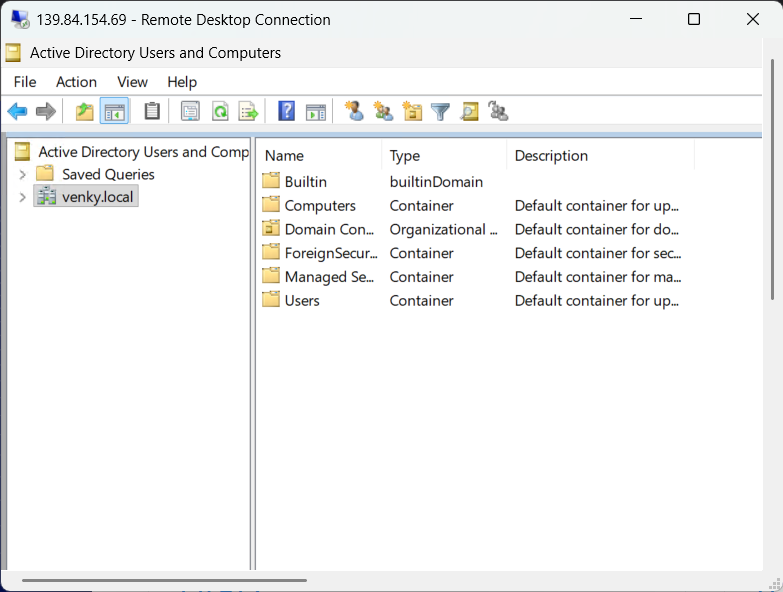
| 设置 | 值 |
|---------|-------|
| 域名 | `venky.local` |
| Domain Controller | `venky-ADDC01.venky.local` |
| 域模式 | Windows 2025 Domain |
| NetBIOS 名称 | VENKY |
### 2. 在 Active Directory 中创建的用户
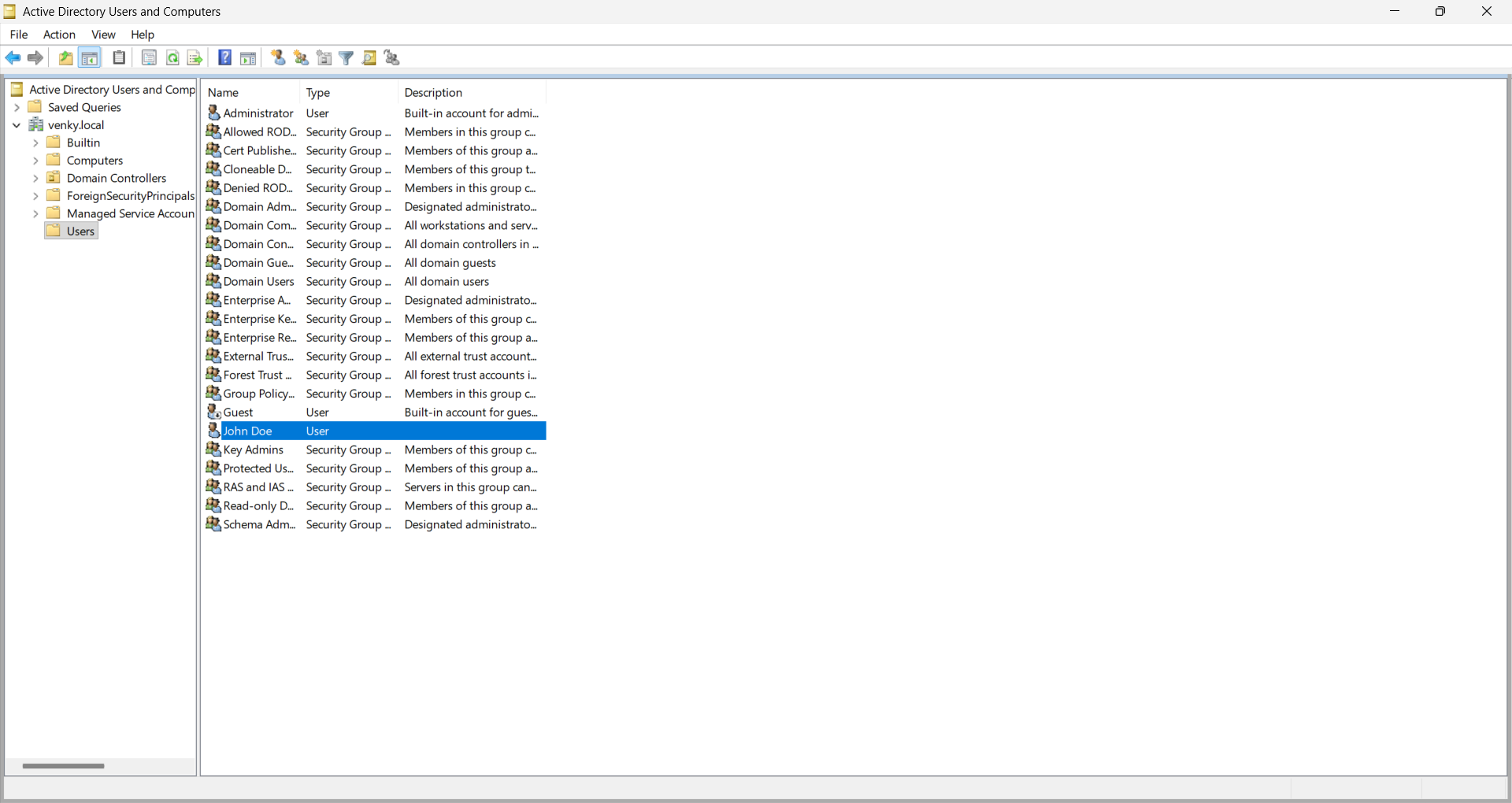
域用户 **John Doe** (`JDoe@venky.local`) 被创建为标准域用户 — 用于模拟在攻击中被针对的真实企业员工账户。
### 3. 加入域的测试机
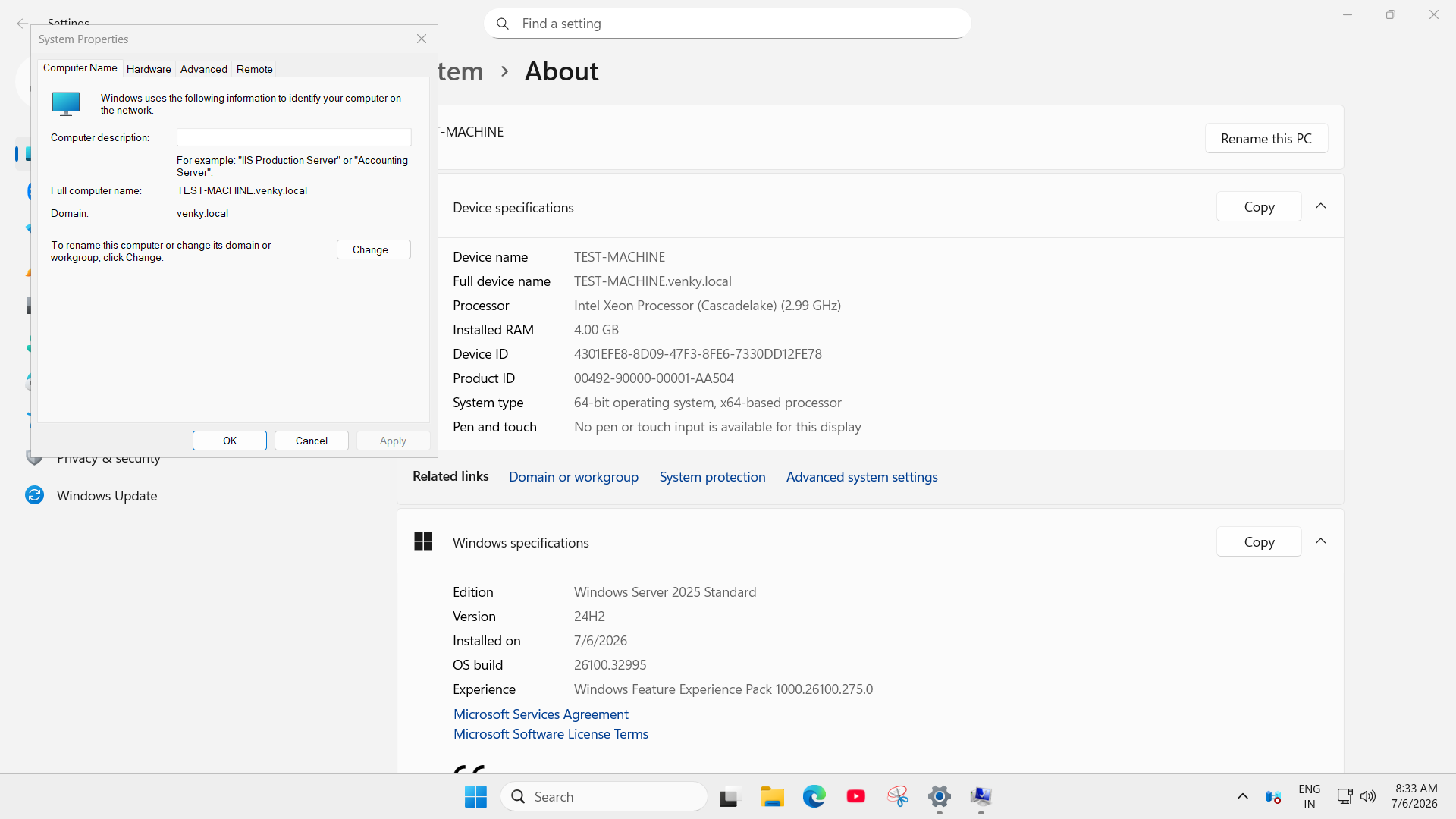
- **计算机名:** TEST-MACHINE
- **完整名称:** TEST-MACHINE.venky.local
- **域名:** venky.local
- **RDP:** 已启用 — 允许远程登录模拟
## 📊 Splunk SIEM 配置
### 4. Splunk Dashboard
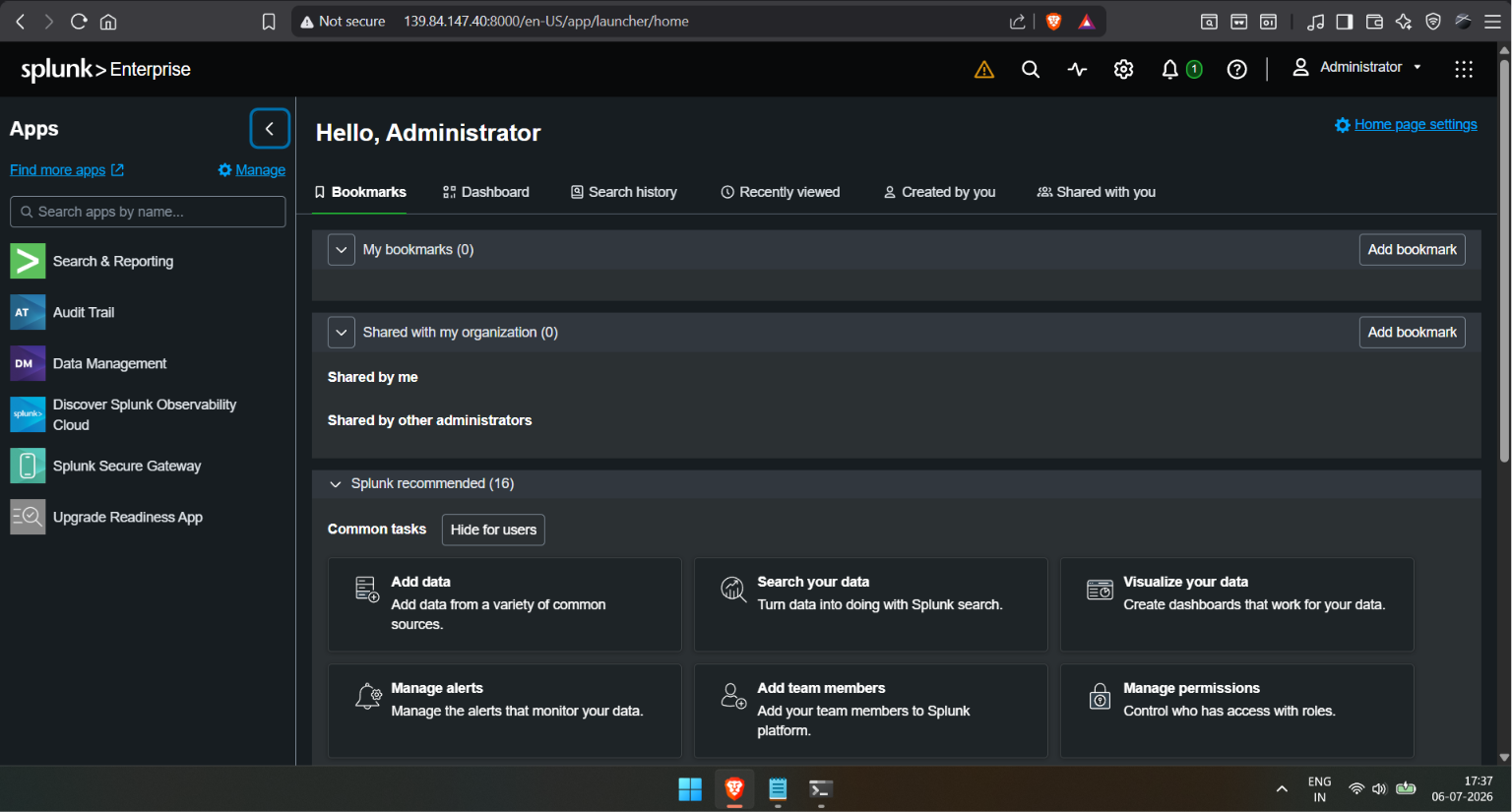
Splunk Enterprise 部署在 Ubuntu 24.04 上。两台 Windows 机器上均安装了 Splunk Universal Forwarder,以便实时发送 Windows Security 事件日志。
### 5. 流入 Splunk 的日志
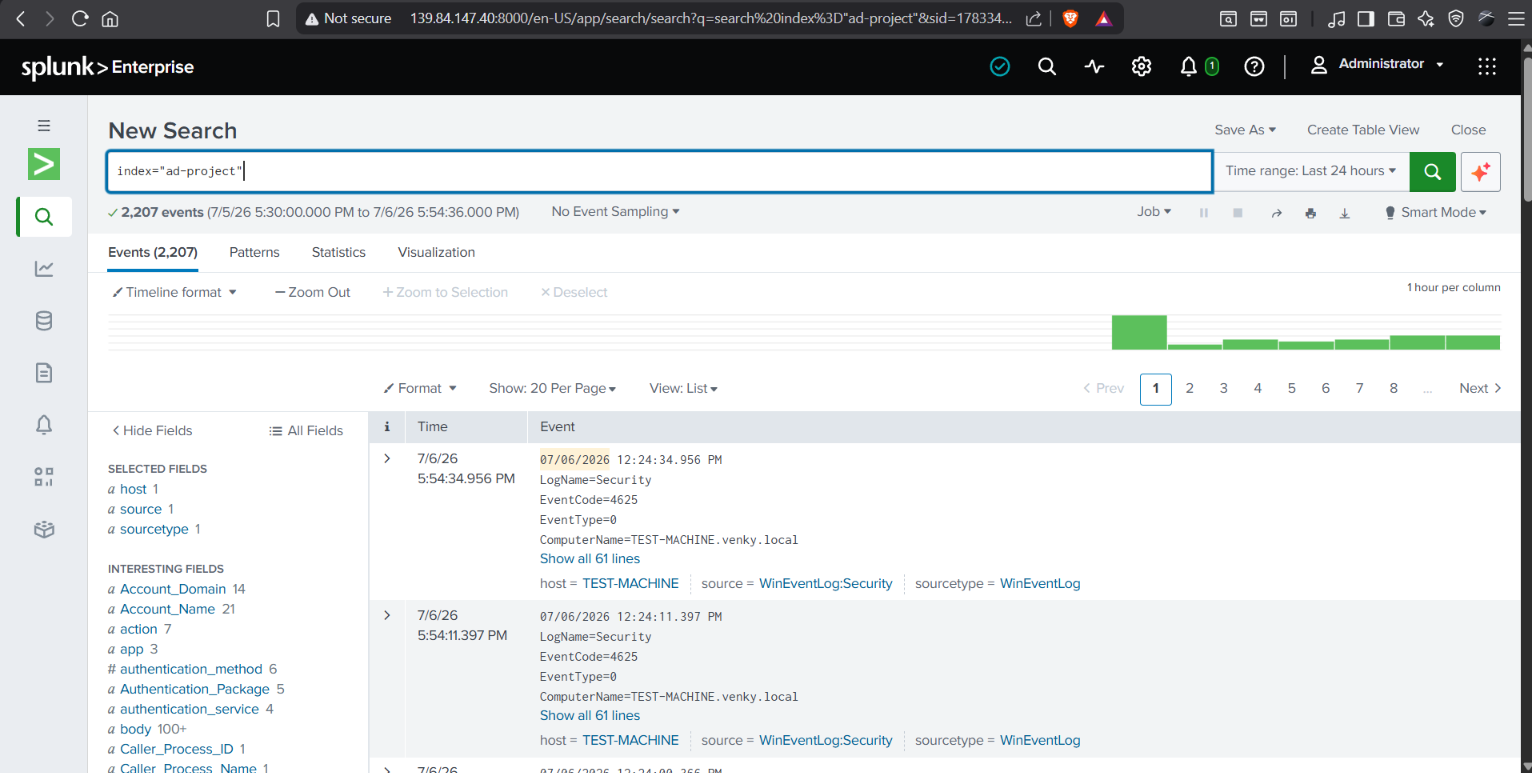
```
index="ad-project" | stats count by host
```
| Host | 事件数 | % |
|------|--------|---|
| venky-ADDC01 | 5,971 | 71.47% |
| TEST-MACHINE | 2,384 | 28.53% |
已接收 **总计 8,355 个事件** — 证实 DC 和 endpoint 的遥测数据均正常流入。
## ⚔️ 攻击模拟与检测
### 6. 检测到未经授权的 RDP 登录
外部攻击者成功通过 RDP 从公共 IP 地址 向 TEST-MACHINE 进行的身份验证。
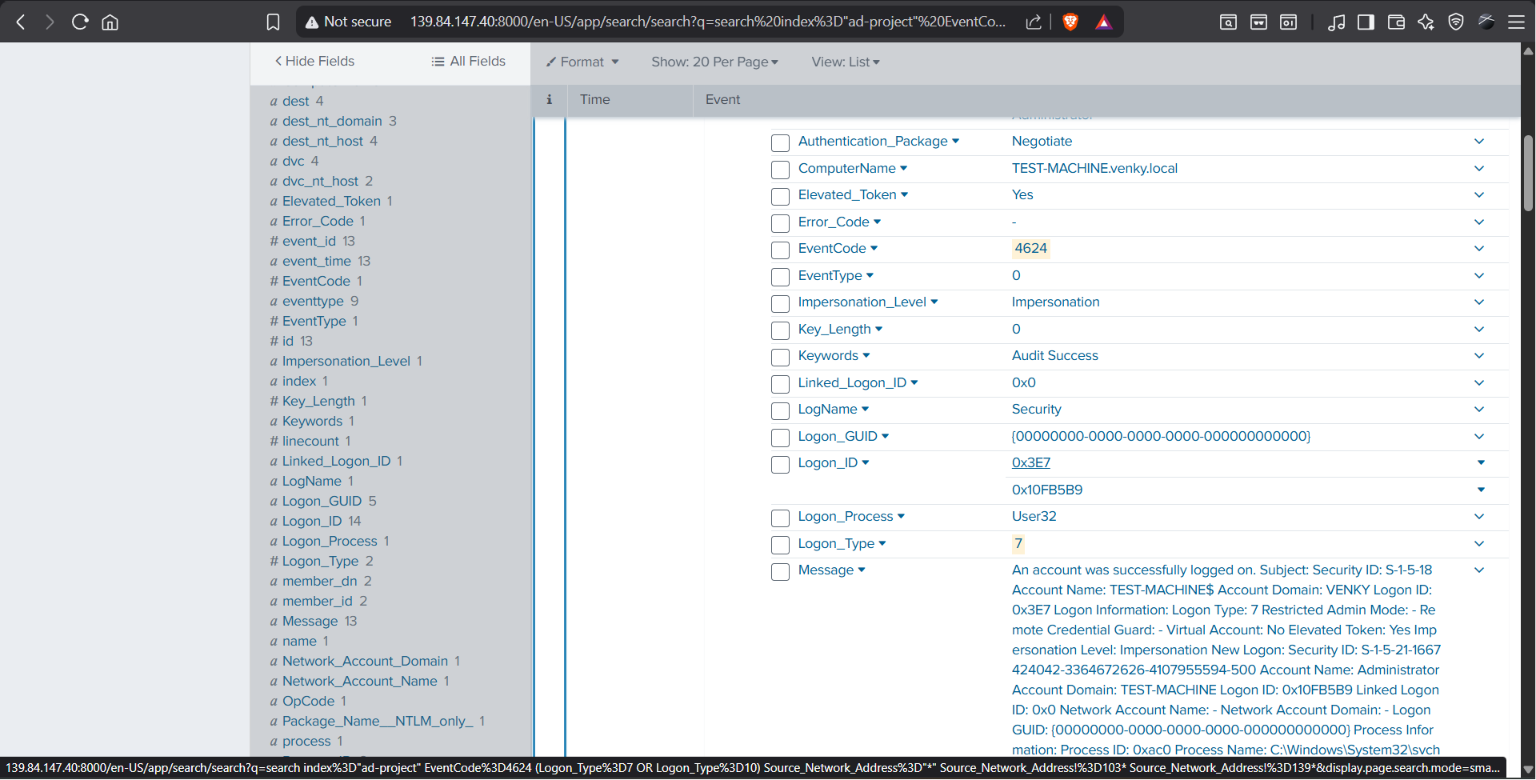
**来自 Splunk 的关键字段:**
| 字段 | 值 |
|-------|-------|
| EventCode | **4624** (成功登录) |
| Logon_Type | **7** (解锁/远程交互) |
| ComputerName | TEST-MACHINE.venky.local |
| Source_Network_Address | 139.84.154.69 |
| User | Administrator |
| Keywords | 审计成功 |
### Splunk 检测查询
```
index="ad-project" EventCode=4624
(Logon_Type=7 OR Logon_Type=10)
Source_Network_Address=*
Source_Network_Address!=127.*
Source_Network_Address!=10.*
Source_Network_Address!=192.168.*
| table _time, ComputerName, user, Source_Network_Address, Logon_Type
```
### 7. 触发 Splunk 告警
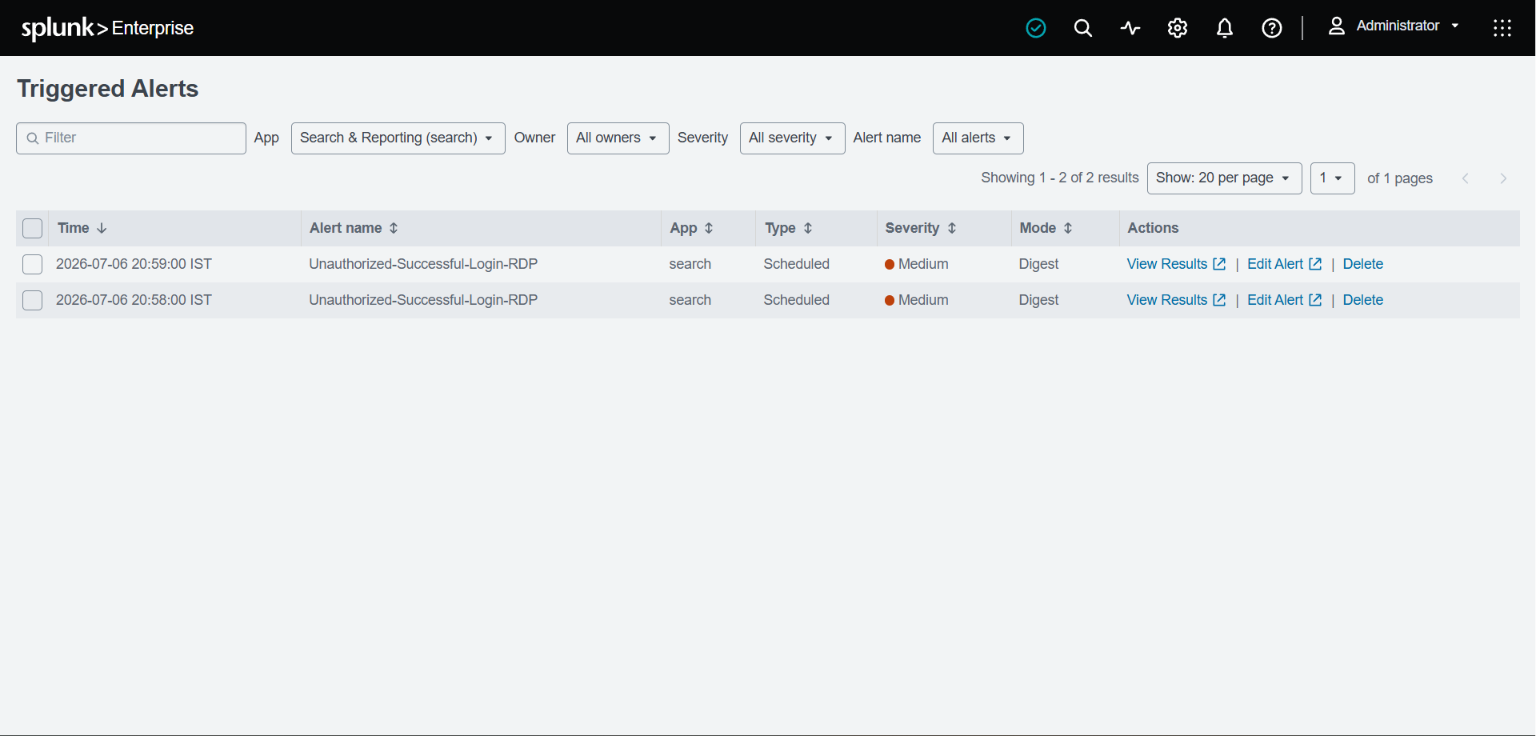
告警 **"Unauthorized-Successful-Login-RDP"** 触发了两次,证实检测功能正在运行:
- 2026-07-06 20:59:00 IST
- 2026-07-06 20:58:00 IST
## 🤖 SOAR 自动化 — Shuffle Playbook
### 8. Shuffle Workflow
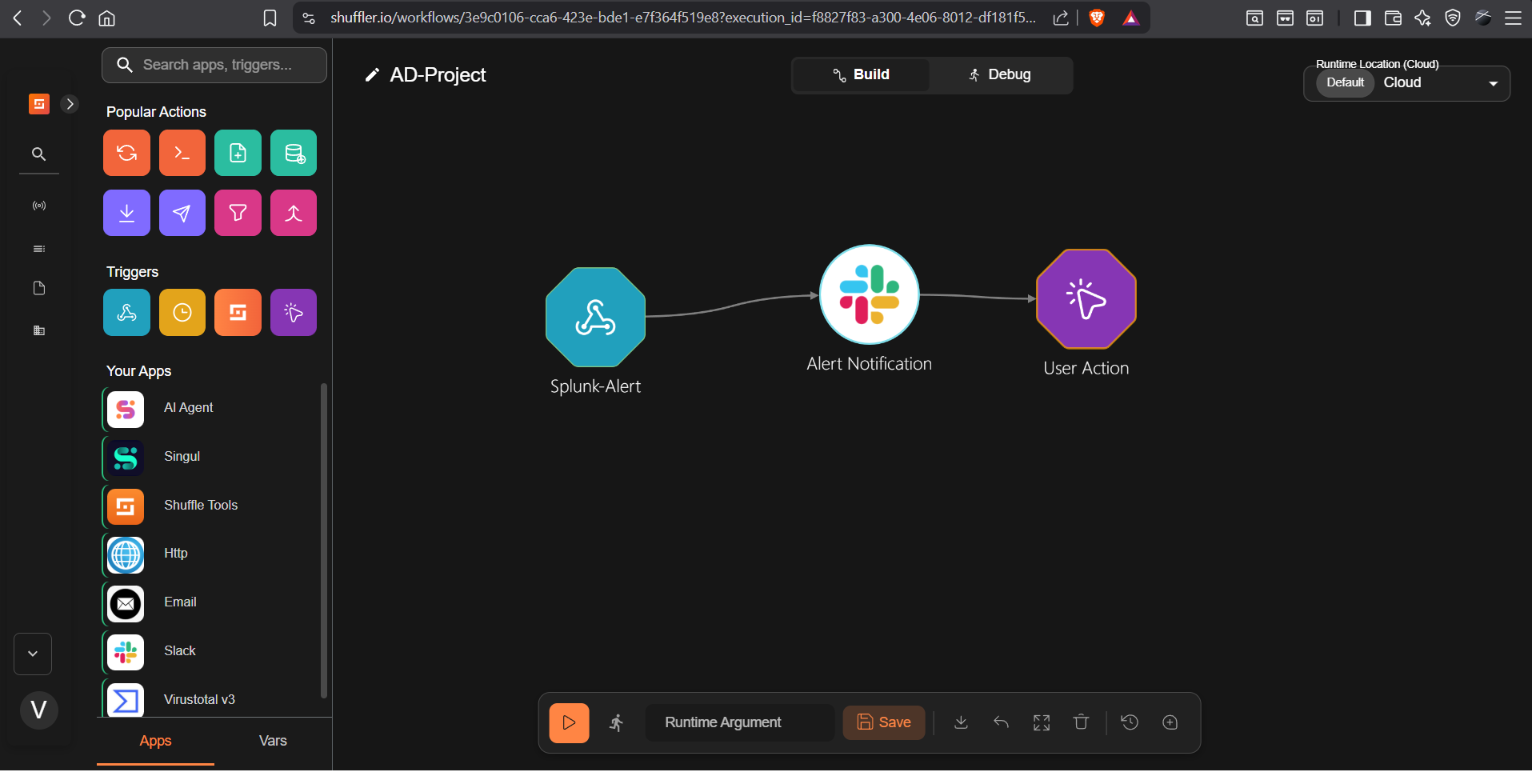
**Playbook:成功响应未经授权的登录**
```
Splunk Alert (Webhook)
↓
Alert Notification → Slack #alerts channel
↓
User Action → Email SOC Analyst
"Would you like to disable the user?"
↓
[YES] → Disable Domain Account
[NO] → Do Nothing
```
### 9. 收到 Slack 告警
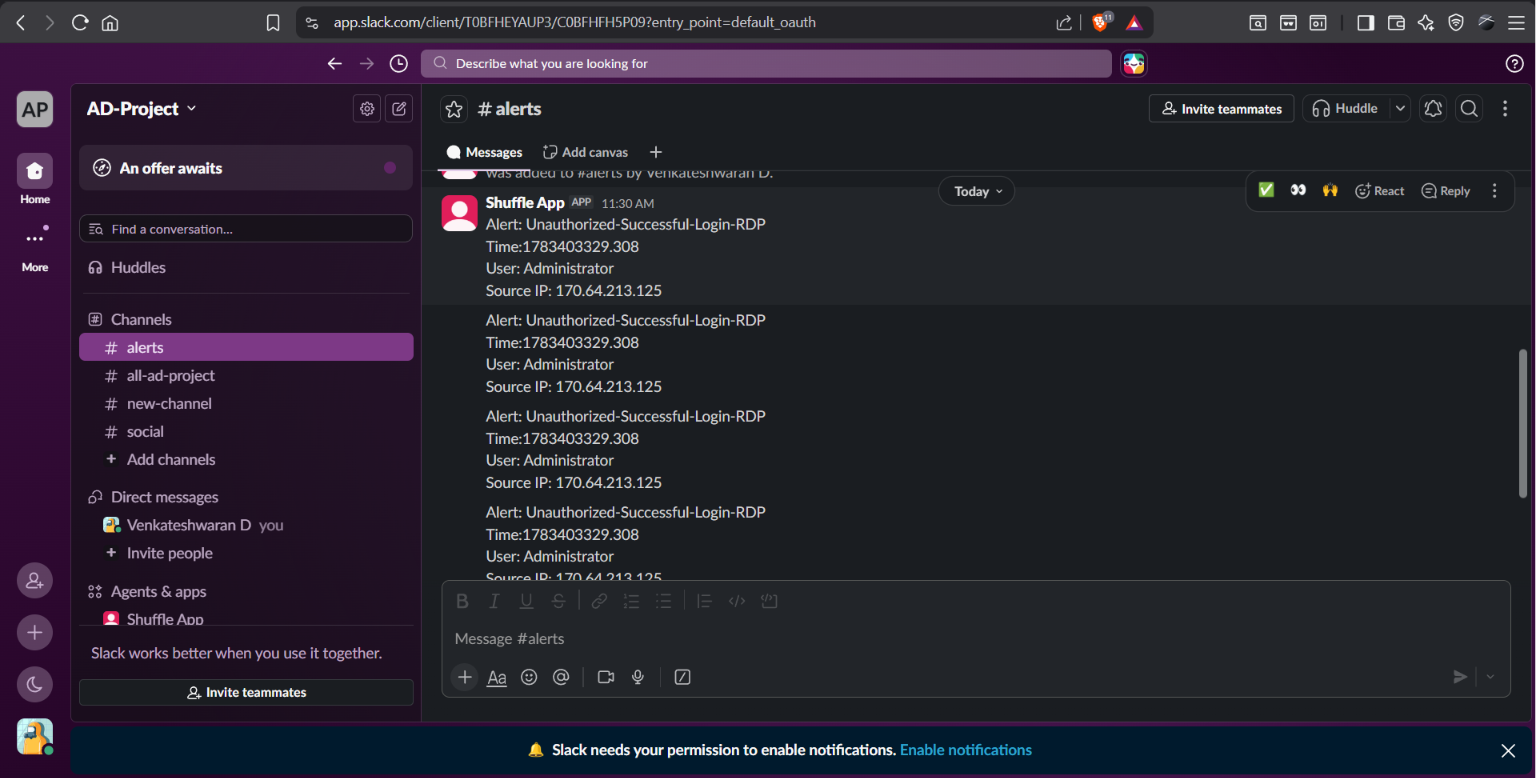
Shuffle 自动发布到 **AD-Project** Slack 工作区的 **#alerts** 频道:
```
Alert: Unauthorized-Successful-Login-RDP
Time: 1783403329.308
User: Administrator
Source IP: 170.64.213.125
```
### 10. SOC 分析师电子邮件 — 禁用用户决定
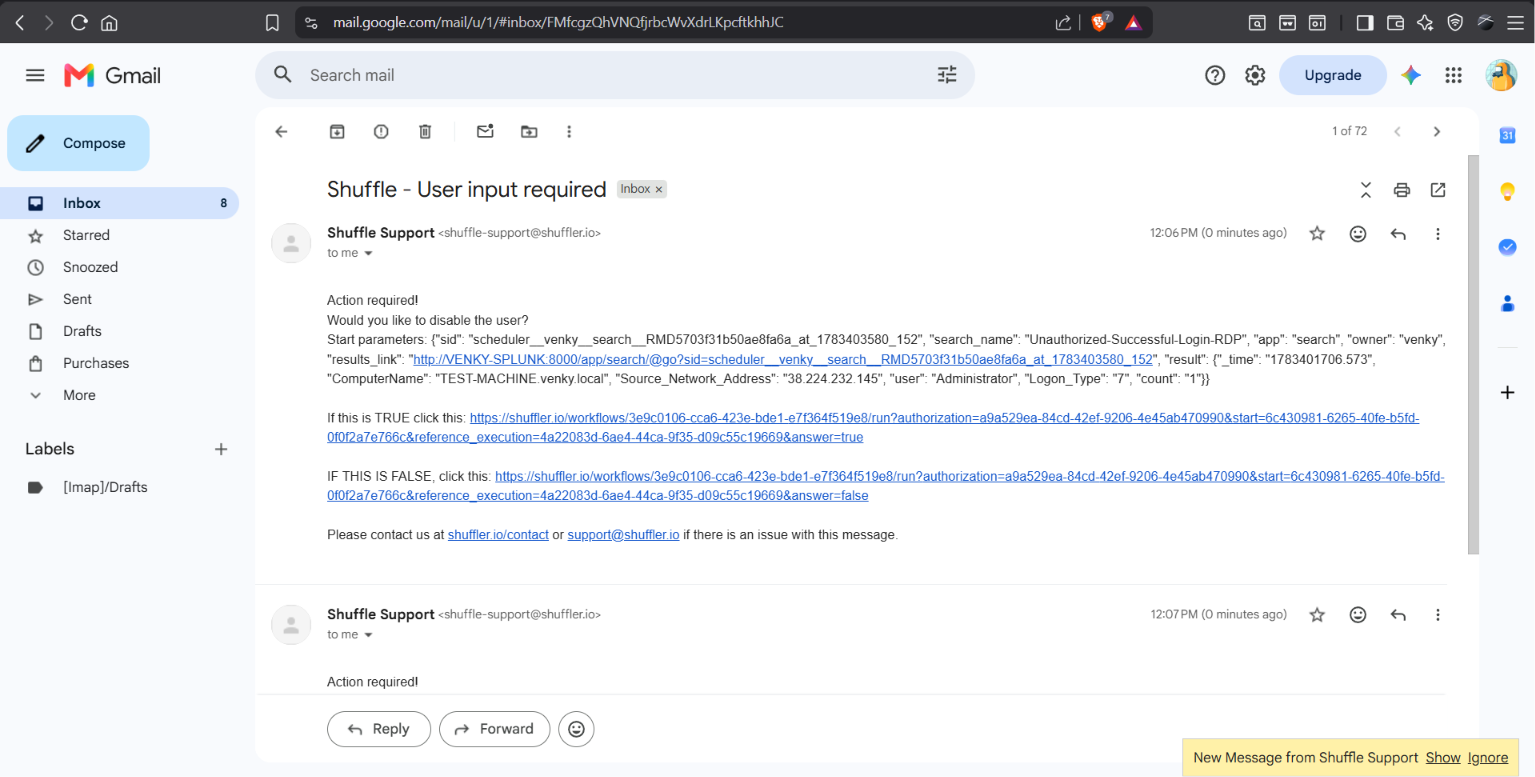
Shuffle 向 SOC 分析师发送了一封自动电子邮件,询问:
这模拟了真实的**交互式 SOAR playbook**,在采取自动操作之前,分析师拥有最终决定权。
## ✅ Pipeline 完整验证
| 阶段 | 工具 | 结果 |
|-------|------|--------|
| 构建 AD 域 | Windows Server 2025 | ✅ venky.local 域已上线 |
| 创建用户 | Active Directory | ✅ John Doe 域用户 |
| 机器加入域 | TEST-MACHINE | ✅ TEST-MACHINE.venky.local |
| 日志流向 Splunk | Universal Forwarder | ✅ 已接收 8,355 个事件 |
| 检测到 RDP 攻击 | Splunk — Event ID 4624 | ✅ 触发告警 |
| Slack 通知 | Shuffle → Slack | ✅ #alerts 中的消息 |
| 分析师决策邮件 | Shuffle User Action | ✅ 是/否 禁用用户 |
## 📁 仓库结构
```
ad-splunk-lab/
├── README.md
├── splunk-queries/
│ └── detection-queries.spl # All Splunk SPL queries used
├── docs/
│ └── setup-notes.md # Infrastructure setup notes
└── screenshots/
├── 01-architecture.png
├── 02-vultr-instances.png
├── 03-ad-domain.png
├── 04-users-in-ad.png
├── 05-domain-joined.png
├── 06-splunk-dashboard.png
├── 07-splunk-events.png
├── 08-event-4624.png
├── 09-splunk-alert-triggered.png
├── 10-shuffle-workflow.png
├── 11-slack-alert.png
└── 12-email-user-action.png
```
## 🎯 展示的技能
- 在云上 部署 Active Directory 域
- Windows Server 2025 Domain Controller 配置
- 域用户和 OU 管理
- Windows endpoint 的加域操作
- 在 Ubuntu 上部署 Splunk Enterprise
- Splunk Universal Forwarder 配置
- 摄取 Windows Security 事件日志
- 编写用于 RDP 攻击检测的 SPL 查询
- Event ID 关联(4624、4625 — 登录事件)
- 配置 Splunk 定时告警
- 设计 Shuffle SOAR playbook
- 集成 Slack 进行实时 SOC 通知
- 交互式分析师决策工作流(User Action 节点)
- 云基础设施管理
## 📌 关键 Event ID 参考
| Event ID | 描述 | 相关性 |
|----------|-------------|-----------|
| **4624** | 账户成功登录 | 检测未经授权的 RDP 访问 |
| **4625** | 账户登录失败 | 检测暴力破解尝试 |
| **4720** | 创建用户账户 | 检测通过新账户建立的持久性 |
| **4732** | 将用户添加到安全组 | 检测权限提升 |
| **4768** | 请求 Kerberos 票据 | 检测 Kerberoasting |
## 📌 参考
- [Splunk 文档](https://docs.splunk.com)
- [Shuffle SOAR](https://shuffler.io)
- [Microsoft Event ID 4624](https://learn.microsoft.com/en-us/windows/security/threat-protection/auditing/event-4624)
- [MITRE ATT&CK T1078 — 有效账户](https://attack.mitre.org/techniques/T1078/)
- [MyDFIR AD 项目](https://www.youtube.com/@MyDFIR)
## 🔗 SOC 家用实验室系列
| 实验 | 项目 | 状态 |
|-----|---------|--------|
| 实验 1 | [NSM Stack — TShark + Zeek + Suricata IDS](https://github.com/Gitlovess/nsm-lab) | ✅ 已完成 |
| 实验 2 | [pfSense Firewall + Suricata IPS](https://github.com/Gitlovess/pfSense-Suricata-IPS-lab) | ✅ 已完成 |
| 实验 3 | [Windows 10 Endpoint 加固](https://github.com/Gitlovess/Windows-10-Endpoint-Hardening) | ✅ 已完成 |
| 实验 4 | [Linux 服务器加固](https://github.com/Gitlovess/linux-hardening-lab) | ✅ 已完成 |
| 实验 5 | [SOC 自动化 — Wazuh + Shuffle + TheHive](https://github.com/Gitlovess/soc-automation-lab) | ✅ 已完成 |
| 实验 6 | Active Directory + Splunk (本仓库) | ✅ 已完成 |
标签:Active Directory, Plaso, RDP暴力破解检测, SOAR, Terraform 安全, 安全运营, 扫描框架