xAmirHamza77/AntiStrike7.0
GitHub: xAmirHamza77/AntiStrike7.0
一款 AI 驱动的综合渗透测试平台,内置近百个攻击模块并支持多 Agent 编排与 MCP 集成,实现对多维度安全漏洞的自动化发现与报告。
Stars: 1 | Forks: 0

Antistrike 7.0 — Obsidian Edition
Advanced AI-powered penetration testing platform
# Antistrike 7.0 — Obsidian Edition
先进的 AI 驱动渗透测试平台,具备多界面控制、扩展的攻击覆盖范围以及智能编排。
## 功能
- **99 个攻击模块** — Web、API、网络、云、移动、二进制、无线等
- **73 种漏洞类型** — SQLi、XSS、SSRF、XXE、SSTI、IDOR、GraphQL、LLM injection 等
- **88 个精选 payload** — 按攻击类型组织并附带元数据
- **内置 HTTP 扫描器** — 核心测试无需外部工具
- **多 agent 协调** — 针对复杂评估的并行专家 agent
- **攻击链** — 自动发现漏洞链
- **三种界面** — Web 仪表板、CLI 和交互式 TUI
- **MCP 集成** — 用于 AI 助手控制(Cursor、Claude、Copilot)的 16 个工具
- **授权门控** — 任何测试前强制要求注册 scope
- **报告** — 执行摘要、SARIF 以及 JSON 导出
## 快速开始
```
# 安装
cd Antistrike-7.0
pip install -e .
# 启动 API server
antistrike-server
# 或:python -m antistrike.cli.main serve
# 打开 web dashboard
# http://127.0.0.1:7700/dashboard
# 注册授权(扫描前必须完成)
antistrike authorize https://target.example.com -a "Security Lead"
# 运行扫描
antistrike scan https://target.example.com --depth standard
# 全面 profile 评估
antistrike assess https://target.example.com --profile web --depth deep
# 交互式 TUI
antistrike tui
# 列出可用模块
antistrike modules
```
## MCP 设置
添加到您的 AI 助手 MCP 配置中:
```
{
"mcpServers": {
"antistrike": {
"command": "python3",
"args": ["-m", "antistrike.mcp.bridge", "--server", "http://127.0.0.1:7700"],
"timeout": 600
}
}
}
```
或者将 `config/antistrike-mcp.json` 复制到您的客户端配置中。
### MCP 工具
| 工具 | 描述 |
|------|-------------|
| `register_scope` | 注册授权的测试 scope |
| `run_vulnerability_scan` | 内置漏洞扫描器 |
| `run_tool_module` | 执行特定的攻击模块 |
| `run_profile_assessment` | 完整的 profile 扫描(web/api/network/cloud) |
| `create_attack_chain` | 漏洞链分析 |
| `list_modules` | 列出所有攻击模块 |
| `get_payloads` | 获取 payload 库 |
| `spawn_agent_team` | 部署多 agent 测试团队 |
| `generate_report` | 创建评估报告 |
| `server_health` | 检查服务器状态 |
## 扫描深度
| 深度 | 描述 |
|-------|-------------|
| `quick` | 表面扫描 — SQLi、XSS、CORS、重定向 |
| `standard` | 均衡扫描 — 增加 SSRF、LFI、SSTI、命令注入 |
| `deep` | 深入扫描 — 增加 NoSQL、XXE、原型污染、Host header |
| `exhaustive` | 全频谱扫描 — 注册表中的所有攻击类别 |
## 攻击 Profile
| Profile | 模块 |
|---------|---------|
| `web` | 目录暴力破解、漏洞扫描、注入套件、爬虫 |
| `api` | API 模糊测试、GraphQL、JWT、OAuth、参数发现 |
| `network` | 端口扫描、服务枚举、SMB、SNMP |
| `cloud` | AWS/Azure/GCP 审计、K8s、容器、IaC |
| `mobile` | APK 分析、移动 API 测试 |
| `binary` | 逆向工程、ROP、固件 |
| `full_spectrum` | 组合所有 profile |
## 视觉素材
| 素材 | 预览 |
|-------|---------|
| Logo |  |
| 仪表板 | 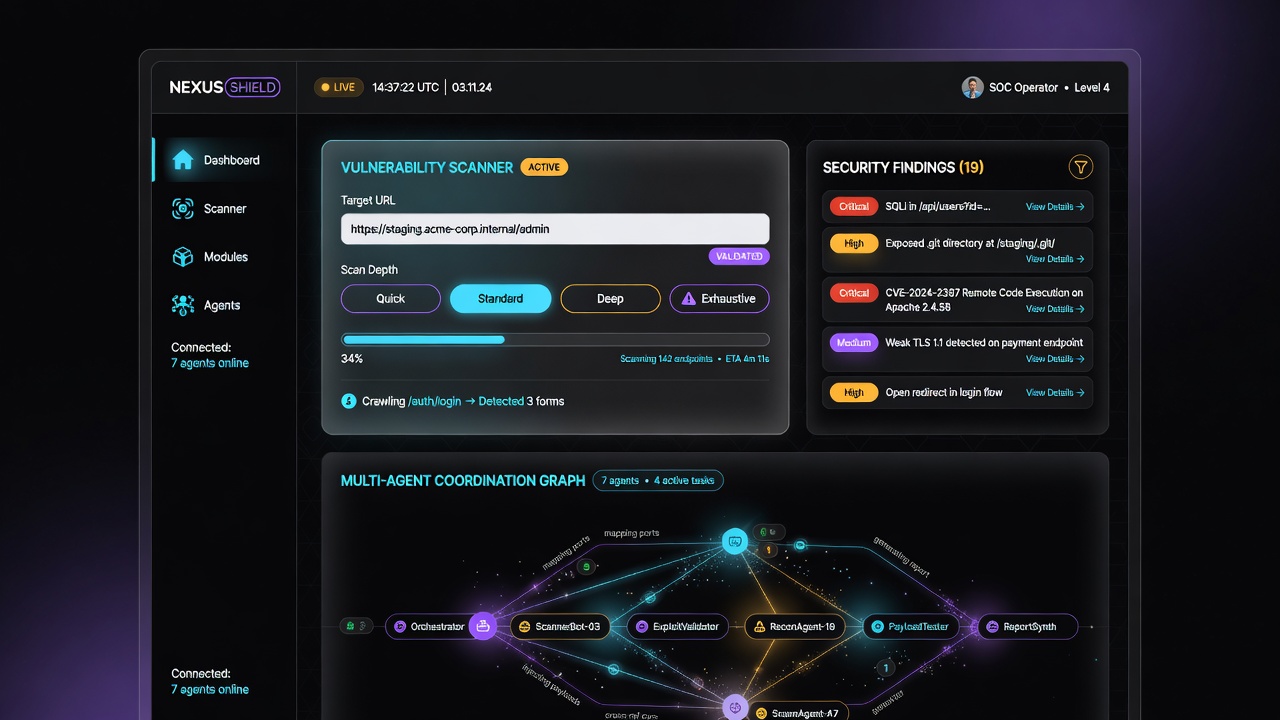 |
| 平台统计 | 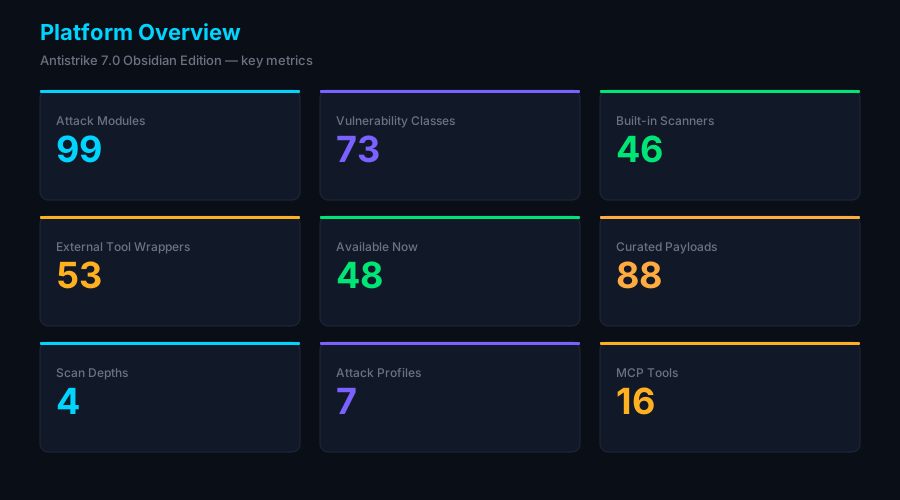 |
| 模块类别 | 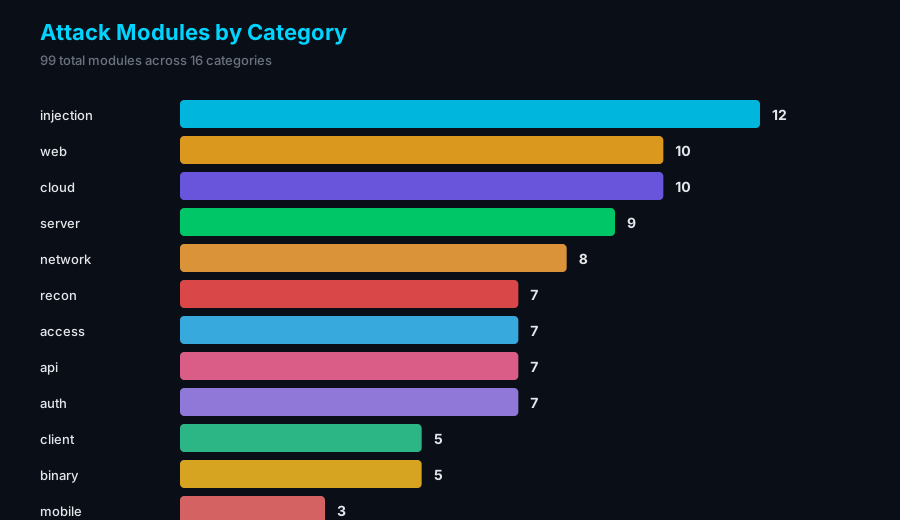 |
| 架构 | 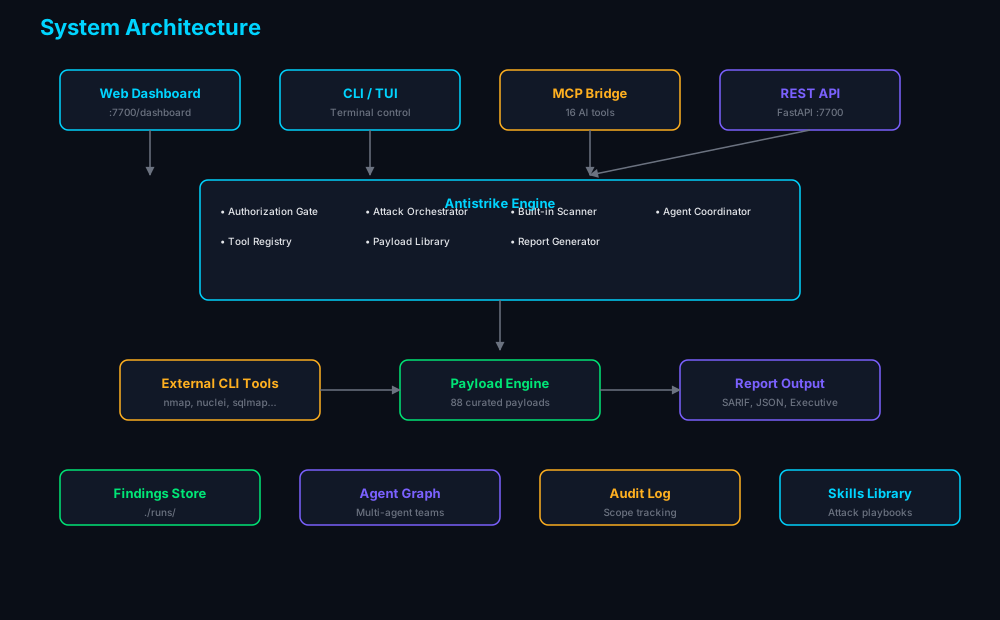 |
**在线图库:** https://xamirhamza77.github.io/AntiStrike7.0/
或者在本地打开 `assets/gallery.html`。
从实时数据重新生成图表:
```
python scripts/generate_charts.py
```
## 架构
```
┌──────────────────┐ ┌──────────────────┐ ┌──────────────────┐
│ Web Dashboard │ │ CLI / TUI │ │ AI Assistant │
│ (Control Center)│ │ (Terminal) │ │ (MCP Client) │
└────────┬─────────┘ └────────┬─────────┘ └────────┬─────────┘
│ │ │
└─────────────────────┼──────────────────────┘
│ REST API (:7700)
▼
┌──────────────────────┐
│ Antistrike Engine │
│ ├─ Authorization │
│ ├─ Orchestrator │
│ ├─ Built-in Scanner │
│ ├─ Agent Coordinator│
│ ├─ Tool Registry │
│ ├─ Payload Library │
│ └─ Report Generator │
└──────────┬───────────┘
│
┌──────────┴───────────┐
│ External CLI Tools │
│ (nmap, nuclei, etc) │
└──────────────────────┘
```
## 配置
编辑 `config/antistrike.json`:
```
{
"server": { "host": "127.0.0.1", "port": 7700 },
"scan": { "default_depth": "standard", "max_concurrent_jobs": 8 },
"authorization": { "require_scope_confirmation": true }
}
```
环境变量:`ANTISTRIKE_SERVER__PORT`、`ANTISTRIKE_SCAN__COMMAND_TIMEOUT`
## 授权
所有测试都需要明确的授权。在任何扫描之前注册 scope:
```
antistrike authorize https://target.example.com \
-a "John Doe, CISO" \
-d deep \
-p web -p api
```
## 外部工具
Antistrike 借助其内置扫描器即可独立运行。如需扩展覆盖范围,请根据需要安装工具:
```
# macOS
brew install nmap nuclei ffuf subfinder sqlmap
# Kali Linux(已预装大多数工具)
```
模块会优雅降级 — 不可用的工具将被跳过并提示安装。
## 安全性
- **仅限授权测试** — 强制要求注册 scope
- **默认不进行 DoS 攻击** — 可通过交战规则进行配置
- **审计日志** — 记录所有操作
- **隔离执行** — 专为渗透测试虚拟机和实验室环境设计
## 许可证
MIT
标签:AI自动化, CISA项目, Python, 无后门, 逆向工具