Kumar-jagadeesh/sec-incident-agent
GitHub: Kumar-jagadeesh/sec-incident-agent
一款基于 Google ADK 和 MCP 构建的多 Agent 网络安全事件响应编排器,能够自动完成告警分类、日志搜索、威胁情报关联以及安全补救措施的人工审核与执行。
Stars: 0 | Forks: 0
# 网络安全事件响应 Agent (`sec-incident-agent`)
一个基于 **Google Agent Development Kit (ADK) 2.0** 和 **Model Context Protocol (MCP)** 构建的智能多 Agent 安全编排器,用于对安全警报进行分类、搜索日志数据库、利用威胁情报丰富事件信息、起草补救计划,并通过 Human-in-the-Loop 机制安全地执行已批准的遏制措施。
本项目作为 **Kaggle Capstone Project** 的一部分提交。
## 📖 目录
* [架构](#-architecture)
* [核心功能](#-core-features)
* [前置条件](#-prerequisites)
* [安装与设置](#-installation--setup)
* [配置](#-configuration)
* [运行方式](#-how-to-run)
* [示例测试用例](#-sample-test-cases)
* [评估与验证](#-evaluation--verification)
* [GitHub 设置与部署说明](#-github-setup--deployment-instructions)
* [故障排除](#-troubleshooting)
* [提交报告](#-submission-writeup)
## 🏗 架构
该系统采用多 Agent 编排架构,中央 Lead Orchestrator 将专门的子任务委派给日志分析和补救 Agent,并由安全输入网关和 Human-in-the-Loop (HITL) 执行节点进行控制。
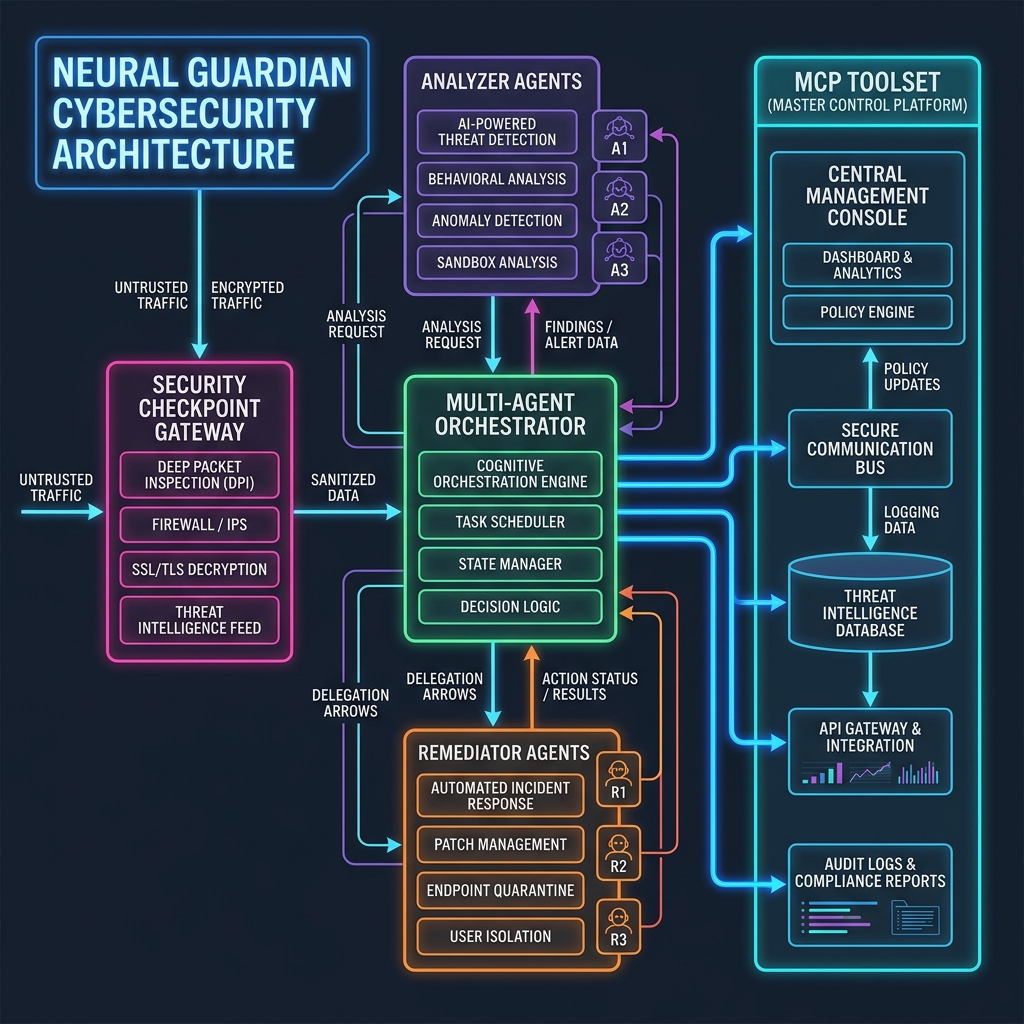
### 工作流图(Mermaid 表示)
```
graph TD
START[START] --> SC[Security Checkpoint Node]
SC -->|clear| ORCH[Orchestrator Agent]
SC -->|security_event| SA[Security Alert Node]
subgraph Multi-Agent Delegation
ORCH -->|AgentTool| AA[Analyzer Agent]
ORCH -->|AgentTool| RA[Remediator Agent]
end
subgraph MCP Server
AA -->|McpToolset| MCP[Local MCP Server]
RA -->|McpToolset| MCP
MCP --- T1[IOC Lookup]
MCP --- T2[CVE Lookup]
MCP --- T3[Threat Intelligence]
MCP --- T4[Log Search]
MCP --- T5[Incident Report Gen]
end
ORCH --> HR[Human Review HITL Node]
HR -->|approved| ER[Execute Remediation Node]
HR -->|denied| CR[Cancel Remediation Node]
SA --> END[End]
ER --> END
CR --> END
```
## ⚡ 核心功能
1. **安全入口检查点 (`app/agent.py`)**
* **受 OWASP 启发的过滤**:去除输入字符串中的 HTML 标签和脚本元素。
* **PII 与凭据脱敏**:在电子邮件、密码、bearer token 和凭据被 LLM 上下文处理之前,自动对其进行脱敏。
* **Prompt 注入防御**:过滤特征关键词(例如,“ignore previous instructions”),并将恶意 prompt 重定向到安全警报节点。
* **审计日志记录**:为所有网关检查输出结构化的 JSON 日志。
2. **专用 Agent (`app/agent.py`)**
* **Lead Orchestrator**:管理执行状态并委派任务。
* **Log Analyst Agent**:搜索日志并关联入侵指标。
* **Remediator Agent**:概述缓解选项并构建 Markdown 安全报告的结构。
3. **特定领域的 MCP 服务器 (`app/mcp_server.py`)**
* 通过 Stdio 传输公开标准安全接口。
* 将 Agent 连接到模拟的防火墙/身份验证日志、CVE 字典以及 IP 信誉查询引擎。
4. **Human-in-the-Loop (HITL) 安全防护**
* 每当请求高严重性的补救措施(例如,阻止 IP 或锁定账户)时,暂停工作流执行。
* 提示管理员进行审查,要求在执行前进行明确的 `yes` 确认。
## 📋 前置条件
* **Python**:已安装并配置 `3.11` 或 `3.12`。
* **包管理器**:[uv](https://docs.astral.sh/uv/)(强烈推荐用于快速、确定性的同步)。
* **Gemini API Key**:通过 [Google AI Studio](https://aistudio.google.com/apikey) 进行设置。
## 🚀 安装与设置
1. **克隆仓库**:
git clone https://github.com/Kumar-jagadeesh/sec-incident-agent.git
cd sec-incident-agent
2. **同步依赖**:
本项目使用 `uv` 进行包管理。同步您的环境(这将创建一个 `.venv` 目录并复制软件包):
make install
3. **配置环境变量**:
从模板创建本地 `.env` 文件:
cp .env.example .env
打开 `.env` 文件并配置您的 API 密钥:
GOOGLE_API_KEY=AIzaSy...YourKeyHere...
GEMINI_MODEL=gemini-2.5-flash
## ⚙ 配置
`.env` 中的关键环境变量:
| 键 | 描述 | 默认值 |
|---|---|---|
| `GOOGLE_API_KEY` | 来自 Google AI Studio 的 Gemini API Key | *(必填)* |
| `GEMINI_MODEL` | ADK Agent 使用的 LLM 模型 | `gemini-2.5-flash` |
| `PORT` | API 服务器执行端口 | `8000` |
## 💻 运行方式
### 1. 交互式开发者 Playground UI
启动 ADK Web Playground 界面,以实时测试对话流、审计日志和 Human-in-the-Loop 审查 prompt。
```
make playground
```
*可通过 [http://127.0.0.1:18081](http://127.0.0.1:18081) 访问。*
### 2. 生产级 API 服务器
在本地运行 FastAPI 应用程序,以向其他系统公开 Agent 端点:
```
make run
```
*API 文档将在 [http://127.0.0.1:8000/docs](http://127.0.0.1:8000/docs) 处提供。*
### 3. 快速终端测试
使用 `agents-cli` 运行单轮 prompt 检查:
```
uv run agents-cli run "Can you check if there is any threat reputation for the IP address 8.8.8.8?"
```
## 🧪 示例测试用例
直接在 Playground UI 或 CLI 中测试三个标准安全场景:
### 场景 1:低严重性(IOC 验证)
* **Prompt**:`Can you check if there is any threat reputation for the IP address 8.8.8.8?`
* **流程**:网关批准输入 -> Orchestrator 发送给 Analyzer -> Analyzer 查询 IP 信誉 -> 返回干净的报告 -> 将响应提供给用户,无需请求批准。
### 场景 2:漏洞分析与数据脱敏
* **Prompt**:`We received an alert regarding CVE-2021-44228. Can you search details for this vulnerability and give mitigation recommendations? Please send updates to ciso@company.com.`
* **流程**:安全检查点将 `ciso@company.com` 脱敏为 `[REDACTED_EMAIL]`。Orchestrator 调用 Analyzer 检查 CVE (Log4Shell) 详情。Remediator 提供缓解建议。执行暂停以等待人工批准。
### 场景 3:关键遏制(SSH 攻击)
* **Prompt**:`Alert: We see suspicious activity. Search the security logs for failed login attempts, analyze the source IP 203.0.113.15, and generate the response.`
* **流程**:网关批准 -> Analyzer 搜索身份验证日志 -> 发现来自 `203.0.113.15` 的 SSH 暴力破解尝试 -> Remediator 起草 IP 阻止操作 -> 执行暂停。UI 提示:`Do you approve these remediation steps? (Reply 'yes' or 'no')`。回复 `yes` 将执行遏制规则。
## 📊 评估与验证
本项目包含一套全面的评估套件,用于衡量 Agent 响应质量、工具轨迹以及安全护栏合规性。
### 运行自动化单元/集成测试
执行本地 pytest 套件:
```
make test
```
### 运行 ADK Agent 评估指标
1. **生成评估轨迹**:
uv run agents-cli eval generate
2. **评估性能打分**:
uv run agents-cli eval grade
此项将根据位于 `tests/eval/datasets/` 中的预配置场景对 Agent 进行评估。
## 🐙 GitHub 设置与部署说明
要将此代码库推送到您自己的 GitHub 仓库:
1. **初始化 Git**:
git init
git branch -M main
2. **添加文件**:
git add .
*(确保您的 `.gitignore` 正确阻止了包含敏感凭据的 `.env` 被上传)。*
3. **提交**:
git commit -m "Initial commit: Cybersecurity Incident Response Agent"
4. **关联仓库并推送**:
git remote add origin https://github.com/Kumar-jagadeesh/sec-incident-agent.git
git push -u origin main
### 部署到 Google Cloud Run
要在 Google Cloud Run 上托管此事件响应 Agent:
1. 使用 Cloud Run 部署配置增强项目:
uv run agents-cli scaffold enhance . --deployment-target cloudrun
2. 部署服务:
uv run agents-cli deploy
## 🛠 故障排除
1. **错误:`404 Model Not Found`**
* *解决方案*:检查您的 `.env` 是否包含有效的活动模型(例如 `GEMINI_MODEL=gemini-2.5-flash`)。确保您的 API 密钥在 Google AI Studio 中有权访问该特定模型。
2. **错误:`429 Resource Exhausted`**
* *解决方案*:Gemini API 的免费层级限制了每分钟的请求数 (RPM)。暂停 60 秒后再次运行命令。如果要在生产环境中部署,请配置付费的 Google Cloud 结算账户。
3. **端口冲突(`8000` 或 `18081` 已被占用)**
* *解决方案*:停止任何挂起的后台进程。在 Windows (PowerShell) 上:
Get-Process -Id (Get-NetTCPConnection -LocalPort 18081, 8000 -ErrorAction SilentlyContinue).OwningProcess | Stop-Process -Force
## 🎬 演示脚本
[DEMO_SCRIPT.txt](file:///c:/Users/kumar/adk-workspace/sec-incident-agent/DEMO_SCRIPT.txt) 中提供了时长为 3-4 分钟的口头叙述演示脚本,涵盖了项目讲解,包括视觉提示和逐节点的架构说明。
## 📝 提交报告
[SUBMISSION_WRITEUP.md](file:///c:/Users/kumar/adk-workspace/sec-incident-agent/SUBMISSION_WRITEUP.md) 中提供了完整的、可供评委评审的 Capstone 项目报告。它详细介绍了网络安全事件响应 Agent 的问题陈述、解决方案设计、安全层、评估结果以及生产影响。
标签:逆向工具