olemeyer/rocketplaneIO
GitHub: olemeyer/rocketplaneIO
自托管的 Kubernetes AI SRE 平台,结合 eBPF 零插桩可观测性与通过风险分级 action pipeline 安全执行修复的 AI Copilot。
Stars: 141 | Forks: 3
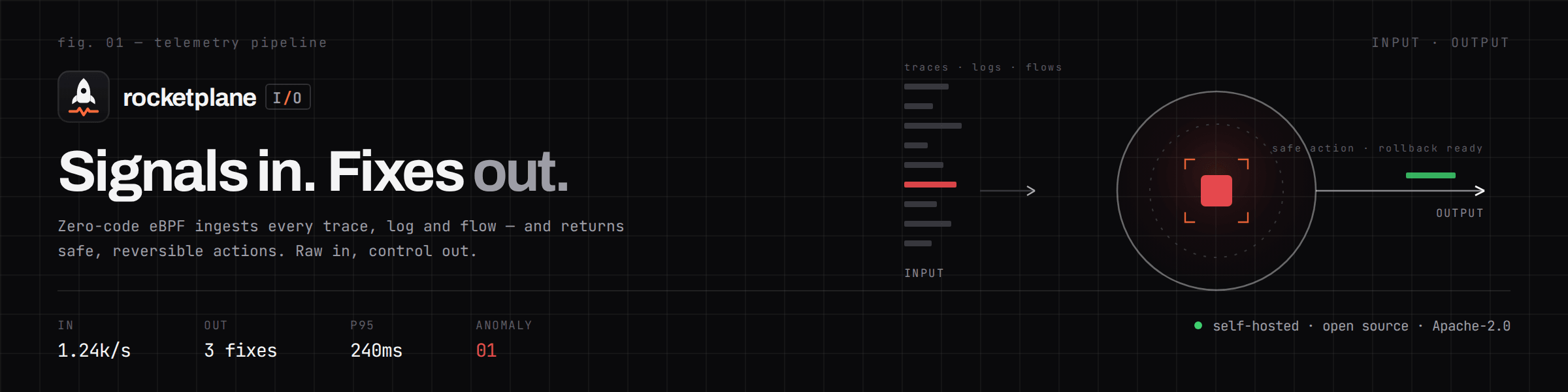
专为 Kubernetes 集群设计的 AI SRE ——
能够真正且安全地修复问题。
自托管 · Apache-2.0 · 自带 LLM · 支持物理隔离
 [](LICENSE)  [**快速开始**](#quick-start) · [**安全吗?**](#is-it-safe) · [**核心原理**](#under-the-hood)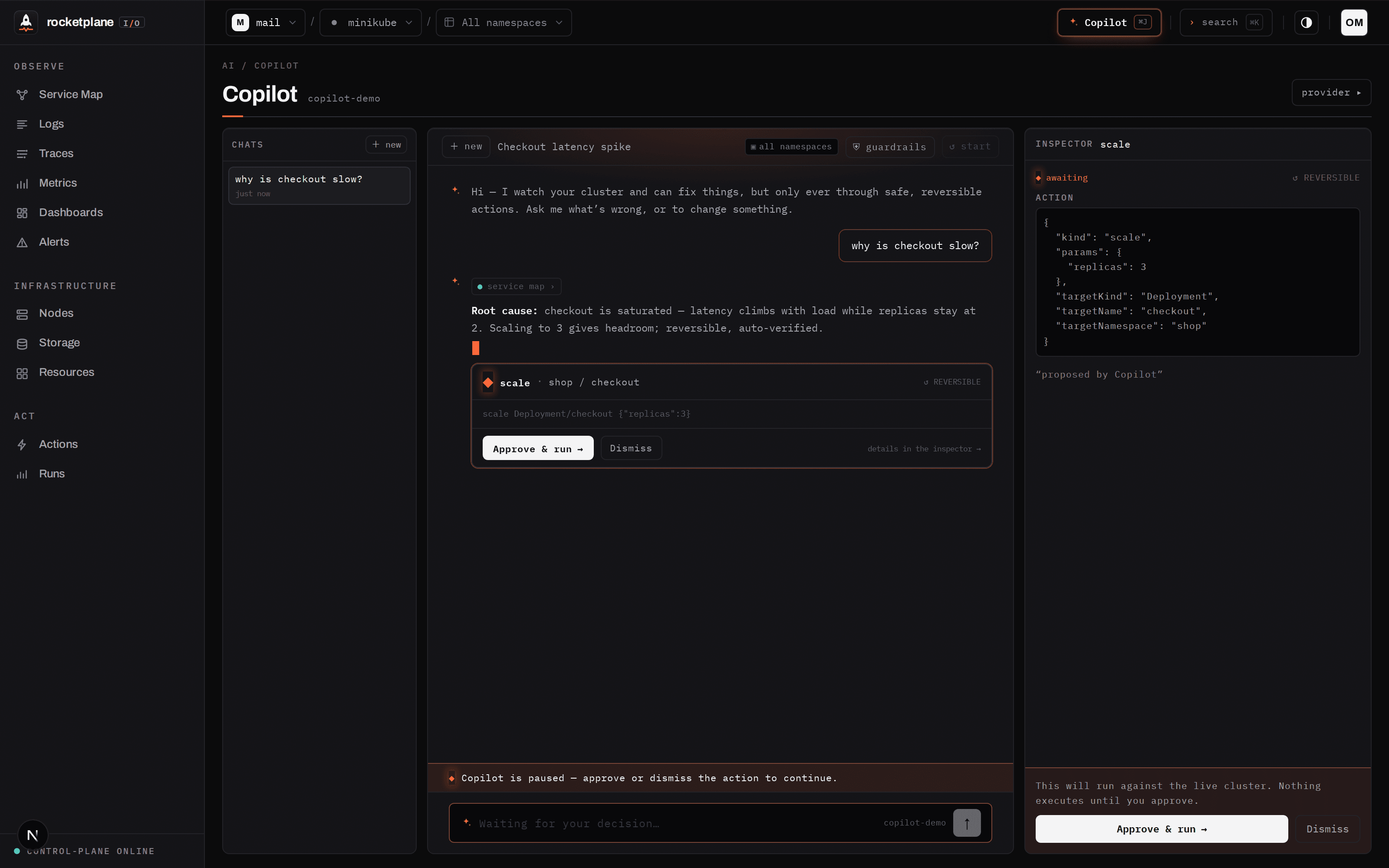
You ask “why is checkout slow?”. The Copilot reads the service map and the logs itself,
names the root cause with evidence, and proposes one fix — which runs only after you approve it,
as a pipeline that verifies itself or rolls back.
## 其他地方找不到的三大特色 ### 1 · 带有安全目录的 AI SRE —— 而不是只会用 kubectl 的 AI Copilot 会自行进行调查:eBPF 追踪、日志、PromQL 指标、实时服务拓扑图以及 **完整的 Kubernetes 清单**(Services、Ingress、ConfigMaps、策略 —— 一切尽在掌握)。但它 只能通过 **约 30 个命名且可逆的 action pipeline** 来更改集群。没有 shell,没有 `kubectl`,没有它可能产生幻觉的 YAML。 每个 action 都经过了风险评估 —— 并且由 *您* 为每个级别设置审批规则: | 级别 | 示例 | 默认审批方式 | |---|---|---| | ◎ 只读 | debug bundle、rollout history、drain preview | 自动运行 | | ↺ 可逆 | 扩容、重启、设置镜像、配置编辑 | 一键审批 | | ◇ 干扰性 | 驱逐 pod、rollout undo、清理 | 一键审批 | | △ 破坏性 | drain、**缩容至 0 (scale-to-0)**、NoExecute 污点 | **输入目标名称以授权执行** | 风险感知参数(`scale replicas=3` 是可逆的;`replicas=0` 是破坏性的),作用域 在服务端强制执行(命名空间作用域的 session 无法触及节点或其他命名空间),并且 每个级别都可以设置为 `auto`、`click`、`confirm` 或 `off`。 **模型提出建议。确定性的 pipeline 负责执行,在 pod 级别进行验证,并执行回滚。** LLM 永远不会直接触碰集群。 接入任何兼容 Anthropic 或 OpenAI 的模型 —— 包括完全本地化、支持物理隔离的模型。无论哪种方式,您的遥测数据都不会离开您的基础设施。 ### 2 · 为您从未插桩的服务生成追踪 只需一个仅限出站的 agent 加上一个 eBPF DaemonSet ([OTel eBPF Instrumentation](https://github.com/grafana/beyla)),原 Grafana Beyla)。支持 HTTP/gRPC spans,**具备跨服务上下文传播 —— 包括编译后的 Go 二进制文件** —— 外加 SQL、 Redis 和 Kafka 客户端 spans。无需 SDK,无需 sidecar,无需更改代码。
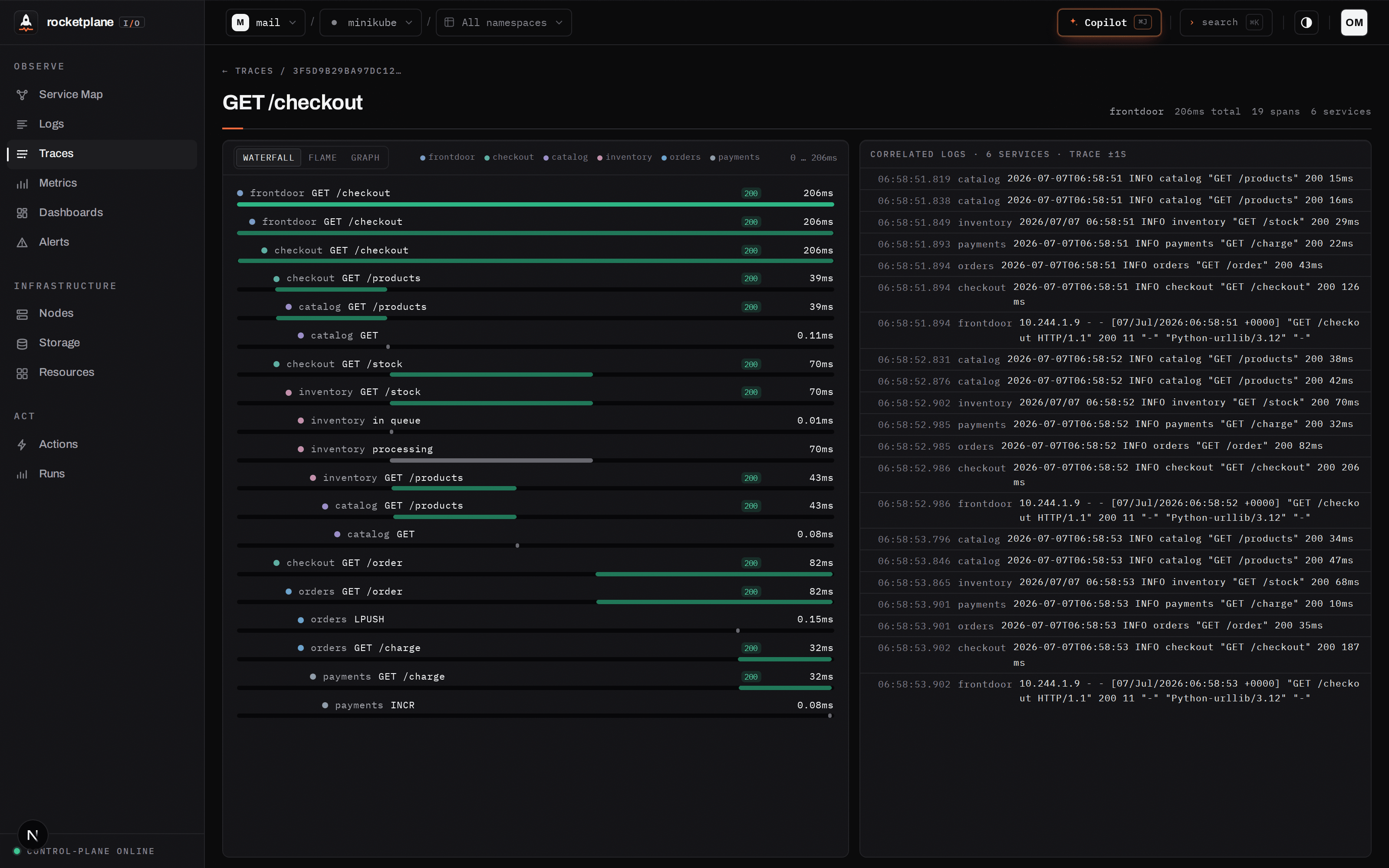
A real 500 on
### 3 · 每次更改都会自我证明 —— 否则自我撤销
Actions 绝非即发即忘的 `kubectl` 调用。每一个都是一个 pipeline ——
**触发 → 观察 → 验证** —— 只有在集群真正收敛时才会报告成功:
旧 pod 消失,新 pod Ready 且稳定。取消、超时或验证失败都会触发
从变异发生 *之前* 拍摄的快照进行自动回滚。
GET /checkout: the failure cascades frontdoor → checkout → catalog,
the exact ERROR log lines are correlated on the right. No SDK in any of these services.
An ERROR log line is two clicks away from this view. PromQL runs on the real Prometheus engine, embedded, on ClickHouse.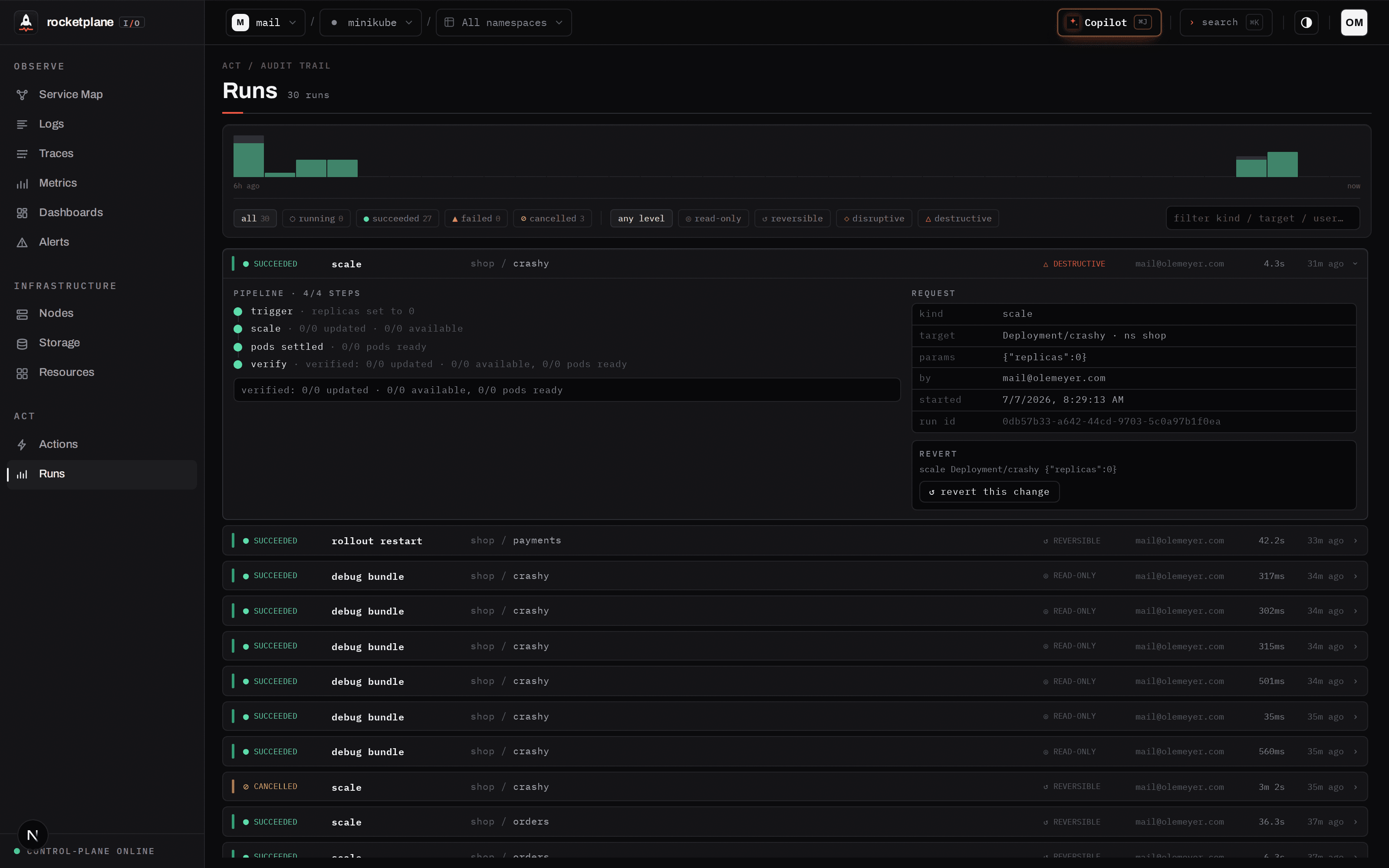
Runs — the audit trail. Who ran what, the full step timeline, and
↺ revert: one click re-applies the exact state captured before the change. Cancel always
terminates — a reaper finalizes anything a dead agent leaves behind, and force-cancel never waits.
## 快速开始
整个平台通过已发布的镜像运行 ([ghcr.io](https://github.com/olemeyer?tab=packages&repo_name=rocketplaneIO))。
您需要 Docker 以及一个供其指向的 Kubernetes 集群(minikube 也可以)。
**1 — 运行平台**
```
curl -O https://raw.githubusercontent.com/olemeyer/rocketplaneIO/main/deploy/compose/docker-compose.prod.yml
curl -o .env https://raw.githubusercontent.com/olemeyer/rocketplaneIO/main/deploy/compose/.env.example
# 在 .env 中设置 RP_SESSION_SECRET(例如 `openssl rand -hex 32`);默认值适用于本地试用
docker compose --env-file .env -f docker-compose.prod.yml up -d
```
UI 将在 **http://localhost:4173** 启动,控制平面在 `:8090` 启动。
**2 — 连接您的集群**
打开 UI,创建所有者账户,点击 **Connect cluster** —— 它会提供给您一条可复制粘贴的
命令,用于安装 agent 和 Beyla DaemonSet(通过渲染后的 `kubectl apply` 或 Helm)。
当服务拓扑图绘制出您的命名空间并且 Traces 下出现 spans 时,您就上线了 —— 完全
无需修改您的哪怕一行代码。
**3 — 开启 Copilot**
从顶部栏打开它,并连接任何兼容 Anthropic 或 OpenAI 的提供商(包括
本地的提供商)。密钥将保留在您的实例上;请求会直接从您的控制平面发送到
您选择的提供商。
目前的镜像标签为 edge(跟随 main 分支);带有标签的正式发布和平台
Helm chart 是下一个里程碑。想要一个演示工作负载吗?一个位于 nginx 背后、基于 Python + Redis 的购物应用 —— 也就是这里每张截图中展示的那个 —— 位于
deploy/dev/ (kubectl apply -f deploy/dev/shop-realistic.yaml -f deploy/dev/frontdoor.yaml)。
## 它安全吗?
每个平台团队都会优先阅读这一部分:
- **仅限出站。** agent 通过 HTTPS 向外拨号;没有任何东西会连接到您的集群中,也没有任何东西
在监听。Actions 由 agent *主动认领* —— 绝不会被推送进来。
- **枚举的 RBAC,分为两部分** ([`deploy/install.yaml`](deploy/install.yaml)):*observe* 是
只读的;*act* 仅包含 action 目录所需的确切写入权限。删除 act 块
(或在 Helm 中设置 `rbac.actions=false`)即可获得一个严格只读的 agent。没有通配符,没有
cluster-admin。
- **Secrets:** 清单只显示名称、类型和键的数量 —— 绝不显示值。这种限制在
agent 代码中强制执行;如果您更愿意通过 RBAC 来强制执行,请删除那一条 `secrets` 规则,
agent 会平滑降级。
- **LLM 被隔离。** 它通过您使用的相同的经过身份验证的 API 进行读取,并且只
通过列入白名单的、经过验证的、受风险控制的 action 目录进行更改。每一个提议、批准和结果
都会记录在审计跟踪中。
- **eBPF:** Beyla 作为特权 DaemonSet 运行(内核版本 ≥ 5.8 且支持 BTF)。捕获层使用的是
上游的 OpenTelemetry 工具 —— rocketplaneIO 是位于其上层的调查与 action 循环。
- **资源占用**(在单节点 minikube 上持续施加合成负载测量 —— 仅供参考,
非生产环境基准测试):rocketplaneIO **agent** 是一个轻量级的 pod,在全集群范围内仅占用 **~2m 的 CPU
和 ~10Mi 的内存**。**Beyla** 才是真正的开销所在,并且会随请求量而扩展 ——
**空闲时约 0.02 核心负载,高负载时峰值可达约 0.25 核心,每节点约 280Mi 内存**(有上限限制;其
默认限制为 512Mi)。整个集群一个 agent,每个节点一个 Beyla。
## 盒子里还有什么
实时服务拓扑图 · 带自动修复的告警 · 基于 ClickHouse 的 PromQL · 完整的 K8s 清单 · Starlark 工作流 · 更多界面
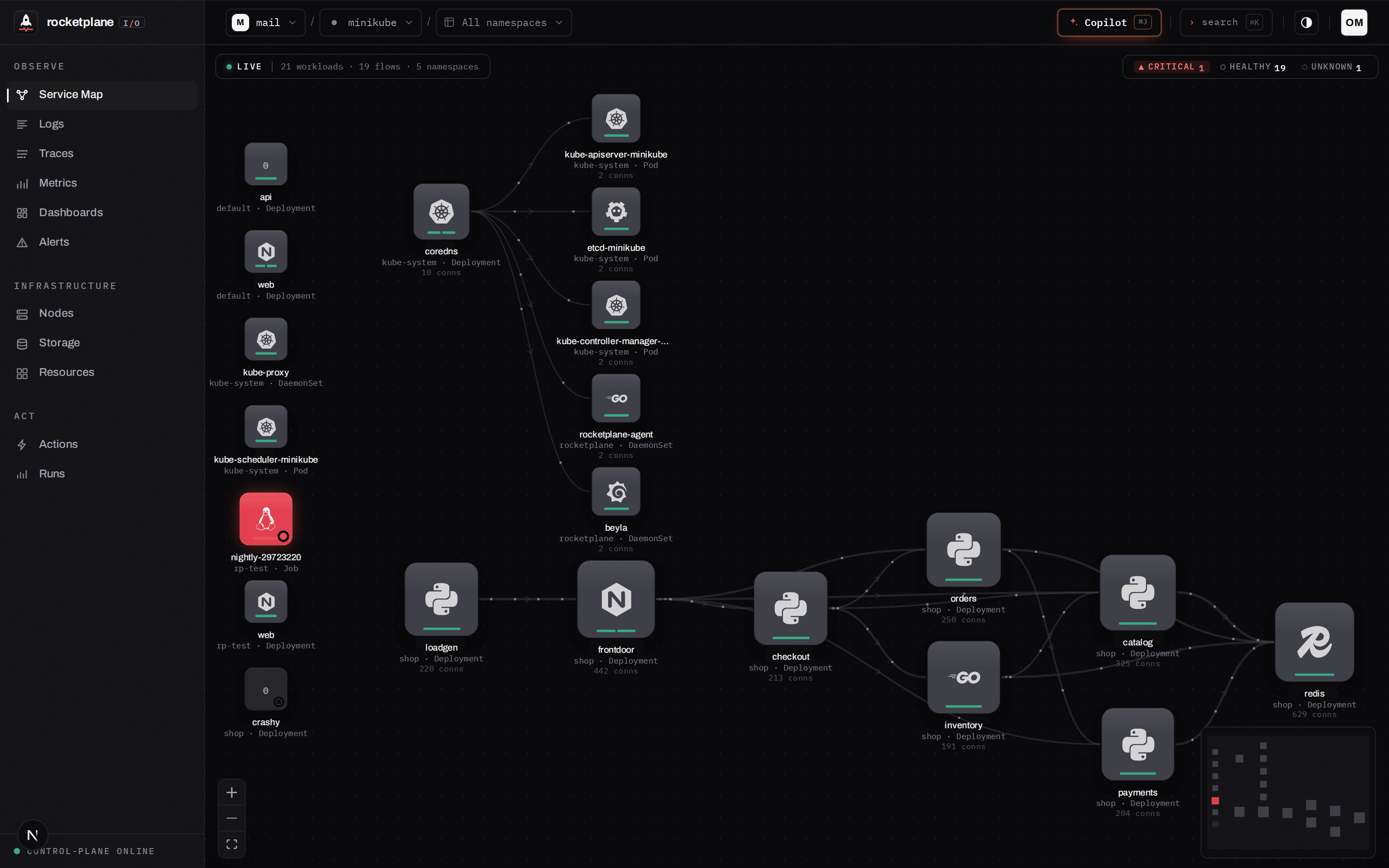 Service map — topology from real eBPF traffic flows; tech logos matched from container
images; live-updating.
Service map — topology from real eBPF traffic flows; tech logos matched from container
images; live-updating.
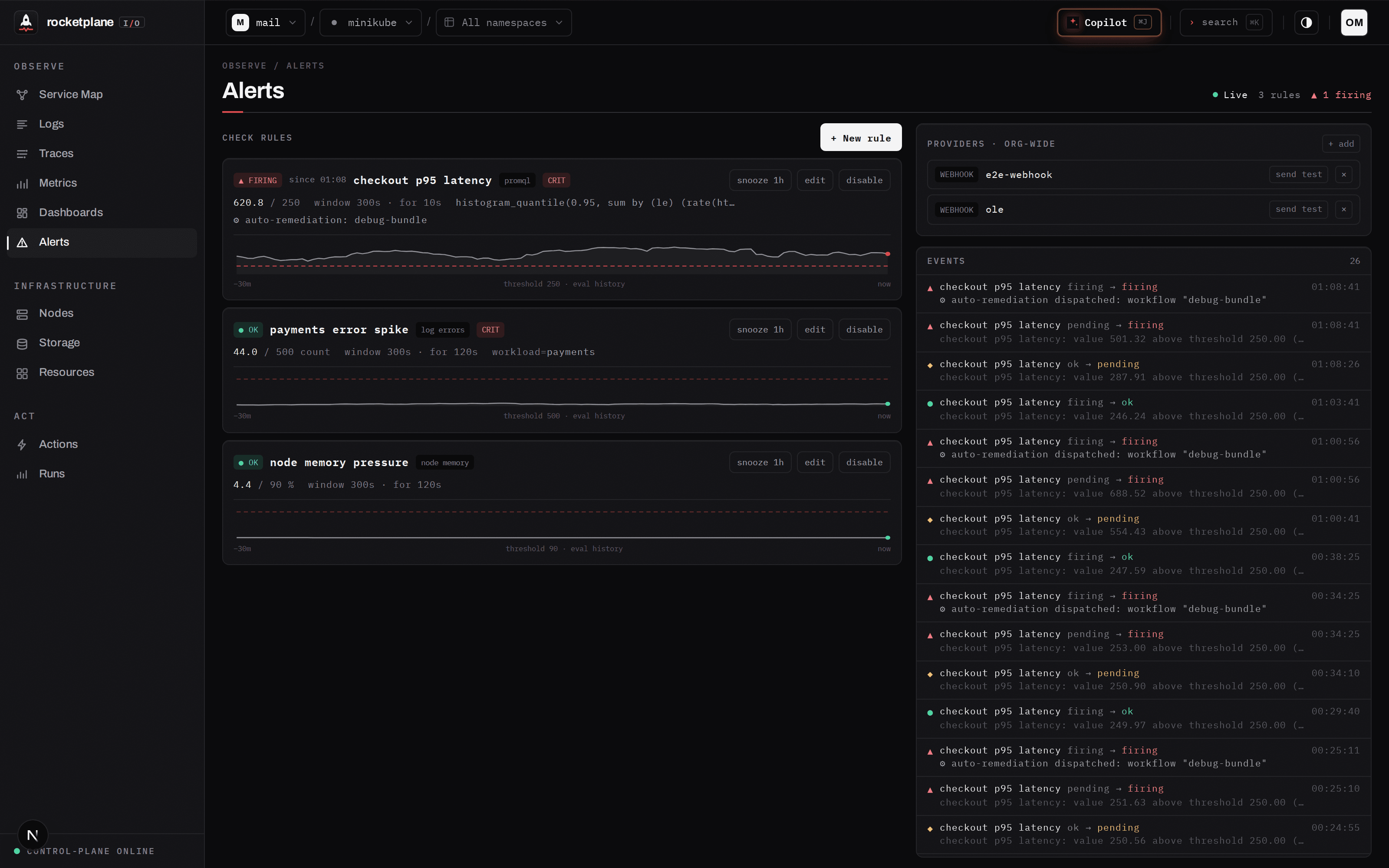 Alerts — typed checks or PromQL conditions with
 for-durations and
sparklines. A firing rule can dispatch a remediation workflow: once per transition, fully audited,
still subject to verify-or-rollback.
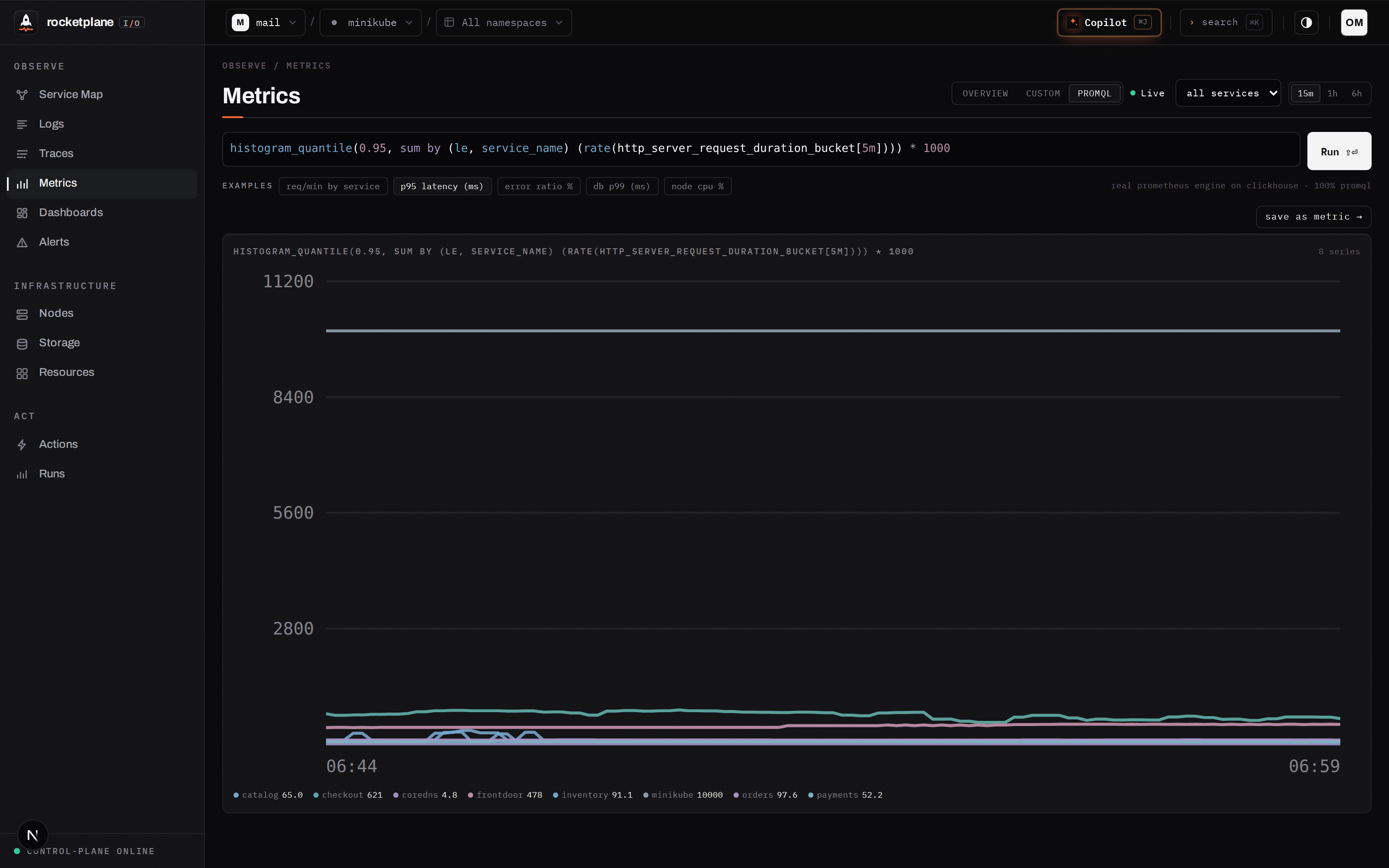 PromQL — the actual Prometheus evaluation engine, embedded and pointed at ClickHouse
(internal/promqlx); editor built on
codemirror-promql. Custom metrics are named PromQL expressions, validated at save.
PromQL — the actual Prometheus evaluation engine, embedded and pointed at ClickHouse
(internal/promqlx); editor built on
codemirror-promql. Custom metrics are named PromQL expressions, validated at save.
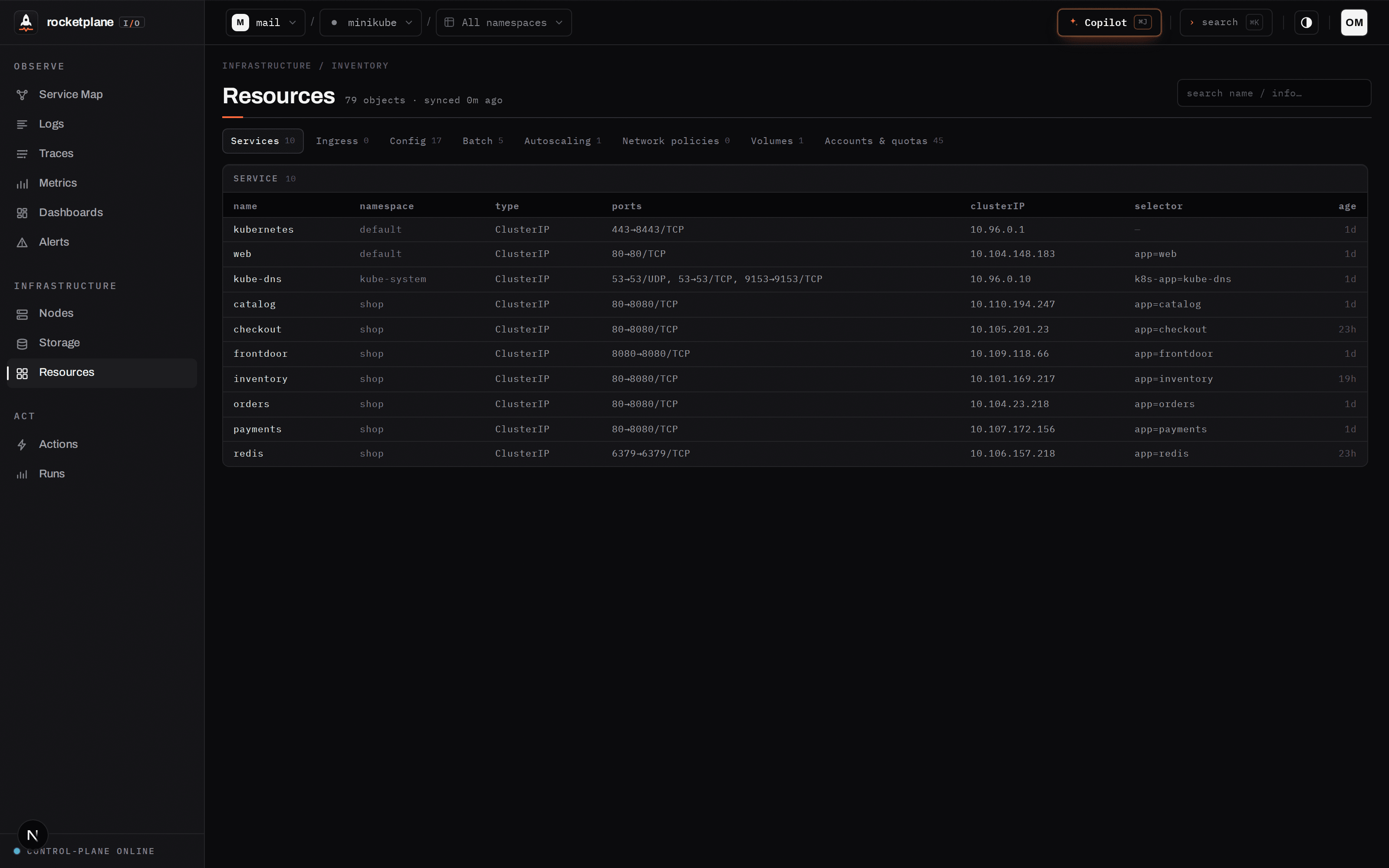 Resources — the complete cluster inventory (Services, Ingress, ConfigMaps, batch,
policies, volumes, quotas), synced every 60s. The same data the Copilot reads via
Resources — the complete cluster inventory (Services, Ingress, ConfigMaps, batch,
policies, volumes, quotas), synced every 60s. The same data the Copilot reads via
list_resources.
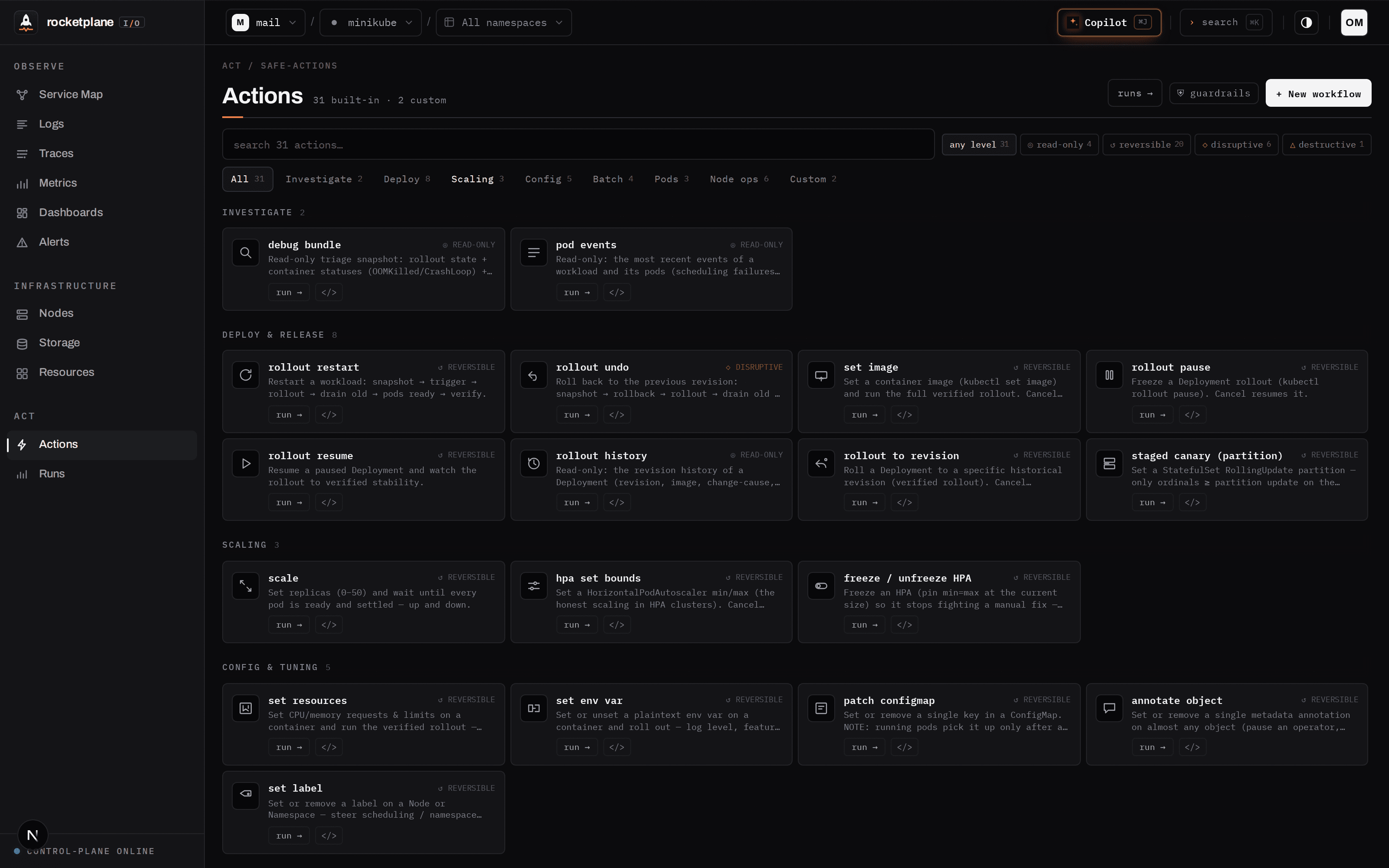 Actions — the catalog, searchable and risk-graded. Every built-in is also readable,
forkable Starlark: automate what an operator does by hand, with typed parameters that
render as forms. Deterministic, compiled at save.
Actions — the catalog, searchable and risk-graded. Every built-in is also readable,
forkable Starlark: automate what an operator does by hand, with typed parameters that
render as forms. Deterministic, compiled at save.
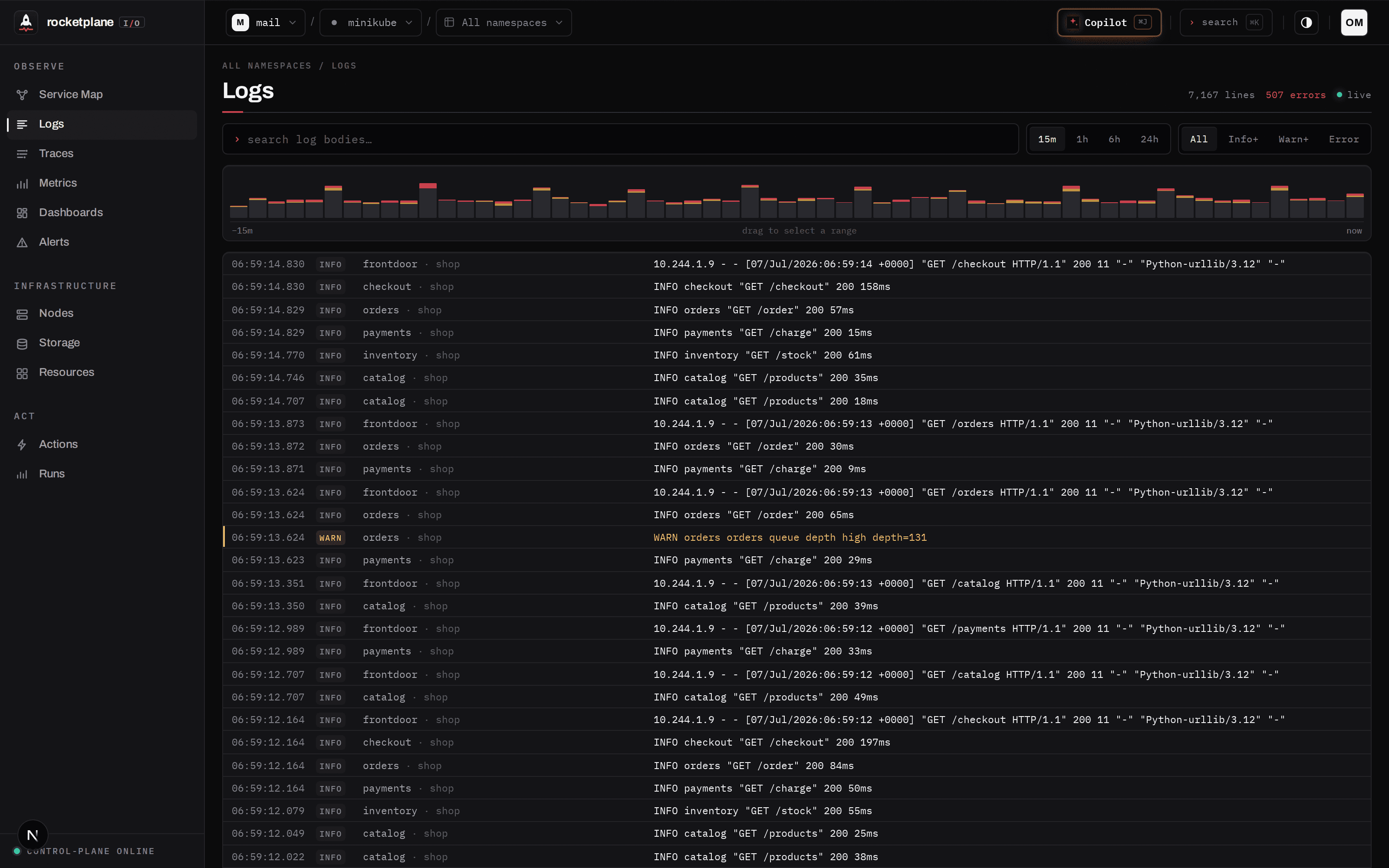 Logs — severity histogram, brushing, and the two-click path to the distributed
trace.
Logs — severity histogram, brushing, and the two-click path to the distributed
trace.
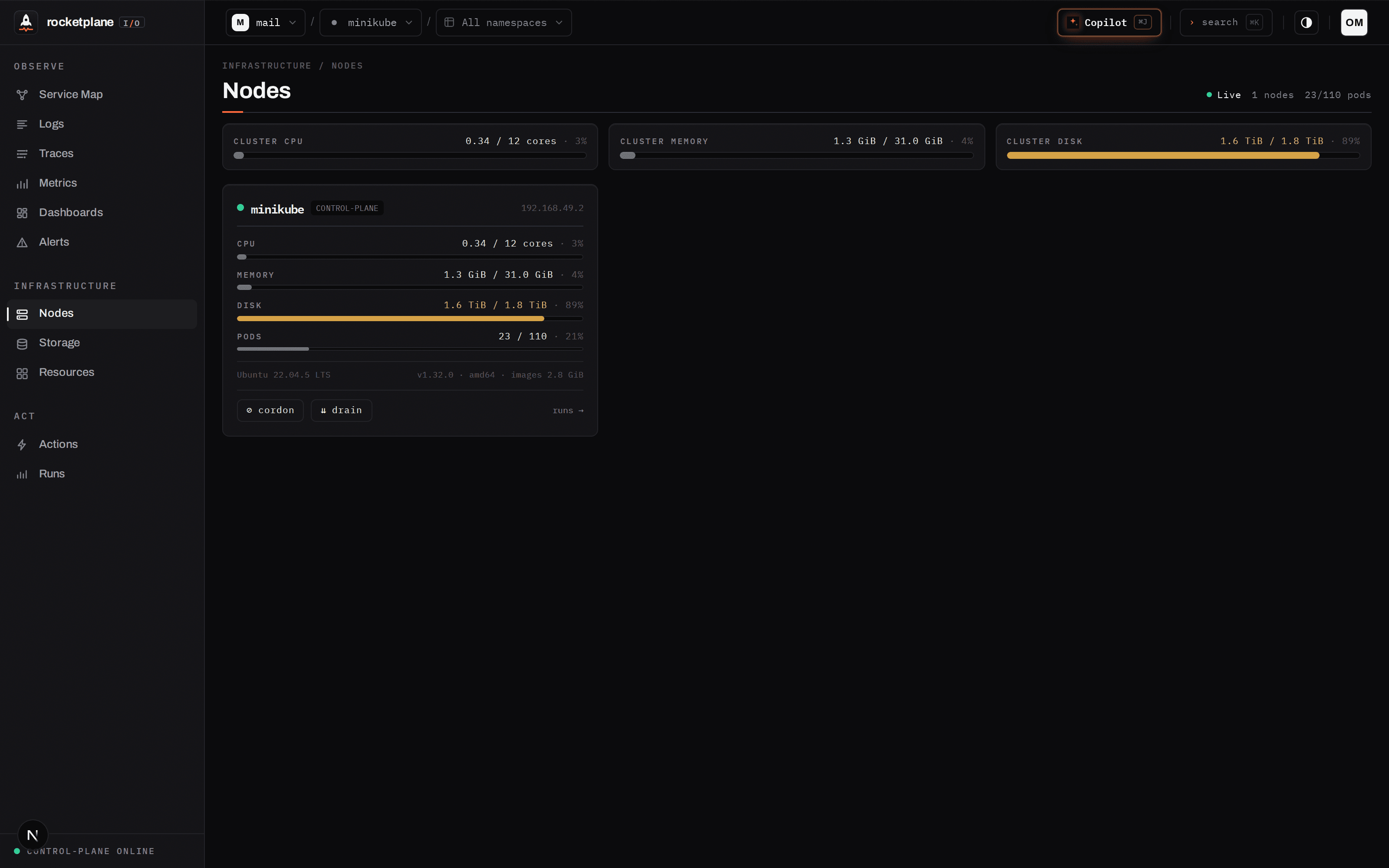 Nodes — kubelet-level stats; cordon/drain are verified actions, with a read-only
drain preview that shows the blast radius first.
UI 遵循严格的仪表盘设计系统 (RETICLE) —— 健康状态保持平静,仅对 异常情况进行提示。
Monorepo 布局
``` ├── agent/ # in-cluster agent (Go): sync, logs, inventory, action pipelines + revert snapshots ├── services/controlplane/ # control plane (Go): API, auth, alerts, Copilot loop, PromQL engine │ └── internal/ │ ├── api/ # REST + SSE + copilot_* (loop, guardrails, approval gate) │ ├── promqlx/ # embedded Prometheus engine on ClickHouse │ ├── alerts/ · telemetry/ · events/ · store/ · migrations/ │ └── ../cmd/mcp/ # MCP server — same tools for external agents ├── apps/web/ # Next.js UI (RETICLE design system) └── deploy/ # compose (platform + dev stores), helm chart, install.yaml, demo shop ```从源码开发
前置条件:Go 1.25+,带有 pnpm 的 Node 22+,Docker。 ``` git clone https://github.com/olemeyer/rocketplaneIO && cd rocketplaneIO docker compose -f deploy/compose/docker-compose.yml up -d # dev data stores + collector go run ./services/controlplane/cmd/controlplane # control plane on :8090 cd apps/web && pnpm install && pnpm dev # UI on :4173 ``` 自行构建平台镜像(即 CI 发布的内容): ``` docker build -t rocketplaneio/controlplane -f services/controlplane/Dockerfile . docker build -t rocketplaneio/web -f apps/web/Dockerfile . docker build -t rocketplaneio/agent -f agent/Dockerfile . ```
基于 Go、Next.js、eBPF 和 ClickHouse 构建 · rocketplaneIO
标签:AI助手, API集成, DLL 劫持, Docker镜像, EVTX分析, 可观测性, 大语言模型, 日志审计, 测试用例, 用户代理, 自动化运维, 请求拦截, 运维