Jamonygr/sre-agent

GitHub: Jamonygr/sre-agent

基于 Terraform 的 Azure SRE 沙盒实验室,用于练习云原生故障检测、告警响应和自动化修复流程。

Stars: 15 | Forks: 0

# SRE Agent Azure Lab [![Terraform](https://img.shields.io/badge/Terraform-%3E%3D1.9.0-623CE4?logo=terraform)](https://terraform.io) [![AzureRM](https://img.shields.io/badge/AzureRM-4.x-0078D4?logo=microsoftazure)](https://registry.terraform.io/providers/hashicorp/azurerm/latest) [![PowerShell](https://img.shields.io/badge/PowerShell-Runbooks-5391FE?logo=powershell)](https://learn.microsoft.com/powershell/) [![License](https://img.shields.io/badge/License-MIT-green.svg)](LICENSE)


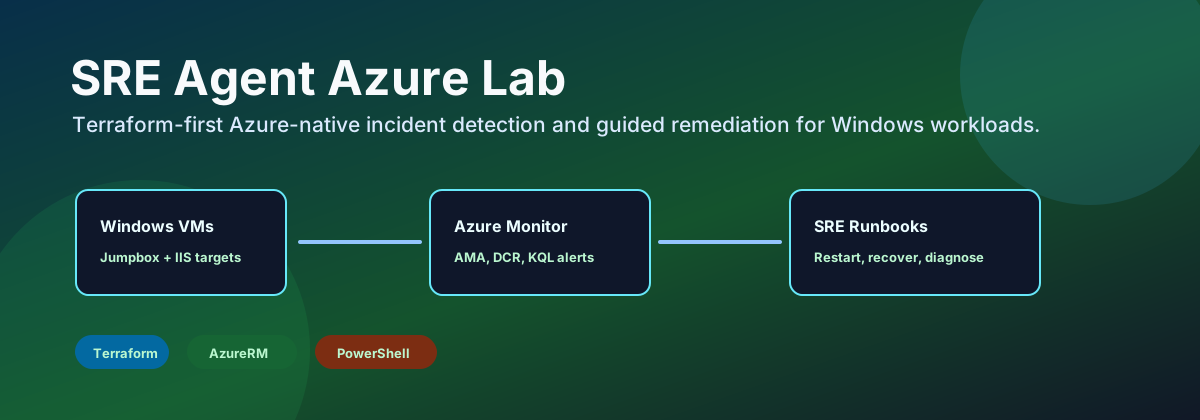
SRE Agent Azure Lab banner

## 概述 SRE Agent Azure Lab 是一个 Terraform 优先的 Azure 沙盒,用于练习原生故障检测和引导式修复。它预配了 Windows VM 故障目标以及可选的现代应用平台目标:Azure Kubernetes Service、Azure App Service、Azure Container Apps 和 Azure Functions。 它使用了 Azure Monitor Agent、Data Collection Rules、Log Analytics、KQL 告警、Workbooks、Azure Automation runbook、Update Manager、Policy、Resource Health 告警和成本控制。 该实验室有意采用 Azure 原生架构:Terraform 负责预配平台,Azure Monitor 负责检测信号,Automation runbook 负责执行安全的实验室修复。在 v1 版本中不需要第三方监控技术栈。 ## 质量审查路径 | 步骤 | 命令或文件 | 验证内容 | | --- | --- | --- | | 最低成本配置 | `environments/cheap-lab.tfvars` | 一个跳板机、一个 IIS 目标、原生监控、SRE runbook,无高级网络服务 | | Terraform 验证 | `terraform fmt -check -recursive` 和 `terraform validate` | HCL 格式化和 provider schema 有效性 | | 无执行计划 | `.\scripts\Invoke-LocalPlan.ps1 -VarFile environments/cheap-lab.tfvars` | 可在创建资源前规划 Azure 图 | | 脚本验证 | `.\scripts\Invoke-SreLabValidation.ps1` | 部署后存在资源组、遥测、告警、AMA 和 runbook | | 故障演练 | `.\scripts\Invoke-SreIncident.ps1 -Scenario IisOutage` | 实验室可以生成用于告警和修复练习的信号 | ## 架构

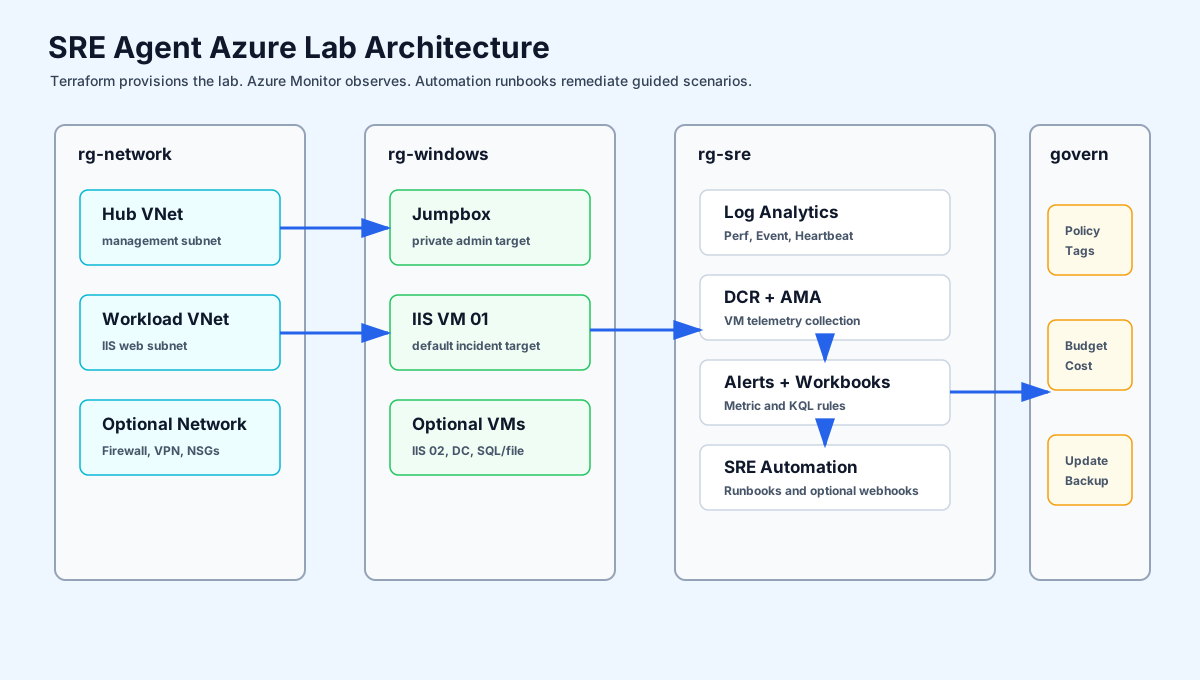
SRE Agent Azure Lab architecture

部署会创建四个主要的资源组角色: | 角色 | 目的 | | --- | --- | | `network` | Hub、管理和工作负载 VNet、子网、NSG、peering、可选的 Firewall/VPN | | `windows` | 跳板机和 Windows IIS 故障目标 | | `apps` | 可选的 AKS、App Service、Container Apps 和 Functions 目标 | | `sre` | Log Analytics、DCR、告警、Workbooks、仪表盘、Automation runbook、可选的 Backup | | `governance` | 可选的 Azure Policy 分配和防护栏资源 | ## 原生 SRE 流程

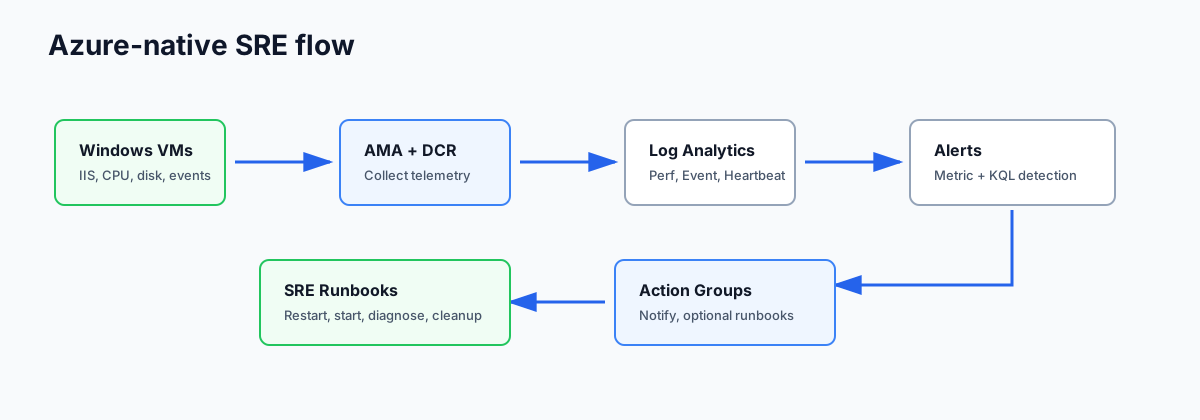
Azure-native SRE telemetry and remediation flow

1. Windows VM 运行 Azure Monitor Agent。 2. Data Collection Rules 将性能计数器、Windows 事件、心跳、IIS 和磁盘信号发送到 Log Analytics。 3. 指标和 KQL 告警可检测 CPU、VM 可用性、缺失心跳、IIS 宕机、磁盘压力和严重的 Windows 事件。 4. Action Groups 通知操作员。 5. Azure Automation runbook 可以重启 IIS、启动已停止的 VM、收集诊断信息或清理实验室安全的临时文件。 6. 直接的告警到 runbook webhook 默认保持关闭状态,需要设置 `enable_alert_runbook_webhooks = true`。 ## 部署配置 | 配置 | 文件 | 最适用于 | 成本态势 | | --- | --- | --- | --- | | `cheap-lab` | `environments/cheap-lab.tfvars` | 首次审查和低成本演示 | 最低 | | `dev` | `environments/dev.tfvars` | Terraform 和模块测试 | 极低 | | `lab` | `environments/lab.tfvars` | 带有 AKS、App Service、Container Apps 和 Functions 的常规 SRE 故障实验室 | 中等 | | `full` | `environments/full.tfvars` | 包含应用平台、备份和额外目标的扩展演示 | 最高 | 除非您明确需要 AKS、App Service、Container Apps、Functions、Backup、Firewall、VPN 或额外的 Windows 目标,否则请从 `cheap-lab` 开始。 ## 快速开始 前置条件: - 已使用 `az login` 登录的 Azure CLI - Terraform 1.9 或更高版本 - 已使用 `az account set --subscription ` 或 `ARM_SUBSCRIPTION_ID` 选定的 Azure 订阅 - 通过 `TF_VAR_admin_password` 或被忽略的 `terraform.tfvars` 提供的私有 VM 密码 ``` terraform init -backend=false -reconfigure terraform validate .\scripts\Invoke-LocalPlan.ps1 -VarFile environments/cheap-lab.tfvars ``` 对于实际执行(apply): ``` terraform init terraform apply -var-file=environments/cheap-lab.tfvars .\scripts\Invoke-SreLabValidation.ps1 -Environment cheap-lab ``` ## 主控制面板 主要的功能开关位于 `terraform.tfvars` 或已提交的环境配置中。 ``` deploy_monitoring = true deploy_log_analytics = true deploy_azure_monitor_agent = true deploy_data_collection_rules = true deploy_alerts = true deploy_log_query_alerts = true deploy_workbooks = true deploy_sre_agent = true enable_alert_runbook_webhooks = false deploy_update_management = true deploy_backup = false deploy_policy = true deploy_cost_management = true deploy_windows_targets = true deploy_iis_farm = true deploy_firewall = false deploy_vpn_gateway = false deploy_aks = true deploy_app_service = true deploy_container_apps = true deploy_functions = true ``` ## 实验室场景
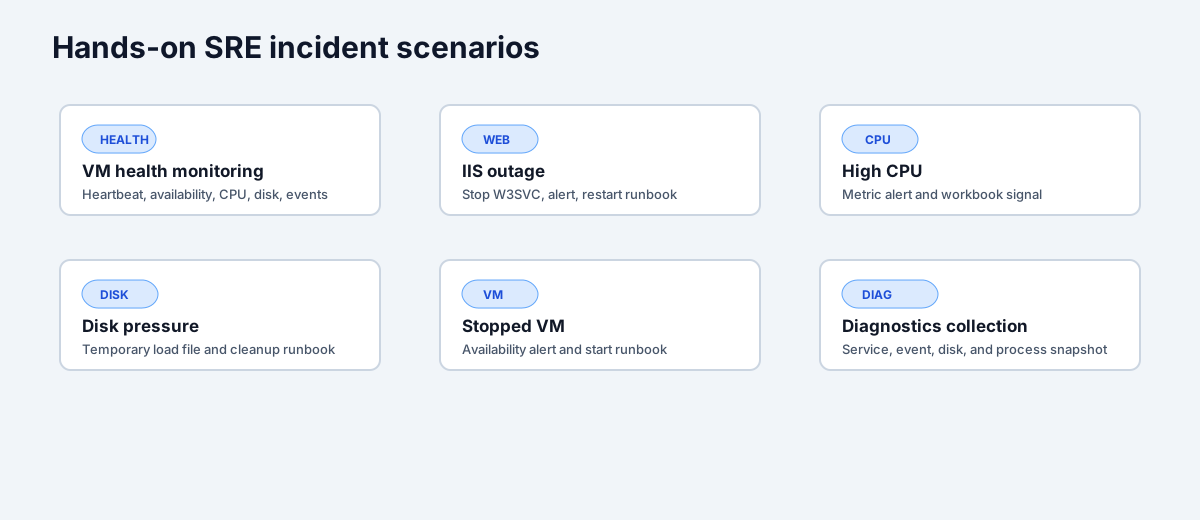
SRE incident scenarios

| 场景 | 验证内容 | | --- | --- | | VM 健康监控 | 心跳、VM 可用性、CPU、内存、磁盘和 Windows 事件可见性 | | IIS 宕机 | 停止 W3SVC,检测服务控制事件,然后通过 runbook 重启 IIS | | 高 CPU | 产生 CPU 压力并确认指标告警行为 | | 磁盘压力 | 创建临时实验室负载文件并确认磁盘可用空间告警行为 | | 停止的 VM | 停止 VM 并验证 VM 可用性信号以及 runbook 恢复 | | 诊断收集 | 使用 `Collect-VMDiagnostics` 捕获服务、事件、卷和进程快照 | | 更新治理 | 使用 Update Manager 维护配置和 PatchGroup 标签 | | 成本护栏 | 在 SRE 资源组上使用 Azure 预算跟踪支出 | | 现代应用平台 | 部署 AKS、App Service、Container Apps 和 Functions 作为额外的 Resource Health 和操作目标 | ## 测试 ``` terraform fmt -check -recursive terraform init -backend=false -reconfigure terraform validate .\scripts\Invoke-LocalPlan.ps1 -VarFile environments/cheap-lab.tfvars Get-ChildItem scripts -Filter *.ps1 | ForEach-Object { $null = [System.Management.Automation.Language.Parser]::ParseFile($_.FullName, [ref]$null, [ref]$null) } ``` Terratest 冒烟测试位于 `tests/` 中,当未设置 `ARM_SUBSCRIPTION_ID` 时,将跳过实时的 Azure 检查。 ## 成本与安全说明 - 在您有意让告警调用 runbook 之前,请保持 `enable_alert_runbook_webhooks = false`。 - 除非您拥有受信任的 CIDR,否则请保持 `allowed_rdp_source_ips = []`。 - 请先使用 `cheap-lab`;`lab` 会启用现代应用平台服务,而 `full` 会添加更多 VM 和 Backup。 - AKS 节点、App Service 计划、Firewall、VPN Gateway、Backup 存储和 Managed Grafana 会显著增加成本。 - 完成后销毁临时部署。 ## 文档导图 - [Wiki 首页](wiki/README.md) - [架构概述](wiki/architecture/overview.md) - [监控和仪表盘](wiki/architecture/monitoring-and-dashboards.md) - [更新管理](wiki/architecture/update-management.md) - [变量参考](wiki/reference/variables.md) - [输出参考](wiki/reference/outputs.md) - [流水线](wiki/reference/pipeline.md)
标签:AI合规, ECS, SRE, Terraform, 云计算, 偏差过滤, 微软云, 监控告警, 自动化运维, 规则引擎