Aladeen12541/claude-ip-rotator
GitHub: Aladeen12541/claude-ip-rotator
一个 Claude Code 插件,通过 AWS API Gateway 跨 10 个区域轮换出口 IP,帮助安全测试工具绕过 WAF 速率限制和 IP 封禁。
Stars: 2 | Forks: 0
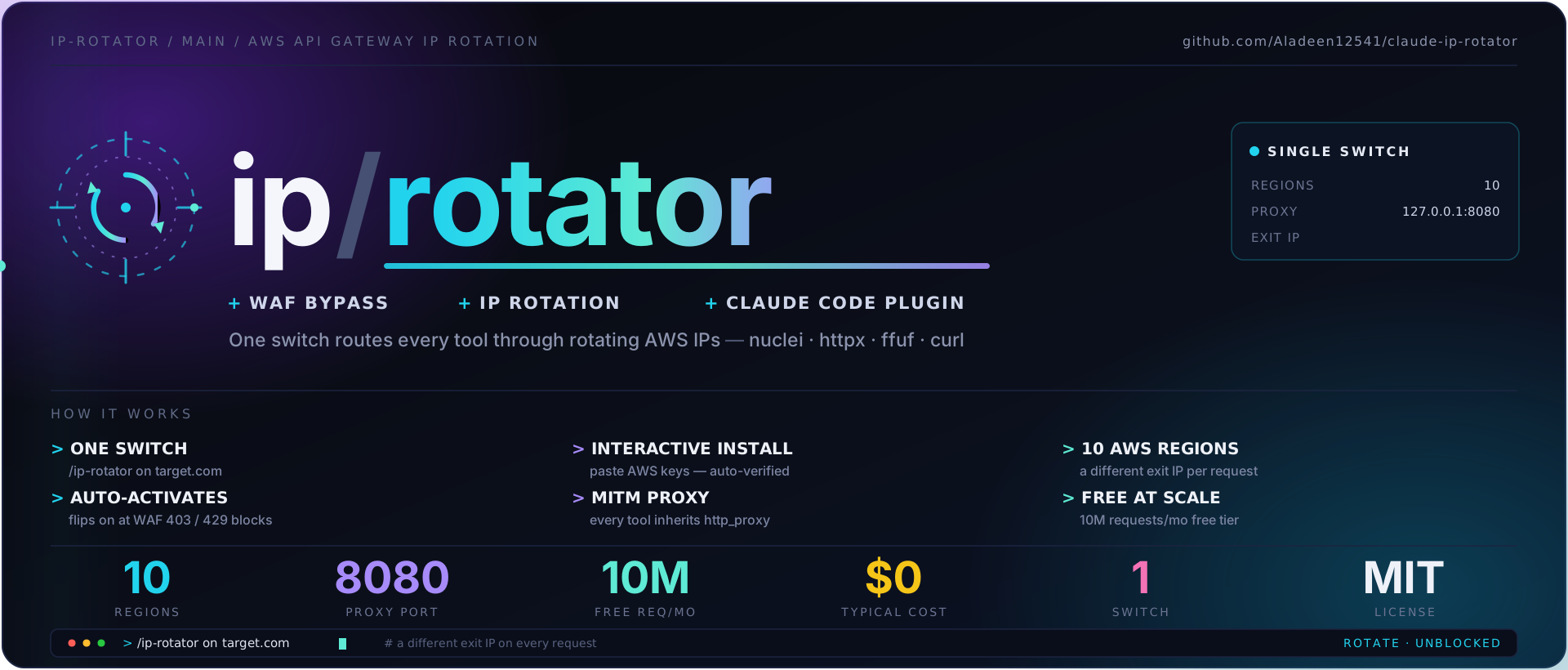
**一个开关**即可将*每一个*工具 —— `nuclei`、`httpx`、`ffuf`、`curl` 以及任何支持 `http_proxy` 的工具 —— 通过**轮换的 AWS IP 地址**进行路由,从而让 WAF 速率限制和 IP 封禁在每次请求时重置。
[](LICENSE)
[](https://docs.claude.com/en/docs/claude-code)
[](https://www.python.org/)
[](install.sh)
[](#requirements)
[](https://github.com/Aladeen12541/claude-ip-rotator/actions/workflows/ci.yml)
## 目录
- [为什么使用](#why)
- [工作原理](#how-it-works)
- [快速开始](#-quick-start)
- [配置你的 AWS 账户](#-set-up-your-aws-account)
- [使用方法](#-usage)
- [成本](#-cost)
- [环境要求](#requirements)
- [目录结构](#layout)
- [故障排除](#-troubleshooting)
- [安全性](#security)
## 为什么使用
速率限制和 IP 封禁是阻碍测试进程的首要因素。这个插件将
[AWS API Gateway](https://aws.amazon.com/api-gateway/) 部署在你的流量前端,覆盖 **10 个区域**
并为**每一次请求**轮换出口 IP —— 适用于你的*所有*工具,无需
为每个工具单独设置标志。它是整个会话的即插即用方案。
| | |
|---|---|
| 🔀 **一个开关** | `/ip-rotator on target.com` —— 搞定。所有工具都会继承它。 |
| 🤖 **自动激活** | 当 Claude 察觉到 WAF 拦截(Cloudflare 1020、Wordfence 403、AWS WAF、HTTP 429)时会自动开启。 |
| 🔐 **交互式安装程序** | 只需粘贴一次你的 AWS 密钥 —— 它会在你开始之前完成配置、验证权限并确认其*生效*。 |
| 💸 **测试规模下免费** | 每月 1000 万次请求包含在 AWS 免费额度内。一次典型的会话成本为 **$0**。 |
| 📦 **独立自包含** | 状态保存在 `~/.config/ip-rotator/` 中。没有依赖于仓库的相对路径 —— 完全可移植。 |
## 工作原理
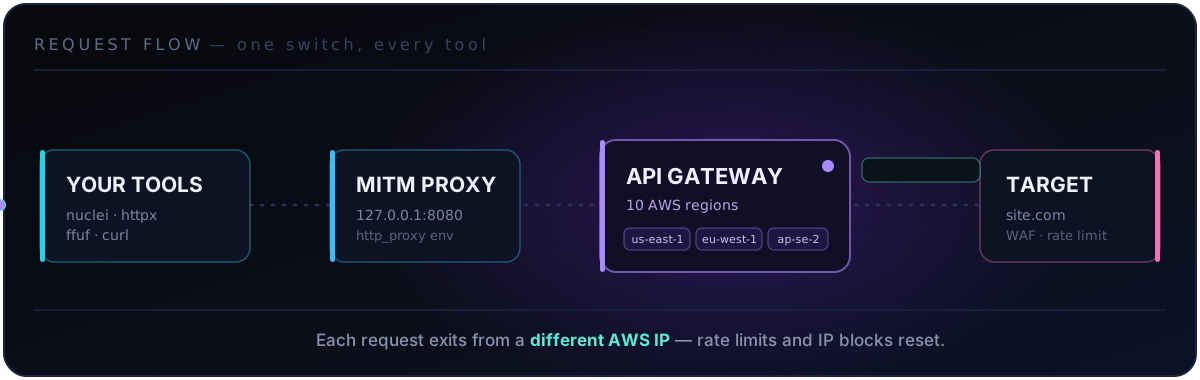
1. `on` 跨越 **10 个 AWS 区域**创建 API Gateway endpoint(通过 [`requests-ip-rotator`](https://github.com/Ge0rg3/requests-IP-Rotator))。
2. 在 `127.0.0.1:8080` 上启动本地的 [`mitmproxy`](https://mitmproxy.org/) MITM 代理。
3. 写入 `~/.config/ip-rotator/env.sh` 以导出 `http_proxy` / `https_proxy`。
4. 引入该文件会使**每个子进程**继承代理 —— 无需额外标志。
5. 每个请求都从**不同的 AWS IP** 发出 → 速率限制和 IP 封禁随即重置。
## 🚀 快速开始
```
git clone https://github.com/Aladeen12541/claude-ip-rotator.git
cd claude-ip-rotator
chmod +x install.sh
./install.sh # installs deps + plugin, then prompts for your AWS keys
```
重启 Claude Code,然后执行:
```
/ip-rotator on target.com # start rotation
/ip-rotator status # check state
/ip-rotator off # stop everything (do this when done!)
```
安装程序运行四个步骤:
| 步骤 | 作用 |
|:---:|---|
| **1** | 安装 Python 依赖(`requests`、`requests-ip-rotator`、`boto3`、`mitmproxy`) |
| **2** | 注册插件 —— 如果存在 `claude` CLI marketplace 则通过它注册,否则复制到 `~/.claude/skills/ip-rotator/` |
| **3** | **交互式获取你的 AWS 密钥**,写入 `~/.aws/`,并验证 API Gateway 访问权限 |
| **4** | 运行依赖与权限检查 |
## 🔑 配置你的 AWS 账户
轮换器会在**你的**账户中创建和删除 API Gateway REST API。你需要一个具有 API Gateway 权限和访问密钥的 IAM 用户。只需一次,约 2 分钟。
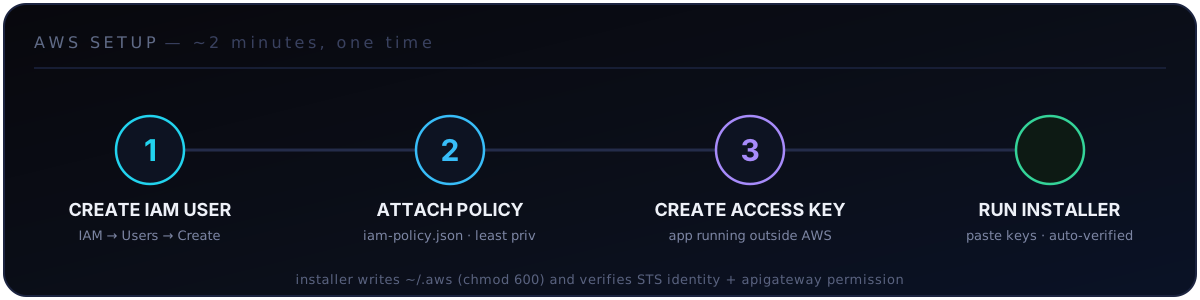
1. 创建 IAM 用户
1. [AWS 控制台](https://console.aws.amazon.com/) → **IAM** → **用户** → **创建用户**。
2. 为其命名,例如 `ip-rotator`。保持“控制台访问”未选中(仅限编程访问)。
2. 授予 API Gateway 权限(最小权限)
附加一个正好包含该工具所需权限的内联策略 —— 即 [`iam-policy.json`](iam-policy.json) 的内容:
```
{
"Version": "2012-10-17",
"Statement": [
{
"Sid": "IpRotatorApiGateway",
"Effect": "Allow",
"Action": [
"apigateway:GET",
"apigateway:POST",
"apigateway:PUT",
"apigateway:PATCH",
"apigateway:DELETE"
],
"Resource": "arn:aws:apigateway:*::/*"
}
]
}
```
控制台路径:选择该用户 → **权限** → **添加权限** → **创建内联
策略** → **JSON** 标签页 → 粘贴 → 命名为 `ip-rotator-apigw` → **创建策略**。
3. 创建访问密钥
1. 选择该用户 → **安全凭证** → **创建访问密钥**。
2. 使用场景:**在 AWS 外部运行的应用程序** → **创建访问密钥**。
3. 复制 **访问密钥 ID** 和 **秘密访问密钥**(该密钥仅显示一次)。
4. 将密钥提供给安装程序
运行 `./install.sh` 并在第 3 步提示时粘贴它们。它会将密钥写入 `~/.aws/credentials`
(`default` 配置文件,`chmod 600`)并进行验证:
```
✓ AWS identity: arn:aws:iam::123456789012:user/ip-rotator
✓ apigateway permissions confirmed — rotation will work.
```
已经运行过 `aws configure`?安装程序会检测到有效的身份并提供复用选项。
## 🎛️ 使用方法
当你说出“bypass waf”、“rotate ip”,或者当目标开始返回 `403`/`429` 时,该技能会**自动激活**。你也可以显式地驱动它:
```
/ip-rotator on target.com # start: gateway + proxy + env
/ip-rotator status # show active gateways + proxy
/ip-rotator off # stop everything, clean state
```
底层机制
```
# 在后台启动,然后对所有工具激活:
python3 "${CLAUDE_PLUGIN_ROOT}/scripts/ip_rotator.py" on https://target.com &
source ~/.config/ip-rotator/env.sh
# 现在所有工具都从轮换的 AWS IP 退出 — 无需每个工具单独的 flag:
nuclei -u https://target.com -t cves/
httpx -l hosts.txt
ffuf -u https://target.com/FUZZ -w wordlist.txt
curl -k https://target.com/path # -k: MITM proxy uses a self-signed CA
# 停止并清除:
python3 "${CLAUDE_PLUGIN_ROOT}/scripts/ip_rotator.py" off
unset http_proxy https_proxy HTTP_PROXY HTTPS_PROXY ROTATOR_ACTIVE
```
直接使用 CLI(在 Claude 之外)
```
python3 scripts/ip_rotator.py on https://target.com # start everything
python3 scripts/ip_rotator.py status # state
python3 scripts/ip_rotator.py req GET https://target.com/x -v # single rotated request
python3 scripts/ip_rotator.py batch urls.txt --json # batch scan
python3 scripts/ip_rotator.py off # stop everything
python3 scripts/ip_rotator.py nuke # force-delete orphaned gateways
python3 scripts/ip_rotator.py check # verify deps + AWS creds
```
## 💸 成本
AWS API Gateway 免费额度 = **100 万次请求 / 区域 / 月**。拥有 10 个区域意味着
**每月 1000 万次免费请求** —— 一次典型的测试会话成本为 **$0**。超出免费额度后,
价格为每 100 万次请求约 **$3**。
## 环境要求
- **Python 3.8+** 和 `pip`
- 一个拥有 IAM 访问密钥的 **AWS 账户**([如上所述设置](#-set-up-your-aws-account))
- **Linux 或 macOS**(Windows 可通过 WSL 使用)
- *(可选)* `claude` CLI —— 启用 marketplace 安装路径
## 目录结构
```
claude-ip-rotator/
├── .claude-plugin/
│ ├── plugin.json # plugin manifest
│ └── marketplace.json # self-hosted single-plugin marketplace
├── skills/ip-rotator/
│ └── SKILL.md # auto-activating skill
├── commands/
│ └── ip-rotator.md # /ip-rotator slash command
├── scripts/
│ └── ip_rotator.py # the rotation engine (self-contained)
├── iam-policy.json # least-privilege AWS policy to attach
├── requirements.txt
├── install.sh # interactive installer
├── LICENSE
└── README.md
```
## 🩺 故障排除
| 症状 | 解决方案 |
|---|---|
| 安装时提示 `apigateway is DENIED` | 将 [`iam-policy.json`](iam-policy.json) 附加到你的 IAM 用户 |
| `STS failed` / 凭证无效 | 密钥/secret 错误,或密钥已停用 —— 重新运行 `./install.sh` |
| 端口 8080 被占用 | `/ip-rotator on target.com --port 9090` |
| HTTPS 证书错误 | 添加 `-k`(curl)/ `--no-verify`(httpx) —— MITM 使用的是自签名 CA |
| 网关返回 503 | 重试,或者先执行 `off` 再执行 `on` 以重新创建 endpoint |
| 缺少 mitmproxy | 退回到仅支持 HTTP 的代理;执行 `pip install mitmproxy` 以使用 HTTPS MITM |
| 孤立的网关产生计费 | `python3 scripts/ip_rotator.py nuke` |
| `${CLAUDE_PLUGIN_ROOT}` 为空 | 你不在 Claude 环境中 —— 直接调用 `scripts/ip_rotator.py` |
## 安全性
- **凭证**仅保存在 `~/.aws/`(`chmod 600`)中,绝不会被记录,并且已被 `.gitignore` 忽略。
AWS secret 通过 **stdin** 传递给配置写入器 —— 它绝不会出现在进程的
argv / `ps` 列表中。
- **最小权限** —— 随附的 [`iam-policy.json`](iam-policy.json) 仅授予该工具实际使用的五个
API Gateway 操作。没有 S3,没有 IAM,没有 EC2。
- **仅限授权使用** —— 参阅顶部的警告。这是攻击性工具;你需对保持在授权范围和遵守法律负责。
- 发现此仓库存在安全问题?在仓库的
**Security → Report a vulnerability**(安全 → 报告漏洞)标签页下提交报告(私密)。
**MIT 许可协议** · 专为授权的安全测试而构建 · [报告问题](https://github.com/Aladeen12541/claude-ip-rotator/issues)
标签:API网关, AWS, DPI, IP轮换, 安全合规, 安全测试, 应用安全, 攻击性安全, 绕过WAF, 网络代理, 逆向工具