NullOperatorr/Detecting-Dos-Attack-using-Suricata
GitHub: NullOperatorr/Detecting-Dos-Attack-using-Suricata
一个基于 Suricata 的 DoS 攻击检测实验教学项目,通过编写和测试自定义检测规则来防护 ICMP 洪水攻击。
Stars: 0 | Forks: 0
# CyberLab-01
**目标:**
你是一名 SOC 分析师,你的公司最近经历了一次 DoS 攻击。
在事件解决后,你的经理要求你开发一种方法来保护公司的基础设施免受再次攻击。
**任务:**
编写一条 Suricata 规则来检测未来的 DoS 尝试。
注意:我将使用 Kali Linux 虚拟机执行此任务。
**1- 更新你的 Kali Linux:**
```
sudo apt update
sudo apt upgrade
```
**2- 安装 Suricata:**
```
sudo apt install suricata -y
Note: (-y) means yes to all.
```
你可以通过输入 (Suricata) 来验证你的 Suricata 版本。
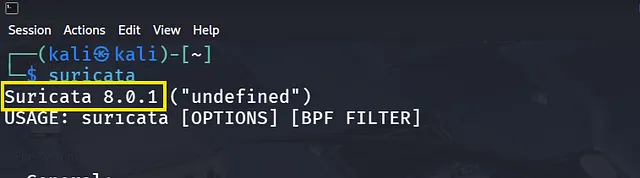 你可以在以下路径中找到 Suricata 配置文件:(/etc/suricata)
 **3- 配置 Suricata:**
1- 通过 (ip a) 记录你当前运行的 IP 地址。
**3- 配置 Suricata:**
1- 通过 (ip a) 记录你当前运行的 IP 地址。
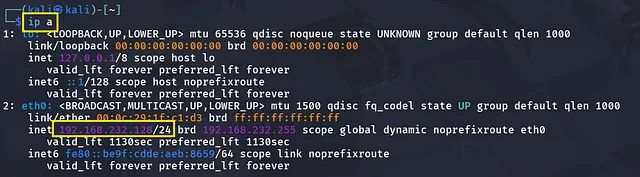 2- 现在打开 Suricata 配置文件
```
sudo mousepad /etc/suricata/suricata.yaml
```
3- 在配置文件中进行以下编辑:
使用你所在的网络范围更新 HOME_NET(对我来说是 192.168.232.0/24),如前所述,然后保存。
2- 现在打开 Suricata 配置文件
```
sudo mousepad /etc/suricata/suricata.yaml
```
3- 在配置文件中进行以下编辑:
使用你所在的网络范围更新 HOME_NET(对我来说是 192.168.232.0/24),如前所述,然后保存。
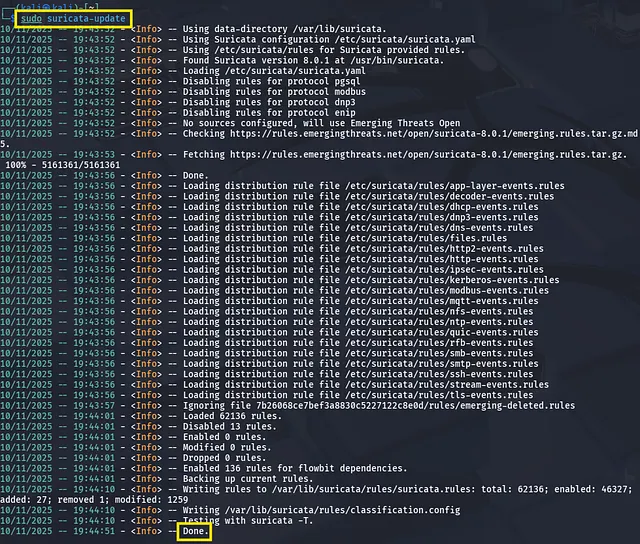
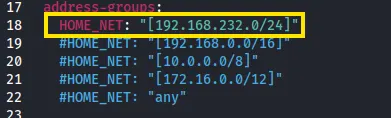 现在 Suricata 已准备好工作,等待我们制定规则并见证奇迹,但首先让我们更新刚刚所做的修改。
```
sudo suricata-update
```
现在 Suricata 已准备好工作,等待我们制定规则并见证奇迹,但首先让我们更新刚刚所做的修改。
```
sudo suricata-update
```
 ***4- 制定 Ping Flood 规则:****
注意:要在文件中写入任何规则,只需确保它以扩展名 (.rules) 结尾,这是 Suricata 识别它的方式。
```
touch DoS.rules
sudo mousepad Dos.rules
```
编写以下规则:
```
alert icmp any any -> $HOME_NET any (msg:"[!] PING flood detection - excessive amount of echo requests"; itype:8; flow:to_server; threshold: type limit, track by_src, count 100, seconds 10; classtype:attempted-dos; sid:1000010;)
alert icmp any any -> $HOME_NET any ( msg:"[!] PING flood detection - rapid icmp echo requests"; itype:8; flow:to_server; detection_filter: track by_src, count 50, seconds 1; classtype:attempted-dos; sid:1000011;)
```
***4- 制定 Ping Flood 规则:****
注意:要在文件中写入任何规则,只需确保它以扩展名 (.rules) 结尾,这是 Suricata 识别它的方式。
```
touch DoS.rules
sudo mousepad Dos.rules
```
编写以下规则:
```
alert icmp any any -> $HOME_NET any (msg:"[!] PING flood detection - excessive amount of echo requests"; itype:8; flow:to_server; threshold: type limit, track by_src, count 100, seconds 10; classtype:attempted-dos; sid:1000010;)
alert icmp any any -> $HOME_NET any ( msg:"[!] PING flood detection - rapid icmp echo requests"; itype:8; flow:to_server; detection_filter: track by_src, count 50, seconds 1; classtype:attempted-dos; sid:1000011;)
```
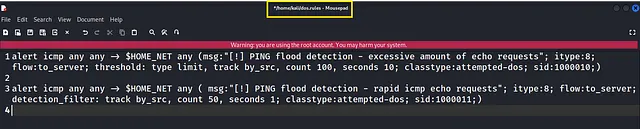 然后保存。
***解释:***
*规则 1:*
1- (alert icmp any any -> $HOME_NET any):任何进入本地网络的 ICMP。
2- (itype:8):表示 Echo 请求。
3- (flow:to_server):表示从客户端发往服务器。
4- (threshold: type limit, track by_src, count 100, seconds 10):设置接收以触发警报的消息数量限制。
5- (classtype:attempted-dos):归入此类别。
*规则 2:*
1- (detection_filter: track by_src, count 50, seconds 1):检测并在一秒内出现 50 次请求后发出警报。
注意:规则 1 和 2 彼此相似,但检测模式有所不同(规则 1)检测 100 次请求/10 秒(敏感度较低且较慢)
(规则 2)检测 50 次请求/1 秒(敏感度更高且更迅速)
**5- 在 Suricata 配置文件中进行编辑:**
1- 复制我们之前创建的 Dos.rules 的路径 (/home/Desktop/Dos.rules)
2- 打开 Suricata 配置文件
```
sudo mousepad /etc/suricata/suricata.yaml
```
并向下滚动直到找到 rule-files,然后粘贴你的规则路径并保存。
然后保存。
***解释:***
*规则 1:*
1- (alert icmp any any -> $HOME_NET any):任何进入本地网络的 ICMP。
2- (itype:8):表示 Echo 请求。
3- (flow:to_server):表示从客户端发往服务器。
4- (threshold: type limit, track by_src, count 100, seconds 10):设置接收以触发警报的消息数量限制。
5- (classtype:attempted-dos):归入此类别。
*规则 2:*
1- (detection_filter: track by_src, count 50, seconds 1):检测并在一秒内出现 50 次请求后发出警报。
注意:规则 1 和 2 彼此相似,但检测模式有所不同(规则 1)检测 100 次请求/10 秒(敏感度较低且较慢)
(规则 2)检测 50 次请求/1 秒(敏感度更高且更迅速)
**5- 在 Suricata 配置文件中进行编辑:**
1- 复制我们之前创建的 Dos.rules 的路径 (/home/Desktop/Dos.rules)
2- 打开 Suricata 配置文件
```
sudo mousepad /etc/suricata/suricata.yaml
```
并向下滚动直到找到 rule-files,然后粘贴你的规则路径并保存。
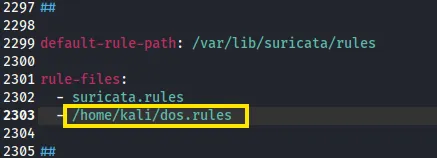 3- 现在更新并测试你的规则,验证没有错误:
```
sudo suricata -T -c /etc/suricata/suricata.yaml -i eth0
Note that: the (-T) means testing.
```
3- 现在更新并测试你的规则,验证没有错误:
```
sudo suricata -T -c /etc/suricata/suricata.yaml -i eth0
Note that: the (-T) means testing.
```
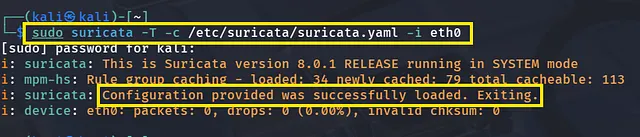 4- 让我们启动 Suricata
```
sudo suricata -c /etc/suricata/suricata.yaml -i eth0
```
4- 让我们启动 Suricata
```
sudo suricata -c /etc/suricata/suricata.yaml -i eth0
```
 现在我们准备好了,但让我们编写一段简短的 Python 代码来测试我们的规则,并按照经理的要求妥善完成任务。
**6- Python Ping-flood 脚本:**
现在让我们攻击自己
此脚本将通过 ICMP 洪水(ICMP Flooding)模拟 DoS 攻击,它会通过发送大量 ping 请求淹没网络,直到目标无法访问。(在这种情况下,我们的 Kali VM 是目标)
```
# pip install python-ping
from pythonping import ping
# 获取 IP address 或 hostname
host_address = input("Enter single IP address or hostname: ")
while True:
try:
# Ping host
result = ping(
host_address,
count=10000,
size=1000,
timeout=1
)
print(result)
except KeyboardInterrupt:
print("\n Ping flood stopped by user.")
break
except Exception as e:
print(f"\n Error: {e}")
break
input("\n Press Enter to continue . . .")
```
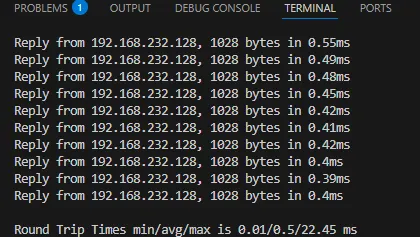
在你的本地 PC 上运行此脚本,并输入目标(Kali VM)的 IP。
现在我们准备好了,但让我们编写一段简短的 Python 代码来测试我们的规则,并按照经理的要求妥善完成任务。
**6- Python Ping-flood 脚本:**
现在让我们攻击自己
此脚本将通过 ICMP 洪水(ICMP Flooding)模拟 DoS 攻击,它会通过发送大量 ping 请求淹没网络,直到目标无法访问。(在这种情况下,我们的 Kali VM 是目标)
```
# pip install python-ping
from pythonping import ping
# 获取 IP address 或 hostname
host_address = input("Enter single IP address or hostname: ")
while True:
try:
# Ping host
result = ping(
host_address,
count=10000,
size=1000,
timeout=1
)
print(result)
except KeyboardInterrupt:
print("\n Ping flood stopped by user.")
break
except Exception as e:
print(f"\n Error: {e}")
break
input("\n Press Enter to continue . . .")
```
在你的本地 PC 上运行此脚本,并输入目标(Kali VM)的 IP。
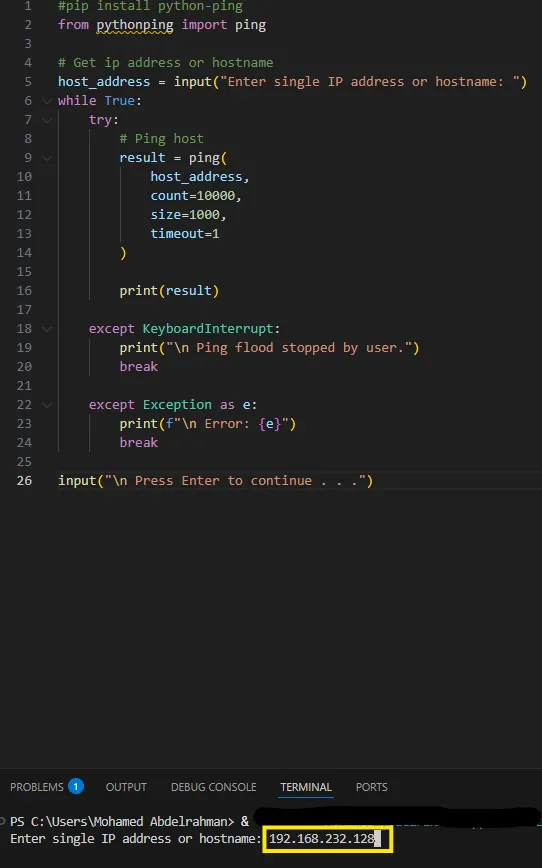
 **7- 检查 Suricata 日志文件:**
Suricata 记录其检测结果的路径是 (/var/log/suricata/fast.log),让我们看一下:
```
tail /var/log/suricata/fast.log
```
**7- 检查 Suricata 日志文件:**
Suricata 记录其检测结果的路径是 (/var/log/suricata/fast.log),让我们看一下:
```
tail /var/log/suricata/fast.log
```
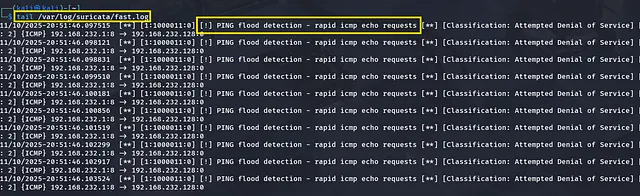 现在已验证我们的 Suricata 规则正在工作,能够检测恶意行为,任务已完成。
**8- 经验教训:**
- 学习了如何编写和自定义 Suricata 检测规则。
- 了解了 Suricata 规则的结构,包括头部和规则选项。
- 加深了对如何使用 IDS 规则来检测和响应基于网络的攻击的理解。
现在已验证我们的 Suricata 规则正在工作,能够检测恶意行为,任务已完成。
**8- 经验教训:**
- 学习了如何编写和自定义 Suricata 检测规则。
- 了解了 Suricata 规则的结构,包括头部和规则选项。
- 加深了对如何使用 IDS 规则来检测和响应基于网络的攻击的理解。
你可以在以下路径中找到 Suricata 配置文件:(/etc/suricata)
**3- 配置 Suricata:**
1- 通过 (ip a) 记录你当前运行的 IP 地址。
2- 现在打开 Suricata 配置文件
```
sudo mousepad /etc/suricata/suricata.yaml
```
3- 在配置文件中进行以下编辑:
使用你所在的网络范围更新 HOME_NET(对我来说是 192.168.232.0/24),如前所述,然后保存。
现在 Suricata 已准备好工作,等待我们制定规则并见证奇迹,但首先让我们更新刚刚所做的修改。
```
sudo suricata-update
```
***4- 制定 Ping Flood 规则:****
注意:要在文件中写入任何规则,只需确保它以扩展名 (.rules) 结尾,这是 Suricata 识别它的方式。
```
touch DoS.rules
sudo mousepad Dos.rules
```
编写以下规则:
```
alert icmp any any -> $HOME_NET any (msg:"[!] PING flood detection - excessive amount of echo requests"; itype:8; flow:to_server; threshold: type limit, track by_src, count 100, seconds 10; classtype:attempted-dos; sid:1000010;)
alert icmp any any -> $HOME_NET any ( msg:"[!] PING flood detection - rapid icmp echo requests"; itype:8; flow:to_server; detection_filter: track by_src, count 50, seconds 1; classtype:attempted-dos; sid:1000011;)
```
然后保存。
***解释:***
*规则 1:*
1- (alert icmp any any -> $HOME_NET any):任何进入本地网络的 ICMP。
2- (itype:8):表示 Echo 请求。
3- (flow:to_server):表示从客户端发往服务器。
4- (threshold: type limit, track by_src, count 100, seconds 10):设置接收以触发警报的消息数量限制。
5- (classtype:attempted-dos):归入此类别。
*规则 2:*
1- (detection_filter: track by_src, count 50, seconds 1):检测并在一秒内出现 50 次请求后发出警报。
注意:规则 1 和 2 彼此相似,但检测模式有所不同(规则 1)检测 100 次请求/10 秒(敏感度较低且较慢)
(规则 2)检测 50 次请求/1 秒(敏感度更高且更迅速)
**5- 在 Suricata 配置文件中进行编辑:**
1- 复制我们之前创建的 Dos.rules 的路径 (/home/Desktop/Dos.rules)
2- 打开 Suricata 配置文件
```
sudo mousepad /etc/suricata/suricata.yaml
```
并向下滚动直到找到 rule-files,然后粘贴你的规则路径并保存。
3- 现在更新并测试你的规则,验证没有错误:
```
sudo suricata -T -c /etc/suricata/suricata.yaml -i eth0
Note that: the (-T) means testing.
```
4- 让我们启动 Suricata
```
sudo suricata -c /etc/suricata/suricata.yaml -i eth0
```
现在我们准备好了,但让我们编写一段简短的 Python 代码来测试我们的规则,并按照经理的要求妥善完成任务。
**6- Python Ping-flood 脚本:**
现在让我们攻击自己
此脚本将通过 ICMP 洪水(ICMP Flooding)模拟 DoS 攻击,它会通过发送大量 ping 请求淹没网络,直到目标无法访问。(在这种情况下,我们的 Kali VM 是目标)
```
# pip install python-ping
from pythonping import ping
# 获取 IP address 或 hostname
host_address = input("Enter single IP address or hostname: ")
while True:
try:
# Ping host
result = ping(
host_address,
count=10000,
size=1000,
timeout=1
)
print(result)
except KeyboardInterrupt:
print("\n Ping flood stopped by user.")
break
except Exception as e:
print(f"\n Error: {e}")
break
input("\n Press Enter to continue . . .")
```
在你的本地 PC 上运行此脚本,并输入目标(Kali VM)的 IP。
**7- 检查 Suricata 日志文件:**
Suricata 记录其检测结果的路径是 (/var/log/suricata/fast.log),让我们看一下:
```
tail /var/log/suricata/fast.log
```
现在已验证我们的 Suricata 规则正在工作,能够检测恶意行为,任务已完成。
**8- 经验教训:**
- 学习了如何编写和自定义 Suricata 检测规则。
- 了解了 Suricata 规则的结构,包括头部和规则选项。
- 加深了对如何使用 IDS 规则来检测和响应基于网络的攻击的理解。标签:DoS防护, IDS/IPS, Metaprompt, Suricata, 安全运营, 安全防御规则, 扫描框架, 现代安全运营, 网络安全, 逆向工具, 隐私保护