GjcCS/SOC-Lab-MDE-Threat-Simulation
GitHub: GjcCS/SOC-Lab-MDE-Threat-Simulation
基于 Azure 与 Microsoft Defender for Endpoint 构建的 SOC 实验室项目,通过模拟真实攻击场景并编写 KQL 检测查询来实践端到端的事件响应流程。
Stars: 0 | Forks: 0
# 🛡️ SOC 家庭实验室 — 使用 Microsoft Defender for Endpoint 进行威胁模拟与检测






## 📋 项目概述
本项目记录了基于 Microsoft Azure 构建的**基于云的 SOC 家庭实验室**的设计与实现,该实验室用于使用 **Microsoft Defender for Endpoint (MDE)** 模拟、检测和调查真实的网络攻击场景。
### 目标
- 通过 Microsoft Defender for Cloud 部署和配置一台已加入 MDE 的云端 VM
- 模拟三种映射到 MITRE ATT&CK 框架的真实攻击技术
- 在 Microsoft Defender 门户中生成并分析真实的安全事件
- 在 Advanced Hunting 中编写并验证 4 个 KQL 检测查询,并获得确认结果
- 记录完整的事件响应生命周期:检测 → 调查 → 补救
## 🏗️ 实验室架构
```
┌─────────────────────────────────────────────────────────────────┐
│ AZURE CLOUD ENVIRONMENT │
│ │
│ Resource Group: RG-SOC-Lab │
│ ┌─────────────────────────────────────┐ │
│ │ VM: vm-soc-lab-01 │ │
│ │ OS: Windows 11 Pro (10.0.26xxx) │ │
│ │ Size: Standard_B2s │ │
│ │ IP: 10.0.0.4 (Private) │ │
│ │ │ │
│ │ ┌─────────────────────────────┐ │ │
│ │ │ MDE Sensor (MsSense.exe) │ │ │
│ │ │ Status: Onboarded ✅ │ │ │
│ │ └────────────┬────────────────┘ │ │
│ └────────────────│────────────────────┘ │
│ │ HTTPS :443 (Telemetry) │
│ ▼ │
│ ┌─────────────────────────────────────┐ │
│ │ Microsoft Defender for Cloud │ │
│ │ Defender for Servers Plan 2 │ │
│ └────────────────┬────────────────────┘ │
└───────────────────│─────────────────────────────────────────────┘
│
▼
security.microsoft.com
┌─────────────────────────────────────┐
│ Microsoft 365 Defender Portal │
│ │
│ • Incidents & Alerts │
│ • Advanced Hunting (KQL) │
│ • Device Timeline │
│ • Automated Investigation │
│ • MITRE ATT&CK Mapping │
└─────────────────────────────────────┘
```
### 技术栈
| 组件 | 技术 |
|---|---|
| 云平台 | Microsoft Azure |
| 目标操作系统 | Windows 11 Pro (Build 26xxx) |
| 安全平台 | Microsoft Defender for Endpoint Plan 2 |
| 云安全 | Microsoft Defender for Cloud (Servers Plan 2) |
| 检测语言 | KQL — Kusto Query Language |
| 攻击框架 | MITRE ATT&CK v14 |
| VM 大小 | Standard_B2s (2 vCPU, 4 GB RAM) |
## ⚔️ 攻击场景
### 攻击 #1 — 暴力破解攻击
| 字段 | 详情 |
|---|---|
| **MITRE 战术** | TA0006 — Credential Access |
| **MITRE 技术** | T1110 — Brute Force |
| **子技术** | T1110.001 — Password Guessing |
| **目标** | 本地用户账户 `TargetUser_BF` |
| **方法** | 通过 PowerShell 反复出现 WMI 身份验证失败 |
| **关键事件** | Windows Event ID 4625 (Logon Failure) |
| **MDE 表** | `DeviceLogonEvents` |
| **ActionType** | `LogonFailed` |
**模拟内容:** 针对本地用户账户进行多次连续的身份验证失败尝试,产生与 Hydra 或 Medusa 等自动密码猜测工具一致的规律。
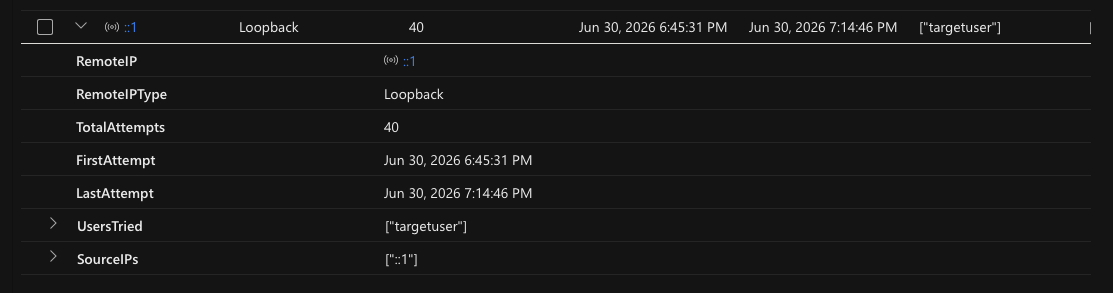
**确认结果:** 在 29 分钟的时间窗口内(下午 6:45 → 晚上 7:14),针对 `targetuser` 进行了 40 次失败的登录尝试。源 IP `::1` (loopback) 确认这是受控的自攻击实验室场景。
### 攻击 #2 — 本地权限提升
| 字段 | 详情 |
|---|---|
| **MITRE 战术** | TA0004 — Privilege Escalation / TA0003 — Persistence |
| **MITRE 技术** | T1098 — Account Manipulation |
| **子技术** | T1098.001 — Additional Local Groups |
| **方法** | 创建非特权用户并将其添加到本地管理员组 |
| **关键事件** | Event ID 4720 (Account Created), Event ID 4732 (Member Added to Group) |
| **MDE 表** | `DeviceEvents` |
| **ActionType** | `UserAccountCreated`, `UserAccountAddedToLocalGroup` |
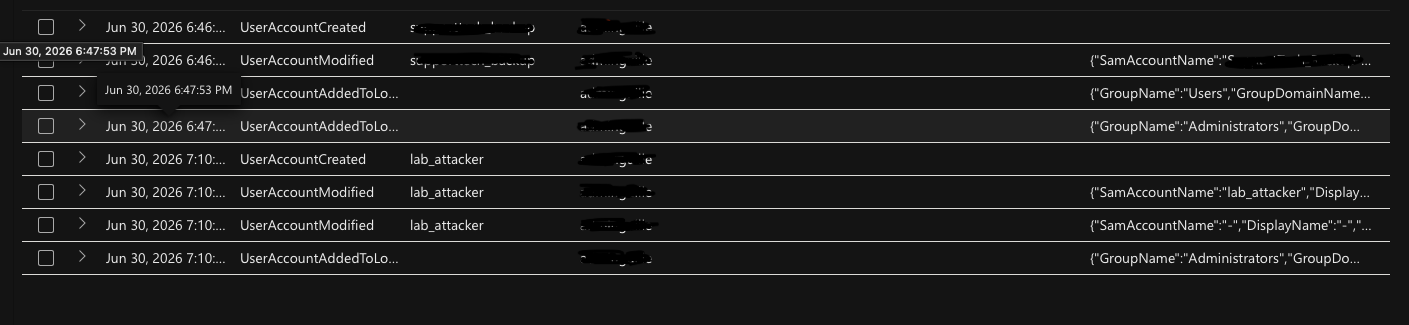
**模拟内容:** 获得初始访问权限的威胁行为者创建后门本地管理员账户,以维持持久化的提升访问权限——这是一种常见的后渗透技术。
**确认结果:** MDE 在 `DeviceEvents` 中检测并捕获到两条独立的提权链。
### 攻击 #3 — 混淆的 PowerShell 执行
| 字段 | 详情 |
|---|---|
| **MITRE 战术** | TA0005 — Defense Evasion / TA0002 — Execution |
| **MITRE 技术** | T1059.001 — PowerShell / T1027 — Obfuscation |
| **子技术** | T1564.003 — Hidden Window |
| **方法** | 使用 `-NoExit -ExecutionPolicy Bypass -WindowStyle Hidden` 的 PowerShell 生成子进程 |
| **关键事件** | Event ID 4688 (Process Creation), Event ID 4104 (Script Block Logging) |
| **MDE 表** | `DeviceProcessEvents` |
**模拟内容:** 攻击者执行带有规避标志的 PowerShell,旨在绕过执行策略、隐藏窗口并抑制错误——这符合“就地取材”(LOtL)技术。
**确认结果:** 检测到多个 `powershell.exe → powershell.exe` 子进程链。活动时间从 6 月 30 日晚上 7:09 一直持续到 7 月 1 日凌晨 12:53。

### 攻击 #4 — 注册表持久化 (ASEP)
| 字段 | 详情 |
|---|---|
| **MITRE 战术** | TA0003 — Persistence / TA0005 — Defense Evasion |
| **MITRE 技术** | T1547.001 — Registry Run Keys / Startup Folder |
| **相关** | T1036 — Masquerading(条目伪装为 "WindowsUpdate") |
| **方法** | `reg.exe` 修改 `HKCU\Software\Microsoft\Windows\CurrentVersion\Run` |
| **MDE 表** | `DeviceRegistryEvents` |
| **生成的警报** | 🟠 **"Anomaly detected in ASEP registry"** — 严重程度:**中** |
**模拟内容:** 攻击者通过写入一个名为 `WindowsUpdate` 的伪装 Run 键条目,指向隐藏的 PowerShell 进程来建立持久化——结合了 T1547.001 与 T1036 伪装。
**确认结果:** 在 7 月 1 日凌晨 12:54 捕获到 `RegistryValueSet` 事件。在 Defender 门户中触发了**中等严重程度的警报**,并提供完整的进程树可视化。

## 🚨 门户中生成的事件与警报
| 警报 | 严重程度 | 类别 | 状态 | 技术 |
|---|---|---|---|---|
| Anomaly detected in ASEP registry | 🟠 中 | Defense Evasion, Privilege Escalation | 已解决 | T1547.001 |
| 'EICAR_Test_File' malware was prevented | ⬜ 信息 | Malware | 已解决 | — |
### 进程树 — 攻击链可视化
```
6/30/2026 6:25 PM
└── powershell.exe [PID 10948]
│
7:09 PM — Remote execution
└── powershell.exe -NoExit -ExecutionPolicy Bypass -WindowStyle Hidden
│
7/1/2026 12:42 AM — Remote execution
└── powershell.exe -NoExit -ExecutionPolicy Bypass -WindowStyle Hidden
│
12:54 AM — Remote execution
└── reg.exe add HKCU\Software\Microsoft\Windows\CurrentVersion\Run
│
12:54 AM
└── ⚡ ALERT: Anomaly detected in ASEP registry [MEDIUM]
```
**门户截图:**
[📂 设备已加入](https://github.com/GjcCS/SOC-Lab-MDE-Threat-Simulation/tree/main/INCIDENTS-AND-ALERTS/Device-Onboarded)
[📂 警报和异常](https://github.com/GjcCS/SOC-Lab-MDE-Threat-Simulation/tree/main/INCIDENTS-AND-ALERTS/Alerts-and-Anomalies)
[📂 进程树警报](https://github.com/GjcCS/SOC-Lab-MDE-Threat-Simulation/tree/main/INCIDENTS-AND-ALERTS/Process-Tree-Alerts)
## 📊 已确认的遥测数据 (Advanced Hunting)
在攻击执行后的 24 小时内,所有 4 个 MDE 表中的数据均已确认:
| MDE 表 | 捕获的事件 | 覆盖的攻击 |
|---|---|---|
| `DeviceNetworkEvents` | 434 | 网络侦察 |
| `DeviceProcessEvents` | 228 | PowerShell 执行链 |
| `DeviceEvents` | 225 | 账户操作,防病毒 |
| `DeviceLogonEvents` | 40 | 暴力破解尝试 |
## 🔎 KQL 检测查询
所有 4 个查询均已在 Microsoft Defender Advanced Hunting 中验证,并获得了确认结果。
### 查询 1 — 暴力破解检测
```
DeviceLogonEvents
| where DeviceName == "vm-soc-lab-01"
| where Timestamp > ago(24h)
| where ActionType == "LogonFailed"
| summarize
TotalAttempts = count(),
FirstAttempt = min(Timestamp),
LastAttempt = max(Timestamp),
UsersTried = make_set(AccountName),
SourceIPs = make_set(RemoteIP)
by RemoteIP, RemoteIPType
| where TotalAttempts >= 5
| extend AttackDuration = LastAttempt - FirstAttempt
| order by TotalAttempts desc
```
### 查询 2 — 权限提升检测
```
DeviceEvents
| where DeviceName == "vm-soc-lab-01"
| where Timestamp > ago(24h)
| where ActionType in (
"UserAccountAddedToLocalGroup",
"UserAccountCreated",
"UserAccountModified"
)
| project
Timestamp,
ActionType,
AccountName,
InitiatingProcessAccountName,
InitiatingProcessFileName,
InitiatingProcessCommandLine,
AdditionalFields
| order by Timestamp asc
```
### 查询 3 — 混淆的 PowerShell 检测
```
DeviceProcessEvents
| where DeviceName == "vm-soc-lab-01"
| where Timestamp > ago(24h)
| where FileName == "powershell.exe"
| where ProcessCommandLine has_any (
"-EncodedCommand", "-enc ", "-NoExit",
"-WindowStyle Hidden", "-ExecutionPolicy Bypass",
"FromBase64String", "DownloadString",
"DownloadFile", "IEX", "Invoke-Expression"
)
| project
Timestamp,
ProcessCommandLine,
InitiatingProcessFileName,
InitiatingProcessCommandLine,
AccountName
| order by Timestamp desc
```
### 查询 4 — ASEP 注册表持久化检测
```
DeviceRegistryEvents
| where DeviceName == "vm-soc-lab-01"
| where Timestamp > ago(24h)
| where RegistryKey has_any (
"\\Software\\Microsoft\\Windows\\CurrentVersion\\Run",
"\\Software\\Microsoft\\Windows\\CurrentVersion\\RunOnce",
"\\SOFTWARE\\Microsoft\\Windows NT\\CurrentVersion\\Winlogon"
)
| project
Timestamp,
ActionType,
RegistryKey,
RegistryValueName,
RegistryValueData,
InitiatingProcessFileName,
InitiatingProcessCommandLine,
AccountName
| order by Timestamp desc
```
## 🗺️ MITRE ATT&CK 覆盖范围
| 技术 ID | 名称 | 战术 | 已确认 |
|---|---|---|---|
| T1110.001 | Password Guessing | Credential Access | ✅ |
| T1098.001 | Additional Local Groups | Privilege Escalation | ✅ |
| T1059.001 | PowerShell | Execution | ✅ |
| T1027 | Obfuscated Files or Information | Defense Evasion | ✅ |
| T1547.001 | Registry Run Keys / Startup Folder | Persistence | ✅ |
| T1564.003 | Hidden Window | Defense Evasion | ✅ |
| T1036 | Masquerading | Defense Evasion | ✅ |
| T1057 | Process Discovery | Discovery | ✅ |
| T1087.001 | Local Account Discovery | Discovery | ✅ |
## 📁 仓库结构
```
SOC-Lab-MDE-Threat-Simulation/
│
├── README.md
├── KQL-QUERY-1/ ← Brute Force query + results screenshot
├── KQL-QUERY-2/ ← Privilege Escalation query + results screenshot
├── KQL-QUERY-3/ ← Obfuscated PowerShell query + results screenshot
├── KQL-QUERY-4/ ← ASEP Registry query + results screenshot
└── INCIDENTS-AND-ALERTS/
├── alerts-and-anomalies/ ← Portal alerts list screenshot
├── alerts-resolved/ ← Resolved alerts screenshot
├── device-evidence/ ← Device evidence artifacts
├── device-onboarded/ ← MDE onboarding confirmation
└── process-tree-alerts/ ← Attack chain Process Tree visualization
```
## 🎓 关键学习要点
- **MDE 与 Sentinel 架构对比:** MDE Advanced Hunting 中的 `Timestamp` 对比 Sentinel 中的 `TimeGenerated` —— 这是 SC-200 考试的关键区别
- **`withsource=` 语法:** 在 MDE 的 `union` 查询中识别源表所必需 —— `$table` 和 `Type` 无法生效
- **警报严重等级:** 只有“中等”及以上级别的警报会自动生成带有攻击故事可视化的事件 —— “信息”级别的警报不会创建事件
- **EICAR 离线处理:** Defender 由于其已知的签名而完全离线处理 EICAR —— 它会生成 `AntivirusDetection` 遥测数据,但不会生成门户事件
- **Defender PassiveMode:** Azure VM 可以被 Defender for Cloud 置于 Defender 被动模式 —— 了解这一点对于排查缺失警报至关重要
- **ASEP 注册表检测:** 通过 PowerShell 子进程对 `HKCU\...\CurrentVersion\Run` 进行修改会可靠地触发中等严重级别的警报
## 🔧 复现前置条件
- Microsoft Azure 订阅(现收现付或免费试用)
- Microsoft 365 Developer 租户 —— 免费且可 90 天续期一次,包含 MDE Plan 2 → [developer.microsoft.com](https://developer.microsoft.com/microsoft-365/dev-program)
- 访问 `security.microsoft.com`
- Windows 11 VM(最低 Standard_B2s)
## ⚠️ 免责声明
本实验室中的所有攻击模拟均在作者拥有和管理的**受控、隔离的环境**中进行。未涉及任何生产系统、网络或第三方基础设施。本项目仅供教育和网络安全技能开发之用。
## 👤 作者
**Guillermo Costa**
[](https://www.linkedin.com/in/guillermo-costa)
[](https://github.com/GjcCS)
标签:AI合规, Azure, KQL查询, Microsoft Defender, TGT, 安全运营中心, 攻防演练, 端点检测与响应, 网络映射, 脱壳工具