Moh4696/freecut
GitHub: Moh4696/freecut
freecut 是 video-use 的开源分支,用免费本地 Whisper 转录替换付费 ElevenLabs 依赖,让 AI 代理通过文本理解视频并自动完成剪辑后期全流程。
Stars: 239 | Forks: 48
# freecut
**freecut** 是 [browser-use/video-use](https://github.com/browser-use/video-use) 的一个分支,将付费的 ElevenLabs Scribe 依赖替换为免费、可插拔的转录后端。使用 Claude Code 编辑视频,100% 开源,零必需的 API 密钥。
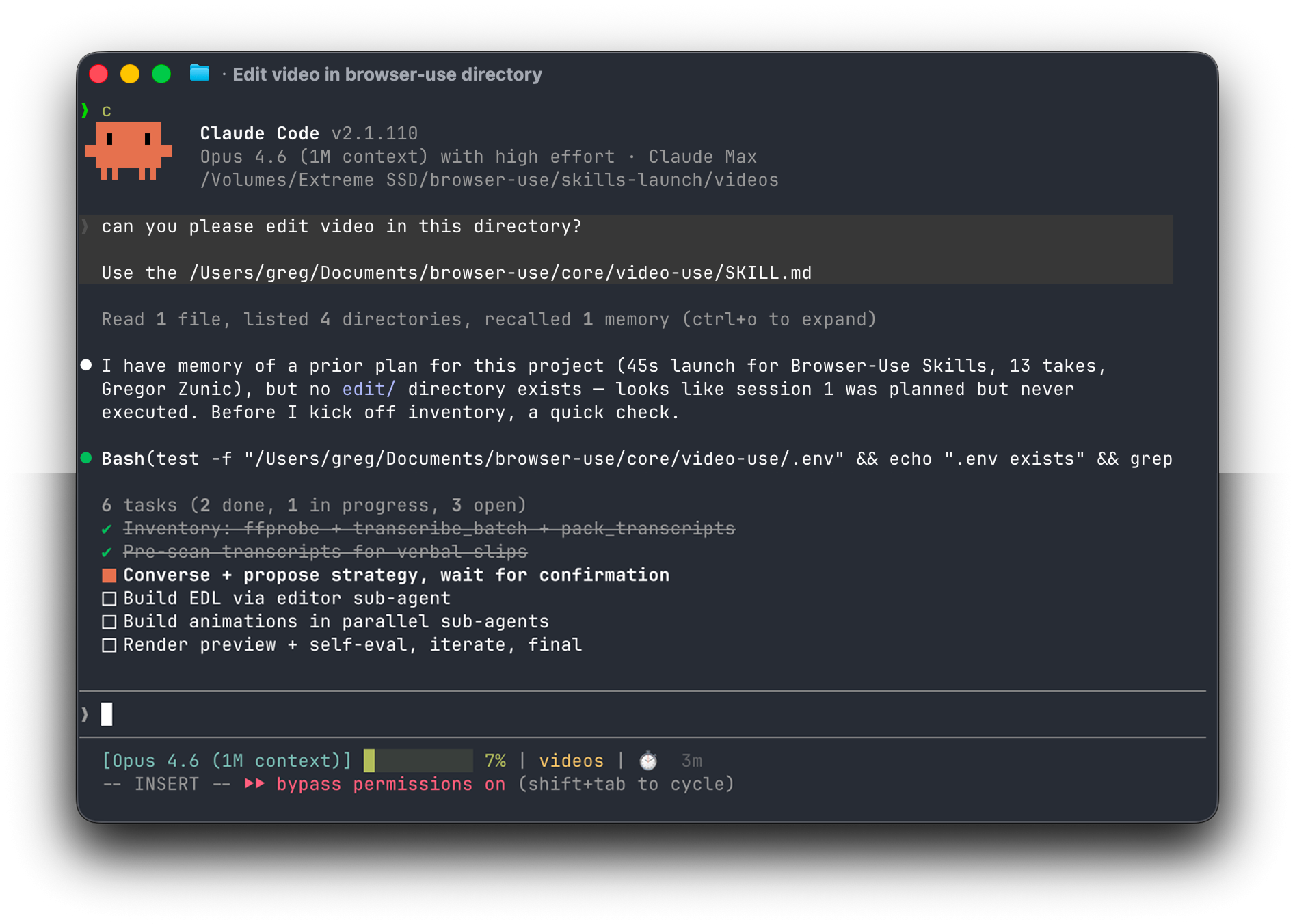
将原始素材放入文件夹,与 Claude Code 聊天,即可拿回 `final.mp4`。适用于任何内容——访谈、混剪、教程、旅行、采访——无需预设或菜单。
## 与 `video-use` 有何不同
`video-use` 很棒,但强制要求付费的 ElevenLabs Scribe API 密钥。`freecut` 将转录层重构为可插拔的后端,并提供了免费的默认选项:
| Backend | Cost | Speakers | Runs on Mac? | Trigger |
|--------------|------|----------|--------------|-----------------------------------------------|
| `whisper` | Free | 1 (fixed)| ✅ Local | 默认。`mlx-whisper` 或 `faster-whisper`。 |
| `vibevoice` | GPU cost | N (real diarization) | ❌ CUDA-only | 设置 `VIBEVOICE_ASR_URL`,传递 `--backend vibevoice`。 |
| `elevenlabs` | Paid | N (Scribe diarization) | ✅ (cloud) | 设置 `ELEVENLABS_API_KEY`,传递 `--backend elevenlabs`。 |
下游的所有内容(`pack_transcripts.py`、`render.py`、EDL 生成、SKILL)均保持不变——每个后端输出的都是相同的 `{"words": [...]}` 结构。
## 功能说明
- **剪掉填充词**(`umm`、`uh`、错误的开口)以及片段之间的空白时间
- **自动色彩分级**每个片段(温暖的电影感、自然鲜明,或任何自定义的 ffmpeg 链)
- 在每个剪切处添加 **30ms 音频淡入淡出**,让你永远不会听到爆音
- 按照你的风格**刻录字幕**——默认为 2 个词的大写区块,完全可自定义
- 通过 [HyperFrames](https://github.com/heygen-com/hyperframes)、[Remotion](https://www.remotion.dev/)、[Manim](https://www.manim.community/) 或 PIL **生成动画叠加层**——在并行的子代理中生成,每个动画一个
- 在向你展示任何内容之前,在每个剪切边界**自我评估渲染输出**
- 在 `project.md` 中**持久化会话记忆**,以便下周的会话能从上次中断的地方继续
## 设置提示词
粘贴到 Claude Code、Codex、Hermes、Openclaw 或任何具有 shell 访问权限的代理中:
```
Set up https://github.com/Moh4696/freecut for me.
Read install.md first to install this repo, wire up ffmpeg, register the skill
with whichever agent you're running under, and install a local Whisper backend
(mlx-whisper on Apple Silicon, otherwise faster-whisper). No API keys are
required — transcription runs locally. Then read SKILL.md for daily usage,
and always read helpers/ because that's where the editing scripts live.
After install, don't transcribe anything on your own — just tell me it's ready
and wait for me to drop footage into a folder.
```
然后将你的代理指向一个包含原始素材的文件夹:
```
cd /path/to/your/videos
claude # or codex, hermes, etc.
```
在会话中:
它会清点素材,提出一种策略,等待你的确认,然后在你素材旁边生成 `edit/final.mp4`。所有输出都存放在 `
/edit/` 中——技能目录保持干净。
## 手动安装
```
# 1. Clone 并 symlink 到你的 agent 的 skills 目录
git clone https://github.com/Moh4696/freecut ~/Developer/freecut
ln -sfn ~/Developer/freecut ~/.claude/skills/freecut # Claude Code
# ln -sfn ~/Developer/freecut ~/.codex/skills/freecut # Codex
# 2. 安装核心 deps
cd ~/Developer/freecut
uv sync # or: pip install -e .
# 3. 安装一个 Whisper backend(任选其一)
uv pip install mlx-whisper # Apple Silicon — fastest
# uv pip install faster-whisper # 其他所有地方
# 4. 系统 deps
brew install ffmpeg # required
brew install yt-dlp # optional, for URL sources
```
就是这样——默认的 `whisper` 后端不需要 `.env`。
### 可选:使用 VibeVoice-ASR 进行多人对话分离
`whisper` 是单说话人模式。要进行真正的“谁/何时/什么”对话分离,请使用 `--backend vibevoice`。[microsoft/VibeVoice-ASR](https://huggingface.co/microsoft/VibeVoice-ASR) 模型仅支持 CUDA,因此 freecut 通过 HTTP 与其通信——指向租用的 GPU 机器、Modal/RunPod 部署,或 Azure AI Foundry endpoint:
```
cp .env.example .env
echo "VIBEVOICE_ASR_URL=https://your-endpoint/transcribe" >> .env
python helpers/transcribe_batch.py /path/to/videos --backend vibevoice
```
该 endpoint 只需接受 multipart `file=` POST 请求,并返回 VibeVoice 的片段 JSON(或标准化的 `{"words":[…]}` 结构);有关确切的契约,请参见 [`helpers/transcribe.py`](helpers/transcribe.py)。
### 可选:原始 ElevenLabs Scribe 后端
如果你已经有 ElevenLabs 密钥并且想要 Scribe 的特定输出:
```
echo "ELEVENLABS_API_KEY=sk-..." >> .env
python helpers/transcribe_batch.py /path/to/videos --backend elevenlabs
```
## 工作原理
LLM 从不“观看”视频。它是在**阅读**视频——通过两层结构,共同为其提供以词边界精度进行剪辑所需的一切信息。
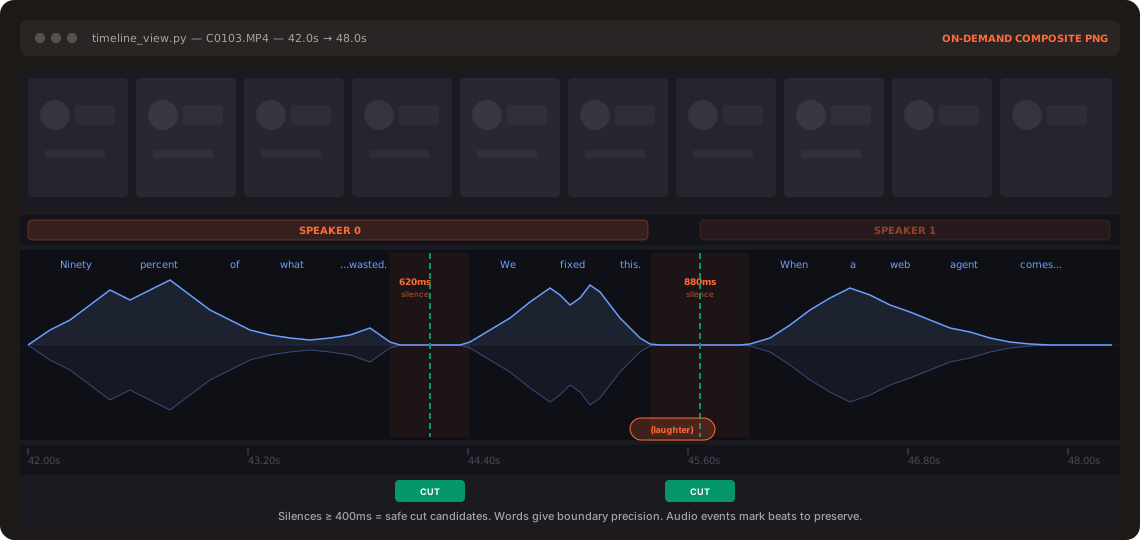
**第 1 层 —— 音频转录(始终加载)。** 每个素材进行一次转录调用,提供词级别的时间戳和(可选的)说话人对话分离。所有片段打包进一个约 12KB 的 `takes_packed.md` 中——这是 LLM 的主要阅读视图。
```
## C0103 (时长:43.0秒,8个短语)
[002.52-005.36] S0 Ninety percent of what a web agent does is completely wasted.
[006.08-006.74] S0 We fixed this.
```
**第 2 层 —— 视觉合成(按需)。** `timeline_view` 为任何时间范围生成胶片条 + 波形图 + 词标签 PNG。仅在决策点调用——例如模糊的停顿、重拍对比、剪切点检查。
与 browser-use 为 LLM 提供结构化 DOM 而非截图的理念相同——只不过是针对视频的。
## Pipeline
```
Transcribe ──> Pack ──> LLM Reasons ──> EDL ──> Render ──> Self-Eval
│
└─ issue? fix + re-render (max 3)
```
自我评估循环会在每个剪切边界对_渲染后的输出_运行 `timeline_view`——捕捉视觉跳跃、音频爆音、隐藏的字幕。只有在通过检查后,你才会看到预览。
## 设计原则
1. **文本 + 按需视觉。** 不转储帧。转录内容即为交互界面。
2. **音频为主,视觉为辅。** 剪辑基于语音边界和静音间隙。
3. **询问 → 确认 → 执行 → 自我评估 → 持久化。** 未经策略批准,绝不触碰剪辑。
4. **对内容类型零假设。** 先观察,询问,然后再编辑。
5. **12 条硬性规则,其余赋予艺术自由。** 制作的准确性是不容妥协的。品味则不然。
有关完整的生产规则和编辑技巧,请参见 [`SKILL.md`](./SKILL.md)。
## 致谢
- 基础工具:[browser-use/video-use](https://github.com/browser-use/video-use) (MIT)
- 本地 ASR:[OpenAI Whisper](https://github.com/openai/whisper)、[mlx-whisper](https://github.com/ml-explore/mlx-examples/tree/main/whisper)、[faster-whisper](https://github.com/SYSTRAN/faster-whisper)
- 对话分离后端:[microsoft/VibeVoice-ASR](https://huggingface.co/microsoft/VibeVoice-ASR) (MIT)标签:AI应用, Whisper, 二进制发布, 开源工具, 自动化处理, 视频编辑, 语音转写, 逆向工具, 音视频处理