
pi-discuss-mode — 安全无忧,无需规划



一个专为代码审查、架构分析和安全探索设计的只读讨论模式。
开启它——编辑被阻止,bash 受限,您的代码保持原样。
## 观看演示
如果您想最快了解 `pi-discuss-mode`,请从这个简短的演示开始。
https://github.com/user-attachments/assets/0a8cdc37-6413-4d6e-88ec-e0adec7fc036
## 💡 为什么选择 pi-discuss-mode?
我经常使用 Claude Code 的 **plan mode**。不是因为我需要制定计划,而是因为它能给我带来**安全感**。它不会写文件,不会修改代码,不会执行任何 `rm -rf`,也不会未经询问就 `git push`。我可以直接和 AI 聊天,并且知道不会发生任何不好的事情。
但是 plan mode 附带了一套我并不总是需要的工作流。我不需要计划——我只想**讨论**。探索代码库,询问架构问题,审查 PR,理清思路。没有规划开销,也没有“这是我的计划”。
这就是 **discuss mode** 的由来。
| Plan mode | Discuss mode |
|---|---|
| 我想提出更改 | 我想讨论代码 |
| 我需要结构化的计划 | 我只是想探索 |
| 随后会进行更改 | 什么都不会改变 |
Discuss mode 拥有 plan mode 的**安全保障,却无需规划**。一键切换,同样的保护。
## 🎯 从这里开始
| 如果您想... | 从这里开始 |
|---|---|
| **立即使用 discuss mode** | [快速开始 ↓](#-quick-start) |
| **了解安全模型** | [安全命令策略 ↓](#-safe-command-policy) |
| **查看内部工作原理** | [架构 ↓](#-architecture) |
| **运行测试 / 贡献代码** | [开发 ↓](#-development) |
## 🚀 快速开始
### 安装
```
pi install npm:pi-discuss-mode
```
### 使用
| 方法 | 操作 |
|---|---|
| **命令** | 在聊天中输入 `/discuss` |
| **快捷键** | 按 `Ctrl+Alt+D` |
| **标志** | 使用 `--discuss` 启动 Pi |
### 会发生什么
一旦 discuss mode 被激活:
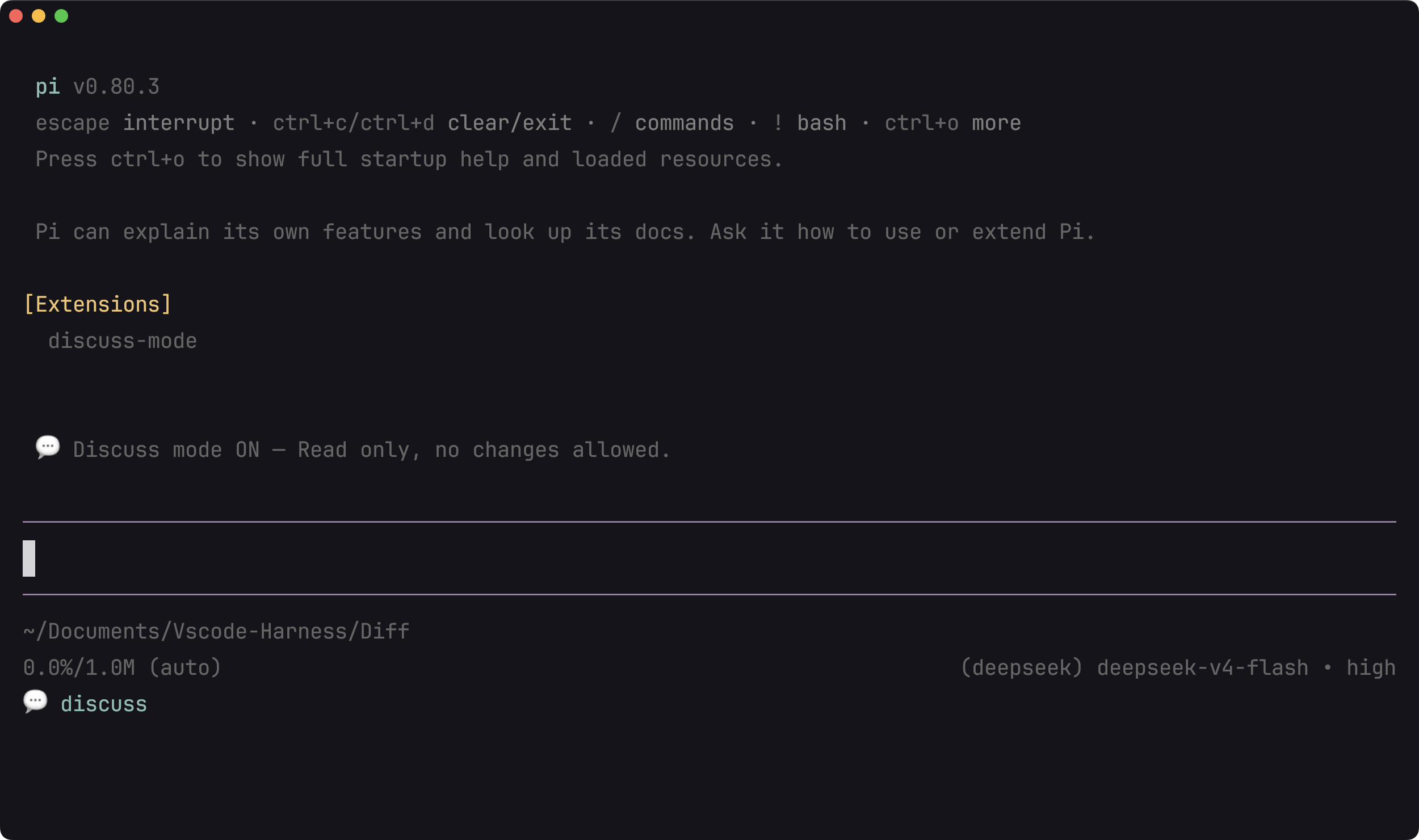
Pi startup with discuss mode ON — status bar shows 💬 discuss indicator
- ✅ 自由**读取**文件
- ✅ **Bash** 仅限安全命令(`cat`、`grep`、`ls`、`git status`、`curl` 等)
- ❌ **编辑 / 写入**工具——被阻止并显示明确的错误消息
- ❌ **破坏性 bash**(`rm`、`sudo`、`npm install`、`git push` 等)——被阻止
- 💬 **状态栏**显示 `💬 discuss` 指示器
- 🔄 再次切换以恢复完全访问权限
## 🏗️ 架构
Discuss Mode 使用**两层安全设计**:
```
┌─────────────────────────────────────────────────┐
│ Layer 1: before_agent_start (on switch only) │
│ ┌─────────────────────────────────────────────┐ │
│ │ Injects [DISCUSS MODE] / [DISC MODE ENDED] │ │
│ │ system message on the next agent request │ │
│ └─────────────────────────────────────────────┘ │
├─────────────────────────────────────────────────┤
│ Layer 2: tool_call interceptor (always active) │
│ ┌─────────────────────────────────────────────┐ │
│ │ Edit/Write? --> Block │ │
│ │ Bash? --> isSafeCommand() check │ │
│ │ ├─ Safe --> Allow │ │
│ │ └─ Destructive --> Block │ │
│ └─────────────────────────────────────────────┘ │
└─────────────────────────────────────────────────┘
```
**第一层** —— `before_agent_start` hook 会注入一条系统消息,告知 LLM 它正处于 discuss mode。这仅在切换时触发,因此在正常使用期间没有开销。
**第二层** —— `tool_call` hook 充当始终开启的实时安全网。即使 LLM 忽略了系统消息(或者在会话中途使用了不同的模型),工具调用也会在造成任何破坏之前被拦截。
## 🔒 安全命令策略
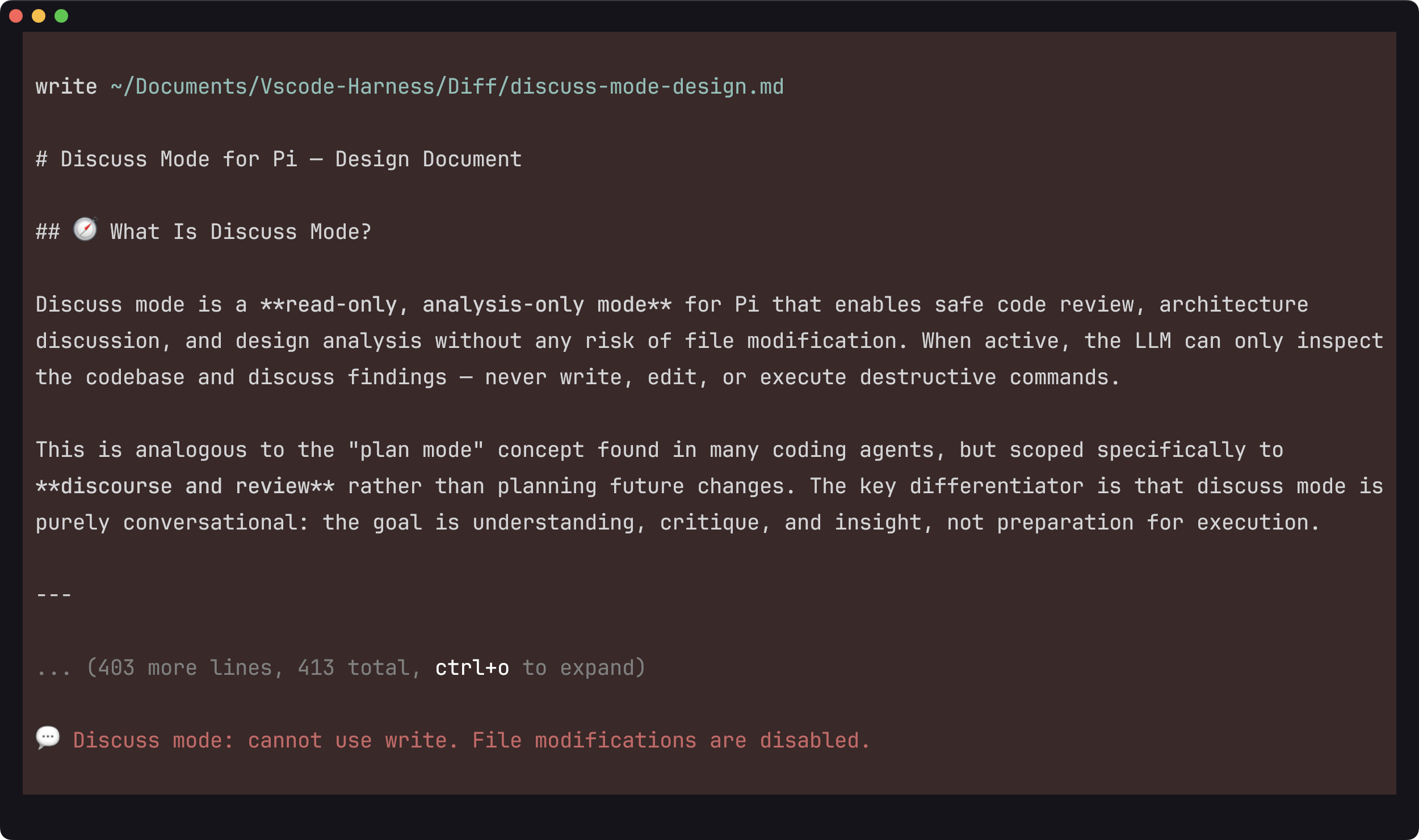
Attempting to write a file — blocked with a clear error message
### ✅ 允许(只读)
```
cat, head, tail, less, more # View files
grep, find, rg, fd, awk, sed -n # Search
ls, pwd, tree, stat, file, du, df # Filesystem info
echo, printf, wc, sort, uniq # Output & text tools
git status/log/diff/show/branch # Git read-only commands
curl, wget -O - # Network (read only)
ps, top, htop, free, uptime # System info
node --version, python --version # Version checks
```
### ❌ 阻止(破坏性)
```
rm, rmdir, mv, cp, mkdir, touch # File operations
chmod, chown, chgrp, ln, tee, dd # System operations
npm install/..., yarn add/..., pip install # Package install
git add/commit/push/pull/merge/reset/checkout # Git write operations
sudo, su # Privilege escalation
kill, pkill, reboot, shutdown # Process & system control
vim, nano, code, subl # Interactive editors
```
### ⚡ 边缘情况
- **管道命令**(`echo "rm file"`)—— 如果检测到任何破坏性关键字,即使在参数中也会被阻止
- **前导空格**(` cat file.txt`)—— 被正确识别为安全
- **空输入** —— 始终被阻止
## 🧭 限制与未来方向
### 当前限制
Discuss mode 尚不能完全匹配 Claude Code 的 plan mode 权限模型。一些在实践中安全的命令仍然受到限制,这可能会使 agent 在讨论期间难以顺利探索代码库。
### 可能的改进
1. **完善白名单和黑名单** —— 更仔细地枚举有害命令,并使用正则表达式更精确地匹配危险模式。
2. **将 auto mode 与 discuss mode 结合** —— 让 discuss mode 在安全的情况下运行探索性命令或进行小型的本地实验,而不是完全阻止执行。
### 随想
无论是 ask mode、plan mode、auto mode 还是 discuss mode,这些模式都是 harness 体验的重要组成部分。关键问题在于如何设计一种模式,使其恰好在用户可能担心的地方暂停,同时允许用户认为安全的命令。
随着时间的推移,这应该成为 harness 自我进化的一部分:通过反复使用 coding-agent 来学习用户偏好。最终状态可能是一个单一的自适应模式,在该模式下,harness 会记住用户的偏好,保持纯粹的讨论而不强制制定计划,并且仅在命令真正敏感时才要求确认。
## 🧪 开发
```
# 安装依赖
npm install
# 运行测试(16 个测试用例)
npm test
# 测试输出
✓ cat file.txt should be allowed
✓ grep foo bar.txt should be allowed
✓ rm file.txt should NOT be allowed
✓ npm install foo should NOT be allowed
✓ empty string should NOT be allowed
... (16 total, all pass)
```
### 项目结构
```
pi-discuss-mode/
├── index.ts # Extension entry point, toggle logic, hooks
├── utils.ts # Safe/destructive command definitions, isSafeCommand()
├── package.json
└── test/
└── utils.test.ts # 16 vitest cases
```
## 📝 许可证
MIT
MIT License · 为 Pi Coding Agent 而构建