danoszz/penthera
GitHub: danoszz/penthera
一款专为 AI 编程助手和命令行设计的轻量级应用安全扫描工具,支持黑白盒结合的自动化检测与闭环修复。
Stars: 2 | Forks: 0
   
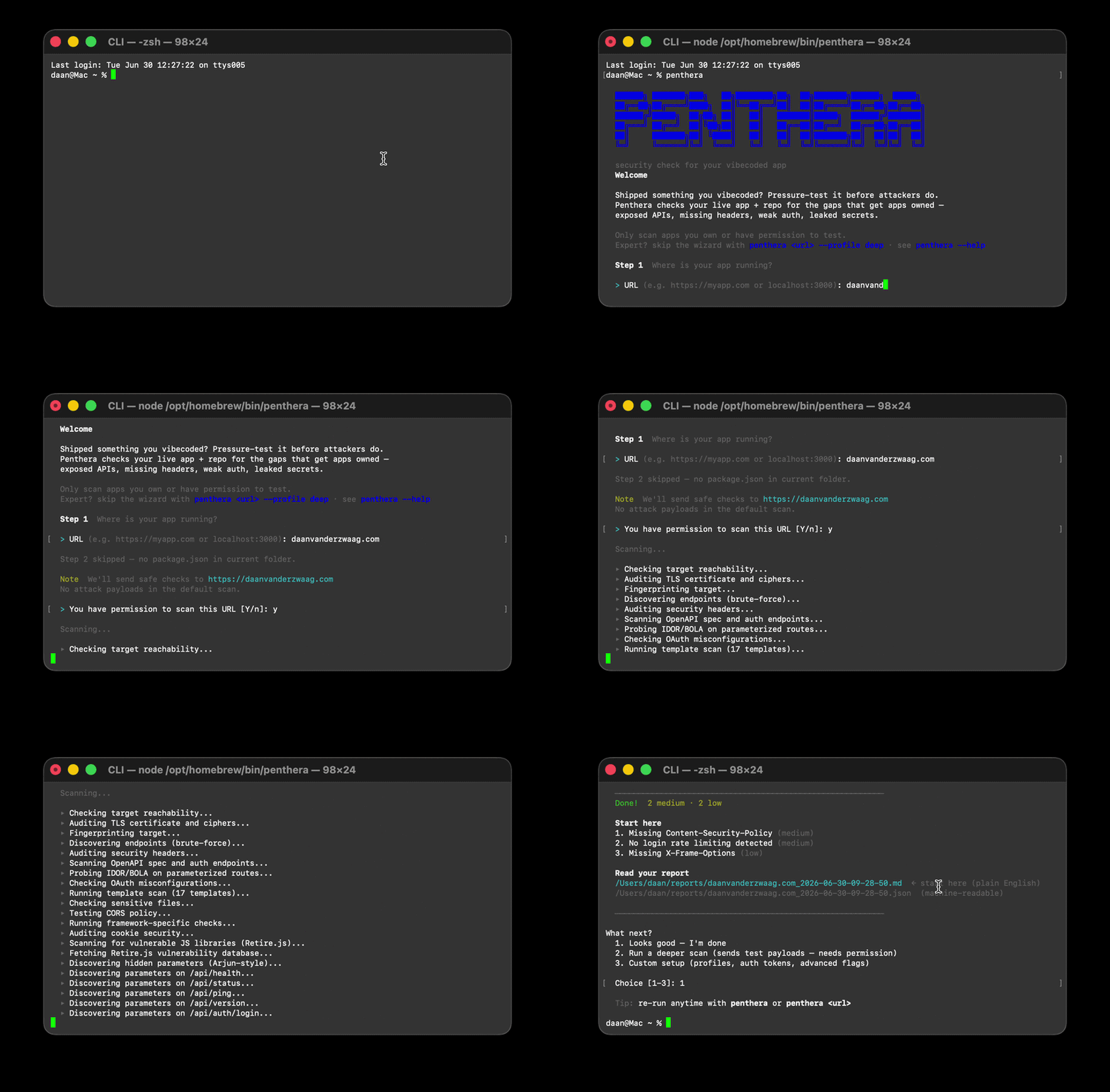
TLS, headers, CORS
endpoint + OpenAPI discovery
JWT, auth, IDOR/OAuth
injection, fuzzing"] P --> WB["White-box
API routes
secret scanning
trust boundaries"] P --> MA["Machine audit
(macOS)"] BB --> F[["Findings
scored by severity"]] WB --> F MA --> F F --> T["Terminal summary
+ top 3 fixes"] F --> MD["Markdown report"] F --> J["JSON"] F --> S["SARIF to GitHub Security"] ``` 扫描结果映射到 [OWASP Web 安全测试指南](docs/owasp-wstg-coverage.md) (WSTG v4.2)。默认扫描是非破坏性的。基于 payload 的测试是可选项 (`--deep`、`--fuzz`、`--all`)且需要经过明确确认。 ## 道德使用与授权 Penthera 会向你指定的目标发送 HTTP 请求。某些模式(`--deep`、 `--fuzz`、`--all`)会发送旨在发现漏洞的攻击 payload。请负责任地 使用它。 **你可以在以下情况使用 Penthera:** - 你**拥有**目标(你的应用、你的服务器、你的项目)。 - 你拥有系统所有者的**书面授权**(电子邮件、工单、签署的扫描范围)。 - 你扫描**localhost**或你控制的私有实验环境。 - 你将其用于**防御性安全**:研究、课程作业、CI 加固、发布前审计。 **你绝不能用 Penthera 来:** - 扫描你不拥有或没有明确测试权限的系统。 - 在未授权的情况下探测政府、医疗、金融或第三方的生产系统。 - 窃取数据、破坏服务或绕过访问控制。 - 利用扫描结果攻击、勒索或伤害任何人。 未经授权的安全测试可能违反计算机滥用法律(例如美国的 CFAA、英国的《计算机滥用法》以及欧盟各国的同等法律),并可能导致 刑事起诉、民事责任、IP 封锁、账号终止以及 学术或职业处罚。 ## 免责声明 提供 Penthera 旨在用于合法的安全研究和你 拥有或获得授权测试的系统的防御性测试,且仅限此目的。 - 它是一个研究和自我评估工具。扫描你自己的应用,以便在攻击者之前发现并修复 漏洞。 - 如果指向他人的系统,加固系统的同样功能也可能造成伤害。 请谨慎合法地使用。 - 作者不 condone 未经授权或恶意的使用,并且对 因使用或滥用此软件引起的任何损害、损失或法律后果不承担 任何责任。 - 本软件“按原样”提供,不提供任何形式的保证。请参阅 [LICENSE](LICENSE) (MIT)。 - 你有全责确保你运行的每次扫描都是经过授权且 在你所在的司法管辖区合法的。 使用 Penthera 即表示你接受这些条款。 ## 安装 [一键安装程序](#run-it)是最快的途径。要手动设置: ``` git clone https://github.com/danoszz/penthera.git cd penthera npm install npm link # exposes `penthera` and `penthera-scan` globally penthera --version ``` 要求:Node.js 18+ 和 npm。可选:用于 `--nuclei` 的 nuclei-templates,以及 Docker。要在 container 中运行它: ``` docker build -t penthera . docker run --rm penthera https://your-app.example ``` ## 快速开始 ``` # 首次使用?不带 args 运行以进行引导式设置 penthera # 安全的默认扫描(non-destructive) penthera https://myapp.com # Staging 加源代码,完整报告集 penthera https://staging.myapp.com --repo . --all -o reports/scan.json --sarif reports/scan.sarif # Baseline diff:仅显示自上次扫描以来的新发现 penthera https://myapp.com -o reports/scan.json --baseline reports/previous.json # 已认证扫描(session cookie 或 bearer token) PENTHERA_BEARER=eyJ... penthera https://myapp.com --profile standard penthera https://myapp.com --auth-cookie "session=abc123" ``` 写入 `-o reports/scan.json` 同时也会在旁边生成人类可读的 `reports/scan.md` 。报告默认被 gitignored。 ### 退出代码 | 代码 | 含义 | |------|---------| | `0` | 没有严重或高危发现 | | `1` | 检测到严重或高危发现 | | `2` | 扫描失败(无法访问目标、配置错误) | ## 输出 | 格式 | 标志 | 用途 | |--------|------|-----| | 终端 | *(默认)* | 彩色摘要加上前 3 项修复 | | **Markdown** | `--markdown file.md` 或 `-o file.json` | 人类可读报告(执行摘要、发现表、修复项)。自动在 `-o` 文件旁边生成 | | JSON | `--json` 或 `-o file.json` | CI pipeline、基线差异对比、自定义工具 | | SARIF | `--sarif file.sarif` | GitHub Security / 代码扫描选项卡 | ## 为你的 AI 编程 Agent 准备 Penthera 作为一个 [Agent Skill](https://agentskills.io) 发布,这是 Cursor、 Claude Code、Claude.ai 和 [40 多种 agent 工具](https://agentskills.io/clients)使用的开放格式。 该 skill 会指导 agent 运行授权扫描、选择正确的 profile, 并总结发现结果,因此你只需描述你的需求。 **安装**(以下任意一种): ``` # 跨 agent,无摩擦 npx skills add danoszz/penthera # 或者使用 one-line installer(同时会链接 CLI) curl -fsSL https://raw.githubusercontent.com/danoszz/penthera/main/install.sh | bash # 或者复制到单个项目中进行团队共享 cp -r skills/penthera .cursor/skills/penthera # Cursor cp -r skills/penthera .claude/skills/penthera # Claude Code ``` 或者作为 Claude Code 插件安装(会自动安装该 skill): ``` /plugin marketplace add danoszz/penthera /plugin install penthera@penthera ``` 对于 Claude.ai(网页版),压缩并上传该 skill: ``` npm run package:skill # produces penthera-skill.zip; upload in Settings > Capabilities > Skills ``` **触发它的提示词:** - “扫描我在 3000 端口上的 localhost 应用的安全问题” - “对 staging.myapp.com 运行部署前审计,并总结严重发现” - “扫描此仓库中的硬编码密钥和暴露的 API 路由” - “将今天的扫描与上周的基线进行比较,仅显示新发现” - “为 GitHub 代码扫描生成 SARIF 报告” 该 skill 包含一个强制性的授权关卡。它会拒绝你不 拥有或未获授权测试的目标。在首次扫描前运行 preflight: ``` bash skills/penthera/scripts/preflight.sh http://localhost:3000 ``` Skill 源码和工作流位于 [`skills/penthera/SKILL.md`](skills/penthera/SKILL.md)。 ## 扫描与修复 Penthera 不仅仅报告问题。它形成闭环:要求你的 agent 修复它发现的问题,它会检测问题,对你的代码应用框架感知的修复(以 diff 形式显示供你批准),然后重新扫描以证明问题已解决。 ``` "Scan my app and fix what you find" "Fix the security headers on my Next.js app and re-scan to confirm" "Find and fix hardcoded secrets in this repo" ``` 修复来自涵盖 Next.js、Express、Fastify、Hono 和 FastAPI 的[修复剧本](skills/penthera/references/remediation.md)。它们始终以 diff 形式显示供你批准,并通过重新扫描验证;绝不会盲目应用,也绝不触碰生产环境。要从一开始就构建默认安全的设计,请参阅[安全默认值](skills/penthera/references/secure-defaults.md)。 ## CI 集成 ``` # 按计划扫描 staging URL 并将结果上传到 GitHub Security。 # 设置 PENTEST_STAGING_URL secret 以启用。完整示例:.github/workflows/scan.yml - run: npx penthera "$PENTEST_URL" --profile standard --sarif reports/scan.sarif - uses: github/codeql-action/upload-sarif@v3 with: sarif_file: reports/scan.sarif ``` 仓库自身的 CI(`.github/workflows/ci.yml`)在 Node 18、 20 和 22 上运行离线测试套件,并在每次 push 时对模拟的漏洞 API 进行自我扫描。 ## 配置 要针对你自己的路由进行实时集成测试: ``` cp pentest.config.example.js pentest.config.js # gitignored ``` 编辑路由组,然后运行 `npm run pentest:live`。设置 `PENTEST_BASE_URL` 以 指向预发布环境,而无需编辑文件。 ## 测试与贡献 ``` npm test # full suite (124 tests) npm run pentest:mock # offline tests against a local mock vuln API npm run mock-server # start the mock API on port 8765 ``` 请参阅 [CONTRIBUTING.md](CONTRIBUTING.md) 了解项目布局、如何添加探测 或 template、测试矩阵以及发布和发布检查清单。 ## 状态 **v1.0,生产就绪。** URL、仓库和机器扫描,扫描 profile, Markdown、JSON 和 SARIF 报告,session 感知的身份验证,JWT、IDOR、OAuth 和 header 探测,自适应知识图谱探测,插件和 templates API, Docker、CI 和 Agent Skill 均已发布。请参阅 [CHANGELOG](CHANGELOG.md) 了解完整历史。 Penthera 正在积极维护中。欢迎提交 Issues 和 PR。 ## 支持 Penthera Penthera 是免费且基于 MIT 许可的。如果它在发布前帮你拦截了问题, 你可以帮助维持它的维护: [](https://github.com/sponsors/danoszz) 赞助资金将用于支持开发新探测、扩展框架覆盖范围,并保持套件 跟进新的攻击模式。非常感谢。 ## 隐私 Penthera 没有遥测功能。它不会向作者或任何第三方收集、存储或传输任何使用数据、分析或个人信息。它也不会进行网络回传。 - **扫描流量仅发送到你指定的目标。** 通过 `--auth-bearer`、`--auth-cookie` 或 `PENTHERA_*` 环境变量传入的 Auth token 仅发送到该目标。 - **报告保留在本地。** 输出会写入你机器上的 `reports/`(已被 gitignored)目录。 - **JS 漏洞检查**会从 GitHub 下载公共数据库(Retire.js),以便在本地将你应用中的库与已知的 CVE 进行比对。不会发送关于你目标的任何详细信息。 - **Recon 模式**(`--recon`)会使用目标域名查询公共 OSINT 来源(crt.sh、web.archive.org、AlienVault OTX),以查找子域名和历史 URL。这会将目标域名共享给这些第三方服务。请省略 `--recon` 以避免这种情况。 你有责任确保你有权扫描任何目标。请参阅[道德使用](#ethical-use--authorization)。 ## 许可证与披露 MIT。请参阅 [LICENSE](LICENSE)。通过 [SECURITY.md](SECURITY.md) 报告 Penthera 本身的漏洞。只扫描你拥有或获得授权测试的系统。
标签:AI代理, DAST, GraphQL安全矩阵, MITM代理, SAST, Web安全, 图数据库, 安全扫描器, 恶意软件分析, 暗色界面, 盲注攻击, 自定义脚本, 蓝队分析, 请求拦截