sampreeth0x/SentinelXDR-SOC-Dashboard
GitHub: sampreeth0x/SentinelXDR-SOC-Dashboard
一个开源的实时 Windows 端点检测与响应平台,通过终端代理采集系统遥测数据,结合 Sigma/YAML 规则和 IOC 匹配检测威胁,并提供 SOC 实时仪表板和自动化响应能力。
Stars: 0 | Forks: 0
# SentinelXDR
[](https://github.com/sampr/SentinelXDR/actions/workflows/ci.yml)
实时、跨平台的端点检测与响应平台。**不是模拟器** —— 代理会监控实际的操作系统,并将真实的遥测数据流式传输到 SOC 仪表板。
本仓库是**以 Windows 优先的垂直切片**:一个可运行的 EDR,包含 Windows 端点代理,FastAPI 后端(目前使用 SQLite / 支持 PostgreSQL),规则引擎 + IOC 哈希匹配,以及 React 仪表板,并已端到端验证。Linux 支持、其余规则、Sigma/YARA 加载和 PDF 报告将推迟到后续切片。
## 这个 EDR 的实际功能(已验证,非模拟)
- **检测即代码**:用于单一和关联规则的 YAML 规则 DSL (`backend/.../rules/*.yaml`),**外加 Sigma 规则加载** (`sigma_rules/*.yml`) —— Sigma YAML 解析器/条件评估器会将 Sigma 选择项映射到事件模型上,并与内置规则一同触发。放入社区 Sigma 规则即可直接运行。
- **MITRE ATT&CK 覆盖图**:每条规则的技术/战术都会被聚合到一个 ATT&CK Navigator 层中 —— `GET /coverage/attack-navigator.json`(在 https://mitre-attack-nav.github.io/attack-navigator/ 打开)以及 `/coverage/summary`。
- **SOAR / 自动化响应**:告警 → YAML playbook (`response_playbooks/*.yaml`) → 命令队列 → 代理拉取 `GET /commands` 并执行 `kill_process`、`quarantine_file`、`block_ip`、`isolate_host`、`collect_forensics`,随后发送 ack。`isolate_host` 受 `SENTINEL_ALLOW_ISOLATE` 控制,因此误触发的 playbook 不会导致主机瘫痪。手动响应:`POST /alerts/{id}/respond`。
- **威胁情报**:AlienVault OTX pulse 摄取 (`OTX_KEY`),STIX 2.1 bundle 解析(无需 key),以及 VirusTotal v3 hash 丰富化 (`VT_KEY`) —— 在没有 key 的情况下都会优雅地空操作。`POST /threatintel/refresh|stix|enrich`。
- **SIEM 转发**:ECS 标准化 + CEF/syslog/Splunk-HEC 导出 (`SIEM_FORWARD_URL`, `SIEM_FORMAT=ecs|cef|syslog|hec`, `SIEM_TOKEN`)。在开发环境中为空操作。
- **滚动取证日志**:每个摄取的事件都会以**1000 个事件的批次**(仅追加)进行归档,并附带规范事件 JSON 的 **SHA-256 完整性哈希**(防篡改)以及按类型的运行序列。两个来源:后端*完整记录*(`kind=ingest`,每个事件,未采样)和仪表板*实时视图快照*(`kind=live`,分析师的 1000 个事件缓冲区,填满时自动归档)。可从 **Forensics** 页面浏览和导出任何批次 —— `GET /forensic/stats|batches|batches/{id}`,`POST /forensic/live-snapshot`。
- **实时 USB 检测**:两级 WMI 收集器每约 1.5 秒轮询一次可移动存储设备(`usb_mount`/`usb_unmount`,包含供应商/型号/序列号)**以及** PnP 外设(`usb_device_connect`/`usb_device_disconnect` —— 没有驱动器号的鼠标、键盘、网络摄像头、NIC)。基准快照会抑制一直存在的内部集线器。
- **检测验证 + CI**:`tests/atomic_validation.py` 是一个 Atomic Red Team 风格的 pytest 套件(在内存中重现技术遥测并断言检测是否触发),在 GitHub Actions 上跨 Python 3.11/3.12 运行。
## 架构
```
Endpoint Agent (Windows) -> POST /ingest -> FastAPI backend
collectors: process, file, network, auth(EVTX), registry, usb, service, persistence
|
async ingest queue -> write events -> rule engine (single + correlation)
| \-> IOC hash match -> alert engine
WebSocket /stream -> React + ECharts dashboard
|
SQLite (default) / PostgreSQL (optional, via DATABASE_URL)
```
## 快速开始 (Windows)
```
# 1. Backend
cd C:\Users\sampr\Projects\SentinelXDR\core ; pip install -e .
cd C:\Users\sampr\Projects\SentinelXDR\backend ; pip install -e .
python -m uvicorn sentinel_backend.app:app --host 127.0.0.1 --port 8000 --reload
# 2. Agent (elevated — accept the UAC prompt, or run from an admin PowerShell)
cd C:\Users\sampr\Projects\SentinelXDR\agent ; pip install -e .
python -m sentinel_agent --backend http://127.0.0.1:8000 --endpoint-id local-win-1
# add --no-elevate to run degraded (no EVTX/System32, auth off)
# 3. Dashboard (requires Node.js)
# If `node`/`npm` are not on PATH (but installed), prepend the Node dir:
$env:PATH = "C:\Program Files\nodejs;$env:PATH"
cd C:\Users\sampr\Projects\SentinelXDR\frontend ; npm install ; npm run dev
# open http://localhost:5173
```
## 检测规则(本切片)
| 规则 | 类型 | 严重性 | MITRE | 触发条件 |
|------|------|----------|-------|---------|
| R1 | single | high | T1059.001, T1027 | 启动带有 `-enc`/`-EncodedCommand`/`-e`/`-EncodedParameter` 的 `powershell.exe` |
| R9 | single | high | T1059.001 | Office 父进程 (winword/excel/outlook/powerpnt) 生成 powershell/cmd/wscript/cscript |
| R12 | correlation | critical | T1486 | 10秒内在受监视的根目录下发生 >20 次可疑文件修改/扩展名更改 |
| R4 | single | high | T1562.001 | Defender 的 `DisableAntiSpyware`/`DisableRealtimeMonitoring` 被更改为 1,或 `Set-MpPreference -DisableRealtimeMonitoring` |
| R8 | correlation | high | T1046 | 一个远程 IP 在 120秒内连接了 >20 个不同端口 |
| R13 | single | medium | T1052, T1091 | USB 可移动存储设备被挂载(U盘 / 外置硬盘获得了驱动器号) |
| R14 | single | low | T1200 | USB 外设已连接(鼠标 / 键盘 / 摄像头 / NIC —— 无驱动器号) |
| IOC | single | critical | — | 写入/重命名文件的 SHA256 与种子 IOC 哈希匹配 |
有关种子 IOC 哈希(EICAR + 两个测试样本),请参见 `seeds/iocs.json`。
## 验证(安全触发器)
所有八个检测路径(R1, R9, R12, R4, R8, R13, R14, IOC)都在构建过程中进行了验证 —— 有关离线规则引擎测试套件请参见 `backend/test_rules.py`(通过 `python backend/test_rules.py` 运行),并从提权的 shell 中运行以下命令以进行实时触发:
```
# R1 - encoded PowerShell (keep alive so the 1s process poll catches it)
$enc=[Convert]::ToBase64String([Text.Encoding]::Unicode.GetBytes('Start-Sleep -Seconds 6')); powershell -EncodedCommand $enc
# R12 - mass file modification (temp is watched)
$d="$env:TEMP\mass_test"; New-Item -ItemType Directory -Force $d | Out-Null
1..30 | % { $f=Join-Path $d "doc$_.docx"; Set-Content $f "data"; Rename-Item $f ($f -replace '\.docx$','.locked') }
Remove-Item $d -Recurse -Force
# R4 - Defender disabled. The live registry flip requires admin AND may be blocked by
# Tamper Protection, and running `Set-MpPreference -DisableRealtimeMonitoring` would
# actually weaken Defender. Both R4 branches (registry + cmdline) are instead validated
# by the offline harness: python backend/test_rules.py (search for "R4").
# If you still want a live registry trigger, run elevated and RESTORE AFTER:
# New-ItemProperty -Path 'HKLM:\SOFTWARE\Microsoft\Windows Defender' -Name DisableAntiSpyware -Value 1 -PropertyType DWord -Force
# Remove-ItemProperty -Path 'HKLM:\SOFTWARE\Microsoft\Windows Defender' -Name DisableAntiSpyware
# R8 - port scan to an external IP (distinct ports within 120s)
1..25 | % { try { $s=New-Object Net.Sockets.Socket('InterNetwork','Stream','Tcp'); $s.BeginConnect('8.8.8.8',$_,$null,$null) | Out-Null; Start-Sleep -Milliseconds 50 } catch {} }; Start-Sleep -Seconds 5
# R13 / R14 - USB. Plug a USB stick (R13, usb_mount) or a USB mouse/keyboard
# (R14, usb_device_connect) with the agent running and the dashboard open. The event
# streams over WS within ~1.5s and an alert appears on the Alerts page. No shell trigger
# needed — it's physical. Verify via REST:
# (Invoke-WebRequest http://127.0.0.1:8000/events?monitor_type=usb&limit=5).Content
```
对于 IOC 测试,请将 EICAR 测试文件写入桌面(受监视的文件夹)。注意:Windows Defender 可能会立即将其隔离,这本身就展示了该平台的功能 —— 如果作为替代,请查看 `seeds/iocs.json` 获取合成样本哈希(已验证可用):
```
# IOC - synthetic sample (sha256 is seeded, benign content)
'SENTINELXDR-TEST-IOC-SAMPLE-0001' | Set-Content "$env:USERPROFILE\Desktop\sentinel_ioc_test.txt" -NoNewline
# expect a critical "IOC hash match: fc997ce1fd2fd303..." alert within a few seconds
Remove-Item "$env:USERPROFILE\Desktop\sentinel_ioc_test.txt"
```
## 验证状态(当前构建)
- **后端**:启动,为 IOC 数据库注入种子数据,异步摄取 pipeline(队列 + worker)处理事件并发出告警。`GET /healthz`、`/endpoints`、`/iocs`、`/alerts`、`/events`、`/metrics`、`WS /stream` 全部在线。
- **规则引擎**:`python backend/test_rules.py` 通过 —— R1、R9、R4(两个分支)、R8、R12、IOC 在合成事件上触发;否定用例(纯 powershell、本地 IP 扫描)未触发。
- **代理**:8 个收集器在实时 Windows 主机上运行,包含真实的遥测数据(进程/文件/网络/注册表/服务/USB 存储 + USB PnP 外设;提权时通过订阅 EVTX Security 通道进行身份验证,在 `--no-elevate` 降级模式下关闭),心跳 + 指标 + IOC 同步流畅。
- **观察到的实时检测**:R1(编码的 PowerShell),R8(端口扫描 8.8.8.8),R12(大规模文件修改),R13(USB 存储挂载),R14(USB 外设连接),IOC(合成哈希匹配)。R4 通过测试套件验证(注册表 + 命令行分支)。
- **取证日志**:仅追加的 1000 个事件的批次(摄取完整记录 + 仪表板实时快照),具有 SHA-256 完整性,可从 Forensics 页面浏览/导出。
- **仪表板**:Vite dev server 提供 UI 服务,将 REST + WebSocket 代理到后端,已确认实时指标 + 告警 + 事件时间轴。
## 概念验证
1.仪表板
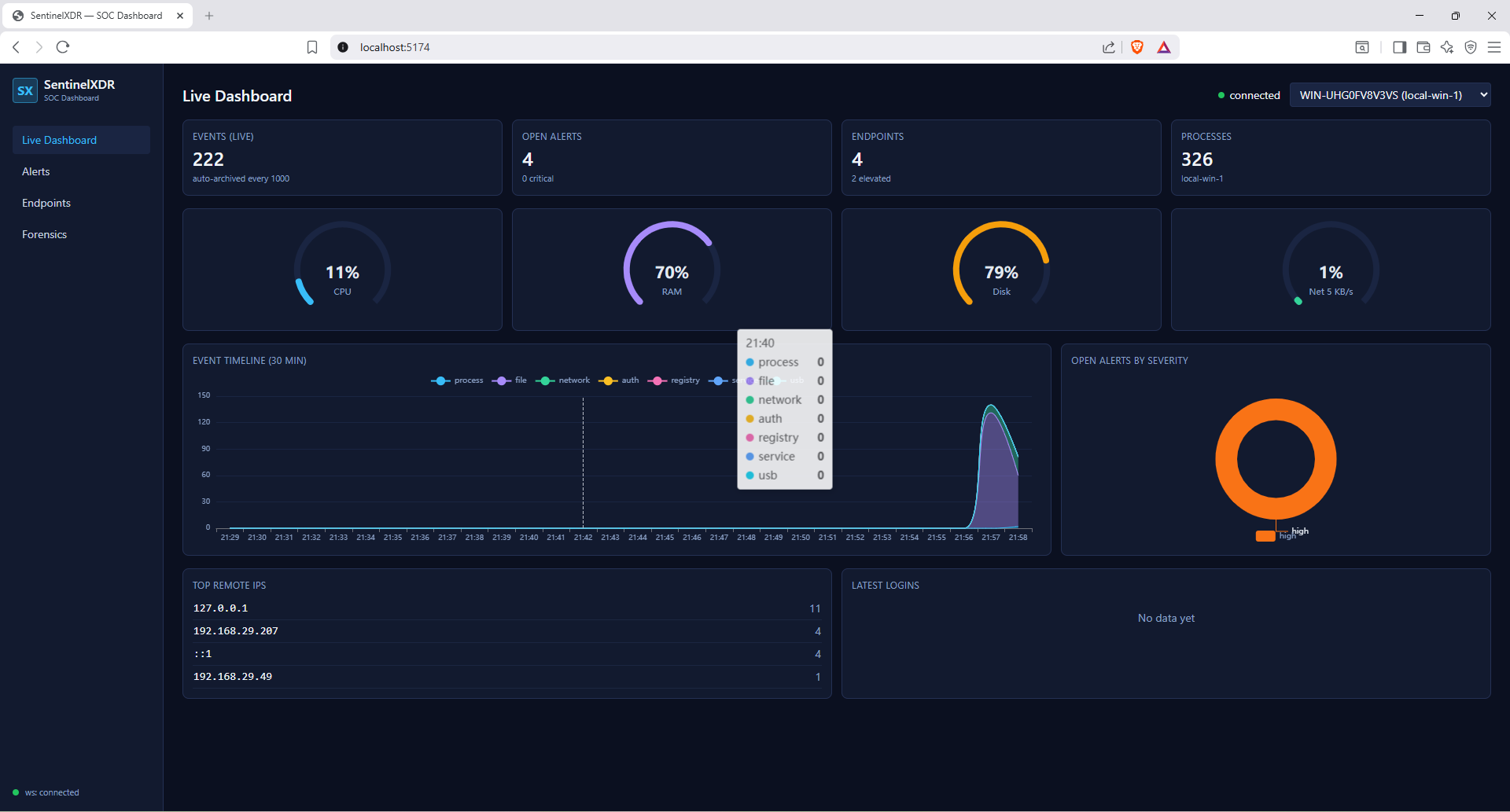 这是实时的 SentinelXDR-SOC-Dashboard。
2.仪表板
这是实时的 SentinelXDR-SOC-Dashboard。
2.仪表板
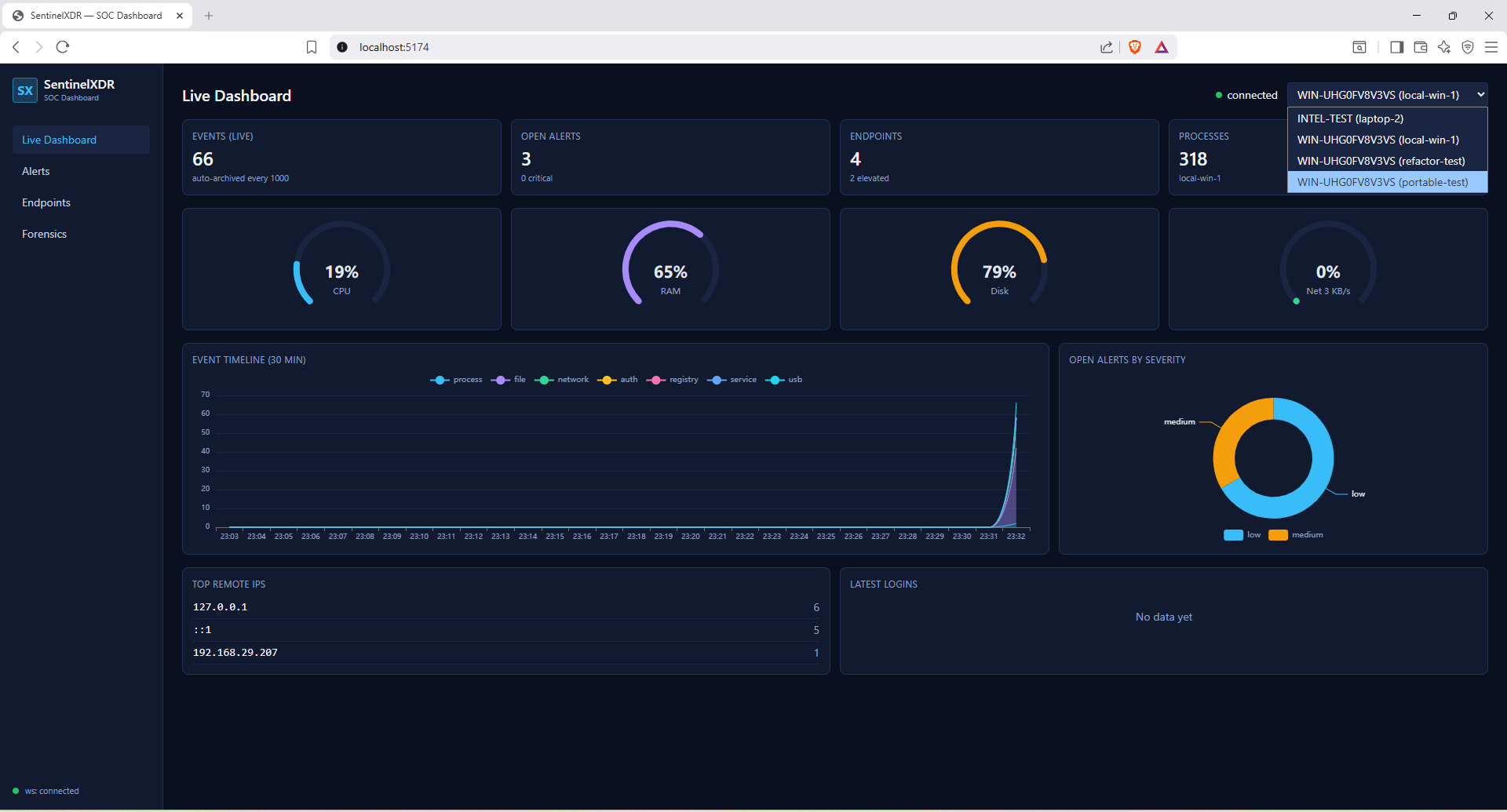 带有同一网络中不同机器下拉菜单的仪表板
3.告警
带有同一网络中不同机器下拉菜单的仪表板
3.告警
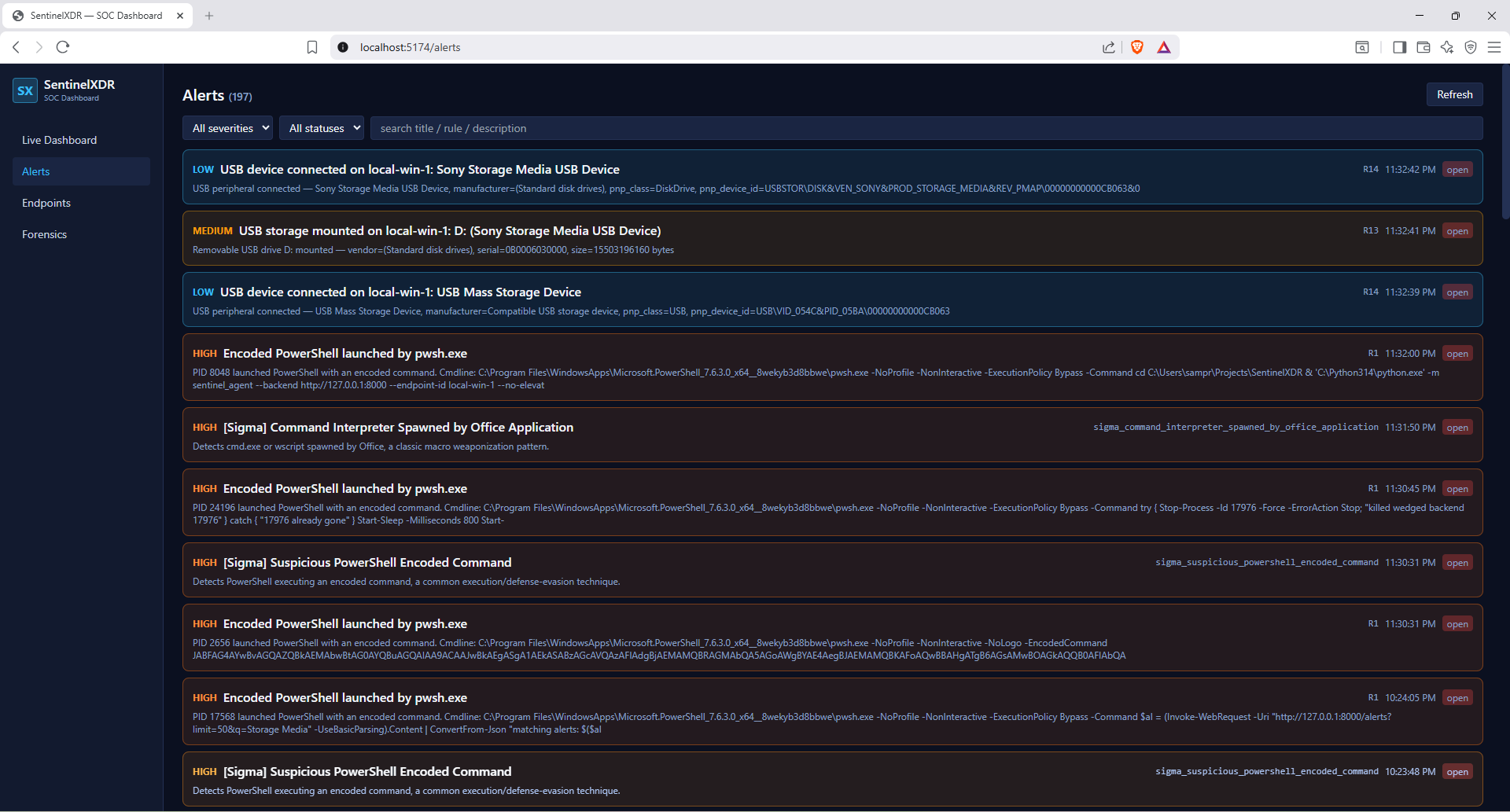 生成的告警
4.告警
生成的告警
4.告警
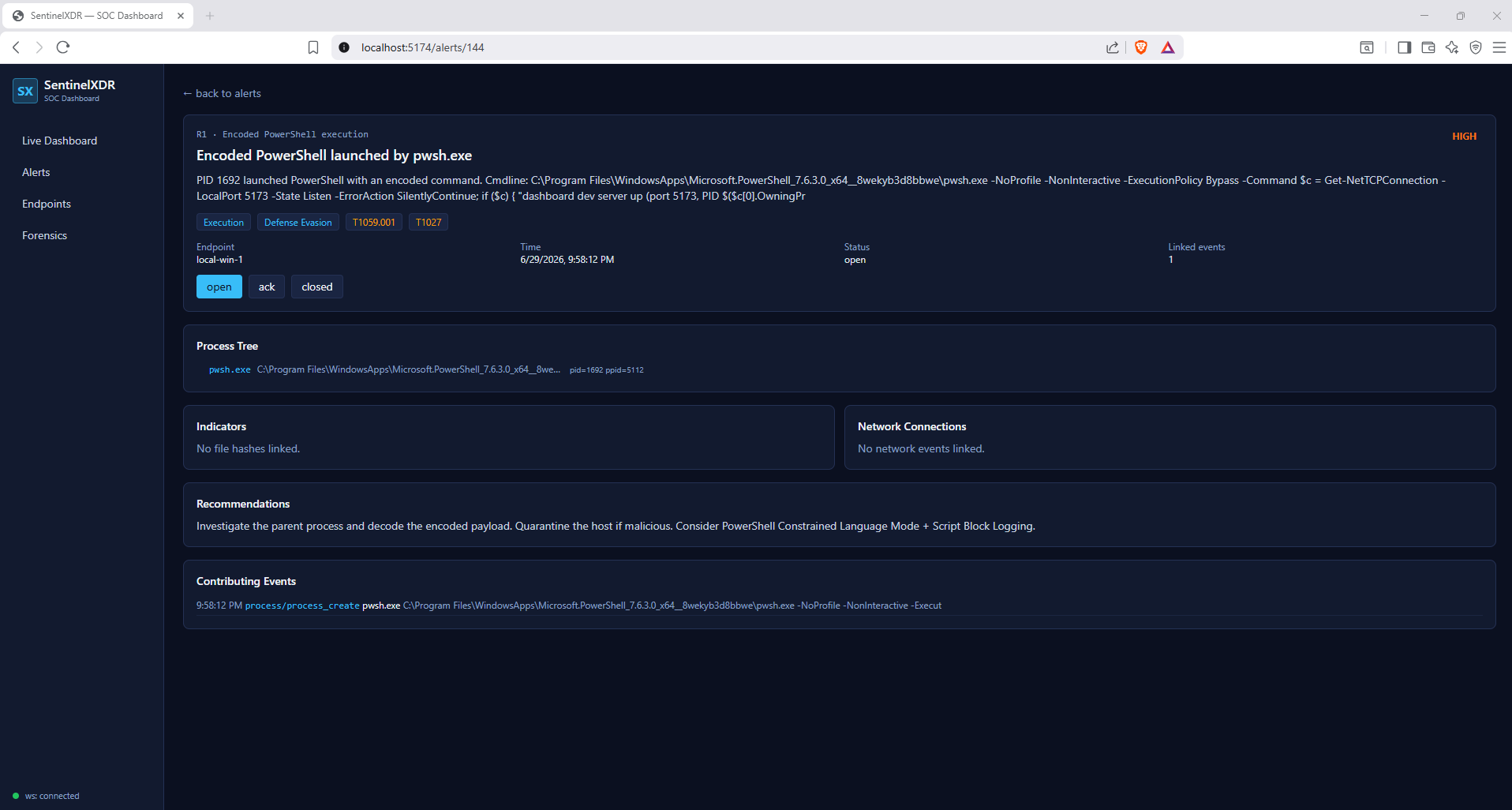 带有深度信息的告警
5.端点
带有深度信息的告警
5.端点
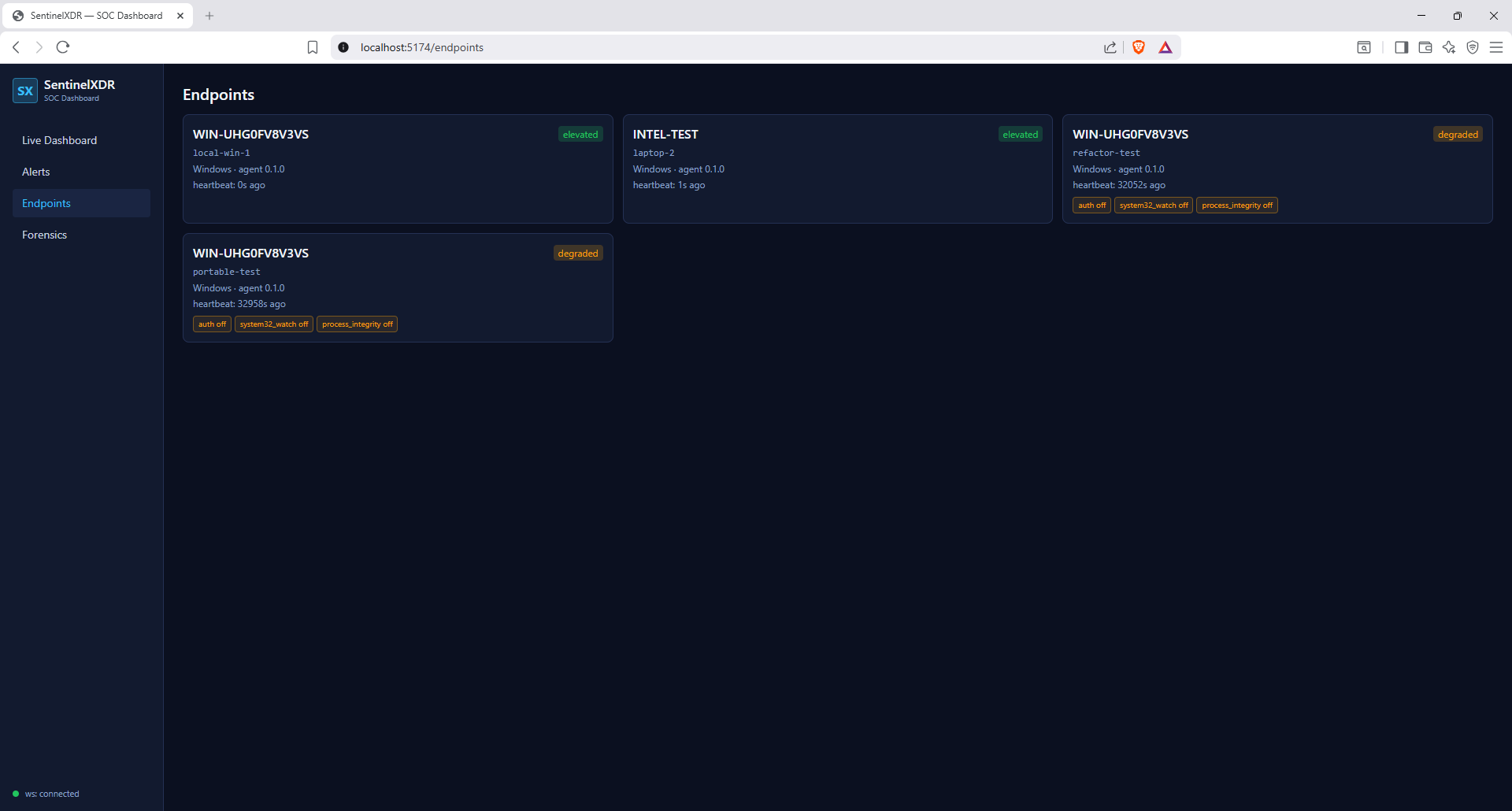 计算机的端点
6.取证
计算机的端点
6.取证
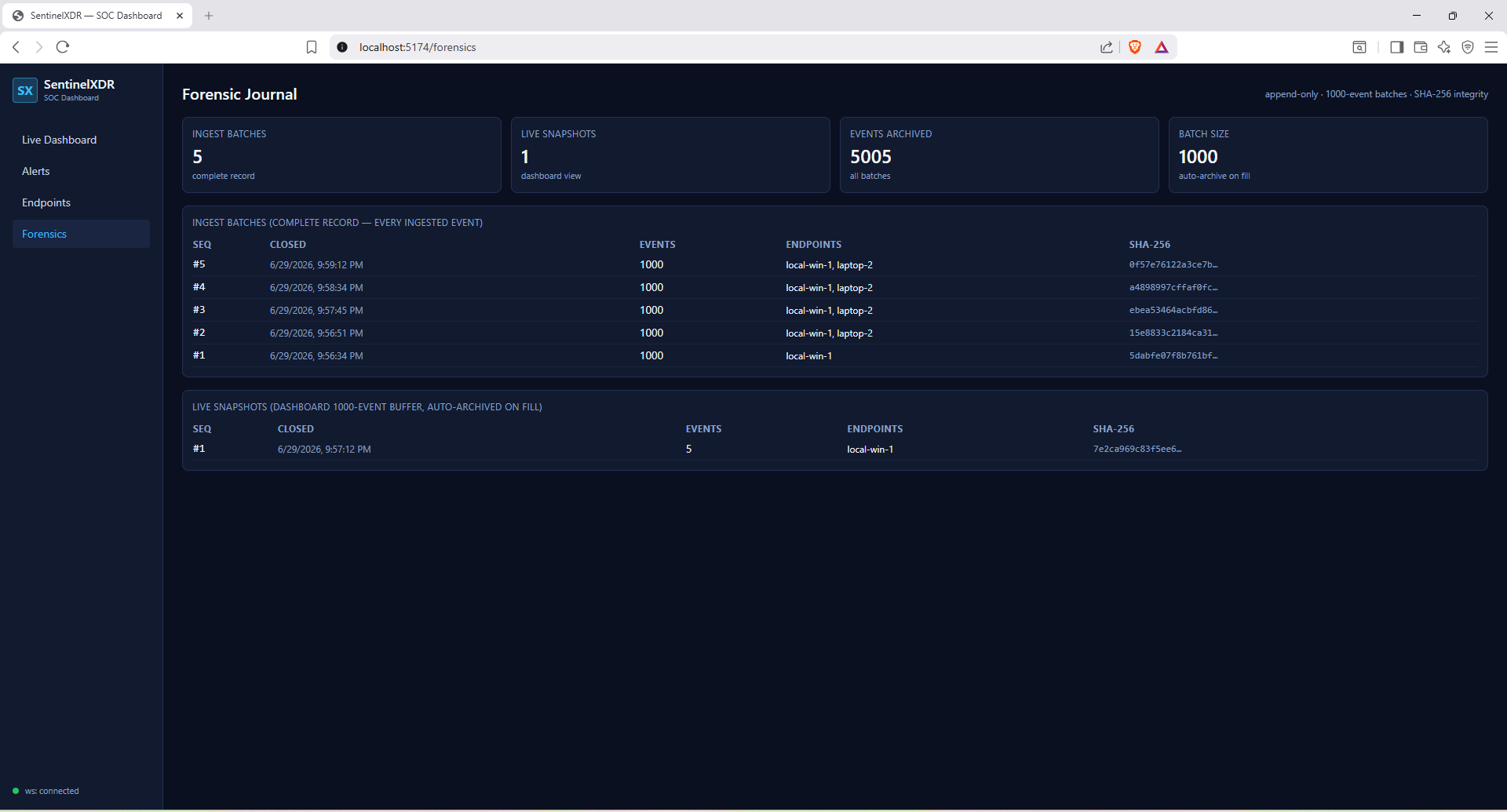 取证日志
7.取证
取证日志
7.取证
 基于批次的取证日志深入信息
## 布局
```
core/ shared SQLAlchemy models, pydantic schemas, enums (editable dep of agent+backend)
backend/ FastAPI app, async ingest pipeline, rule engine (YAML DSL), WebSocket hub
agent/ Windows endpoint agent + 8 collectors, SHA256 IOC matching, shipper
frontend/ Vite + React + TypeScript + Tailwind + Apache ECharts + Zustand dashboard
seeds/ IOC seed list (JSON)
```
## 已知限制(本切片)
- **进程捕获:** psutil 以 1 秒间隔轮询会漏掉亚秒级进程。计划在后续切片中使用 ETW 修复。
- **身份验证 (EVTX):** Windows Security 事件日志需要管理员权限。在降级模式 (`--no-elevate`) 下,身份验证监控将关闭,并在心跳中上报。
- **System32 文件监视:** 受管理员权限控制并限制为 `*.exe/*.dll/*.sys`;降级时跳过。
- **网络 pid 归因:** 外部进程 pid 归因需要管理员权限;降级时为 pid=None。
- **哈希计算成本:** 限制在受监视目录、小于 100 MB 的文件中,并带有 LRU 缓存和每次迭代的时间上限。
## PostgreSQL(可选)
SQLite 是默认选项。要使用 Postgres:
```
docker compose --profile pg up -d
$env:DATABASE_URL = "postgresql+asyncpg://sentinel:sentinel@localhost:5432/sentinel"
# then start the backend as usual; tables are created on startup
```
## 推迟到后续切片
ETW 进程捕获;beaconing / DNS 隧道 / 数据泄露规则;剩余的 10 条规范规则;Sigma + YARA 加载;PDF/CSV/JSON 报告导出;Linux 代理;生产环境部署强化(TLS、身份验证、代理注册、签名更新)。
基于批次的取证日志深入信息
## 布局
```
core/ shared SQLAlchemy models, pydantic schemas, enums (editable dep of agent+backend)
backend/ FastAPI app, async ingest pipeline, rule engine (YAML DSL), WebSocket hub
agent/ Windows endpoint agent + 8 collectors, SHA256 IOC matching, shipper
frontend/ Vite + React + TypeScript + Tailwind + Apache ECharts + Zustand dashboard
seeds/ IOC seed list (JSON)
```
## 已知限制(本切片)
- **进程捕获:** psutil 以 1 秒间隔轮询会漏掉亚秒级进程。计划在后续切片中使用 ETW 修复。
- **身份验证 (EVTX):** Windows Security 事件日志需要管理员权限。在降级模式 (`--no-elevate`) 下,身份验证监控将关闭,并在心跳中上报。
- **System32 文件监视:** 受管理员权限控制并限制为 `*.exe/*.dll/*.sys`;降级时跳过。
- **网络 pid 归因:** 外部进程 pid 归因需要管理员权限;降级时为 pid=None。
- **哈希计算成本:** 限制在受监视目录、小于 100 MB 的文件中,并带有 LRU 缓存和每次迭代的时间上限。
## PostgreSQL(可选)
SQLite 是默认选项。要使用 Postgres:
```
docker compose --profile pg up -d
$env:DATABASE_URL = "postgresql+asyncpg://sentinel:sentinel@localhost:5432/sentinel"
# then start the backend as usual; tables are created on startup
```
## 推迟到后续切片
ETW 进程捕获;beaconing / DNS 隧道 / 数据泄露规则;剩余的 10 条规范规则;Sigma + YARA 加载;PDF/CSV/JSON 报告导出;Linux 代理;生产环境部署强化(TLS、身份验证、代理注册、签名更新)。
这是实时的 SentinelXDR-SOC-Dashboard。
2.仪表板
带有同一网络中不同机器下拉菜单的仪表板
3.告警
生成的告警
4.告警
带有深度信息的告警
5.端点
计算机的端点
6.取证
取证日志
7.取证
标签:DNS 反向解析, EDR, IP 地址批量处理, SOAR, 威胁情报, 安全态势感知, 安全运营中心, 开发者工具, 测试用例, 端点检测与响应, 网络映射, 脆弱性评估, 脱壳工具, 逆向工具