SamyamCodesavvy/log-guard-siem

GitHub: SamyamCodesavvy/log-guard-siem

一个端到端实现的迷你 SIEM 平台,覆盖从安全日志摄取、解析、规则检测到告警与可视化的完整安全监控闭环。

Stars: 0 | Forks: 0

# 🛡️ LogGuard-SIEM **一个从零开始构建的迷你安全信息与事件管理 (SIEM) 平台。** LogGuard-SIEM 会摄取安全日志(SSH 认证、sudo、nginx 访问日志),使用自定义正则表达式引擎将其解析为结构化字段,通过基于规则的检测 pipeline 进行处理,并通过 REST API 和实时 Web 仪表板展示告警和日志活动——这与 Splunk 和 Wazuh 等商业工具所围绕构建的核心循环相同,由一人端到端完整实现。 ![Python](https://img.shields.io/badge/Python-3.13-3776AB?style=flat&logo=python&logoColor=white) ![FastAPI](https://img.shields.io/badge/FastAPI-0.115-009688?style=flat&logo=fastapi&logoColor=white) ![PostgreSQL](https://img.shields.io/badge/PostgreSQL-15-4169E1?style=flat&logo=postgresql&logoColor=white) ![Docker](https://img.shields.io/badge/Docker-Compose-2496ED?style=flat&logo=docker&logoColor=white) ![Nginx](https://img.shields.io/badge/Nginx-Reverse%20Proxy-009639?style=flat&logo=nginx&logoColor=white) ![Prometheus](https://img.shields.io/badge/Prometheus-Metrics-E6522C?style=flat&logo=prometheus&logoColor=white) ![Grafana](https://img.shields.io/badge/Grafana-Dashboards-F46800?style=flat&logo=grafana&logoColor=white) ![CI](https://img.shields.io/badge/CI%2FCD-GitHub%20Actions-2088FF?style=flat&logo=githubactions&logoColor=white) ![Tests](https://img.shields.io/badge/pytest-passing-brightgreen?style=flat&logo=pytest&logoColor=white) ![License](https://img.shields.io/badge/license-MIT-lightgrey) ## 目录 - [为什么做这个项目](#why-this-project) - [架构](#architecture) - [功能](#features) - [技术栈](#tech-stack) - [截图](#screenshots) - [快速开始](#quick-start) - [API 端点](#api-endpoints) - [检测规则](#detection-rules) - [测试与 CI/CD](#testing--cicd) - [监控](#monitoring) - [项目结构](#project-structure) - [展示的技能](#skills-demonstrated) - [路线图](#roadmap) - [许可证](#license) ## 为什么做这个项目 大多数作品集项目都是 CRUD 应用。LogGuard-SIEM 是一个小巧但完整的**安全工程**系统:它接收非结构化的日志文本,从中提取含义,关联跨时间窗口的事件,并将原始噪音转化为可操作的告警——同时以真实后端服务的方式进行打包(容器化、监控、测试和持续集成)。 它展示了安全工程师 / 后端工程师应当掌握的完整循环: **摄取 → 解析 → 检测 → 告警 → 可视化 → 交付 (Docker) → 监控 (Prometheus/Grafana) → 验证 (pytest) → 自动化 (CI/CD)** ## 架构

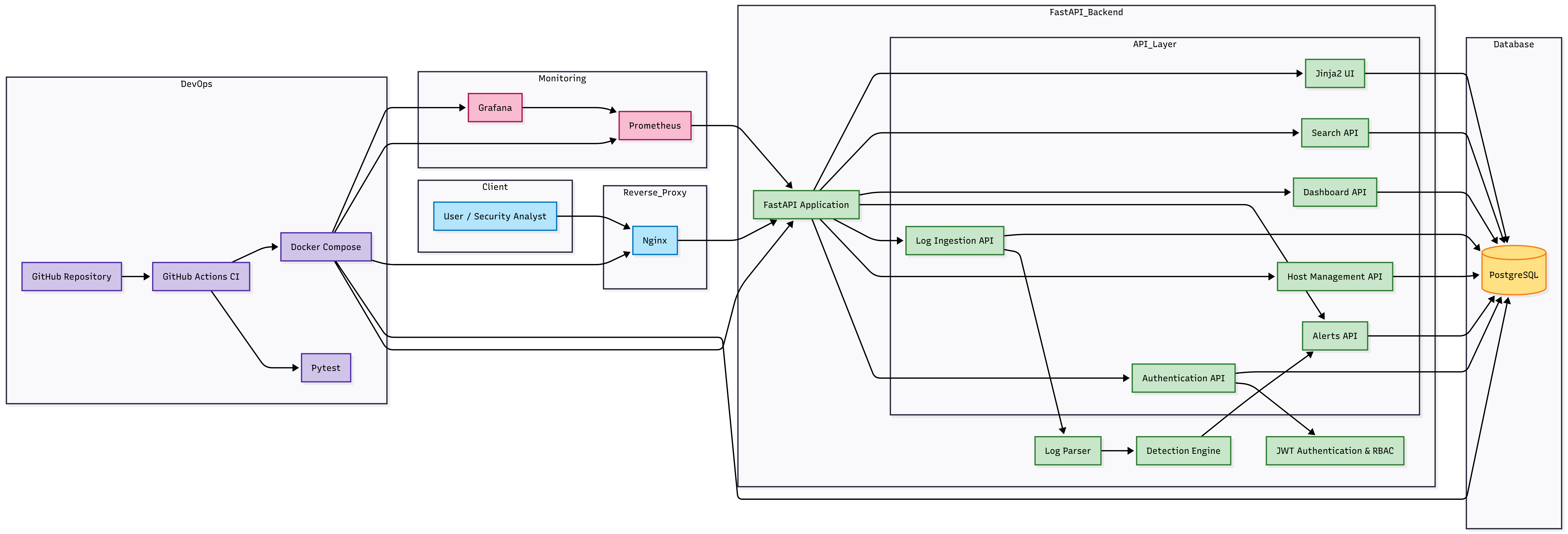
LogGuard SIEM Architecture

## 功能 - **JWT 认证**,使用 bcrypt 密码哈希和基于角色的访问控制(管理员 / 分析员 / 查看者) - **主机管理** — 注册和跟踪受监控的机器 (CRUD) - **日志摄取 API** — 支持单条和批量摄取,通过基于正则表达式的解析器从原始 syslog/nginx 行中提取主机名、程序、用户、源 IP 和操作 - **基于规则的检测引擎** — 每条摄取的日志都会根据 5 条关联规则进行实时评估(见 [检测规则](#detection-rules)) - **仪表板 API** — 汇总统计数据、每小时日志量、攻击者 IP 排行、失败登录用户排行 - **搜索 API** — 按关键字、IP、用户名、主机名、严重程度过滤日志 - **Web 前端** (Jinja2 + Tailwind + Chart.js) — 暗色主题仪表板、实时日志表、带有内联状态处理(调查中 / 已解决 / 误报)的告警表 - **容器化部署** — 5 服务的 Docker Compose 技术栈(app、PostgreSQL、Nginx、Prometheus、Grafana),单命令启动 - **可观测性** — Prometheus 抓取 `/metrics`,Grafana 仪表板展示请求率/延迟/错误率 - **自动化测试** — pytest 套件覆盖认证流程、日志解析和检测逻辑,在内存中的 SQLite DB 上运行 - **CI/CD pipeline** — GitHub Actions 在每次 push/PR 时运行测试、lint 检查和 Docker 构建 ## 技术栈 | 层级 | 技术 | |---|---| | API 框架 | FastAPI | | 数据库 | PostgreSQL 15 | | ORM / 迁移 | SQLAlchemy 2.0 + Alembic | | 认证 | JWT (`python-jose`) + bcrypt (`passlib`) | | 前端 | Jinja2, Tailwind CSS, Chart.js | | 容器化 | Docker + Docker Compose (5 个服务) | | 反向代理 | Nginx | | 监控 | Prometheus + Grafana | | 测试 | pytest, pytest-cov, SQLite (测试 DB) | | CI/CD | GitHub Actions (test → lint → Docker build) | | 环境 | Kali Linux, Python 3.13 | ## 截图 | 仪表板 | 日志 | |---|---| | ![仪表板](https://static.pigsec.cn/wp-content/uploads/repos/cas/bc/bc354a2ea9d2bda03e4ad19fd96a8220900747c7bc02cbee9a463fe410082b47.png) | ![日志](https://static.pigsec.cn/wp-content/uploads/repos/cas/b6/b66e890108bb1d69c12cb5d41cdfb69cf5a9f50fc2730e34f60122e5cf3cc701.png) | | 日志详情 | 告警 | |---|---| | ![日志详情](https://static.pigsec.cn/wp-content/uploads/repos/cas/94/9455bc90224053cf476a14d6d9ad403c39eb94a7e102e9407e655b690f5a1d80.png) | ![告警](https://static.pigsec.cn/wp-content/uploads/repos/cas/78/78a0fe79901f193f2c937906729e4c7a89988db4e800ef62b16f63dbd5096411.png) | | 告警详情 | |---| | ![告警详情](https://static.pigsec.cn/wp-content/uploads/repos/cas/cf/cf38c87bf261521ad6c05a422064f81dc76df0f42ced13bbd213cd3869ec3a9c.png) | ## 快速开始 ``` # 1. Clone 并进入 repo git clone https://github.com/SamyamCodesavvy/log-guard-siem.git cd log-guard-siem # 2. 配置 environment cp .env.example .env # set SECRET_KEY to a long random string # 3. Build 并启动 full stack (FastAPI + PostgreSQL + Nginx + Prometheus + Grafana) docker compose up --build -d # 4. 检查每个 service 是否 healthy docker compose ps ``` 然后访问: | 服务 | URL | |---|---| | Web UI | `http://localhost:8080/ui/dashboard` | | API 文档 (Swagger) | `http://localhost:8080/docs` | | 健康检查 | `http://localhost:8080/health` | | Prometheus | `http://localhost:9090` | | Grafana | `http://localhost:3000` (首次登录为 admin / admin) | ### 本地开发 (不使用 Docker) ``` python3 -m venv venv && source venv/bin/activate pip install -r requirements.txt docker run -d --name siem-postgres -e POSTGRES_USER=siem_user \ -e POSTGRES_PASSWORD=siem_pass -e POSTGRES_DB=siem_db -p 5432:5432 postgres:15 alembic upgrade head uvicorn app.main:app --reload --host 0.0.0.0 --port 8000 ``` ## API 端点 | 方法 | 端点 | 描述 | 认证 | |---|---|---|---| | POST | `/auth/register` | 注册新用户 | 否 | | POST | `/auth/login` | 登录,获取 JWT token | 否 | | GET | `/auth/me` | 获取当前用户 | 是 | | POST | `/hosts/` | 注册主机 | 是 | | GET | `/hosts/` | 列出主机 | 是 | | PUT | `/hosts/{id}` | 更新主机 | 是 | | DELETE | `/hosts/{id}` | 删除主机 | 是 | | POST | `/logs/` | 摄取单条日志 | 是 | | POST | `/logs/batch` | 摄取多条日志 | 是 | | GET | `/logs/` | 列出日志 (带过滤器) | 是 | | GET | `/logs/{id}` | 获取日志详情 | 是 | | GET | `/alerts/` | 列出告警 | 是 | | GET | `/alerts/{id}` | 获取告警详情 | 是 | | PUT | `/alerts/{id}/resolve` | 更新告警状态 | 是 | | GET | `/dashboard/` | 仪表板统计数据 | 是 | | GET | `/search/` | 搜索日志 | 是 | | GET | `/health` | 健康检查 | 否 | | GET | `/metrics` | Prometheus 指标 | 否 | ## 检测规则 每条发送至 `/logs` 或 `/logs/batch` 的日志都会在解析后立即送入检测引擎进行处理: | 规则 | 触发条件 | 严重程度 | |---|---|---| | SSH 暴力破解 | 5 分钟内来自同一 IP 的 5 次以上失败登录 | 严重 | | 权限提升尝试 | sudo 认证失败 | 高 | | 检测到 Root 登录 | 开启 Root 会话或 Root 登录成功 | 高 | | 检测到凭证共享 | 1 小时内有 3 个以上不同的用户名从同一 IP 登录 | 中 | | 疑似 Web 攻击 | 10 分钟内来自同一 IP 的 10 次以上 HTTP 401/403 响应 (nginx 日志) | 高 | ## 测试与 CI/CD - **pytest 套件** 覆盖了注册/登录/token 流程、受保护路由的访问限制,以及针对独立的内存 SQLite 数据库的日志解析器正确性(登录失败、登录成功、sudo 失败)——在本地运行测试不需要 PostgreSQL/Docker。 ``` pytest tests/ -v pytest tests/ --cov=app --cov-report=term-missing ``` - **GitHub Actions** (`.github/workflows/ci.yml`) 会在每次向 `main`/`develop` 分支进行 push 和 pull request 时运行: 1. **test** — 安装依赖项,运行带覆盖率报告的完整 pytest 套件 2. **lint** — flake8 静态分析 3. **docker** — 构建生产环境 Docker 镜像,以便在合并前捕获构建中断 Actions 标签页上的绿色勾选意味着该应用程序可以顺利安装、通过所有测试并成功构建——这与真正的工程团队在合并代码前所强制执行的把关标准一致。 ## 监控 - `prometheus-fastapi-instrumentator` 在 `/metrics` 暴露请求计数、延迟和错误率指标。 - Prometheus 每 15 秒抓取一次 FastAPI 应用 (`prometheus/prometheus.yml`)。 - Grafana 已预先配置 Prometheus 作为数据源;导入仪表板 ID `12900`(或构建自定义仪表板)以显示请求率/延迟/错误面板。 ## 项目结构 ``` log-guard-siem/ ├── app/ │ ├── api/ # FastAPI routers (auth, hosts, logs, alerts, dashboard, search, ui) │ ├── authentication/ # JWT + bcrypt logic │ ├── detection/ # Rule-based detection engine │ ├── models/ # SQLAlchemy ORM models │ ├── schemas/ # Pydantic request/response schemas │ ├── services/ # Business logic (host, dashboard) │ ├── static/js/ # Frontend auth/fetch helpers │ ├── templates/ # Jinja2 pages (login, dashboard, logs, alerts) │ ├── utils/ # DB session, log parser │ ├── config.py │ └── main.py ├── tests/ # pytest suite (auth, detection/parser) ├── alembic/ # DB migrations ├── nginx/nginx.conf # Reverse proxy config ├── prometheus/prometheus.yml ├── .github/workflows/ci.yml # GitHub Actions pipeline ├── docker-compose.yml # 5-service stack ├── Dockerfile ├── requirements.txt └── README.md ``` ## 展示的技能 | 技能领域 | 项目中的证明 | |---|---| | 后端开发 | 拥有 15 个以上端点的 FastAPI REST API、Pydantic 验证、摄取时触发的后台检测 | | 数据库工程 | PostgreSQL schema 设计、SQLAlchemy 2.0 ORM、Alembic 迁移 | | 安全工程 | JWT 认证、bcrypt 哈希、基于角色的访问控制、基于正则表达式的日志解析、5 规则威胁检测引擎 | | Linux 与网络 | SSH/syslog 日志格式解析、基于 IP 的关联、Nginx 反向代理配置 | | DevOps 与容器化 | 多服务 Docker Compose(app、DB、proxy、监控)、自定义 Dockerfile、容器健康检查 | | 监控与可观测性 | Prometheus 指标监控、Grafana 仪表板展示 | | CI/CD | GitHub Actions pipeline — 每次 push 时自动进行测试、lint 和 Docker 构建 | | 测试 | pytest 单元及集成测试、FastAPI `TestClient`、独立的 SQLite 测试数据库 | ## 路线图 - [x] 阶段 0 — 环境搭建 (Kali Linux, Python 3.13, Docker, Git) - [x] 阶段 1 — 项目脚手架与 FastAPI 基础 - [x] 阶段 2 — 数据库模型与 Alembic 迁移 - [x] 阶段 3 — JWT 认证 - [x] 阶段 4 — 主机管理 API - [x] 阶段 5 — 日志摄取与解析器 - [x] 阶段 6 — 检测引擎与告警 - [x] 阶段 7 — 仪表板与搜索 API - [x] 阶段 8 — 交互式 Jinja2 前端 - [x] 阶段 9 — 全面 Docker 化 (5 服务 Compose 技术栈) - [x] 阶段 10 — Nginx 反向代理 - [x] 阶段 11 — Prometheus 与 Grafana 监控 - [x] 阶段 12 — pytest 测试套件 - [x] 阶段 13 — GitHub Actions CI/CD ## 许可证 由 **Samyam Giri** 💛 构建,作为一个展示从原始日志行到关联告警,再到容器化、监控和持续集成服务的全安全工程能力的个人学习 / 作品集项目。 MIT 许可证。
标签:AV绕过, CISA项目, CSV导出, FastAPI, PostgreSQL, Python, 安全规则引擎, 安全运营, 扫描框架, 无后门, 测试用例, 自定义请求头, 请求拦截, 逆向工具







