finografic/deps-xscan
GitHub: finografic/deps-xscan
一款基于已解析锁文件的 npm 依赖安全扫描工具,聚合 OSV、GitHub Advisory 和 Dependabot 数据源并按严重程度生成 CI 友好的报告与退出码。
Stars: 0 | Forks: 0
# 🔒 @finografic/deps-xscan
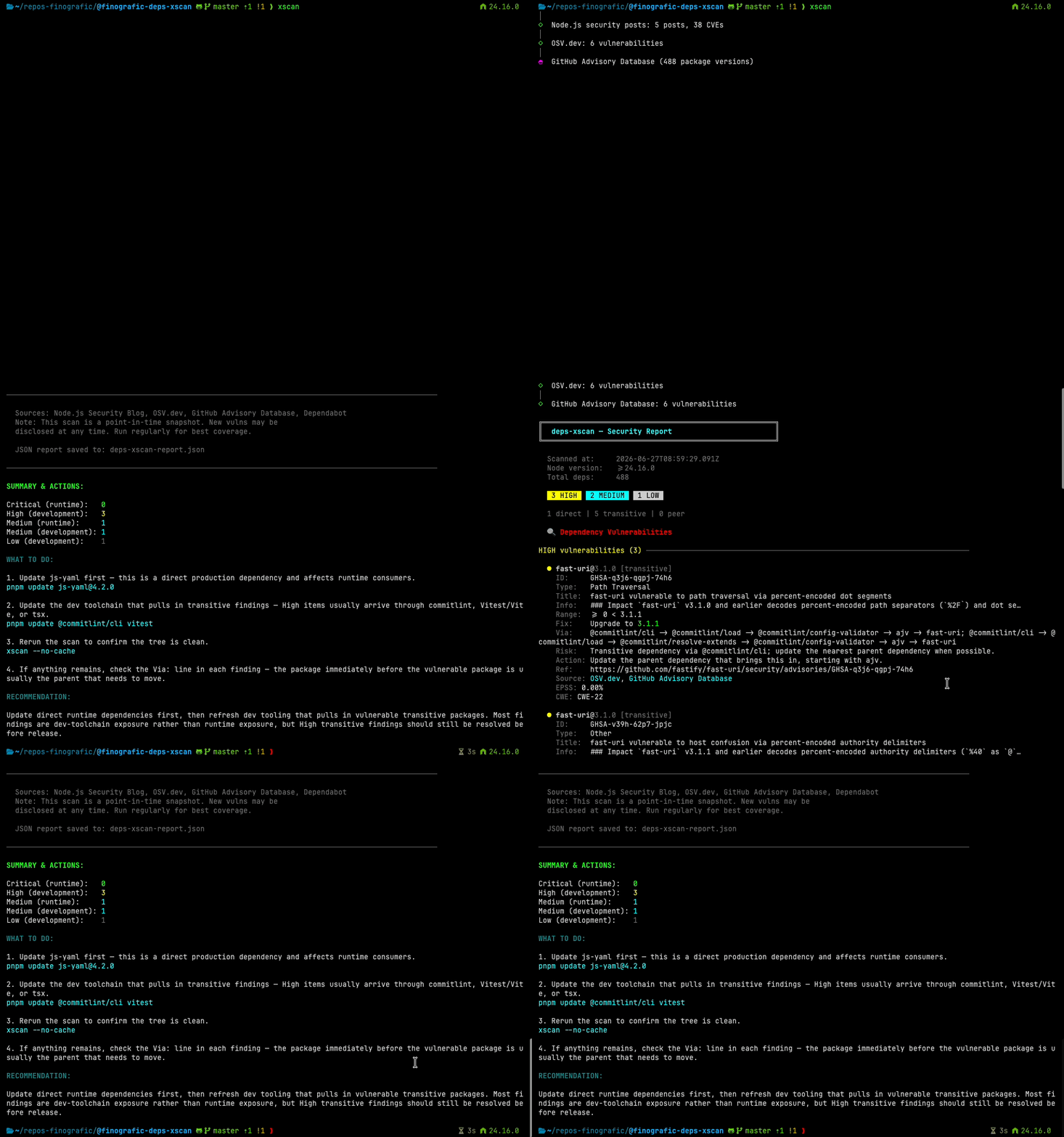 `xscan` 的构建旨在填补“这个包存在于我的依赖树中的某处”与“我到底该对它做些什么?”之间的空白。
它会根据你已解析的版本报告检测结果,标记直接/运行时与开发/传递依赖的暴露情况,对安全公告来源进行去重,并输出对 CI 友好的退出代码。
## 功能
- 从 `pnpm-lock.yaml` 或 `package-lock.json` 解析已解析的依赖树。
- 为每个已解析的 npm 包版本查询 **OSV.dev**。
- 默认查询 **GitHub Advisory Database**。
- 可选导入特定仓库的 **Dependabot alerts**。
- 根据你的项目 engine/runtime 检查最近的 **Node.js 安全发布文章**。
- 显示直接、传递、peer、运行时和开发依赖的上下文。
- 根据 GHSA/CVE 标识合并重复的 OSV/GitHub/Dependabot 检测结果。
- 生成终端和 JSON 报告。
- 在长时间的网络获取期间使用源码级别的 spinner。
- 当存在 Critical 或 High 检测结果时以非零状态退出。
## 安装
此包已发布至 GitHub Packages。
```
pnpm add -g @finografic/deps-xscan
```
如果你的 npm 客户端尚未针对 GitHub Packages 注册表进行配置,
请添加注册表并配置具有包读取权限的 auth token:
```
@finografic:registry=https://npm.pkg.github.com
//npm.pkg.github.com/:_authToken=${NPM_TOKEN}
```
安装的二进制文件为:
```
xscan
```
## 快速开始
```
xscan # scan current directory
xscan scan # explicit scan command
xscan --project ./my-app # scan another project
xscan --format terminal # terminal report only
xscan --format json # JSON report only
xscan --no-cache # bypass API cache
```
## 安全来源
| 来源 | 默认启用 | 需要 token | 用途 |
| ---------------------------- | ---------------- | -------------- | ---------------------------------------------------------------------- |
| OSV.dev | 是 | 否 | 根据已解析的包版本查询的开放漏洞数据库 |
| GitHub Advisory Database | 是 | 否 | GitHub 审查的 npm 公告,包含 GHSA/CVE、CVSS、EPSS 和 CWE 数据 |
| Dependabot alerts | 否 | 是 | 特定于仓库的告警状态、manifest 路径、作用域和修复目标 |
| Node.js 安全发布日志 | 是 | 否 | 根据项目 Node.js 版本检查的运行时公告 |
GitHub Advisory Database 检查无需身份验证即可运行,但使用 token 可以提高速率限制。Dependabot alerts 需要仓库访问权限。
## 使用示例
使用默认的终端和 JSON 输出扫描当前项目:
```
xscan
```
将 JSON 写入自定义路径:
```
xscan --format json --json-out ./security/deps-xscan-report.json
```
包含当前仓库的 Dependabot alerts:
```
xscan --dependabot
```
扫描另一个仓库并显式提供 GitHub owner/name:
```
xscan --project ~/repos/my-app --dependabot --github-repo owner/repo
```
强制获取最新数据并显示详细的源日志:
```
xscan --no-cache --verbose
```
禁用 GitHub Advisory Database 检查:
```
xscan --no-github
```
## 选项
| 选项 | 描述 |
| -------------------------------- | ----------------------------------------------------------------- |
| `--project
`xscan` 的构建旨在填补“这个包存在于我的依赖树中的某处”与“我到底该对它做些什么?”之间的空白。
它会根据你已解析的版本报告检测结果,标记直接/运行时与开发/传递依赖的暴露情况,对安全公告来源进行去重,并输出对 CI 友好的退出代码。
## 功能
- 从 `pnpm-lock.yaml` 或 `package-lock.json` 解析已解析的依赖树。
- 为每个已解析的 npm 包版本查询 **OSV.dev**。
- 默认查询 **GitHub Advisory Database**。
- 可选导入特定仓库的 **Dependabot alerts**。
- 根据你的项目 engine/runtime 检查最近的 **Node.js 安全发布文章**。
- 显示直接、传递、peer、运行时和开发依赖的上下文。
- 根据 GHSA/CVE 标识合并重复的 OSV/GitHub/Dependabot 检测结果。
- 生成终端和 JSON 报告。
- 在长时间的网络获取期间使用源码级别的 spinner。
- 当存在 Critical 或 High 检测结果时以非零状态退出。
## 安装
此包已发布至 GitHub Packages。
```
pnpm add -g @finografic/deps-xscan
```
如果你的 npm 客户端尚未针对 GitHub Packages 注册表进行配置,
请添加注册表并配置具有包读取权限的 auth token:
```
@finografic:registry=https://npm.pkg.github.com
//npm.pkg.github.com/:_authToken=${NPM_TOKEN}
```
安装的二进制文件为:
```
xscan
```
## 快速开始
```
xscan # scan current directory
xscan scan # explicit scan command
xscan --project ./my-app # scan another project
xscan --format terminal # terminal report only
xscan --format json # JSON report only
xscan --no-cache # bypass API cache
```
## 安全来源
| 来源 | 默认启用 | 需要 token | 用途 |
| ---------------------------- | ---------------- | -------------- | ---------------------------------------------------------------------- |
| OSV.dev | 是 | 否 | 根据已解析的包版本查询的开放漏洞数据库 |
| GitHub Advisory Database | 是 | 否 | GitHub 审查的 npm 公告,包含 GHSA/CVE、CVSS、EPSS 和 CWE 数据 |
| Dependabot alerts | 否 | 是 | 特定于仓库的告警状态、manifest 路径、作用域和修复目标 |
| Node.js 安全发布日志 | 是 | 否 | 根据项目 Node.js 版本检查的运行时公告 |
GitHub Advisory Database 检查无需身份验证即可运行,但使用 token 可以提高速率限制。Dependabot alerts 需要仓库访问权限。
## 使用示例
使用默认的终端和 JSON 输出扫描当前项目:
```
xscan
```
将 JSON 写入自定义路径:
```
xscan --format json --json-out ./security/deps-xscan-report.json
```
包含当前仓库的 Dependabot alerts:
```
xscan --dependabot
```
扫描另一个仓库并显式提供 GitHub owner/name:
```
xscan --project ~/repos/my-app --dependabot --github-repo owner/repo
```
强制获取最新数据并显示详细的源日志:
```
xscan --no-cache --verbose
```
禁用 GitHub Advisory Database 检查:
```
xscan --no-github
```
## 选项
| 选项 | 描述 |
| -------------------------------- | ----------------------------------------------------------------- |
| `--project ` | 要扫描的项目根目录。默认为当前工作目录。 |
| `--cache-ttl ` | API 缓存 TTL(以小时为单位)。默认为 `24`。 |
| `--no-cache` | 在此次运行中禁用缓存读取/写入。 |
| `--format ` | 输出格式:`terminal`、`json` 或 `both`。默认为 `both`。 |
| `--node-posts ` | 要检查的 Node.js 安全文章数量。默认为 `5`。 |
| `--json-out ` | JSON 报告输出路径。默认为 `deps-xscan-report.json`。 |
| `-v`, `--verbose` | 显示每个来源的详细进度日志。 |
| `--no-github` | 禁用 GitHub Advisory Database 检查。 |
| `--dependabot` | 获取仓库的 Dependabot alerts。需要 token。 |
| `--github-repo ` | 用于 Dependabot alerts 的仓库。从 git origin 自动检测。 |
| `--github-alert-states ` | 逗号分隔的 Dependabot 状态。默认为 `open`。 |
| `--github-token-env ` | 逗号分隔的 token 环境变量名称,按顺序检查。 |
| `-h`, `--help` | 显示命令帮助。 |
## GitHub 身份验证
Token 查找专为本地和 CI 使用而设计,无需在每次执行命令前内联 `export`。
查找顺序:
1. 从被扫描的项目根目录加载 `.env` 和 `.env.local`。
2. 使用 `--github-token-env` 提供的显式名称(如果提供)。
3. 否则依次尝试 `NPM_TOKEN`、`GH_TOKEN`,然后是 `GITHUB_TOKEN`。
4. 如果已设置,则从 `GITHUB_TOKEN_FILE` 读取 token。
`.env` 示例:
```
NPM_TOKEN=ghp_...
```
扫描示例:
```
xscan --project ~/repos/my-app --dependabot
```
Dependabot alerts 需要具有以下权限之一的 token:
- Fine-grained token:仓库的 **Dependabot alerts: read**
- Classic token:`repo` 或 `security_events`,具体取决于仓库的可见性
Token 的值绝不会打印在报告中。
## 报告
终端报告按严重程度对检测结果进行分组:
- `Critical`
- `High`
- `Medium`
- `Low`
- `Unknown`
每条检测结果包括受影响的包、已安装版本、来源 ID、依赖路径、已知情况下的修复版本、公告参考以及实用的操作指南。当 GitHub 丰富了某项检测结果时,报告还可以显示 EPSS、CWE、manifest 路径、作用域以及 Dependabot alert URL。
JSON 报告包含相同的检测结果数据以及生成的操作摘要。
默认情况下,它会写入:
```
deps-xscan-report.json
```
## 退出代码
| 代码 | 含义 |
| ---- | ------------------------------------------------------ |
| `0` | 无 Critical 或 High 检测结果 |
| `1` | 发现 Critical 或 High 检测结果,适用于 CI 门禁 |
| `2` | 致命扫描错误 |
## 缓存
API 响应将作为哈希 JSON 缓存在:
```
~/.config/finografic/deps-xscan/cache/
```
遵循 `XDG_CONFIG_HOME` 环境变量。旧的 `~/.deps-xscan-cache` 位置会在首次写入时迁移。
使用以下标志来控制缓存行为:
```
xscan --cache-ttl 6
xscan --no-cache
```
## 支持的项目
当前支持的 lockfile:
- pnpm: `pnpm-lock.yaml`
- npm: `package-lock.json`
Node.js 版本检测检查顺序如下:
- `package.json` `engines.node`
- `.nvmrc`
- `.node-version`
- 当前 runtime 回退
## 开发
```
pnpm install
pnpm scan
pnpm typecheck
pnpm lint:ci
pnpm test:run
pnpm build
```
实用的开发快捷方式:
```
pnpm scan:verbose
pnpm scan:json
pnpm scan:no-cache
```
请参阅[开发者工作流](./docs/process/DEVELOPER_WORKFLOW.md)和[发布流程](./docs/process/RELEASE_PROCESS.md)以了解项目维护详情。
## 许可证
MIT © [Justin Rankin](https://github.com/finografic)
`xscan` 的构建旨在填补“这个包存在于我的依赖树中的某处”与“我到底该对它做些什么?”之间的空白。
它会根据你已解析的版本报告检测结果,标记直接/运行时与开发/传递依赖的暴露情况,对安全公告来源进行去重,并输出对 CI 友好的退出代码。
## 功能
- 从 `pnpm-lock.yaml` 或 `package-lock.json` 解析已解析的依赖树。
- 为每个已解析的 npm 包版本查询 **OSV.dev**。
- 默认查询 **GitHub Advisory Database**。
- 可选导入特定仓库的 **Dependabot alerts**。
- 根据你的项目 engine/runtime 检查最近的 **Node.js 安全发布文章**。
- 显示直接、传递、peer、运行时和开发依赖的上下文。
- 根据 GHSA/CVE 标识合并重复的 OSV/GitHub/Dependabot 检测结果。
- 生成终端和 JSON 报告。
- 在长时间的网络获取期间使用源码级别的 spinner。
- 当存在 Critical 或 High 检测结果时以非零状态退出。
## 安装
此包已发布至 GitHub Packages。
```
pnpm add -g @finografic/deps-xscan
```
如果你的 npm 客户端尚未针对 GitHub Packages 注册表进行配置,
请添加注册表并配置具有包读取权限的 auth token:
```
@finografic:registry=https://npm.pkg.github.com
//npm.pkg.github.com/:_authToken=${NPM_TOKEN}
```
安装的二进制文件为:
```
xscan
```
## 快速开始
```
xscan # scan current directory
xscan scan # explicit scan command
xscan --project ./my-app # scan another project
xscan --format terminal # terminal report only
xscan --format json # JSON report only
xscan --no-cache # bypass API cache
```
## 安全来源
| 来源 | 默认启用 | 需要 token | 用途 |
| ---------------------------- | ---------------- | -------------- | ---------------------------------------------------------------------- |
| OSV.dev | 是 | 否 | 根据已解析的包版本查询的开放漏洞数据库 |
| GitHub Advisory Database | 是 | 否 | GitHub 审查的 npm 公告,包含 GHSA/CVE、CVSS、EPSS 和 CWE 数据 |
| Dependabot alerts | 否 | 是 | 特定于仓库的告警状态、manifest 路径、作用域和修复目标 |
| Node.js 安全发布日志 | 是 | 否 | 根据项目 Node.js 版本检查的运行时公告 |
GitHub Advisory Database 检查无需身份验证即可运行,但使用 token 可以提高速率限制。Dependabot alerts 需要仓库访问权限。
## 使用示例
使用默认的终端和 JSON 输出扫描当前项目:
```
xscan
```
将 JSON 写入自定义路径:
```
xscan --format json --json-out ./security/deps-xscan-report.json
```
包含当前仓库的 Dependabot alerts:
```
xscan --dependabot
```
扫描另一个仓库并显式提供 GitHub owner/name:
```
xscan --project ~/repos/my-app --dependabot --github-repo owner/repo
```
强制获取最新数据并显示详细的源日志:
```
xscan --no-cache --verbose
```
禁用 GitHub Advisory Database 检查:
```
xscan --no-github
```
## 选项
| 选项 | 描述 |
| -------------------------------- | ----------------------------------------------------------------- |
| `--project 标签:GNU通用公共许可证, MITM代理, Node.js, npm, 依赖扫描, 域名收集, 暗色界面, 模型提供商, 自动化攻击