josh-melton-db/logistics-control-center
GitHub: josh-melton-db/logistics-control-center
基于 Databricks 构建的 AI 驱动物流控制中心,提供实时监控、智能路径重规划、自然语言数据查询及自动化客户沟通等事件响应能力。
Stars: 0 | Forks: 0
# 物流控制中心
基于 Databricks 构建的 AI 驱动的物流事件响应应用程序。功能包括实时流式分析、通过 Genie Space 进行的自然语言查询,以及使用 Knowledge Assistant 的智能文档问答。
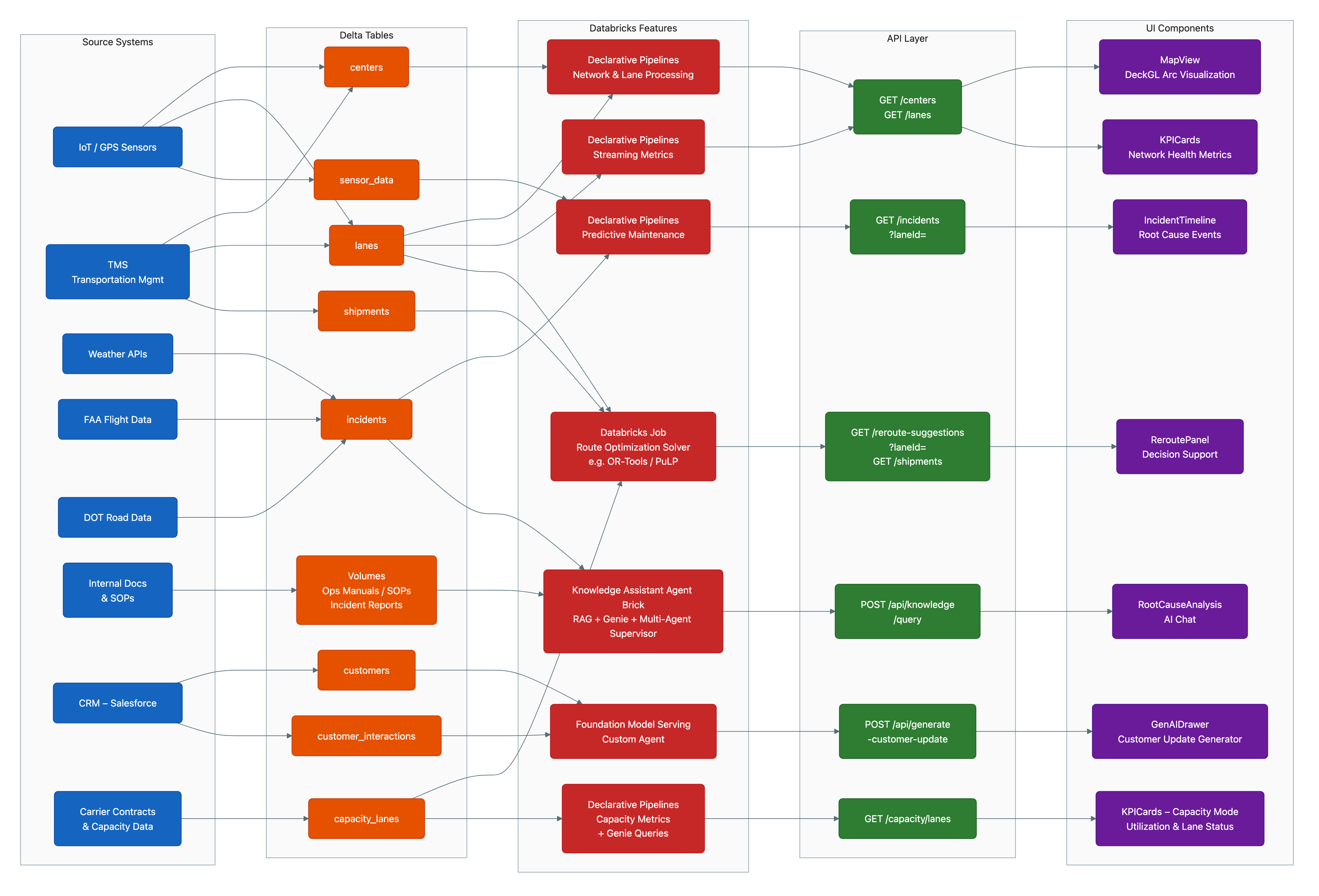
## 功能
| 功能 | 描述 |
|---------|-------------|
| **实时仪表板** | 通过实时更新监控货物、事件和网络健康状况 |
| **AI 驱动的重新路由** | 发生事件时自动提供重新路由建议 |
| **自然语言分析** | 使用 Genie Space 对您的数据进行提问 |
| **文档问答** | 通过 Knowledge Assistant 查询物流 SOP 和流程 |
| **客户沟通** | 使用 Foundation Models 生成 AI 客户更新 |
## 架构
```
┌─────────────────────────────────────────────────────────────────────────────┐
│ Logistics Control Center │
├─────────────────────────────────────────────────────────────────────────────┤
│ │
│ ┌──────────────┐ ┌──────────────┐ ┌──────────────────────────────┐ │
│ │ React UI │────▶│ FastAPI │────▶│ Databricks Services │ │
│ │ (Vite) │ │ Backend │ │ ├─ SQL Warehouse │ │
│ └──────────────┘ └──────────────┘ │ ├─ Genie Space │ │
│ │ ├─ Knowledge Assistant │ │
│ │ └─ Foundation Models │ │
│ └──────────────────────────────┘ │
│ │
├─────────────────────────────────────────────────────────────────────────────┤
│ Data Pipeline (SDP) │
├─────────────────────────────────────────────────────────────────────────────┤
│ │
│ ┌──────────┐ ┌──────────┐ ┌──────────┐ ┌──────────────────┐ │
│ │ Bronze │────▶│ Silver │────▶│ Gold │────▶│ Serving Tables │ │
│ │ (Raw) │ │ (Clean) │ │ (Agg) │ │ + Metric Views │ │
│ └──────────┘ └──────────┘ └──────────┘ └──────────────────┘ │
│ ▲ │
│ │ │
│ ┌────┴─────┐ │
│ │ UC Volume │ ◀── Raw JSON events (shipments, incidents, sensors) │
│ └──────────┘ │
│ │
└─────────────────────────────────────────────────────────────────────────────┘
```
## 一键部署
跳过手动步骤 — 使用 **Claude Code** 或 **Databricks Genie Code** 一键部署。
### Claude Code
```
/logistics-demo
```
该技能负责处理一切事务:配置补丁、bundle 部署、设置作业、agent ID 提取、重新部署和权限设置。请选择 **demo mode**(合成数据)或 **customer data adapt**(映射您现有的表)。
### Databricks Genie Code
打开带有 Genie Code 的 notebook 并提示:
```
Read the file at harness/SKILL.md and follow the Demo Deploy instructions.
Use catalog "my_catalog" and warehouse_id "my_warehouse_id".
```
有关这两个 runtime 的完整详细信息,请参阅 [`harness/README.md`](harness/README.md)。
## 手动部署(快速入门)
### 前置条件
- 启用了 Unity Catalog 的 Databricks 工作区
- SQL Warehouse(推荐使用 Serverless)
- 您拥有 `CREATE SCHEMA` 权限的 catalog
* 已安装并通过身份验证的 [Databricks CLI](https://docs.databricks.com/dev-tools/cli/install.html)
### 克隆并部署
```
git clone https://github.com/josh-melton-db/logistics-control-center.git
cd logistics-control-center
```
### 部署(7 个步骤)
| 步骤 | 操作 | 需要修改的内容 |
|------|--------|--------------|
| 1 | 在本地克隆 repo | 无 |
| 2 | 在 `databricks.yml` 中设置 `warehouse_id` + `catalog`;在 `app.yaml` 中设置 `catalog` | 2 个文件,3 个值 |
| 3 | `databricks bundle deploy -t dev`(创建 pipeline + jobs,尚未创建应用) | 无 |
| 4 | `databricks bundle run logistics_setup -t dev`(约 10 分钟)— 记录输出中的 ID | 无 |
| 5 | `databricks bundle run logistics_streaming_refresh -t dev`(约 5 分钟) | 无 |
| 6 | 将 `include: - resources/app.yml` 和 ID 添加到 `databricks.yml`,重新部署并运行权限设置 | 1 个文件,3 处修改 |
| 7 | 通过部署输出中的 URL 访问应用 | 无 |
每个值只需输入**一次** — warehouse ID、Genie Space ID 和 KA endpoint 会通过 `valueFrom` 自动注入到应用中。
- [SETUP.md](SETUP.md) - 详细的分步指南
- [CONFIG.md](CONFIG.md) - 配置文件参考
## 本地开发
针对模拟数据运行 UI,无需部署到 Databricks:
```
npm install
pip install -r requirements.txt
./start-dev.sh
```
- Frontend: http://localhost:5173
- Backend API: http://localhost:8001
- API docs: http://localhost:8001/docs
要测试 backend 集成(需要 Databricks CLI 身份验证):
```
python test_backend.py
```
## 项目结构
```
logistics-control-center/
├── README.md # This file
├── SETUP.md # Detailed setup instructions
├── databricks.yml # Bundle config — pipeline + jobs (infra)
├── app.yaml # App runtime config (startup + env vars)
├── start-app.sh # Databricks App startup (build + gunicorn)
├── start-dev.sh # Local development (frontend + backend)
├── tests/ # Bundle contract and integration tests
├── e2e/ # Playwright UI tests
├── scripts/ # Deployment validation helpers
├── resources/
│ └── app.yml # App resource (included in Step 6)
│
├── harness/ # One-Click Deploy harness (Claude Code + Genie Code)
│ ├── SKILL.md # Skill router (entry point for both runtimes)
│ ├── README.md # Runtime usage and prompts
│ └── resources/
│ ├── DEMO_DEPLOY.md # Demo deploy flow (synthetic data)
│ ├── CUSTOMER_ADAPT_FLOW.md # Customer data adapt flow (real data)
│ ├── SCHEMA_CONTRACT.md # Table/column definitions + alias map
│ ├── CUSTOMER_ADAPT.md # Discovery + mapping algorithm
│ └── CONFIG_TEMPLATE.yaml # Config template
│
├── backend/ # FastAPI Python backend
│ ├── main.py # App entry point
│ └── api.py # API routes
│
├── src/ # React TypeScript frontend
│ ├── App.tsx # Main app component
│ ├── components/ # UI components
│ ├── pages/ # Page views
│ └── lib/ # Utilities
│
├── databricks/ # Databricks resources
│ ├── notebooks/ # Setup and job notebooks
│ │ ├── setup_tables.sql
│ │ ├── generate_synthetic_data.ipynb
│ │ ├── create_genie_space.ipynb
│ │ ├── create_knowledge_assistant.ipynb
│ │ └── ...
│ └── pipelines/ # SDP SQL definitions
│ ├── 01_bronze.sql
│ ├── 02_silver.sql
│ └── 03_gold.sql
│
├── public/ # Static assets
├── requirements.txt # Python dependencies
├── package.json # Node.js dependencies
└── *.config files # Build configuration
```
## 配置文件
### Databricks 配置
| 文件 | 用途 | 客户是否需要修改? |
|------|---------|-----------------|
| `databricks.yml` | Bundle 定义 — pipeline、jobs、变量 | **是** — warehouse_id, catalog(步骤 2),include + IDs(步骤 5) |
| `resources/app.yml` | 应用资源 + 权限 job | **否** — 通过 `databricks.yml` 引入 |
| `app.yaml` | 应用 runtime 配置 — 启动命令 + 环境变量 | **是** — 仅需 catalog(步骤 2) |
**更改 AI 模型:**用于客户沟通和重新路由建议的 Foundation Model 在 `app.yaml` 文件中的 `DATABRICKS_MODEL_ENDPOINT`(约第 46 行)进行设置。要使用不同的模型,请将该值更改为您工作区中可用的任何 Foundation Model API endpoint(例如 `databricks-llama-4-maverick`、`databricks-claude-sonnet-4`)。然后使用 `databricks bundle deploy -t dev` 重新部署。
### Frontend 构建配置
| 文件 | 用途 | 客户是否需要修改? |
|------|---------|-----------------|
| `package.json` | Node.js 依赖项和构建脚本 | 否 |
| `vite.config.ts` | Vite bundler — 处理 React 构建、路径别名 | 否 |
| `tailwind.config.ts` | Tailwind CSS 主题、颜色、动画 | 否 |
| `postcss.config.js` | 用于 CSS 处理的 PostCSS 插件 | 否 |
| `tsconfig.json` | TypeScript 项目引用(指向 app/node 配置) | 否 |
| `tsconfig.app.json` | React 源代码的 TypeScript 设置 | 否 |
| `tsconfig.node.json` | Vite 配置的 TypeScript 设置 | 否 |
### 每个配置的作用
**`package.json`** - Node.js 项目清单
- 定义依赖项(React、Vite、Tailwind、用于地图的 deck.gl)
- 构建脚本:`npm run dev`(本地)、`npm run build`(生产)
- 无需客户进行任何修改
**`tsconfig.json`** - TypeScript 根配置
- 为源代码引用 `tsconfig.app.json`
- 为构建工具引用 `tsconfig.node.json`
- 启用项目引用以加快构建速度
**`tsconfig.app.json`** - Frontend TypeScript 设置
- Target: ES2022,用于现代 JavaScript
- 路径别名:`@/*` 映射到 `./src/*`,以便更简洁地进行导入
- 启用严格模式以保证类型安全
**`tsconfig.node.json`** - 构建工具的 TypeScript 设置
- 仅用于 `vite.config.ts`
- 用于构建时脚本的 Node.js 类型
## 部署内容
| 资源 | 名称 | 描述 |
|----------|------|-------------|
| **Pipeline** | `logistics-control-center-streaming` | Bronze/Silver/Gold 数据处理 |
| **Job** | `logistics-control-center-setup` | 一次性设置(数据、agents) |
| **Job** | `logistics-control-center-streaming-refresh` | 定时数据更新(5 分钟) |
| **Job** | `logistics-control-center-app-permissions` | 授予应用 UC 访问权限 |
| **App** | `logistics-incident-response` | React + FastAPI 应用程序 |
| **Genie Space** | `Logistics Control Center Metrics` | 自然语言分析 |
| **Knowledge Assistant** | `ka-*-endpoint` | 文档问答 |
## 自定义
### 使用您自己的数据
1. 替换 `generate_synthetic_data.ipynb` 中的合成数据生成逻辑
2. 更新 `01_bronze.sql` 中的 Bronze 层 schema 以匹配您的数据
3. 根据您的业务逻辑调整 Silver/Gold 转换
4. 更新 `create_genie_space.ipynb` 中的 Genie Space 指令
### 添加新指标
1. 在 `create_helper_metric_views.sql` 中添加新视图
2. 使用新表更新 Genie Space
3. 在 `backend/api.py` 中添加相应的 API endpoints
4. 在 `src/components/` 中创建 frontend 组件
## 故障排除
| 问题 | 解决方案 |
|-------|----------|
| `Catalog not found` | 确保您可以访问 `databricks.yml` 中指定的 catalog |
| `Warehouse not found` | 验证 warehouse ID 并确保您拥有 CAN_USE 权限 |
| `App won't start` | 在 `https:///logz` 检查日志 |
| `Genie Space errors` | 确保指标视图已成功创建 |
| `Can't edit/delete Genie Space` | 为您自己授予 CAN_MANAGE 权限:Genie → 您的 Space → Share → Add your email → Can Manage。详情请参阅 [SETUP.md](SETUP.md#genie-space-permissions) |
## 许可证
**Databricks Field Engineering 演示。**
本仓库未在开源许可证下发布。它由 Databricks Field Engineering (SAs / DSAs) 维护,并根据标准的 Databricks 客户合作条款与客户共享。
如果您是客户,并以此作为您自己部署的起点,您可以自由地 fork 并对其进行修改,以便在您自己的 Databricks 工作区中使用。
有关重用或分发的问题,请在本仓库中提一个 issue。
标签:AV绕过, Databricks, FastAPI, React, Syscalls, 人工智能, 多线程, 实时分析, 物流管理, 用户模式Hook绕过, 自动化攻击, 逆向工具