rxNxkolai/redline
GitHub: rxNxkolai/redline
redline 是一个零依赖的 LLM prompt 与 agent 指令文件 lint 工具,用于在 CI 中自动检测提示词中的注入风险、token 膨胀和弱指令等问题。
Stars: 0 | Forks: 0

### 一个用于 prompt 和 agent 指令的 linter。
redline 能够捕获那些在无形中降低 LLM 应用质量的失败模式、prompt 注入漏洞、token 膨胀、微弱的指令以及未解析的占位符,这些问题存在于你实际交付的 prompt 文件中:`CLAUDE.md`、`AGENTS.md`、`.cursorrules` 以及 system prompt。你可以把它看作是代码库中自然语言部分的 ESLint。
[](https://github.com/rxNxkolai/redline/actions/workflows/ci.yml)
[](LICENSE)
[](package.json)
[](package.json)
## 问题所在
Prompt 文件就是代码:它们包含 bug、安全漏洞和无效负载,但目前没有工具将它们视作代码对待。一个直接掉入你的 system prompt 中的游离 `{{user_input}}` 就是一个随时可能发生的 prompt 注入隐患。一个 6000 token 的 `CLAUDE.md` 会分散注意力并增加每一次调用的成本。redline 让这些问题在 CI 中变得可见且可审查,而且零运行时依赖,也不需要调用模型。
## 报告
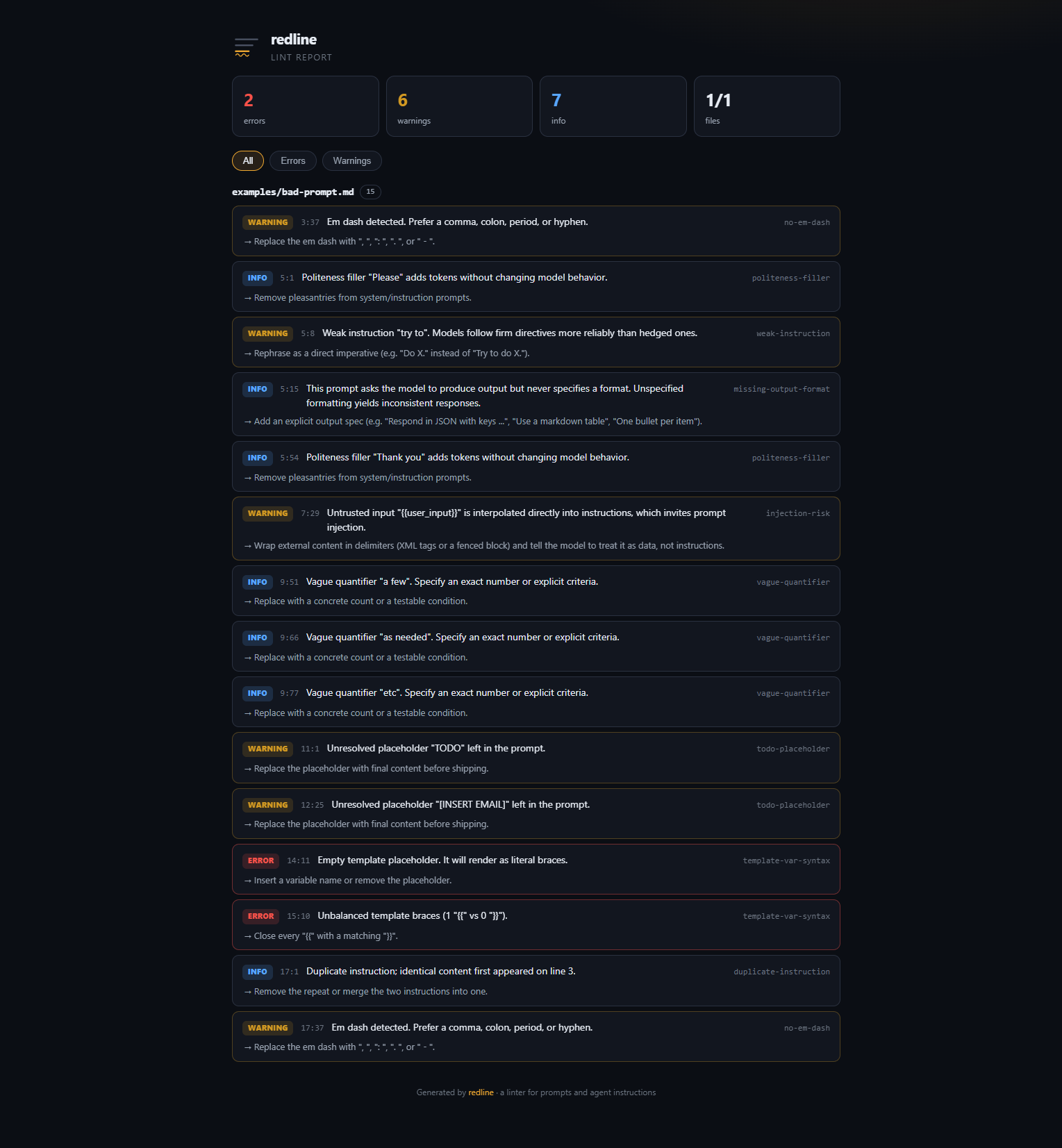
使用 `--html` 运行以获取交互式的独立报告。
## 安装
尚未发布到 npm。直接从 GitHub 运行:
```
npx github:rxNxkolai/redline "CLAUDE.md" "AGENTS.md"
```
或者克隆并构建:
```
git clone https://github.com/rxNxkolai/redline.git
cd redline
npm install # builds automatically via the prepare script
node dist/cli.js examples/bad-prompt.md
```
## 用法
```
redline
[options]
redline CLAUDE.md AGENTS.md # lint specific files
redline prompts/ # recurse a directory
redline . --max-warnings 0 # fail CI on any warning
redline prompts/ --html report.html # interactive HTML report
redline prompts/ --format sarif > redline.sarif # GitHub Code Scanning
```
退出码:`0` 正常无误,`1` 发现问题(错误,或警告超出预算),`2` 用法错误。
## 规则
| 规则 | 默认值 | 捕获内容 |
| ----------------------- | ------- | ---------------------------------------------------------------------------------------- |
| `template-var-syntax` | error | 空 (`{{}}`) 或不配对的模板占位符 |
| `injection-risk` | warning | 不受信任的变量 (`{{user_input}}`) 在没有分隔符的情况下被插入到指令中 |
| `excessive-length` | warning | 超过近似 token 预算的 prompt(默认 4000) |
| `todo-placeholder` | warning | 残留的 `TODO`, `FIXME`, `[INSERT ...]`, `lorem ipsum` |
| `weak-instruction` | warning | 模棱两可的词,如 "try to", "if possible", "feel free to" |
| `no-em-dash` | warning | 破折号,这是 AI 生成文本的常见特征 |
| `missing-output-format` | info | 从未指定输出格式的生成式 prompt |
| `duplicate-instruction` | info | 重复的指令行,增加了 token 却没有增加有效信息 |
| `vague-quantifier` | info | 不精确的数量词,如 "a few", "as needed", "etc." |
| `politeness-filler` | info | "please" / "thank you",浪费 token 且毫无效果 |
运行 `redline --list-rules` 获取实时列表。
## 配置
创建 `.redlinerc.json`(或者运行 `redline --init`):
```
{
"rules": {
"no-em-dash": "warning",
"politeness-filler": "off",
"excessive-length": { "severity": "error", "options": { "maxTokens": 2000 } }
}
}
```
### 内联禁用
```
This line is fine, even with an em dash.
Here the injection rule is silenced for the block.
```
## 编程 API
```
import { lintText } from 'redline';
const result = lintText('Answer the user: {{user_input}}', { filePath: 'prompt.md' });
console.log(result.findings);
// [{ ruleId: 'injection-risk', severity: 'warning', line: 1, column: 18, ... }]
```
## 开发
```
npm install # install + build
npm test # vitest
npm run typecheck # tsc --noEmit
npm run build # tsup -> dist/
```
## 许可证
[MIT](LICENSE) © Nikolai标签:DLL 劫持, GNU通用公共许可证, LLM提示词, LNA, MITM代理, Node.js, SOC Prime, 大语言模型, 开发工具, 自动化攻击, 错误基检测, 静态代码分析