jayelbotvibe-web/hermes-pentest-lab
GitHub: jayelbotvibe-web/hermes-pentest-lab
基于 AI Agent 编排的生产级渗透测试实验室,集成 24+ 安全工具并实现从侦察到 PDF 报告的全流程自动化。
Stars: 5 | Forks: 0
# Hermes Pentest Lab
[](LICENSE)
[](https://github.com/NousResearch/hermes-agent)
[](docker/docker-compose.yml)
[](skills/)
[](#-finding-knowledge-base-new)
[](https://jayelbotvibe-web.github.io/hermes-pentest-lab/)
[](#-tools-included)
[](scripts/pentest-canary.sh)
[](reports/templates/)
## 运行效果
```
$ hermes
/skill pentest-engage
Agent: Validating scope... ✓ 192.168.1.0/24 authorized
VPN check... ✓ wg0 UP
LUKS check... ✓ /dev/mapper/pentest mounted
Pre-flight checks complete. 6/6 subagents ready.
Agent: OSINT agent → 12 subdomains, 47 email addresses found
Recon agent → 14 live hosts, 3 high-value services
Web agent → SQLi confirmed on /login (CVSS 9.8)
Network agent → Kerberoastable account: svc_sql
Agent: Building report...
Findings: 2 Critical, 1 High, 4 Medium, 3 Low
Risk level: Critical
Report saved: reports/acme-corp-2026-07/report-2026-07-01.pdf
Engagement complete. All actions logged to audit trail.
```
## 架构
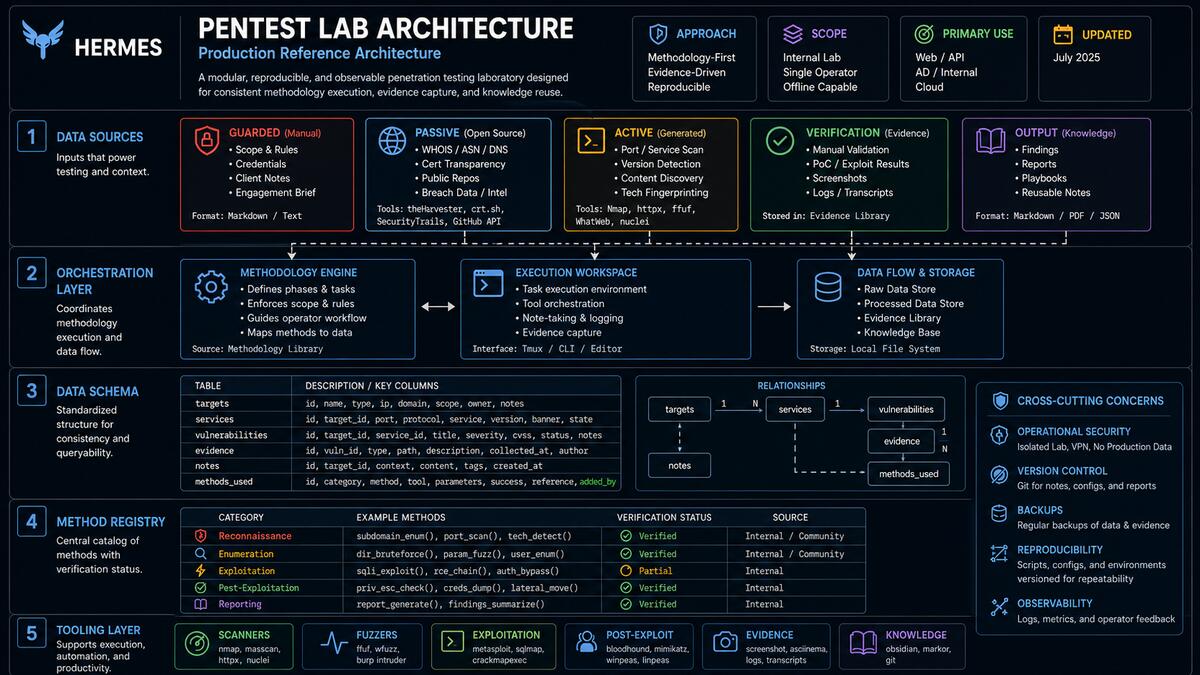
**[→ 查看完整的交互式架构图](https://jayelbotvibe-web.github.io/hermes-pentest-lab/pentest-architecture.html)** (在新窗口打开 — 可滚动的 SVG,深色主题,按层颜色区分)
### 工作原理
1. **你**告诉 Hermes 要测试什么(例如,“扫描 192.168.1.0/24”)
2. **Hermes**检查范围,启动 VPN,并并行调度子 agent
3. **每个子 agent**在 Kali 主机上原生运行工具
4. **发现**流入共享的 SQLite 数据库
5. **报告 agent**生成带有 CVSS 评分的专业 PDF
6. **审计追踪**记录每一个操作
## 📊 示例报告
来自实际评估的两份报告 —— 一个是漏洞目标,另一个是经过加固的生产站点。
| | Juice Shop 基准测试 | ZeroDayBrief 博客 |
|---|---|---|
| **风险** | 🔴 高 (38/100) | 🟢 低 (94/100) |
| **发现** | 14 (0C/1H/8M/5L) | 1 (信息) |
| **控制措施** | 6 通过 / 3 警告 / 7 失败 | 15 通过 / 0 警告 / 1 失败 |
| **目标** | OWASP Juice Shop v20.0.0 | zerodaybrief.blog |
| **PDF** | [juice-shop-benchmark-report.pdf](docs/reports/samples/juice-shop-benchmark-report.pdf) (337KB) | [zerodaybrief-report.pdf](docs/reports/samples/zerodaybrief-report.pdf) (43KB) |
| **HTML** | [查看](https://jayelbotvibe-web.github.io/hermes-pentest-lab/reports/samples/juice-shop-benchmark-report.html) | [查看](https://jayelbotvibe-web.github.io/hermes-pentest-lab/reports/samples/zerodaybrief-report.html) |
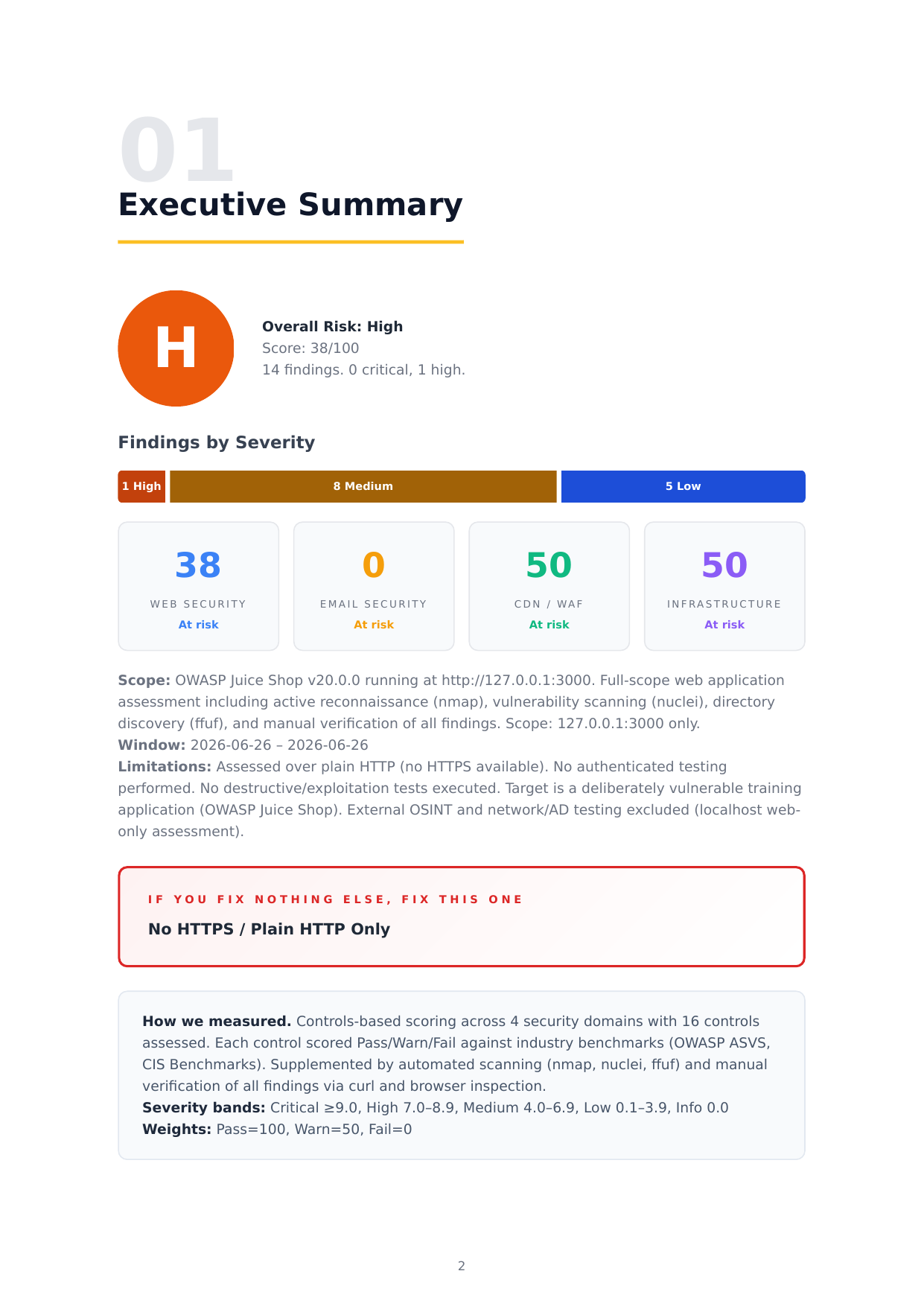 **设计:** 深色渐变封面 · 4类记分卡 · 发现热力图 · 内联证据截图 · 业务优先描述 · 带值的观察控制措施 · 修复清单 · A4 纵向原生打印
*由 `build-report.py` v2 生成 —— 自动化 CVSS 影响生成,针对单个发现的截图嵌入,发现热力图,5阶段方法论。*
## 🚀 快速开始
### 你需要准备什么
- **Kali Linux**(原生或虚拟机)并通过 apt/pipx 安装了相关工具
- **Docker + Docker Compose v2**(仅用于实验靶机和 Neo4j)
- **30GB 可用磁盘空间,8GB 内存**
- **[Hermes Agent](https://github.com/NousResearch/hermes-agent)**(用于 AI 编排)
### 1. 克隆并安装主机工具
```
git clone https://github.com/jayelbotvibe-web/hermes-pentest-lab.git
cd hermes-pentest-lab
# Kali 打包工具 (apt)
sudo apt update && sudo apt install -y nmap metasploit-framework ffuf gobuster wpscan sqlmap hydra john hashcat enum4linux whatweb responder impacket-scripts evil-winrm wireshark seclists
# Python 工具 (pipx)
pipx install netexec # NetExec — SMB/LDAP/WinRM enumeration (successor to crackmapexec)
pipx install bloodhound
pipx install certipy-ad
pipx install theHarvester
pipx install holehe
pipx install sherlock
# Docker(仅用于实验靶机 + Neo4j)
sudo apt install -y docker.io docker-compose-v2 wireguard-tools age cryptsetup pandoc
```
### 2. 启动实验靶机(可选 —— 用于练习)
```
docker compose -f docker/docker-compose.yml --profile lab up -d
# Juice Shop: http://127.0.0.1:3000
# DVWA: http://127.0.0.1:8080 (admin/password)
```
### 3. 运行你的第一次扫描
```
./scripts/init-engagement.sh my-first-test
nmap -sV -p1-1000
**设计:** 深色渐变封面 · 4类记分卡 · 发现热力图 · 内联证据截图 · 业务优先描述 · 带值的观察控制措施 · 修复清单 · A4 纵向原生打印
*由 `build-report.py` v2 生成 —— 自动化 CVSS 影响生成,针对单个发现的截图嵌入,发现热力图,5阶段方法论。*
## 🚀 快速开始
### 你需要准备什么
- **Kali Linux**(原生或虚拟机)并通过 apt/pipx 安装了相关工具
- **Docker + Docker Compose v2**(仅用于实验靶机和 Neo4j)
- **30GB 可用磁盘空间,8GB 内存**
- **[Hermes Agent](https://github.com/NousResearch/hermes-agent)**(用于 AI 编排)
### 1. 克隆并安装主机工具
```
git clone https://github.com/jayelbotvibe-web/hermes-pentest-lab.git
cd hermes-pentest-lab
# Kali 打包工具 (apt)
sudo apt update && sudo apt install -y nmap metasploit-framework ffuf gobuster wpscan sqlmap hydra john hashcat enum4linux whatweb responder impacket-scripts evil-winrm wireshark seclists
# Python 工具 (pipx)
pipx install netexec # NetExec — SMB/LDAP/WinRM enumeration (successor to crackmapexec)
pipx install bloodhound
pipx install certipy-ad
pipx install theHarvester
pipx install holehe
pipx install sherlock
# Docker(仅用于实验靶机 + Neo4j)
sudo apt install -y docker.io docker-compose-v2 wireguard-tools age cryptsetup pandoc
```
### 2. 启动实验靶机(可选 —— 用于练习)
```
docker compose -f docker/docker-compose.yml --profile lab up -d
# Juice Shop: http://127.0.0.1:3000
# DVWA: http://127.0.0.1:8080 (admin/password)
```
### 3. 运行你的第一次扫描
```
./scripts/init-engagement.sh my-first-test
nmap -sV -p1-1000
./scripts/build-report.py my-first-test
```
你将在 `reports/my-first-test/report-*.pdf` 获得一份专业的 PDF 报告。
### 4. 使用 AI 编排器
在 Hermes Agent 会话中:
```
/skill pentest-engage
```
然后描述你想要测试的内容 —— Hermes 会处理剩下的事情。
## 🛠️ 包含的工具
### Web 应用测试
| 工具 | 运行时 | 用途 |
|------|---------|---------|
| ffuf | 💻 主机 | 目录/文件爆破,虚拟主机发现 |
| nuclei | 💻 主机 | CVE 和错误配置扫描(6,683 个模板) |
| sqlmap | 💻 主机 | 自动化 SQL 注入检测 |
| gobuster | 💻 主机 | 目录、DNS 和 VHOST 枚举 |
| wpscan | 💻 主机 | WordPress 漏洞扫描器 |
| whatweb | 💻 主机 | 技术指纹识别 |
### 网络与活动目录
| 工具 | 运行时 | 用途 |
|------|---------|---------|
| nmap | 💻 主机 | 端口扫描,服务检测,OS 指纹识别 |
| metasploit | 💻 主机 | 漏洞利用框架 (6.4) — 受限执行 |
| netexec (nxc) | 💻 主机 | SMB/LDAP/WinRM 枚举与认证 |
| bloodhound-python | 💻 主机 | 活动目录攻击路径分析 |
| certipy-ad | 💻 主机 | AD 证书服务利用 |
| kerbrute | 💻 主机 | Kerberos 用户枚举和密码喷洒 |
| impacket | 💻 主机 | Windows 协议工具 (secretsdump, GetUserSPNs) |
| responder | 💻 主机 | LLMNR/NBT-NS/mDNS 欺骗 — 受限执行 |
| evil-winrm | 💻 主机 | Windows 远程管理 shell |
| enum4linux | 💻 主机 | SMB 枚举 |
| hydra | 💻 主机 | 在线暴力破解(仅限用户批准) |
| john / hashcat | 💻 主机 | 密码哈希破解 |
### OSINT 与被动侦察
| 工具 | 运行时 | 用途 |
|------|---------|---------|
| theHarvester | 💻 主机 | 电子邮件、子域名和姓名枚举 |
| holehe | 💻 主机 | 检查电子邮件是否在服务中注册 |
| sherlock | 💻 主机 | 跨 300+ 社交网络的用户名搜索 |
| crt.sh | 💻 主机 | 证书透明度日志子域名发现 |
| shodan | 💻 主机 | 互联网连接设备搜索引擎 |
### 基础设施
| 服务 | 访问 | 用途 |
|---------|--------|---------|
| Neo4j 5 | 🐳 neo4j `:7474` `:7687` | BloodHound CE 图数据库 |
| Juice Shop | 🐳 lab `:3000` | OWASP 易受攻击的 Web 应用(练习) |
| DVWA | 🐳 lab `:8080` | Damn Vulnerable Web App(练习) |
### 原生工具
| 工具 | 运行时 | 用途 |
|------|---------|---------|
| Burp Suite CE | 💻 主机 | 拦截代理(653MB .jar) |
| Wireshark 4.6 | 💻 主机 | 数据包捕获分析 |
| hashcat 7.1 | 💻 主机 | GPU 密码破解 |
| Firefox + FoxyProxy | 💻 主机 | 手动 Web 测试 |
| Report Builder | 💻 主机 | Jinja2 → WeasyPrint → PDF → DOCX |
## 🤖 AI 子 Agent
6 个专门的 agent —— 每个都具备深厚的领域知识、预检查和速率限制。
| Agent | 阶段 | 等级 | 功能 | 输出 |
|-------|-------|------|-------------|--------|
| Scope | 1️⃣ 守卫 | 🛡️ 始终首位 | 根据范围验证每个目标,记录审计追踪 | `{allowed, reason}` |
|
标签:CISA项目, Docker, WireGuard, 后端开发, 安全防御评估, 实时处理, 密码管理, 模拟器, 版权保护, 自动化报告, 逆向工具