icynetx/RconKIT
GitHub: icynetx/RconKIT
ReconKit 是一个将多种侦察工具整合到统一控制台的安全侦察工作台,提供快速扫描、报告导出和 AI 辅助分析能力。
Stars: 0 | Forks: 0
ReconKit ⚡
将杂乱的侦察工具转化为整洁的指挥中心 —— 通过一个友好的控制台,实现快速扫描、精美报告以及 AI 辅助的防御洞察。






nmap • dig • whatweb • httpx • sslscan • subfinder • nuclei • OpenRouter AI
## ✨ 什么是 ReconKit?
ReconKit 是一个实用的侦察工作区,专为想要结果而非混乱的人设计。只需提供一个域名或 IP,它就会将 `nmap`、`dig`、`whatweb`、`httpx`、`sslscan`、`nuclei` 等工具整合在一起,然后将输出转化为整洁的表格、实用的笔记、报告以及可选的 AI 分析。
它就像一个小型的指挥中心:初学者可以使用引导式控制台,而有经验的操作员仍然可以运行直接的一次性命令,并将所有内容导出为报告。
ReconKit 适用于:
- 需要快速进行授权外部侦察的红队操作员。
- 检查暴露在互联网上的内容的蓝队工程师。
- 希望拥有清晰工作流而不是随机敲击命令的学生和初学者。
- 需要整洁的 JSON、Markdown、HTML、原始证据和 AI 辅助摘要的顾问。
## 🚀 核心亮点
- 🕹️ **控制台优先的工作流**:运行 `reconkit` 并使用 `set target`、`show options`、`run` 和 `mission` 等简单命令进行操作。
- 🛰️ **真实的侦察工具,更清爽的体验**:涵盖 DNS、nmap、WHOIS、Web 指纹识别、TLS 检查、被动发现、屏幕截图和模板检查。
- 🧠 **AI 分析师模式**:将标准化的扫描证据发送给 OpenRouter,并获得清晰的英文防御分析。
- 📊 **整洁无乱的报告**:导出控制台输出、JSON、Markdown、HTML、原始工件以及扫描差异对比。
- 🧩 **贴心助力的安装程序**:尽可能使用原生包管理器,并支持 Go/Python 作为后备方案。
- 🪟 **全面支持 Windows**:创建原生启动器,更新用户 PATH,并在可选的 Unix 工具不可用时依然保持运行。
- 🧼 **人类可读的输出**:对齐的表格、自动换行的列、快速浏览笔记以及实用的后续步骤。
## 📸 实战演示
GitHub 会内联渲染这些 GIF 动图,在大多数浏览器中它们会自动播放。这些动图特意做得很短,以便访客能在几秒钟内理解工作流,而无需阅读整个 README。
⚡ Guided Console
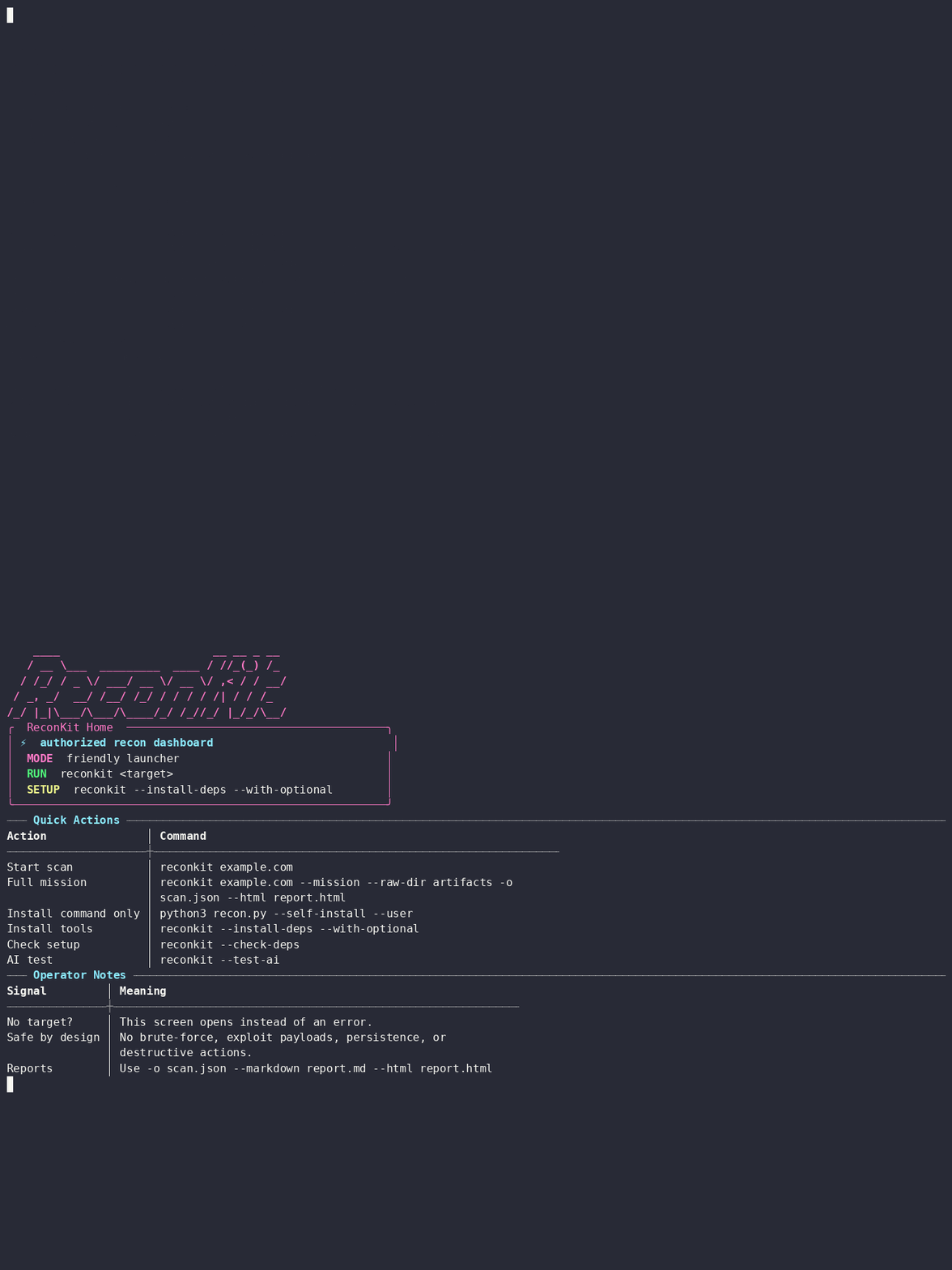
Open ReconKit like a command center and start with simple console commands.
reconkit
|
🛰️ Full Mission Scan
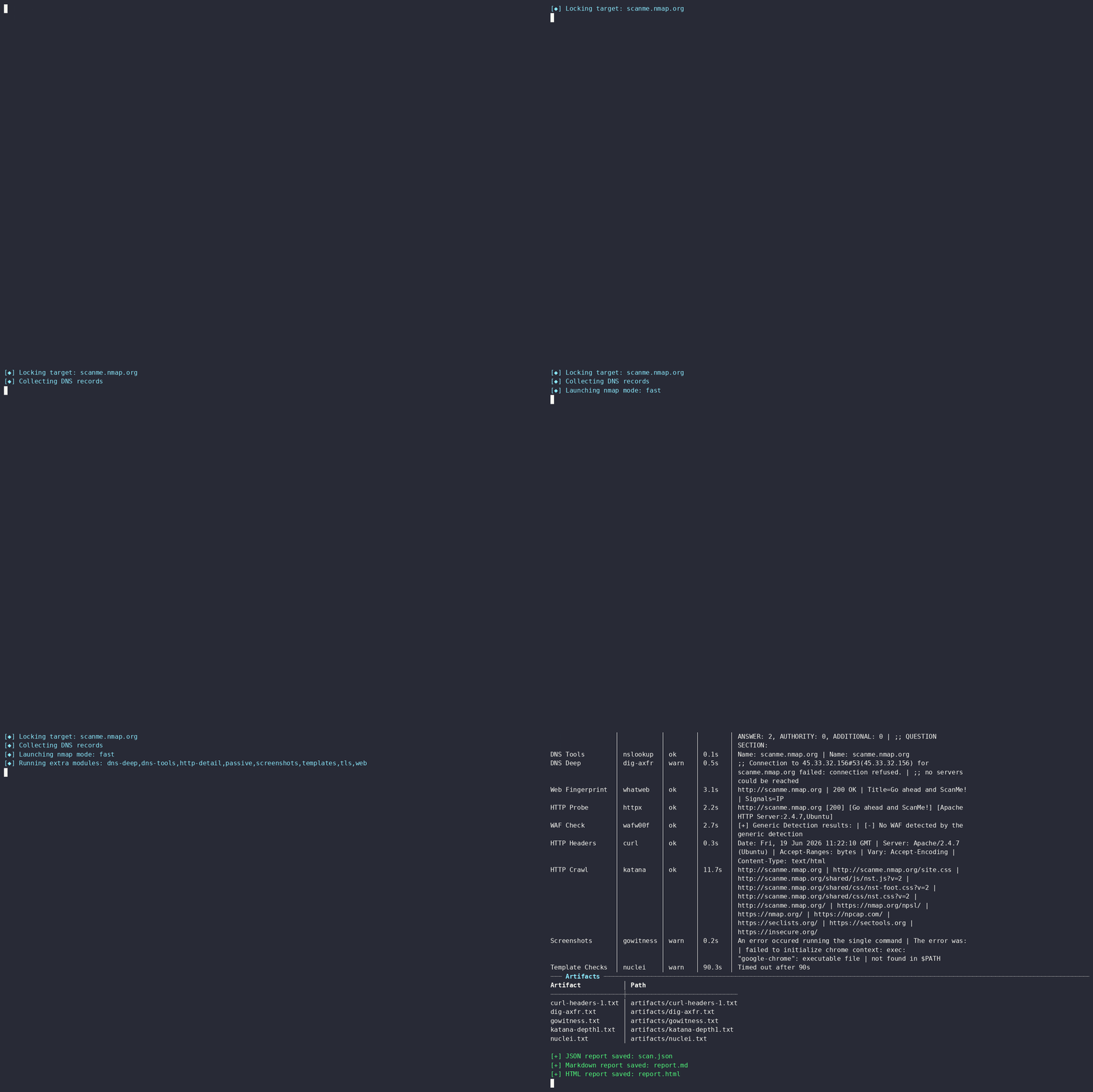
Run DNS, nmap, web, TLS, passive modules, artifacts, and reports in one flow.
reconkit scanme.nmap.org --mission --no-whois --raw-dir artifacts -o scan.json --markdown report.md --html report.html -t 120
|
🧠 AI-Assisted Analysis
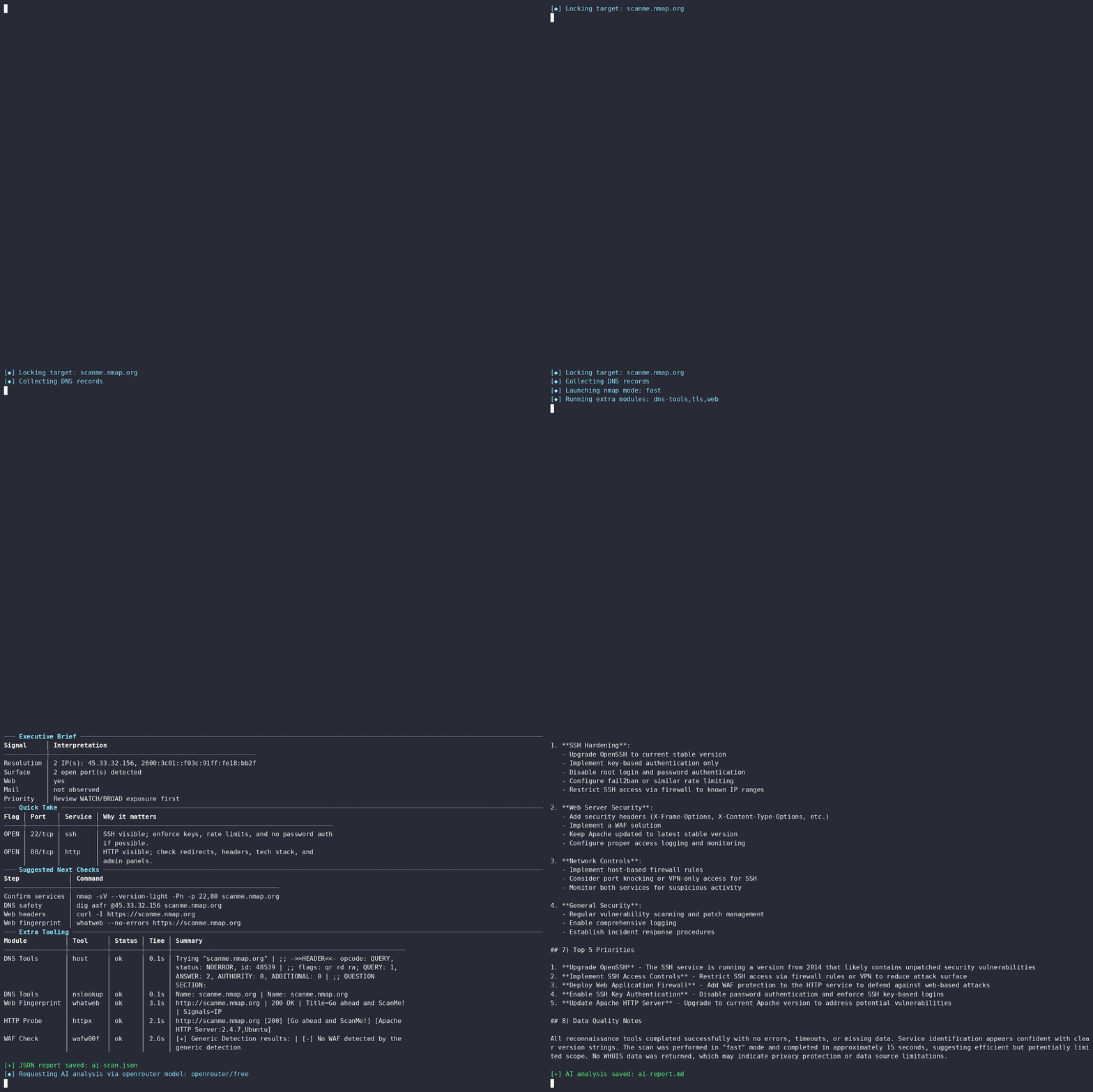
Turn normalized scan evidence into a clear defensive analysis with OpenRouter.
reconkit scanme.nmap.org -M safe --no-whois --ai --ai-out ai-report.md -o ai-scan.json -t 90
|
📊 Clean HTML Report
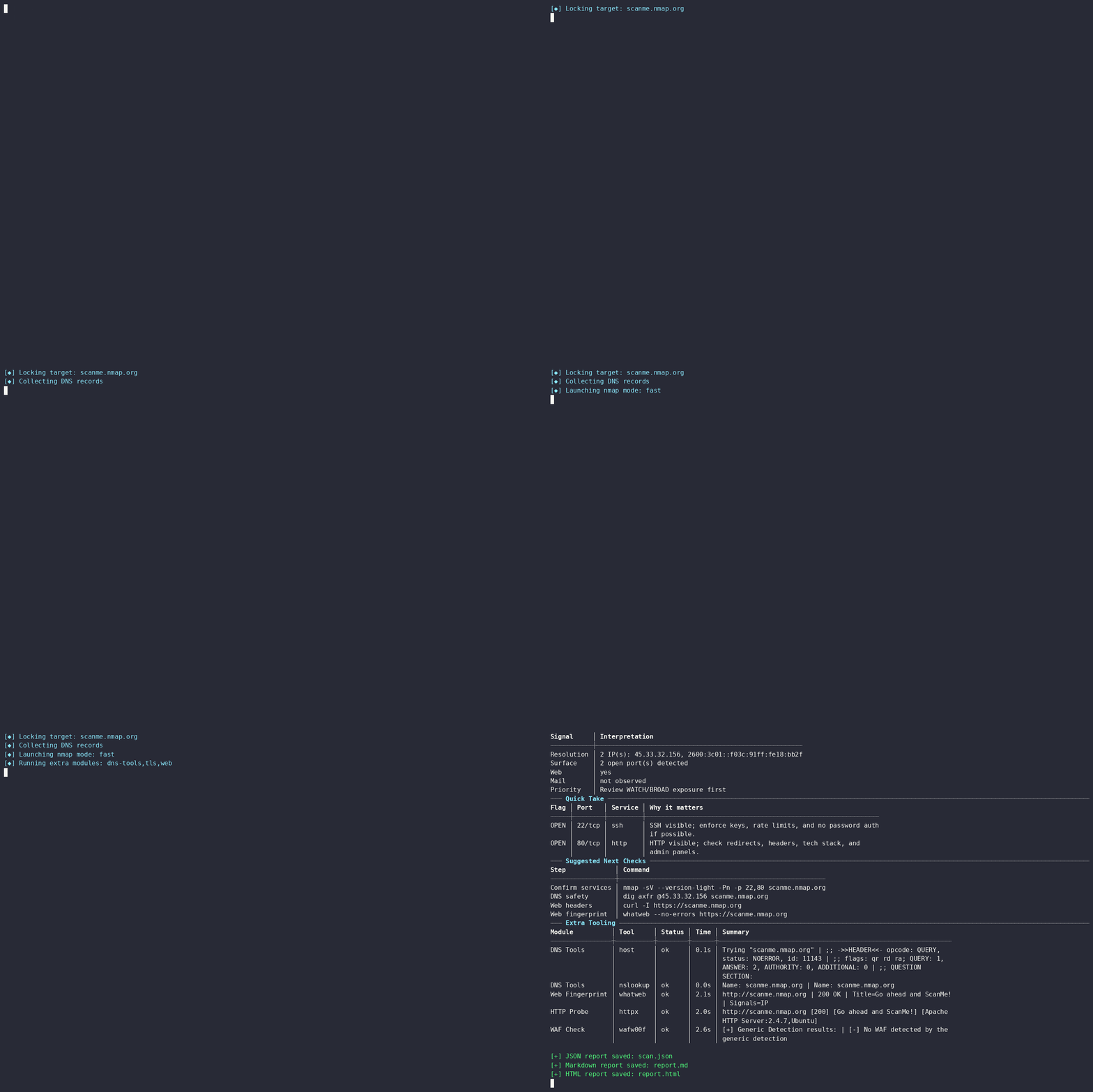
Export Markdown and HTML reports that are easy to share and review.
reconkit scanme.nmap.org -M safe --no-whois -o scan.json --markdown report.md --html report.html
|
🧩 Dependency Installer
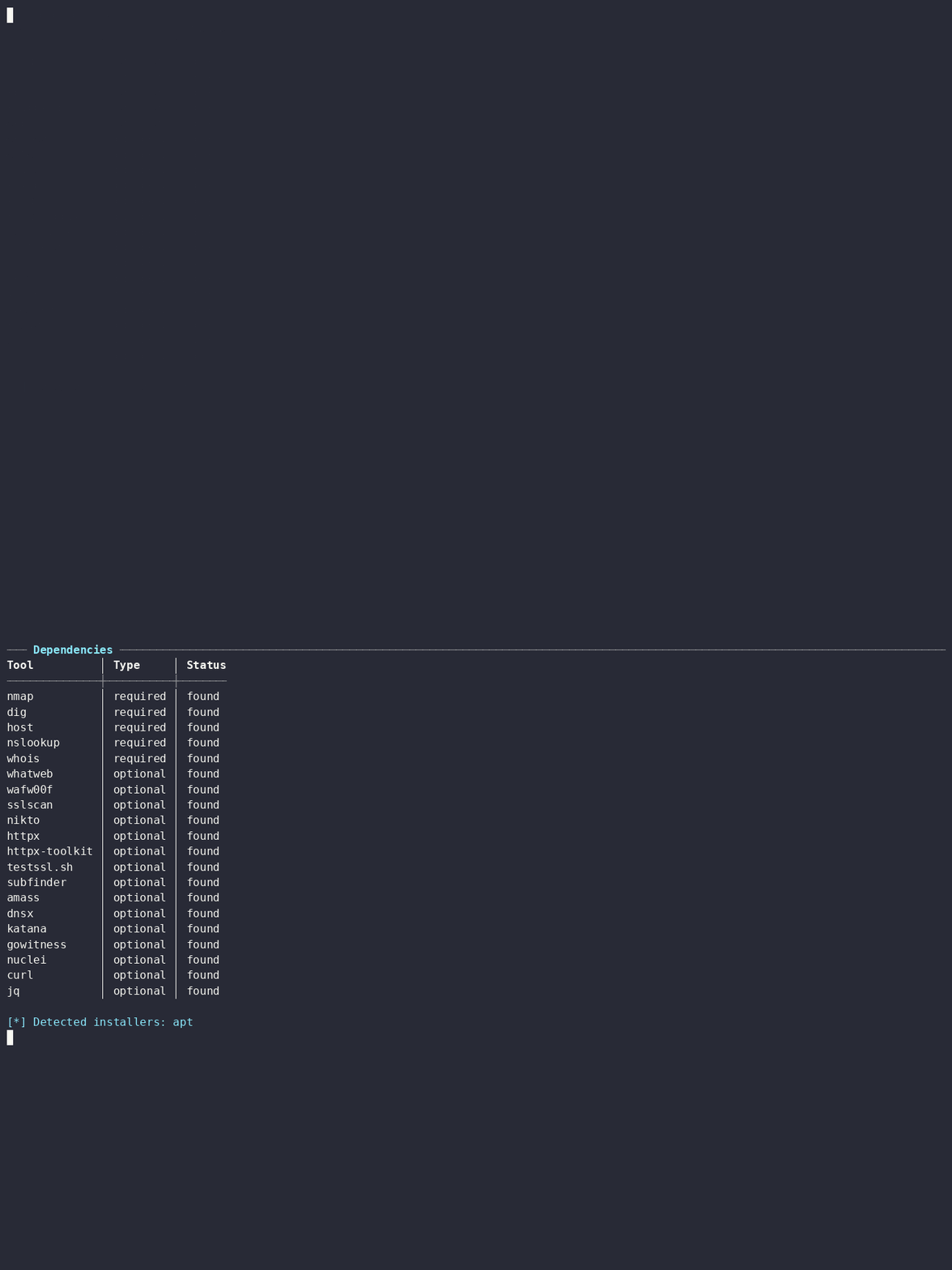
Preview or install required and optional tools without memorizing package names.
reconkit --install-deps --with-optional --dry-run
|
🔁 Delta Scan
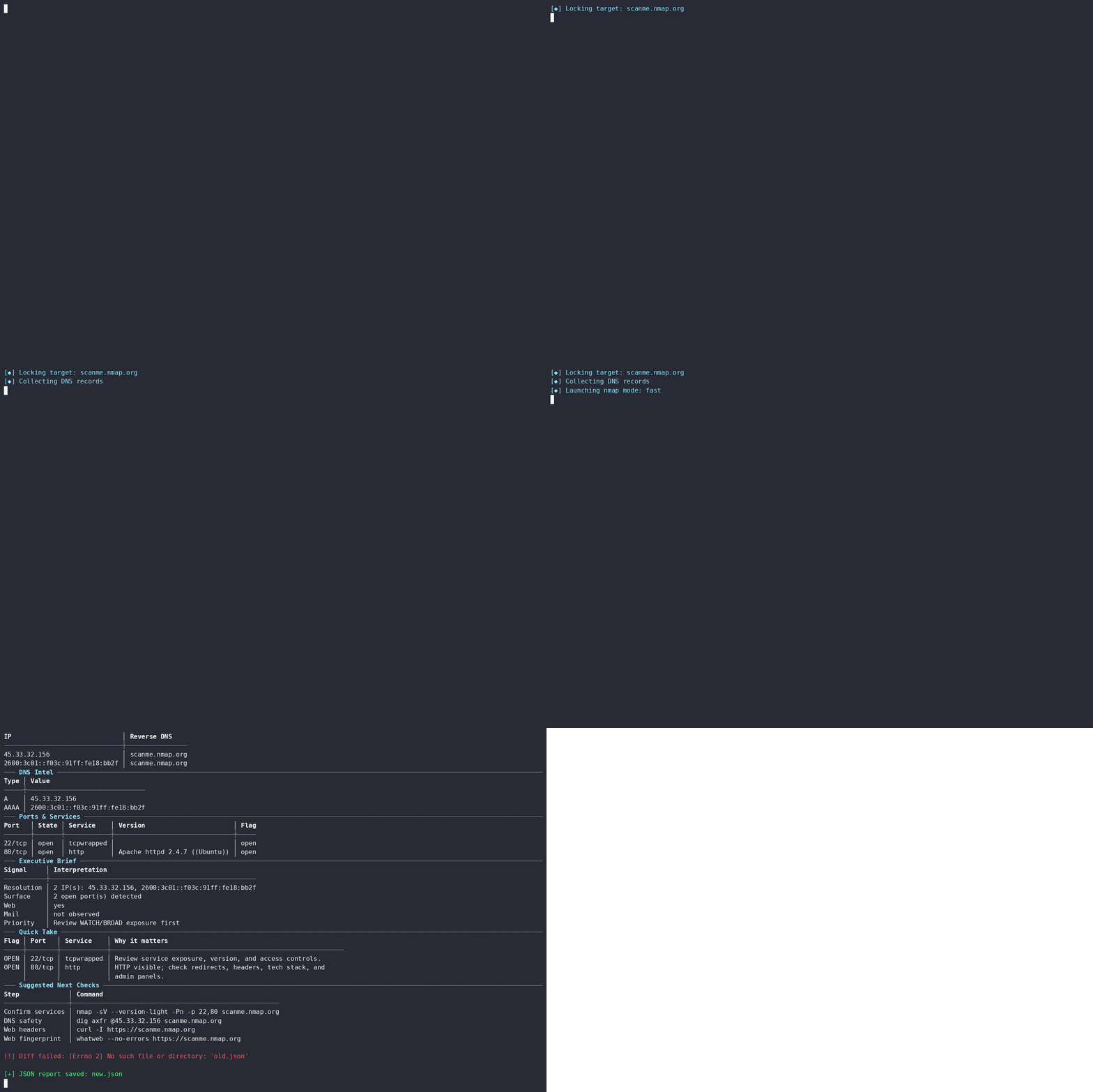
Compare scans and quickly spot changes in IPs, ports, and exposure.
reconkit scanme.nmap.org -M none --no-whois --diff old.json -o new.json
|
## ⚡ 快速开始
### 1) 安装 `reconkit` 命令
```
python3 recon.py --self-install --user
```
### 2) 打开你的侦察控制台
```
reconkit
```
接下来,自然地进行操作:
```
reconkit(no-target)> help
reconkit(no-target)> set target example.com
reconkit(example.com)> set mode balanced
reconkit(example.com)> set modules mission
reconkit(example.com)> enable no_whois
reconkit(example.com)> run
reconkit(example.com)> exit
```
### 3) 喜欢直接使用命令?试试一次性模式
```
reconkit example.com
reconkit example.com --deep --ai --ai-out ai-report.md -o scan.json -t 120
reconkit example.com --mission --raw-dir artifacts -o scan.json --markdown report.md --html report.html
```
## 🧭 交互式控制台指南
运行不带参数的 `reconkit`,你会得到一个引导式的控制台,而不是一堆眼花缭乱的参数标志。只需设置一次目标,调整扫描风格,准备好后随时运行。
| 命令 | 作用 |
|---|---|
| `help` 或 `?` | 显示控制台命令。 |
| `show options` | 显示当前目标、配置文件、模块、报告路径和标志。 |
| `show modules` | 显示模块预设。 |
| `show deps` | 打印依赖状态。 |
| `set target example.com` | 设置目标域名、IP 或 URL。 |
| `set mode fast` | 设置扫描模式:`fast`、`balanced` 或 `deep`。 |
| `set modules mission` | 设置模块预设或以逗号分隔的模块。 |
| `set ports 80,443,8080` | 使用自定义端口。 |
| `unset ports` | 清除自定义端口并恢复默认设置。 |
| `set timeout 120` | 设置单工具超时时间(以秒为单位)。 |
| `set raw_dir artifacts` | 设置原始工件输出目录。 |
| `set json scan.json` | 设置 JSON 输出路径。 |
| `set markdown report.md` | 设置 Markdown 输出路径。 |
| `set html report.html` | 设置 HTML 输出路径。 |
| `enable ai` / `disable ai` | 启用/禁用 AI 分析。 |
| `enable aggressive` | 当工具存在时,启用更重负载的安全检查。 |
| `enable no_whois` | 跳过 WHOIS。 |
| `enable show_commands` | 在输出中显示确切的工具命令。 |
| `run` 或 `scan` | 使用当前选项运行扫描。 |
| `quick example.com` | 立即运行快速的安全扫描。 |
| `mission example.com` | 运行完整的任务工作流。 |
| `install` | 尽力安装所需的 + 可选的工具。 |
| `dryrun` | 显示依赖安装计划,但不实际安装。 |
| `test ai` | 测试 OpenRouter 的 endpoint/model/API key。 |
| `shell
` | 运行本地 shell 命令。 |
| `clear` | 清除屏幕并重新绘制控制台横幅。 |
| `exit`、`quit`、`q` | 退出控制台。 |
## 🛠️ 安装说明
最快的方法是使用一键安装程序。它会下载 ReconKit,为你的用户安装 `reconkit` 命令,然后尽最大努力安装可用的工具。安装程序首先使用浅层 git clone,如果 clone 缓慢或被阻止,它会自动回退到下载 GitHub ZIP。
### Linux / macOS —— 一行命令
```
curl -fsSL https://raw.githubusercontent.com/icynetx/RconKIT/main/scripts/install.sh | sh
```
如果你只想要 ReconKit 命令,而**不**希望自动安装外部工具:
```
curl -fsSL https://raw.githubusercontent.com/icynetx/RconKIT/main/scripts/install.sh | RECONKIT_SKIP_TOOLS=1 sh
```
如果你只想要必需的工具,不要可选的工具:
```
curl -fsSL https://raw.githubusercontent.com/icynetx/RconKIT/main/scripts/install.sh | RECONKIT_INSTALL_OPTIONAL=0 sh
```
### Windows PowerShell —— 一行命令
```
iwr -useb https://raw.githubusercontent.com/icynetx/RconKIT/main/scripts/install.ps1 | iex
```
仅安装命令,不包含外部工具:
```
$env:RECONKIT_SKIP_TOOLS="1"; iwr -useb https://raw.githubusercontent.com/icynetx/RconKIT/main/scripts/install.ps1 | iex
```
仅安装必需的工具:
```
$env:RECONKIT_INSTALL_OPTIONAL="0"; iwr -useb https://raw.githubusercontent.com/icynetx/RconKIT/main/scripts/install.ps1 | iex
```
安装完成后,如有需要,请打开一个新的终端:
```
reconkit
reconkit --check-deps
reconkit scanme.nmap.org -M safe --no-whois -t 90
```
### 从 clone 的仓库进行本地/手动安装
当你已经手动下载了该项目时,请使用此方法。
```
python3 recon.py --self-install --user
reconkit --install-deps --with-optional
reconkit --check-deps
```
Windows 本地安装:
```
Set-ExecutionPolicy -Scope CurrentUser RemoteSigned
.\scripts\install-windows.ps1
```
Windows CMD 本地安装:
```
scripts\install-windows.cmd
```
### 支持的系统
| 系统 | 推荐安装方式 |
|---|---|
| Kali / Ubuntu / Debian | `curl -fsSL .../scripts/install.sh \| sh` |
| Fedora / RHEL-like | `curl -fsSL .../scripts/install.sh \| sh` |
| Arch Linux | `curl -fsSL .../scripts/install.sh \| sh` |
| Alpine Linux | `curl -fsSL .../scripts/install.sh \| sh` |
| macOS | `curl -fsSL .../scripts/install.sh \| sh` |
| Windows PowerShell | `iwr -useb .../scripts/install.ps1 \| iex` |
## 📦 依赖安装程序
ReconKit 会检查已安装的内容,检测你的包管理器,并尽最大努力构建安装计划。如果你的操作系统上没有可选工具,它会明确提示你并继续工作。
| 平台 | 提供者 |
|---|---|
| Debian/Ubuntu/Kali | `apt` |
| Fedora/RHEL-like | `dnf` |
| Arch | `pacman` |
| Alpine | `apk` |
| macOS | `brew` |
| Windows | `winget`、`choco` |
| 跨平台后备方案 | `go install`、`pipx`、`python -m pip --user` |
预览安装命令:
```
reconkit --install-deps --with-optional --dry-run
```
仅安装必需工具:
```
reconkit --install-deps
```
安装必需 + 可选工具:
```
reconkit --install-deps --with-optional
```
检查状态:
```
reconkit --check-deps
```
### ReconKit 可以使用的工具
| 类别 | 工具 |
|---|---|
| 核心 | `nmap`、`dig`、`host`、`nslookup`、`whois` |
| Web 指纹识别 | `whatweb`、`httpx` / `httpx-toolkit`、`curl` |
| WAF/TLS | `wafw00f`、`sslscan`、`testssl.sh` |
| 被动发现 | `subfinder`、`amass` |
| HTTP 爬取/截图 | `katana`、`gowitness` |
| 模板检查 | `nuclei` |
| 报告助手 | `jq` |
可选工具很有用,但并非强制要求。如果缺少某个工具,ReconKit 会报告并继续执行,而不会中断你的扫描。
## 🔍 扫描模式
| 模式 | 命令 | 适用场景 |
|---|---|---|
| `fast` | `reconkit example.com` | 你希望快速获取 DNS + 常见端口的 nmap 结果。 |
| `balanced` | `reconkit example.com -m balanced` | 你希望获得更广泛常见服务的覆盖。 |
| `deep` | `reconkit example.com -m deep` 或 `--deep` | 你希望进行 nmap 服务/版本/默认脚本检测以及后备发现。 |
## 🧩 模块
使用 `-M` / `--modules` 来决定除了核心的 DNS + nmap 工作流之外,ReconKit 还应该做多少工作。
| 模块 | 运行的内容 |
|---|---|
| `none` | 仅核心 DNS + nmap。 |
| `dns` / `dns-tools` | `host`、`nslookup` 摘要。 |
| `dns-deep` | 使用 `dig axfr` 进行安全的 DNS AXFR 验证。 |
| `passive` / `subdomains` | 安装后使用 `subfinder` 和 `amass` 进行被动发现。 |
| `web` | 使用 `whatweb`、`httpx` 进行 Web 指纹识别,并使用 `wafw00f` 进行 WAF 检查。 |
| `http` | `web` + HTTP 标头检查和浅层爬取。 |
| `http-detail` | `curl` 标头和安装后的 `katana` 浅层爬取。 |
| `tls` / `ssl` | 使用 `sslscan` 或 `testssl.sh` 进行 TLS 检查。 |
| `screenshots` / `shots` | 使用 `gowitness` 进行 Web 屏幕截图。 |
| `templates` / `nuclei` | 安装后进行安全的 nuclei 模板检查。 |
| `safe` | `dns-tools`、`web`、`tls`。默认模式。 |
| `all` | `safe`、`passive`、`dns-deep`、`http-detail`。 |
| `full` | `all`、`screenshots`、`templates`。 |
| `mission` | 与 `full` 相同;专为完整工作流扫描而设计。 |
示例:
```
reconkit example.com -M none
reconkit example.com -M web,tls,http-detail
reconkit example.com -M passive,dns-deep
reconkit example.com --mission
```
## 🧾 所有 CLI 开关
| 开关 | 示例 | 解释 |
|---|---|---|
| `target` | `reconkit example.com` | 要扫描的域名、IP 或 URL。 |
| `-h`、`--help` | `reconkit --help` | 显示帮助和示例。 |
| `-m`、`--mode`、`--profile` | `-m balanced` | 扫描模式:`fast`、`balanced`、`deep`。 |
| `-p`、`--ports` | `-p 80,443,8080` | 自定义 nmap 端口/范围。 |
| `-M`、`--modules` | `-M web,tls` | 额外模块或预设。 |
| `-A`、`--aggressive` | `-A` | 当工具存在时,启用更重负载的安全检查,如 `nikto`/`testssl.sh`。 |
| `-t`、`--timeout` | `-t 120` | 单工具命令超时时间(以秒为单位)。 |
| `-o`、`--json` | `-o scan.json` | 保存标准化的 JSON 报告。 |
| `--markdown`、`--md` | `--markdown report.md` | 保存 Markdown 报告。 |
| `--html` | `--html report.html` | 保存独立的 HTML 报告。 |
| `--raw-dir` | `--raw-dir artifacts` | 保存原始工具输出/工件。 |
| `--diff` | `--diff old.json` | 将当前扫描与之前的 JSON 进行比较。 |
| `--deep` | `--deep` | `-m deep` 的别名。 |
| `--mission` | `--mission` | 启用完整的任务集。 |
| `--passive` | `--passive` | 添加被动子域名发现模块。 |
| `--http-detail` | `--http-detail` | 添加 HTTP 标头和浅层爬取。 |
| `--screenshots` | `--screenshots` | 安装后使用 `gowitness` 捕获屏幕截图。 |
| `--templates`、`--nuclei` | `--templates` | 安装并授权后运行 nuclei 模板。 |
| `--cmd`、`--show-commands` | `--cmd` | 显示 ReconKit 执行的确切命令。 |
| `--explain` | `--explain` | 在扫描输出中显示开关指南。 |
| `--no-color` | `--no-color` | 禁用 ANSI 颜色。适用于 CI/日志文件。 |
| `--no-whois` | `--no-whois` | 跳过 WHOIS 查询。 |
| `--install-deps` | `--install-deps` | 尽最大努力安装必需的工具。 |
| `--self-install`、`--setup` | `--self-install --user` | 安装 `reconkit` 命令。 |
| `--user` | `--self-install --user` | 首选用户 bin 目录,例如 `~/.local/bin` 或 `%USERPROFILE%\.reconkit\bin`。 |
| `--with-optional` | `--install-deps --with-optional` | 同时安装可选的侦察/Web/TLS 工具。 |
| `--dry-run` | `--install-deps --dry-run` | 打印安装计划而不进行安装。 |
| `--check-deps` | `--check-deps` | 打印依赖状态并退出。 |
| `--ai` | `--ai` | 使用 `recon_config.json` 分析扫描结果。 |
| `--ai-timeout` | `--ai-timeout 90` | AI 请求超时时间(以秒为单位)。 |
| `--ai-out` | `--ai-out ai-report.md` | 将 AI 分析保存到文件。 |
| `--ai-prompt` | `--ai-prompt` | 打印配置的 AI 系统提示词并退出。 |
| `--show-config` | `--show-config` | 打印加载的 AI 配置,而不暴露完整的 API key。 |
| `--test-ai` | `--test-ai` | 在不进行扫描的情况下测试 AI endpoint/model/API key。 |
| `--version` | `--version` | 显示 ReconKit 版本和 Team CynetX 链接。 |
## 🧠 使用 OpenRouter 进行 AI 分析
ReconKit 从 `recon_config.json` 读取 AI 设置,因此你不需要每次都传递 model、endpoint 或提示词。
配置示例:
```
{
"provider": "openrouter",
"endpoint_url": "https://openrouter.ai/api/v1/chat/completions",
"model": "openrouter/free",
"api_key_env": "OPENROUTER_API_KEY",
"api_key": "",
"temperature": 0.15,
"max_tokens": 5000,
"continuation_rounds": 5,
"empty_response_retries": 5,
"retry_delay_seconds": 3,
"http_referer": "https://local.reconkit",
"x_title": "ReconKit AI Analysis"
}
```
推荐的 API key 用法:
```
export OPENROUTER_API_KEY="YOUR_OPENROUTER_API_KEY"
reconkit --test-ai
reconkit example.com --deep --ai --ai-out ai-report.md -o scan.json
```
AI 输出结构:
1. 执行摘要
2. 攻击面表格
3. 风险评估
4. 攻击者可能如何滥用这些信息(防御视角)
5. 推荐的后续授权测试
6. 防御性加固计划
7. 前 5 大优先事项
8. 数据质量说明
## 📊 报告和工件
| 输出 | 命令 | 结果 |
|---|---|---|
| 控制台 | `reconkit example.com` | 精美的终端仪表板。 |
| JSON | `-o scan.json` | 机器可读的标准化数据。 |
| Markdown | `--markdown report.md` | 对 GitHub/客户友好的报告。 |
| HTML | `--html report.html` | 独立的 HTML 报告。 |
| 原始证据 | `--raw-dir artifacts` | 工具输出和工件。 |
| 差异对比 | `--diff old.json` | 突出显示与前一次扫描相比的变化。 |
| AI 报告 | `--ai-out ai-report.md` | 保存的 AI 分析。 |
一个完整的报告工作流如下所示:
```
reconkit example.com --mission --raw-dir artifacts -o scan.json --markdown report.md --html report.html --ai --ai-out ai-report.md -t 120
```
## 🧯 故障排除
| 问题 | 解决方案 |
|---|---|
| `reconkit: command not found` | 运行 `python3 recon.py --self-install --user`,然后打开一个新的终端。 |
| GitHub clone 超时 | 重新运行一键安装程序;它现在会回退到下载 GitHub ZIP。如果你的网络屏蔽了 GitHub,你也可以使用 VPN/代理。 |
| 旧启动器提示 `Permission denied` | 删除 PATH 中前面损坏的旧启动器,然后再次进行 self-install。 |
| Ubuntu 上缺少 `httpx` | 运行 `reconkit --install-deps --with-optional`;ReconKit 会使用 `go install` 作为后备。 |
| `apt` 中不可用 `amass` | 这在许多发行版中很正常;ReconKit 会使用后备/手动说明。 |
| Windows 无法看到新的 Go 工具 | 安装后打开一个新的 PowerShell/CMD。 |
| AI 返回空/无内容 | 使用 `--test-ai`,检查 `recon_config.json`、API key、model 以及 OpenRouter 账户限制。 |
| Windows 上缺少 DNS 工具 | ReconKit 会回退到 Python A/AAAA 解析;使用 WSL/Kali 获取完整的 BIND 工具。 |
## ✅ 示例工作流
### 快速暴露检查
```
reconkit example.com -M safe --no-whois
```
### 带报告的深度扫描
```
reconkit example.com --deep -A --raw-dir artifacts -o scan.json --markdown report.md --html report.html -t 180
```
### Web/TLS 侧重点
```
reconkit example.com -p 80,443,8080,8443,2083,2096 -M web,tls,http-detail --cmd
```
### 被动发现 + DNS 验证
```
reconkit example.com -M passive,dns-deep --raw-dir artifacts
```
### 比较变化
```
reconkit example.com -M none --no-whois -o old.json
reconkit example.com -M none --no-whois --diff old.json -o new.json
```
### AI 辅助防御报告
```
reconkit example.com --mission --ai --ai-out ai-report.md -o scan.json --html report.html -t 120
```
## 🛡️ 范围与道德准则
构建 ReconKit 旨在帮助防御者和授权操作员清晰地了解暴露情况。保持专业性:仅扫描你拥有、管理或获得书面测试许可的资产。
在设计上,ReconKit 会避免:
- 暴力破解和密码喷射。
- 漏洞利用 payload 和武器化的 PoC。
- 恶意软件、持久化、规避或破坏性操作。
- 未经授权的访问尝试。
## 👥 CynetX 团队
由 **Team CynetX** 用 ❤️ 构建,献给那些关心整洁侦察、可读报告和实用安全工作的操作员。
© 2026 Team CynetX. 保留所有权利。
- 网站:https://cynetx.ir
- Telegram:https://t.me/cynetx
如果 ReconKit 让你的工作流变得更清爽,请给仓库点个 Star,并把它分享给那些仍在手动阅读原始工具输出的人。标签:Python, UDP扫描, 实时处理, 密码管理, 插件系统, 数据展示, 无后门, 红队, 运行时操纵, 逆向工具