abc1230940/CyberDefenders-BlackEnergy
GitHub: abc1230940/CyberDefenders-BlackEnergy
CyberDefenders BlackEnergy 蓝队实验的内存取证分析解题报告,演示如何使用 Volatility 对 BlackEnergy 恶意软件感染样本进行数字取证调查。
Stars: 0 | Forks: 0





CyberDefenders 解题报告 - BlackEnergy
场景
一家跨国公司遭遇了网络攻击,导致敏感数据被盗。此次攻击使用了一种此前未见的 BlackEnergy v2 恶意软件变种。公司的安全团队已获取受感染机器的内存转储,并希望您以 SOC 分析师的专业知识来分析该转储,以了解此次攻击的范围和影响。
(返回顶部)
Tools Used
Installation of Volatility 2
Step 1: Download Volatility 2 Standalone Executable
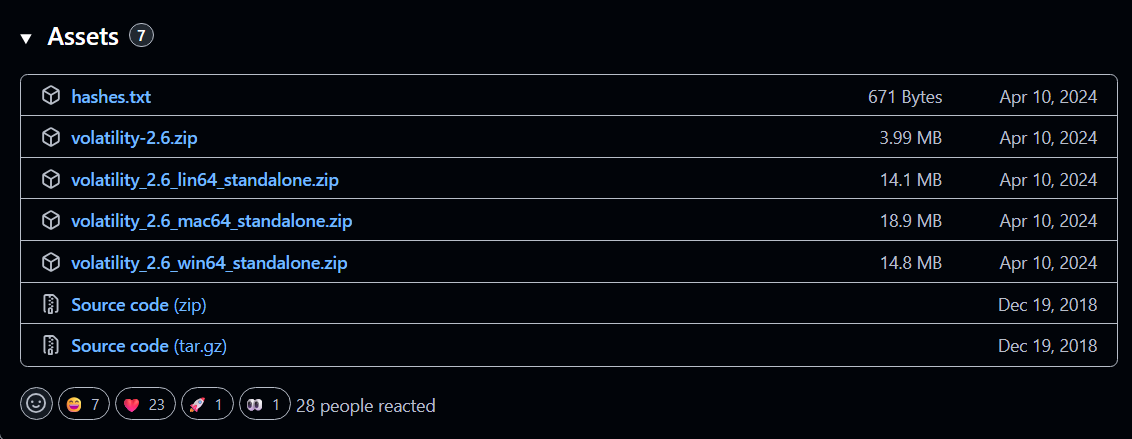
Download the Volatility 2 standalone executable from the offical GitHub repository.
Step 2: Verify Installation
cd path\\to\\volatility-2.6
.\volatility_2.6_win64_standalone.exe -h
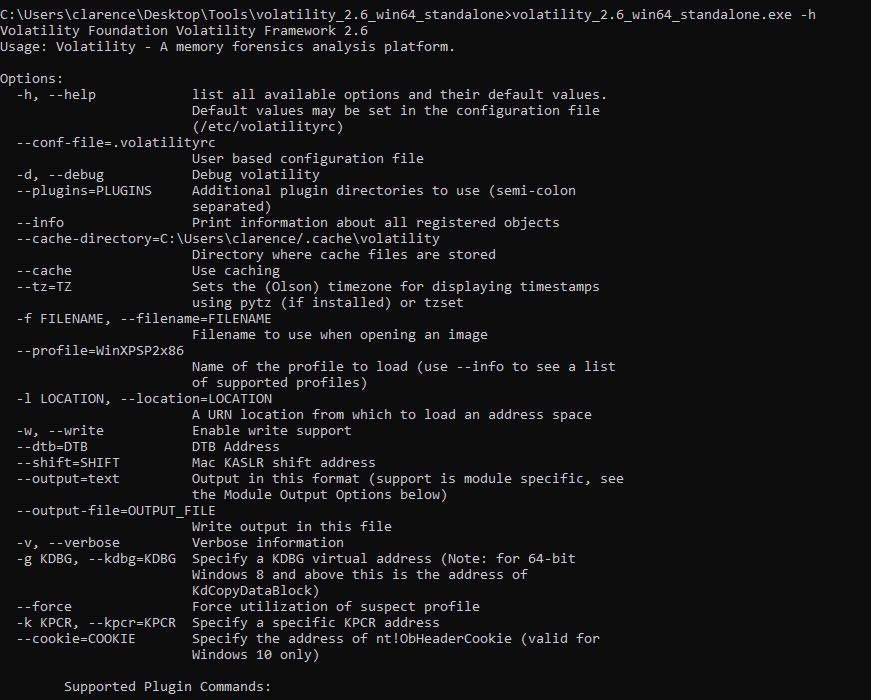
The help menu will be shown if the installation is successful. Plugins can also be found in the help menu for memory analysis.
Questions
1. Which volatility profile would be best for this machine?
This is the very first thing to do when analyzing the memory dump with Volatility 2. After finding the profile of the investigated machine, volatility 2 can analyze the data from the memory dump with this profile.
volatility_2.6_win64_standalone.exe -f "path\\to\\CYBERDEF-567078-20230213-171333.raw" imageinfo
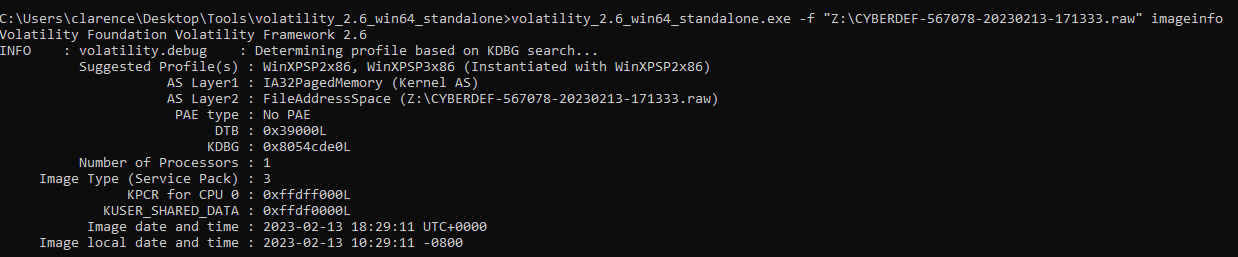
the suggested profiles were WinXPSP2x86 and WinXPSP3x86 but the best for the machine was WinXPSP2x86 .
2. How many processes were running when the image was acquired?
To find all processes running in the memory captured, we used the plugin pslist.
volatility_2.6_win64_standalone.exe -f "path\\to\\CYBERDEF-567078-20230213-171333.raw" --profile WinXPSP2x86 pslist
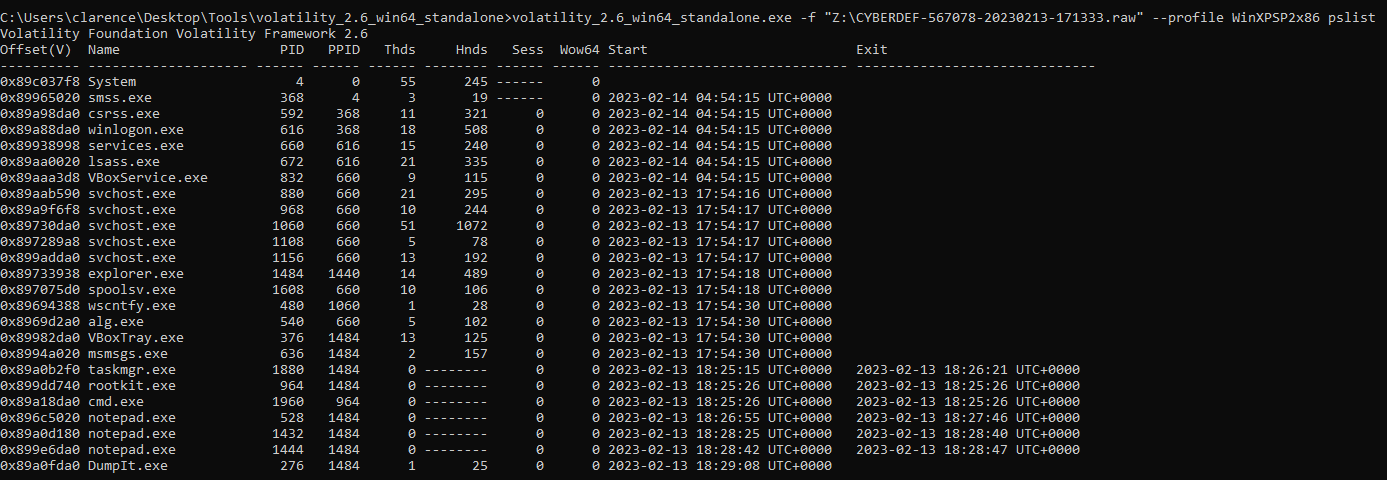
There were total 25 processes running in the memory. However 6 of them exited, indicating that those processes terminated. Therefore, 25 - 6 = 19 were running in the memory when captured.
3. What is the process ID of cmd.exe?
According to the above screenshot, the process ID of cmd.exe was 1960.
4. What is the name of the most suspicious process?
In my practice I would look at the parent-child relationship of the processes to predict which the abnormal process was. However in this case, rootkit.exe caught my eyes.
5. Which process shows the highest likelihood of code injection?
In this question, we can use malfind plugin to look at the memory allocations which malcious code could be written in the memory space.
volatility_2.6_win64_standalone.exe -f "path\\to\\CYBERDEF-567078-20230213-171333.raw" --profile WinXPSP2x86 malfind
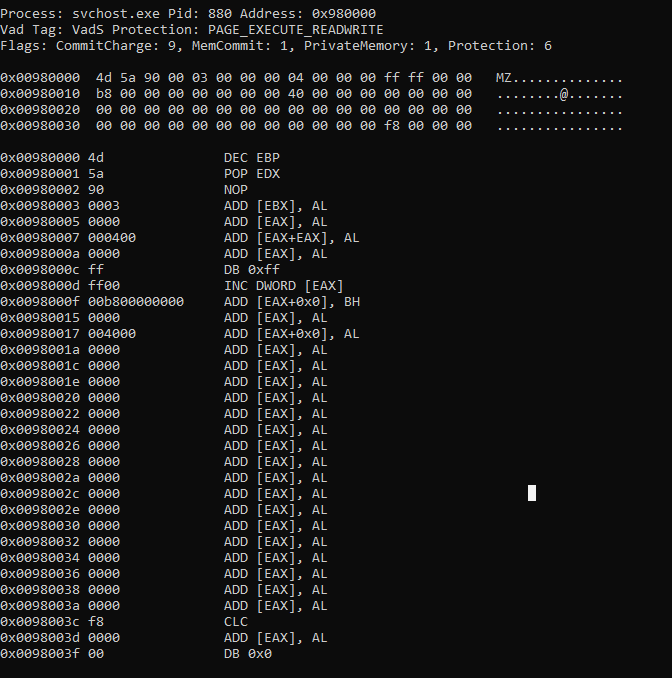
At the bottom of the result, a hex dump of the memory space marked as PAGE_EXECUTE_READWRITE showed the bytes 4D 5A, the MZ header in the process svchost.exe (PID: 880), indicating that a standalone Windows executable was injected and could be executed in the memory space, which was highly suspicious.
6. There is an odd file referenced in the recent process. Provide the full path of that file.
In order to find the file dropped by the suspicious process svchost.exe (PID: 880), we can use handles plugin, which looked at the process interacting with the kernel mode resources.
volatility_2.6_win64_standalone.exe -f "path\\to\\CYBERDEF-567078-20230213-171333.raw" --profile WinXPSP2x86 -p 880 -t file handles
-p 880: The process ID of svchost.exe
-t file: only showed the drooped files
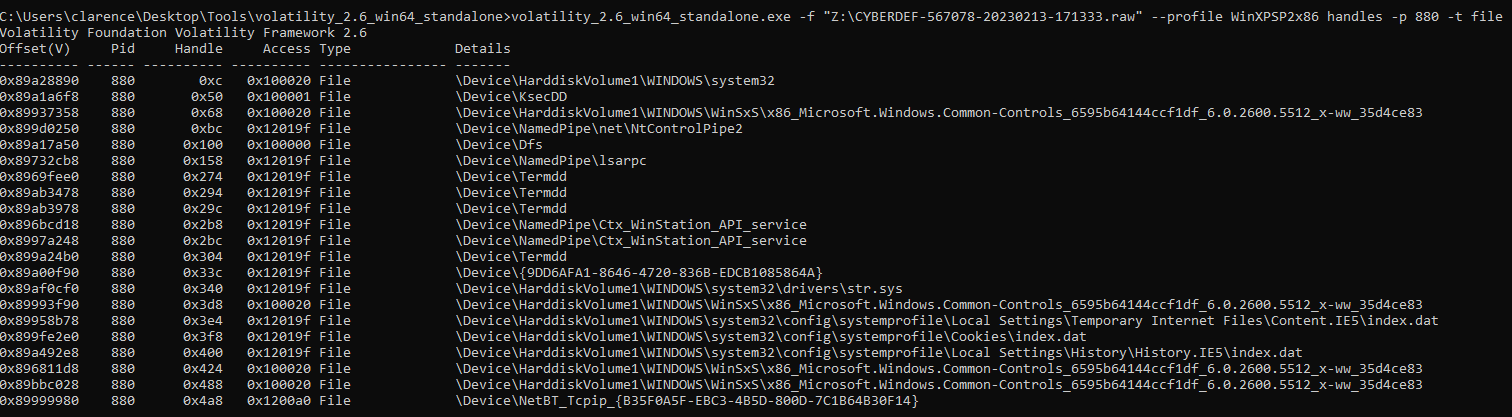
According to the result, the file path of C:\WINDOWS\system32\drivers\str.sys was suspicious. .sys file is a kernel-mode driver running at ring 0, directly interacting with the hardware, invading detection by the EDR and AV!
7. What is the name of the injected DLL file loaded from the recent process?
In order to find the .dll libraries loaded by the suspicious process svchost.exe (PID: 880), we can use ldrmodules plugin.
volatility_2.6_win64_standalone.exe -f "path\\to\\CYBERDEF-567078-20230213-171333.raw" --profile WinXPSP2x86 -p 880 ldrmodules
-p 880: The process ID of svchost.exe
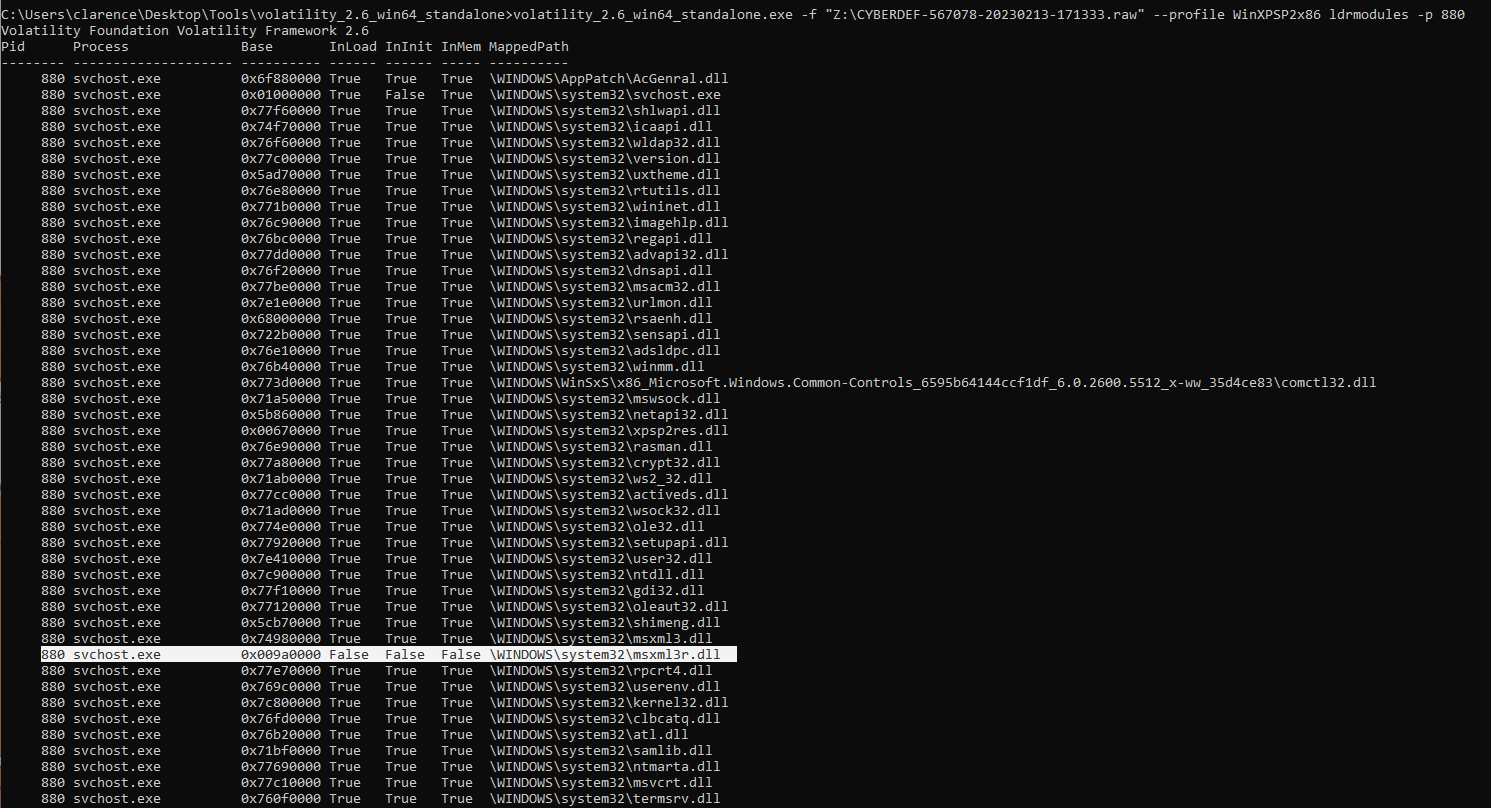
According to the result, only msxml3r.dll showed False flags in 3 columns, indicating that the library was not officially registed while running in the memory to invade detection by AV or EDR.
8. What is the base address of the injected DLL?
At first i thought it was 0x9a0000 from the above screenshot, but actually we need to use malfind plugin to find the base memory of the svchost.exe
volatility_2.6_win64_standalone.exe -f "path\\to\\CYBERDEF-567078-20230213-171333.raw" --profile WinXPSP2x86 malfind
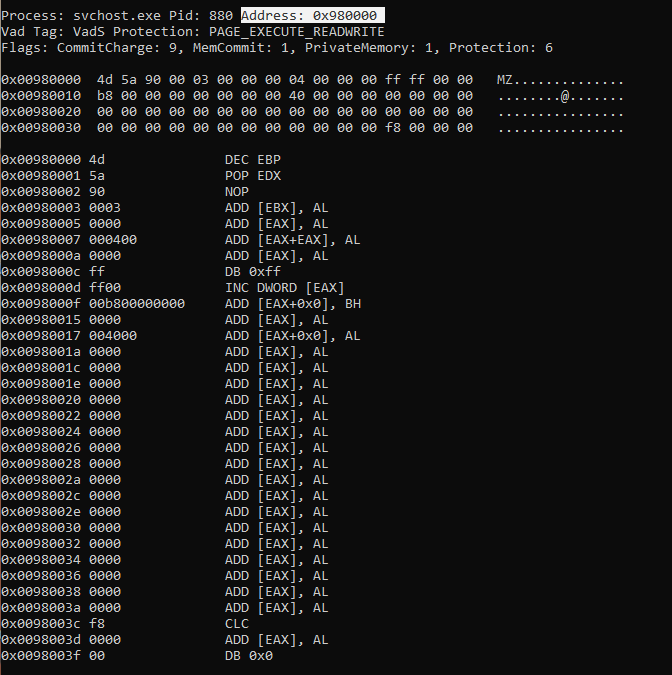
the base address was 0x980000.
参考
CyberDefenders - BlackEnergy 实验室
(返回顶部)