study8677/ai-status-hub
GitHub: study8677/ai-status-hub
一个基于 GitHub Actions 和 Pages 运行的 AI 服务商官方状态监控看板,无需 API 密钥即可追踪 OpenAI、Claude、Gemini 等平台的故障与可用性信息。
Stars: 1 | Forks: 0
# AI 状态中心
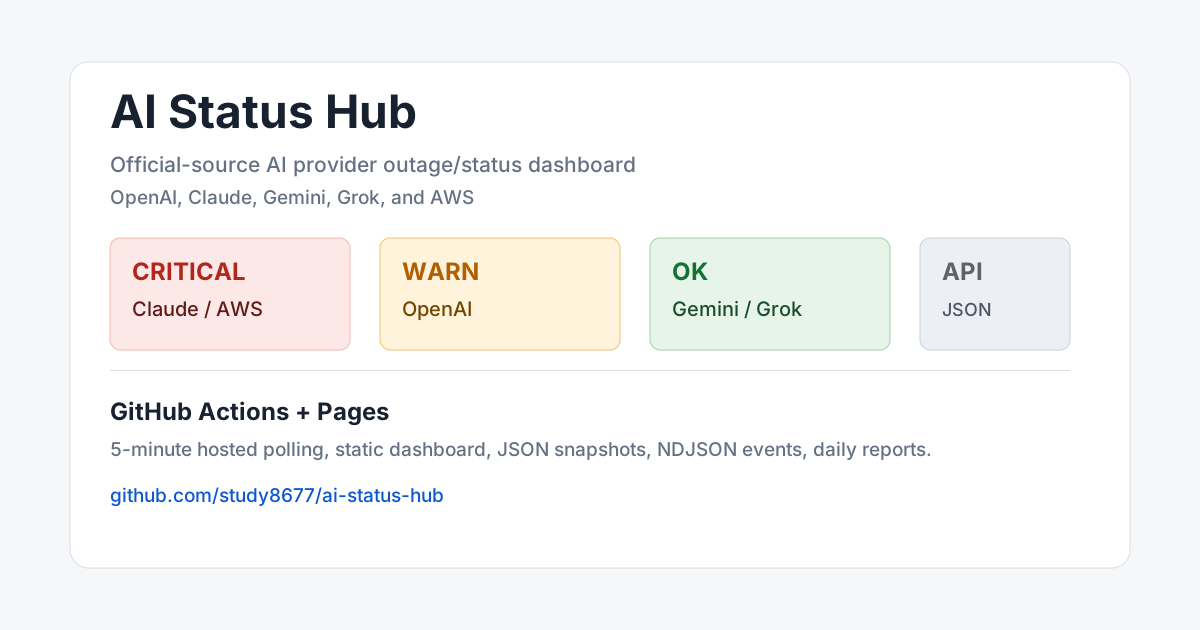
面向 OpenAI、Anthropic Claude、Google Gemini、xAI Grok 和 AWS 的官方源 AI 提供商状态看板。
[](https://github.com/study8677/ai-status-hub/actions/workflows/monitor.yml)
[](https://study8677.github.io/ai-status-hub/)
[](https://github.com/study8677/ai-status-hub/stargazers)
[](./LICENSE)
[](https://www.python.org/)
[](https://study8677.github.io/ai-status-hub/)
仅追踪来自官方状态页的 AI 故障信息。无需 API 密钥,无需付费探测,不依赖第三方状态聚合站。基于 GitHub Actions + Pages 运行,并发布实时看板、JSON API、NDJSON 事件流和日报。
官方状态源优先的 AI 服务状态中心:不消耗模型 API quota,不依赖第三方聚合站,Fork 后即可自托管。
[在线看板](https://study8677.github.io/ai-status-hub/) · [最新 JSON](https://study8677.github.io/ai-status-hub/last_run.json) · [部署文档](./docs/SELF_HOST.md) · [输出 API](./docs/API.md) · [官方源说明](./docs/SOURCES.md) · [路线图](./docs/ROADMAP.md)
## 为什么值得用
- **官方源优先**:不依赖第三方聚合站,不主动消耗模型 API quota。
- **免费托管**:GitHub Actions 定时采样,GitHub Pages 发布页面。
- **一眼判断问题**:服务按 `正常 / 预警 / 严重 / 未知` 排序,严重事件优先显示。
- **可机器读取**:同时发布 `last_run.json`、`events.ndjson`、日报 JSON/Markdown。
- **误报边界清晰**:抓取失败显示为 `未知`,不会直接算作 provider outage。
- **易于 Fork**:无第三方 Python 依赖,改 `services.json` 和 parser 就能扩展。
## 实时演示
| 页面 | 地址 |
|---|---|
| 中文状态看板 | https://study8677.github.io/ai-status-hub/ |
| 最新快照 | https://study8677.github.io/ai-status-hub/last_run.json |
| 事件流 | https://study8677.github.io/ai-status-hub/output/events.ndjson |
| 日报 | https://github.com/study8677/ai-status-hub/tree/gh-pages/reports |
快速查看当前状态:
```
curl -s https://study8677.github.io/ai-status-hub/last_run.json \
| jq -r '.services[] | [.service, .level, .overall_status] | @tsv'
```
## 更新频率
- 计划频率:每 5 分钟触发一次。
- 触发分钟:北京时间每小时 `00 / 05 / 10 / 15 / 20 / 25 / 30 / 35 / 40 / 45 / 50 / 55` 分。
- 实际更新:GitHub Actions 触发后还要完成采样、生成页面、推送 `gh-pages`,通常会晚几十秒到数分钟。
- 1 分钟级别监控:需要自托管 runner 或外部调度器,GitHub 托管 runner 不适合严格 1 分钟轮询。
## 官方数据源
| 服务 | 官方源 | 解析方式 | 说明 |
|---|---|---|---|
| OpenAI | https://status.openai.com/api/v2/summary.json | Statuspage JSON | 读取组件状态和 active incident。 |
| Claude | https://status.claude.com/api/v2/summary.json | Statuspage JSON | `indicator=none` 视为基础正常,但 active major incident 仍会拉红。 |
| Gemini | https://status.cloud.google.com/incidents.json | Google Cloud incident JSON | 只筛选 Gemini / Vertex Gemini 相关事件。 |
| Grok | https://status.x.ai/feed.xml | xAI RSS + 页面回退 | 页面被 Cloudflare 拦截时,以 RSS 作为主要机器可读源。 |
| AWS | https://health.aws.amazon.com/public/currentevents | AWS public health JSON | 全量 AWS public current events;响应为 UTF-16 JSON,事件时间来自 `event_log`。 |
## 自托管
Fork 后只需要 GitHub Actions + Pages:
1. Fork 仓库。
2. 在 fork 中启用 GitHub Actions。
3. 将 Pages 来源设为 `gh-pages` 分支。
4. 手动运行一次 `AI Status Hub Monitor` workflow。
5. 打开你的 Pages URL。
更多细节见 [自托管](./docs/SELF_HOST.md)。
## 本地运行
```
python3 -m unittest discover -s tests -v
python3 monitor.py run
python3 monitor.py report
python3 monitor.py loop --interval 60
```
可编辑安装:
```
python3 -m pip install -e .
ai-status-hub run
ai-status-hub report
```
Docker:
```
docker compose up --build
```
## 输出结构
| 路径 | 用途 |
|---|---|
| `monitor.py` | 抓取、解析、评分、去抖、存储、页面渲染。 |
| `services.json` | 官方源服务配置。 |
| `tests/test_monitor.py` | 解析器和边界测试。 |
| `docs/API.md` | JSON/NDJSON/日报输出说明。 |
| `docs/SOURCES.md` | 官方源可信度和误报边界。 |
| `docs/schema/last_run.schema.json` | 公开 JSON 快照 Schema。 |
| `.github/workflows/monitor.yml` | GitHub Actions 托管运行。 |
| `.github/workflows/ci.yml` | push/PR 测试。 |
| `gh-pages` 分支 | 发布页面和运行态数据。 |
## 状态规则
| 等级 | 含义 |
|---|---|
| `正常` / `ok` | 官方源显示 operational,且没有相关 active incident。 |
| `预警` / `warn` | 降级、部分故障或较低级别 active incident。 |
| `严重` / `critical` | major outage、service disruption、active major incident,或 AWS public currentevents 里的最高活动影响级别。 |
| `未知` / `unknown` | 官方源抓取或解析失败。这代表监控源健康问题,不直接算作服务故障。 |
告警去抖:
- 连续 2 次异常才触发。
- 连续 2 次恢复才消警。
- source failure 不直接制造 provider outage。
## 示例
- [使用 Python 消费 JSON](./examples/consume-json.py)
- [从 GitHub Actions 消费](./examples/github-action.yml)
## 项目边界
这个项目只使用官方状态源,不主动探测模型 API,不发送测试 prompt,不依赖第三方聚合状态页。这样可以避免消耗 API quota,也能把信号限定在服务商正式发布的事件上。
标签:AI服务, GitHub Actions, Python, 无后门, 状态看板, 网络调试, 自动化, 自动笔记, 请求拦截, 运维监控, 逆向工具