# Springgraph
### 为 Spring Cloud 微服务打造的代码知识图谱 · AI 协同引擎
把 `@RestController` 链路、Feign 远程调用、MyBatis SQL、事务边界变成一张可点击的图。
让 AI Agent 30 秒内答出 "这个端点调了哪些表" — 不再 grep + Read 几十次。
[](https://opensource.org/licenses/MIT)
[](https://www.npmjs.com/package/@jinglonglong/springgraph)
[](https://nodejs.org/)
[](https://spring.io/projects/spring-cloud)
[](https://modelcontextprotocol.io/)
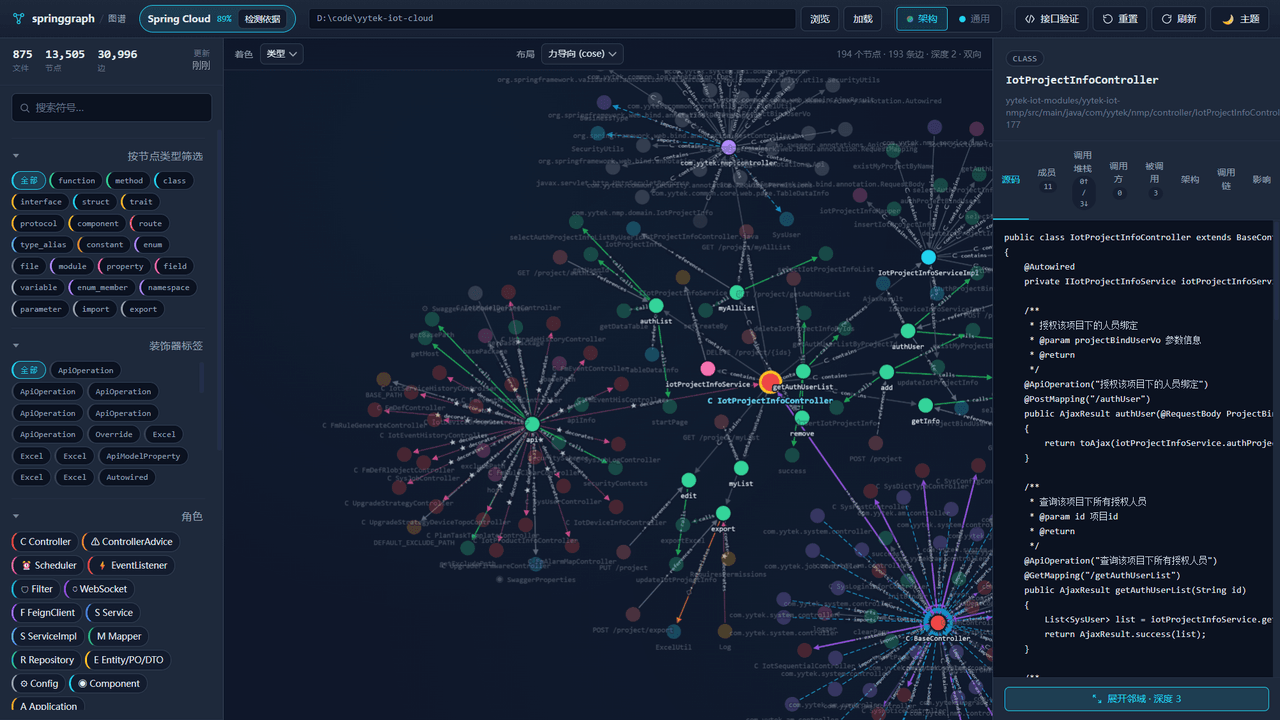
## 🎯 为什么这个工具存在
当你的 AI Agent (Claude Code / Cursor) 面对一个 Spring Cloud 微服务项目时,会发生什么?
- ❌ "调用链是啥?" → AI 答:让我 Read 一下 `UserController`...再 `git grep` 一下 `@Autowired`...再 Read 几个文件...3 分钟后还在查。
- ❌ "这段 SQL 谁调的?" → AI grep 出 8 个 `selectById`,不知道哪个真正会触发。
- ❌ "改这个 Feign 接口会炸哪些服务?" → AI:不知道,你得自己看。
- ❌ "中间件用了哪些?敏感配置在哪?" → AI:让我 Read 一下每个 `application.yml`...
**Springgraph 帮你 (和你的 AI) 直接跳过这些步骤。** 它把代码预先解析成一张图,Agent 一次调用就能拿到完整答案。
实测数据(基于 7 个真实开源 Spring Cloud 仓库的 A/B 评估,中位数):
- **57%** 减少 Token 消耗
- **46%** 减少分析耗时
- **71%** 减少工具调用次数
- 在大型项目上,实现**零文件 Read**
## ✨ Features
- **🧩 Spring 语义知识图谱** — 解析 `@RestController` / `@Service` / `@Mapper` / `@FeignClient` / `@Value` / `@ConfigurationProperties`,自动连接 HTTP → Service → SQL
- **🔌 4 个 Spring 专属 MCP 工具** — `spring_find_entry` / `spring_trace_flow` / `spring_assets_overview` / `spring_method_impact`,经过 A/B 优化,大幅降低 Agent 选错工具的概率
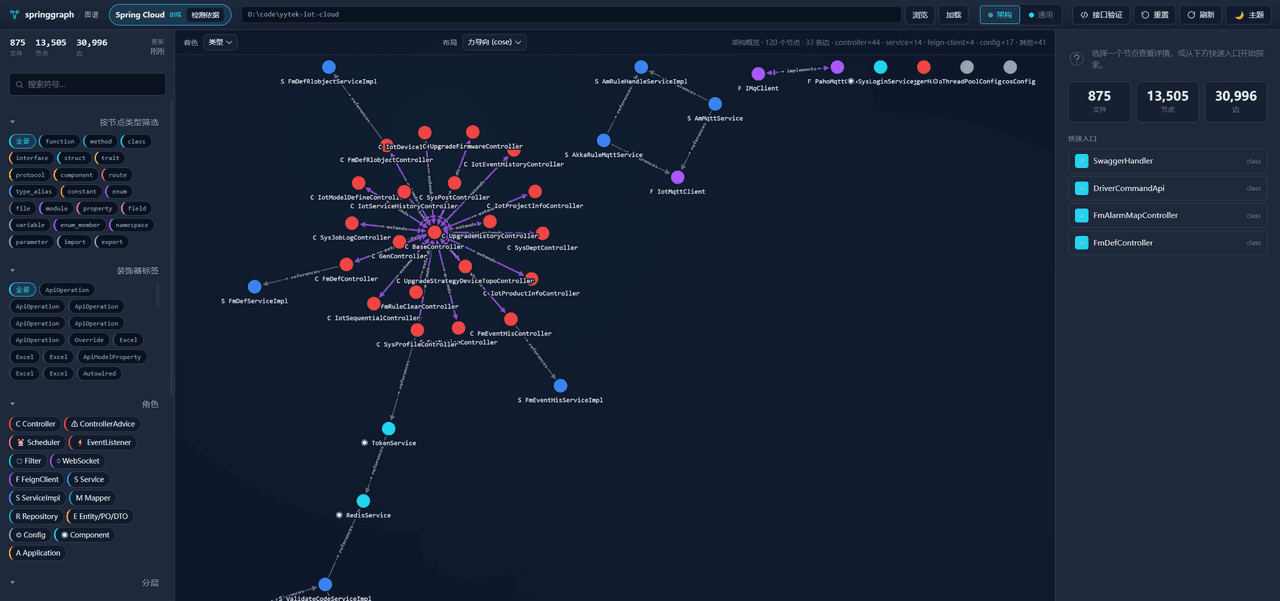
- **🏗 架构剖面引擎** — 把项目自动分成 6 层(Entry / Remote / Business / Data / Model / Infrastructure)和 15 种角色
- **🔁 Spring Bean 装配解析** — 深度理解 `@Autowired` / `@Resource` / 构造注入(包括 Lombok `@RequiredArgsConstructor`)/ 接口派发
- **🕸 MyBatis XML 链路** — Java `Mapper` 接口 ↔ XML 命名空间 ↔ SQL 语句 ↔ 数据库表
- **🌐 浏览器可视化** — 内置 Web UI,基于 Cytoscape.js,鼠标悬停即高亮整条调用链
- **⚡ 100% 本地** — 代码不出你的机器,无需 API key,数据保存在 `.springgraph/springkg.db`
- **📦 一键安装** — 全局 npm / npx 免安装 / 独立安装脚本(无需 Node.js)三种方式
## 🚀 30 秒快速开始
### 方式 1:npx 零依赖试用(最快)
npx @jinglonglong/springgraph web
浏览器自动打开 `http://127.0.0.1:4000`,看到架构图。
### 方式 2:全局安装(推荐)
npm install -g @jinglonglong/springgraph
为你的 AI Agent 自动配置 MCP 服务(支持 Claude Code、Cursor、Codex CLI、opencode 等):
springgraph install -y
### 方式 3:独立脚本(无需 Node.js)
# macOS / Linux
curl -fsSL https://raw.githubusercontent.com/jinglonglong/springgraph/master/install.sh | sh
# Windows (PowerShell)
irm https://raw.githubusercontent.com/jinglonglong/springgraph/master/install.ps1 | iex
### 索引你的项目
进入 Spring Cloud 项目根目录:
cd your-spring-cloud-project
springgraph init -i
看到类似输出:
✓ Found 12 controllers
✓ Found 8 @FeignClient interfaces
✓ Found 23 @Mapper interfaces
✓ Linked 47 MyBatis SQL statements
✓ Built 156 architecture edges
✓ Spring semantic layer ready in .springgraph/springkg.db
现在你的 Claude Code / Cursor 就可以直接使用 4 个 `spring_*` 工具了。
### 启动 Web UI 可视化
springgraph web
打开浏览器,你将看到:
- 🎯 **架构剖面图** — Controller / Service / Mapper 的层级关系一目了然
- 🔍 **点击节点下钻** — 查看 MyBatis XML、SQL 文本、调用链头
- 🖱 **悬停高亮** — 鼠标悬停在任意节点,自动高亮上游调用和下游依赖
- 🗺 **请求链路追踪** — 输入 URL,看到从 Endpoint 到 SQL 的完整路径
## 🎯 真实使用场景
### 场景 1:微服务调用链分析
Agent 调用 `spring_trace_flow`:
=== 调用链分析结果 ===
1. [Entry] UserController.getUser (UserController.java:24)
2. [Business] UserService.getUserById (UserService.java:12)
3. [Data] UserMapper.selectById (UserMapper.java:8)
4. [SQL] select * from users where id = #{id} (UserMapper.xml:4)
### 场景 2:微服务排障
Agent 调用 `spring_assets_overview`:
=== Services (3) ===
- com.example.user.UserController — user-service/.../UserController.java:7
- com.example.order.OrderController — order-service/.../OrderController.java:5
=== Middlewares (1) ===
- Filter: localhost:8080 (gateway-service/.../MyFilter.java:10)
=== Sensitive Config (2) ===
- spring.datasource.password — application.yml:5 (value: ***)
- spring.redis.password — application.yml:12 (value: ***)
### 场景 3:代码结构理解
Agent 调用 `spring_assets_overview` + `spring_find_entry`,直接告诉你:
✓ 12 controllers across 3 microservices
✓ Layer breakdown: Entry(12) / Remote(8) / Business(23) / Data(15)
✓ 47 REST endpoints, 8 Feign clients, 23 SQL queries
### 场景 4:服务依赖分析
Agent 用 `spring_find_entry` + `spring_trace_flow` 反向追踪:
user-service → OrderClient (@FeignClient) → order-service
user-service → PaymentClient (@FeignClient) → payment-service
### 场景 5:架构重构辅助
Agent 调用 `spring_method_impact`:
=== 影响面分析 ===
- 调用方: UserController.getUser (line 24)
- 调用方: UserController.updateUser (line 38)
- 关联 SQL: selectById (UserMapper.xml:4)
- 事务边界: @Transactional (UserService.java:8)
- 异常处理: GlobalExceptionHandler (GlobalExceptionHandler.java:15)
### 场景 6:新人 onboarding
Agent 通过 Web UI + 多次 `spring_*` 工具调用,5 分钟内给你完整的架构图、关键链路、依赖关系、技术栈清单。比 Read 几十个文件快 10 倍。
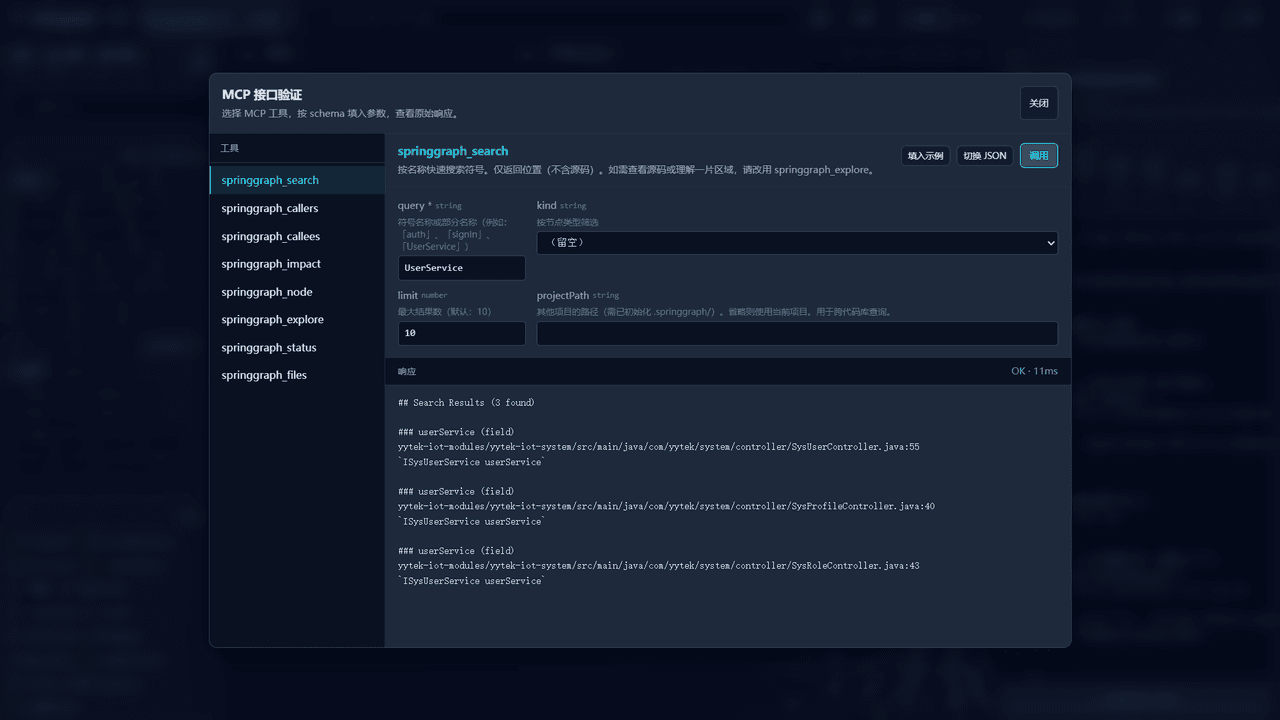
### 场景 7:用 Web UI 直接验证 MCP 接口
不需要写测试代码,Web UI 自带**接口验证器**(`接口验证` tab),可视化选择 MCP 工具、填入参数、一键调用、查看原始响应 — 调试 Agent 行为或为新工具编写 demo 极方便。
## 🛠 内部架构
┌──────────────────────────────────────────┐
│ AI Agent (Claude Code / Cursor) │
└──────────────────┬───────────────────────┘
│ MCP Protocol
▼
┌───────────────────────────┐
│ Springgraph MCP Server │
│ (springgraph serve --mcp) │
└──────┬──────────────┬───────┘
│ │
▼ ▼
┌──────────────┐ ┌──────────────┐
│ springgraph.db │ │ springkg.db │
│ (通用代码图) │ │(Spring 语义层)│
└──────────────┘ └──────────────┘
│
┌───────────────────┼───────────────────┐
│ │ │
▼ ▼ ▼
Spring 符号提取 MyBatis XML 解析 架构剖面引擎
(@RestController (Mapper ↔ XML (6 层 + 15 角色)
@Service ...) ↔ SQL 链接)
四个核心模块:
1. **Parser** — Tree-sitter 抽取,20+ 语言,精准解析 Java 注解与 XML
2. **Graph Builder** — 构建 `Spring Symbol` / `Spring Edge` 关系图
3. **Storage** — SQLite + FTS5,本地文件,毫秒级查询
4. **MCP Server** — 4 个精简工具,Agent 友好
## 🗺 Roadmap
- [x] ✅ Spring 语义知识图谱
- [x] ✅ 4 个 MCP 工具(精简后)
- [x] ✅ Web UI 可视化
- [x] ✅ MyBatis XML 链路解析
- [ ] 🚧 **Nacos / Apollo 配置中心集成** — 自动同步配置变更到图谱
- [ ] 🚧 **Spring Cloud Gateway 路由分析** — 完整覆盖 gateway → service 调用链
- [ ] 🚧 **Sentinel / Hystrix 流控规则可视化** — 关联限流配置与代码
- [ ] 📋 **Dubbo 支持** — 扩展到 Apache Dubbo 微服务
- [ ] 📋 **分布式事务追踪** — Seata / RocketMQ 事务消息链路
- [ ] 📋 **VS Code 插件** — 不依赖 AI,直接 IDE 内可视化
- [ ] 📋 **OpenSpec / OpenAPI 集成** — 把仓库内 `.opencode/skills` 与本项目协同打通
## 🤖 支持的 AI Agent
Springgraph 通过 `springgraph install` 一条命令,自动检测并接入以下所有主流 AI Agent:
| Agent | 配置文件 | 自动配置项 |
|---|---|---|
| **Claude Code** | `~/.claude.json` / `.mcp.json` | MCP 服务 + 权限白名单 + `CLAUDE.md` 指令块 |
| **Cursor** | `~/.cursor/mcp.json` | MCP 服务 + `.cursor/rules/springgraph.mdc` |
| **Codex CLI** | `~/.codex/config.toml` | TOML 格式的 MCP 块 + `AGENTS.md` |
| **opencode** | `opencode.jsonc` | JSONC 格式的 MCP 服务配置 |
| **Hermes Agent** | Hermes config | 自动注入 MCP |
| **Gemini CLI** | `~/.gemini/GEMINI.md` + MCP | 指令 + MCP |
| **Antigravity IDE** | Antigravity config | MCP |
| **Kiro** | Kiro config | MCP |
## 📊 对比:为什么选 Springgraph?
| 需求 | 通用代码搜索 | 通用 GraphRAG | **Springgraph** |
|---|---|---|---|
| Spring Cloud 调用链 | ❌ 需要手动 grep | ⚠️ 需要配置 | ✅ 自动解析 `@RestController` / `@FeignClient` |
| MyBatis SQL 链路 | ❌ 不支持 | ⚠️ 需要自定义 | ✅ XML ↔ Mapper ↔ SQL 自动关联 |
| Spring Bean 依赖 | ❌ 静态分析有限 | ⚠️ 需要重索引 | ✅ 深度理解 `@Autowired` / 构造注入 |
| AI 工具选择 | ❌ 10+ 工具,Agent 困惑 | ⚠️ 上下文窗口爆炸 | ✅ **精简到 4 个工具** |
| 微服务启动时间 | - | ⚠️ 5+ 分钟 | ✅ **1 分钟** |
| 隐私性 | ⚠️ 可能上传 | ⚠️ 通常需要云服务 | ✅ **100% 本地** |
## 🧰 命令行工具
| 命令 | 说明 |
|---|---|
| `springgraph init` | 初始化项目,建立索引 |
| `springgraph index` | 重新建索引 |
| `springgraph sync` | 增量同步(文件监听会自动调用) |
| `springgraph status` | 查看索引状态 |
| `springgraph serve --mcp` | 启动 MCP 服务器 |
| `springgraph web` | 启动 Web UI 可视化界面 |
| `springgraph install` | 为 AI Agent 配置 MCP |
| `springgraph daemon` | 管理后台 MCP 服务 |
完整命令列表见 [CLI 参考文档](https://jinglonglong.github.io/springgraph/reference/cli/)。
## 🌟 立即体验
# 30 秒看到架构图
npx @jinglonglong/springgraph web
# 或全局安装,深度使用
npm install -g @jinglonglong/springgraph
springgraph install -y
## 📚 文档
- [完整文档站](https://jinglonglong.github.io/springgraph/)
- [快速开始](https://jinglonglong.github.io/springgraph/getting-started/quickstart/)
- [MCP 工具参考](https://jinglonglong.github.io/springgraph/reference/mcp-server/)
- [Web UI 使用指南](https://jinglonglong.github.io/springgraph/guides/web-ui/)
- [架构剖面引擎](https://jinglonglong.github.io/springgraph/core-concepts/resolution/)
## 📜 License
联系方式:xyjnglong@163.com
**⭐ 如果这个项目对你有帮助,请在 GitHub 上给它一个 Star!**
让更多 Spring Cloud 开发者发现它。


