nmdra/notebrain-cli
GitHub: nmdra/notebrain-cli
一款用 Go 编写的本地优先 CLI 工具,将 Obsidian 笔记仓库转化为完全离线的语义搜索和图谱遍历知识后端,专为 AI 编程智能体设计。
Stars: 7 | Forks: 0
# NoteBrain CLI
一款 Go CLI 工具,可将你的 [Obsidian](https://obsidian.md/) 仓库转化为完全离线的知识后端,专为 **AI 编程智能体** 设计。NoteBrain 会将 markdown 笔记索引到本地的 **[ChromaDB](https://www.trychroma.com/)** 向量数据库中,并通过结构化输出提供语义搜索、wikilink 图谱遍历以及隐藏关联发现等功能——旨在直接由自主智能体、shell 管道和 LLM 工具使用工作流进行链式调用。
内置 [AI 智能体技能](wiki/Skill_Usage.md),可与 [Google Antigravity](https://antigravity.google/)、[Pi agent](https://pi.dev) 和 Claude Code 等智能体集成。该技能经过专门优化,可减少 token 消耗并降低延迟。
[](https://github.com/nmdra/notebrain-cli/actions/workflows/release.yml)
[](https://pkg.go.dev/github.com/nmdra/notebrain-cli)
[](https://github.com/nmdra/notebrain-cli/blob/master/go.mod)
[](https://github.com/nmdra/notebrain-cli/blob/main/LICENSE)
[](https://github.com/nmdra/notebrain-cli/releases)
[](https://github.com/nmdra/notebrain-cli/stargazers)
**4. 链式命令以检索完整笔记:**
```
# 从顶部搜索结果中提取 slug
SLUG=$(notebrain search "message broker" --limit 1 --jsonpath="$.results[0].note_slug")
# 获取完整的重构笔记文本
notebrain get "$SLUG" --jsonpath="$.text"
```
**5. 自动化索引** 使用 cron 作业或 systemd 定时器,让你的索引保持最新(参见[定时摄入](wiki/Scheduled_Ingestion.md))。
## 配置
NoteBrain 从位于 `~/.notebrain/config/config.toml` 的 TOML 文件中读取配置(或通过传递 `--config=/path/to/config.toml` 指定)。CLI 标志始终会覆盖 TOML 的值。
复制模板以快速开始:
```
mkdir -p ~/.notebrain/config
cp config.example.toml ~/.notebrain/config/config.toml
```
关键设置([完整参考](./config.example.toml)):
```
vault-path = "/path/to/Second Brain 2.0"
vault-name = "Second Brain 2.0"
format = "text" # "text", "json", "tsv", "ndjson"
skip-attachments = true # ignore image/file links in graph
skip-phantom = true # exclude uncreated "phantom" notes
respect-exclude = true # honor Obsidian's ignore rules
```
### 数据位置
所有持久化数据均存储在 `~/.notebrain/` 下:
| 路径 | 内容 |
| --------------------------------- | -------------------------------------------------------- |
| `~/.notebrain/chroma/` | ChromaDB 向量存储(嵌入、元数据、链接图谱) |
| `~/.notebrain/config/config.toml` | 用户配置文件 |
如需完全卸载,请移除 `notebrain` 二进制文件并删除 `~/.notebrain/`。
## 文档
| 指南 | 描述 |
| ---------------------------------------------------- | ---------------------------------------------------------- |
| [安装](wiki/Installation.md) | 前置条件、预构建二进制文件、从源码构建 |
| [命令参考](wiki/Commands.md) | 完整的 CLI 命令和标志文档 |
| [架构](wiki/Architecture.md) | 内部细节:分块 pipeline、嵌入、ChromaDB schema |
| [定时摄入](wiki/Scheduled_Ingestion.md) | 用于后台索引的 Cron 和 systemd 定时器设置 |
| [AI 智能体技能使用](wiki/Skill_Usage.md) | 使用内置 AI 智能体技能进行自主检索 |
| [DeepWiki](https://deepwiki.com/nmdra/notebrain-cli) | AI 生成的代码库文档 |
## 贡献
欢迎提交贡献!请在 [GitHub](https://github.com/nmdra/notebrain-cli) 上提交 issue 或 pull request。
本项目使用 [Conventional Commits](https://www.conventionalcommits.org/)、Go vendoring (`vendor/`),并通过 [Lefthook](https://github.com/evilmartians/lefthook) 使用 pre-commit 钩子。
## 许可证
[MIT 许可证](LICENSE) — 版权所有 © 2026 nmdra
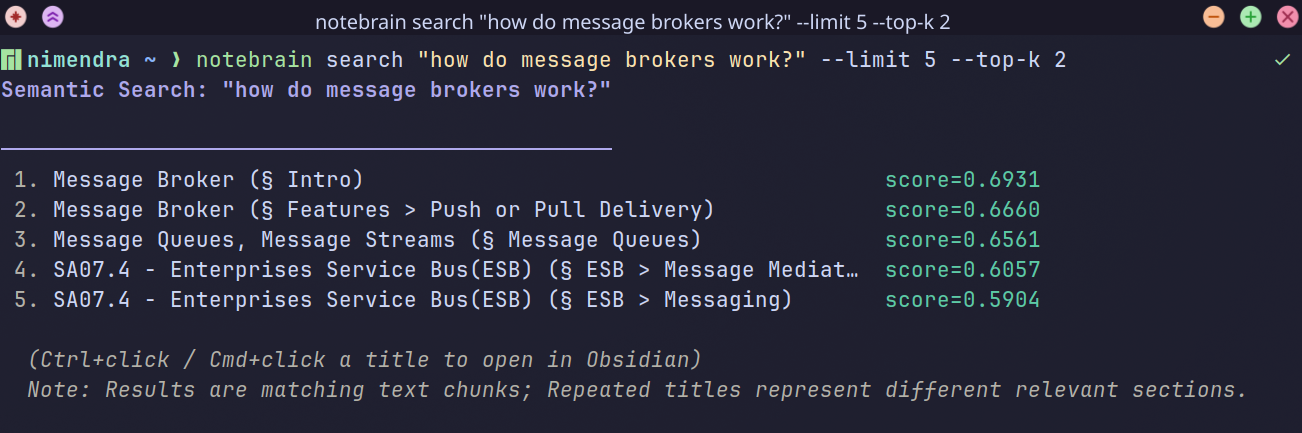
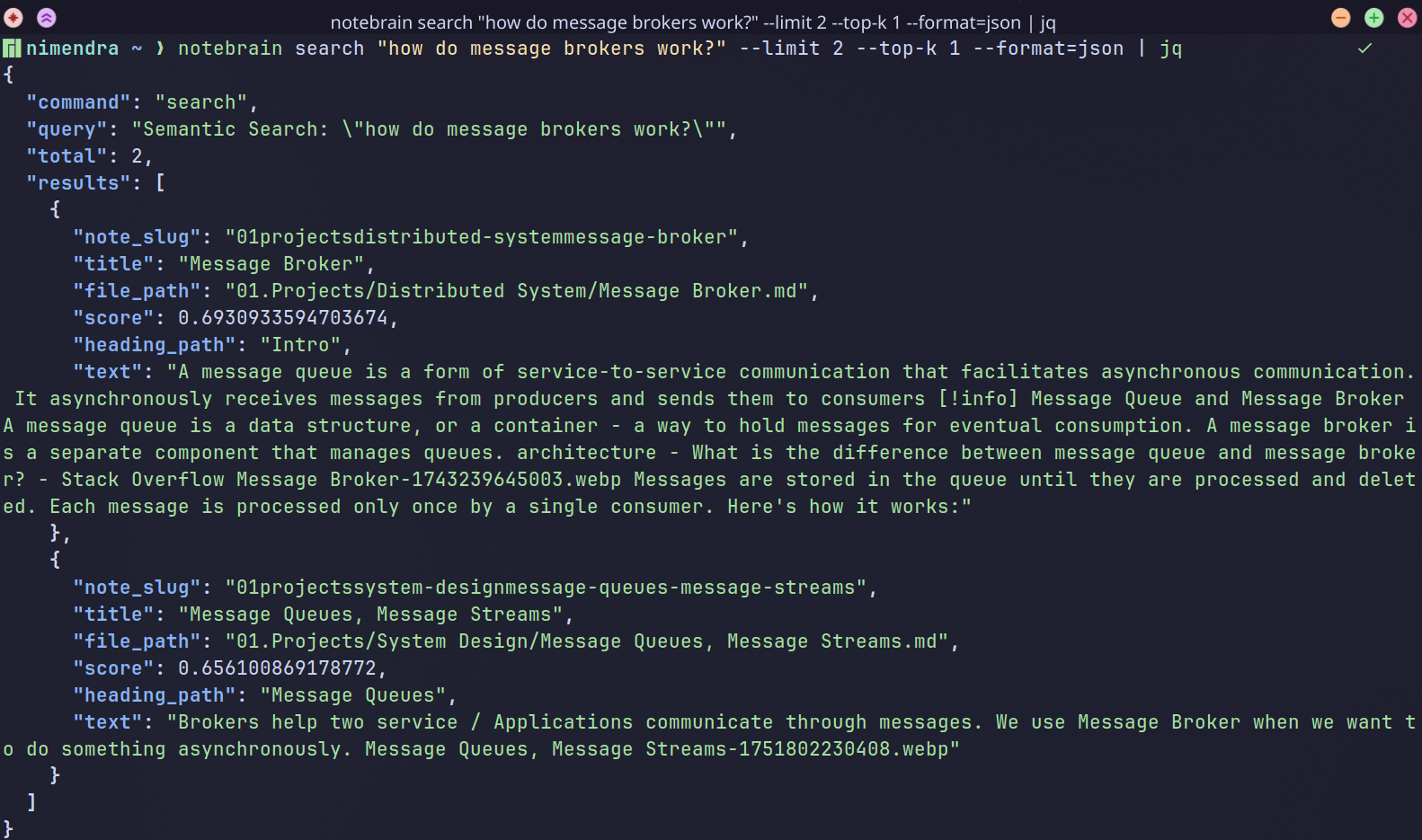
JSON 输出示例
标签:AI智能体, CNCF毕业项目, EVTX分析, Go, RAG, Ruby工具, 向量数据库, 日志审计, 知识管理, 语义检索