onlyv4ns/rikontol
GitHub: onlyv4ns/rikontol
一款面向漏洞赏金狩猎的 11 阶段自动化侦察流水线,能将域名一键转化为包含漏洞发现与优先级评分的完整攻击面地图。
Stars: 0 | Forks: 0
# Rikontol v0.4.0
Rikontol 用于漏洞赏金狩猎的自动化侦察 pipeline。只需一条命令,即可将一个域名从零开始转化为完整的攻击面地图 —— 包括子域名、存活主机、开放端口、云资产、技术栈、endpoint、隐藏参数、漏洞、屏幕截图、403 绕过以及子域名接管候选目标 —— 并支持 diff 监控、优先级评分和 HTML 报告生成。
## 截图
**CLI — 命令概览**
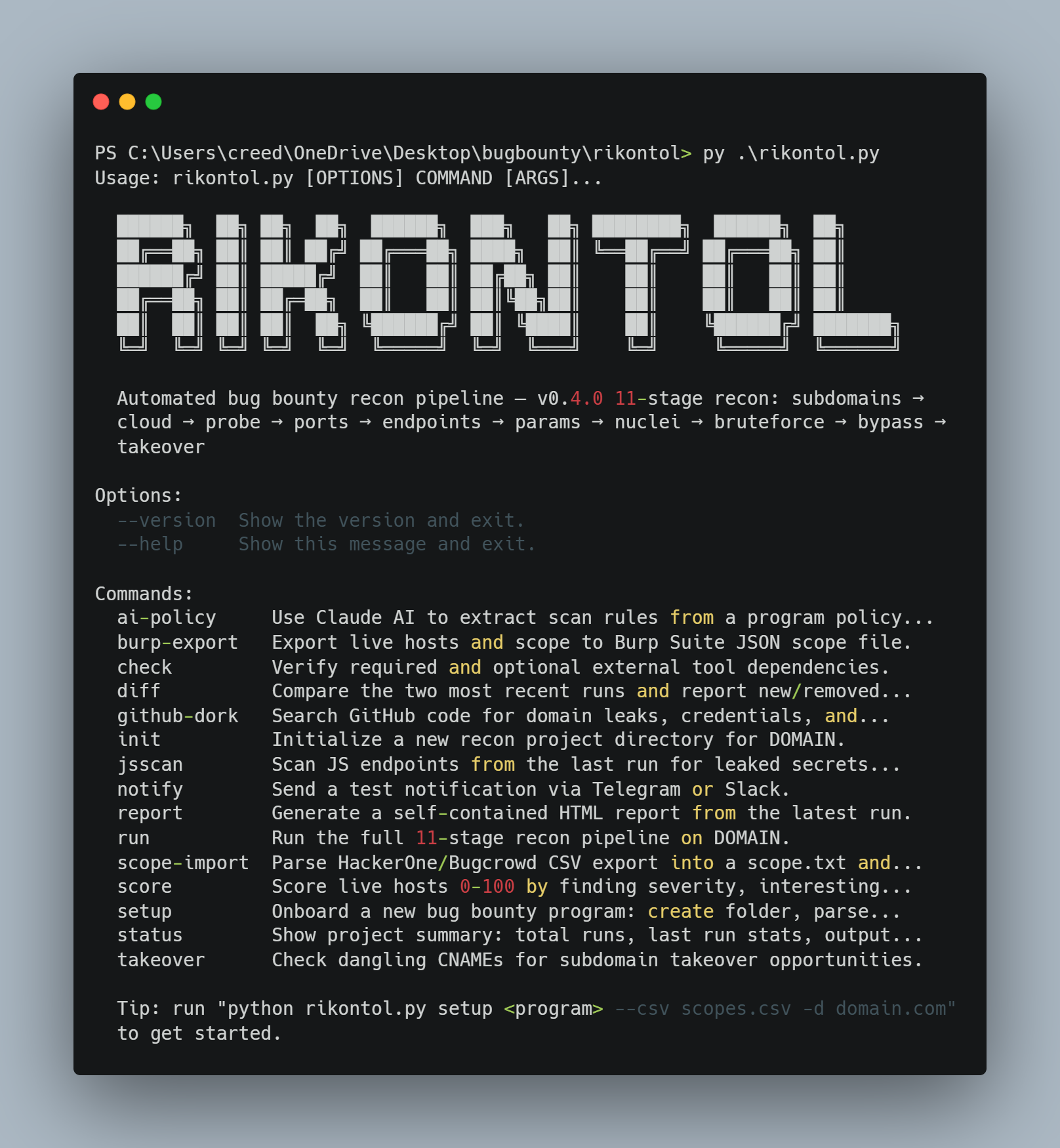
**设置 — 范围导入与策略分析**
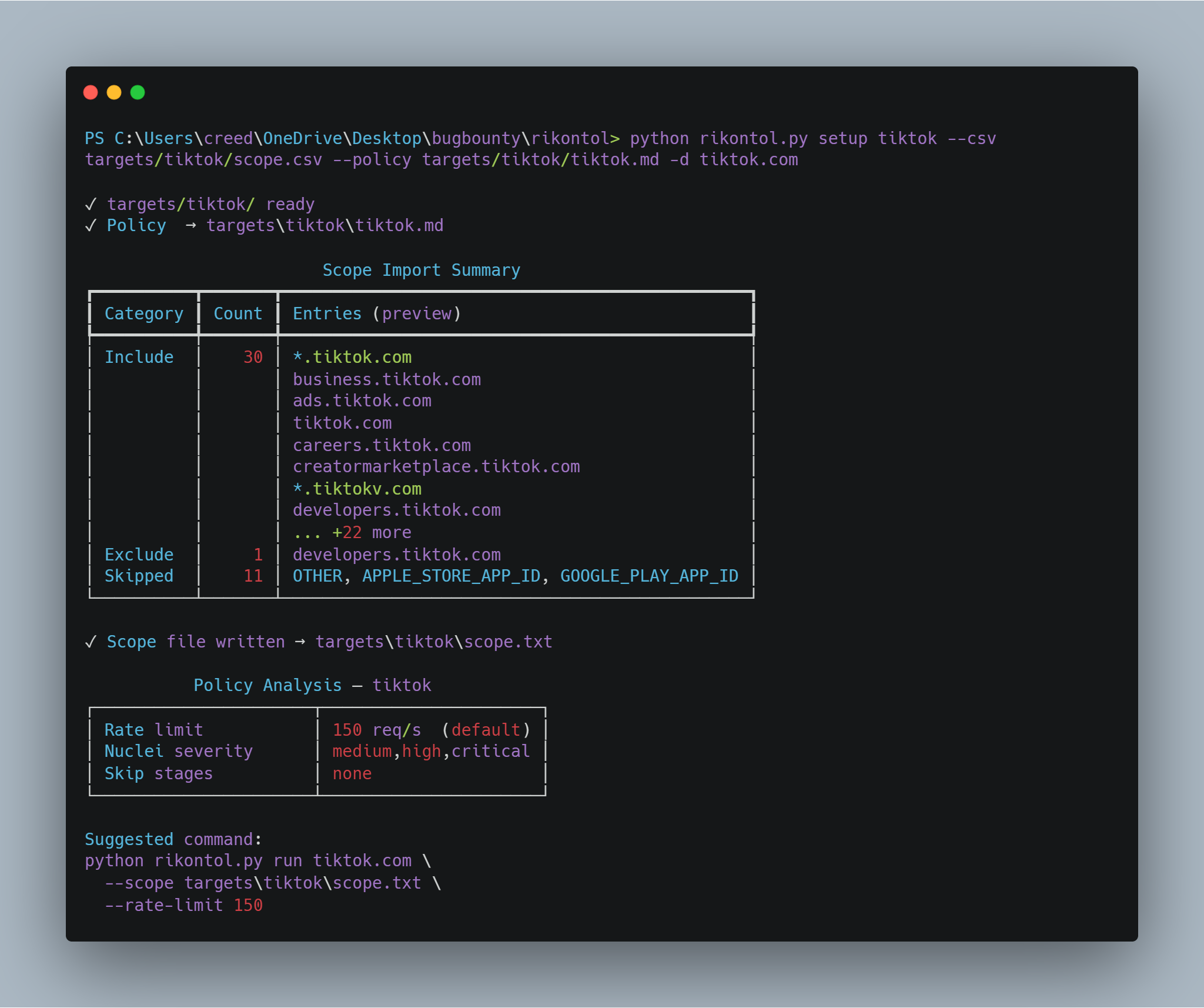
**HTML 报告 — 运行摘要仪表板**
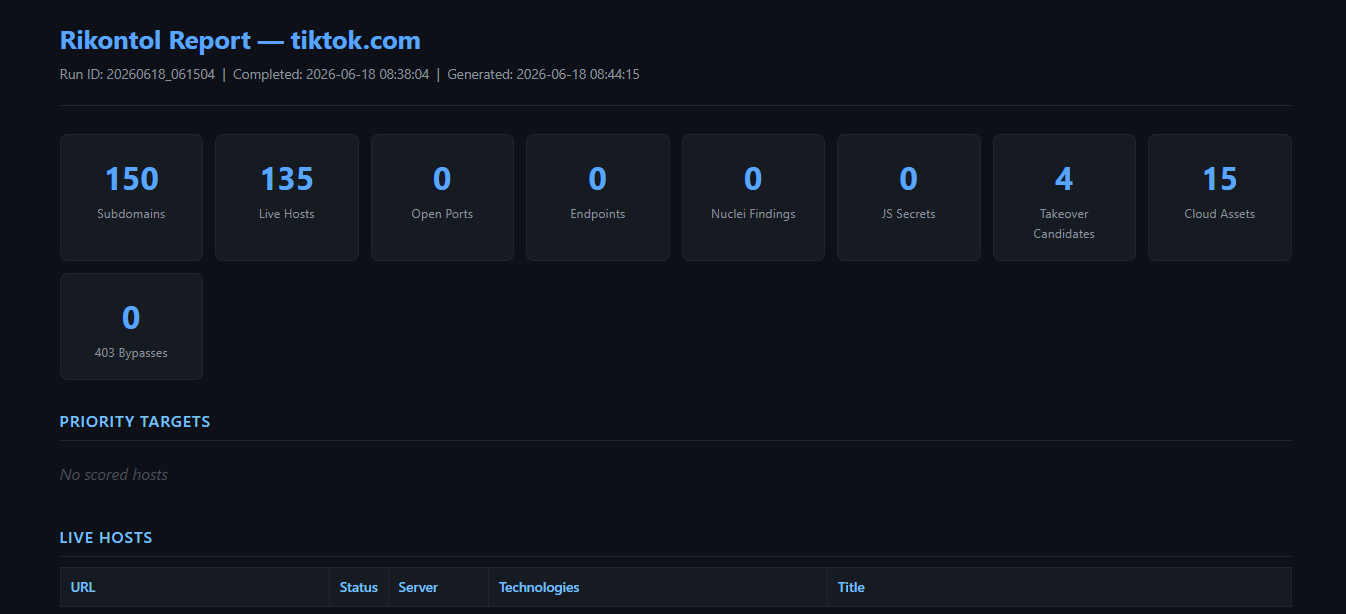
**Pipeline 输出 — 接管候选目标与侦察摘要**
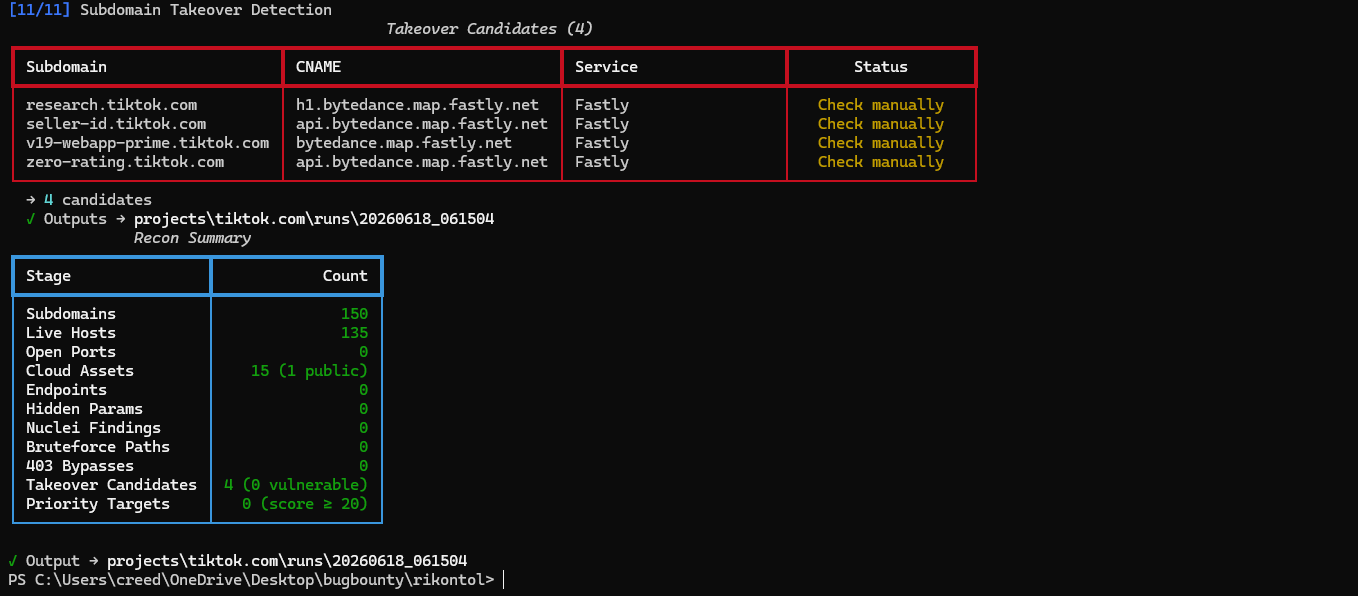
## Pipeline(11 个阶段)
| # | 阶段 | 作用 | 工具 |
|---|-------|-------------|------|
| 1 | 子域名枚举 | 被动发现 → 范围过滤 → DNS 解析过滤 | `subfinder`, `amass` |
| 2 | 云资产发现 | 查找暴露的 S3/Azure/GCP/DO 存储桶 | 内置 |
| 3 | 存活主机探测 | HTTP/S 探测 — 状态码、标题、技术栈 | `httpx` |
| 4 | 端口扫描 | 扫描非标准端口 | `naabu` |
| 5 | 屏幕截图 | 对每个存活主机进行可视化快照 | `gowitness` |
| 6 | Endpoint 发现 | 爬取 JS SPA + 历史 URL | `katana`, `gau`, `waybackurls` |
| 7 | 参数发现 | 查找 API endpoint 上的隐藏 HTTP 参数 | `arjun` |
| 8 | Nuclei 扫描 | 基于模板的漏洞扫描(中危/高危/严重) | `nuclei` |
| 9 | 目录暴破 | 发现每个主机的隐藏路径 | `ffuf` |
| 10 | 403 绕过 | 在被阻止的 URL 上测试标头/路径绕过技术 | 内置 |
| 11 | 接管检测 | 检测指向未声明服务的悬空 CNAME | 内置 |
| — | 优先级评分 | 根据所有发现结果为每个主机打分(0–100) | 内置 |
| — | 范围过滤 | 在每个阶段执行包含/排除模式 | 内置 |
| — | WAF 绕过 | 向所有主动工具发送可配置的 `user_agent` | 内置 |
| — | Diff 监控 | 比较运行结果,突出显示新增/移除的资产 | 内置 |
| — | JS 密钥扫描 | 使用正则表达式扫描 JS 文件以查找暴露的密钥和 token | 内置 |
| — | 通知 | 通过 Telegram 或 Slack 发送新资产警报 | 内置 |
## 要求
### Python
```
click>=8.1.0
rich>=13.0.0
pyyaml>=6.0
requests>=2.31.0
anthropic>=0.20.0 # optional — for ai-policy command
```
### 外部工具(基于 Go)
**必需:**
```
go install -v github.com/projectdiscovery/subfinder/v2/cmd/subfinder@latest
go install -v github.com/projectdiscovery/httpx/cmd/httpx@latest
go install github.com/projectdiscovery/katana/cmd/katana@latest
go install github.com/lc/gau/v2/cmd/gau@latest
```
**可选(强烈推荐):**
```
go install -v github.com/projectdiscovery/naabu/v2/cmd/naabu@latest
go install -v github.com/projectdiscovery/nuclei/v3/cmd/nuclei@latest
go install github.com/ffuf/ffuf/v2@latest
go install github.com/sensepost/gowitness@latest
go install github.com/tomnomnom/waybackurls@latest
go install -v github.com/owasp-amass/amass/v4/...@master
pip install arjun
```
## 安装
```
cd recontool
pip install -r requirements.txt
python rikontol.py check
```
## 项目设置
### `setup` — 接入新项目
```
# 创建文件夹 + 显示说明
python rikontol.py setup grab
# 创建文件夹 + 处理 CSV + 分析 policy
python rikontol.py setup grab --csv scopes.csv -d grab.com
# 包含 policy 文件的完整设置
python rikontol.py setup grab --csv scopes.csv --policy grab_rules.md -d grab.com
```
创建 `targets//`,解析 CSV,生成 `scope.txt`,并自动执行以下操作:
- 根据 CSV 中的 `availability_requirement` 推速率限制
- 如果任何资产具有高可用性要求,则跳过激进阶段
- 从指令文本中提取额外的 OOS 模式(staging/dev 环境)
- 输出根据项目规则调整的建议 `run` 命令
## 命令
### `check` — 验证工具依赖
```
python rikontol.py check
```
### `init` — 初始化项目
```
python rikontol.py init example.com
python rikontol.py init example.com --scope scope.txt
```
### `run` — 完整 pipeline
```
python rikontol.py run grab.com --scope targets/grab/scope.txt
python rikontol.py run grab.com --scope targets/grab/scope.txt --rate-limit 20
```
跳过阶段:
```
python rikontol.py run grab.com --skip-subdomains --skip-screenshot
python rikontol.py run grab.com --skip-nuclei --skip-bruteforce --skip-bypass
```
所有跳过标志:
| 标志 | 跳过项 |
|------|-------|
| `--skip-subdomains` | 子域名枚举(重用上一次运行) |
| `--skip-cloud` | 云资产发现 |
| `--skip-probe` | 存活主机探测(重用上一次运行) |
| `--skip-portscan` | 端口扫描 |
| `--skip-screenshot` | 屏幕截图 |
| `--skip-endpoints` | Endpoint 发现 |
| `--skip-params` | 参数发现 |
| `--skip-nuclei` | Nuclei 漏洞扫描 |
| `--skip-bruteforce` | 目录暴破 |
| `--skip-bypass` | 403 绕过测试 |
| `--skip-takeover` | 接管检测 |
### `report` — 生成 HTML 报告
```
python rikontol.py report grab.com
python rikontol.py report grab.com --open
```
根据最新运行的结果生成包含所有发现的自包含 HTML 报告:存活主机、开放端口、云资产、nuclei 发现、JS 密钥、接管候选目标、403 绕过、发现的参数、GitHub dork 结果以及优先级目标。
### `score` — 显示优先级评分
```
python rikontol.py score grab.com
```
根据 nuclei 发现、JS 密钥、接管候选目标、关注端口、高价值技术、API endpoint、敏感暴破路径和隐藏参数,为每个存活主机打分(0–100)。
### `github-dork` — 搜索 GitHub 泄露
```
python rikontol.py github-dork grab.com
```
在 GitHub 代码中搜索域名提及、泄露的凭证、API 密钥和内部 endpoint。在 `config.yaml` 中配置 `github.token` 以获取更高的速率限制。
### `burp-export` — 导出到 Burp Suite 范围
```
python rikontol.py burp-export grab.com
python rikontol.py burp-export grab.com --scope targets/grab/scope.txt -o burp_grab.json
```
将存活主机和范围模式导出为 Burp Suite JSON 范围文件,随时可通过 Target → Scope → Import 导入。
### `ai-policy` — AI 驱动的策略分析
```
python rikontol.py ai-policy targets/grab/grab.md -p grab
```
使用 Claude API 分析策略 Markdown 文件并提取:速率限制提示、禁用工具、额外的 OOS 模式、必需的标头、认证要求、扫描时间限制和重要说明。需要在 `config.yaml` 中配置 `ai.api_key` 并执行 `pip install anthropic`。
### `diff` — 比较运行结果
```
python rikontol.py diff grab.com
```
### `jsscan` — JS 密钥扫描
```
python rikontol.py jsscan grab.com
```
### `takeover` — 独立接管检查
```
python rikontol.py takeover grab.com
```
### `notify` — 测试通知
```
python rikontol.py notify "Test message"
```
### `status` — 项目摘要
```
python rikontol.py status grab.com
```
### `scope-import` — 手动 CSV 导入
```
python rikontol.py scope-import targets/grab/scopes.csv -o targets/grab/scope.txt -d grab.com
```
## 范围
### 从 HackerOne / Bugcrowd CSV 导入
`setup` 命令会自动处理此操作。如需手动使用:
```
python rikontol.py scope-import scopes.csv -o scope.txt -d example.com
```
读取 `identifier`、`asset_type`、`eligible_for_bounty`、`eligible_for_submission` 列。自动包含符合条件的 WILDCARD/URL 资产,排除不符合条件的资产,并从指令文本中提取额外的 OOS 模式。
### 手动范围文件
```
*.example.com
example.com
!mail.example.com
!*.staging.example.com
```
无前缀的行 = 包含。以 `!` 或 `-` 开头的行 = 排除。支持通配符。
## 输出结构
```
projects/
└── grab.com/
├── meta.json
├── report_.html
├── burp_scope.json
├── diff__vs_.json
└── runs/
└── 20260617_153000/
├── raw_subdomains.txt all discovered (pre-DNS-filter)
├── subdomains.json in-scope + DNS-resolving only
├── live_hosts.json
├── live_hosts.csv
├── technologies.json
├── open_ports.json
├── cloud_assets.json
├── screenshots/
├── endpoints.json
├── endpoints.txt
├── endpoints.csv
├── params.json
├── nuclei_findings.json
├── bruteforce.json
├── bypass403.json
├── takeover_candidates.json
├── js_secrets.json
├── github_dorks.json
├── priority_scores.json
└── run_meta.json
targets/
└── grab/
├── grab.md program rules & notes
├── scope.txt generated include/exclude patterns
└── scopes_.csv HackerOne/Bugcrowd raw export
```
## 配置
```
rate_limit: 150
timeout: 10
use_amass: false
# 作为 User-Agent header 发送给所有活跃工具 (httpx, katana, nuclei, ffuf, arjun, gowitness, bypass403)
user_agent: "Mozilla/5.0 (Windows NT 10.0; Win64; x64) AppleWebKit/537.36 (KHTML, like Gecko) Chrome/125.0.0.0 Safari/537.36"
arjun:
threads: 4
timeout: 15
max_urls: 5
bypass403:
max_urls: 30
github:
token: ""
ai:
api_key: ""
model: claude-haiku-4-5-20251001
naabu:
ports: "80,443,8080,8443,8888,9090,9200,3000,5000,6443,10250"
rate: 200 # reduced from 1000 — safer for WAF/IDS
nuclei:
severity: medium,high,critical
rate_limit: 50
templates: []
katana:
depth: 3
js_crawl: true
concurrency: 10
rate_limit: 10 # requests/sec per host — raise carefully on targets without WAF
ffuf:
wordlist: wordlists/common.txt
extensions: php,html,js,json,asp,aspx,txt
threads: 40
rate: 150
max_hosts: 10
gowitness:
threads: 4
timeout: 10
notify:
telegram:
enabled: false
bot_token: ""
chat_id: ""
slack:
enabled: false
webhook_url: ""
```
## 典型工作流
```
1. Setup program
python rikontol.py setup grab --csv scopes.csv -d grab.com
2. Run full recon (command from setup output)
python rikontol.py run grab.com \
--scope targets/grab/scope.txt \
--rate-limit 20 \
--skip-portscan --skip-bruteforce
3. Search GitHub for leaks
python rikontol.py github-dork grab.com
4. Re-run on subsequent days (skip slow stages)
python rikontol.py run grab.com --skip-subdomains --skip-screenshot
5. Check what changed
python rikontol.py diff grab.com
6. Generate report
python rikontol.py report grab.com --open
7. Export to Burp Suite for manual testing
python rikontol.py burp-export grab.com
8. Focus manual testing on priority targets
→ open report, sort by Priority Targets section
→ check priority_scores.json for scores ≥ 50
```
## 架构
```
rikontol.py
modules/
core.py orchestration, 11-stage pipeline
subdomain.py subfinder / amass → scope filter → DNS resolve filter
probe.py httpx (probe + fingerprint), streaming Popen
cloud.py S3 / Azure / GCP / DO bucket discovery
portscan.py naabu
screenshot.py gowitness
endpoints.py katana + gau / waybackurls
params.py arjun — hidden parameter discovery
nuclei.py nuclei
bruteforce.py ffuf
bypass403.py header + path bypass techniques
takeover.py CNAME matching + NXDOMAIN verification
scorer.py 0–100 priority scoring per host
report.py self-contained HTML report generator
github_dork.py GitHub Search API
burp_export.py Burp Suite JSON scope export
ai_policy.py Claude API policy text analysis
diff.py run comparison engine
notify.py Telegram + Slack
js_scanner.py regex secret scanner
scope.py include/exclude filter
scope_importer.py HackerOne/Bugcrowd CSV parser
policy_analyzer.py structured CSV fields → rate limit, skip flags, OOS
output.py JSON + CSV generation
checker.py tool dependency check
wordlists/
common.txt ~130 common paths for directory bruteforce
targets/
/ one folder per bug bounty program
scope.txt generated scope
.md program notes and rules
scopes_*.csv HackerOne/Bugcrowd export
```
## 限制
- 主动漏洞利用(SQLi payload、认证绕过攻击)不在范围内 —— 仅限侦察和漏洞检测。
- 无 Web UI —— 仅限 CLI。
- 单机运行 —— 无分布式扫描。
- 必须单独安装外部工具。
- `ai-policy` 需要执行 `pip install anthropic` 并拥有 Anthropic API 密钥。
- `arjun`(参数发现)需要执行 `pip install arjun`。
- `github-dork` 需要 GitHub token 才能进行代码搜索(GitHub 限制了未经身份验证的访问)。
- gowitness 要求系统安装了 Chrome/Chromium。
- 在 Windows 上,某些工具的行为与 Linux 上不同。
标签:GitHub, 子域名枚举, 实时处理, 密码管理, 攻击面测绘, 日志审计, 系统安全, 自动化侦察, 运行时操纵, 逆向工具