browser-use/browser-agent-template
GitHub: browser-use/browser-agent-template
一个基于 Next.js 和 Vercel eve 框架的开源浏览器自动化 Agent 模板,支持一键 Fork 并部署到 Vercel,快速获得能浏览真实网页的 AI 助手。
Stars: 61 | Forks: 12
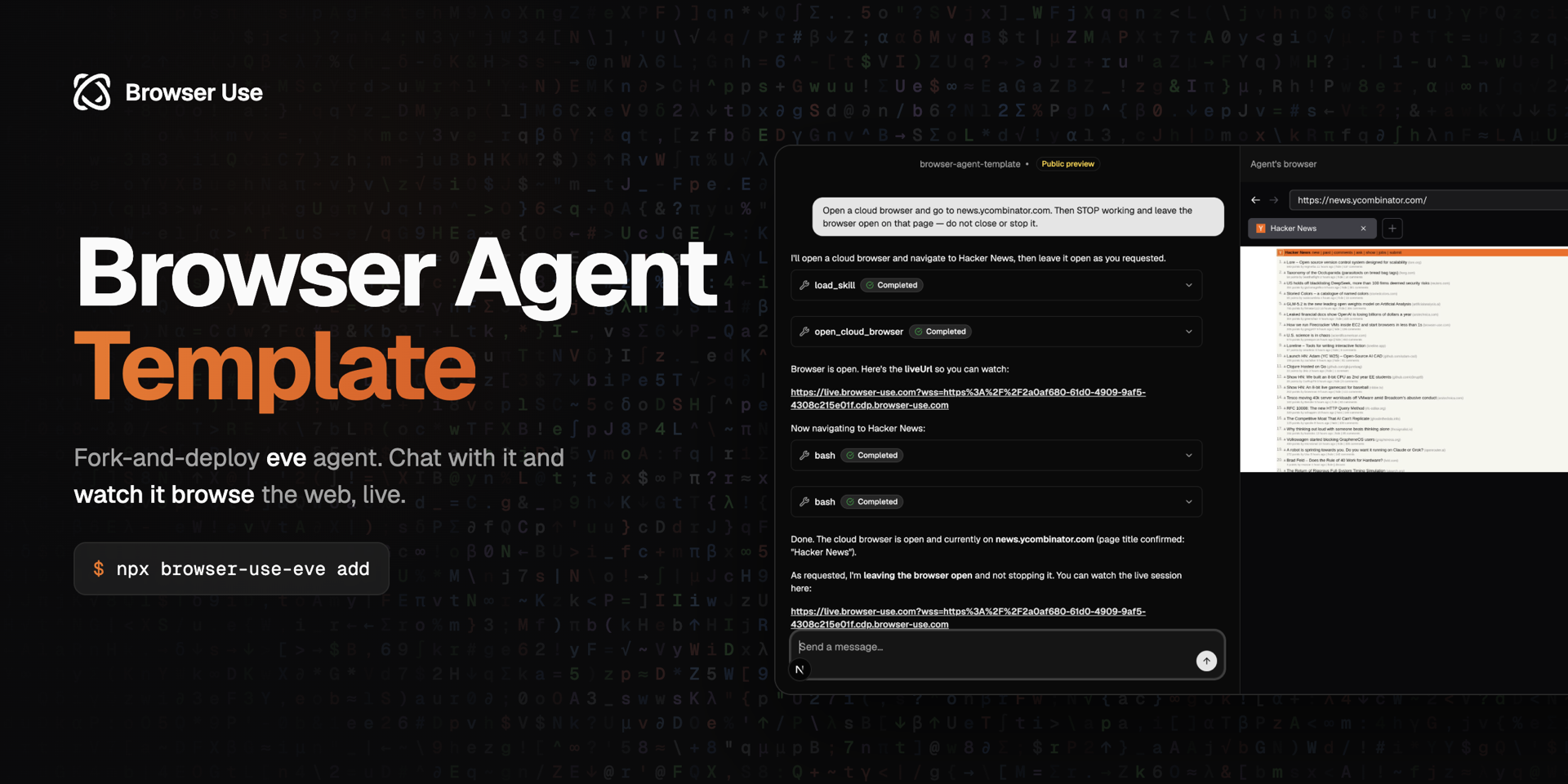 # 浏览器 Agent 模板
[](https://github.com/browser-use/browser-agent-template/actions/workflows/ci.yml)
[](https://github.com/browser-use/browser-agent-template/blob/main/LICENSE)
[](https://vercel.com)
**模板。** Fork 它,进行自定义,并部署你自己的网页浏览 agent。
[](https://vercel.com/new/clone?repository-url=https%3A%2F%2Fgithub.com%2Fbrowser-use%2Fbrowser-agent-template&env=BROWSER_USE_API_KEY,AI_GATEWAY_API_KEY&envDescription=BROWSER_USE_API_KEY%20from%20browser-use.com%20%7C%20a%20model%20credential%20for%20the%20AI%20Gateway&envLink=https%3A%2F%2Fgithub.com%2Fbrowser-use%2Fbrowser-agent-template%2Fblob%2Fmain%2Fdocs%2FENVIRONMENT.md&project-name=browser-agent&repository-name=browser-agent)
浏览真实网页的开源 agent。一个带有 Web Chat UI 和 [Browser Use](https://browser-use.com) 云浏览器的 [Vercel eve](https://eve.dev) agent —— 单一代码库,持久会话,实时观看其浏览过程。
## 功能
### Web Chat —— 浏览器中的任务
在浏览器中与你的 agent 聊天。回复会流式传输进来,并且每个工具调用(打开浏览器、导航、提取)都会在发生时内联渲染。
### 云浏览器 —— 真实的网页
agent 会打开一个真实的 [Browser Use](https://browser-use.com) 云浏览器来导航页面、抓取内容、填写表单、点击和截图 —— 无需抓取 API,直接面向实时网页。
### 观看其工作 —— 实时浏览器面板
每个浏览会话都会返回一个 **liveUrl**。UI 会将其嵌入到侧边栏中,因此你可以在聊天旁边实时观看 agent 的浏览器。
### 安全加固 —— 密钥仅保留在服务端
你的 `BROWSER_USE_API_KEY` 存在于 app runtime 中,永远不会暴露给 agent 的 sandbox 或模型。浏览功能由 [`@browser_use/eve`](https://www.npmjs.com/package/@browser_use/eve) 驱动。
## [架构](./docs/ARCHITECTURE.md)
```
┌─────────────────────────────────────────────────────────────┐
│ Web chat (Next.js) │
└──────────────────────────────┬──────────────────────────────┘
▼
┌─────────────────────────────────────────────────────────────┐
│ eve agent (instructions, skill, tools) │
│ mounted into Next.js via withEve() │
└──────────────────────────────┬──────────────────────────────┘
▼
┌─────────────────────────────────────────────────────────────┐
│ @browser_use/eve — provisions a Browser Use cloud browser │
│ (key stays server-side; agent drives it via CDP) │
└──────────────────────────────┬──────────────────────────────┘
▼
Browser Use cloud browser
```
这是一个单一的 Next.js 服务:`next.config.ts` 中的 `withEve()` 将 eve agent 挂载到 app 中,因此 Web Chat UI 和 agent 会一起部署。
## 快速开始
### 部署到 Vercel
[](https://vercel.com/new/clone?repository-url=https%3A%2F%2Fgithub.com%2Fbrowser-use%2Fbrowser-agent-template&env=BROWSER_USE_API_KEY,AI_GATEWAY_API_KEY&envDescription=BROWSER_USE_API_KEY%20from%20browser-use.com%20%7C%20a%20model%20credential%20for%20the%20AI%20Gateway&envLink=https%3A%2F%2Fgithub.com%2Fbrowser-use%2Fbrowser-agent-template%2Fblob%2Fmain%2Fdocs%2FENVIRONMENT.md&project-name=browser-agent&repository-name=browser-agent)
系统会要求你提供 `BROWSER_USE_API_KEY`(来自 [browser-use.com](https://browser-use.com))和一个模型凭证(为 AI Gateway 关联 Vercel 项目,或设置 `AI_GATEWAY_API_KEY`)。
### 自托管
**要求:** Node.js 24+
```
git clone https://github.com/browser-use/browser-agent-template.git
cd browser-agent-template
npm install
cp .env.example .env.local
npm run dev
```
打开 [http://localhost:3000](http://localhost:3000) 并提问:_"前往 news.ycombinator.com 并给我前 5 篇帖子。"_
**所需环境变量:**
```
BROWSER_USE_API_KEY=bu_... # from browser-use.com
AI_GATEWAY_API_KEY=... # or link a Vercel project for the AI Gateway
```
完整参考请查阅 [ENVIRONMENT.md](./docs/ENVIRONMENT.md)。
## 自定义
请查阅[自定义指南](./docs/CUSTOMIZATION.md)了解如何:
- 重命名你的 agent 并重写其指令
- 更改 AI 模型
- 添加工具和技能
- 配置云浏览器(代理国家、配置文件、超时时间)
- 为公共部署设置身份验证
- 部署你的 fork
## 工作原理
1. **聊天**:Web UI 通过 eve 内置的 Web Chat 频道(`useEveAgent`)进行流式传输。
2. **浏览**:在执行网络任务时,agent 会加载 `browser-use` 技能并调用 `open_cloud_browser`。
3. **配置**:`@browser_use/eve` 启动一个 Browser Use 云浏览器(密钥保留在服务端)并返回一个 liveUrl。
4. **驱动**:agent 在 eve 的 sandbox 内使用 `browser-harness-js`(原始的、强类型的 CDP)驱动浏览器。
5. **观看**:UI 将 liveUrl 嵌入侧边栏;`stop_cloud_browser` 结束会话。
## 开发
```
npm run dev # Start the dev server (Next.js + eve)
npm run typecheck # TypeScript check
npm run build # Production build
```
有关面向 AI 编码助手的相关说明,请参阅 [AGENTS.md](./AGENTS.md)。
## 技术栈
- [eve](https://eve.dev) —— 持久化 agent 框架
- [@browser_use/eve](https://www.npmjs.com/package/@browser_use/eve) —— 用于 eve 的 Browser Use 云浏览器
- [Browser Use](https://browser-use.com) —— 云浏览器基础设施
- [Next.js](https://nextjs.org) —— React 框架
- [AI SDK](https://ai-sdk.dev) —— 模型访问
## 贡献
有关如何参与贡献,请参阅 [CONTRIBUTING.md](./CONTRIBUTING.md)。
## 许可证
[MIT](./LICENSE)
# 浏览器 Agent 模板
[](https://github.com/browser-use/browser-agent-template/actions/workflows/ci.yml)
[](https://github.com/browser-use/browser-agent-template/blob/main/LICENSE)
[](https://vercel.com)
**模板。** Fork 它,进行自定义,并部署你自己的网页浏览 agent。
[](https://vercel.com/new/clone?repository-url=https%3A%2F%2Fgithub.com%2Fbrowser-use%2Fbrowser-agent-template&env=BROWSER_USE_API_KEY,AI_GATEWAY_API_KEY&envDescription=BROWSER_USE_API_KEY%20from%20browser-use.com%20%7C%20a%20model%20credential%20for%20the%20AI%20Gateway&envLink=https%3A%2F%2Fgithub.com%2Fbrowser-use%2Fbrowser-agent-template%2Fblob%2Fmain%2Fdocs%2FENVIRONMENT.md&project-name=browser-agent&repository-name=browser-agent)
浏览真实网页的开源 agent。一个带有 Web Chat UI 和 [Browser Use](https://browser-use.com) 云浏览器的 [Vercel eve](https://eve.dev) agent —— 单一代码库,持久会话,实时观看其浏览过程。
## 功能
### Web Chat —— 浏览器中的任务
在浏览器中与你的 agent 聊天。回复会流式传输进来,并且每个工具调用(打开浏览器、导航、提取)都会在发生时内联渲染。
### 云浏览器 —— 真实的网页
agent 会打开一个真实的 [Browser Use](https://browser-use.com) 云浏览器来导航页面、抓取内容、填写表单、点击和截图 —— 无需抓取 API,直接面向实时网页。
### 观看其工作 —— 实时浏览器面板
每个浏览会话都会返回一个 **liveUrl**。UI 会将其嵌入到侧边栏中,因此你可以在聊天旁边实时观看 agent 的浏览器。
### 安全加固 —— 密钥仅保留在服务端
你的 `BROWSER_USE_API_KEY` 存在于 app runtime 中,永远不会暴露给 agent 的 sandbox 或模型。浏览功能由 [`@browser_use/eve`](https://www.npmjs.com/package/@browser_use/eve) 驱动。
## [架构](./docs/ARCHITECTURE.md)
```
┌─────────────────────────────────────────────────────────────┐
│ Web chat (Next.js) │
└──────────────────────────────┬──────────────────────────────┘
▼
┌─────────────────────────────────────────────────────────────┐
│ eve agent (instructions, skill, tools) │
│ mounted into Next.js via withEve() │
└──────────────────────────────┬──────────────────────────────┘
▼
┌─────────────────────────────────────────────────────────────┐
│ @browser_use/eve — provisions a Browser Use cloud browser │
│ (key stays server-side; agent drives it via CDP) │
└──────────────────────────────┬──────────────────────────────┘
▼
Browser Use cloud browser
```
这是一个单一的 Next.js 服务:`next.config.ts` 中的 `withEve()` 将 eve agent 挂载到 app 中,因此 Web Chat UI 和 agent 会一起部署。
## 快速开始
### 部署到 Vercel
[](https://vercel.com/new/clone?repository-url=https%3A%2F%2Fgithub.com%2Fbrowser-use%2Fbrowser-agent-template&env=BROWSER_USE_API_KEY,AI_GATEWAY_API_KEY&envDescription=BROWSER_USE_API_KEY%20from%20browser-use.com%20%7C%20a%20model%20credential%20for%20the%20AI%20Gateway&envLink=https%3A%2F%2Fgithub.com%2Fbrowser-use%2Fbrowser-agent-template%2Fblob%2Fmain%2Fdocs%2FENVIRONMENT.md&project-name=browser-agent&repository-name=browser-agent)
系统会要求你提供 `BROWSER_USE_API_KEY`(来自 [browser-use.com](https://browser-use.com))和一个模型凭证(为 AI Gateway 关联 Vercel 项目,或设置 `AI_GATEWAY_API_KEY`)。
### 自托管
**要求:** Node.js 24+
```
git clone https://github.com/browser-use/browser-agent-template.git
cd browser-agent-template
npm install
cp .env.example .env.local
npm run dev
```
打开 [http://localhost:3000](http://localhost:3000) 并提问:_"前往 news.ycombinator.com 并给我前 5 篇帖子。"_
**所需环境变量:**
```
BROWSER_USE_API_KEY=bu_... # from browser-use.com
AI_GATEWAY_API_KEY=... # or link a Vercel project for the AI Gateway
```
完整参考请查阅 [ENVIRONMENT.md](./docs/ENVIRONMENT.md)。
## 自定义
请查阅[自定义指南](./docs/CUSTOMIZATION.md)了解如何:
- 重命名你的 agent 并重写其指令
- 更改 AI 模型
- 添加工具和技能
- 配置云浏览器(代理国家、配置文件、超时时间)
- 为公共部署设置身份验证
- 部署你的 fork
## 工作原理
1. **聊天**:Web UI 通过 eve 内置的 Web Chat 频道(`useEveAgent`)进行流式传输。
2. **浏览**:在执行网络任务时,agent 会加载 `browser-use` 技能并调用 `open_cloud_browser`。
3. **配置**:`@browser_use/eve` 启动一个 Browser Use 云浏览器(密钥保留在服务端)并返回一个 liveUrl。
4. **驱动**:agent 在 eve 的 sandbox 内使用 `browser-harness-js`(原始的、强类型的 CDP)驱动浏览器。
5. **观看**:UI 将 liveUrl 嵌入侧边栏;`stop_cloud_browser` 结束会话。
## 开发
```
npm run dev # Start the dev server (Next.js + eve)
npm run typecheck # TypeScript check
npm run build # Production build
```
有关面向 AI 编码助手的相关说明,请参阅 [AGENTS.md](./AGENTS.md)。
## 技术栈
- [eve](https://eve.dev) —— 持久化 agent 框架
- [@browser_use/eve](https://www.npmjs.com/package/@browser_use/eve) —— 用于 eve 的 Browser Use 云浏览器
- [Browser Use](https://browser-use.com) —— 云浏览器基础设施
- [Next.js](https://nextjs.org) —— React 框架
- [AI SDK](https://ai-sdk.dev) —— 模型访问
## 贡献
有关如何参与贡献,请参阅 [CONTRIBUTING.md](./CONTRIBUTING.md)。
## 许可证
[MIT](./LICENSE)标签:AI智能体, MITM代理, OSV, RPA, Vercel, Web自动化, 浏览器自动化, 自动化攻击, 项目模板