cipher-sentry/ssh-honeypot-sensor
GitHub: cipher-sentry/ssh-honeypot-sensor
一款开源的分布式 SSH 蜜罐传感器,通过捕获真实攻击中的凭据、会话和上传文件并汇聚到中央平台,将攻击行为转化为可操作的威胁情报。
Stars: 0 | Forks: 0
# CipherSentry SSH Honeypot
**English** · [Español](README.es.md)
[](LICENSE) [](https://github.com/cipher-sentry/ssh-honeypot-sensor/releases) 
**将每一次攻击转化为情报。**
开源 SSH honeypot,将攻击者的连接转化为可操作的情报:它捕获凭据、会话和 payload,并通过将命令模拟委托给 **CipherSentry Shell API**,使它们显得真实可信。
## Swarm — 分布式传感器网络
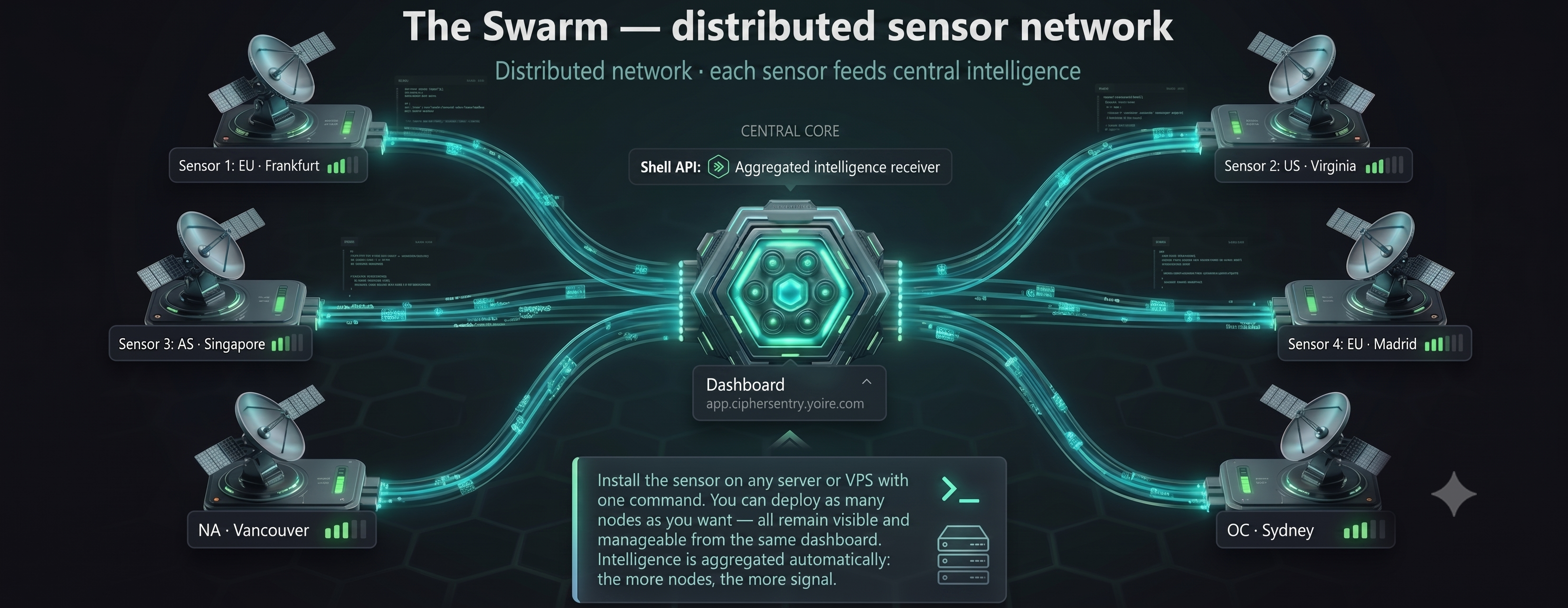
只需一条命令即可在任何服务器或 VPS 上安装传感器,并部署任意数量的节点——一个充满活力的传感器网络,每个节点都向一个中心汇聚。所有节点在单个仪表板中保持可见且可管理,情报会自动聚合:节点越多,信号越强。
## 快速部署
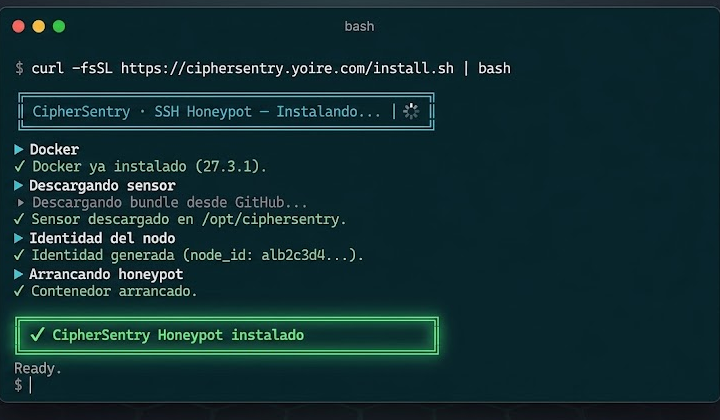
```
curl -fsSL https://ciphersentry.yoire.com/install.sh | bash
```
### 安装程序选项
| 选项 | 描述 | 默认值 |
|--------|-------------|---------|
| `--key ` | 从一开始就将节点链接到您的账户 | *匿名模式* |
| `--dir ` | 安装目录 | `/opt/ciphersentry` |
| `--port ` | Honeypot SSH 端口 | 若 22 可用则为 22,否则为 2222 |
| `--no-docker` | 跳过 Docker 安装(如果您已经安装了) | — |
常见示例:
```
# Linked to your account
curl -fsSL https://ciphersentry.yoire.com/install.sh | bash -s -- --key
# Docker already installed, custom directory
curl -fsSL https://ciphersentry.yoire.com/install.sh | bash -s -- \
--dir /opt/ciphersentry \
--no-docker
# Specific port (e.g. on a host with real SSH on 22)
curl -fsSL https://ciphersentry.yoire.com/install.sh | bash -s -- --port 2222
```
**从零开始即可运行:** 传感器预配置了 CipherSentry Shell API。
**将节点链接到您的账户:**
```
bash node.sh enroll # prints your code (e.g. NODO-A1B2-C3D4-E5F6)
# → The Swarm → Add node → paste the code
```
从那时起,您所有的捕获记录都将显示在您的账户中。
## 节点管理
在安装目录中(默认为 `/opt/ciphersentry`):
| 命令 | 操作 |
|---------|--------|
| `bash node.sh` | 状态:端口、已捕获会话、Shell API 可达性 |
| `bash node.sh up` | 启动 honeypot |
| `bash node.sh down` | 停止 honeypot |
| `bash node.sh logs` | 实时活动 |
| `bash node.sh enroll` | 将此节点链接到您账户的代码 |
| `bash node.sh test` | 测试与 Shell API 的连接 |
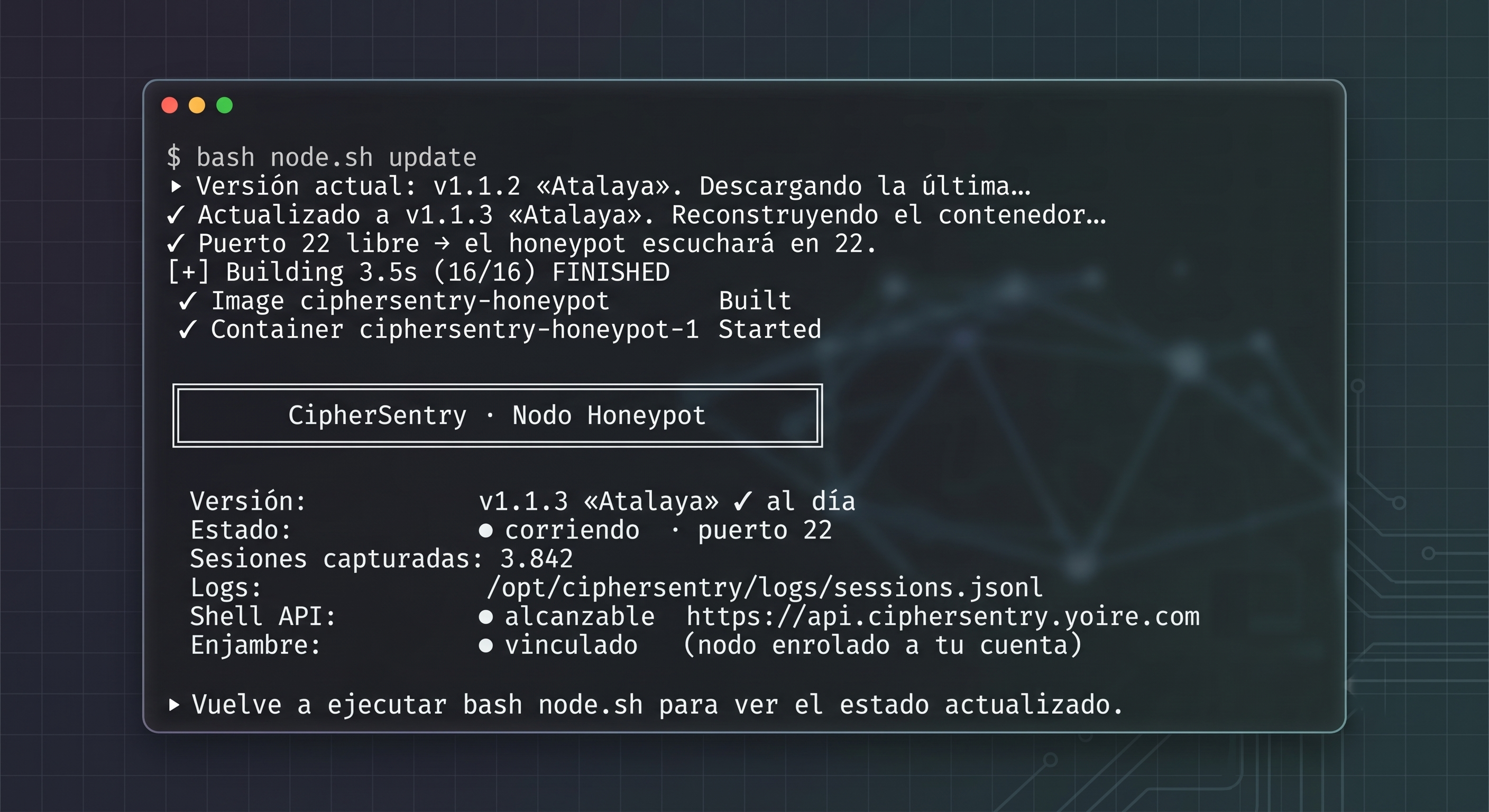
| `bash node.sh update` | 更新到最新版本并重新构建 |
## 更新传感器
```
bash node.sh update
```
下载**最新发布的版本**,重建容器并**保留您的 `config.yaml`、节点身份和日志**。无需手动操作。
## 仪表板
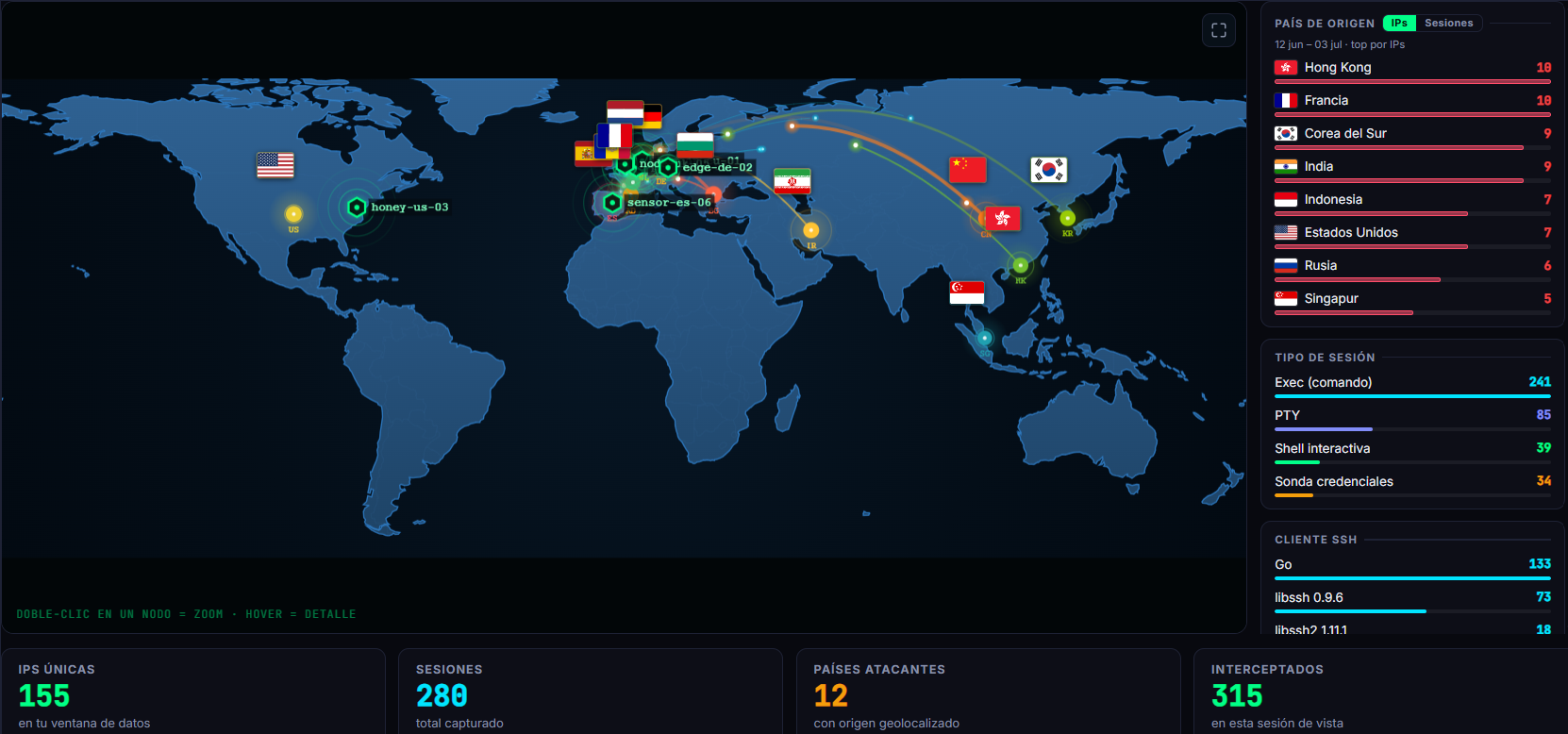
在单一面板中管理您的所有节点,探索会话,分析 IP 并导出情报。
## 套餐
开源 SSH 客户端永久免费。套餐用于衡量 **Shell API**(模拟每个会话的私有引擎)的使用量。
| 功能 | **Free** | **Starter** | **Pro** | **Enterprise** |
|------------|----------|-------------|---------|----------------|
| **价格** | €0 / 永久 | €19/月 | €79/月 | €499+/月 |
| 开源 SSH 客户端 (MIT) · Debian 12 模拟 · 每会话 VFS | ✓ | ✓ | ✓ | ✓ |
| 凭据捕获窗口 · JSON Lines 日志 | ✓ | ✓ | ✓ | ✓ |
| 命令 | 无限制 | 无限制 | 无限制 | 无限制 |
| 会话窗口(最近 N 个会话) | 200 | 2,000 | 20,000 | 无限制 |
| Swarm 节点 | 1 | 3 | 10 | 无限制 |
| 可访问的历史记录 | 您的窗口 | 您的窗口 | 您的窗口 | 自定义 |
| 对您会话的每 IP 分析 | — | ✓ | ✓ | ✓ |
| 综合情报报告 | — | ✓ | ✓ | ✓ |
| 通过 API 导出 IOC(威胁情报源) | — | — | ✓ | ✓ |
| 共享多租户 Shell API | ✓ | ✓ | ✓ | — |
| 专用隔离实例(按需) | — | — | — | 准备中 |
| 优先支持 | — | — | 邮件 | 专用频道 |
开始使用无需信用卡 · [查看所有套餐 →](https://ciphersentry.yoire.com/planes.html)
## 配置
### config.yaml
节点经过**预配置**,无需任何改动即可立即运行。对于大多数用途,您无需编辑此文件 —— 安装程序的 `--key` 和 `node.sh enroll` 涵盖了其余部分。
```
# CipherSentry Honeypot Client — configuration
host: "0.0.0.0"
port: 2222
host_key_file: "host_key"
ssh_banner: "Debian GNU/Linux 12"
ssh_version: "OpenSSH_8.4p1 Debian-5+deb11u1"
accept_any_password: true
fake_hostname: "web-srv-01"
log_dir: "logs"
verbose: false
# Credential-capture window: during [start_minute, end_minute) of each hour, EXEC
# (one-shot commands) are blocked to record credential + command without serving them.
# Interactive SHELL sessions are ALWAYS allowed (they are the gold).
credential_capture:
enabled: true
start_minute: 45 # from xx:45
end_minute: 60 # to xx:00 (60 = on the hour)
# Central Shell API — preconfigured, the node works from minute zero.
# Overridable with SHELL_API_URL (env or .env).
shell_api_url: "https://api.ciphersentry.yoire.com"
# Web panel (for the enrollment link). Overridable with DASHBOARD_URL.
dashboard_url: "https://app.ciphersentry.yoire.com"
# NOTE: your node's identity and its account/plan are determined by the `node_id`
# (enroll it with `node.sh enroll` → paste the code in The Swarm). You do NOT need to
# configure any per-account API key. API access uses a shared transport key
# (SHELL_API_KEY, default `free-demo`) — not your credential, and it doesn't set your tier.
```
### 凭据捕获窗口
在每小时的 `[start_minute, end_minute)` 期间,honeypot **会阻止非交互式
命令(EXEC,`ssh host "cmd"`)**:它将凭据和尝试执行的命令记录
在 `exec_blocked` 事件中,但**不会**执行它。这会诱使机器人不断尝试
凭据。**交互式 SHELL 会话在首次尝试时始终允许** —— 它们
最有价值且绝不会被阻止。在窗口之外,EXEC 正常运行。
### 环境变量
| 变量 | 描述 | 默认值 |
|----------|-------------|---------|
| `HONEYPOT_PORT` | SSH 端口 | `2222` |
| `SHELL_API_URL` | Shell API URL | `https://api.ciphersentry.yoire.com` |
| `SHELL_API_KEY` | Shell API 的 API key | `free-demo` |
| `NODE_ID` | 节点身份(在 Swarm 中实现每个节点的颗粒度) | `node_identity/id` |
| `HONEYPOT_VERBOSE` | 详细日志(`1`/`0`) | `0` |
环境变量优先于 `config.yaml`。
**`NODE_ID`** —— 在每次会话中发送到 Shell API 的节点身份,以便活动
可以**按节点**(而不仅仅是按账户)统计。如果未设置,它会自动从
`node_identity/id`(由 `node.sh` 生成)中读取。使用 Docker 时,请挂载 `./node_identity`
(已包含在 `docker-compose.yml` 中)或通过 `.env` 传递 `NODE_ID`。
## Shell API
此 honeypot 需要 **CipherSentry Shell API** 实例才能工作。没有它,就无法模拟命令。
更多信息:[ciphersentry.yoire.com](https://ciphersentry.yoire.com/)
## 日志
每个事件都以 JSON Lines 格式记录到 `logs/sessions.jsonl` 中,与 CipherSentry 仪表板兼容。如果节点具有 `node_id`,**所有**事件都会携带它(包括像 `probe` 和 `connection` 这样的会话前事件),以便面板可以将所有活动归因于该节点。
事件类型:`connection`、`credential_probe`、`probe`、`command`、`output`、`exec_blocked`、`channel_fingerprint`、`disconnect`、`privilege_escalation` 以及 SFTP 事件:`sftp_session`、`sftp_upload`、`sftp_download`、`sftp_list`、`sftp_delete`。
## SFTP
honeypot 实现了 **SFTP/SCP** 子系统,因此处于“文件”模式下的客户端(例如 Termius)
可以无错误地连接和浏览。每个 SFTP 会话都在一个**隔离的临时
沙箱** (chroot) 中运行,其中预置了可信的 Debian 12 目录树;不会触及主机的真实
文件系统或其他会话。
**防删除的上传捕获。** 当攻击者上传文件时,其字节会
在**写入时**被复制到独立于沙箱的隔离区:
```
logs/sftp_uploads//__
```
- 捕获的文件**会被保留,即使攻击者随后将其删除或重命名**
(一个运行后自删除的 dropper 也会被照样存储)。
- 会保留上传的**每一个版本**,而不仅仅是最后一个。
- 每次上传都会记录一个 `sftp_upload` 事件,其中包含 `path`、`size`、`sha256` 以及
隔离区路径。删除操作会被记录为 `sftp_delete`(掩盖痕迹的证据)。
- **上传的任何内容都不会被执行** —— 它会作为惰性数据存储。
隔离区位于 `logs/` 下(不提交到 git;不通过 SFTP 暴露)。
## SSH 客户端兼容性
已使用 OpenSSH 和移动客户端进行了测试。与 **Termius (Android, libssh2)** 的兼容性
需要对 asyncssh 处理进行多项调整。关键点:
- 禁用 `keyboard-interactive` (asyncssh 在没有处理程序的情况下默认会通告它)。
- `ssh_version` 不带 `SSH-2.0-` 前缀 (asyncssh 已经自动添加了它)。
- 客户端的 *window-change* 请求以 stdin 上的 `TerminalSizeChanged` 异常到达
并且必须被忽略,不能被视为会话结束。
## 许可证
MIT — © 2026 CipherSentry
标签:Docker, Python, SSH, 威胁情报, 安全, 安全防御评估, 开发者工具, 无后门, 网络传感器, 蜜罐, 证书利用, 请求拦截, 超时处理, 逆向工具