GeekyBlessing/aws-attack-path-analyzer
GitHub: GeekyBlessing/aws-attack-path-analyzer
一款具备 SCP 感知和跨账号检测能力的 AWS 提权路径分析工具,通过量化风险评分和自动修复指南帮助团队发现并修复 IAM 配置风险。
Stars: 0 | Forks: 0
# ⚔️ AWS 攻击路径分析器






## 功能说明
| 功能 | 基础工具 | 本工具 |
|---------|------------|-----------|
| IAM 提权检测 | 是 | 是 |
| SCP 感知 | 否 | 是 |
| 条件键评估 | 否 | 是 |
| 跨账号路径检测 | 否 | 是 |
| 风险评分 (0-100) | 否 | 是 |
| 执行摘要 | 否 | 是 |
| 修复指南 | 否 | 是 |
| SCP 打包导出 | 否 | 是 |
| REST API | 否 | 是 |
| Docker 部署 | 否 | 是 |
## 真实发现 — 实时 AWS 账号
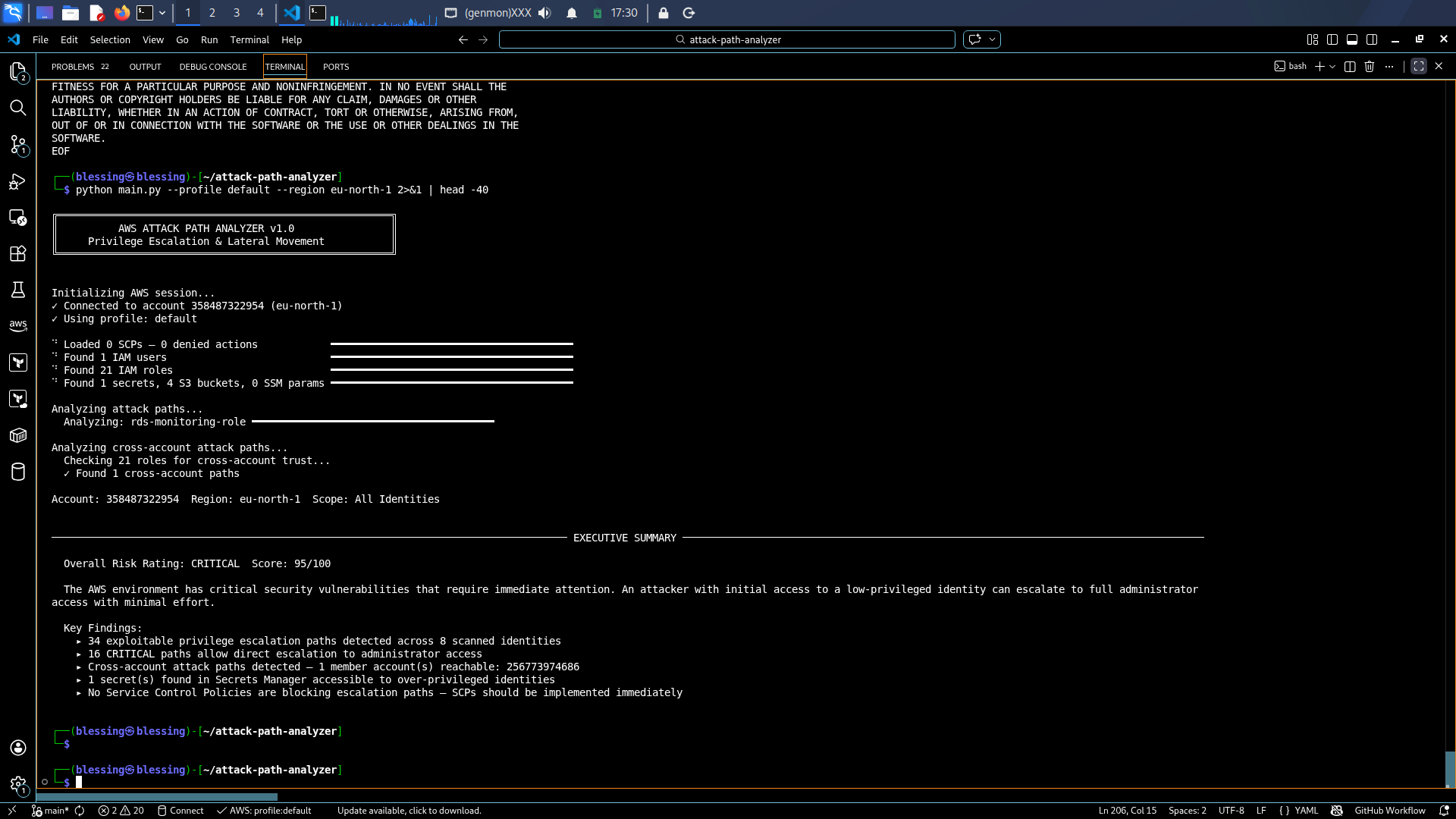
已针对真实的 AWS 账号 (eu-north-1) 进行测试:
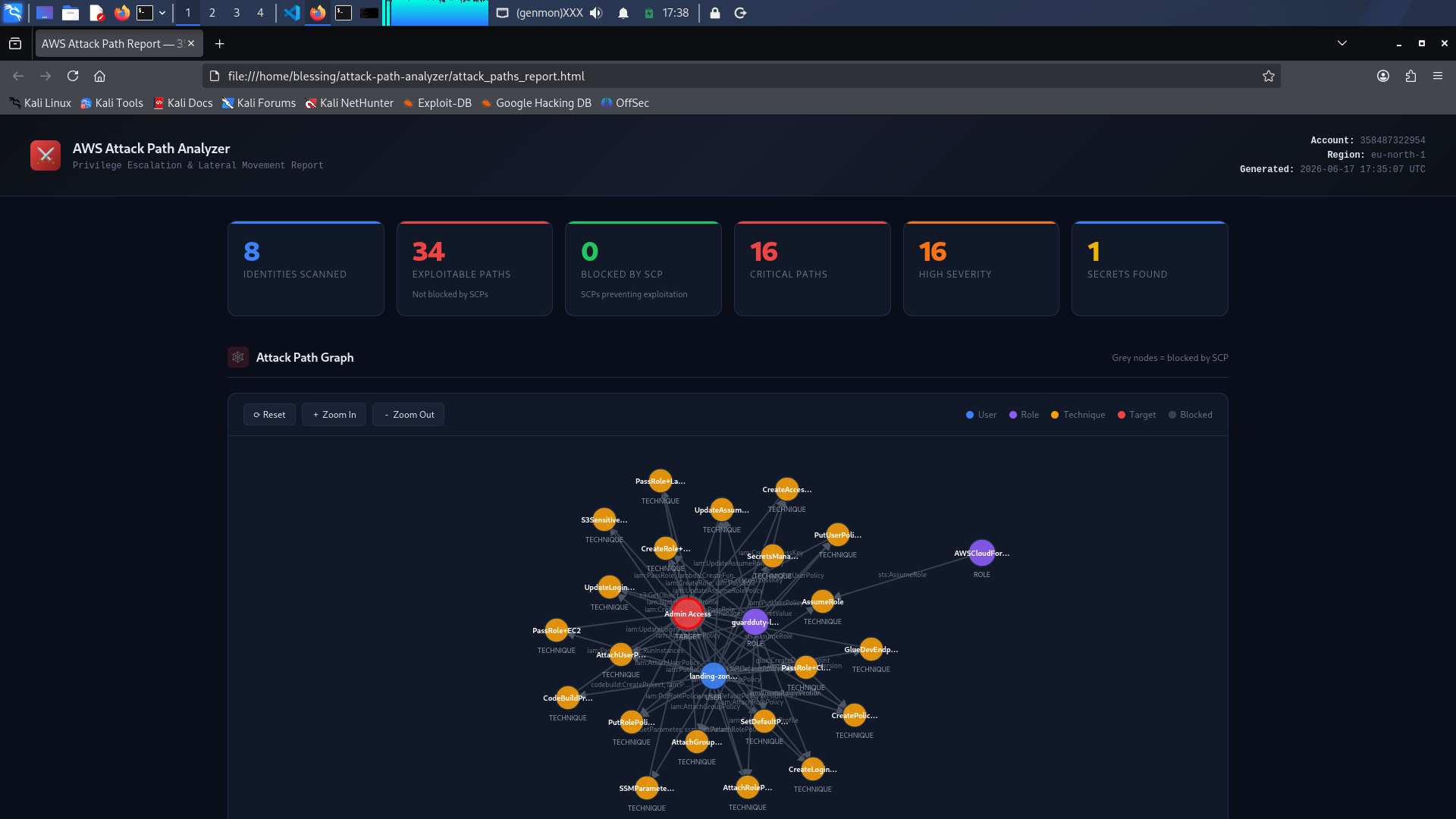
- 总体风险:严重 95/100
- 扫描的身份数量:8
- 可利用路径:34
- 严重路径:16
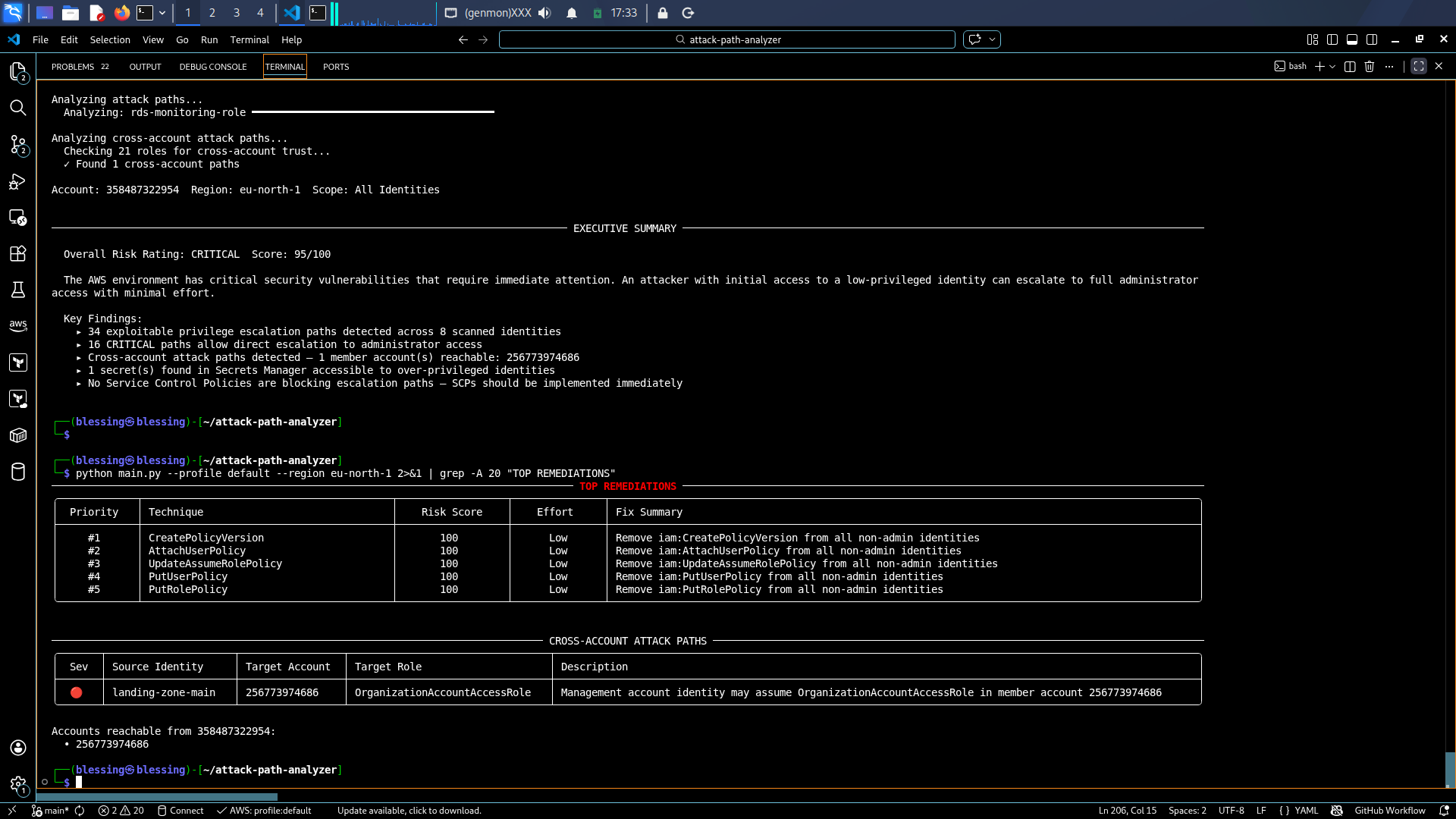
- 跨账号路径:1 (Management 到 Log Archive)
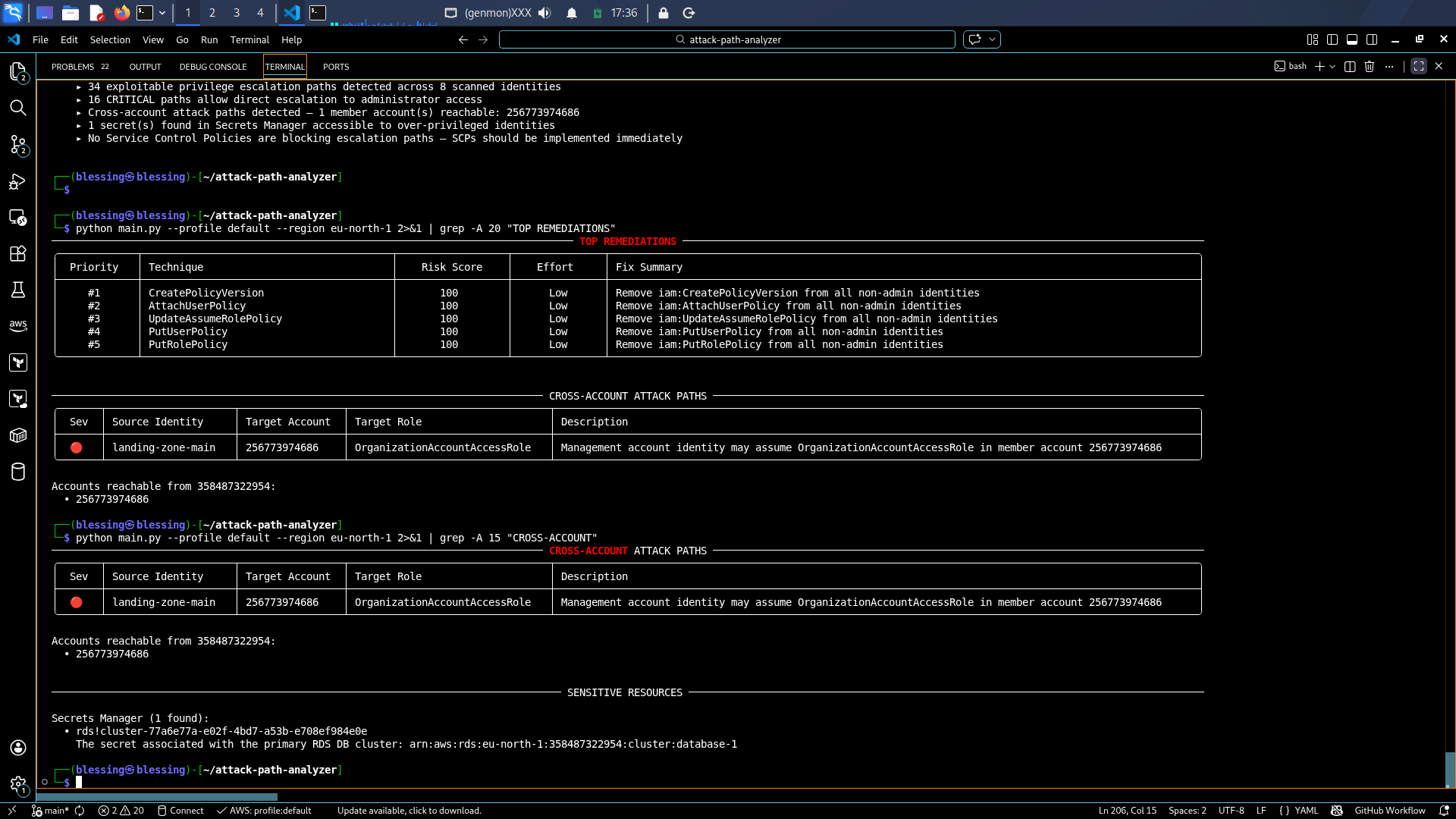
- 暴露的机密:1 (RDS 集群机密)
## 涵盖的提权技术
| 技术 | 所需权限 | 严重程度 | MITRE |
|-----------|---------------------|----------|-------|
| CreatePolicyVersion | iam:CreatePolicyVersion | Critical | T1098.001 |
| AttachUserPolicy | iam:AttachUserPolicy | Critical | T1098.001 |
| AttachGroupPolicy | iam:AttachGroupPolicy | Critical | T1098.001 |
| AttachRolePolicy | iam:AttachRolePolicy | Critical | T1098.001 |
| UpdateAssumeRolePolicy | iam:UpdateAssumeRolePolicy | Critical | T1098.001 |
| PutUserPolicy | iam:PutUserPolicy | Critical | T1098.001 |
| PutRolePolicy | iam:PutRolePolicy | Critical | T1098.001 |
| CreateRole+PassRole | iam:CreateRole, iam:PassRole | Critical | T1098.001 |
| AssumeRole to Admin | sts:AssumeRole | Critical | T1548 |
| PassRole+Lambda | iam:PassRole, lambda:* | High | T1648 |
| PassRole+EC2 | iam:PassRole, ec2:RunInstances | High | T1548 |
| PassRole+CloudFormation | iam:PassRole, cloudformation:* | High | T1648 |
| SecretsManagerAccess | secretsmanager:GetSecretValue | High | T1552.001 |
| CreateAccessKey | iam:CreateAccessKey | High | T1098.001 |
| CodeBuildPrivesc | codebuild:CreateProject, iam:PassRole | High | T1648 |
| GlueDevEndpoint | glue:CreateDevEndpoint | High | T1648 |
| SSMParameterAccess | ssm:GetParameter | Medium | T1552.001 |
| S3SensitiveRead | s3:GetObject | Medium | T1530 |
| SetDefaultPolicyVersion | iam:SetDefaultPolicyVersion | High | T1098.001 |
## 架构
```
flowchart TD
A[AWS Account] -->|boto3 API calls| B[Analyzer Engine]
B --> C[IAM Enumerator]
B --> D[SCP Analyzer]
B --> E[Condition Evaluator]
B --> F[Cross-Account Detector]
C --> G[Attack Paths]
D --> G
E --> G
F --> G
G --> H[Risk Scorer]
H --> I[Executive Summary]
H --> J[Remediation Engine]
I --> K[CLI Report]
I --> L[HTML Report D3.js]
I --> M[FastAPI REST API]
J --> M
M --> N[POST /scan]
M --> O[GET /paths]
M --> P[GET /summary/executive]
M --> Q[GET /remediation/export/scp-bundle]
```
## 快速开始
### CLI
```
pip install -r requirements.txt
python main.py --profile default --region eu-north-1
```
### API
```
pip install fastapi uvicorn[standard]
uvicorn api.main:app --host 0.0.0.0 --port 8000 --reload
curl -X POST http://localhost:8000/api/v1/scan -H "Content-Type: application/json" -d '{"profile": "default", "region": "eu-north-1"}'
```
### Docker
```
docker-compose up --build
```
## API 端点
| 方法 | 端点 | 描述 |
|--------|----------|-------------|
| POST | /api/v1/scan | 触发完整的 AWS 账号扫描 |
| GET | /api/v1/paths | 获取所有攻击路径 |
| GET | /api/v1/paths/top | 按风险评分排名靠前的路径 |
| GET | /api/v1/paths/critical | 仅显示严重路径 |
| GET | /api/v1/paths/cross-account | 跨账号路径 |
| GET | /api/v1/summary/executive | 执行摘要 |
| GET | /api/v1/summary/risk | 风险评分明细 |
| GET | /api/v1/remediation | 修复指南 |
| GET | /api/v1/remediation/export/scp-bundle | 可直接部署的 SCP 文档 |
## 风险评分方法
| 因素 | 权重 | 描述 |
|--------|--------|-------------|
| 严重程度 | 40 分 | Critical/High/Medium/Low |
| 可利用性 | 30 分 | 所需的权限数量 |
| 资产价值 | 20 分 | Admin/Secrets/Data/Lateral |
| 控制有效性 | 10 分 | 如果被 SCP/条件阻止则扣除 |
## 所需的 IAM 权限
附加 AWS 托管策略 SecurityAudit 以及 organizations 读取权限。
## CI/CD 流水线
每次推送时触发 GitHub Actions:
1. 对所有模块进行 Lint 和语法检查
2. Docker 构建和测试
3. Bandit 安全扫描
4. 演示 HTML 报告制品
## 参考
- Rhino Security Labs: https://rhinosecuritylabs.com/aws/aws-privilege-escalation-methods-mitigation/
- MITRE ATT&CK Cloud: https://attack.mitre.org/matrices/enterprise/cloud/
- AWS IAM 最佳实践: https://docs.aws.amazon.com/IAM/latest/UserGuide/best-practices.html
## 作者
**Toriola Opeyemi** — 云安全工程师
- GitHub: https://github.com/GeekyBlessing
- LinkedIn: https://linkedin.com/in/toriola-opeyemi
- Substack: https://geekyblessing.substack.com
## 📸 实时扫描结果
### 执行摘要
### 修复指南与跨账号路径
### 交互式 HTML 仪表板
### 风险评分
标签:AV绕过, AWS, Docker, DPI, FastAPI, IAM, 协议分析, 安全防御评估, 权限提升, 网络测绘, 请求拦截, 逆向工具