ColinVaughn/Synaptic
GitHub: ColinVaughn/Synaptic
Synaptic 将代码仓库转化为可查询的知识图谱,为 AI 编码助手提供低 Token 消耗的依赖追踪、变更影响预测和重构验证能力。
Stars: 20 | Forks: 0
# Synaptic
[rev2]`(或 `--since `)报告
在两个 git 修订版之间图谱的变化、添加/删除的依赖项、删除的 API、
架构漂移、新增的循环和热点,并附带 Markdown 或自包含的 HTML 报告。
- **架构搜索 (SYNQL)**:`synaptic search` 在图上运行一种受 Cypher 启发的小型查询
语言,匹配结构(类型、可见性、LOC、扇入/扇出,
可变长度路径),支持 `count(...)` 聚合、`--explain`、保存的查询,以及
一个命名模式库(singleton、factory、observer、service-locator、god-class)。不是
文本搜索。
- **安全重构**:`synaptic refactor rename` / `move` / `extract` 生成带有置信度评分的
执行计划(`plan.json` + `plan.md`)供 AI agent 应用,然后 `refactor verify`
重新构建并检查图是否保持一致(定义已移动/重命名,没有丢失引用,没有
新增循环)。Synaptic 从不自行编辑源码。
- **更改预测和推测性执行**:`synaptic predict` 在你编辑之前预测更改的
影响范围、处于风险中的公共 API、受影响的测试、新增循环、风险评分,以及一个验证
清单(`--edit ":"` 在编写任何
代码之前预测描述的编辑);`synaptic speculate` 然后在一个一次性的 git worktree 中应用更改
并实际运行受影响的测试以及构建/类型检查,报告真实的通过/失败情况——
预测的基准事实部分;并且 `synaptic eval replay` 重放历史以根据
git 基准事实(共同编辑的测试、删除的 API)对预测质量进行评分,将预测准确性转化为
可作 CI 门禁的指标。请参阅
[命令](https://github.com/ColinVaughn/Synaptic/wiki/Commands)。
- **SQL 性能与安全审计**:`synaptic sql audit` 标记行级安全漏洞、
过于宽泛的授权、可能的 SQL 注入、过滤/外键列上缺失的索引、
`SELECT *`、不可 sargable 的谓词、N+1 模式,以及主键缺失,所有这些都在 SQL 感知的
图上进行(提取现在会对列、索引、RLS 策略和授权进行建模,并将应用程序
查询链接到它们触及的表)。`synaptic sql advise --query ""` 在你编写候选
查询之前对其进行评估,并与图中的表/索引/RLS 进行交叉引用。请参阅
[SQL 审计](https://github.com/ColinVaughn/Synaptic/wiki/SQL-Auditing)。
- **MCP server**(协议 2025-11-25)通过 stdio 或 HTTP 暴露 26 个只读工具:
子图搜索、源码阅读、反向影响、PR/工作树影响范围、更改
预测、预测性测试选择、编辑影响预测、结构搜索、时光旅行
diff、仅计划重命名,以及 SQL 审计/建议,外加提示词、补全、资源订阅
和结构化的工具输出。请参阅
[MCP Server](https://github.com/ColinVaughn/Synaptic/wiki/MCP-Server)。
- **增量重建**、文件监控和 git hooks 保持图谱最新。请参阅
[增量更新](https://github.com/ColinVaughn/Synaptic/wiki/Incremental-Updates)。
- **具备图感知能力的 PR 仪表板**,带有影响范围和合并顺序冲突检测。请参阅
[PR 仪表板](https://github.com/ColinVaughn/Synaptic/wiki/PR-Dashboard)。
## Token 经济
查询紧凑图谱的一个核心回报是**阅读一个简短的答案,而不是整个
代码库**。在 Synaptic 自身的源码(199 个 Rust 文件,56,408 行,**510,966**
`cl100k` token)上测量,一个针对结构性问题的 `query_graph` 答案是 **~1,950 token**
(受其 token 预算限制),而阅读答案实际触及的源文件需要:
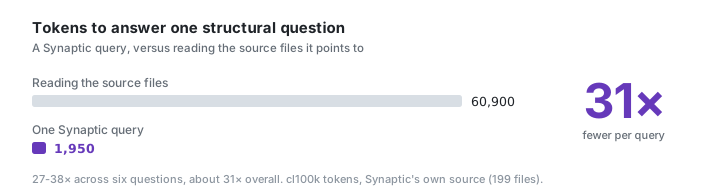
在跨越不同子系统的六个问题中,查询图使用的 token 比阅读答案引用的文件**少 27-38 倍**
(总体约 **31 倍**):
| 问题 | 查询响应 | 阅读文件 | 节省的 Token |
|---|--:|--:|--:|
| HTTP 请求处理 | 1,804 | 48,803 | 27x |
| 会话创建 / 清理 | 1,974 | 65,578 | 33x |
| query_graph 子图 | 2,011 | 53,759 | 27x |
| 提取遍历器 | 1,977 | 70,443 | 36x |
| PR 获取 / 排名 | 1,926 | 73,231 | 38x |
| 增量合并 | 2,010 | 53,440 | 27x |
无论仓库变得多大,查询响应始终保持很小(它受 token
预算限制),因此这个比例会随着代码库的增长而增加。请注意,`graph.json` 索引本身很大,
因为它编码了每一个符号和边缘;你永远不会将其加载到上下文中,你只需查询它并
取回上面的那部分切片。
**可重现。** Token 是通过
`cargo run -p synaptic-server --example tokcount` 获得的精确 `cl100k_base` 计数。基准是结果节点所在的唯一源文件
(整个文件,即保守的 grep-then-read 情况;它不
计算在没有图谱的情况下你可能打开的死胡同文件)。在任何
仓库上运行 `synaptic extract .` 并亲自进行比较。
## 高级工具性能
分析工具之所以能在毫秒内给出答案,是因为它们是在内存中的图上运行的,而不是
在源码上。Criterion 微基准测试(开发机器;运行 `cargo bench -p synaptic-synql -p synaptic-refactor`):
| 操作 | 负载 | 时间 |
|---|---|--:|
| SYNQL 属性查询 (`search`) | 在包含 2,000 个节点的图上执行 `WHERE`/`loc`/`fan_out` | **~0.47 ms** |
| SYNQL 关系模式连接 (`search`) | 在包含 2,000 个节点的图上进行一跳连接 | **~0.97 ms** |
| 安全重构重命名计划 (`refactor rename`) | 热门符号,跨 40 个文件的 ~120 个调用点,包括文本扫描 | **~4.9 ms** |
时光旅行 `diff` 受限于构建而不是查询:图增量本身是
近乎瞬时的,成本在于在一次性 git worktree 中构建每个修订版。构建的
图会按 commit SHA 缓存在 `synaptic-out/history/` 下,因此对相同的
提交进行重复的 diff 会立即返回,只有工作树侧会被重新构建。
## 准确率
上面的 Token 研究是对一个仓库进行的冒烟测试。Synaptic 提取的关系已
单独进行了验证,对比的是一个**手工标注的语料库**,其中包含微型仓库的
真实调用边缘、测试链接、影响范围(包括*不应*被标记的干扰节点),以及
跨语言耦合(包括*不应*连接的相似项),这些都由
手工记录在一个 `ground_truth.toml` 文件中。如果任何被标记的符号未能解析,预检会使运行失败,
因此丢弃的节点会成为显眼的失败,而不是悄悄减小分母。下面的每个数字
都是与这些标签的精确集合比较,可通过 `synaptic eval corpus` 复现:
| 固件 | 家族 | 调用 P/R/F1 | 受影响测试召回率 | 影响范围 召回率 / 排除率 / 大小 | 跨语言 P/R/F1 |
|---|---|---|---|---|---|
| systems-rust | systems-rust | 100/50/66 | — | 100% / 100% / 1.0 | — |
| scripting-python | scripting-python | 100/100/100 | 100% | 100% / 100% / 2.0 | — |
| web-ts | web-ts | 100/100/100 | — | 100% / 100% / 1.0 | — |
| oo-java | oo-java | 100/100/100 | — | 100% / 100% / 1.0 | — |
| systems-go | systems-go | 100/100/100 | — | 100% / 100% / 1.0 | — |
| deep-python (多跳) | scripting-python | 100/100/100 | 100% | 100% / 100% / 3.0 | — |
| cross-lang-ts-rust | cross-lang | — | — | — | 100/100/100 |
在 7 个固件 / 6 个语言家族 / 26 个标记符号(全部已解析)中:合并后的调用边缘
在 15 个标记边缘上**精确率 100% / 召回率 93% / F1 分数 96%**;影响范围**召回率 100%,
0 个干扰项泄露**;受影响测试在标记链接上的**召回率
100%**,并且唯一一个标记为*不相关*的测试被正确地**没有**
选中;跨语言**精确率 100% / 召回率
100%**,2 个干扰耦合被正确地**没有**连接。客观解读这些数字:
- 在这个 15 边缘的语料库中**没有观察到错误的调用边缘**(精确率 100%);这是针对该语料库的
结果,而不是大规模应用下的保证。
- 对于能够解析跨文件调用的 Python/TypeScript/Java/Go,**召回率是 100%**。Rust 上的
**50%** 是真实且符合预期的:Rust 调用解析是在文件内部的,因此模块限定的
跨文件调用属于真正的漏报。跨文件的*可达性*仍然通过 `imports`
边缘得到保留,这就是为什么影响范围的召回率保持在 100% 的原因。
- **影响范围是根据噪声而不是仅仅根据漏报来评分的:** 每个种子都标记了必须排除在外的干扰节点,
并且没有任何泄露(100% 排除率);报告的平均影响集大小等于
实际受影响的集合大小,因此遍历范围并没有过广。
- **受影响测试的选择是多跳:** `deep-python` 固件更改了一个位于其测试下方三个调用
跳数的叶子节点,并且仍然选中了该测试,同时一个故意不相关的测试被排除在外
(因此召回率不是以牺牲精确率为代价换来的)。
- **跨语言的精确率是实至名归的:** 一个 TypeScript 的 `fetch("/session")` 会连接到为其提供服务的 Rust
axum 处理程序,而 `/sessions`(看起来相似的路径)和一个不相关的处理程序则
被正确地保持未连接状态。
该语料库故意做得小巧且经过手工验证;它验证的是在
代表性形态下的提取*正确性*,而不是互联网规模的覆盖率。[规模](#scale)部分测量的是真实的
代码库。方法学和基准事实格式请参阅 [BENCHMARKS.md](BENCHMARKS.md)。
### 预测校准
更改预测层为每个预测的共同更改附加了一个置信度。`synaptic eval
calibrate` 用于衡量该置信度是否有意义:它会遍历最近的历史记录,并且对于每个
提交,将每个更改过的文件用作种子,询问预测器(仅在先前的提交上训练过)
哪些文件应该共同更改,然后根据实际
更改的内容对每个预测的置信度进行评分。它会报告一张**可靠性表**(每个置信度
区间内的预测命中率与实际观察到的命中率)、**Brier 分数**、针对总是猜测基准率
的基准的 **Brier 技巧分数**(这样 Brier 数值才具有可解释性),以及**预期校准误差**。
这是一个特定于具体仓库的属性:置信度反映了每个仓库的提交习惯,因此请在你自己的仓库上运行它。
在这个仓库自身的(重度压缩的、合成的)历史上,技巧分数是**负的**——这里的共同更改
预测比*猜测基准率更糟*,因为压缩的提交会同时触及许多
文件并夸大了表面上的共同更改。这说明该指标发挥了作用:它拒绝粉饰
在这个历史上校准不良的预测器。方法学详见 [BENCHMARKS.md](BENCHMARKS.md)。
## 规模
提取吞吐量跨越了真实的 OSS 代码库,涵盖不同规模层级和语言家族,
每个都在固定的 SHA 下克隆(`synaptic eval scale`;网络 + git,选择性开启)。每次计时都是
3 次重复实验的中位数。**冷启动**首先清除了 AST 缓存(真正的冷状态);**热启动**是缓存已预热状态;
**增量**指重新提取单个文件。在 Windows / x86_64 / 16 逻辑 CPU 上测量:
| 仓库 | 家族 | 层级 | 文件数 | 代码行数 | 节点 | 边缘 | 冷启动 (秒) | 热启动 (秒) | 增量 (秒) | 文件/秒 |
|---|---|---|--:|--:|--:|--:|--:|--:|--:|--:|
| memchr | systems-rust | 小型 | 75 | 70,044 | 3,849 | 13,592 | 12.5 | 7.5 | 4.3 | 10 |
| click | scripting-python | 中型 | 112 | 35,063 | 2,189 | 3,475 | 2.4 | 1.7 | 0.8 | 66 |
| p-map | web-ts | 小型 | 10 | 1,501 | 85 | 83 | 0.07 | 0.04 | 0.04 | 269 |
| cobra | go | 中型 | 55 | 19,514 | 846 | 2,362 | 1.1 | 0.7 | 0.4 | 82 |
| axum | systems-rust | 大型 | 348 | 52,969 | 3,656 | 9,510 | 4.7 | 3.6 | 3.5 | 97 |
绝对时间取决于机器配置;可复现的信号是**冷启动→热启动比率**
(~1.4-2 倍;Rust AST 缓存在重建时移除了重新解析的步骤),并且吞吐量随
仓库内容扩展,而不是在大型层级上崩溃。请注意 `memchr` 的按文件计算速度较慢:它是
重度宏且边缘密集的(75 个文件中有 1.36 万条边缘),基准测试展现了这一情况而不是
将其隐藏。`incr` 仅重新提取一个文件,但仍然会重新运行图组装,
因此它并不是零成本的。固定的 SHA 使得运行结果可重现;请审慎更新它们。完整的方法学和清单
详见 [BENCHMARKS.md](BENCHMARKS.md)。
## 安装
Synaptic 使用稳定的 Rust 工具链构建(通过
[rust-toolchain.toml](rust-toolchain.toml) 固定在 1.95 版本)。
```
# 从 clone 出的仓库中,将 `synaptic` 二进制文件安装到你的 PATH:
cargo install --path bin/synaptic
# ...或在 in-tree 中构建它:
cargo build --release # -> target/release/synaptic
```
针对 Linux/macOS/Windows 的预编译二进制文件附在每个标记的
[GitHub Release](../../releases) 中(参见 `release` 工作流)。可选的集成位于
功能标志(默认关闭)之后:`pg`(Postgres 内省)、`push`(实时
Neo4j/FalkorDB 导出),以及 `office` / `gws` / `media`(电子表格 / Google-Workspace /
音视频摄取),例如 `cargo install --path bin/synaptic --features pg,push`。请参阅
[安装](https://github.com/ColinVaughn/Synaptic/wiki/Installation)和[配置](https://github.com/ColinVaughn/Synaptic/wiki/Configuration)。
## 快速开始
```
# 1. 为当前目录构建 graph -> synaptic-out/
synaptic extract .
# 2. 向 graph 提问(返回相关的 subgraph)
synaptic query "authentication flow"
# 3. 更改一个 symbol 会破坏什么?(reverse impact)
synaptic affected parse_config
# 4. 通过 MCP 将 graph 提供给 AI 助手
synaptic serve
```
`extract` 会遵循 `.synapticignore` / `.gitignore` 并跳过敏感文件(`.env`、密钥)。
仅包含代码的语料库可完全离线运行;针对文档和论文的可选
LLM 语义分析(`extract --semantic`)需要 API key(例如 `OPENAI_API_KEY`)。请参阅
[快速开始](https://github.com/ColinVaughn/Synaptic/wiki/Quickstart)。
## 输出产物 (`synaptic-out/`)
| 产物 | 它是什么 |
|---|---|
| `graph.json` | 完整图谱(节点-链接 JSON),无需重新阅读文件即可查询 |
| `GRAPH_REPORT.md` | God nodes、令人惊讶的连接、建议的问题、导入循环 |
| `graph.html` | 交互式 2D 浏览器(搜索 + 社区着色) |
| `graph-3d.html` | 交互式 3D 力导向图(搜索、关系切换、联邦颜色) |
| `graph.svg` | 静态布局(Barnes-Hut,组件压缩,资产形状化) |
| `graph.graphml` / `graph.cypher` / `graph.dot` | 导入到 Gephi / Neo4j / Graphviz |
| `callflow.html` / `tree.html` | Mermaid 调用流程 + D3 文件树 |
| `obsidian/`, `wiki/` | Obsidian 知识库 / Markdown wiki(使用 `--obsidian` / `--wiki`) |
## 命令
| 命令 | 它的作用 |
|---|---|
| `extract [path]` | 构建图谱并写入 `synaptic-out/`。标志:`--directed`、`--obsidian`、`--wiki`、`--semantic` |
| `export ` | 从现有的 `graph.json` 重新输出一种格式(无需重建),或实时推送到 Neo4j/FalkorDB |
| `query ` | 返回按相关性排序的子图(每个节点均已评分)。标志:`--max-nodes`、`--repo`、`--dfs`、`--since `(提升分支上更改的代码的权重)、`--seed-changed` |
| `path ` | 两个节点之间的最短路径 |
| `explain ` | 显示一个节点及其邻居 |
| `affected ` | (传递性地)依赖于某个节点的节点。标志:`--depth`、`--relation` |
| `search [synql]` | 通过 SYNQL 或命名 `--pattern` 进行结构搜索。标志:`--explain`、`--save`/`--saved`、`--json` |
| `diff [rev2]` | 两个 git 修订版之间的时光旅行图差异。标志:`--since`、`--report`、`--html`、`--scope` |
| `refactor ` | 为 agent 规划安全的 `rename`/`move`/`extract`,然后 `verify` 图谱(从不编辑源码) |
| `predict [paths...]` | 在应用更改之前进行预测:影响范围、受影响的测试、风险、删除的 API、循环。标志:`--base`、`--edit ":"`、`--gate` |
| `speculate [paths...]` | 在一次性 worktree 中真实运行更改:受影响的测试 + 构建/类型检查,并报告通过/失败情况。标志:`--patch`、`--test-cmd`、`--check-cmd` |
| `sql ` | 在 SQL 感知图上 `audit` SQL 的性能 + 安全性,或在编写候选查询之前 `advise --query ""`。标志:`--severity`、`--explain --db-url`(实时 EXPLAIN,需要 `--features live-explain`) |
| `eval replay [from]` | 重放历史记录以根据 git 基准事实(可用作 CI 门禁)对预测质量进行评分。标志:`--min-test-recall` |
| `update [paths...]` | 文件更改后增量重建(使用 `--full` 进行完全重建) |
| `watch` | 随着文件更改自动重建 |
| `serve` | 运行 MCP server(stdio,或 `--http --api-key `) |
| `prs [number]` | 具备图感知能力的 PR 仪表板 / 详情。标志:`--triage`、`--conflicts`、`--base`、`--repo` |
| `workspace ` | 多仓库 / monorepo 联邦化(`init`/`add`/`discover`/`build`/`federate`/`sync`/`status`/`list`) |
| `global ` | 跨仓库的全局图存储(`~/.synaptic`) |
| `merge-graphs ` | 将多个 `graph.json` 文件组合成一个命名空间化的图 |
| `ingest ` | 摄取外部源(cargo / mcp / scip / pg / url;在功能标志后的 `office` / `gws` / `media`) |
| `hook ` | 管理 git hooks + `graph.json` 合并驱动程序 |
| `install` / `uninstall [platform]` | 为主机助手安装 Synaptic 技能 |
| `cache ` | 维护磁盘上的提取缓存 |
包含所有标志的完整参考在[命令](https://github.com/ColinVaughn/Synaptic/wiki/Commands)中。在终端中运行
`synaptic --help` 获取标志列表。
## 从 AI 助手中使用它 (MCP)
```
synaptic serve # stdio MCP server
synaptic serve --http 127.0.0.1:8765 --api-key "$SYNAPTIC_API_KEY" # HTTP server
```
服务器公开了 26 个只读工具:图导航(`query_graph`、`get_node`、
`get_source`、`get_neighbors`、`get_community`、`god_nodes`、`graph_stats`、`shortest_path`)、
影响分析(`affected`、`find_callers`、`find_callees`、`predict_impact`、`affected_tests`、
`predict_edit`)、联邦(`list_repos`、`repo_stats`)、更改/PR 审查(`working_changes_impact`、
`list_prs`、`get_pr_impact`、`triage_prs`)、高级三件套(`structural_search`、
`time_travel_diff`、仅限计划的 `plan_rename`),以及 SQL 审计(`audit_sql`、`advise_sql`)。
它还提供 MCP 提示词、参数补全、资源模板和
订阅,以及一个面向非 MCP 客户端的小型 REST 接口表面(`/api/stats`、`/api/query`、...)。`synaptic install` 将图连接到主机助手(Claude 的 `PreToolUse` hook;Codex 的原生 MCP server,对于 Codex 桌面应用使用 `synaptic install codex --global`)。请参阅 [MCP Server](https://github.com/ColinVaughn/Synaptic/wiki/MCP-Server) 和
[助手集成](https://github.com/ColinVaughn/Synaptic/wiki/Assistant-Integration)。
## 语言
通过 tree-sitter 支持 30 多种语言,每种语言都在 CI 中独立构建和测试:Python、
JavaScript/TypeScript(+ JSX/TSX、Vue/Svelte/Astro)、Go、Rust、Java、C#、Kotlin、Swift、C、
C++、Objective-C、Ruby、PHP、Scala、Groovy、Lua、Dart、Elixir、Julia、ig、Bash、PowerShell、
Verilog、Fortran,以及用于 Classic ASP、Salesforce Apex、
Pascal/Delphi 和 Razor/Blazor 的正则/委托提取器。加上数据和项目格式:SQL、JSON、YAML、
HCL/Terraform、.NET 项目文件(`.csproj`/`.sln`/`.slnx`)以及 Markdown 结构。
针对 PHP/Laravel 和 Dart/Flutter 的框架感知边缘。完整细分详见
[语言](https://github.com/ColinVaughn/Synaptic/wiki/Languages)。
## 文档
完整文档位于[项目 wiki](https://github.com/ColinVaughn/Synaptic/wiki) 中:
- **入门:**[主页](https://github.com/ColinVaughn/Synaptic/wiki/Home) - [安装](https://github.com/ColinVaughn/Synaptic/wiki/Installation) - [快速开始](https://github.com/ColinVaughn/Synaptic/wiki/Quickstart)
- **概念:**[架构](https://github.com/ColinVaughn/Synaptic/wiki/Architecture) - [语言](https://github.com/ColinVaughn/Synaptic/wiki/Languages)
- **使用:**[命令](https://github.com/ColinVaughn/Synaptic/wiki/Commands) - [提取](https://github.com/ColinVaughn/Synaptic/wiki/Extraction) - [查询](https://github.com/ColinVaughn/Synaptic/wiki/Querying) - [分析和报告](https://github.com/ColinVaughn/Synaptic/wiki/Analysis-and-Reports) - [输出格式](https://github.com/ColinVaughn/Synaptic/wiki/Output-Formats) - [可视化](https://github.com/ColinVaughn/Synaptic/wiki/Visualizations)
- **集成:**[MCP Server](https://github.com/ColinVaughn/Synaptic/wiki/MCP-Server) - [助手集成](https://github.com/ColinVaughn/Synaptic/wiki/Assistant-Integration) - [摄取](https://github.com/ColinVaughn/Synaptic/wiki/Ingestion) - [语义分析](https://github.com/ColinVaughn/Synaptic/wiki/Semantic-Analysis)
- **扩展:**[工作区和联邦化](https://github.com/ColinVaughn/Synaptic/wiki/Workspaces-and-Federation) - [增量更新](https://github.com/ColinVaughn/Synaptic/wiki/Incremental-Updates) - [PR 仪表板](https://github.com/ColinVaughn/Synaptic/wiki/PR-Dashboard)
- **参考:**[配置](https://github.com/ColinVaughn/Synaptic/wiki/Configuration) - [开发](https://github.com/ColinVaughn/Synaptic/wiki/Development)
## 开发
```
cargo test --workspace --all-features # all tests
cargo fmt --all --check # formatting (enforced in CI)
cargo clippy --workspace --all-targets --all-features -- -D warnings
```
代码库包含 22 个库 crate(`crates/*`)以及 `synaptic` 二进制文件(`bin/`)。CI
隔离构建每种语言的语法,因此语法更新若悄悄丢弃节点/边缘
将在自身测试中失败。请参阅[开发](https://github.com/ColinVaughn/Synaptic/wiki/Development)和[架构](https://github.com/ColinVaughn/Synaptic/wiki/Architecture)。
## 许可证
GNU Affero General Public License v3.0 或更高版本(`AGPL-3.0-or-later`),请参阅
[LICENSE](LICENSE)。如果你将修改后的 Synaptic 版本作为网络服务运行(例如
HTTP MCP server),AGPL 要求你向其用户提供你修改后的源码。




标签:AI智能体, MCP, Rust, WebSocket, 代码知识图谱, 代码重构, 依赖分析, 可视化界面, 网络流量审计, 通知系统, 错误基检测, 静态代码分析