shaurya-security/aws-cloud-detection-pipeline
GitHub: shaurya-security/aws-cloud-detection-pipeline
一个基于 AWS 和 Wazuh 构建的云安全检测实验室,通过模拟真实攻击并采集多源日志来练习检测规则编写与安全告警调查。
Stars: 0 | Forks: 0
# 云检测实验室 — Wazuh + AWS
这是一个建立在 AWS 上的实操检测实验室,用于模拟和检测跨三种日志来源的真实攻击:主机日志、网络流量和 AWS API 调用。
其目标是构建一个能够反映 SOC 分析师实际工作内容的项目——收集日志、发起攻击、编写检测规则和调查警报——但这所有的工作都在云环境中进行,而不是在本地虚拟机上。
## 本项目涵盖的内容
| 层级 | 来源 | 检测内容 |
|---|---|---|
| 主机 | 通过 Wazuh agent 获取的 `auth.log` | SSH 暴力破解、登录失败 |
| 网络 | VPC Flow Logs → S3 → Wazuh | 端口扫描、横向移动 |
| API | CloudTrail → S3 → Wazuh | AWS 枚举 (DescribeInstances, DescribeFlowLogs) |
## 基础设施
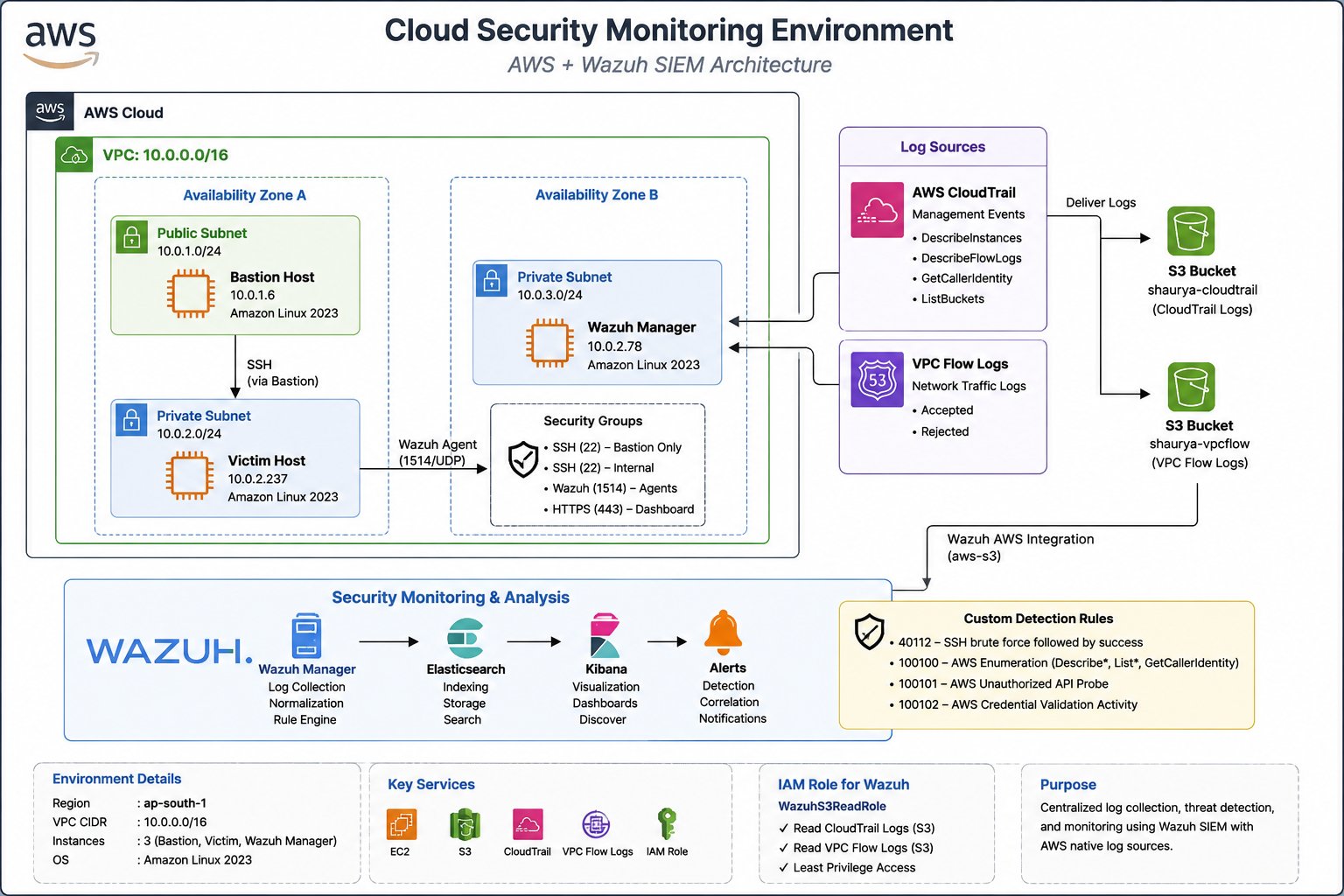
`ap-south-1` (孟买) 中的三个 EC2 实例:
```
VPC (10.0.0.0/16)
├── Public Subnet
│ └── Bastion / NAT Instance ← SSH entry point + routes private traffic
└── Private Subnet (10.0.2.0/24)
├── Shaurya-Manager (m7i-flex.large) ← Wazuh all-in-one
└── Shaurya-Victim (t3.small) ← SSH target / Wazuh agent
```
日志流向:
```
CloudTrail ──► shaurya-cloudtrail (S3) ──► Wazuh aws-s3 wodle ──► analysisd ──► Alerts
VPC Flow Logs ► shaurya-vpcflow (S3) ──► Wazuh aws-s3 wodle ──► analysisd ──► Alerts
auth.log ──────────────────────────────────► Wazuh agent ──────────► analysisd ──► Alerts
```
整个环境都是使用我的 [AWS 基础设施 CLI 工具包](https://github.com/shaurya-security/aws-infra-cli) 配置的——无需在控制台中手动点击。
## 攻击模拟
### 1. SSH 暴力破解 → Victim
从私有子网内部运行 Hydra(模拟已经拥有内部访问权限的攻击者):
```
hydra -l ec2-user -P /tmp/passwords.txt ssh://10.0.2. -t 4 -f -V
```
15 次失败尝试,1 次成功登录。为了生成分层的警报数据,manager 和 victim 被分开作为目标进行了攻击。
**检测方式:** 规则 40112 — *多次身份验证失败后成功*
### 2. AWS API 枚举 → Manager
从 manager 实例中,运行了拥有被盗凭证的攻击者可能会运行的 AWS CLI 命令:
```
aws ec2 describe-instances --region ap-south-1
aws ec2 describe-flow-logs --region ap-south-1
```
CloudTrail 记录了这些 API 调用。Wazuh 从 S3 中提取了这些日志并触发了警报。
**检测方式:** 规则 100100 — *AWS 枚举:DescribeFlowLogs / DescribeInstances*
## 检测结果
### 仪表盘摘要
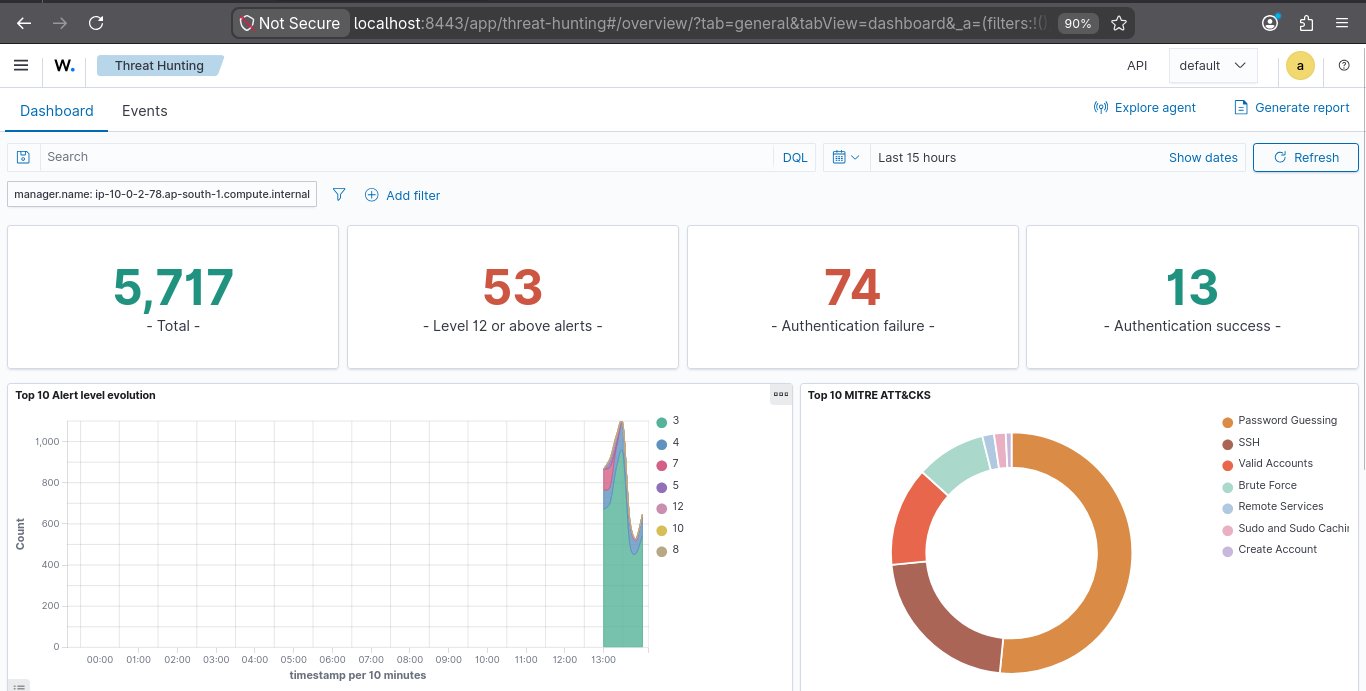
在实验室运行期间共有 5,717 条警报。其中 53 条为高危级别(level 12+)。74 次身份验证失败,13 次成功登录。
警报时间线上的峰值与运行暴力破解和枚举攻击的时间完全对应。
### CloudTrail 枚举检测
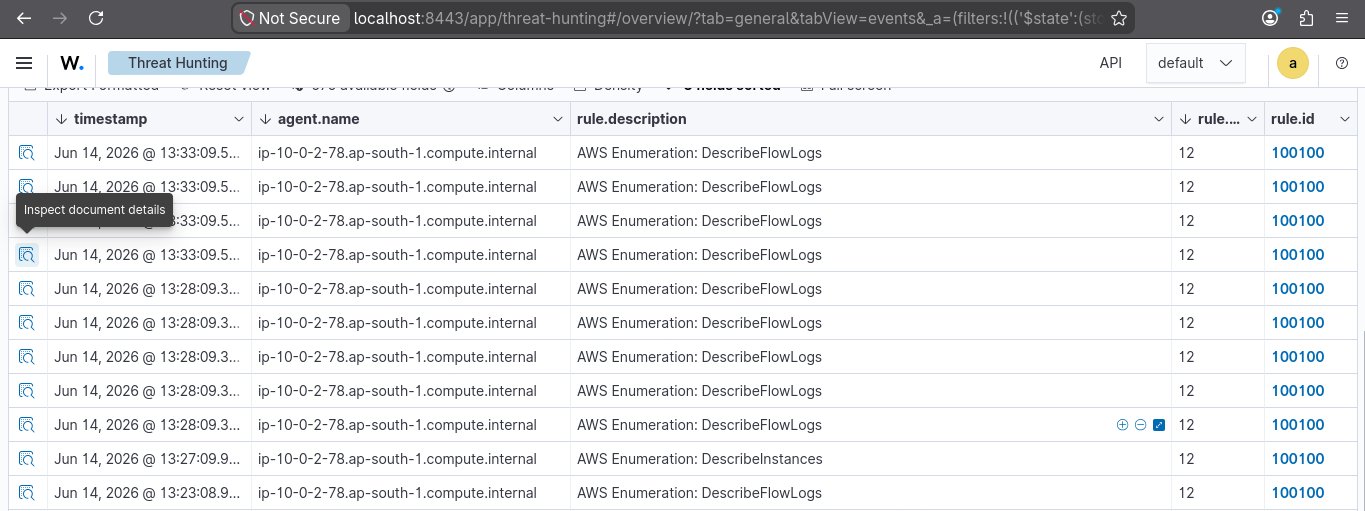
Wazuh 从 S3 获取 CloudTrail 事件,并在每次调用 `DescribeFlowLogs` 和 `DescribeInstances` 时触发规则 100100。Agent 名称是 manager 的私有 DNS——这证实了它是通过 aws-s3 wodle 传来的,而不是通过主机 agent。
### SSH 暴力破解 — Agent 端
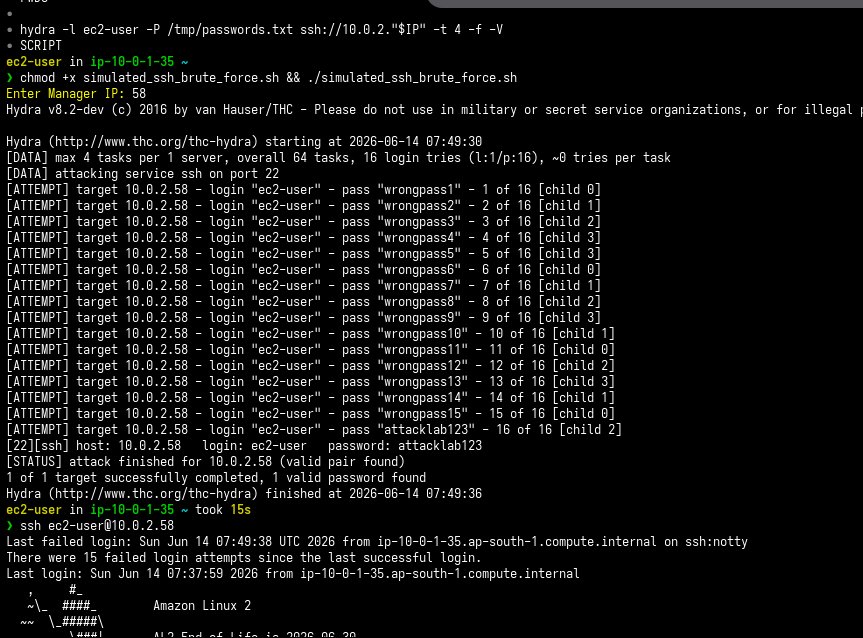
从私有子网内部针对 victim 实例运行 Hydra。15 个错误密码,`attacklab123` 为正确密码,最后确认获得了完整的 shell 访问权限。
### SSH 暴力破解 — Manager 端
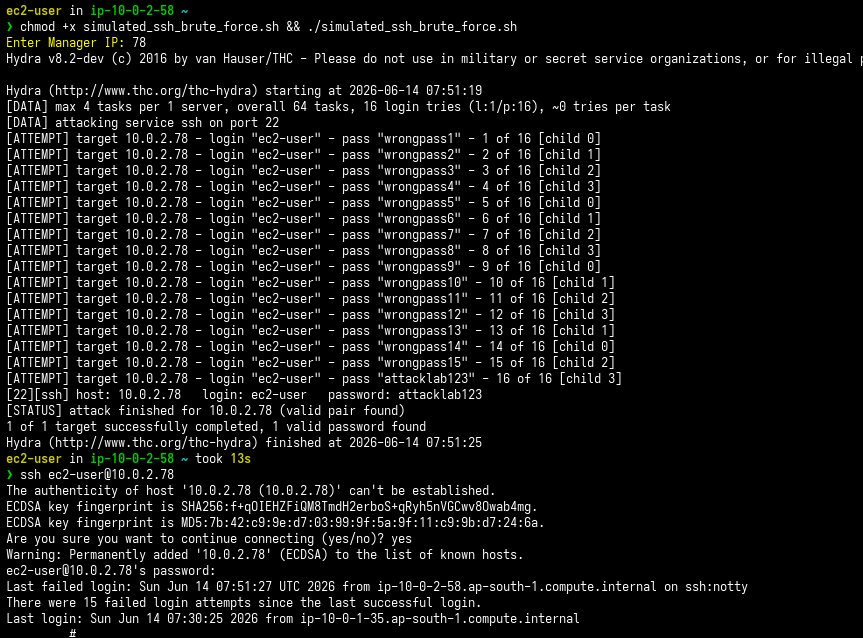
对 manager 运行相同的模拟。最后一次登录行显示了之前的暴力破解尝试——证实了之前的会话数据得到保留,并且 Wazuh 正在对其进行跟踪。
### 暴力破解检测 + 枚举同时发生
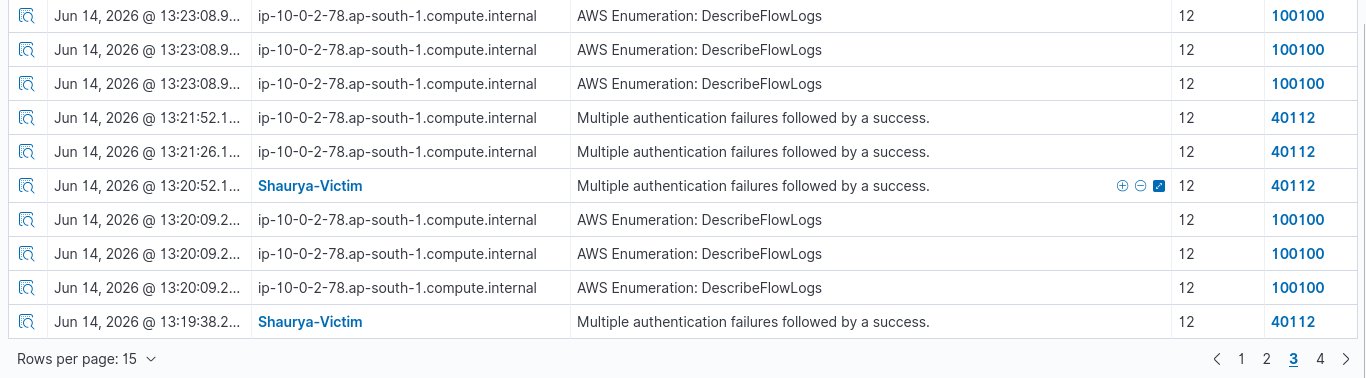
在同一个威胁狩猎 视图中可以看到两种攻击类型。来自 `Shaurya-Victim` 的规则 40112(暴力破解 → 成功),以及来自 manager 的规则 100100(AWS 枚举)——全部为 level 12。
### 警报调查
**第 1 页 — 事件上下文**
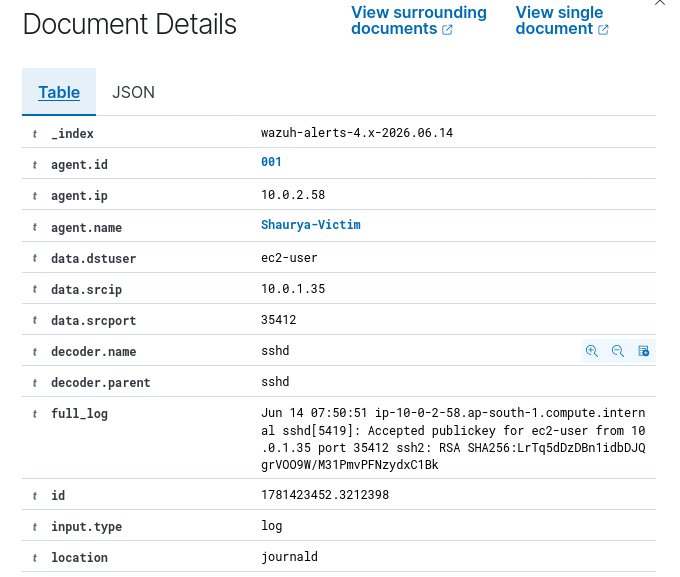
打开了单个警报。源 IP 为 `10.0.1.35`(攻击者),目标为 `Shaurya-Victim`。解码器是 `sshd`。完整日志显示 `Accepted publickey`——即暴力破解后的成功登录。
**第 2 页 — 规则元数据**
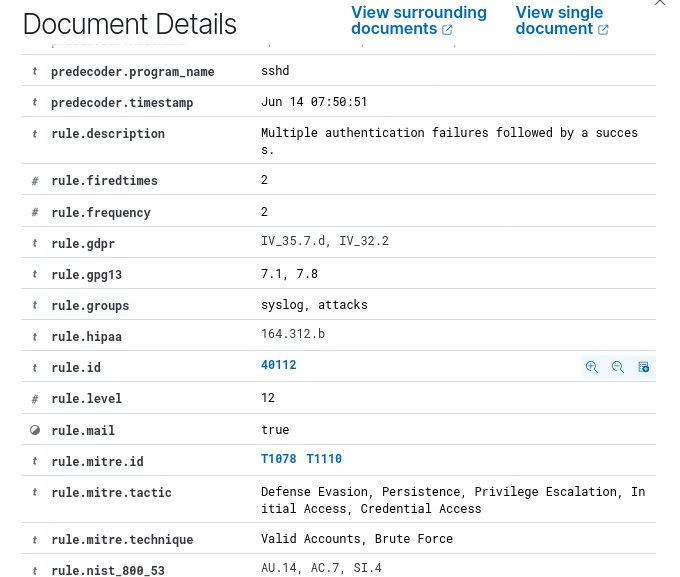
规则 40112,Level 12。MITRE 映射:T1078 (Valid Accounts)、T1110 (Brute Force)。战术:Credential Access、Initial Access、Persistence、Privilege Escalation。合规标签:GDPR、HIPAA、NIST 800-53。
### CLI 设置 — IAM + 日志配置
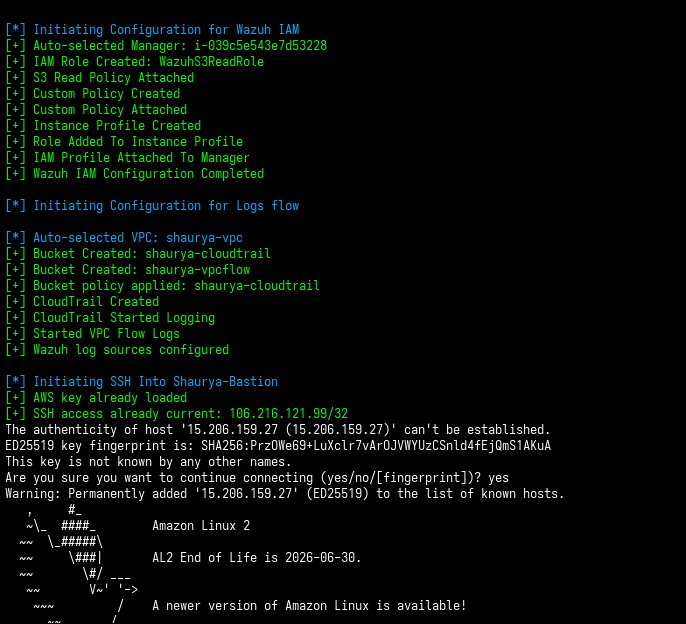
运行单个命令即设置了整个 IAM 和日志收集堆栈——无需使用控制台,无需点击。
输出显示了确切的序列:创建 IAM role,附加 S3 policy,创建并附加自定义 EC2 policy,创建 instance profile,将 profile 附加到 manager——紧接着,自动选择 VPC,创建两个 S3 bucket,创建 CloudTrail trail 并开始记录日志,启动 VPC Flow Logs。最后一行进入了堡垒机 SSH 会话,随时可以开始工作。
这就是端到端运行 [`aws-infra-cli`](https://github.com/shaurya-security/aws-infra-cli) 中的 `aws_wazuh_iam_setup` 和 `aws_wazuh_logs_setup` 的全过程。
### IAM Role 验证
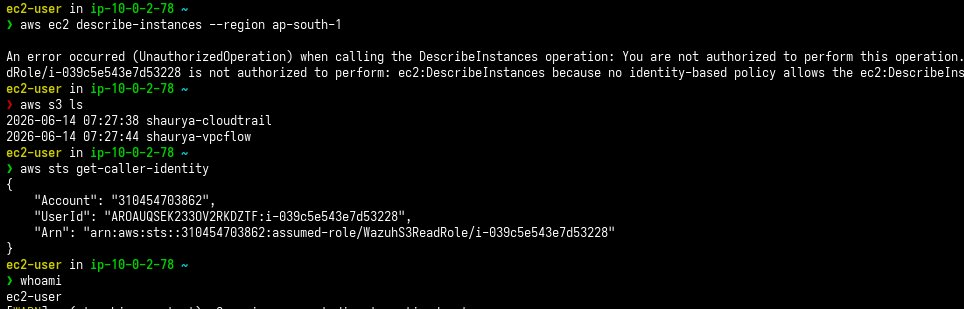
在 Wazuh 能够从 S3 提取数据之前,manager 需要一个具有正确权限的 IAM role。
- `aws sts get-caller-identity` → 确认已担任 `WazuhS3ReadRole`
- `aws s3 ls` → 两个 bucket 均可见
- `aws ec2 describe-instances` → **被拒绝** — 该 role 仅具有 S3 读取权限
最后一行是最重要的。最小权限原则按预期工作。
## IAM 设计
```
WazuhS3ReadRole
├── AmazonS3ReadOnlyAccess (managed policy)
└── WazuhEC2DescribeFlowLogs (custom inline policy)
WazuhInstanceProfile
└── attached to: Shaurya-Manager
```
自定义 policy 允许 `ec2:DescribeFlowLogs`(Wazuh 集成所需),但不包含对 EC2 的任何其他权限。该 role 被限制在 instance profile 范围内——任何地方都不存在长期凭证。
## 自定义规则
完整规则文件请参阅 [`rules/`](rules/)。
**规则 100100 — AWS 枚举**
```
amazon
DescribeInstances|DescribeFlowLogs|DescribeSecurityGroups
AWS Enumeration: $(aws.eventName)
aws,enumeration,T1069,T1087
```
这会在任何看起来像侦察的 CloudTrail 事件上触发——描述 instance、flow logs 或 security group。
## 自动化
整个环境(VPC、子网、security group、EC2 instance、S3 bucket、CloudTrail、VPC Flow Logs、IAM role)都是使用 [`aws-infra-cli`](https://github.com/shaurya-security/aws-infra-cli) 进行搭建和销毁的。
本项目中使用的关键函数:
| 函数 | 作用 |
|---|---|
| `authorize_wazuh_ingress` | 在 SG 中开放 Wazuh 端口,启动 Manager + Victim |
| `aws_wazuh_logs_setup` | 创建 S3 bucket,配置 CloudTrail,启动 VPC Flow Logs |
| `aws_wazuh_iam_setup` | 创建 role,附加 policy,关联 instance profile |
| `ssh_manager` / `ssh_agent` | 通过堡垒机 SSH 连接到私有 instance |
| `aws_wazuh_logs_cleanup` | 删除 trail、flow logs、S3 bucket |
| `aws_wazuh_iam_cleanup` | 分离并删除所有 IAM 资源 |
Wazuh 专用模块的源码:[`scripts/wazuh_module.sh`](scripts/wazuh_module.sh)
## 项目结构
```
wazuh-cloud-detection-lab/
├── README.md ← this file
├── screenshots/ ← evidence, in order of the attack chain
│ ├── cloud_detection_architecture.png
│ ├── dashboard_summary.png
│ ├── cli_setup_output.png
│ ├── iam_integration_working.png
│ ├── cloudtrail_detection_trigger.png
│ ├── agent_ssh_brute_force.png
│ ├── manager_ssh_brute_force.png
│ ├── detection_of_brute_force.png
│ ├── investigation_view_p1.png
│ └── investigation_view_p2.png
├── rules/
│ └── local_rules.xml ← custom Wazuh rules (100100 etc.)
├── scripts/
│ └── wazuh_module.sh ← Wazuh-specific functions from aws-infra-cli
└── runbook/
└── investigation_runbook.md ← how to investigate an alert from this lab
```
## 我学到了什么
搭建日志管道比编写检测规则更难。
要让 CloudTrail 事件进入 Wazuh,需要正确的 S3 bucket policy、实例上正确的 IAM role,以及 `aws-s3` wodle 正确的 `ossec.conf` 配置。其中任何一个出错,你都会一无所获——没有报错,只有一片死寂。
IAM 的最小权限设置也经历了几次迭代。第一个版本赋予了 `AmazonS3ReadOnlyAccess` 加上完全的 EC2 访问权限。将其缩小到仅限 `DescribeFlowLogs`,意味着需要准确找出 Wazuh 所需的权限,不多不少。
在检测方面,规则 40112 是一个内置的 Wazuh 规则,已经能很好地处理先暴力破解后成功登录的模式。规则 100100 是自定义的——通过匹配 `amazon` 组和特定的 `eventName` 值,专门编写为在 CloudTrail 枚举事件上触发。
## 相关内容
- [aws-infra-cli](https://github.com/shaurya-security/aws-infra-cli) — 用于构建此环境的工具包
- [wazuh-ssh-bruteforce-detection](https://github.com/shaurya-security/wazuh-ssh-bruteforce-detection) — 早期项目,在本地虚拟机上使用相同的检测概念
标签:漏洞利用检测, 漏洞探索